Picking a PC case is one of those decisions that sounds simple until you're three hours into a build, swearing at a cable that won't reach, wondering why the GPU is sitting two millimetres from the front radiator fans. The case either works with you or it quietly makes everything harder. So when a budget mid-tower shows up promising mesh airflow, tempered glass, DRGB fans, and a white finish for well under fifty quid, the obvious question is: what corners got cut to hit that price?
This is the Montech X3 Mesh review you actually want. Not the one that just lists the box contents and calls it a day. The X3 Mesh in white (ASIN B092441BHJ) sits squarely in budget territory, and at that price it competes with some genuinely decent options. But hundreds of owner reviews with a positive overall rating suggest Montech has done something right here. The question is whether that rating holds up when you dig into the clearances, the airflow design, and the build experience, or whether it's mostly people happy they got a pretty case for cheap.
Short answer: it's better than it has any right to be at this price. Longer answer follows.
Core Specifications
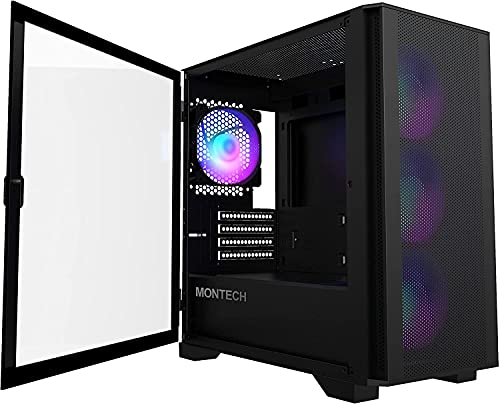
The X3 Mesh is a midi-tower, which means it sits in the mainstream sweet spot: big enough to fit most builds without dominating your desk. Montech specifies support for ATX, Micro-ATX, and Mini-ITX motherboards, which covers the vast majority of consumer builds. The case ships with three 120mm DRGB fans pre-installed at the front, which is genuinely good value at this price point. Most budget cases throw in one or two mediocre fans and call it done.
Fan mounting goes beyond those three front fans. There's a rear 120mm mount, top mounts for up to three 120mm or two 140mm fans, and the front can accommodate up to three 120mm or two 140mm fans. That's a lot of airflow potential for a budget case. Radiator support is similarly generous: 360mm at the front, 240mm or 120mm at the top, and 120mm at the rear. GPU clearance is rated at 380mm, which handles current-gen cards including triple-fan AIB models of the RTX 5000 series without drama. CPU cooler height clearance sits at 165mm, so most tower coolers including the Noctua NH-D15 at 165mm will just about squeeze in, though you'll want to double-check your specific cooler's measurements.
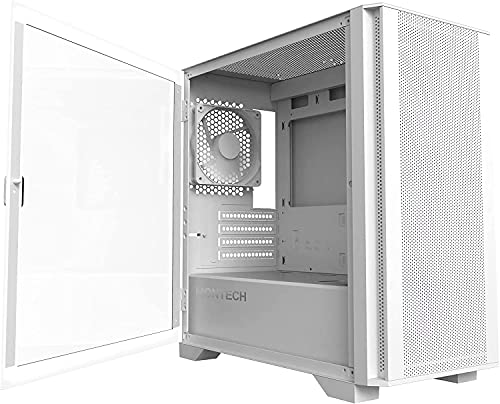
The tempered glass side panel is a proper tinted panel, not the thin acrylic some budget cases try to pass off as glass. The steel chassis uses 0.6mm SPCC steel, which is standard for this price bracket. It's not the thickest you'll find, but it's not the flimsy stuff that flexes when you look at it sideways. Weight comes in at around 6.5kg, which is about right for a mid-tower of this size. Here's the full spec rundown:
| Specification | Detail |
|---|---|
| Form Factor | Midi-Tower |
| Motherboard Support | ATX, Micro-ATX, Mini-ITX |
| Dimensions (H x W x D) | 465 x 210 x 430mm |
| Weight | ~6.5kg |
| Steel Thickness | 0.6mm SPCC |
| Side Panel | Tempered Glass (tinted) |
| Included Fans | 3 x 120mm DRGB (front) |
| Fan Mounts (total) | Front: 3x120mm / 2x140mm; Top: 3x120mm / 2x140mm; Rear: 1x120mm |
| Radiator Support | Front: up to 360mm; Top: up to 240mm; Rear: 120mm |
| Max GPU Length | 380mm |
| Max CPU Cooler Height | 165mm |
| Drive Bays (3.5") | 2 |
| Drive Bays (2.5") | 2 (dedicated) + 2 (on 3.5" trays) |
| Expansion Slots | 7 |
| Front I/O | 2x USB 3.0 Type-A, 1x USB 3.2 Gen 1 Type-C, HD Audio |
| PSU Support | ATX (up to 200mm) |

Form Factor and Dimensions
At 465mm tall, 210mm wide, and 430mm deep, the X3 Mesh is a fairly standard midi-tower footprint. It's not trying to be a compact case, and it's not bloated into full-tower territory either. That 210mm width is on the slimmer side for a mid-tower, which is if you're planning a chunky build with thick cables everywhere. It'll fit on a standard desk without eating your entire workspace, and it's short enough to slot under most desks if that's where your PC lives.
The white colourway (this specific variant) is a proper painted finish rather than a plasticky coating. Owner reviews generally praise the look, with several noting it photographs well and holds up to fingerprints better than you'd expect. The tinted tempered glass side panel gives the build a premium look that punches well above the price tag. That said, the white finish does show dust more than a black case would, so if you're in a dusty environment or just not the type to clean your PC regularly, factor that in.
Footprint-wise, this is a case that'll work on a standard ATX desk setup without any awkward repositioning. The front mesh panel means you need a few centimetres of clearance at the front for proper airflow, so don't shove it flush against a wall or into a tight cabinet. That's not a criticism specific to this case, it applies to any mesh-front design. Seven expansion slots on the rear give you the usual PCIe flexibility, and the layout is conventional enough that there are no surprises when you're slotting in graphics cards or PCIe accessories.
Motherboard Compatibility
The X3 Mesh supports ATX, Micro-ATX, and Mini-ITX motherboards. That covers the three most popular consumer form factors, so unless you're building on an E-ATX board, you're fine here. The standoff layout is standard, and owner reports don't flag any issues with standoff placement or misalignment, which is actually more of a problem than you'd think with budget cases from less established brands.
For ATX builds, you'll have the full motherboard tray to work with, and the cable routing cutouts are positioned to work with standard ATX layouts. Micro-ATX boards will leave a bit more room in the lower half of the case, which actually makes cable management slightly easier. Mini-ITX is supported but you're probably not buying a midi-tower for an ITX build unless you want the extra expansion slots and storage options, which is a perfectly valid reason.
One thing from owner feedback: the motherboard tray itself doesn't flex noticeably when you're screwing in the board, which sounds like a basic requirement but genuinely isn't guaranteed at this price. A rigid tray makes a real difference when you're trying to line up the I/O shield and get all seven or eight motherboard screws in without the whole thing bowing. Montech seems to have got this right, and the owner reviews back that up with no consistent complaints about tray rigidity or standoff issues.
GPU Clearance
Three hundred and eighty millimetres of GPU clearance is the headline number, and it's a good one. Current flagship cards like the RTX 5090 and RX 9070 XT in triple-fan AIB configurations typically run between 310mm and 360mm in length, so you've got comfortable headroom even with the biggest consumer GPUs available right now. If you're running a more modest card, the extra clearance just means easier installation and better airflow around the GPU.
There's no vertical GPU mount included in the box, which isn't unusual at this price. If you want to show off your graphics card through the tempered glass panel, you'd need to source a third-party vertical mount separately, and you'd also need to factor in whether a PCIe riser cable would restrict GPU bandwidth depending on the spec. For most people building a straightforward horizontal-mount system, none of that matters.
The 380mm clearance figure assumes a standard front fan or radiator configuration. If you're installing a 360mm front radiator, the effective GPU clearance may be reduced depending on the radiator and fan thickness. Owner reports suggest the front radiator and GPU combination works without issue for most standard builds, but if you're going with a particularly thick radiator (30mm plus fans) combined with a very long GPU, it's worth measuring before you commit. That's not a flaw unique to the X3 Mesh, it's just the physics of fitting everything into a 430mm-deep chassis.
CPU Cooler Clearance
A 165mm CPU cooler height limit is generous for a mid-tower. Most popular air coolers sit comfortably under that ceiling. The be quiet! Dark Rock Pro 4 comes in at 162.8mm, the Deepcool AK620 at 155mm, and even the chunky Thermalright Peerless Assassin 120 SE at 155mm all have room to breathe. The Noctua NH-D15 is right at the limit at 165mm, so technically it fits, but you'll want to verify your specific motherboard and RAM configuration doesn't create any clearance issues with the side panel.
AIO radiator support is where the X3 Mesh gets interesting. Front support for up to 360mm means you can run a proper 360mm AIO without compromise, which is unusual at this price point. Top support goes up to 240mm, and the rear takes a 120mm unit. For most builders, the front 360mm slot is the prime real estate, and the X3 Mesh handles it without the top-mounted RAM clearance headaches that plague some cases with top-360mm support.
Owner feedback on AIO installation is largely positive. A few reviews mention that the front radiator mounting is straightforward with no awkward bracket gymnastics, which matters more than it sounds when you're trying to align 12 screws through a radiator, fans, and the case bracket simultaneously. The pump head clearance on the motherboard side is also fine for standard AM5 and LGA1851 cooler mounts, with no reports of the pump head fouling on the case wall or side panel.
Storage Bay Options
Two 3.5-inch drive bays and four 2.5-inch mounting positions (two dedicated, two on the 3.5-inch trays) gives you a reasonable amount of storage flexibility. For a modern build that's primarily NVMe-based with maybe one or two SATA SSDs, that's more than enough. If you're building a budget gaming rig or a home media server that relies heavily on spinning hard drives, two 3.5-inch bays is on the lean side, but it's standard for this class of case.
The 2.5-inch mounting is tool-free on the dedicated mounts, which is a nice touch. SSD installation without needing to hunt for the right screws is one of those small quality-of-life details that adds up over the course of a build. The 3.5-inch trays use thumbscrews, so no tools required there either. The drive cages sit behind the PSU shroud, keeping the visible interior clean when you're looking through the tempered glass panel.
For NVMe storage, you're relying entirely on your motherboard's M.2 slots, which is fine for modern builds. Most current ATX boards ship with at least two M.2 slots, and higher-end boards offer three or four. The case doesn't have any dedicated M.2 mounting on the chassis itself, but that's completely normal and nobody should expect it at this price. The storage situation here is adequate for the target audience, and the clean layout behind the PSU shroud means your drives won't clutter up the main chamber view.

Cable Management
The PSU shroud covers the bottom of the case and hides the power supply and most of the cable mess, which is the single most important cable management feature in any mid-tower. Without it, even a tidy build looks chaotic. With it, you can route your cables behind the motherboard tray and only bring them through the cutouts where needed. The X3 Mesh has this sorted, and the cutouts are positioned sensibly for standard ATX builds.
Rear panel clearance for cables is reportedly around 20mm, which is workable but not luxurious. Thicker modular cable sets can make it a squeeze to close the rear panel, and a few owner reviews mention this as a minor frustration. The solution is either to use thinner cables, route them more carefully, or accept that the rear panel needs a firm push to close. It's not a dealbreaker, but it's about if you're planning a build with a lot of cable runs.
Velcro cable tie points are included, which is something cheaper cases often skip entirely. Having proper anchor points for cable management makes the difference between a build that looks clean and one that looks like a bowl of spaghetti. The 24-pin ATX routing, CPU power routing, and GPU power routing cutouts are all in sensible positions. Owner feedback on cable management is generally positive, with most builders noting it's easier than expected for a budget case. A few mention that the CPU power cable routing near the top of the motherboard tray could be more generous, but it's manageable.
Airflow and Thermal Design
This is the bit that matters most, and it's where the X3 Mesh earns its name. The front panel is a proper mesh design, not a solid panel with a few token holes cut into it. Mesh fronts allow significantly more air through than solid or glass fronts, and three pre-installed 120mm DRGB fans pulling air in through that mesh means you've got real positive pressure airflow from the moment you power on. That's a proper thermal setup, not an afterthought.
The top panel also has mesh ventilation for exhaust, and the rear has the standard 120mm exhaust mount. The included rear fan position is empty from the factory (the three front fans are the included ones), so you'll want to add a rear 120mm exhaust fan to complete the airflow loop. That's a small additional cost, but upfront. Running three intake fans with no exhaust creates positive pressure that can push air out through gaps, but a dedicated rear exhaust fan creates a proper front-to-rear airflow path that's more effective for CPU cooling.
Does the Montech X3 Mesh have dust filters? Yes, and they're in the right places. There's a magnetic dust filter on the top panel and a bottom filter for the PSU intake. The front mesh itself acts as a pre-filter for the intake fans. The top and bottom filters are removable for cleaning, which matters because a dust filter you can't easily clean is basically just a restriction after a few months. Owner reviews confirm the filters are easy to remove and reinstall, which is exactly what you want. The overall thermal design is genuinely good for the price, and it's one of the main reasons the X3 Mesh has built a solid reputation in the budget segment.
Front I/O and Connectivity
Two USB 3.0 Type-A ports and one USB 3.2 Gen 1 Type-C port on the front panel is a solid I/O setup for a budget case. The Type-C port is particularly welcome because plenty of cases at this price still ship without one, and it's the connector you actually want for modern peripherals, phones, and accessories. The Type-C here runs at USB 3.2 Gen 1 speeds (5Gbps), not the faster Gen 2 (10Gbps), but for the target audience and price point that's perfectly fine.
HD Audio is included for headphone and microphone connections, which is standard. The power button has a clean, tactile feel according to owner reports, and the reset button is separate and accessible without being so prominent that you'll hit it by accident. The front I/O panel sits at the top of the case, which is the conventional position for a tower that sits on a desk. If your PC lives on the floor, top-mounted I/O is less convenient, but that's a layout preference rather than a design flaw.
The DRGB fans connect to the included controller hub or directly to a motherboard ARGB header. Montech uses standard ARGB connectors, so compatibility with motherboard RGB software (ASUS Aura Sync, MSI Mystic Light, Gigabyte RGB Fusion, ASRock Polychrome) is straightforward. You're not locked into proprietary software, which is a genuine relief compared to some brands that make you install their own RGB app just to change the fan colour. The RGB itself is described by owners as bright and even, with decent colour mixing across the fan blades.
Build Quality and Materials
Are Montech cases good? Based on the X3 Mesh, yes, more than you'd expect for the price. The 0.6mm SPCC steel is thin but not embarrassingly so. It doesn't flex dramatically when you're pushing cables around or screwing in components, which is the practical test that matters more than the spec sheet number. Panel alignment is generally reported as good out of the box, with the tempered glass side panel sitting flush and the rear panel closing without drama (the cable clearance caveat aside).
The tempered glass panel is proper tempered glass with a tint, not acrylic. Tempered glass is heavier and more fragile than acrylic, but it looks significantly better and doesn't scratch from light contact the way acrylic does. The panel attaches with thumbscrews, so removal and reinstallation during a build is quick. A small number of owner reviews mention the glass arrived with minor scratches or packaging damage, which is a shipping and packaging quality issue rather than a product quality issue, and Amazon's returns process handles it without fuss.
Sharp edges are the bane of budget case builds, and the X3 Mesh gets mostly clean marks here. Owner reviews don't flag consistent complaints about sharp internal edges cutting hands during installation, which is genuinely one of the things that separates a thoughtfully manufactured budget case from a cheap one. The screw quality is adequate, nothing premium, but they thread properly and don't strip easily. The overall impression from owner feedback is of a case that feels more expensive than it is, which is exactly what you want from a budget product. Which Montech PC case is the best? That's a bigger conversation, but the X3 Mesh is comfortably among their stronger offerings in the budget-to-mid range.
How It Compares
The X3 Mesh competes primarily against the Fractal Design Focus 2 and the Corsair 3500X at similar price points. The Fractal Focus 2 is a strong alternative with excellent build quality and a clean aesthetic, but it typically costs more and ships with fewer fans. The Corsair 3500X is another mesh-front mid-tower with solid airflow credentials, but again tends to sit at a higher price point than the X3 Mesh.
Closer to the X3 Mesh's actual price, you're looking at the DeepCool CC560 and the Phanteks P300A. The CC560 is a decent budget option but ships with fewer fans and has less radiator flexibility. The P300A has excellent airflow thanks to its mesh front, but the build quality and included fans don't quite match what Montech offers here. The X3 Mesh's combination of three included DRGB fans, 360mm front radiator support, and Type-C front I/O at budget pricing is genuinely hard to beat in this bracket.
Where the X3 Mesh falls short compared to pricier options is predictable: thinner steel, less rear cable clearance, no vertical GPU mount, and no tempered glass top panel. If those things matter to you and you have the budget, spending more gets you more. But if you're trying to build a capable, good-looking system without overspending on the chassis, the X3 Mesh makes a compelling case for itself.
| Feature | Montech X3 Mesh | DeepCool CC560 | Phanteks P300A |
|---|---|---|---|
| Form Factor | Mid-Tower | Mid-Tower | Mid-Tower |
| Included Fans | 3x 120mm DRGB | 4x 120mm (non-RGB) | 3x 120mm DRGB |
| Front Panel | Mesh | Mesh | Mesh |
| Max GPU Length | 380mm | 370mm | 420mm |
| Max CPU Cooler Height | 165mm | 165mm | 160mm |
| Front Radiator Support | 360mm | 240mm | 360mm |
| USB Type-C Front I/O | Yes (USB 3.2 Gen 1) | Yes | Yes |
| Tempered Glass Panel | Yes (tinted) | Yes | Yes |
| Price Tier | Budget | Budget | Budget |

Final Verdict
The Montech X3 Mesh review verdict is straightforward: this is a genuinely good budget mid-tower that delivers on its core promises. Three DRGB fans, a proper mesh front, 360mm radiator support, Type-C I/O, and a tinted tempered glass panel at a budget price point is a combination that's hard to argue with. The hundreds of owner reviews with a positive overall rating aren't just people being polite; they reflect a case that works well in practice and doesn't have any glaring design failures.
The compromises are real but predictable. Thin 0.6mm steel means it's not the most rigid chassis you'll ever build in. Rear cable clearance is tight enough that thick modular cable sets can be a squeeze. There's no included rear exhaust fan, so budget an extra few pounds for one. The white finish shows dust more than a black case. None of these are dealbreakers, and all of them are exactly what you'd expect from a case at this price.
Who should buy the X3 Mesh? First-time builders who want a good-looking, airflow-focused case without spending serious money. Anyone building a mid-range gaming PC who wants the aesthetics of a premium build on a budget chassis. Builders who want 360mm AIO support without paying mid-range case prices. And anyone who's looked at the Fractal Focus 2 or Corsair 3500X and thought "I like the idea but not the price."
Who should skip it? If you're building a high-end system with a flagship GPU and a bespoke custom water loop, spend more on the chassis. Cases like the Fractal Torrent or Lian Li Lancool III offer meaningfully better build quality, airflow, and cable management for serious builds. Also, if you generate a lot of desk dust and can't be bothered cleaning the case regularly, the white finish will haunt you.
If your budget is tight and you're genuinely looking for the most capable case you can get without crossing into mid-range pricing, the X3 Mesh is the answer. It's not perfect, but it's properly good for what it costs, and that's a harder thing to achieve than it sounds. Score: 8 out of 10.
What works. What doesn’t.
5 + 4What we liked5 reasons
- Three DRGB 120mm fans included at budget pricing
- 360mm front radiator support is genuinely unusual at this price
- Proper mesh front panel for real airflow, not decorative holes
- USB Type-C front I/O when many budget rivals skip it
- Dust filters on top and bottom, magnetic and easy to remove
Where it falls4 reasons
- Thin 0.6mm SPCC steel, not the most rigid chassis
- Rear cable clearance is tight with thick modular cables
- No rear exhaust fan included, budget an extra few pounds
- White finish shows dust more than a black case would
Full specifications
11 attributes| Form factor | Mid-Tower |
|---|---|
| CPU cooler clearance MM | 160 |
| Dimensions MM | 370 x 210 x 480 |
| Fans included | 6 |
| GPU clearance MM | 305 |
| MAX FAN count | 8 |
| MAX radiator MM | 360 |
| PSU support | ATX up to 160mm |
| Side panel | tempered glass |
| Supported motherboard | ATX, Micro-ATX, Mini-ITX |
| Weight KG | 5.42 |
Got a motherboard yet?
4 reviewsThe maker lists ATX, Micro-ATX and Mini-ITX boards for this case. These ATX boards fit it.
Frequently asked
5 questions01Is the Montech X3 Mesh Midi-Tower, DRGB, Tempered Glass good for airflow?+
Yes, it's one of the case's strongest points. The full mesh front panel allows significantly more airflow than solid or glass-fronted cases, and three pre-installed 120mm DRGB fans pull air through from the front. The top panel has mesh ventilation for exhaust, and there's a rear 120mm mount for an additional exhaust fan (not included but recommended). Dust filters are present on the top and bottom. For a budget case, the thermal design is genuinely well thought out, and owner reviews consistently praise the airflow performance.
02What's the GPU clearance on the Montech X3 Mesh Midi-Tower, DRGB, Tempered Glass?+
Montech specifies 380mm maximum GPU length, which comfortably accommodates current-generation triple-fan AIB graphics cards including flagship RTX 5000 and RX 9000 series models. If you're installing a 360mm front radiator alongside a very long GPU, check the combined depth of the radiator and fans against the available clearance, as thick radiators can reduce effective GPU clearance. For standard builds without a front radiator, 380mm gives you plenty of room.
03Can the Montech X3 Mesh Midi-Tower, DRGB, Tempered Glass fit a 360mm AIO?+
Yes, and this is one of the X3 Mesh's headline features for the price. The front panel supports up to a 360mm radiator, which is the primary mounting location for large AIOs. The top panel supports up to 240mm, and the rear takes a 120mm unit. Owner reviews confirm front 360mm AIO installation is straightforward without awkward bracket work. RAM clearance with a top-mounted radiator is less of an issue here than in cases with top-360mm support, since the front is the preferred 360mm location.
04Is the Montech X3 Mesh Midi-Tower, DRGB, Tempered Glass easy to build in?+
Generally yes, with one caveat. The tool-free 2.5-inch SSD mounting, sensible cable routing cutouts, PSU shroud, Velcro cable tie points, and thumbscrew side panel all make the build process reasonably smooth. The motherboard tray is rigid enough not to flex during installation. The one frustration some owners report is rear cable clearance of around 20mm, which can be a squeeze with thick modular cable sets. Using sleeved or thinner cables resolves it. No consistent reports of sharp internal edges cutting hands, which is a genuine quality marker at this price.
05What warranty and returns apply to the Montech X3 Mesh Midi-Tower, DRGB, Tempered Glass?+
Montech's standard warranty terms should be confirmed on their official website at the time of purchase. When buying through Amazon UK, you're also covered by Amazon's 30-day returns policy and the A-to-Z Guarantee, which protects your purchase if the item arrives damaged or not as described. If the tempered glass panel arrives with damage (a small number of owner reviews mention this), Amazon's returns process handles it efficiently.