Most PC case frustrations are completely predictable before you've even opened the box. You know the type: a front panel that looks like a mesh but breathes like a bin bag, GPU clearance that technically fits a 380mm card but only if you don't also want a front radiator, and a cable management zone so shallow you're basically origami-folding your 24-pin into submission. These are the problems that turn what should be a satisfying Saturday afternoon build into a three-hour argument with a screwdriver. The Montech TG3 is a direct answer to most of that grief, and this Montech TG3 review is going to tell you exactly where it delivers and where it doesn't.
Here's the short version: for a budget-tier mid-tower, the TG3 gets the fundamentals right in a way that a lot of cases at this price point simply don't. Proper mesh front, back-connect motherboard support, decent clearances, and dozens of owner reviews with a positive overall rating all point to a case that does what it says. It's not flawless, and there are a couple of things before you click buy, but if you're building a clean, airflow-focused rig without spending a fortune on the chassis, this is a very sensible place to start.
Core Specifications
The TG3 is an ATX mid-tower, which means it sits comfortably in the mainstream sweet spot: not so big it dominates your desk, not so small you're fighting for space inside. Montech has built this one around a steel chassis with a tempered glass side panel on the left and a mesh front panel for intake. The overall dimensions come in at roughly 430mm tall, 210mm wide, and 450mm deep, which is fairly typical for the class. It's not a compact case, but it's not going to dwarf your monitor either.
Fan support is where the TG3 starts to look interesting for the money. You get three 120mm fans included from the factory, which is more than you get from a lot of similarly priced competitors who ship you one and expect you to sort the rest yourself. There's support for up to six 120mm fans across the front (three), top (two), and rear (one), or you can swap in 140mm fans at the front and top if you prefer. Radiator support follows the same layout: 360mm at the front, 240mm or 280mm at the top, and 120mm at the rear. That's a proper range for a case at this price.
The back-connect ready designation is worth paying attention to. This is Montech's acknowledgement that motherboards like the ASUS BTF series and similar back-connect designs are becoming more mainstream, and the TG3's rear panel has been designed to accommodate the routing those boards require. It's a forward-thinking feature at a price where most manufacturers are still catching up. PSU clearance allows for units up to 200mm in length, which covers the vast majority of modular and semi-modular options you'd pair with a build at this level.
| Specification | Detail |
|---|---|
| Form Factor | ATX Mid-Tower |
| Motherboard Support | E-ATX (up to 280mm), ATX, mATX, mITX |
| Dimensions (HxWxD) | ~430 x 210 x 450mm |
| Tempered Glass | Left side panel |
| Front Panel | Mesh (high airflow) |
| Included Fans | 3x 120mm |
| Fan Support | Front: 3x 120mm or 2x 140mm; Top: 2x 120/140mm; Rear: 1x 120mm |
| Radiator Support | Front: 360mm; Top: 240/280mm; Rear: 120mm |
| Max GPU Length | 400mm |
| Max CPU Cooler Height | 165mm |
| PSU Clearance | Up to 200mm |
| Drive Bays (3.5") | 2 |
| Drive Bays (2.5") | 2 |
| Front I/O | USB 3.0 x2, USB-C x1, HD Audio |
| Back-Connect Ready | Yes |
| Owner Rating | 4.8/5 |
| Price | £66.12 · Details |

Form Factor and Dimensions
Mid-tower is the right choice for most people, and the TG3 is a good example of why. It's big enough to house full-size ATX hardware without the internal cramping you get in budget mATX cases, but it's not the kind of hulking full-tower that needs its own postcode. The footprint, around 210mm wide and 450mm deep, sits it comfortably on a standard desk or on the floor beside one without feeling like an intrusion. The 430mm height is similarly sensible. Nothing about the physical size is going to cause you a problem in a typical setup.
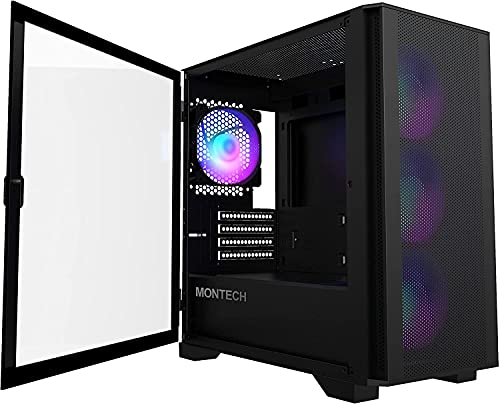
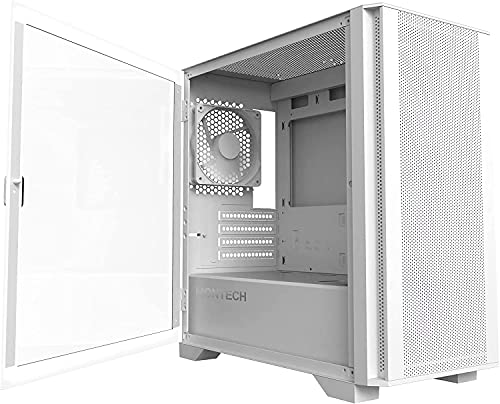
The tempered glass side panel is on the left, which is the standard orientation for a right-handed build. Montech uses a swing-open design rather than a sliding panel, which owner reviews consistently flag as a nice touch. You're not wrestling a panel off and then trying to remember where you put it while your hands are full of GPU. It opens, you work, it closes. Simple. The right-side panel is steel, which is fine, and it gives you a solid wall to route cables against without worrying about bowing the glass.
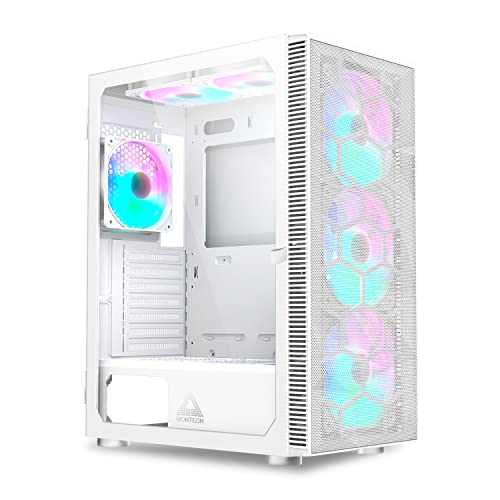
The mesh front panel is the visual centrepiece and the functional heart of the airflow design. It runs almost the full height of the case front, which means there's no decorative shroud eating into your intake area. Some budget cases give you a front that looks like mesh from a distance but is actually a fine plastic grille that chokes airflow. From what owner feedback and the product imagery confirm, the TG3's mesh is genuinely open. That matters a lot when you're running three 120mm fans behind it and expecting them to actually move air rather than just make noise.
Motherboard Compatibility
The TG3 supports ATX, mATX, and mITX as you'd expect, but Montech also lists E-ATX support up to 280mm width. That's a meaningful addition because true E-ATX boards (the full 305mm wide ones) are quite niche, but the slightly wider EATX variants that some high-end consumer boards use do pop up, and it's good to know the TG3 can handle them. For the vast majority of builders, standard ATX is what they're running, and the TG3 has plenty of room for that.
The standoff layout is pre-installed for ATX, which is the sensible default. If you're dropping in an mATX or mITX board you'll need to adjust a few standoffs, but that's a two-minute job with a standoff tool and nothing to worry about. What's more notable is the back-connect readiness. Motherboards that route all power and data connectors to the rear of the PCB, hiding cables entirely from the glass-side view, are a growing category. Montech has cut the necessary routing channels and given the rear panel enough clearance to handle the thicker cable bundles these boards generate. If you're planning a back-connect build now or in the future, this case is genuinely set up for it rather than retrofitted.
One thing: if you're running a standard ATX board with a traditional connector layout, the back-connect features are just extra routing flexibility rather than something you need to specifically use. They don't get in the way. Several owner reviews mention that the rear panel feels spacious even with a conventional build, which suggests Montech hasn't compromised the standard experience to add the back-connect capability. That's the right call. You want features that add value without creating trade-offs for people who don't need them.
GPU Clearance
Four hundred millimetres of GPU clearance is the headline number here, and it's a good one. To put that in context, an RTX 4090 Founders Edition is 336mm long. Most third-party RTX 4080 and 4090 cards from the likes of ASUS, MSI, and Gigabyte sit in the 340mm to 360mm range. Even the chunkier triple-fan designs from ASUS ROG and Gigabyte AORUS rarely push past 380mm. So 400mm covers pretty much every current flagship card without drama, and it leaves enough breathing room that you're not playing Tetris with your front fans or radiator.
The more important question with GPU clearance is always what happens when you install a front radiator. A 360mm radiator at the front eats into the effective GPU clearance because the fans and rad assembly sit inside the case depth. Montech's specs suggest you still have workable GPU room with a front 360mm installed, but if you're planning that specific combination with a very long card, it's worth double-checking your exact GPU length against the installed radiator depth. Most builders running a 360mm AIO front mount will be pairing it with a card in the 300mm to 340mm range anyway, which is completely fine here.
Vertical GPU mounting isn't listed as a native feature of the TG3, which isn't unusual at this price point. If you want to show off your GPU vertically through the tempered glass, you'd need a third-party vertical mount bracket and a riser cable, and you'd be doing that at your own expense and risk. For a budget mid-tower, that's an acceptable omission. The horizontal mount position is solid, the PCIe slots are well-positioned, and owner feedback doesn't flag any wobble or fitment issues with large cards. The GPU sits where it should and stays there.
CPU Cooler Clearance
A 165mm CPU cooler height limit is genuinely good for a case in this price range. To give that some real-world meaning: the Noctua NH-D15, which is one of the biggest and best air coolers you can buy, stands 165mm tall. The be quiet! Dark Rock Pro 4 is 162.8mm. The Deepcool AK620 is 160mm. So the TG3 can handle essentially every popular high-end air cooler on the market without you needing to double-check compatibility. That's a relief, because nothing is more annoying than buying a case and then discovering your cooler won't fit by 3mm.
For AIO liquid cooling, the front panel is where you want to go for maximum radiator size. Three 120mm fan mounts at the front translates to 360mm radiator support, and that's the sweet spot for most all-in-one coolers. You can fit a 240mm or 280mm radiator at the top as well, which gives you flexibility if you want to run a top-mounted AIO and keep the front clear for intake fans. The rear handles a single 120mm fan or a slim 120mm radiator for a basic AIO setup, though most people running liquid cooling will use the front or top positions.
Pump head clearance with top-mounted radiators is worth thinking about if you're using a 240mm or 280mm AIO at the top with tall RAM. Some cases with top radiator mounts position them close enough to the motherboard that high-profile RAM (anything over about 40mm) causes a conflict. The TG3's internal dimensions give reasonable headroom here, and owner reviews don't raise this as a specific problem, but if you're running 50mm-tall RGB RAM sticks and a top-mounted radiator, measure twice before you order. Standard-height RAM is completely fine.
Storage Bay Options
Two 3.5-inch bays and two 2.5-inch bays. That's the storage situation in the TG3, and honestly it's adequate for most modern builds rather than generous. If you're building a system with two HDDs and a couple of SSDs, you're sorted. If you're planning a NAS-adjacent rig with four or five spinning drives, this isn't the case for you, but then a mid-tower at this price point was never going to be. Most people building in 2026 are running one or two M.2 NVMe drives on the motherboard and maybe a 2.5-inch SATA SSD for extra storage, which means the physical drive bays are almost irrelevant to the build.
The 3.5-inch drive cage sits in the lower section of the case, tucked behind the PSU shroud. This is the standard placement and it keeps the main build area clear. The 2.5-inch mounts are on the rear of the motherboard tray, which is good for keeping the visible side of the build clean. No drives dangling in front of the glass, no brackets interrupting the airflow path. It's a sensible layout that prioritises the visual build experience over maximum storage density, which is the right call for a case with a tempered glass side panel.
Tool-free drive mounting would be a nice addition and it's something a few owner reviews mention wishing for. The TG3 uses screws for drive installation, which is fine and arguably more secure, but it does mean you need a screwdriver for drive swaps. Not a dealbreaker by any stretch, but if you're the type who likes to hot-swap drives or regularly changes storage configurations. The drive cage itself is removable if you want to free up the space for a longer PSU or better airflow at the bottom of the case, which is a useful option to have.

Cable Management
This is where the TG3 earns a lot of its goodwill from builders. The PSU shroud covers the bottom section of the case, hiding the power supply and the inevitable bird's nest of modular cables that accumulates down there. Behind the motherboard tray, Montech has provided proper cable routing channels with Velcro straps included, which is not a given at this price. Having Velcro straps in the box means you can actually bundle cables neatly rather than just stuffing them into the void and hoping the side panel closes. Several owner reviews specifically praise the cable management experience, which is a good sign.
The rear panel clearance, the gap between the motherboard tray and the right-side steel panel, looks to be around 20mm to 25mm based on the case dimensions and owner feedback. That's enough for most cable runs without forcing the panel to bow outward when you close it. Thicker cable bundles, particularly the 24-pin ATX power cable and CPU EPS cables, can be tricky in shallower cases, but the TG3 seems to handle them without drama. The back-connect ready design means the routing channels are particularly well thought out, which benefits even standard builds.
The PSU shroud has a cutout at the top for the cables to pass through into the main chamber, and there are grommeted cable routing holes around the motherboard tray. The grommets are rubber, which keeps things looking tidy from the glass side. One thing from owner feedback is that the included fans use standard 3-pin connectors rather than PWM 4-pin, which means speed control depends on your motherboard headers or a fan controller rather than PWM signal. That's a minor point for most builders, but if you're planning a tight PWM control setup, factor it in.
Airflow and Thermal Design
The mesh front panel is the single biggest airflow advantage the TG3 has over a lot of its budget competition. Cases with solid or semi-solid fronts create a restriction that no amount of fan speed can fully compensate for. With a proper open mesh, the three included 120mm front fans can pull air in freely, push it across the motherboard and GPU, and exhaust it through the top and rear. That's the classic positive-pressure intake setup, and it works. Dust filtration is handled by a removable filter at the front, which is essential if you're not going to spend every month cleaning the inside of your case.
Three fans included from the factory is a solid starting point. You're getting front intake covered straight away, and the rear exhaust position is also occupied. The top fan mounts are empty by default, so if you want to add top exhaust fans or a top radiator you'll need to buy those separately. For a basic build with a decent CPU cooler and a mid-range GPU, the three included fans should provide adequate airflow without needing immediate upgrades. Owner reviews back this up, with several builders noting good temperatures without adding extra fans right away.
The tempered glass left panel doesn't have ventilation, which is standard practice and the right call. Venting the glass side would compromise the visual appeal and create a potential dust ingress point. The top panel has a mesh section for exhaust, which means hot air rising from the CPU and GPU area can exit naturally without being trapped. The bottom of the case has a PSU intake filter as well, so the power supply draws clean air from below. Overall the thermal design is well thought out for the price, and the combination of mesh front, filtered intakes, and open top exhaust should keep temperatures in check for most builds.
Front I/O and Connectivity
The front I/O panel gives you two USB 3.0 Type-A ports, one USB Type-C port, and a combined HD audio jack for headphones and microphone. The USB-C inclusion is important at this price point because a lot of budget cases still ship with just USB-A, and USB-C is now the standard connection for everything from phones to external drives to controllers. Having it on the front panel means you're not constantly reaching around the back of the case, which is exactly where front I/O should save you effort.
The USB-C header connects to your motherboard's internal USB 3.2 Gen 1 or Gen 2 header, so you'll need a motherboard with that connector to use it. Most modern ATX motherboards include one, but it's your board's spec sheet before assuming. The USB 3.0 Type-A ports use the standard internal USB 3.0 header, which is universal on any board from the last decade. The HD audio connector uses the standard Intel HD Audio header, again universal. So in practice, everything on the front I/O should work with any modern motherboard without adapter faff.
The power button is positioned at the top of the front panel, which is the standard location for a mid-tower. There's no reset button, which is an increasingly common omission as manufacturers realise almost nobody uses a dedicated reset button in normal operation. The power button itself gets a positive mention in owner reviews for feeling solid rather than cheap and clicky. No RGB lighting on the I/O panel, which keeps things clean and avoids the garish look some budget cases go for. If you want RGB in your build, it comes from your components, not from the case's own LEDs.
Build Quality and Materials
Steel chassis, tempered glass side panel, mesh front. That's the material breakdown, and at this price it's what you expect. The steel gauge is the usual 0.6mm to 0.7mm for budget mid-towers, which means the chassis is rigid enough for a permanent desktop build but won't feel as solid as a premium case with thicker steel. Owner reviews don't flag any flexing or racking issues, which suggests the construction is adequate. The panel alignment is reported as good, with the glass panel sitting flush and the front mesh fitting without gaps or rattles.
Sharp edges are the silent enemy of a good build experience, and they're a common complaint with budget cases. The TG3 seems to have avoided the worst of this based on owner feedback. Nobody's reporting cut fingers from the drive bays or motherboard tray, which is a good sign. The tempered glass panel uses a swing-open hinge mechanism that owners describe as smooth and secure. Tempered glass at this price tier is typically 3mm to 4mm thick, which is standard. It won't shatter from a casual knock but it's not the kind of thing you want to stress-test either.
The finish on the steel panels is a matte black powder coat, which is durable and doesn't show fingerprints as badly as gloss finishes. The front mesh panel is a separate piece that clips onto the front of the chassis, and it can be removed for cleaning or fan installation without tools. Montech's build quality reputation has improved significantly over the past few years, and the TG3 reflects that. It's not a premium case, but it doesn't feel like a cheap one either. For what you're paying, the construction is genuinely above average for the category.
How It Compares
The obvious competition at this price tier includes the Fractal Design Focus 2 and the DeepCool CC560. The Focus 2 is a solid mid-tower with good build quality and decent airflow, but it's typically priced higher than the TG3 and doesn't include back-connect readiness as a feature. The DeepCool CC560 is probably the closest direct competitor: it ships with four fans included versus the TG3's three, has similar clearances, and sits at a comparable price. The CC560's front panel is also mesh, so the airflow competition is real.
Where the TG3 differentiates itself from the CC560 is the back-connect readiness and the slightly cleaner internal layout. The CC560 is a great case but it's a more conventional design. If you're building on a standard ATX board with traditional connectors, the CC560's extra fan is a tangible advantage. If you're planning a back-connect build or want a case that's more future-proof for that platform, the TG3 makes more sense. The Corsair 4000D Airflow is another name that comes up in this conversation, but it sits at a higher price point and arguably offers more premium build quality to justify it.
The NZXT H5 Flow is another comparison worth making. It's a clean, well-built case with excellent airflow and a very tidy interior, but it's priced noticeably above the TG3 and only includes one fan. You're paying for the NZXT brand and the premium feel of the build, and for some people that's worth it. For others, the TG3 offers 80% of the experience at a significantly lower cost. That's the honest assessment: the TG3 isn't the best case at any price, but at its price it's very hard to beat on pure value.
| Feature | Montech TG3 | DeepCool CC560 | NZXT H5 Flow |
|---|---|---|---|
| Form Factor | ATX Mid-Tower | ATX Mid-Tower | ATX Mid-Tower |
| Included Fans | 3x 120mm | 4x 120mm | 1x 120mm |
| Max GPU Length | 400mm | 380mm | 365mm |
| Max CPU Cooler Height | 165mm | 168mm | 165mm |
| Front Radiator Support | 360mm | 360mm | 360mm |
| Top Radiator Support | 240/280mm | 240mm | 280mm |
| USB-C Front I/O | Yes | Yes | Yes |
| Back-Connect Ready | Yes | No | No |
| Tempered Glass | Yes (left side) | Yes (left side) | Yes (left side) |
| Price Tier | Entry | Entry | Mid-Range |

Final Verdict
The Montech TG3 is a genuinely good budget mid-tower that solves the right problems. Mesh front for real airflow, three fans included so you're not immediately spending more money, 400mm GPU clearance that handles any current card, 165mm CPU cooler height that covers every serious air cooler on the market, and back-connect readiness that puts it ahead of most of its competition on future-proofing. The positive overall rating from dozens of owners isn't a fluke. People who've built in this thing are happy with it, and the spec sheet explains why.
The storage bay count is modest at two 3.5-inch and two 2.5-inch, but that's fine for a modern build where M.2 NVMe drives live on the motherboard. The included fans are 3-pin rather than PWM 4-pin, which is a minor limitation for control flexibility. And there's no vertical GPU mount option without a third-party bracket. None of these are dealbreakers. They're just the trade-offs you accept at an entry-level price point, and the TG3 makes better trade-offs than most of its rivals.
Who should buy this? Anyone building a mid-range to high-end gaming PC who doesn't want to spend serious money on the chassis. If you're pairing an RTX 4070 or RX 7800 XT with a modern ATX board and you want good airflow, clean cable management, and a case that won't fight you during the build, the TG3 is a proper answer. It's also a smart pick if you're planning a back-connect build now or think you might want to in the future. The Montech product range has grown into a credible alternative to the established names, and the TG3 is a good example of why.
Who should skip it? If you're building a budget system and the case budget is tight, the DeepCool CC560 at a similar price with four included fans might actually serve you better if back-connect isn't on your radar. And if you're building a premium rig with a flagship GPU and a high-end AIO, spending a bit more on something like the Fractal Design North or the be quiet! Pure Base 500DX makes sense because the build quality step-up is noticeable and the extra money is proportional to what you're putting inside.
But for most people reading this? The TG3 is the right call. It's competitively priced, it's well thought out, and it does what a good case should do: stay out of your way and let you build. That's not nothing. Score: 8.5 out of 10.
What works. What doesn’t.
5 + 3What we liked5 reasons
- Genuine open mesh front for real airflow, not a decorative grille
- Three 120mm fans included out of the box
- 400mm GPU clearance handles every current flagship card
- Back-connect motherboard ready, ahead of most rivals at this price
- Solid cable management with Velcro straps included and good rear clearance
Where it falls3 reasons
- Included fans are 3-pin, not PWM 4-pin, limiting speed control options
- Only two 3.5-inch drive bays for builders needing more HDD storage
- No native vertical GPU mount option without a third-party bracket
Full specifications
11 attributes| Form factor | Mid-Tower |
|---|---|
| CPU cooler clearance MM | 180 |
| Dimensions MM | 465 x 239 x 523 |
| Fans included | 2 |
| GPU clearance MM | 430 |
| MAX FAN count | 9 |
| MAX radiator MM | 360 |
| PSU support | ATX up to 250mm |
| Side panel | tempered glass |
| Supported motherboard | ATX, Micro-ATX, Mini-ITX |
| Weight KG | 9.5 |
Got a motherboard yet?
4 reviewsThe maker lists ATX, Micro-ATX and Mini-ITX boards for this case. These ATX boards fit it.
Frequently asked
5 questions01Is the MONTECH TG3 High Airflow ATX Mid-Tower PC Case, Back-Connect Ready, Black good for airflow?+
Yes, and genuinely so rather than just on paper. The TG3 has a proper open mesh front panel that spans almost the full height of the case, which allows the three included 120mm intake fans to pull air in freely. Compare that to budget cases with semi-solid fronts that choke airflow regardless of fan speed, and the difference is real. The top panel has a mesh exhaust section, and there's a removable dust filter at the front to keep debris out. For a budget mid-tower, the thermal design is well thought out and owner reviews consistently report good temperatures without needing additional fans.
02What's the GPU clearance on the MONTECH TG3 High Airflow ATX Mid-Tower PC Case, Back-Connect Ready, Black?+
The TG3 supports GPUs up to 400mm in length, which is enough for every current flagship card on the market. An RTX 4090 Founders Edition is 336mm; most triple-fan AIB cards from ASUS, MSI, and Gigabyte sit in the 340mm to 360mm range. So you have comfortable headroom even with the largest current cards. If you're installing a front 360mm radiator at the same time, the effective GPU clearance reduces slightly due to the radiator and fan assembly depth, so check your specific GPU length against the installed radiator if you're combining both.
03Can the MONTECH TG3 High Airflow ATX Mid-Tower PC Case, Back-Connect Ready, Black fit a 360mm AIO?+
Yes. The front panel supports a 360mm radiator with three 120mm fans, which is the primary and best position for a large AIO in this case. The top panel supports up to 280mm (two 140mm fans) or 240mm (two 120mm fans), giving you a secondary option if you want to keep the front clear for intake fans. The rear handles a single 120mm fan or slim radiator. If you're mounting a 240mm or 280mm AIO at the top, check your RAM height as very tall RGB RAM sticks can occasionally conflict with top-mounted radiators, though standard-height RAM is fine.
04Is the MONTECH TG3 High Airflow ATX Mid-Tower PC Case, Back-Connect Ready, Black easy to build in?+
Owner feedback is consistently positive on the build experience. The swing-open tempered glass panel is more convenient than sliding panels, the cable management channels are well-placed, and Velcro straps are included in the box rather than being an afterthought. Rear panel clearance is adequate for routing standard cable bundles without the panel bowing. The back-connect readiness means the routing channels are particularly thoughtful, which benefits even standard builds. No significant reports of sharp edges or poor panel alignment from owners, which is a common budget-case complaint that the TG3 largely avoids.
05What warranty and returns apply to the MONTECH TG3 High Airflow ATX Mid-Tower PC Case, Back-Connect Ready, Black?+
Montech's warranty terms for the TG3 are best confirmed directly on their official product page, as they vary by region. When purchasing through Amazon UK, you're covered by Amazon's standard 30-day return window and the A-to-Z Guarantee, which protects you if the item arrives damaged or not as described. For warranty claims beyond the return window, contact Montech directly through their official support channels.