Forget the glamour shots. When you're picking a budget MicroATX case, what you actually need to know is whether the PSU shroud has enough depth to hide your cables, whether 320mm of GPU fits without touching the front fan, and whether the rear panel has enough clearance to close without pinching wires. That's the stuff that determines whether a build goes smoothly or turns into a two-hour swearing session. So that's what this Montech AIR 100 LITE review is going to focus on.
The short version: this is a genuinely solid budget MicroATX case that solves the problems that make cheap cases annoying. It gives you a tempered glass side panel, a PSU shroud, decent cable routing space, and a front mesh panel for airflow, all for a price that sits firmly in budget territory. Owner feedback across dozens of reviews averages ★★★★½ (4.5), which for a case at this price is pretty telling. There are caveats, and we'll get to them, but if you're building a compact rig on a tight budget, this deserves serious consideration.
The Montech AIR 100 LITE review has been a long time coming because Montech doesn't get the attention it deserves in the UK. They're a Taiwanese brand that's been quietly putting out well-specced cases at prices that undercut the Fractal and NZXT competition by a noticeable margin. The AIR 100 LITE is their entry-level MicroATX offering, and based on the spec sheet and what real owners report, it punches above its weight class in the ways that matter most.
Core Specifications
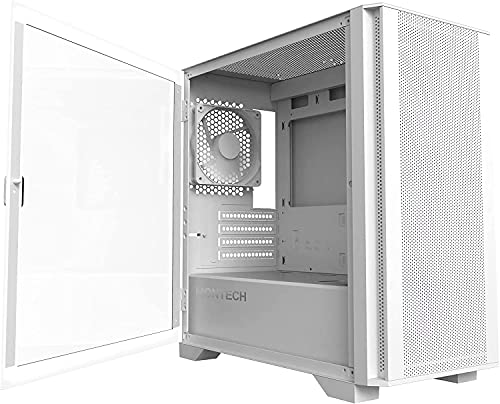
The AIR 100 LITE is a MicroATX mid-tower. It supports motherboards up to MicroATX, which means it'll also take Mini-ITX boards without any fuss. The case measures 175mm wide, 360mm tall, and 355mm deep, so it's genuinely compact without being a cramped nightmare to build inside. Steel construction throughout the main chassis, with a 4mm tempered glass side panel on the left. Not the thinnest glass we've seen on a budget case, which is a good thing.
Fan support is where things get interesting for the price. You get a 120mm exhaust fan pre-installed at the rear. The front panel supports up to two 120mm or two 140mm fans, and the top panel takes a single 120mm. That's a total of four fan positions for a case this size, which is respectable. Radiator support extends to a 240mm unit at the front, which covers the majority of popular AIO coolers. No top radiator support, but that's typical for a case with this footprint.
GPU clearance comes in at 320mm, CPU cooler height is rated to 155mm, and the PSU takes a standard ATX unit up to 160mm in length. There's a PSU shroud covering the bottom of the case, which keeps things looking tidy. Drive storage is modest: one 3.5-inch bay and two 2.5-inch bays. The front I/O panel includes two USB 3.0 Type-A ports and a combined audio jack. No USB-C, which is the main thing that dates this case slightly.
| Specification | Detail |
|---|---|
| Form Factor | MicroATX Mid-Tower |
| Supported Motherboards | MicroATX, Mini-ITX |
| Dimensions (W x H x D) | 175mm x 360mm x 355mm |
| Side Panel | 4mm Tempered Glass (left) |
| GPU Clearance | 320mm |
| CPU Cooler Height | 155mm |
| PSU Support | ATX, up to 160mm |
| Fan Support (Front) | 2x 120mm or 2x 140mm |
| Fan Support (Rear) | 1x 120mm (included) |
| Fan Support (Top) | 1x 120mm |
| Radiator Support | 240mm (front) |
| Drive Bays (3.5") | 1 |
| Drive Bays (2.5") | 2 |
| Front I/O | 2x USB 3.0 Type-A, audio combo jack |
| Expansion Slots | 4 |
| Included Fans | 1x 120mm rear exhaust |
| Colour | White |
| Price | £40.02 · Details |

Form Factor and Dimensions
At 175mm wide, 360mm tall, and 355mm deep, the AIR 100 LITE sits in a genuinely useful middle ground. It's not trying to be an ITX cube, and it's not pretending to be a full ATX tower. It's a proper compact MicroATX case that'll fit on most desks without dominating them. For context, the footprint is noticeably smaller than a standard ATX mid-tower like the Fractal Design Core 1000, which runs closer to 200mm wide. You're saving real desk space here.
The compact dimensions do come with trade-offs, as they always do. The 355mm depth is tight by modern standards. It's enough for most builds, but if you're planning to run a full-length PSU at 180mm or beyond, you'll hit the limit. Montech rates the PSU bay at 160mm max, so check your power supply dimensions before you commit. Most budget and mid-range PSUs from brands like Seasonic, Corsair, and be quiet! fall within that limit, but some fully modular units from the higher end of the market push past it.
The white finish is clean and consistent across the steel panels, which owners appreciate. A few reviewers note the white holds up well and doesn't show fingerprints as badly as you might expect from a gloss finish, partly because Montech has gone for a matte-style powder coat rather than anything shiny. The overall footprint means it'll sit comfortably on a desk beside a monitor without looking ridiculous, and it'll tuck under a desk if that's your preference. For a compact build that doesn't need to be hidden away, the proportions are genuinely good.
Motherboard Compatibility
The AIR 100 LITE supports MicroATX and Mini-ITX motherboards. That's your lot. No ATX support, which is by design given the chassis dimensions. If you're coming from a full-size ATX build and wondering whether you can shoehorn your existing board in, you can't. But if you're building fresh on a compact platform, the MicroATX standard gives you access to a huge range of boards from AMD and Intel ecosystems, from budget B-series options right up to higher-end X and Z-series chipsets.
The standoff layout follows the standard MicroATX pattern, and owners report no issues with board installation. The motherboard tray is properly sized, with standoffs pre-installed in the correct positions for MicroATX. Mini-ITX builds will need to check standoff positioning, but that's a two-minute job with a standoff tool and nothing unusual for a case in this class. The cutout behind the CPU socket area is reasonably sized, which matters when you're fitting an aftermarket cooler and need to access the backplate without pulling the motherboard out.
One thing: with four expansion slots, you're limited to the slots a MicroATX board provides anyway, so there's no mismatch there. If you're running a dual-slot GPU and nothing else, you've got room for one more expansion card, which covers the vast majority of builds. Anyone planning a capture card alongside a GPU, for instance, will be fine. The slot covers are standard punch-out style on the LITE version, which is a minor annoyance compared to tool-free alternatives, but it's not a dealbreaker at this price.
GPU Clearance
Montech rates the AIR 100 LITE at 320mm of GPU clearance. That's a meaningful number in 2026, because modern GPUs have been getting longer at an alarming rate. The good news is that 320mm covers a solid range of current cards. AMD's RX 7600 and RX 7700 XT both come in under 320mm on reference and most AIB designs. The RTX 4060 and RTX 4060 Ti similarly fit without drama. Where you start hitting the wall is with higher-end cards like the RTX 4070 Ti Super or RX 7900 GRE, which frequently exceed 320mm on triple-fan AIB designs.
So this case is really aimed at mid-range GPU pairings, which makes complete sense given it's a budget MicroATX chassis. Nobody's dropping a 350mm flagship GPU into a case at this price point. The 320mm clearance is honest and usable for the target market. What owners do flag occasionally is that the clearance measurement assumes no front radiator is installed. If you're running a 240mm AIO at the front, GPU clearance will be reduced by the thickness of the radiator and fans combined, potentially bringing your effective clearance down to around 270mm to 280mm depending on the radiator. Plan accordingly.
There's no vertical GPU mount option on the AIR 100 LITE, which won't surprise anyone at this price. Vertical mounts typically require a PCIe riser cable and additional bracket hardware, and cases that include them tend to cost significantly more. If showing off your GPU through the tempered glass is a priority, you'll want to position it on a board with good heatsink aesthetics, because it'll be mounted horizontally in the standard orientation. The glass side panel gives you a clear view of the GPU from the side, which is still a nice touch for a case at this price.
CPU Cooler Clearance
The 155mm CPU cooler height clearance is the number that matters here, and it's a decent one for a compact MicroATX case. To put it in context: the popular Arctic Freezer 34 comes in at 157mm, which technically exceeds the limit by 2mm. The Noctua NH-U12S Redux sits at 158mm. The be quiet! Pure Rock 2 is 155mm exactly. So you're right at the edge with some popular coolers, and owners do occasionally mention this as something to double-check before buying. The Noctua NH-U12A at 158mm would be a squeeze, and realistically you'd want to stay under 150mm to have a comfortable margin.
The good news is that 155mm is enough for a solid selection of 120mm tower coolers that perform well. The Cooler Master Hyper 212 series typically comes in around 158mm to 160mm, so that's one to avoid. But alternatives like the DeepCool AK400 at 155mm, or the ID-Cooling SE-224-XT at 154mm, fit cleanly and perform well on modern mid-range platforms. For anyone planning an AIO, the front 240mm radiator support is the relevant spec, and we'll cover that in the airflow section.
The CPU backplate cutout on the motherboard tray is. Owners report it's large enough to access standard AM4, AM5, and LGA1700 backplates without removing the board, which saves a significant amount of time during cooler installation. That's not guaranteed on budget cases and it's a genuinely useful design choice. If you're swapping coolers on an existing build, or if you're building for the first time and want the option to adjust the cooler without a full teardown, this cutout makes that possible. Small detail, real-world useful.
Storage Bay Options
Storage options are modest. You get one 3.5-inch drive bay and two 2.5-inch bays. For a budget MicroATX case in 2026, that's about what you'd expect, and it's honestly fine for most modern builds. The reality is that the majority of new builds are running an NVMe SSD as the primary drive, which mounts directly to the motherboard and doesn't need a dedicated bay at all. The 2.5-inch bays cover anyone running a SATA SSD for additional storage, and the single 3.5-inch bay is there if you need a mechanical hard drive for bulk storage or backup.
The 3.5-inch bay sits behind the PSU shroud, which keeps it out of sight and helps with the overall clean look of the build. Mounting is tool-based rather than tool-free, which is a minor gripe. Some owners mention the drive cage feels a little lightweight, but none report drives actually coming loose, so it's more of an aesthetic concern than a functional one. The 2.5-inch bays are accessible and mount to the rear of the motherboard tray, which is a sensible placement that keeps cables tidy.
If you're planning a NAS-style build or a media server with multiple spinning drives, this isn't the case for you. But for a gaming or general-purpose compact build with one NVMe boot drive and maybe a 2.5-inch SATA SSD for games or data, the storage provision is entirely adequate. It's also that the PSU shroud area can sometimes be used to stash a small SSD on a bracket in similar cases, though the AIR 100 LITE doesn't officially spec this out. The hidden 3.5-inch bay position does leave a little room for creative cable and drive management if you're that way inclined.

Cable Management
This is where the AIR 100 LITE genuinely earns its keep for a budget case. The PSU shroud covers the bottom of the case and hides the power supply and the mess of cables coming off it, which immediately makes the build look cleaner through the tempered glass. Behind the motherboard tray, there's reported clearance of around 15mm to 20mm for cable routing, which is enough to run your 24-pin ATX cable, CPU power cables, and SATA leads without the rear panel refusing to close. That's not a given at this price point.
Cable routing holes are positioned sensibly around the motherboard tray. There are grommeted cutouts for the main power connectors, and the routing channels are placed where you actually need them: near the top for the CPU power cable run, and centrally for the 24-pin. Owners consistently mention that the build goes together cleanly, and the cable management is easier than they expected for a case in this price bracket. A few reviewers specifically call out that the rear panel closes without a fight, which is the real test of whether a case has adequate cable management space.
Velcro cable tie points are included, which is a detail that some cases at twice the price skip. You get a few anchor points behind the tray to secure cable bundles and keep things from flopping around. It's not the most elaborate cable management system you'll find, and it doesn't need to be. For a compact MicroATX build with a modular or semi-modular PSU, the routing options are sufficient to achieve a tidy result. Using a fully modular PSU will make life considerably easier here, as it always does in compact cases where rear space is at a premium.
Airflow and Thermal Design
The front panel is mesh. That's the headline for thermals, and it's the right call for a case called the AIR 100. Mesh fronts allow significantly more airflow than solid or glass fronts, which matters when you're running a mid-range GPU and a modern CPU in a compact chassis. The mesh covers most of the front panel face, and there's a removable dust filter behind it, which owners confirm is easy to pull out and clean. Dust filtration on budget cases is often an afterthought, so this is a welcome inclusion.
As mentioned, one 120mm fan comes pre-installed at the rear as exhaust. The front panel supports two 120mm or two 140mm intake fans, and the top takes one 120mm. So out of the box you've got one fan, and a sensible upgrade path to four fans total. For most builds, adding two 120mm or 140mm intake fans at the front will make a meaningful difference to thermals, particularly for the GPU. The front-to-rear airflow path is straightforward and unobstructed, which is the right foundation. Owner reports don't flag any unusual thermal issues, which suggests the basic design works as intended.
The tempered glass right side panel (opposite the main glass panel) is solid steel, which is fine. The top panel has a ventilation strip for the optional top fan, and there's a dust filter there too. The bottom of the case has a PSU intake filter as well, so you've got dust filtration on all the main intake points, which is genuinely impressive for a case at this price. Keeping dust out of a system is one of the most underrated maintenance factors in long-term reliability, and Montech has covered the basics properly here. The included rear fan is nothing special acoustically, but it's functional and a reasonable starting point.
Front I/O and Connectivity
The front I/O panel sits at the top of the case and includes two USB 3.0 Type-A ports and a combined 3.5mm audio jack for headphones and microphone. The power button is clean and tactile, and there's a reset button alongside it. The layout is straightforward and the button placement is practical for a case that'll sit on a desk at roughly monitor height.
The absence of USB-C is the main thing that dates this case. USB Type-C front panel headers have become standard on mid-range and premium cases, and while they're not universal on budget options, they're increasingly expected. If you're connecting a USB-C device regularly, like a modern phone, a portable SSD, or a VR headset, you'll need to reach around to the back of your PC or use a separate hub. That's a minor but real inconvenience. Whether it's a dealbreaker depends entirely on your usage. For a lot of builders, two USB 3.0 ports is plenty.
Some cases split headphone and microphone into separate 3.5mm ports, which is more convenient if you're using a headset with a single combined plug. The AIR 100 LITE uses a single combo jack, which works with modern headsets that use a TRRS connector but requires an adapter for older headsets with separate plugs. It's a minor detail but before you commit. The front I/O header connections on the inside are standard and well-labelled, and owners don't report any issues with the connectors reaching motherboard headers on standard MicroATX board layouts.
Build Quality and Materials
The steel chassis is the standard for budget cases, and the AIR 100 LITE doesn't pretend otherwise. What owners do consistently note is that the steel feels adequate rather than flimsy. There's a difference between budget cases that feel like they'll fold if you look at them sideways and budget cases that feel like solid, if unspectacular, construction. The AIR 100 LITE sits in the latter category. Panel alignment is reported as good out of the box, with no significant gaps or misalignment issues flagged in the owner reviews.
The 4mm tempered glass side panel is a genuine highlight. Thinner glass, around 3mm, is more common at this price point and feels noticeably less substantial. The 4mm panel gives the case a premium feel that's disproportionate to its cost. It's secured with thumbscrews and hinges smoothly. A small number of owners mention the glass panel hinge feels slightly stiff initially, but this appears to loosen with use and nobody reports it causing actual problems. It's the kind of detail that matters on day one of the build and then stops being relevant.
Sharp edges are a perennial problem with budget steel cases, and the AIR 100 LITE isn't entirely innocent here. A few owners mention catching fingers on the drive bay area and around the front panel clips during installation. It's not dramatically worse than the competition at this price, but it's worth wearing gloves if you're sensitive to that sort of thing. The overall fit and finish of the white powder coat is well-regarded, with owners noting that the colour is consistent and clean across panels. For a white case, that consistency matters because mismatched whites between panels look terrible, and Montech has avoided that problem.
How It Compares
The main competition in this price bracket for a white MicroATX case with tempered glass comes from the Fractal Design Core 1000 and the Cooler Master MasterBox Q300L. The Core 1000 is an older design that's been around for years and offers solid build quality but lacks a PSU shroud and has a more restrictive front panel for airflow. The Q300L is a popular alternative with magnetic dust filters and a more flexible panel layout, but its build quality is notably thinner and the tempered glass, where available, is typically acrylic rather than real glass.
The AIR 100 LITE undercuts both on price in most comparisons while offering the PSU shroud and real tempered glass that the Core 1000 and Q300L struggle to match at equivalent pricing. The Q300L has more flexible fan and radiator mounting options, including top and side radiator support, which gives it an edge for AIO-heavy builds. But for a straightforward air-cooled or front-AIO build, the AIR 100 LITE's spec sheet is competitive and its positive overall rating from dozens of owners suggests the real-world experience backs up what the specs promise.
It's also worth comparing against Montech's own AIR 100 (non-LITE), which adds a mesh top panel and additional fan mounting flexibility. If your budget stretches to the standard AIR 100, the extra airflow headroom is worth having. But if the LITE version hits your price point and the standard doesn't, you're not getting a fundamentally worse case, just a slightly less flexible one. The core build experience and quality are similar between the two.
| Feature | Montech AIR 100 LITE | Cooler Master MasterBox Q300L | Fractal Design Core 1000 |
|---|---|---|---|
| Form Factor | MicroATX | MicroATX | MicroATX |
| Side Panel | 4mm Tempered Glass | Acrylic | No window / acrylic option |
| PSU Shroud | Yes | No | No |
| Front Panel | Mesh | Mesh (magnetic filter) | Solid with vents |
| GPU Clearance | 320mm | 360mm | 310mm |
| CPU Cooler Height | 155mm | 157mm | 160mm |
| Max Radiator (Front) | 240mm | 240mm | 120mm |
| USB-C Front I/O | No | No | No |
| Included Fans | 1x 120mm | 1x 120mm | 1x 120mm |
| Owner Rating | ★★★★½ (4.5) | Varies by listing | Varies by listing |
| Price Tier | Budget | Budget | Budget |

Final Verdict
The Montech AIR 100 LITE is a budget MicroATX case that gets the fundamentals right in a way that a lot of its competition doesn't. You get real 4mm tempered glass rather than acrylic, a PSU shroud for a clean build, a mesh front panel for proper airflow, dust filters on all intake points, and enough cable management space behind the tray to actually close the rear panel without a fight. For a case at this price, that's a strong package.
The limitations are real but predictable. The 320mm GPU clearance rules out longer flagship cards, though that's not really the target market here. The 155mm CPU cooler height limit needs checking against your cooler of choice before you buy. There's no USB-C on the front I/O, which will frustrate some builders. And storage options are minimal, so if you're running multiple spinning drives, look elsewhere. But none of these are surprising for the price tier, and none of them are worse than the competition.
Owner feedback at 4.5 stars from dozens of reviews is genuinely encouraging. That's not a case with a handful of enthusiastic early reviews propping up a mediocre product. It's a consistent pattern of builders who found the case easy to work with, liked the build quality, and felt they got good value. The white finish gets specific praise for consistency, and the cable management space comes up repeatedly as a positive surprise.
Who should buy this? Anyone building a compact gaming or general-purpose PC on a tight budget who wants a clean-looking result without spending mid-range money on the case. First-time builders will appreciate the straightforward layout and the PSU shroud hiding their cable chaos. Anyone pairing a mid-range GPU like an RX 7600 or RTX 4060 with a compact MicroATX platform will find this fits their build perfectly.
Who should skip it? If you've got a GPU longer than 300mm and you're planning a front AIO, the effective clearance gets tight. If USB-C front I/O is non-negotiable, you'll need to step up to a slightly pricier option. And if you're running more than one hard drive, the single 3.5-inch bay will frustrate you quickly. In that case, the Cooler Master MasterBox Q300L gives you more flexible panel mounting and a bit more internal volume, though you'll sacrifice the PSU shroud and the real glass.
If your budget genuinely won't stretch beyond the budget tier and you're torn between this and something even cheaper with a solid front panel and no shroud, spend the extra few pounds and get the AIR 100 LITE. The airflow difference from the mesh front alone is worth it, and the PSU shroud will make your build look considerably better through that glass panel. It's a well-thought-out case for what it costs, and the owner reviews back that up.
What works. What doesn’t.
5 + 4What we liked5 reasons
- 4mm tempered glass side panel is thicker than most budget competitors
- PSU shroud included for a clean, tidy build
- Mesh front panel with removable dust filter for proper airflow
- Cable management space behind tray is genuinely usable
- Dust filters on all main intake points at this price is impressive
Where it falls4 reasons
- No USB-C front I/O port
- 155mm CPU cooler height limit rules out some popular tower coolers
- Only one 3.5-inch drive bay limits storage expansion
- Some sharp edges reported around drive bay area during builds
Full specifications
11 attributes| Form factor | Micro-ATX |
|---|---|
| CPU cooler clearance MM | 161 |
| Dimensions MM | 425 x 405 x 210 |
| Fans included | 2 |
| GPU clearance MM | 330 |
| MAX FAN count | 7 |
| MAX radiator MM | 280 |
| PSU support | ATX PSU, bottom mounted |
| Side panel | tempered glass |
| Supported motherboard | Micro-ATX, Mini-ITX |
| Weight KG | 6 |
Got a motherboard yet?
4 reviewsThe maker lists Micro-ATX and Mini-ITX boards for this case. These Micro-ATX boards fit it.
Frequently asked
5 questions01Is the Montech AIR 100 LITE White Tempered Glass MicroATX Case good for airflow?+
Yes, for a budget case it's well set up for airflow. The front panel is mesh with a removable dust filter, which allows significantly more air intake than the solid or glass fronts you find on cheaper alternatives. One 120mm fan is included at the rear as exhaust. The front supports up to two 120mm or two 140mm intake fans, and the top takes one 120mm, giving you a four-fan total capacity. Dust filters are present on the front intake, top panel, and PSU intake, which is genuinely good coverage for the price. Adding two front intake fans is the most impactful upgrade you can make to the thermal performance.
02What's the GPU clearance on the Montech AIR 100 LITE White Tempered Glass MicroATX Case?+
Montech rates the AIR 100 LITE at 320mm of GPU clearance. This covers most mid-range cards comfortably, including the RTX 4060, RTX 4060 Ti, RX 7600, and RX 7700 XT on standard AIB designs. Longer triple-fan cards on higher-end GPUs like the RTX 4070 Ti Super or RX 7900 GRE often exceed 320mm, so check your specific card's dimensions before buying. If you're planning a front 240mm AIO alongside a GPU, note that the radiator and fans will reduce effective GPU clearance to roughly 270mm to 280mm depending on the radiator thickness.
03Can the Montech AIR 100 LITE White Tempered Glass MicroATX Case fit a 360mm AIO?+
No. The AIR 100 LITE supports a maximum 240mm radiator at the front panel. There is no top radiator support and no side mounting option. So if you're planning a 360mm AIO, this isn't the right case. A 240mm AIO at the front is fully supported, and this covers a wide range of popular coolers including options from Corsair, NZXT, and DeepCool. Just bear in mind that fitting a 240mm radiator at the front will reduce your available GPU clearance, so check your GPU length against the reduced clearance figure before committing to that configuration.
04Is the Montech AIR 100 LITE White Tempered Glass MicroATX Case easy to build in?+
Owner feedback consistently rates the build experience positively for a budget case. The PSU shroud keeps the lower section tidy, cable routing holes are positioned sensibly around the motherboard tray, and the rear panel clearance of around 15mm to 20mm is enough to route cables without the panel refusing to close. Velcro cable tie anchor points are included. The main frustrations reported by some owners are occasional sharp edges around the drive bay area, and the slot covers being punch-out style rather than tool-free. Using a modular or semi-modular PSU will make cable management considerably easier in this chassis.
05What warranty and returns apply to the Montech AIR 100 LITE White Tempered Glass MicroATX Case?+
Specific warranty terms for the AIR 100 LITE are not listed in the verified product data available to us. We'd recommend checking the Montech official website or the Amazon product listing for current warranty information. When purchasing through Amazon UK, you're covered by Amazon's standard 30-day return policy and the A-to-Z Guarantee, which provides protection if the item arrives damaged or not as described.