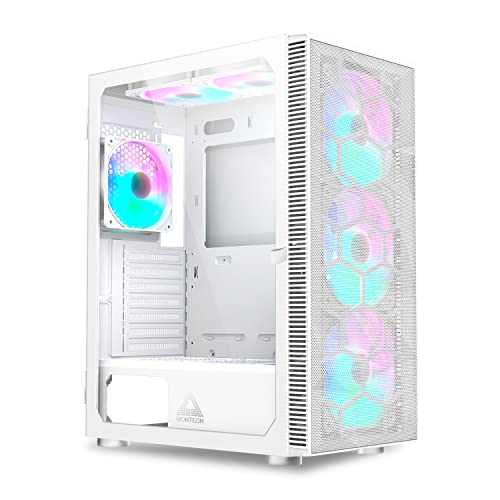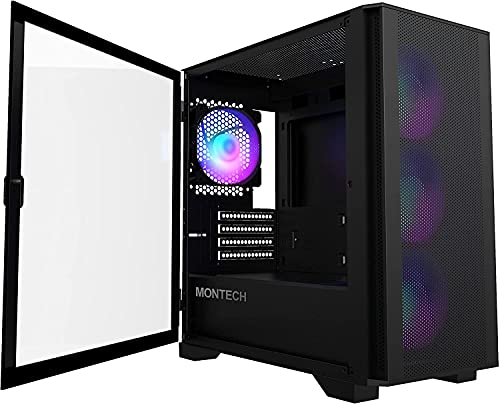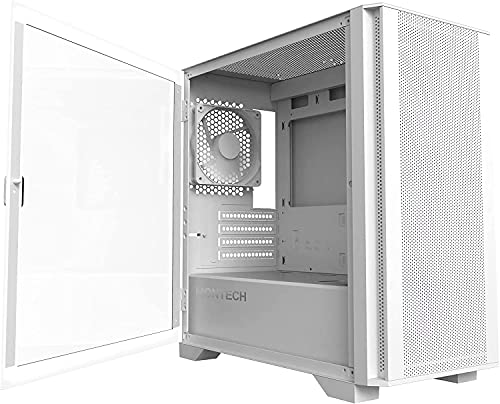
Marketing photos of PC cases are basically lies. A curved tempered glass front panel looks stunning in a render with RGB bouncing off it, but that tells you precisely nothing about whether you'll be swearing at it forty minutes into a build because the cable routing channels are too narrow or the side panel fights you every time. The Montech King 95 PRO mid-tower case UK buyers have been picking up in decent numbers sits in an interesting spot: it's priced firmly in enthusiast territory, ships with six ARGB fans pre-installed, and promises dual-chamber construction with proper airflow. That's a lot of claims to live up to.
Here's the short version: it largely delivers. The hundreds of owner reviews have a positive overall rating, which for a case at this price tier is genuinely impressive. People aren't just rating it highly because it looks good in their setup photos (though it does). They're rating it highly because the build experience is better than you'd expect, the included fans are actually usable, and the dual-chamber layout does real work separating your PSU mess from the main build. There are some caveats, and we'll get into them, but this is a case that earns its price rather than just charging it.
The Montech King 95 PRO mid-tower case UK listing targets builders who want performance and aesthetics without having to buy fans separately or fight the case to get their components in. Whether it actually hits that mark across the board is what the rest of this piece is about.
Core Specifications
The King 95 PRO is an ATX mid-tower built around a dual-chamber design, which means the PSU and drive cabling live behind a dedicated shroud and partition rather than just being shoved behind the motherboard tray. The chassis supports ATX, Micro-ATX, and Mini-ITX motherboards. GPU clearance is rated at 410mm, CPU cooler height at 185mm, and the case ships with six 140mm ARGB PWM fans pre-installed, three front intake and three top exhaust, all connected through an included fan hub. That's a proper push-pull setup out of the box, which matters.
Radiator support is generous: 360mm at the front, 360mm on top, and 120mm at the rear. The front panel is that curved tempered glass piece you've seen in the product shots, and the side panel is also tempered glass. Panels are described as tool-free, which owner feedback broadly confirms works as advertised. The case has a front I/O setup including USB 3.0 Type-A ports and a USB 3.2 Gen 2 Type-C port, plus the usual headphone and mic jacks. Steel construction throughout the main chassis, with the tempered glass panels obviously being the exception.
The footprint is what you'd expect from a mid-tower: not small, but not the kind of thing that'll dominate a desk in an embarrassing way. Weight is around 10kg, which is on the heavier side for a mid-tower, partly because of those six included fans and the dual glass panels. The PSU clearance accommodates standard ATX power supplies up to around 200mm in length, which covers the vast majority of modern units. Drive bays include two 3.5-inch HDD mounts and two 2.5-inch SSD mounts, with additional 2.5-inch mounting points on the back of the motherboard tray.
| Specification | Detail |
|---|---|
| Form Factor | ATX Mid-Tower |
| Motherboard Support | ATX, Micro-ATX, Mini-ITX |
| GPU Clearance | 410mm |
| CPU Cooler Height | 185mm |
| Included Fans | 6x 140mm ARGB PWM (3 front intake, 3 top exhaust) |
| Front Radiator Support | Up to 360mm |
| Top Radiator Support | Up to 360mm |
| Rear Fan/Radiator | 1x 120mm |
| Drive Bays (3.5") | 2 |
| Drive Bays (2.5") | 4 (2 dedicated + 2 on tray) |
| Front I/O | USB 3.0 x2, USB 3.2 Gen 2 Type-C x1, HD Audio |
| Panel Material | Tempered Glass (front, side), Steel chassis |
| PSU Clearance | Up to ~200mm ATX |
| Weight | ~10kg |
| Price | £137.88 · Details |

Form Factor and Dimensions
Mid-tower is the right call for most builds, and the King 95 PRO sits comfortably in that category without being awkward about it. The external dimensions are roughly 480mm tall, 220mm wide, and 480mm deep, which puts it in the larger end of mid-tower territory. That depth is partly a consequence of the dual-chamber layout and the curved front panel, which adds a few millimetres over a flat-fronted design. On a standard desk it'll sit fine, but if you're working with a particularly shallow desk or a small corner setup, measure first.
The curved tempered glass front is worth talking about from a practical standpoint rather than just an aesthetic one. It's not a mesh front, which has airflow implications we'll cover later, but it does allow light to pass through cleanly, which is why the ARGB fans behind it look so dramatic in photos. The curve itself is subtle enough that it doesn't make the case feel bulky from the front. From the side, the full-height tempered glass panel gives you a clear view of the motherboard area, and because the PSU is hidden in the lower chamber, you're not looking at a tangle of cables when you glance at the build.
The footprint is manageable for a case that's doing this much. You're getting a dual-chamber chassis with six fans and dual glass panels, and Montech hasn't made it unnecessarily wide or deep to achieve that. The steel chassis underneath is solid, and owner feedback consistently mentions that the case doesn't feel flimsy or hollow when you move it around. That 10kg weight is actually reassuring in this context. It means the steel is doing its job rather than being thinned out to hit a lower weight figure on a spec sheet.
Motherboard Compatibility
ATX, Micro-ATX, and Mini-ITX are all supported, with standoffs pre-installed for ATX as standard. If you're dropping in a Micro-ATX or Mini-ITX board, you'll need to move standoffs, which is a five-minute job but about before you start. The case is not E-ATX compatible, which rules it out for the very high-end workstation crowd, but for the vast majority of gaming and enthusiast builds that's not going to matter at all. Standard ATX boards like those based on Intel's LGA1700 platform or AMD's AM5 socket fit without issue.
The motherboard tray cutout is generously sized, which matters for CPU cooler installation. A large cutout means you can access the backplate without removing the motherboard, and several owner reviews specifically call this out as a positive. It's one of those details that sounds minor until you're trying to swap a cooler on an already-built system and you realise the cutout is too small. Montech got this right. The tray itself is solid steel with no flex when you're tightening standoffs, which is a better experience than some cases in this price range where the tray has a bit of give to it.
The dual-chamber design also means the motherboard area is genuinely uncluttered. The PSU, HDDs, and the bulk of your cabling live below the shroud partition, so the main chamber you're looking at through the side panel is just the motherboard, GPU, cooler, and RAM. This makes the build look cleaner and also makes it easier to work in, because you're not navigating around a dangling PSU cable while trying to seat a RAM stick. For builders who care about the finished look as much as the component selection, this layout is genuinely worth paying for.
GPU Clearance
410mm of GPU clearance is the headline figure, and that's enough for anything you'd realistically install in a mid-tower right now. An RTX 5090 Founders Edition comes in around 336mm in length, and most AIB triple-fan cards from Asus, Gigabyte, or MSI sit between 300mm and 360mm. So you have headroom to spare. The 410mm spec doesn't shrink significantly even with a front radiator installed, which is one of the practical benefits of having a properly thought-out internal layout rather than just a big empty box.
Vertical GPU mounting is not a native feature of this case, which matters if that's something you were planning. You'd need an aftermarket riser cable and some creativity with the PCIe bracket layout. For the majority of builders that's not a concern, but it's a gap compared to some competitors at this price point. The PCIe slots themselves are standard and the bracket screws are tool-free in the sense that they're thumbscrews, which is a small but appreciated detail when you're swapping cards.
Owner feedback doesn't flag any issues with GPU fitment, which is encouraging. With 410mm of clearance, the case is future-proofed reasonably well. Even the most aggressively sized triple-fan cards from the current generation fit with room to spare, and you won't be in a situation where a new GPU purchase forces a case upgrade. The GPU support bracket situation is if you're running a very heavy card, as some owners with large triple-slot GPUs mention they appreciate having a support option to prevent sag, and the King 95 PRO's internal layout does allow for aftermarket GPU sag brackets to be fitted.
CPU Cooler Clearance
185mm of CPU cooler clearance covers essentially every air cooler on the market. The Noctua NH-D15 comes in at 165mm, the be quiet! Dark Rock Pro 4 at 162.8mm, and even some of the chunkier tower coolers like the Thermalright Phantom Spirit 120 SE sit comfortably under that ceiling. So if you're planning a high-end air cooling setup, you're fine. No compromises needed, no measuring tape required before you buy.
AIO support is where the King 95 PRO gets interesting. Front mounting supports up to 360mm, top mounting also supports up to 360mm, and there's a 120mm rear exhaust position. That means you can run a 360mm AIO at the front as intake or a 360mm at the top as exhaust, depending on your thermal strategy. Running a 360mm front AIO as intake with the three top 140mm fans exhausting is a genuinely strong thermal configuration, and the fact that the case ships with six fans already in those positions means you don't need to buy additional fans to make it work. You'd just be replacing the front fans with your AIO radiator and fans.
RAM clearance with a top-mounted radiator is if you're using particularly tall RAM. The top radiator position sits close enough to the motherboard that very tall heatspreaders can cause fitment issues, which is a common complaint across many mid-towers with top radiator support. Owner reviews on the King 95 PRO don't flag this as a widespread problem, but if you're running something like Corsair Dominator Titanium with its tall fins, double-check the clearance before committing to a top-mounted AIO. Standard-height RAM is completely fine.
Storage Bay Options
Two 3.5-inch HDD bays and four 2.5-inch SSD mounting points. The 3.5-inch bays live in the lower chamber behind the PSU shroud, which keeps them out of sight and out of the main airflow path. Tool-free mounting for 3.5-inch drives uses a tray-and-clip system that owner feedback generally describes as solid rather than flimsy. It's not the most elegant drive mounting solution in the world, but it works and it doesn't require you to dig out a screwdriver every time you want to swap a drive.
The 2.5-inch SSD mounting is split between dedicated brackets and positions on the back of the motherboard tray. This is a sensible approach because it means you can run SSDs without them cluttering up the main chamber. If you're running an NVMe-only setup, which is increasingly common with modern builds, the 2.5-inch bays become less critical, but having them there for SATA SSDs or additional storage is useful. The hidden mounting positions behind the tray are particularly good for keeping the cable side of the build tidy.
Two 3.5-inch bays won't satisfy everyone. If you're building a NAS-adjacent system or you have a serious media storage requirement, you'll run out of HDD space quickly. But for a gaming or enthusiast build where one or two mechanical drives handle bulk storage alongside an NVMe boot drive, it's adequate. The dual-chamber design does limit how many drive bays you can reasonably fit without making the lower chamber a cramped mess, so Montech has made a sensible trade-off here between storage capacity and build practicality.

Cable Management
This is where the dual-chamber design earns its keep most obviously. The PSU sits in a dedicated lower compartment, completely separate from the main motherboard area. Your 24-pin ATX cable, EPS CPU power cables, and SATA/Molex runs all live in a channel system that routes them from the lower chamber up behind the motherboard tray and out through grommeted openings to wherever they need to go. The result is that the main chamber stays clean, and the cable chaos is contained behind the tray where nobody has to look at it.
The rear cable management space, between the motherboard tray and the back panel, is reported by owners as adequate rather than generous. There's enough room to route and bundle cables without forcing the side panel shut, which is the minimum you'd hope for at this price. Velcro cable tie points are included at multiple positions behind the tray, which is genuinely useful for keeping bundles organised. The grommeted cable pass-throughs are rubber-lined and positioned sensibly, so you're not routing cables at awkward angles to get them where they need to go.
A few owner reviews mention that the cable routing for the included fan hub can feel a bit involved, simply because you have six fans and a hub to connect, plus the ARGB daisy-chain. It's not a criticism of the case design specifically, just the reality of managing six fans. The hub itself mounts in the lower chamber, which keeps it out of the main build area. Once everything is routed and tidied, the result is a clean build that would have taken significantly more effort in a single-chamber case. Montech has clearly thought about where builders actually struggle with cable management and tried to address it structurally rather than just providing more tie points.
Airflow and Thermal Design
The curved tempered glass front panel is the most significant thermal design decision in this case, and it's worth being direct about it. Glass fronts restrict airflow compared to mesh fronts. That's just physics. The King 95 PRO addresses this by routing intake air through vents at the bottom and sides of the front panel rather than through the glass itself, which is a common approach for glass-fronted cases. How effective it is depends on how well those vents are sized and positioned, and owner feedback suggests the airflow is genuinely good rather than merely acceptable.
Six 140mm ARGB PWM fans pre-installed is a strong starting point. Three front intake fans pulling air through those side vents and across the radiator or directly into the main chamber, three top exhaust fans pushing hot air out. This is a positive-pressure-biased configuration when all fans run at similar speeds, which helps keep dust out of unfiltered gaps. Dust filters are present on the front and bottom intake positions, which is important for long-term maintenance. The PWM control means the fans respond to your motherboard's fan curve, so they're not just blasting at full speed all the time.
The fan hub included with the case supports PWM speed control and ARGB sync, and it connects to a single motherboard fan header and a single ARGB header. This is a practical solution to the problem of having six fans but a motherboard with only three or four fan headers. The PWM signal from your motherboard controls all six fans simultaneously through the hub. The limitation is that you can't independently control the front and top fans without bypassing the hub, which some enthusiasts will find frustrating if they want to run different curves for intake and exhaust. For most builders it won't matter.
Front I/O and Connectivity
The front I/O panel sits at the top of the case, which is the standard position for a mid-tower and means it's accessible without bending down if the case is on a desk. You get two USB 3.0 Type-A ports, one USB 3.2 Gen 2 Type-C port, a headphone jack, and a microphone jack. The USB Type-C port requires a USB 3.2 Gen 2 header on your motherboard, which is present on most modern mid-range and high-end boards but if you're pairing this with an older platform.
The USB 3.2 Gen 2 Type-C front port is genuinely useful. It supports 10Gbps transfer speeds, which means plugging in an external SSD for a quick file transfer is actually fast rather than being throttled by an older USB standard. The USB 3.2 specification supports these speeds over the Type-C connector, and having it on the front panel rather than only on the rear I/O of the motherboard is a practical convenience that you notice regularly. It's one of those features that sounds like a minor spec-sheet checkbox until you actually use it.
The power button has an RGB ring around it, which ties into the ARGB ecosystem of the case. It's a small detail but it looks tidy and it means the front I/O area doesn't look like an afterthought. The reset button is present and sensibly sized, small enough that you won't hit it accidentally but large enough to find without squinting. No SD card slot, which some people will miss, but it's not a common inclusion at this price tier and its absence isn't a surprise. Overall the front I/O is well specified for a gaming and enthusiast build in 2026.
Build Quality and Materials
Owner feedback on build quality is consistently positive, which is reflected in that good overall rating across hundreds of reviews. The steel chassis feels solid, panel alignment is good out of the box, and the tempered glass panels don't have the slightly wobbly feel you sometimes get from cheaper cases where the hinges or clips aren't quite right. The curved front glass panel is a structural element as well as an aesthetic one, and Montech has reinforced it properly rather than just hoping it holds together.
The tool-free panel removal works as described. The side panel uses a push-and-slide mechanism that owners report is smooth and doesn't require excessive force. A few reviews mention the front glass panel is slightly more involved to remove than the side, which makes sense given its curved shape and the way it clips into the chassis. It's not a problem, just something to be aware of if you're planning to access the front fans regularly for cleaning. The dust filters are removable for cleaning, which is important given that the front vents are the primary intake path.
Sharp edges are the bane of case builders everywhere, and this is an area where the King 95 PRO gets a reasonably clean report. Most owners don't flag edge sharpness as an issue, which suggests Montech has done a decent job with the steel finishing. The screw quality is adequate, thumbscrews are used where they make sense, and the included hardware bag has what you need without being confusing. The fan hub mounting and the cable tie points feel like they were designed by someone who has actually built a PC rather than just drawn one in CAD. That sounds like a low bar, but you'd be surprised how many cases at this price fail it.
How It Compares
The obvious competitors at this price tier are the Lian Li Lancool 216 and the Corsair 4000D Airflow. The Lancool 216 is a strong alternative that prioritises mesh airflow over aesthetics, shipping with two 160mm fans and a mesh front panel that gives it a thermal edge over any glass-fronted case. If raw temperatures are your only metric, the Lancool 216 is probably the better choice. But it doesn't ship with six fans, it doesn't have the same dual-chamber cable management approach, and the ARGB ecosystem is less developed out of the box.
The Corsair 4000D Airflow is a perennial recommendation for good reason. It's a well-built, practical mid-tower with a mesh front and solid cable management. But it ships with no fans at all in the base configuration, which means you're spending more money to get to a comparable fan count to the King 95 PRO. By the time you've bought three or four decent ARGB fans for the 4000D Airflow, you're spending more overall than the King 95 PRO costs with its six fans included. The 4000D Airflow also doesn't have the dual-chamber design, so cable management is more traditional.
The Montech King 95 PRO mid-tower case UK position is essentially this: it's the best value proposition if you want ARGB fans included, dual-chamber cable management, and a glass front aesthetic. It gives up some thermal performance compared to a mesh-front competitor, but it makes up for it with a genuinely better out-of-the-box experience and a cleaner build result. For builders who don't want to spend extra on fans and who care about how the finished build looks, it's a strong argument.
| Feature | Montech King 95 PRO | Lian Li Lancool 216 | Corsair 4000D Airflow |
|---|---|---|---|
| Form Factor | ATX Mid-Tower | ATX Mid-Tower | ATX Mid-Tower |
| Included Fans | 6x 140mm ARGB PWM | 2x 160mm PWM | None (base version) |
| Front Panel | Curved Tempered Glass | Mesh | Mesh |
| GPU Clearance | 410mm | 400mm | 360mm |
| CPU Cooler Height | 185mm | 176mm | 170mm |
| 360mm Radiator (Front) | Yes | Yes | Yes |
| Dual-Chamber Design | Yes | No | No |
| USB Type-C Front I/O | USB 3.2 Gen 2 | USB 3.2 Gen 2 | USB 3.1 Gen 1 |
| Price Tier | Enthusiast | Enthusiast | Enthusiast (fans extra) |

Final Verdict
The Montech King 95 PRO is a proper enthusiast mid-tower that actually justifies its price tag rather than just wearing it. Six ARGB PWM fans included, dual-chamber cable management that genuinely works, 410mm GPU clearance, 185mm CPU cooler height, 360mm radiator support front and top, and a build quality that hundreds of owners have well rated. That's not a fluke. The case does what it says it does, and it does it without making you fight it every step of the way.
The glass front panel is the one honest compromise. If you're building a system where thermals are the absolute priority and you're happy to sacrifice aesthetics for airflow, a mesh-front case like the Lian Li Lancool 216 will run slightly cooler. The King 95 PRO's intake venting mitigates this more than you might expect, and the six included fans help, but physics doesn't fully disappear just because Montech wants it to. For most gaming builds the thermal difference won't be meaningful in practice, but it's about.
Who should buy this? Builders who want a complete, good-looking mid-tower without buying fans separately, who care about cable management being sorted structurally rather than just having extra tie points, and who are building a gaming or enthusiast system on an ATX platform. The dual-chamber design makes the build experience noticeably cleaner than a single-chamber case at the same price, and the included fans are genuinely usable rather than being the kind of cheap bundled fans you immediately replace. If you're spending money on a high-end GPU and CPU, this case is a worthy home for them.
Who should skip it? If you're on a tighter budget and airflow performance is your priority, the Montech Air 903 Max or a similar mesh-front case at a lower price tier will serve you better thermally and cost less. The King 95 PRO's value proposition depends on you wanting the glass aesthetic and the dual-chamber layout. If neither of those things matters to you, you're paying for features you won't appreciate. And if you need E-ATX support or vertical GPU mounting out of the box, look elsewhere.
Overall score: 8.5 out of 10. It's not perfect, the glass front is a genuine thermal trade-off and the rear cable space is adequate rather than excellent. But for a glass-front dual-chamber mid-tower that ships with six usable ARGB fans and supports full-size cooling hardware, it's one of the better-executed cases at this price in 2026. The Montech King 95 PRO earns a recommendation without any major asterisks attached.
What works. What doesn’t.
5 + 4What we liked5 reasons
- Six 140mm ARGB PWM fans included, genuinely usable out of the box
- Dual-chamber design makes cable management structurally cleaner
- 410mm GPU clearance and 185mm CPU cooler height covers all modern hardware
- 360mm radiator support front and top with room to spare
- USB 3.2 Gen 2 Type-C front I/O is fast and practical
Where it falls4 reasons
- Curved glass front restricts airflow compared to mesh-front competitors
- Rear cable management space is adequate rather than generous
- No vertical GPU mounting support out of the box
- Six-fan hub means no independent front/top fan curve control
Full specifications
11 attributes| Form factor | Mid-Tower |
|---|---|
| CPU cooler clearance MM | 175 |
| Dimensions MM | 475 x 300 x 442 |
| Fans included | 6 |
| GPU clearance MM | 420 |
| MAX FAN count | 9 |
| MAX radiator MM | 360 |
| PSU support | ATX up to 190mm |
| Side panel | tempered glass |
| Supported motherboard | ATX, Micro-ATX, Mini-ITX |
| Weight KG | 12.1 |
If this isn’t right for you
2 options
 8.5 / 10
be quiet! Light Base 900 DX White PC Case, Fully Windowed Front and Side
£169.99 · be quiet! · Details
Got a motherboard yet?
4 reviewsThe maker lists ATX, Micro-ATX and Mini-ITX boards for this case. These ATX boards fit it.
Frequently asked
5 questions01Is the Montech King 95 PRO Dual-Chamber ATX Mid-Tower PC Gaming Case, High-Airflow, Toolless Panels, Sturdy Curved Tempered Glass Front, 6 ARGB PWM Fan Pre-Installed with Fan Hub, Black good for airflow?+
It's good, but not class-leading. The curved tempered glass front panel restricts direct intake airflow compared to mesh-front competitors, and Montech routes intake air through vents at the sides and bottom of the front panel instead. Six 140mm ARGB PWM fans come pre-installed, three front intake and three top exhaust, which is a strong configuration that compensates significantly for the glass front. Dust filters are present on the front and bottom intake positions. For most gaming builds the thermal performance is more than adequate, but if you're pushing a very high TDP system and want every degree of thermal headroom, a mesh-front case will do better.
02What's the GPU clearance on the Montech King 95 PRO Dual-Chamber ATX Mid-Tower PC Gaming Case, High-Airflow, Toolless Panels, Sturdy Curved Tempered Glass Front, 6 ARGB PWM Fan Pre-Installed with Fan Hub, Black?+
The King 95 PRO supports GPUs up to 410mm in length. That covers every current flagship card including triple-fan AIB models of the RTX 5090 and RX 9070 XT, which typically measure between 300mm and 360mm. Clearance doesn't shrink significantly with a front radiator installed due to the dual-chamber layout. Vertical GPU mounting is not natively supported, so you'd need an aftermarket riser cable and bracket if that's a requirement.
03Can the Montech King 95 PRO Dual-Chamber ATX Mid-Tower PC Gaming Case, High-Airflow, Toolless Panels, Sturdy Curved Tempered Glass Front, 6 ARGB PWM Fan Pre-Installed with Fan Hub, Black fit a 360mm AIO?+
Yes, and in two positions. The front panel supports up to a 360mm radiator, and the top panel also supports up to 360mm. The rear position handles a single 120mm fan or radiator. If you're mounting a 360mm AIO at the top, check your RAM height first, as very tall heatspreaders can cause clearance issues, a common limitation across mid-towers with top radiator support. Standard-height RAM is fine. Front-mounted 360mm AIOs as intake work well alongside the three top exhaust fans for a strong thermal configuration.
04Is the Montech King 95 PRO Dual-Chamber ATX Mid-Tower PC Gaming Case, High-Airflow, Toolless Panels, Sturdy Curved Tempered Glass Front, 6 ARGB PWM Fan Pre-Installed with Fan Hub, Black easy to build in?+
Owner feedback consistently says yes. The dual-chamber design separates the PSU and bulk cabling from the main motherboard area, which makes the build process noticeably cleaner than a single-chamber case. The large motherboard tray cutout allows backplate access without removing the board. Tool-free side panel removal works as advertised. Cable management behind the tray has adequate space with Velcro tie points at multiple positions. The main complexity is routing the six fan cables to the included hub, which is a one-time job rather than an ongoing frustration. Sharp edges are not widely reported as an issue.
05What warranty and returns apply to the Montech King 95 PRO Dual-Chamber ATX Mid-Tower PC Gaming Case, High-Airflow, Toolless Panels, Sturdy Curved Tempered Glass Front, 6 ARGB PWM Fan Pre-Installed with Fan Hub, Black?+
Specific warranty terms for this case are not confirmed in the verified product listing data. When purchasing through Amazon UK, you're covered by Amazon's standard 30-day return window and the Amazon A-to-Z Guarantee, which protects you if the item arrives damaged or not as described. For manufacturer warranty details, check the Montech website directly or contact their support before purchasing if warranty length is a deciding factor for you.