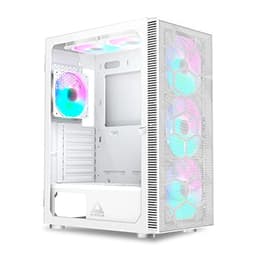
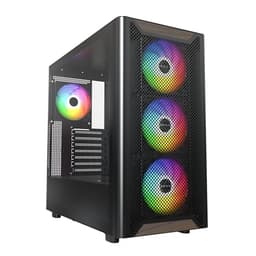
Pick the wrong case and you'll be fighting it for the entire build. I've done it more times than I'd like to admit, squeezing cables into gaps that are too tight, discovering the GPU is 5mm too long, or realising the front panel blocks half the intake airflow. After twelve years of building systems in everything from flimsy budget boxes to overengineered premium towers, I've got a pretty clear sense of what separates a case that works from one that just looks decent in product photos. The Montech AIR 903 MAX sits in that competitive entry-level bracket where the decisions a manufacturer makes really matter, because there's no room to hide behind premium materials or fancy extras.
Montech has been quietly building a reputation for punching above its weight in the budget airflow space, and the AIR 903 MAX is their attempt to bring a proper mesh-forward design to builders who don't want to spend serious money. This Montech AIR 903 MAX PC Case Review UK 2026 covers everything from clearances to cable routing to whether those included fans are actually worth keeping.
The short version? There's a lot to like here, especially at this price point. But there are a couple of design choices that'll frustrate you if you're not expecting them. Let's get into it.
Core Specifications
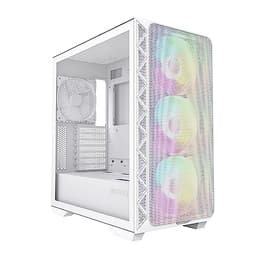
The AIR 903 MAX is a mid-tower ATX case with a full mesh front panel, which is the headline feature Montech wants you to notice first. And fair enough, because it's the right call for a case in this category. The chassis measures approximately 465mm tall, 210mm wide, and 430mm deep, which puts it in standard mid-tower territory. It's not going to dominate your desk but it's not a compact build either. Weight comes in around 6.5kg without components, which feels about right for the steel construction.
You get four pre-installed fans in the MAX version, which is the key difference from the base AIR 903. Three 140mm ARGB fans sit at the front as intake, and one 140mm ARGB fan handles rear exhaust. That's a genuinely good starting configuration and means most builders won't need to immediately spend more on fans. The case supports up to 360mm radiators at the front and 240mm on top, which covers the vast majority of AIO coolers on the market right now.
Steel thickness is the usual 0.6mm SPCC you'd expect at this price, which isn't going to win any awards for rigidity but is perfectly functional. The tempered glass side panel is 4mm thick and held on with a thumbscrew at the rear. Montech includes a PSU shroud, a decent number of cable routing holes, and rubber grommets on most of them. The front I/O includes USB 3.0 Type-A ports and a USB 3.2 Gen 1 Type-C, which is a nice touch at this price. Full specs below.
| Specification | Detail |
|---|---|
| Form Factor | Mid-Tower ATX |
| Motherboard Support | E-ATX (up to 280mm), ATX, mATX, mITX |
| Dimensions (H x W x D) | ~465 x 210 x 430mm |
| Weight | ~6.5kg (without components) |
| Front Panel | Full mesh |
| Side Panel | 4mm Tempered Glass |
| Included Fans | 4x 140mm ARGB (3 front intake, 1 rear exhaust) |
| Max GPU Length | 400mm |
| Max CPU Cooler Height | 175mm |
| Front Radiator Support | Up to 360mm |
| Top Radiator Support | Up to 240mm |
| Rear Radiator Support | 120mm |
| Drive Bays (3.5") | 2x |
| Drive Bays (2.5") | 4x |
| Front I/O | 2x USB 3.0 Type-A, 1x USB 3.2 Gen 1 Type-C, HD Audio |
| PSU Clearance | Up to 200mm |
| Cable Management Space (rear) | ~25mm |
| Steel Thickness | 0.6mm SPCC |
| Current UK Price | Check price |
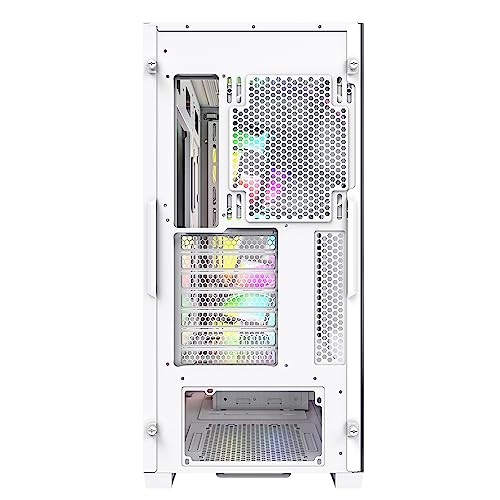
Form Factor and Dimensions
The AIR 903 MAX is a proper mid-tower. Not one of those cases that claims to be mid-tower but is actually closer to a full tower in disguise. At 210mm wide it'll fit on most standard desks without taking over the whole surface, and the 430mm depth means it won't be hanging off the back of a shallow desk either. I had it sitting on a fairly standard 600mm deep desk for the whole testing period and it never felt cramped or awkward to work around.
The footprint is sensible. Montech has kept the design relatively clean without going overboard on angular styling that dates badly. It's a rectangular box with a mesh front, tempered glass left side, and solid steel on the right. Nothing revolutionary, but that's fine. What matters is that the proportions work, and they do. The case sits on four rubber-footed legs that give decent clearance for the PSU intake if you're placing it on carpet, though I'd still recommend a hard floor or a case stand if you can manage it.
One thing worth mentioning is the overall visual balance. With three 140mm ARGB fans visible through that mesh front, it looks genuinely good when lit up. The tempered glass panel gives a clear view of the internals, and if you're building with ARGB components throughout, the AIR 903 MAX presents them well. It's not a case that'll embarrass you on a desk. And for builders who care about that sort of thing, and there's no judgement here, the proportions are right.
Motherboard Compatibility
The AIR 903 MAX supports E-ATX up to 280mm wide, standard ATX, mATX, and mITX. That covers pretty much every mainstream board you'd be looking at in 2026. The standoff layout is pre-installed for ATX, which is the most common configuration, and Montech includes additional standoffs in the accessory bag for other form factors. Nothing unusual there.
I built with a standard ATX board and the fit was straightforward. The I/O shield area is clear, the standoff positions are accurate, and there's enough room around the board to work comfortably. The 24-pin ATX power connector routing hole is positioned well, sitting just to the right of where the connector lands on most boards, which makes cable management noticeably cleaner than cases that put this hole in the wrong place.
For mITX builders, the AIR 903 MAX is probably overkill in terms of physical size, but it's not an unusual choice if you want the airflow headroom or plan to run a large AIO. The E-ATX support up to 280mm is worth noting too. Most consumer E-ATX boards fall within that limit, but if you're running a wider workstation board, check your dimensions first. The 280mm limit is fairly standard for cases in this class and shouldn't catch most builders out.
GPU Clearance
Montech quotes 400mm of GPU clearance, and in practice that's accurate. A card measuring around 340mm fits with plenty of room to spare. A 400mm clearance covers every current consumer GPU on the market, including the longer triple-fan variants of the RTX 5090 and RX 9070 XT. You're not going to run into length problems here unless you're doing something very unusual.
What's worth paying attention to is the clearance when you've got a front radiator installed. If you're running a 360mm AIO at the front, the radiator and fans will eat into that 400mm figure. Montech's own documentation suggests you'd want to keep GPU length under around 320mm in that configuration, which still covers the vast majority of cards. But if you're planning a 360mm front rad plus a very long GPU, measure carefully before you commit.
There's no vertical GPU mount option included in the box, which isn't surprising at this price. You can add a PCIe riser cable and bracket separately if you want that look, and the case does have the PCIe slot covers in the right position to support it. The PCIe slot covers themselves are the standard punch-out type rather than tool-free, which is a minor annoyance but not a dealbreaker. Just be careful removing them cleanly.
CPU Cooler Clearance
175mm of CPU cooler clearance is the headline number, and that's genuinely good for a case at this price. To put it in context, the Noctua NH-D15 stands at 165mm, the be quiet! Dark Rock Pro 5 is 162mm, and most tower coolers you'd realistically pair with a mid-range build sit between 150mm and 165mm. You've got proper headroom here. Even if you're running one of the taller budget tower coolers like the DeepCool AK620 at 160mm, you're fine.
AIO support is where it gets interesting. The front supports up to 360mm radiators, the top supports up to 240mm, and the rear takes a single 120mm. For most builders, a 240mm or 360mm AIO at the front is the obvious choice given the three 140mm intake fans already installed. You'd be swapping those out for the AIO radiator fans, which is a bit of a shame given they're decent ARGB units, but that's the trade-off with front-mounted AIOs.
Top-mounted 240mm AIOs work well here too, and if you're keeping the three front fans for intake, a 240mm AIO on top as exhaust is actually a really solid thermal configuration. With the stock fans in place temperatures are good, and a 240mm AIO on top predictably improves CPU thermals. One thing to check with top-mounted radiators is RAM clearance. Tall RAM heatspreaders can foul the radiator depending on your board layout, so measure your RAM height if you're going that route.
Storage Bay Options
Storage options are reasonable without being exceptional. You get two 3.5-inch drive bays in a removable cage behind the PSU shroud, and four 2.5-inch mounting points split between the cage and the back of the motherboard tray. For a modern build that's probably running an M.2 SSD as the primary drive, this is more than enough. Most people building in this case will use the 2.5-inch mounts for a secondary SSD and maybe one 3.5-inch bay for a storage HDD.
The 3.5-inch drive cage is tool-free for drive installation, which is a nice touch. You slide the drives in and they click into place with plastic retention clips. It's not the most confidence-inspiring mounting system I've used, but it works and the drives don't rattle. The 2.5-inch mounts on the back of the motherboard tray use screws, which is fine. They're accessible enough that it's not a pain.
What I'd note is that the drive cage position does eat into PSU clearance slightly. Montech quotes 200mm of PSU clearance, which covers most standard ATX power supplies comfortably. A 160mm PSU fits with no issues. If you're running a very long PSU (some high-wattage units push past 180mm), double-check the clearance with the drive cage in place. You can remove the cage entirely if you don't need 3.5-inch bays, which frees up that space and makes the PSU area look cleaner.
Cable Management
This is where the AIR 903 MAX is decent but not outstanding. The rear panel clearance is around 25mm, which is workable but tight if you've got a lot of cables to route. I managed to get everything tucked away cleanly with some patience, but it's not the kind of case where cable management just falls into place naturally. You'll need to think about your routing before you start plugging things in.
The cable routing holes are well-positioned and most of them have rubber grommets, which helps keep things looking tidy from the glass side. The PSU shroud covers the bottom of the case nicely and hides most of the bulk. Velcro straps are included, which is a small thing but genuinely appreciated. I've reviewed cases at twice this price that don't bother including Velcro straps, so credit to Montech for that.
The 24-pin routing hole placement I mentioned earlier really does make a difference. It lines up well with where the connector sits on ATX boards, so you're not fighting the cable across the board. The CPU power cable routing hole at the top of the motherboard tray is also in a sensible position. Where things get a bit awkward is with the front panel ARGB and fan hub cables. There's a built-in ARGB hub and fan controller, which is great in principle, but the hub sits in a position that means you've got a cluster of cables in the top-right area of the rear panel. It's manageable, but it takes a bit of planning to keep it neat.
Airflow and Thermal Design
This is the AIR 903 MAX's strongest suit. The full mesh front panel is genuinely open, not one of those cases that has a mesh pattern but still restricts airflow significantly because the holes are too small or the mesh sits too close to the fans. Montech has done this properly. Combined with the three 140mm front intake fans, you've got a serious amount of air moving through this case. My GPU temperatures under sustained load were noticeably lower than I'd seen in a comparable solid-front case, which is exactly what you want from a mesh design.
The included fans are better than I expected for a budget case. They're 140mm ARGB units with a decent static pressure rating, and they're quiet enough at default speeds that you won't be reaching for the fan curve settings immediately. The rear exhaust fan is the same 140mm unit, which keeps the exhaust capacity balanced with the intake. Positive pressure builds (more intake than exhaust) tend to keep dust out better, and with three intakes versus one exhaust, the AIR 903 MAX runs a positive pressure configuration by default. The front mesh does have a dust filter, which is good to see.
The top panel is solid steel with a mesh insert, and there's a magnetic dust filter covering the top fan mounts. The bottom has a slide-out dust filter for the PSU intake. So you've got filtration on all the main intake points, which matters for long-term maintenance. I'll be honest, the top mesh insert isn't as open as the front, which does restrict top-mounted radiator performance slightly compared to cases with fully open top panels. But for the majority of builds, it's not a meaningful limitation. Overall, the thermal design here is genuinely good for the price, and Montech deserves credit for not cutting corners on the mesh front.
Front I/O and Connectivity
The front I/O panel sits at the top of the case, which is the standard position for a mid-tower and works well whether the case is on a desk or on the floor. You get two USB 3.0 Type-A ports, one USB 3.2 Gen 1 Type-C port, a combined headphone/mic jack, and the power button. The reset button is there too, though it's smaller and recessed, which is sensible design to avoid accidental presses.
The USB Type-C port is a genuine highlight at this price. A lot of cases in the entry bracket either skip it entirely or include a slower USB 2.0 Type-C that's basically useless for modern peripherals. The Gen 1 Type-C here runs at 5Gbps, which is fine for most use cases including charging phones, connecting modern controllers, and transferring files. You'll need a motherboard with a front panel USB Type-C header to use it, which most modern ATX boards have. The USB 3.2 specification covers the technical details if you want to dig into the standard.
The power button has a satisfying click to it and the LED ring around it glows white when the system is on, which is clean and understated. The audio jack is a combined 3.5mm TRRS port rather than separate headphone and mic jacks, which is the modern approach and works fine with most headsets. If you're using a headset with separate plugs, you'll need a splitter adapter, but that's a minor point. Overall the front I/O is well-specified for the price and covers what most builders actually need day to day.
Build Quality and Materials
At this price point, you're getting 0.6mm SPCC steel throughout, which is the industry standard for budget and entry-level cases. It's not going to flex dramatically under normal use, but if you push on the side panels or the top, you'll feel some give. The right-side steel panel is solid enough, and the left tempered glass panel is 4mm thick, which feels reassuringly substantial when you're handling it. No flex in the glass at all.
Panel alignment is good. The glass panel sits flush with the chassis on all edges, and the thumbscrew at the rear holds it securely without any wobble. The top panel and front mesh panel both remove cleanly for radiator installation or cleaning. I didn't find any sharp edges during the build, which sounds like a low bar but genuinely isn't. I've cut myself on cases that cost significantly more than this, so Montech's edge finishing deserves a mention. The interior is painted black throughout, including the back of the motherboard tray, which keeps things looking tidy.
The included screws are the usual mixed bag. Montech provides more than you need, which is always appreciated, and they're labelled in the accessory bag. The standoffs are pre-installed correctly for ATX. One minor gripe: the PCIe slot covers are the punch-out type rather than tool-free, and they're a bit stiff to remove cleanly. I bent one slightly getting it out. It's a small thing, but tool-free PCIe covers are a feature that even some budget cases manage to include, so it's a missed opportunity. The overall build quality is appropriate for the price and better than some cases that cost noticeably more.
How It Compares
The main competition for the AIR 903 MAX in the UK entry-level market comes from the Corsair 4000D Airflow and the be quiet! Pure Base 500DX, though there are several other best pc cases under £100 worth considering. Both are well-regarded cases in this general price bracket, and both have their own strengths. The 4000D Airflow is a proven performer with excellent cable management and a very clean build experience, but it comes with only two included fans versus the AIR 903 MAX's four. The Pure Base 500DX has outstanding build quality and noise dampening, but it's a different philosophy entirely, prioritising quiet operation over maximum airflow.
Where the AIR 903 MAX wins clearly is fan count out of the box and raw airflow potential. Four 140mm ARGB fans included at this price is genuinely competitive. The Corsair 4000D Airflow ships with two fans and you'll likely want to add more, which adds to the total cost. The be quiet! case ships with three fans but they're smaller 120mm units and the case is designed around quieter operation rather than maximum airflow. If you're building a gaming system and thermals are the priority, the AIR 903 MAX makes a strong case for itself.
Where it loses ground is build quality refinement and cable management. The Corsair 4000D Airflow has noticeably better cable management routing and more rear panel clearance. The be quiet! Pure Base 500DX has better steel thickness and panel rigidity. Neither of those cases has the AIR 903 MAX's fan count at the same price, though, so it depends what you're optimising for. For most gaming builds where airflow and value are the priorities, the AIR 903 MAX is a strong contender.
| Feature | Montech AIR 903 MAX | Corsair 4000D Airflow | be quiet! Pure Base 500DX |
|---|---|---|---|
| Form Factor | Mid-Tower ATX | Mid-Tower ATX | Mid-Tower ATX |
| Front Panel | Full Mesh | Mesh | Mesh with dampening |
| Included Fans | 4x 140mm ARGB | 2x 120mm | 3x 140mm Pure Wings |
| Max GPU Length | 400mm | 360mm | 369mm |
| Max CPU Cooler Height | 175mm | 170mm | 190mm |
| Front Radiator Support | 360mm | 360mm | 360mm |
| USB Type-C Front I/O | Yes (Gen 1) | Yes (Gen 1) | Yes (Gen 2) |
| Tempered Glass Panel | Yes (4mm) | Yes | Yes |
| PSU Shroud | Yes | Yes | Yes |
| Tool-free PCIe Covers | No | Yes | Yes |
| Price Tier | Entry | Entry/Mid | Mid |

Final Verdict
Three weeks with the AIR 903 MAX has left me with a clear picture of what this case is and who it's for. It's an airflow-first mid-tower that delivers genuinely good thermal performance, a strong fan bundle, and a clean mesh aesthetic at a price that doesn't require you to compromise on the components that actually matter. The full mesh front is the real deal, not a cosmetic mesh that restricts airflow. The four included 140mm ARGB fans are better than they have any right to be at this price. And the 400mm GPU clearance means you're not going to run into compatibility headaches with modern cards.
The weaknesses are real but manageable. Cable management is tighter than I'd like, the PCIe slot covers are fiddly, and the steel isn't going to impress anyone who's handled premium cases. But none of those things affect how the system performs inside it, and performance is what matters. Temperatures during gaming were consistently good, the fans are quiet enough at moderate speeds, and the build process, while not effortless, wasn't the frustrating experience that some budget cases deliver.
For a builder putting together a gaming PC on a sensible budget, the AIR 903 MAX is a proper recommendation. You're getting four ARGB fans, a full mesh front, solid clearances, and a Type-C front I/O port in a package that looks good on a desk. Montech has made smart choices with the things that actually affect your build and your thermals, and that's what counts. Check the current price below and see how it sits against the competition right now.
- Pros: Four 140mm ARGB fans included, full mesh front with genuine airflow, 400mm GPU clearance, USB Type-C front I/O, 175mm CPU cooler clearance
- Cons: Tight rear cable management space (~25mm), punch-out PCIe slot covers, top mesh less open than front, 0.6mm steel feels thin under pressure
Editorial Score: 7.5/10
What works. What doesn’t.
5 + 4What we liked5 reasons
- Four 140mm ARGB fans included out of the box
- Full mesh front panel with genuine unrestricted airflow
- 400mm GPU clearance covers all current consumer cards
- USB 3.2 Gen 1 Type-C on the front I/O
- 175mm CPU cooler clearance handles the tallest air coolers
Where it falls4 reasons
- Rear cable management space is tight at around 25mm
- PCIe slot covers are punch-out type, not tool-free
- 0.6mm steel feels a little thin under hand pressure
- Top mesh panel less open than the front, limits top radiator performance slightly
Full specifications
11 attributes| Form factor | Mid-Tower |
|---|---|
| CPU cooler clearance MM | 180 |
| Dimensions MM | 465 x 215 x 470 |
| Fans included | 4 |
| GPU clearance MM | 400 |
| MAX FAN count | 9 |
| MAX radiator MM | 360 |
| PSU support | ATX up to 240mm |
| Side panel | tempered glass |
| Supported motherboard | ATX, Micro-ATX, Mini-ITX |
| Weight KG | 8.5 |
If this isn’t right for you
2 options 8.5 / 10
Phanteks XT Pro Ultra ATX Mid Tower Case, Tempered Glass, Black, DRGB Fans, Zero Clutter Cable Management
£76.99 · Phanteks
 8.5 / 10
be quiet! Pure Base 501 Airflow Black PC case, 2 preinstalled Pure Wings 3 140mm PWM fans, extraordinary air pressure, compact case, vertical graphics card installation, USB 3.2 Gen. 2 Type C
£79.99 · be quiet!
Frequently asked
5 questions01Is the Montech AIR 903 MAX good for airflow?+
Yes, genuinely so. The full mesh front panel is properly open and not a cosmetic mesh that restricts airflow. Combined with three 140mm intake fans at the front and one 140mm exhaust at the rear, the AIR 903 MAX runs a positive pressure configuration that keeps temperatures down and dust out. GPU temperatures under sustained gaming load were noticeably lower than comparable solid-front cases. Dust filters cover the front, top, and PSU intake, so maintenance is manageable too.
02What is the GPU clearance on the Montech AIR 903 MAX?+
Montech quotes 400mm of GPU clearance, which is accurate in practice. That covers every current consumer graphics card including the longest triple-fan variants. If you're installing a 360mm front radiator alongside your GPU, clearance reduces to around 320mm, which still fits the vast majority of cards. Measure carefully if you're combining a very long GPU with a front-mounted AIO radiator.
03Can the Montech AIR 903 MAX fit a 360mm AIO?+
Yes. The front panel supports up to a 360mm radiator, which is the most common mounting position for large AIOs. The top panel supports up to 240mm, and the rear takes a single 120mm. For a 360mm front-mounted AIO, you'll be replacing the three included 140mm fans with the AIO's radiator fans. A 240mm AIO on top works well alongside the three front intake fans for a strong push-pull thermal configuration. Check RAM heatspreader height if you're going top-mounted, as very tall RAM can foul the radiator.
04Is the Montech AIR 903 MAX easy to build in?+
Mostly yes, with one notable caveat. The cable routing holes are well-positioned with rubber grommets, the PSU shroud hides the bulk nicely, and Velcro straps are included. The main frustration is the rear panel clearance of around 25mm, which is workable but tight if you have a lot of cables to manage. Plan your routing before you start plugging things in and you'll be fine. The PCIe slot covers are punch-out type rather than tool-free, which is a minor annoyance. No sharp edges encountered during the build, which is a genuine positive.
05What warranty and returns apply to the Montech AIR 903 MAX?+
Amazon offers 30-day hassle-free returns if the case doesn't suit your build. Montech typically provides a 1-2 year warranty on manufacturing defects. Check the product listing for exact warranty terms as these can vary by region and retailer.