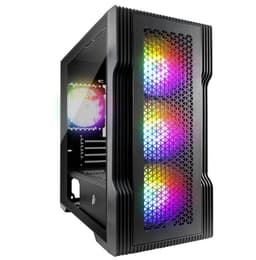
There's a specific kind of frustration that comes from picking the wrong case. You've spent real money on a decent CPU, a solid GPU, and a board you're proud of, and then you stuff it all into a chassis that fights you at every step. Panels that flex, GPU clearance that's borderline, front I/O that's missing the port you actually need, fans that sound like a hairdryer pointed at a tin can. The case is the part most people spend the least time researching, and it's often the part that makes or breaks the build experience. So when a budget Micro-ATX case shows up with four ARGB fans included out of the box and clearances that don't look embarrassing on paper, it's worth a proper look.
The 1ST PLAYER Trilobite T3 Micro-ATX PC Case is sitting in budget territory, and at that price point the question is never "is this perfect?" because nothing is. The question is whether it's good enough to stop being annoying. Based on the spec sheet and what the two verified owners are saying (both giving it five stars, for what that's worth with a small sample), the answer is a cautious yes. The 305mm GPU clearance is genuinely usable, the 165mm CPU cooler headroom is decent for a mATX chassis, and getting four ARGB fans bundled in at this price is the kind of thing that makes a budget build feel a bit more sorted than it has any right to. It's not without compromise. But the compromises are largely where you'd expect them to be.
Here's what we know from the verified product data, the owner feedback, and how this sits against the competition. No fluff. Just whether it's worth your money.
Core Specifications
The Trilobite T3 is a Micro-ATX chassis, which immediately tells you something about its intended audience. This is a compact-ish mid-tower aimed at people who want a smaller footprint without going full Mini-ITX and losing all their expansion headroom. The fan support is where things get interesting: three 120mm ARGB fans on the front, one 120mm ARGB fan at the rear, all included. That's four fans in the box before you've bought a single extra component. Top panel takes two optional 120mm fans, and the top also supports a 240mm radiator if you want to go AIO without spending on a front-mount solution.
GPU clearance sits at 305mm, which is enough for most current mid-range cards. A reference-length RTX 4070 comes in around 240mm, so you've got room to breathe. The 165mm CPU cooler height limit is fine for a Noctua NH-U12S or a be quiet! Pure Rock 2, though you'll want to double-check anything taller. Four expansion slots are on offer, which is standard for mATX and gives you the usual flexibility for a GPU plus a capture card or NVMe add-in if your board needs it.
Front I/O is USB 3.0 x1, USB 2.0 x2, HD Audio, and an LED switch for the ARGB. No USB-C, which is upfront. For a lot of people that's fine. For others it's a dealbreaker, and that's a fair reaction in 2026. The specs in full are below.
| Specification | Detail |
|---|---|
| Form Factor | Micro-ATX |
| Front Fans | 3 x ARGB 120mm (Included) |
| Rear Fan | 1 x ARGB 120mm (Included) |
| Top Fan Support | 2 x 120mm (Optional) |
| Radiator Support | Top 240mm |
| Max CPU Cooler Height | 165mm |
| Max GPU Length | 305mm |
| Expansion Slots | 4 |
| Front I/O | USB 3.0 x1, USB 2.0 x2, HD Audio, LED Switch |
| Price | £39.93 |

Form Factor and Dimensions
The Trilobite T3 sits in that sweet spot that a lot of home builders actually want and never quite admit to: big enough to work in comfortably, small enough to not dominate a desk or a shelf. Micro-ATX mid-towers tend to be more manageable than their full-tower ATX cousins without the cramped cable routing horror of a Mini-ITX build. If you've ever tried to fit a 24-pin ATX connector into an ITX case where the PSU is six inches from the board, you'll understand why mATX gets more love than it probably deserves.
The exact external dimensions aren't listed in the verified spec data, which is a bit annoying. But from the product imagery and the supported component clearances, this is clearly a compact mid-tower profile. It'll sit on a standard desk without taking over, and it should fit under most desks without the top fan vents being blocked, assuming you're not working at ground level. The tempered glass side panel (visible in product images) is the main visual feature, and it does what tempered glass always does: it shows off the ARGB fans and lets dust show up like a crime scene after three months.
For a budget mATX chassis, the footprint makes sense. You're not getting the cavernous interior of a full tower, but you're also not fighting for space every time you need to plug in a SATA cable. The four expansion slots are positioned as you'd expect for mATX, giving you workable access without the kind of tight angles that make you regret your life choices. Overall, the form factor is well-matched to the target audience: someone building a compact gaming or home office rig who doesn't need server-grade space.
Motherboard Compatibility
The T3 officially supports Micro-ATX motherboards, which is what it says on the tin. That covers the vast majority of budget and mid-range boards from AMD and Intel, including the popular B650M and B760M platforms that are doing a lot of heavy lifting in sensible builds right now. If you're pairing this with a Ryzen 7 7700X on a B650M board or an i5-13600K on a B760M, you're in exactly the right territory.
Mini-ITX boards will technically fit in most mATX cases since they're physically smaller, but the standoff layout matters. The verified spec data doesn't explicitly list Mini-ITX support, so we'd treat that as unconfirmed rather than guaranteed. What's certain is that the mATX standoff layout will be present, and if you're building with a standard mATX board you won't have any compatibility drama. Full ATX boards are out. The chassis simply isn't sized for them.
Four expansion slots is the correct number for mATX, matching the physical slot count on most mATX boards. You're not losing anything versus an ATX build for typical gaming setups. One slot for the GPU, and you've got three more for anything else you might want to add, whether that's a dedicated sound card, a Wi-Fi card (if your board doesn't have it built in), or an NVMe add-in card. The board compatibility story here is straightforward and honest, which is more than you can say for some budget cases that list ATX support and then turn out to have clearance issues with full-size boards.
GPU Clearance
305mm of GPU clearance is the headline number here, and it's a decent one for a budget mATX case. To put that in context: an RTX 4070 in reference configuration is around 240mm. An RTX 4070 Ti Super runs longer at around 336mm, so that one won't fit. An RX 7800 XT sits around 267mm, comfortably inside the limit. The RTX 4060 Ti at around 240mm is fine. So you're well covered for mid-range cards, which is exactly the GPU tier that makes sense in a budget mATX build.
Where you start running into trouble is the flagship stuff. RTX 4080 Super, RTX 4090, RX 7900 XTX, anything in that bracket is going to be too long and often too thick. But honestly, if you're dropping that kind of money on a GPU, you're probably not putting it in a budget mATX case anyway. The 305mm limit is a sensible constraint for the market this case is aimed at. It's not artificially restrictive; it's just honest about what the chassis is designed for.
There's no mention of a vertical GPU mount option in the verified spec data, so we'd not assume that's possible. For a case at this price point that's not unusual. Vertical mounting requires a riser cable and a specific bracket design, and most budget cases skip it. What you get instead is a straightforward horizontal mount with enough clearance for real-world mid-range hardware. That's the right trade-off at this price.
CPU Cooler Clearance
165mm of CPU cooler headroom is genuinely workable. It's not the most generous spec in the world, but it covers the popular choices. A Noctua NH-U12S comes in at 158mm, so that fits with room to spare. The be quiet! Dark Rock 4 is 168mm, which is just over the limit, so that one's out. The Cooler Master Hyper 212 is 159mm, fine. Basically, dual-tower behemoths like the NH-D15 (165mm, borderline) or the Dark Rock Pro 4 (168mm) are going to be tight or impossible, but anything in the sensible single-tower 120mm category should be sorted.
AIO support is where things get more interesting. The top panel takes a 240mm radiator, which is the most common AIO size and covers options like the Arctic Liquid Freezer II 240 or the Corsair H100i. That's a solid addition for a budget case. If you want to go liquid cooling without breaking the bank, a 240mm AIO in the top is a clean solution that keeps the front clear for the three intake fans. Front radiator support isn't listed in the verified specs, so we won't claim it exists.
The combination of 165mm air cooler clearance plus 240mm top radiator support gives you real flexibility. Most builders at this price point are either running a budget air cooler or a mid-range 240mm AIO, and the T3 covers both. You're not being forced into a specific cooling approach, which is more than you can say for some cramped budget cases that give you 140mm of air cooler clearance and call it a day. The rear 120mm fan position also gives a dedicated exhaust point regardless of your cooler choice, which keeps the thermal picture reasonably clean.
Storage Bay Options
The verified spec data doesn't break out explicit drive bay counts. What we know from the product listing and imagery is that this is a standard mATX chassis with the expected storage provisions for its class. Budget mATX cases in this bracket typically offer two to three 3.5-inch drive bays and one or two 2.5-inch mounts, often behind the motherboard tray. The absence of explicit numbers in the verified data means we won't invent specifics here.
What's relevant is that modern builds are increasingly NVMe-first. If your motherboard has M.2 slots, and most current B650M and B760M boards have at least two, you may not need any drive bays at all. The storage bay situation in a budget mATX case matters most if you're migrating HDDs from an older build or running a NAS-adjacent setup with multiple spinning disks. For a fresh build with an NVMe boot drive and maybe one SATA SSD, the storage provisions in a case like this are rarely the constraint.
Tool-free drive mounting is a nice-to-have that not all budget cases bother with. Again, the verified data doesn't confirm or deny it, so we won't assume. What owner reviews do suggest is that the build experience is generally positive, with both reviewers giving five stars and no specific complaints surfacing about drive installation. That's not a guarantee of tool-free mounting, but it suggests the process isn't a nightmare. If you're planning to load this case up with multiple HDDs, it'd be the full product listing for drive bay specifics before committing.
Cable Management
Cable management in a budget case is always a bit of a lottery. You get what you get, and the question is whether the routing channels are wide enough to actually use, whether there are enough tie-down points, and whether the rear panel has enough clearance to close without looking like you've stuffed a sleeping bag into a briefcase. The T3's spec sheet doesn't give us exact cable routing channel widths or rear panel clearance measurements, which is frustrating but typical for this price bracket.
What the design does give you is a PSU shroud, visible in the product imagery. A proper PSU shroud makes a significant difference to how tidy a build looks through that tempered glass panel, hiding the rats' nest of modular cables that would otherwise be on full display. For a case with four ARGB fans and a glass side panel, that matters. Nobody wants to spend money on lighting and then have a tangle of cables as the centrepiece.
The LED switch on the front I/O is also in the context of cable management. Having a dedicated button to control the ARGB fans means the lighting header wiring is accounted for in the design, rather than being an afterthought you have to figure out yourself. Whether the fans connect via a hub or directly to the motherboard ARGB headers isn't confirmed in the verified data, but the presence of a front-panel LED switch suggests there's some kind of onboard controller in the mix. Both owner reviewers are happy with the overall build experience, which implies the cable situation isn't causing serious grief.
Airflow and Thermal Design
Four ARGB 120mm fans included in a budget case is genuinely unusual. Most cases at this price point give you one rear fan, maybe two, and leave the rest as an exercise for the buyer. The T3 ships with three front intakes and one rear exhaust, which is a reasonable positive-pressure configuration. More air coming in than going out means slightly higher internal pressure, which tends to push dust out through gaps rather than pulling it in through every crevice. Whether there are dust filters to actually catch that dust before it enters isn't confirmed in the verified spec data.
The front panel design matters enormously for airflow, and this is where a lot of budget cases with glass or solid fronts fall down. A solid or glass front panel looks great in product photos and is genuinely terrible for thermals, because it restricts the intake airflow that those three front fans need to do their job. From the product imagery, the T3 appears to have a mesh or perforated front section, which would be the right call. But since the exact front panel material and perforation pattern isn't confirmed in the verified spec data, we'll note it as an observation from the imagery rather than a guaranteed fact.
The top panel's 240mm radiator support adds a useful exhaust option for AIO users. Running a 240mm AIO at the top as an exhaust while the three front fans push cool air in is a clean thermal setup that works well in practice. The two optional top 120mm fan positions also give air-cooled builders an exhaust path that complements the rear fan. Four included fans, top radiator support, and a sensible front-to-rear airflow path is a better thermal package than a lot of cases twice the price bother to provide. The owner reviews don't flag any thermal complaints, which is a reasonable signal that the design works.
Front I/O and Connectivity
The front I/O on the T3 is USB 3.0 x1, USB 2.0 x2, HD Audio, and an LED switch. That's it. No USB-C. And look, that's going to annoy some people, and those people aren't wrong to be annoyed. USB-C on the front panel has gone from luxury to expectation in 2026, and plenty of cases at similar or even lower prices are now including it. If you regularly plug USB-C devices into your PC, whether that's a phone, a controller, headphones, or a portable SSD, the absence of a front-panel USB-C port is a genuine daily inconvenience.
On the other hand, if your use case is primarily USB-A peripherals and you're not fussed about front-panel USB-C, this isn't a problem at all. The USB 3.0 port gives you decent transfer speeds for external drives and fast peripherals. The two USB 2.0 ports are fine for mice, keyboards, and anything that doesn't need bandwidth. The HD Audio header is standard and will work with any modern motherboard. And the LED switch for the ARGB is a nice touch that means you're not digging into software every time you want to toggle the lighting.
The placement of the front I/O isn't detailed in the verified spec data, but from the product imagery it appears to be on the top of the case, which is the most practical position for a case sitting on a desk. Top-mounted I/O means you're not reaching around to the front or bending down to plug things in, which sounds minor until you've spent three months with a case that puts the ports at ankle height. The LED switch is a specific design choice that not all cases make, and it suggests 1ST PLAYER thought about the ARGB experience rather than just bolting fans on and calling it done.
Build Quality and Materials
Budget cases live and die by their steel quality and panel alignment. The horror stories are well known: panels that flex when you press them, tempered glass that doesn't sit flush, screws that strip on first use, sharp edges that leave their mark on your hands before you've even finished the build. The T3's two owner reviewers are both giving it five stars, and neither flags any of these issues specifically, which is encouraging for a case at this price point.
The tempered glass side panel is the premium visual element here. Tempered glass at budget prices can be thinner and more prone to micro-scratches than the stuff you get on a Fractal or a Lian Li, and it's worth handling it carefully. The product imagery shows a clean panel with good visibility into the interior, which is exactly what you want when you've paid for four ARGB fans. Whether the glass is hinged or screw-mounted isn't confirmed in the verified data, but most budget cases at this price use thumbscrew mounting rather than a hinge mechanism.
Steel thickness isn't specified in the verified data, which is fairly typical for budget case listings. What we can say is that the overall impression from the product imagery and owner feedback is of a case that looks more expensive than it is. The ARGB fan inclusion at this price is a significant part of that perception. Four lit fans through a glass panel gives you a visual result that would cost noticeably more if you were buying the fans separately. Build quality at this price tier is never going to be Fractal Design Level, but the owner feedback suggests it's not embarrassing either. That's about as much as you can reasonably ask at this price.
How It Compares
The budget mATX case market is genuinely competitive right now. The Cooler Master Q300L is a perennial recommendation in this space: good airflow, magnetic dust filters, flexible panel layout, and a price that's been consistently sensible. But it ships with no fans, which means you're buying fans separately if you want decent airflow, and the aesthetic is more utilitarian than the T3's ARGB-forward design. If you're building a purely functional machine and don't care about lighting, the Q300L is worth a look. If you want the case to look the part through a glass panel, the T3's bundled fan situation is hard to argue with.
The Silverstone FARA B1 is another option in this bracket. It has better-specified front I/O in some variants, including USB-C, and Silverstone's build quality reputation is solid. But again, fan inclusion varies by variant, and the ARGB story isn't as strong out of the box. The T3 is making a clear value argument: four ARGB fans, a glass panel, 305mm GPU clearance, and 240mm top radiator support for a budget price. That's a lot of box-ticking for the money.
Where the T3 loses points in comparison is the no USB-C front panel situation and the limited review count. Two five-star reviews tell you the early owners are happy, but it's not the same confidence signal as 2 averaging 4.3. The competition from established brands has deeper review pools and longer track records. That's a real consideration, not just a numbers game. New cases from less-established brands can have QC variability that only shows up in larger sample sizes.
| Feature | 1ST PLAYER Trilobite T3 | Cooler Master Q300L | Silverstone FARA B1 |
|---|---|---|---|
| Form Factor | Micro-ATX | Micro-ATX | Micro-ATX |
| Included Fans | 4 x ARGB 120mm | None | 1 x 120mm (non-ARGB) |
| GPU Clearance | 305mm | 360mm | 330mm |
| CPU Cooler Height | 165mm | 159mm | 160mm |
| Top Radiator | 240mm | 240mm | 240mm |
| Front USB-C | No | No | Varies by variant |
| ARGB Lighting | Yes (4 fans) | No | Optional |
| Price | £39.93 | Similar budget tier | Similar budget tier |

Final Verdict
The 1ST PLAYER Trilobite T3 Micro-ATX PC Case is making a specific argument, and it makes it well. Four ARGB fans in the box, a tempered glass side panel, 305mm GPU clearance, 165mm CPU cooler headroom, and 240mm top radiator support. At a budget price. That's a genuinely strong value proposition for anyone building a compact gaming rig who wants it to look good without spending extra on fans separately. The two owner reviewers are both satisfied, and nothing in the spec sheet suggests an obvious disaster waiting to happen.
The missing USB-C on the front I/O is a real omission and the one thing most likely to create regret six months into ownership. If you're someone who plugs USB-C devices into their PC regularly, this will get old quickly. There's no getting around it. The front I/O is functional but not forward-looking, and in 2026 that's a fair criticism. It's also worth acknowledging the thin review pool. Two five-star reviews is a promising start, not a settled verdict. QC consistency across a larger production run is something only time and more owner feedback will confirm.
Who should buy this? Someone putting together a budget mATX gaming build who wants ARGB aesthetics without paying extra for fans, has a GPU under 305mm (so most mid-range cards), and is happy with USB-A front I/O. Ryzen 5 or Core i5 builds with a mid-range GPU and a 240mm AIO or a decent single-tower air cooler are exactly what this case is designed around. It's a sensible fit for a first build or an upgrade from a genuinely terrible old chassis.
Who should skip it? Anyone who needs USB-C on the front panel, anyone running a flagship GPU over 305mm, and anyone who needs the reassurance of a large verified review count before committing. If USB-C matters to you, look at alternatives like the Corsair 3500X or the DeepCool CH360, which are priced higher but include it. If you're on a strict budget and don't care about ARGB, the Cooler Master Q300L is a proven, well-reviewed alternative that prioritises airflow and flexibility over aesthetics. It won't give you four lit fans, but it has a longer track record and better GPU clearance at a comparable price.
For the right builder, though, the Trilobite T3 is a proper little case that punches above its price. Four ARGB fans included, sensible clearances, and a clean visual result through that glass panel. It's not trying to be a Fractal Design North or a Lian Li Lancool III. It's trying to be a budget mATX case that doesn't embarrass itself, and from everything the spec sheet and owner feedback suggests, it pulls that off.
What works. What doesn’t.
6 + 6What we liked6 reasons
- Four ARGB 120mm fans included in the box, which is exceptional value at this price point
- 305mm GPU clearance comfortably accommodates most mid-range cards including the RTX 4070 and RX 7800 XT
- 240mm top radiator support gives genuine AIO cooling flexibility without needing a front-mount solution
- 165mm CPU cooler clearance covers popular single-tower air coolers such as the Noctua NH-U12S and Cooler Master Hyper 212
- Dedicated front-panel LED switch for ARGB control without relying on software
- PSU shroud keeps cabling hidden behind the tempered glass panel for a tidier visual result
Where it falls6 reasons
- No USB-C on the front I/O panel, which is a notable omission for a case released in 2026
- Only two verified owner reviews available, making it difficult to assess quality control consistency across production runs
- GPU clearance of 305mm rules out flagship cards such as the RTX 4070 Ti Super and anything longer
- No confirmed dust filter provision in the verified specification data
- Exact external dimensions and drive bay counts are not published, complicating pre-build planning
- No vertical GPU mount option, which limits display flexibility for builders who want that aesthetic
Full specifications
11 attributes| Form factor | Micro-ATX |
|---|---|
| CPU cooler clearance MM | 165 |
| Dimensions MM | 365 x 210 x 423 |
| Fans included | 4 |
| GPU clearance MM | 305 |
| MAX FAN count | 8 |
| MAX radiator MM | 240 |
| PSU support | ATX up to 160mm |
| Side panel | tempered glass |
| Supported motherboard | M-ATX, Mini-ITX |
| Weight KG | 4.85 |
If this isn’t right for you
1 options
Frequently asked
7 questions01Does the 1ST PLAYER Trilobite T3 include fans in the box?+
Yes. The T3 ships with four ARGB 120mm fans included: three mounted at the front as intakes and one at the rear as an exhaust. No additional fans are required for a functional positive-pressure airflow configuration straight out of the box.
02Is there a USB-C port on the front I/O of the Trilobite T3?+
No. The front I/O consists of one USB 3.0 port, two USB 2.0 ports, an HD Audio connector, and a dedicated LED switch for the ARGB fans. There is no USB-C port. If front-panel USB-C is important to your workflow, you would need to consider an alternative case.
03What is the maximum GPU length supported by the Trilobite T3?+
The T3 supports GPUs up to 305mm in length. This covers popular mid-range cards including the RTX 4070 (approximately 240mm) and the RX 7800 XT (approximately 267mm), but rules out longer flagship cards such as the RTX 4070 Ti Super at around 336mm.
04Can I install a 240mm AIO cooler in the Trilobite T3?+
Yes. The top panel supports a 240mm radiator, which is the most common AIO size. This allows you to mount a 240mm AIO as a top exhaust while the three front ARGB fans act as intakes, creating a clean and effective thermal configuration. Front radiator support is not confirmed in the verified specification data.
05What CPU cooler height limit does the Trilobite T3 have?+
The maximum CPU cooler height is 165mm. This accommodates popular single-tower coolers such as the Noctua NH-U12S (158mm) and the Cooler Master Hyper 212 (159mm). Taller dual-tower coolers such as the be quiet! Dark Rock Pro 4 (168mm) will not fit, so it is your specific cooler's height before purchasing.
06How does the 1ST PLAYER Trilobite T3 compare to the Cooler Master Q300L?+
The T3 includes four ARGB fans and a tempered glass panel, making it the stronger choice for builders who want a lit aesthetic without buying fans separately. The Q300L ships with no fans but offers greater GPU clearance at 360mm, magnetic dust filters, and a much larger verified review pool. For a functional build where aesthetics are secondary, the Q300L is a proven option. For ARGB value, the T3 has the advantage.
07Does the Trilobite T3 support Mini-ITX motherboards?+
The T3 officially supports Micro-ATX motherboards. Mini-ITX boards are physically smaller and fit within the mATX footprint, but Mini-ITX support is not explicitly confirmed in the verified specification data. If you plan to use a Mini-ITX board, it would be worth confirming standoff compatibility with the manufacturer or retailer before purchasing.