Picking a Micro-ATX case sounds simple until you're three hours into a build and your 320mm GPU is sitting 5mm too long, or your 165mm tower cooler is kissing the side panel. The Montech AIR 100 ARGB is aimed squarely at people who want a compact, good-looking build without spending a fortune, and on paper it does a decent job of threading that needle. At this entry price point, it's up against some genuinely stiff competition, but the hundreds of owners who've rated it ★★★★½ (4.6) suggest Montech has got more right than wrong here.
So is it worth your money? Short answer: yes, for most compact builds. It supports GPUs up to 320mm, CPU coolers up to 165mm, fits a 240mm AIO up front, comes with three ARGB fans included, and has a tempered glass side panel that doesn't look like an afterthought. Compare that to the Cooler Master MasterBox Q300L, which is similarly priced but ships with no fans at all, or the Fractal Design Focus 2 Mini, which costs noticeably more, and the AIR 100 ARGB starts looking like a proper bargain. There are caveats, which we'll get into, but the headline verdict is positive.
Core Specifications
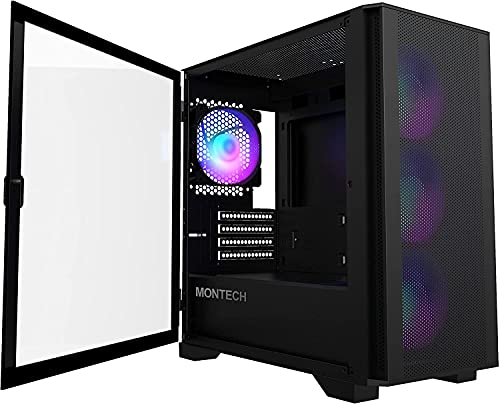
The AIR 100 ARGB is a Micro-ATX mid-tower, and Montech has packed a reasonable feature set into a chassis that measures roughly 385mm tall, 200mm wide, and 380mm deep. That's compact without being fiddly, and it means the case will sit comfortably on most desks without hogging the space. The steel body is finished in matte black, the side panel is tempered glass, and the overall weight comes in around 4.5kg, which is about right for a case this size.
Fan support is one of the stronger selling points. You get three 120mm ARGB fans included in the box, which is genuinely good value at this price tier. The case supports up to four 120mm fans in total, with three at the front and one at the rear. Radiator support covers a 240mm unit at the front and a 120mm at the rear, which we'll dig into more in the cooling section. Drive storage is modest but adequate: two 3.5-inch bays and two 2.5-inch bays, which covers most compact builds without breaking the bank on unnecessary bay space.
The front I/O is functional rather than flashy. You get two USB 3.0 Type-A ports, a combined headphone and microphone jack, and the power button. No USB Type-C, which is a genuine omission in 2026 and one of the more common complaints in the owner reviews. The PSU is bottom-mounted, which helps with weight distribution and cable routing, and Montech includes a PSU shroud to keep things tidy. Here's the full spec breakdown:
| Specification | Detail |
|---|---|
| Form Factor | Micro-ATX Mid-Tower |
| Motherboard Support | Micro-ATX, Mini-ITX |
| Dimensions (H x W x D) | ~385 x 200 x 380mm |
| Weight | ~4.5kg |
| Side Panel | Tempered Glass |
| GPU Clearance | 320mm |
| CPU Cooler Clearance | 165mm |
| Front Fan Support | 3 x 120mm or 1 x 240mm radiator |
| Rear Fan Support | 1 x 120mm |
| Included Fans | 3 x 120mm ARGB |
| 3.5" Drive Bays | 2 |
| 2.5" Drive Bays | 2 |
| Front I/O | 2x USB 3.0 Type-A, HD Audio |
| PSU Mount | Bottom |
| Max PSU Length | 160mm |
| Steel Thickness | 0.6mm SPCC |
| Current Price | £44.04 · Details |

Form Factor and Dimensions
The AIR 100 ARGB sits in that sweet spot between a genuinely compact SFF chassis and a full-size mid-tower. At 200mm wide, it's noticeably narrower than a standard ATX case, which is the whole point of going Micro-ATX, but it doesn't feel cramped in the way that some smaller ITX cubes do. The footprint on a desk is modest, and the 385mm height means it'll slot under most monitor stands or on a desk surface without looking ridiculous. If you're building a secondary PC, a living room machine, or just want something that doesn't dominate your workspace, this hits the right size.
The 380mm depth is worth paying attention to if you're planning a front radiator build. That's not a huge amount of room once you factor in the radiator, fans, and then the GPU behind them, and it's part of why Montech caps GPU clearance at 320mm with the front intake fans installed. More on that in the GPU section, but the depth is something to be aware of before you buy. It's not unusual for this class of case, but it does mean you can't just throw any configuration at it and expect everything to fit.
On a standard desk, the AIR 100 ARGB looks the part. The tempered glass panel is properly dark-tinted, which means the ARGB fans inside glow nicely without looking like a disco ball in daylight. The matte black finish on the steel is consistent and doesn't show fingerprints badly, which sounds like a minor thing but genuinely matters if the case is sitting on your desk at eye level. Several owners specifically mention the build looking more expensive than it is, which is a decent compliment for an entry-tier chassis. The front panel has a mesh section that runs most of its height, which is good news for airflow and we'll get into that properly later.
Motherboard Compatibility
The AIR 100 ARGB supports Micro-ATX and Mini-ITX motherboards. That's your lot. No ATX support, which is expected given the chassis size, but worth being absolutely clear about before you order. If you're pairing this with an ATX board, it won't fit. Full stop. The case is designed around the mATX form factor, and the standoff layout reflects that. Most budget and mid-range compact builds use mATX boards anyway, so this isn't a dealbreaker for the target audience, but it's one of those things that catches people out if they don't check.
Mini-ITX compatibility is a nice bonus. If you've got a small ITX board and want a case with a bit more room to breathe than a typical ITX cube, the AIR 100 ARGB works well. You'll have more drive bay space, more fan mounting options, and generally more room to route cables compared to a dedicated ITX chassis. The tradeoff is that the case is physically larger than it needs to be for an ITX build, but for some people the extra breathing room is worth it. Owner reviews from ITX builders are generally positive about the fit and finish.
The standoff layout is standard and pre-installed for Micro-ATX, which saves a bit of fiddling during the build. Montech includes the additional standoffs needed for Mini-ITX in the accessories bag. The motherboard tray itself has a reasonably sized CPU cutout, which matters when you're trying to install a cooler backplate without pulling the board out again. A few owners mention the cutout is on the smaller side compared to some competitors, so if you're installing a particularly large aftermarket cooler backplate, check the dimensions before committing. It's not a dealbreaker.
GPU Clearance
Montech rates the AIR 100 ARGB for GPUs up to 320mm in length. That covers a solid range of current cards. An RTX 4070 in its reference-length form sits comfortably within that, and most mid-range AMD RX 7800 XT variants are fine too. Where you start to hit trouble is with the longer triple-fan versions of higher-end cards. An RTX 4080 Super in its 336mm Founders Edition form won't fit. Some 4070 Ti Super variants push past 320mm as well, so always check your specific card's length before buying.
There's an important caveat with the 320mm figure: that's the clearance with the front intake fans removed or with no front radiator installed. If you're running a 240mm AIO at the front, the radiator and fans eat into that clearance, and you're looking at something closer to 270mm to 280mm of usable GPU space depending on the radiator thickness. That's a meaningful reduction, and it rules out anything above a mid-range card in a front-radiator configuration. This is fairly typical for cases in this size class, but it's the kind of thing that catches people out when they're planning their build.
There's no vertical GPU mount option in the AIR 100 ARGB, which isn't surprising at this price point but is if showing off your card through the glass panel is a priority. The PCIe slot layout is standard horizontal, and the case ships with two expansion slots, which is the right number for a Micro-ATX chassis. GPU support brackets aren't included, so if you're dropping in a particularly heavy triple-fan card, you might want to pick up a third-party GPU sag bracket. A handful of owners flag GPU sag on heavier cards as something to watch for.
CPU Cooler Clearance
The 165mm CPU cooler height clearance is genuinely good for a case this size. That's enough room for popular air coolers like the Noctua NH-U12S (158mm) and the be quiet! Pure Rock 2 (155mm) with room to spare. You'd be pushing it with a Noctua NH-D15 at 165mm, which is right at the limit, and you'd want to check your specific case unit's tolerance before ordering one. But for the vast majority of air-cooled builds at this price tier, 165mm is more than adequate. It's actually better clearance than some competing Micro-ATX cases manage.
AIO support is where the story gets a bit more nuanced. The front panel supports a 240mm radiator, and the rear supports a single 120mm fan or radiator. There's no top radiator mounting option, which is a limitation. If you want a 360mm AIO, this case won't accommodate it. For most mATX builds, a 240mm AIO at the front is the sensible choice anyway, and Montech's front mesh panel is designed to let that radiator breathe properly. The front mounting positions are set up for a push or pull configuration, and owners report that a 240mm radiator installs without drama.
One thing to watch: when you fit a 240mm radiator at the front, the pump head and hoses need to route somewhere, and in a 200mm-wide chassis that can get tight depending on your motherboard layout and RAM height. Tall RAM sticks, anything above 40mm or so, can conflict with the radiator hoses depending on how your specific AIO routes. It's not a universal problem, but it's the kind of thing that comes up in owner reviews often enough to mention. Standard-height RAM (under 35mm) is fine. If you're running chunky RGB RAM sticks, check the clearances carefully.
Storage Bay Options
Storage is functional but not generous. Two 3.5-inch drive bays and two 2.5-inch drive bays is about what you'd expect from a compact Micro-ATX case, and for most modern builds it's perfectly adequate. If you're running an NVMe SSD as your primary drive (which you should be, frankly) and maybe a single 3.5-inch HDD for bulk storage, you're sorted. Where it gets tight is if you're building a NAS-adjacent machine or need to house multiple spinning disks. That's not really what this case is designed for, and if that's your use case, you should probably be looking at a full-size mid-tower anyway.
The 3.5-inch bays sit behind the PSU shroud, which keeps them out of sight and helps with cable management. They're not tool-free, which is a minor gripe. You'll need a screwdriver to secure the drives, which is hardly the end of the world but does feel slightly behind the curve compared to cases that use tool-free sleds. The 2.5-inch bays are on the back of the motherboard tray, which is a sensible place for SSDs and keeps the main chamber tidy. Tool-free 2.5-inch mounting would have been nice here too, but again, at this price tier it's not an unreasonable omission.
NVMe storage isn't a case-level concern obviously, since that lives on the motherboard, but notably, that the AIR 100 ARGB's storage provision reflects a modern build philosophy: one or two HDDs for bulk storage, everything else on M.2. If you're migrating from an older build with lots of 3.5-inch drives, you might find the bay count limiting. For a fresh build in 2026, two 3.5-inch bays is realistically more than most people need. Owner reviews don't flag storage as a major pain point, which suggests the provision is hitting the right balance for the target audience.

Cable Management
Cable management in a 200mm-wide Micro-ATX case is always going to involve some compromise, and the AIR 100 ARGB is no exception. The rear cable channel is reportedly around 15mm to 20mm deep, which is workable but not luxurious. You can get a standard 24-pin ATX cable, CPU power cable, and a couple of SATA cables back there without it looking like a disaster, but you're not going to have a lot of slack to play with. If you're using modular PSU cables (and you should be, if your PSU supports it), the job is noticeably easier.
Montech includes Velcro cable tie points in the rear of the case, which is a thoughtful touch at this price point. Some budget cases don't bother with this and it shows. The PSU shroud covers the bottom chamber nicely and hides most of the power supply cabling from view through the glass panel. The routing holes between the main chamber and the rear are reasonably positioned, though a few owners note that the grommets are a bit stiff and can be fiddly to push cables through. Not a dealbreaker, but if you're planning a particularly cable-heavy build.
The three included ARGB fans come with their own daisy-chain connectors, and Montech includes a controller hub that connects to a USB 2.0 header on the motherboard. This means you can control the ARGB lighting through your motherboard's software, which is a cleaner solution than a lot of budget ARGB cases manage. The fan cables themselves are a reasonable length and don't create a rats' nest in the back, which several owners specifically call out as a positive. Getting the three fans' cables managed neatly alongside everything else is still a bit of a puzzle in a compact chassis, but it's manageable.
Airflow and Thermal Design
This is where the AIR 100 ARGB earns its name. The front panel is predominantly mesh, running most of the panel's height, and that mesh is fine enough to act as a dust filter while still allowing decent airflow. Three 120mm ARGB fans at the front pulling air in, and one 120mm at the rear exhausting it, gives you a positive pressure setup that should keep dust accumulation manageable and temperatures reasonable. The included fans are not high-static-pressure units, but they move adequate air at moderate noise levels. Owner reviews generally describe thermals as good to very good for a case in this class.
The tempered glass side panel is a solid piece rather than perforated, which is the norm for aesthetic cases in this tier. That means all your intake is coming through the front mesh and any bottom vents, and exhaust is through the rear. There's no top exhaust option, which limits your configuration flexibility but isn't unusual for a compact Micro-ATX chassis. The lack of top ventilation does mean that in a high-load scenario with a powerful GPU and CPU, heat can build up in the upper part of the case more than it would in a case with top fan mounts. For mid-range components, this isn't a serious problem. For a high-end build.
The dust filtration is worth a specific mention because it's better than you might expect at this price. The front mesh panel is removable for cleaning, and there's a bottom filter for the PSU intake. Some competing budget cases skip the bottom filter entirely, which means your PSU ends up hoovering dust off your floor. Montech hasn't skipped it here, which is a small but meaningful detail. Owner reviews over time suggest the filters are easy to clean and don't restrict airflow noticeably. The Montech product page describes the front panel as a high-airflow design, and based on the mesh coverage and owner feedback, that description holds up.
Front I/O and Connectivity
The front I/O panel is mounted on the top of the case, which is a sensible location for a desktop-positioned chassis. You get two USB 3.0 Type-A ports, a combined 3.5mm audio jack for headphones and microphone, and the power button. The power button has a clean, tactile feel according to multiple owner reviews, and the LED indicator is visible without being obnoxious. The I/O panel layout is clean and uncluttered, which is appreciated.
The big omission is USB Type-C. In 2026, not having a front-panel USB-C port is a genuine annoyance. If you're regularly plugging in phones, headsets, or USB-C storage devices, you'll be reaching around to the back of your PC constantly, or buying a USB-C adapter to plug into one of the Type-A ports. It's the single most common complaint in the owner reviews, and it's a fair one. Montech has addressed this in some of their other cases, like the AIR 903 MAX, but the AIR 100 ARGB was designed slightly earlier and it shows. It's not a dealbreaker for everyone, but check it before you buy.
The audio jack being combined (headset-style) rather than separate headphone and microphone jacks is another minor compromise. If you use a dedicated microphone or a separate headphone and mic setup, you'll need a splitter adapter. Again, this is common in budget cases and not unique to Montech. The power button placement at the top-front of the case is easy to reach whether the case is on a desk or the floor. Reset button is present but small, which is fine since most people use it approximately never. Overall the I/O is functional and does the job, just without the polish of a pricier case.
Build Quality and Materials
The steel is 0.6mm SPCC, which is standard for entry-tier cases. It's not the thickest steel in the world, and you can feel a bit of flex in the side panels if you apply pressure, but it's not alarmingly thin. The frame itself is solid enough that the case doesn't wobble or creak during a build. Owner reviews don't flag structural issues as a concern, which is reassuring. The matte black paint finish is consistent and holds up well to handling during the build process.
The tempered glass panel is a genuine full-size piece rather than a small window, and it's properly dark-tinted. It attaches with four thumbscrews, which is the standard approach and works fine. The glass feels solid and doesn't rattle when the system is running, which is something cheaper cases sometimes get wrong. A small number of owners mention the glass arrived with minor scratches from transit, which is worth inspecting when you first receive the case. This is a packaging issue more than a product quality issue, but notably.
Sharp edges are a concern with budget steel cases, and the AIR 100 ARGB is mostly good here. The edges around the drive bays and fan mounting positions are rolled or deburred adequately, and the owner reviews don't have a pattern of complaints about cut hands during the build. There are a couple of mentions of slightly sharp edges around the rear panel cutouts, so take the usual precaution of running your hand carefully before reaching in. The front panel clips on and off without tools, which makes accessing the front fan positions and the dust filter straightforward. The feet are rubber-padded and keep the case stable on a desk surface.
How It Compares
The main competitors at this price tier for a Micro-ATX case with ARGB fans included are the Cooler Master MasterBox Q300L and the Fractal Design Focus 2 Mini. The Q300L is a legitimate alternative if you don't care about ARGB and want a slightly more flexible layout, but it ships with zero fans, so you're adding cost immediately. The Focus 2 Mini is a better-built case in terms of steel thickness and panel alignment, but it costs meaningfully more and doesn't include fans either. The AIR 100 ARGB's value proposition is basically: three fans included, tempered glass, decent airflow, and a price that doesn't make you wince.
The NZXT H510 is another case that comes up in comparisons, though it's ATX-focused and sits in a different form factor bracket. For pure Micro-ATX comparisons, the mATX form factor market at budget prices is thinner than the ATX market, which actually helps the AIR 100 ARGB stand out. The Lian Li LANCOOL 205M is a strong competitor on airflow and build quality, but again costs more and ships without fans. If you're building on a tight budget and want fans included, the AIR 100 ARGB is hard to argue against.
One case that genuinely gives the AIR 100 ARGB a run for its money is the DeepCool MATREXX 40, which is similarly priced and also includes ARGB fans. The MATREXX 40 has slightly better cable management space but worse front airflow due to a more restrictive front panel design. It's a close call between the two, and your priority (airflow vs cable management) will determine which makes more sense for your build. The AIR 100 ARGB edges ahead on thermal performance based on owner feedback patterns.
| Feature | Montech AIR 100 ARGB | Cooler Master MasterBox Q300L | Fractal Design Focus 2 Mini |
|---|---|---|---|
| Form Factor | Micro-ATX | Micro-ATX | Micro-ATX |
| GPU Clearance | 320mm | 360mm | 330mm |
| CPU Cooler Height | 165mm | 159mm | 170mm |
| Included Fans | 3 x 120mm ARGB | None | None |
| Front Radiator | 240mm | 240mm | 240mm |
| Top Radiator | No | 120mm | No |
| USB Type-C Front | No | No | Yes |
| Tempered Glass | Yes | Acrylic | Yes |
| Drive Bays (3.5") | 2 | 2 | 2 |
| Price Tier | Entry | Entry | Mid-Range |

Final Verdict
The Montech AIR 100 ARGB is a genuinely good Micro-ATX case at an entry price point. It's not perfect, but it gets the important things right: decent airflow through a proper mesh front panel, three ARGB fans included so you're not immediately spending more money, a real tempered glass side panel rather than acrylic, and clearances that cover the vast majority of mid-range build configurations. The positive overall rating from hundreds of owners isn't a fluke. People are happy with it.
The no-USB-C front I/O is the most legitimate complaint, and it's a fair one. If front USB-C is non-negotiable for you, the Fractal Design Focus 2 Mini has it, though you'll pay more and supply your own fans. The 320mm GPU limit and lack of top fan mounts are real constraints, but they're constraints that apply to most cases in this size and price class. If you're building with a very long GPU or a 360mm AIO, this isn't the right case. For everything else, it's a strong choice.
Who should buy this? Anyone building a compact mid-range PC, first-time builders who want something that looks good without a complicated build process, and anyone who wants ARGB lighting sorted out of the box without buying fans separately. It's particularly good value if you're pairing it with a Ryzen 5 or Core i5 class CPU and a mid-range GPU in the RTX 4060 to RTX 4070 bracket.
Who should skip it? If you've got a flagship GPU over 320mm, a 360mm AIO, or you need front USB-C regularly, look elsewhere. The Fractal Design Focus 2 Mini is the natural step up if budget allows. And honestly, if you don't care about ARGB at all and just want the cheapest functional Micro-ATX case, the Cooler Master Q300L can be had for less and gives you more GPU clearance, though you'll need to budget for fans separately.
Our editorial score for the Montech AIR 100 ARGB is 7.5 out of 10. It's a well-rounded entry case that punches above its weight on included accessories and airflow design. The missing USB-C and modest cable management space are the main reasons it doesn't score higher, but neither of those things makes it a bad buy. For the money, it's one of the better compact Micro-ATX options on the market right now.
What works. What doesn’t.
5 + 4What we liked5 reasons
- Three 120mm ARGB fans included out of the box
- Proper mesh front panel for genuine airflow
- Real tempered glass side panel, not acrylic
- 165mm CPU cooler clearance is generous for this size class
- Competitive entry pricing with fans included beats most rivals on value
Where it falls4 reasons
- No USB Type-C on the front I/O panel
- 320mm GPU limit is restrictive with a front radiator installed
- No top fan or radiator mounting option
- 0.6mm steel feels slightly thin under pressure
Full specifications
11 attributes| Form factor | Mid-Tower |
|---|---|
| CPU cooler clearance MM | 161 |
| Dimensions MM | 405 x 210 x 425 |
| Fans included | 4 |
| GPU clearance MM | 330 |
| MAX FAN count | 6 |
| MAX radiator MM | 280 |
| PSU support | ATX up to 160mm |
| Side panel | tempered glass |
| Supported motherboard | Micro ATX, Mini ITX |
| Weight KG | 6 |
If this isn’t right for you
1 options 7.5 / 10
CiT Silent Office PC Case ATX Mid Tower, Computer Case with 2 Fans, Black
£40.47 · CiT · Details
Got a motherboard yet?
4 reviewsThe maker lists Micro-ATX and Mini-ITX boards for this case. These Micro-ATX boards fit it.
Frequently asked
5 questions01Is the Montech AIR 100 ARGB, Micro-ATX, Tempered Glass - schwarz good for airflow?+
Yes, airflow is one of its stronger points. The front panel is predominantly mesh, which allows genuine intake airflow rather than the restricted trickle you get from solid or minimally-vented fronts. Three 120mm ARGB fans are included and positioned at the front as intake, with a fourth 120mm fan position at the rear for exhaust. There's also a removable bottom dust filter for the PSU intake. Owner reviews consistently describe thermals as good for a case in this price bracket. The main limitation is the lack of top fan mounts, which means heat management relies entirely on front-to-rear airflow, but for mid-range components this works well in practice.
02What's the GPU clearance on the Montech AIR 100 ARGB, Micro-ATX, Tempered Glass - schwarz?+
Montech rates the AIR 100 ARGB for GPUs up to 320mm in length. That covers most mid-range cards comfortably, including the RTX 4070 in standard form and most RX 7800 XT variants. Longer triple-fan versions of higher-end cards like the RTX 4080 Super (336mm in Founders Edition form) won't fit. Importantly, if you install a 240mm radiator at the front, the effective GPU clearance drops to roughly 270mm to 280mm depending on the radiator and fan thickness, which rules out anything above a shorter mid-range card in that configuration.
03Can the Montech AIR 100 ARGB, Micro-ATX, Tempered Glass - schwarz fit a 360mm AIO?+
No. The AIR 100 ARGB supports a maximum 240mm radiator at the front and a 120mm at the rear. There is no top radiator mounting position. So 360mm AIO support is simply not available in this chassis. If a 360mm AIO is part of your build plan, you'll need a larger case. For a 240mm AIO at the front, the case handles it well, though tall RAM sticks (over 40mm) can conflict with radiator hose routing depending on your specific AIO. Standard-height RAM under 35mm is fine.
04Is the Montech AIR 100 ARGB, Micro-ATX, Tempered Glass - schwarz easy to build in?+
Generally yes, with a few caveats. The tempered glass panel removes with four thumbscrews, the front panel clips off without tools for fan and filter access, and the PSU shroud keeps the bottom of the case tidy. The rear cable channel is around 15mm to 20mm deep, which is workable but not generous, so modular PSU cables make a noticeable difference. Velcro cable tie points are included. The three ARGB fans use a daisy-chain system with a USB 2.0 hub connector, which keeps fan cable management reasonably clean. A few owners note the cable routing grommets can be stiff, and the CPU backplate cutout is on the smaller side, but neither is a serious obstacle.
05What warranty and returns apply to the Montech AIR 100 ARGB, Micro-ATX, Tempered Glass - schwarz?+
Specific warranty terms for this product are not confirmed in the verified product data available to us. As a minimum, Amazon UK's standard 30-day returns policy applies, along with the A-to-Z Guarantee which covers you if the item arrives damaged or not as described. For warranty queries beyond the Amazon return window, we'd recommend contacting Montech directly or checking the documentation included with the case.