
VR-PC-BUILDING Decision guide
How to Choose a PC Case for Gaming: A UK Builder's Guide
A UK builder's guide to choosing a gaming PC case: GPU and cooler clearance, airflow, form factors, radiator support and the mistakes people regret.
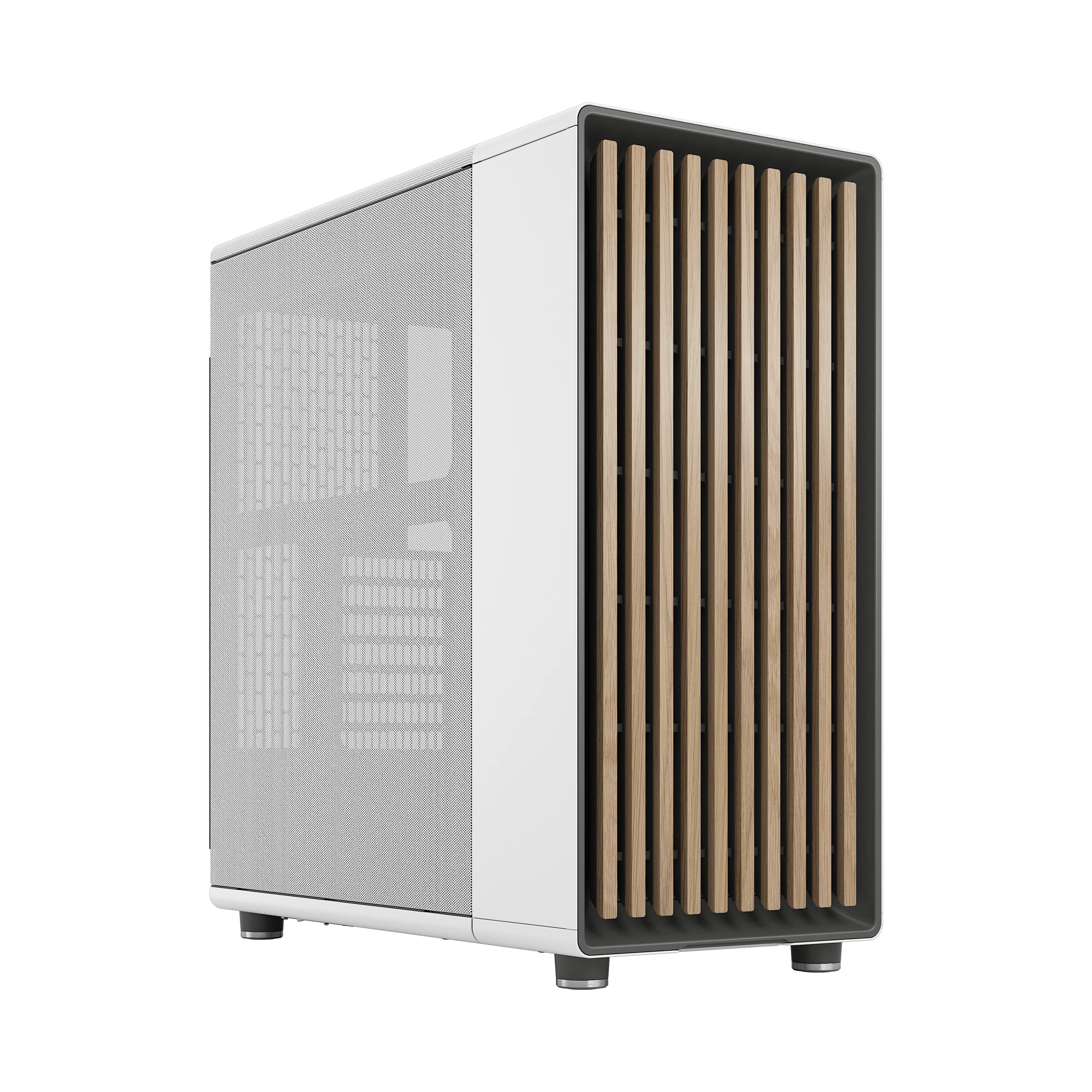 Top pick: Fractal Design Fractal Design North Chalk White - Wood Oak front - Mesh side panels - Two 140mm Aspect PWM fans included - Type C USB - ATX Airflow Mid Tower PC Gaming Case
The case is the part people think about last and regret first. You'll happily spend hours comparing graphics cards and CPUs, then grab whichever box looks good with the RGB cranked up. Fair enough, it's the bit you actually see. But the case decides how cool your kit runs, how quiet it is, and whether your shiny new graphics card even fits. Get it wrong and you're either returning parts or living with a PC that throttles itself the moment a game gets demanding.
This guide walks through what actually matters when picking a case, in roughly the order it'll bite you if you ignore it. If you're building from scratch, it pairs with our wider guide to building a gaming PC, and if you just want our shortlist, head to our gaming case picks.
Why the case matters more than people think
Here's the thing. Two identical builds, same CPU, same GPU, same cooler, can run wildly differently depending on the box they live in. One stays cool and whisper-quiet. The other hits thermal limits in twenty minutes, ramps the fans to jet-engine levels and quietly drops a chunk of performance to stop itself cooking. The only difference? The case and how it moves air.
A case does three jobs. It mounts everything safely, it feeds your components fresh air, and it gets the hot air back out. Looks are a fourth, optional job. The trouble is that looks are the one thing you can judge from a product photo, so that's what most people buy on. The two jobs that actually affect your gaming, airflow and clearance, are invisible until the parts are in your hands. That's why so much of this guide is about numbers you have to look up rather than how the thing looks on a desk.
GPU clearance: the mistake nearly everyone makes
If you take one thing from this guide, take this. The single most common case mistake is buying one that's too short for the graphics card. Modern gaming cards are long, and the chunky three-fan models are very long indeed. It's genuinely heartbreaking to get everything home and find the card won't physically slot in.
Every case lists a maximum GPU length, usually in millimetres. Every graphics card lists its length too. Your job is simple: card length must be safely under the case limit. And I do mean safely. If the case says 360mm and your card is 358mm, that's not a fit, that's a gamble. Front-mounted fans, a front radiator or thick cabling can all steal those last few millimetres. Leave yourself 15 to 20mm of breathing room and you'll never have a problem.
A couple of extra things people forget. Card thickness matters in slim or small cases, since fat triple-slot coolers can block the slots below. And on smaller builds, card height can foul the side panel or a cable shroud. When you're matching a case to a card, our graphics card hub is a good place to confirm the exact dimensions before you commit.
CPU cooler clearance and form factors
The same clearance logic applies to your CPU cooler, just on a different axis. Cases list a maximum CPU cooler height, and big air coolers are tall. Measure twice here, because a cooler that's a few millimetres too tall will press against the side panel and stop it closing. Liquid coolers sidestep this by moving the bulk to a radiator, which brings its own clearance questions we'll get to shortly.
Then there's form factor, which is really just a size system that has to line up across your case and motherboard. The three you'll meet:
- ATX: the standard full-size board. Most features, most expansion slots, easiest to build in. Wants a mid-tower or bigger.
- Micro-ATX: a bit smaller, slightly fewer slots, still plenty for a single graphics card gaming rig. Fits mid-towers and dedicated micro-ATX cases.
- Mini-ITX: tiny, one expansion slot, built for small-form-factor cases. Brilliant for a compact living-room build, but a tighter, fiddlier build with stricter clearance limits.
The rule of thumb: a larger case happily takes its own size board and smaller ones, but never the reverse. An ATX case will mount a mini-ITX board. A mini-ITX case will only ever take a mini-ITX board. Decide your board size first, then make sure the case supports it. Don't fall in love with a tiny case and then try to cram a full ATX board in.
Airflow: intake, exhaust and the front panel
Airflow is where good cases earn their money. The basic idea is a current of air flowing through the case, picking up heat on the way. Cool air comes in the front and bottom, washes over your components, and warm air leaves through the top and rear. Front and bottom for intake, top and rear for exhaust. Keep that picture in your head and most fan decisions sort themselves out.
The front panel is the bit that makes or breaks this. A mesh front lets intake fans pull in air freely, so the system breathes. A solid glass or metal front looks lovely but strangles that intake, forcing the fans to drag air through narrow side gaps. If you love the glass look, that's fine, just make sure the case takes its intake from somewhere generous, like a vented top or side, and watch your temperatures under load.
You'll also hear about positive pressure. Run a touch more intake than exhaust, say two or three fans in versus one or two out, and the case is gently pressurised. That means air only leaves through the vents you've chosen, dragging dust through your filters rather than every unfiltered gap. Slightly positive pressure is the quiet, clean default most builders aim for. Lastly, check the fan mounts: how many fans the case can take and where. A case with mounts at the front, top and rear gives you room to grow. One with two measly mounts boxes you in on day one. For the full picture on keeping components cool, our cooling section goes deeper.
Radiator and AIO support if you're going liquid
Thinking about a liquid cooler? Then radiator clearance jumps up your list. An all-in-one cooler, or AIO, has a radiator and fans that bolt to the inside of the case, and that radiator needs room. Cases publish which radiator sizes they support and where, usually some mix of 240mm, 280mm and 360mm at the top or front.
Two gotchas catch people out. First, a radiator mounted in the front sits exactly where your graphics card wants to be, so a front radiator can shorten your usable GPU length. Always check both numbers together rather than in isolation. Second, top-mounted radiators can clash with tall memory modules or the top of the motherboard, so confirm the case lists enough top clearance for a radiator plus its fans. Going liquid is a lovely way to cool a hot CPU quietly, but it asks more of your case than a simple air cooler does. If you're weighing it up, our cooling guide covers the air-versus-liquid decision in detail.
Cable management, drives, dust and noise
The unglamorous stuff. This is where a good case quietly makes your life easier and your build look ten times tidier. A few features worth having:
- A PSU shroud: a cover over the power supply that hides the unit and the worst of the cable mess. Tidier look, and it keeps stray cables out of your airflow path.
- Cable management room: space and tie-down points behind the motherboard tray so cables route out of sight. Roughly 20mm or more of rear depth makes a real difference, and your airflow thanks you for it too.
- Drive bays: most builds run on a couple of small SSDs now, so you need far fewer bays than cases used to offer. Just check there's a mount for each drive you actually plan to use. Stacks of old-style bays mostly get in the way of airflow these days.
Then dust and noise, the two things you'll notice every single day. Dust filters on the intakes, ideally magnetic or slide-out ones you can pop off and rinse, keep the inside clean and save you stripping the machine down every few months. On noise, remember that a case with plenty of fan mounts can run several fans slowly and stay near-silent, whereas a cramped case forces its few fans to spin fast and loud to shift the same heat. More mounts, lower speeds, quieter PC. Funny how the airflow advice keeps paying off.
The things people genuinely regret
After all that, here's the honest list of what makes builders wince a month down the line. Buying purely for looks, then discovering the gorgeous glass front bakes everything inside. Going too small and finding the graphics card won't fit, or fits but leaves no room to breathe. Skimping on airflow to save a few pounds, then listening to the fans scream through every match. And picking a case with barely any fan mounts, so there's no way to fix the noise or the heat later.
None of these are about spending more. A sensibly chosen mid-range mesh case beats an expensive show-pony for actual gaming, comfortably. So work in this order: confirm your GPU and cooler fit with proper clearance headroom, make sure the case breathes with a decent front intake and enough fan mounts, sort the form factor, then, only then, pick whichever of the survivors looks best to you. Do it that way and you'll end up with a PC that's cool, quiet and built to last. Ready to shortlist? Our best PC cases guide and the wider gaming hub are the next stop.
Read our reviews for each part
Every component in this build, with the models we've reviewed and rated.
Fractal Design Fractal Design North Chalk White - Wood Oak front - Mesh side panels - Two 140mm Aspect PWM fans included - Type C USB - ATX Airflow Mid Tower PC Gaming Case
Our other picks for this guide are temporarily out of stock. This is the one we'd still buy today.
Fractal Design
Fractal Design North Chalk White - Wood Oak front - Mesh side panels - Two 140mm Aspect PWM fans included - Type C USB - ATX Airflow Mid Tower PC Gaming Case
Common questions
Frequently Asked Questions
Check two numbers. The case lists a maximum GPU length in millimetres, and your card has a length in its spec. As long as the card's length is comfortably under the case figure, you're fine. Leave a little headroom, maybe 10 to 20mm, because front-mounted fans or a radiator can eat into that space. Card height and the thickness in slots matter too on smaller builds, so don't only look at length.
Airflow wins, every time. A pretty case that traps heat will throttle your CPU and GPU under load, so your expensive parts run slower and louder than they should. The good news is you no longer have to choose. Plenty of cases look sharp and breathe well, usually thanks to a mesh front. Buy for cooling first, then pick the best-looking option from the cases that pass.
Almost certainly not. A standard mid-tower handles a full-size ATX board, a long graphics card and a 360mm radiator with room to spare, and that covers the vast majority of gaming builds. Full towers make sense for huge custom loops, multiple radiators or a lot of drives. For most people a mid-tower is the sweet spot for space, airflow and price.
For temperatures, yes. A mesh front lets your intake fans pull in cool air without much restriction, so the whole system runs cooler. A solid glass or metal front looks cleaner but chokes the front intake, which is exactly where you want fresh air coming in. If you love the glass look, make sure the case pulls air from elsewhere, like the top or side, and keep an eye on your temperatures.
Three is a sensible starting point: two pulling air in at the front and one pushing it out at the back. That gives you a clear front-to-back flow and slight positive pressure, which helps keep dust down. Hotter builds with a power-hungry GPU benefit from a top exhaust fan as well. More fans spinning slowly tend to be quieter than a few spinning fast, so don't be shy about the mounts.
We're an Amazon Associate. If you click a product link and buy something, we earn a small commission at no extra cost to you. We only recommend products we'd use ourselves.
Top pickFractal Design North Chalk White - Wood Oak front - Mesh side panels - Two 140mm Aspect PWM fans included - Type C USB - ATX Airflow Mid Tower PC Gaming Case£148.99Add to cart →