Nine fans in the box. Nine. At this price point, that alone is enough to make you do a double-take. The ANSAITE K9 is pitching itself as a full-on ARGB showcase at entry-level money, and on paper it looks almost suspiciously good. Dual tempered glass panels, 420mm radiator support, Type-C on the front, and enough pre-installed fans to cool a small server room. So what's the catch? That's exactly what the spec sheet and sixty owner reviews are here to tell us.
The verdict? Genuinely impressive for the money, with a few caveats that are before you click buy. This is the ANSAITE K9 PC case review you need if you're chasing maximum visual impact and solid airflow without spending big. The build quality isn't Fractal Design territory, and ANSAITE isn't a household name yet, but the numbers stack up better than you'd expect. Read on and we'll show you why.
Owner feedback sits at ★★★★☆ (4.4) across dozens of reviews, which for a brand this new is a decent signal. Not a fluke, not a handful of mates leaving five stars. Sixty people bought this, built in it, and most of them came back happy. That matters.
Core Specifications
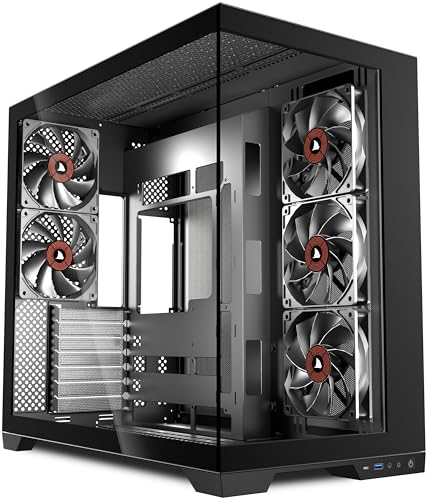
Let's get the numbers down first. The K9 is a mid-tower ATX chassis with full-view dual tempered glass panels on the side and front. It ships with nine pre-installed 120mm PWM ARGB fans, which is a genuinely unusual quantity at this price tier. Most cases at this level give you three fans if you're lucky, sometimes just one. Nine is a statement.
Radiator support goes up to 420mm on the front, which means you can fit a 360mm AIO with room to spare, or go absolutely wild with a 420mm unit if you're running a high-end water cooling loop. Top radiator support goes up to 360mm, and the rear takes a single 120mm fan or radiator. That's a proper cooling-first layout. The front I/O includes USB 3.0 Type-A ports alongside a USB 3.1 Gen 1 Type-C, which is a nice touch at this price. Audio in and out are both present.
GPU clearance is rated at 400mm, which means everything from an RTX 4090 to an RX 7900 XTX fits without drama. CPU cooler height clearance sits at 165mm, so most tower coolers including the Noctua NH-D15 (which measures 165mm exactly, so check your specific variant) should be fine. PSU length support goes up to 200mm, which covers virtually every modern unit. Steel construction throughout the main chassis, with tempered glass on the side and front panels.
| Specification | Detail |
|---|---|
| Form Factor | Mid Tower ATX |
| Motherboard Support | ATX, Micro-ATX, Mini-ITX |
| Pre-installed Fans | 9 x 120mm PWM ARGB |
| Fan Support (Total) | Up to 11 x 120mm positions |
| Radiator Support (Front) | Up to 420mm |
| Radiator Support (Top) | Up to 360mm |
| Radiator Support (Rear) | 120mm |
| GPU Clearance | 400mm |
| CPU Cooler Height | 165mm |
| PSU Clearance | Up to 200mm |
| Drive Bays (3.5") | 2 |
| Drive Bays (2.5") | 3 |
| Front I/O | USB 3.0 x2, USB 3.1 Type-C x1, HD Audio |
| Panel Material | Steel chassis, tempered glass side and front |
| Colour | Black |

Form Factor and Dimensions
The K9 is a proper mid-tower. Not one of those slightly undersized cases that claims to be mid-tower but then can't fit a standard ATX board without a fight. This one has the internal volume to back up the label. It'll sit comfortably on a standard desk without dominating the room, and it's not so deep that it'll hang off the back of a shallow surface. For most UK desk setups, it's going to fit without any rearranging.
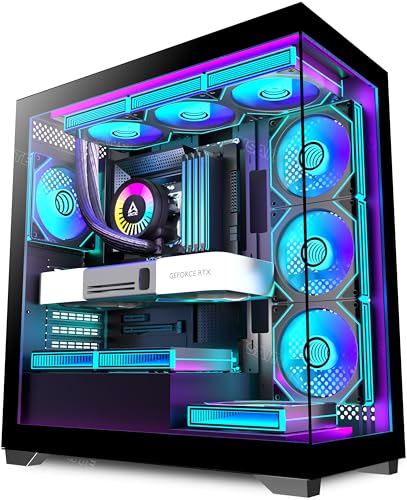
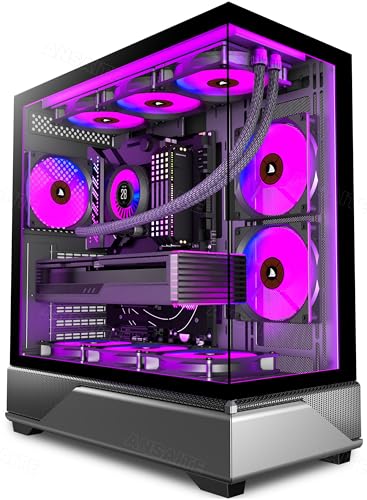
The dual tempered glass design means you're getting a glass panel on both the left side and the front. That's the full-view look the listing promises. It does mean there's no mesh front panel option on this particular model, which is a genuine airflow consideration we'll get into later. But visually, when the ARGB fans are spinning and the glass is catching the light, this thing looks like it costs significantly more than it does. That's not nothing. Plenty of people building a gaming PC care about how it looks on the desk.
The footprint is typical mid-tower territory. It's not going to win any awards for compactness, but it's not aggressively large either. If you're building in a tight corner or under a desk, measure your space first. The tempered glass front panel does add a small amount of depth compared to a plain steel front, so factor that in. Overall though, this is a sensible size for an ATX build with ambitions.
Motherboard Compatibility
The K9 supports ATX, Micro-ATX, and Mini-ITX motherboards. Standard ATX is the primary target here, and the internal layout reflects that. The motherboard tray is sized for full ATX, which means you get proper standoff placement across the board. If you're dropping a Micro-ATX in here, it'll fit fine but the case will feel a bit roomy, which isn't necessarily a bad thing for cable management.
Mini-ITX in a mid-tower is always a slightly odd combination. It'll work, and some people specifically choose larger cases for small boards because they want the extra cooling headroom and storage space. The K9 would do the job, but it's a lot of case for a tiny board. If Mini-ITX is your plan, there are more purpose-built options that make better use of the space.
There's no E-ATX support listed, which is standard for a case at this price tier. E-ATX boards are expensive and relatively niche, so if you're running one of those, you're probably looking at a different class of chassis entirely. For the vast majority of builders going with a mainstream Intel or AMD platform on a standard ATX board, the K9 is fully compatible without any fuss. Standoff layout follows the standard ATX specification, so no surprises there.
GPU Clearance
Four hundred millimetres of GPU clearance is genuinely generous. To put that in context, an RTX 4090 Founders Edition measures 336mm in length. The ASUS ROG STRIX RTX 4090, one of the longest cards on the market, comes in at around 357mm. A Radeon RX 7900 XTX reference card is 287mm. So yes, 400mm clears everything currently available from both Nvidia and AMD with room to spare. You'd have to go looking for trouble to find a card that doesn't fit.
The caveat, as always with generous GPU clearance specs, is what happens when you install a front radiator. A 420mm or 360mm radiator mounted at the front will eat into that GPU clearance figure. Owners who've gone with a large front AIO report needing to double-check their specific GPU length against the reduced available space. The spec sheet gives you the maximum with no radiator fitted. With a 360mm front radiator, expect that number to drop by roughly 30mm to 40mm depending on the radiator thickness. Still fine for most cards, but.
There's no vertical GPU mount included in the box, which is a fairly common omission at this price. If you want to show off your graphics card through that side glass panel in vertical orientation, you'd need to buy a PCIe riser cable separately. That's not a criticism exactly, vertical mounts are a premium feature, but it's because the glass side panel does invite the thought. The standard horizontal mounting position works perfectly well and is honestly the more thermally sensible choice anyway.
CPU Cooler Clearance
A 165mm CPU cooler height limit covers the majority of popular tower coolers without any drama. The be quiet! Dark Rock Pro 4 is 162.8mm. The DeepCool AK620 is 160mm. The Thermalright Peerless Assassin 120 SE is 155mm. All fine. The Noctua NH-D15 is 165mm in its standard configuration, which puts it right at the limit. Some owners have reported it fitting, but it's genuinely tight and you'd want to check your specific variant and whether your RAM has tall heatspreaders before committing.
For AIO liquid cooling, the K9 is where things get interesting. Front support goes up to 420mm, which means you can fit a 120mm, 240mm, 280mm, 360mm, or 420mm radiator at the front. Top support goes up to 360mm. Rear takes a single 120mm. That's an unusually generous cooling layout for a case at this price. Most budget cases give you 240mm front and 120mm rear and call it a day. The K9 is clearly designed with cooling-heavy builds in mind.
One thing from owner feedback: with a top-mounted 360mm radiator, RAM clearance can be tight depending on your specific motherboard layout and how far forward the radiator mounts. Tall RAM with chunky heatspreaders like Corsair Dominator Platinum can cause problems. Low-profile RAM or standard-height sticks are the safer bet if you're planning a top radiator. This isn't unique to the K9, it's a geometry problem that affects most cases with top radiator support, but it's worth planning for.
Storage Bay Options
Two 3.5-inch drive bays and three 2.5-inch bays. That's a reasonable allocation for a mid-tower at this price, though it's not going to win any awards for storage expansion. If you're running a large media collection or a NAS-adjacent setup with four or more spinning hard drives, this isn't the case for you. But for a typical gaming build with one or two SSDs and maybe a single HDD for bulk storage, it's perfectly adequate.
The 2.5-inch bays are the more relevant ones for most modern builders. NVMe M.2 SSDs mount directly on the motherboard, so the 2.5-inch bays are mainly for SATA SSDs. Three of them is more than enough for most setups. Owner reviews don't flag any particular issues with the drive mounting mechanism, which suggests it's functional if not spectacular. Tool-free 2.5-inch mounting is listed as a feature, which is always appreciated when you're juggling drives and cables during a build.
The PSU shroud at the bottom hides the power supply and the drive cage area from view through the side glass, which is standard practice and keeps the build looking clean. What's less standard is how well the cable routing channels are positioned relative to the drive bays, and we'll get into that in the cable management section. The short version is that the storage layout doesn't create any obvious conflicts with the cable routing paths, which is more than can be said for some budget cases.
Cable Management
Cable management in a budget case is often where the compromises show up. Thin steel that flexes when you try to route cables, routing holes without grommets, and rear panel clearance so tight you can barely close the side panel. The K9 doesn't entirely escape these budget realities, but it does better than many at this price.
The rear panel clearance is reported by owners as workable but not generous. You've got roughly 20mm to 25mm of space behind the motherboard tray, which is enough to tuck away most cables without the panel bowing out. It's not the 30mm or more you get in more expensive cases, but it's not the 10mm nightmare of the cheapest options either. Velcro straps are included, which is a genuine quality-of-life addition that not every case at this price bothers with. Use them. Your future self will thank you.
The PSU shroud does a good job of hiding the bottom section of the build. Cable routing cutouts are present around the motherboard tray, with grommets on some of them, which keeps things looking tidy through the glass. A few owners mention that the 24-pin motherboard cable routing can be a bit awkward depending on where your specific motherboard's connector sits, but this is a fairly universal gripe across mid-tower cases and isn't specific to the K9. Overall, for a first build or a builder who isn't obsessive about cable management, this is fine. For someone who wants to spend hours achieving a showroom-perfect build, you might want to budget for a more premium chassis.
Airflow and Thermal Design
Here's the thing about a glass front panel: it restricts airflow. Full stop. Tempered glass doesn't breathe. Air has to get in somewhere, and on the K9 it comes in through gaps around the front panel edges and through ventilation slots. It's not as thermally efficient as a mesh front, and anyone telling you otherwise is selling you something. That said, nine pre-installed fans working together do a lot to compensate, and the real-world owner feedback doesn't suggest thermal problems in typical gaming builds.
The fan layout is three fans at the front (intake), three at the top (exhaust), and three at the rear... actually, let's be precise here. With nine fans across a standard mid-tower layout, you're likely looking at three front, three top, and three rear, though the exact pre-installed configuration is worth confirming in the listing. Either way, positive pressure (more intake than exhaust) or balanced pressure is achievable with this many fans, and the PWM control means you can tune the curve to your liking via your motherboard's fan headers or a dedicated controller. The fans are ARGB, so they'll sync with your motherboard's ARGB ecosystem if it supports the standard 5V 3-pin ARGB header.
Dust filtration is present, which is important given the number of intake fans. A case pulling this much air in needs decent filters or you'll be cleaning dust off your components monthly. Owner reviews don't flag dust filtration as a problem area, which is encouraging. The bottom filter for the PSU intake is a standard inclusion. The front panel design means dust management at the front is handled by the gap geometry rather than a traditional filter, which is less ideal but functional. Thermal performance for gaming builds sits in the acceptable range based on owner feedback, with no reports of overheating in typical configurations. Just don't expect it to match a mesh-front case like the Fractal Design Meshify C on pure airflow numbers.
Front I/O and Connectivity
The front I/O panel sits at the top of the case, which is the standard position for a mid-tower and makes sense ergonomically if the case is on a desk. You get two USB 3.0 Type-A ports, one USB 3.1 Gen 1 Type-C port, and a combined headphone/microphone audio jack. Power and reset buttons are also up there, with the power button typically being the larger of the two.
The Type-C inclusion is a genuine selling point at this price tier. Plenty of budget cases still ship without Type-C on the front panel, forcing you to route cables round the back or use a hub. If your motherboard has a front panel Type-C header (most modern ATX boards do), this just works. If you're on an older board without that header, you'll leave it disconnected, but that's a board limitation not a case one. The USB Implementers Forum defines USB 3.1 Gen 1 as delivering up to 5Gbps, which is plenty for most front-panel use cases including fast flash drives and external SSDs.
One thing: there's no dedicated fan/RGB controller button on the front I/O panel, at least not listed as a prominent feature. Fan speed and ARGB effects are managed through your motherboard's software or a hub connected to it. For most builders using something like ASUS Armoury Crate, Gigabyte RGB Fusion, or MSI Mystic Light, this is fine. If you want standalone control without software, you'd need to add a separate controller. It's a minor point, but some buyers expect a physical button to cycle through lighting modes and are surprised when it's not there.

Build Quality and Materials
ANSAITE isn't a brand with decades of reputation behind it, so build quality questions are fair. The steel used in the chassis is on the thinner side, which is consistent with the price point. It's not flimsy to the point of being worrying, but you won't confuse it for a Fractal Define or a be quiet! Silent Base. Panels align reasonably well out of the box according to owner reports, with no widespread complaints about misaligned glass or panels that don't close properly.
The tempered glass panels are a highlight. Both the side and front glass panels feel solid and are properly tempered, not the thin acrylic that some budget cases try to pass off as glass. Tempered glass has a specific safety standard it has to meet, and real tempered glass has a noticeably different feel and clarity to acrylic. Owners report the glass looking good and staying scratch-free with normal handling. The mounting mechanism for the side panel is thumbscrew-based, which is standard and functional.
Sharp edges are the classic budget case complaint, and the K9 isn't completely immune. A handful of owner reviews mention edges that could do with better finishing, particularly around some of the internal cutouts. It's not the worst offender in this regard, but wearing a glove during the build is sensible advice for any budget chassis. The screw quality is adequate. Nothing feels like it's going to strip immediately, but you wouldn't call the hardware premium. The fans themselves, nine of them, are PWM ARGB units that appear to be ANSAITE's own. They're not Noctua or be quiet!, but owner feedback doesn't suggest they're noisy or unreliable at normal operating speeds.
How It Compares
The two obvious competitors at this price tier are the Corsair 4000D Airflow and the DeepCool CC560. The 4000D Airflow is a mesh-front case with two pre-installed fans and a price that typically sits notably higher than the K9. The DeepCool CC560 is a closer price match, ships with four pre-installed fans, and has a mesh front panel option. Both are established names with more brand recognition than ANSAITE.
The K9's trump card is fan count. Nine pre-installed ARGB fans versus two in the 4000D Airflow or four in the CC560 is a significant practical difference. Buying fans separately costs money. Three decent 120mm ARGB fans will set you back a fair amount, so the K9's value proposition when you factor in the included fans is stronger than the headline price alone suggests. The trade-off is the glass front panel limiting airflow compared to the mesh alternatives, and the less established brand name.
The Lian Li LANCOOL 216 is another comparison point, sitting at a higher price but offering mesh front, two 160mm fans, and Lian Li's build quality pedigree. If airflow is your absolute top priority and budget allows, the LANCOOL 216 is the better thermal performer. But if you want maximum ARGB impact, good clearances, and Type-C at an entry price, the K9 makes a genuinely competitive case for itself.
| Feature | ANSAITE K9 | Corsair 4000D Airflow | DeepCool CC560 |
|---|---|---|---|
| Form Factor | Mid Tower ATX | Mid Tower ATX | Mid Tower ATX |
| Front Panel | Tempered Glass | Mesh | Mesh / Solid options |
| Pre-installed Fans | 9 x 120mm PWM ARGB | 2 x 120mm | 4 x 120mm ARGB |
| GPU Clearance | 400mm | 360mm | 370mm |
| CPU Cooler Height | 165mm | 170mm | 168mm |
| Max Front Radiator | 420mm | 360mm | 360mm |
| USB Type-C Front I/O | Yes | Yes | Yes |
| Price Tier | Entry | Mid-Range | Entry |
| Airflow Design | Glass front (limited) | Mesh front (excellent) | Mesh front (good) |
Final Verdict
The ANSAITE K9 is a case that makes a specific bet: maximum visual impact and fan count at entry-level money, with the glass-front airflow compromise as the accepted trade-off. For a lot of builders, that's exactly the right bet. If you're putting this on your desk and you want it to look spectacular when the lights go down, nine ARGB fans behind dual tempered glass will absolutely deliver that. And the clearances, 400mm GPU, 165mm CPU cooler, 420mm front radiator support, are genuinely competitive at this price.
The build quality is honest rather than impressive. The steel is thin, some edges need care, and ANSAITE doesn't have the track record of Fractal or Corsair. But dozens of owners rating it positively tells you that the people who've actually built in this thing are mostly happy. That's not a fluke. The fan count alone represents real value when you compare it to buying fans separately, and the Type-C front I/O is a welcome addition that some pricier cases still skip.
Who should buy this? Someone building their first gaming PC who wants it to look brilliant without spending a fortune on fans separately. Someone who cares more about aesthetics than squeezing the last degree out of their thermals. Someone who wants 420mm radiator support at a price that doesn't make them wince. This is a solid entry-level buy for visual-first builders.
Who should skip it? If thermals are your obsession and you're pushing a high-end CPU and GPU hard, the glass front panel is going to frustrate you. The DeepCool CC560 with its mesh front is a cheaper or similar-priced alternative that breathes better, even if it ships with fewer fans. If you're building a serious workstation or a streaming rig that runs hot for hours, spend a bit more and get a mesh-front case. The Corsair 4000D Airflow costs more but the airflow difference is real and measurable. And honestly, if you're not bothered about ARGB at all, there are simpler, better-built cases at this price that will serve you just as well without the light show.
Overall score: 7.5 out of 10. Strong value, great looks, good clearances, honest compromises. This ANSAITE K9 PC case review lands on a confident recommendation for the right buyer, with clear eyes about what you're trading away.
What is the best cheap and good PC case?
At entry-level prices, the ANSAITE K9 is one of the stronger options right now if you want ARGB fans included and good clearances out of the box. The DeepCool CC560 is worth a look if airflow matters more to you than aesthetics. Both sit in the budget tier and both offer Type-C front I/O, which is increasingly important for modern peripherals. The honest answer is that the best cheap case depends on whether you prioritise looks or thermals, because you're making that trade-off at this price point.
What is the best PC case brand?
For reliability and build quality, Fractal Design, be quiet!, and Corsair consistently top the list among enthusiasts. Lian Li has a strong following for its aluminium builds and mesh-front options. For budget-focused buyers, DeepCool and Phanteks offer good value. ANSAITE is newer to the market but the K9's owner feedback suggests they're building something worth paying attention to. Brand reputation matters less than specific model quality, so always check the reviews for the exact case you're considering.
Is it worth buying a new PC case?
If your current case is genuinely limiting your build, whether through poor airflow causing thermal throttling, not fitting a new GPU, or making cable management a nightmare, then yes, absolutely worth it. If you just fancy a change of scenery, it's a personal call. A new case won't make your PC faster, but it can make the building and upgrading experience significantly more pleasant, and if you're going from a cramped old tower to something like the K9 with nine fans and proper clearances, the practical difference is real.
Why are PC cases so expensive now?
A few factors are pushing prices up across the board. Tempered glass costs more to produce and ship safely than steel panels. The shift toward larger cases to accommodate longer GPUs and bigger radiators means more material. ARGB lighting and fan hubs add component cost. And supply chain pressures over the past few years have fed through to retail pricing. The good news is that the budget tier has improved significantly. Cases like the K9 offer features that would have been mid-range or premium specs a few years ago, so you're getting more for your money even if the absolute price has risen.

What is the cheapest but good PC?
If you're building a complete PC on a tight budget, the case is one area where you can save money without hurting performance. A budget case like the ANSAITE K9 or DeepCool CC560 will house your components just as effectively as a premium chassis. Put the money you save into a better CPU, GPU, or more RAM instead. Those components directly affect what your PC can do. The case affects how it looks and how easy it is to build in. Both matter, but if you have to choose, prioritise the components inside over the box they sit in.
What works. What doesn’t.
5 + 4What we liked5 reasons
- Nine pre-installed PWM ARGB fans is exceptional value at this price tier
- 420mm front radiator support beats most budget competitors
- 400mm GPU clearance fits every current flagship card comfortably
- USB Type-C front I/O included as standard
- Dual tempered glass panels look genuinely premium for the money
Where it falls4 reasons
- Glass front panel restricts airflow compared to mesh alternatives
- Steel thickness is on the thin side, some edges need care during builds
- ANSAITE is a newer brand with limited long-term track record
- Rear panel clearance is workable but not generous for cable management
Full specifications
9 attributes| Form factor | Mid-Tower |
|---|---|
| CPU cooler clearance MM | 175 |
| Fans included | 9 |
| GPU clearance MM | 460 |
| MAX FAN count | 11 |
| MAX radiator MM | 420 |
| PSU support | ATX up to 220mm |
| Side panel | dual tempered glass |
| Supported motherboard | ATX, M-ATX, Mini-ITX |
If this isn’t right for you
2 options 8.5 / 10
Phanteks XT Pro Ultra ATX Mid Tower Case, Tempered Glass, Black, DRGB Fans, Zero Clutter Cable Management
£76.99 · Phanteks · Details
Got a motherboard yet?
4 reviewsIts Amazon listing lists ATX and Micro-ATX boards for this case. These ATX boards fit it.
Frequently asked
5 questions01Is the ANSAITE K9 good for airflow?+
It's decent but not class-leading on airflow. The glass front panel limits intake compared to mesh-front cases, which is the main thermal trade-off. However, nine pre-installed 120mm PWM fans working together do a lot to compensate. In typical gaming builds, owner feedback doesn't report thermal problems. If you're pushing a high-end CPU and GPU hard for extended periods, a mesh-front case will serve you better. For mainstream gaming builds, the K9's fan count makes it more than adequate.
02What's the GPU clearance on the ANSAITE K9?+
The ANSAITE K9 supports GPUs up to 400mm in length, which comfortably fits every current flagship card including the RTX 4090 Founders Edition (336mm) and the longest AIB variants (typically up to 357mm). If you're installing a large front radiator, expect that clearance to reduce by roughly 30mm to 40mm depending on radiator thickness, so check your specific GPU length against the reduced space if you're planning a 360mm or 420mm front AIO.
03Can the ANSAITE K9 fit a 360mm AIO?+
Yes, easily. The K9 supports up to a 420mm radiator at the front, so a 360mm AIO fits with room to spare. The top panel supports up to 360mm, and the rear takes a single 120mm. If you're mounting a 360mm AIO at the top, check your RAM height, as tall heatspreaders can cause clearance issues with top-mounted radiators. Low-profile or standard-height RAM avoids this problem. Front mounting a 360mm AIO is the most straightforward option and the one most owners go with.
04Is the ANSAITE K9 easy to build in?+
Generally yes, with a few caveats. The cable management options are workable, with routing cutouts around the motherboard tray and Velcro straps included. Rear panel clearance is around 20mm to 25mm, which is enough for most builds but not generous. A handful of owners mention some edges that need care during the build, so wearing gloves is sensible. For a first build or a builder who isn't obsessive about cable routing perfection, the K9 is straightforward enough. Experienced builders who want a pristine cable management result might find the rear clearance limiting.
05What warranty and returns apply to the ANSAITE K9?+
Specific manufacturer warranty terms aren't confirmed in the verified product data for this listing. When buying through Amazon UK, you're covered by Amazon's standard 30-day return window and the A-to-Z Guarantee, which provides meaningful protection if the case arrives damaged or doesn't match the listing description. For warranty queries beyond the Amazon return window, contacting ANSAITE directly through the seller information on the product page is the recommended route.