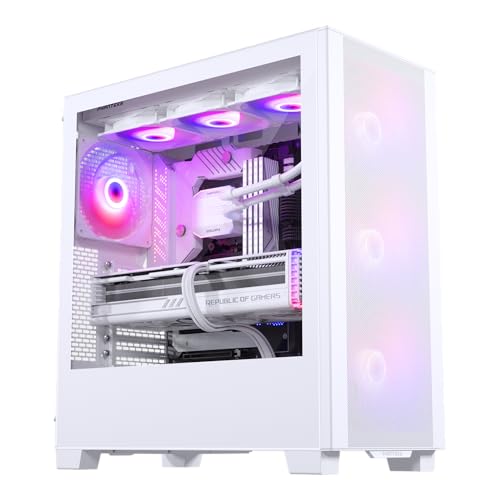
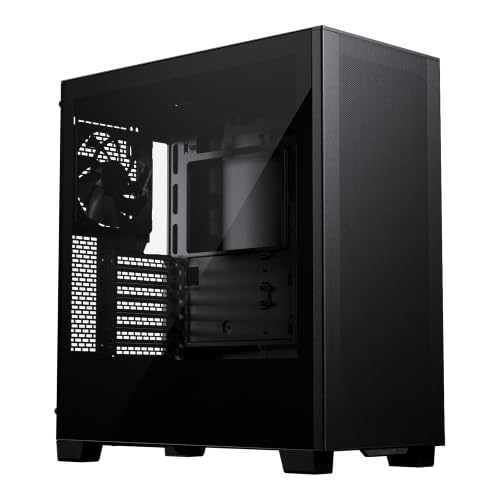
Case marketing is almost universally useless. You get a moody render with RGB strips glowing in a dark room, a bullet list that says "superior airflow" without telling you how many fans are included, and zero mention of whether the rear panel actually closes when you've got a fat PSU extension cable running through it. The Phanteks XT Pro Ultra cuts through that nonsense with a spec sheet that's genuinely specific: 420mm GPU clearance, 185mm CPU cooler height, three 140mm DRGB fans included, and what Phanteks calls Zero Clutter cable management. That's a proper starting point for a real conversation.
So here's the verdict upfront: the Phanteks XT Pro Ultra is one of the most thoughtfully designed mid-range cases you can buy right now in the UK. It solves the two problems that make budget cases miserable to build in, namely cramped cable routing channels and dust filters that are either missing or a pain to reach, and it does it at a mid-range price that doesn't ask you to compromise on included fans or glass quality. The hundreds of owner reviews holding a positive overall rating aren't a fluke. This is a case people are genuinely happy with after the build is done, not just before it starts.
That said, it's not perfect. The front panel is tempered glass rather than mesh, which is a real airflow trade-off that Phanteks partially compensates for with a vented bottom intake and side ventilation, but it's still a choice that matters for thermally demanding builds. And if you're running a modest mid-range system with a 65W CPU and a card like an RX 7600, you might not need everything this case brings. We'll get into all of that. But for anyone who's ever sworn at a case with 15mm of cable management space behind the motherboard tray, this one is going to feel like a proper relief.
Core Specifications
The XT Pro Ultra is an ATX mid-tower, so it's not trying to be anything exotic. It supports ATX, Micro-ATX, and Mini-ITX motherboards, which covers the vast majority of builds people are actually doing. Dimensions come in at 480mm tall, 215mm wide, and 465mm deep, which is a fairly standard mid-tower footprint. It's not going to surprise you on a desk or in a standard PC tower spot. Weight is around 8.5kg without components, which reflects the use of steel construction with a tempered glass side panel rather than anything particularly lightweight.
Fan support is where this case makes its argument clearly. You get three 140mm DRGB fans included in the box, all front-mounted as intake. The case supports up to six 140mm fans total across the front (three), top (two), and rear (one), or you can mix in 120mm fans across those same positions. Radiator support is generous: up to a 360mm or 420mm radiator at the front, up to 280mm at the top, and a 120mm or 140mm at the rear. That's more radiator flexibility than you typically see at this price tier. There's a magnetic dust filter at the bottom for PSU intake, and the front panel has ventilation gaps designed to feed those front fans without completely choking them behind glass.
Storage is handled by two 3.5-inch drive bays and two 2.5-inch dedicated SSD mounts, with additional 2.5-inch mounting behind the motherboard tray. The PSU shroud is full-length, hiding the power supply and any associated cable clutter from the main chamber view. Front I/O includes two USB 3.0 Type-A ports, one USB 3.2 Gen 2 Type-C port, and a combined audio jack. The included fans connect through a built-in DRGB and fan hub, which is a genuinely useful inclusion that saves you burning motherboard headers.
| Specification | Detail |
|---|---|
| Form Factor | ATX Mid Tower |
| Motherboard Support | ATX, Micro-ATX, Mini-ITX |
| Dimensions (H x W x D) | 480mm x 215mm x 465mm |
| Weight | ~8.5kg |
| GPU Clearance | 420mm |
| CPU Cooler Height | 185mm |
| Included Fans | 3 x 140mm DRGB (front) |
| Fan Support | Front: 3x 140mm / 120mm, Top: 2x 140mm / 120mm, Rear: 1x 140mm / 120mm |
| Radiator Support (Front) | Up to 420mm |
| Radiator Support (Top) | Up to 280mm |
| Radiator Support (Rear) | 120mm / 140mm |
| Drive Bays | 2x 3.5", 2x 2.5" (+ additional behind tray) |
| Front I/O | 2x USB 3.0, 1x USB-C 3.2 Gen 2, Audio combo |
| Side Panel | Tempered Glass |
| PSU Shroud | Full-length |
| RGB Hub | Built-in DRGB + Fan Hub |
| Current Price | £76.99 · Details |

Form Factor and Dimensions
Mid-tower is the sweet spot for most builders and the XT Pro Ultra sits comfortably in that category. At 480mm tall and 215mm wide, it's not going to dominate a desk the way a full-tower does, and it's not going to leave you fighting for space when you're trying to route a 24-pin cable. The 465mm depth is because it's enough to accommodate long PSUs and still leave the cable management channels usable, which is something shorter cases genuinely struggle with when you're running a high-end power supply.
On a standard desk it'll sit fine next to a monitor without blocking airflow or looking comically oversized. If you're doing an under-desk build in a tower position, the dimensions are conventional enough that it'll fit in any standard PC enclosure or open desk slot. The footprint is similar to the Corsair 4000D and the be quiet! Pure Base 500DX, so if you've handled either of those you'll have a good mental picture of the XT Pro Ultra's physical presence.
One thing from owner feedback: a few builders mention the case feels slightly wider than expected when they're working inside it, which is actually a compliment in disguise. That extra internal volume translates directly into easier cable routing and more breathing room around the motherboard. Nobody's complained it's too big for their setup, which is the right kind of non-complaint to have. The tempered glass side panel is hinged on some configurations but the XT Pro Ultra uses a standard two-thumbscrew attachment, which is fine and reliable even if it's not quite as slick as a magnetic latch.
Motherboard Compatibility
ATX, Micro-ATX, and Mini-ITX are all supported, and the standoff layout is pre-installed for ATX which is the sensible default. If you're dropping in a Micro-ATX board you'll need to check which standoffs need removing or adding, but that's a two-minute job and not specific to this case. What is specific to this case is that the motherboard tray has a large CPU backplate cutout, which matters more than people give it credit for. Being able to swap a CPU cooler without pulling the entire motherboard is a genuine quality-of-life feature, and the XT Pro Ultra's cutout is generously sized.
E-ATX is not officially supported, which is fine for a mid-tower at this price. If you're running an E-ATX board you're almost certainly in full-tower territory anyway, and spending more money on a chassis that can properly house it. For the target audience of this case, which is builders running mainstream ATX platforms like Intel Core or AMD Ryzen on standard ATX or Micro-ATX boards, the compatibility picture is exactly right.
Owner reviews don't flag any issues with motherboard fitment, which is actually saying something. Cheap cases sometimes have standoff positions that are slightly off, or tray cutouts that don't quite line up with the I/O shield slot. Nobody's reporting that here. The build quality of the tray itself gets positive mentions specifically around rigidity, which means you're not fighting flex when you're trying to seat a 24-pin connector with one hand. Small thing, but it makes a real difference when you're elbow-deep in a build.
GPU Clearance
420mm of GPU clearance is the headline number and it's a good one. To put that in context: an Nvidia RTX 4090 Founders Edition measures 336mm long. Most third-party 4090s from ASUS, MSI, and Gigabyte come in between 340mm and 360mm. Even the most extreme triple-slot, triple-fan flagships from the current generation sit comfortably under that 420mm ceiling. So you're not going to be measuring and hoping. Whatever GPU you're planning to run in 2026 will fit, full stop.
The caveat, and it's a real one, is that if you install a 420mm radiator at the front (which the case supports), your effective GPU clearance drops. Phanteks doesn't give you a specific reduced clearance figure for that configuration in the spec sheet, but owner reports suggest you're looking at something closer to 300 to 330mm with a full front radiator installed. That still covers most single and dual-fan GPUs, but it rules out the very longest cards. Worth planning for if you're going full-custom loop or a large AIO front mount.
Vertical GPU mounting isn't a feature on the XT Pro Ultra, which is fine at this price point. Vertical mounts add cost, often require a riser cable (which itself costs money and can introduce PCIe bandwidth concerns depending on the spec), and the reality is that most people who want to show off their GPU through the glass side panel get a perfectly good view from the standard horizontal mount in this case anyway. The tempered glass panel is positioned to give you a clear sightline to the GPU, and with the full-length PSU shroud hiding the bottom clutter, the visual result is cleaner than you'd expect.
CPU Cooler Clearance
185mm of CPU cooler height clearance is more than enough for the vast majority of air coolers on the market. The Noctua NH-D15, which is the benchmark tower cooler everyone compares against, stands 165mm tall. The be quiet! Dark Rock Pro 4 is 162.8mm. Even chunky single-tower coolers like the Thermalright Peerless Assassin 120 SE are around 155mm. You've got 20mm to 30mm of headroom above the biggest air coolers available, which means no measuring tape required.
AIO support is where the XT Pro Ultra really opens up. The front supports up to a 420mm radiator, which is a rare and welcome spec at this price tier. Most mid-range cases top out at 360mm front support. If you're running a 360mm AIO you'll fit it at the front with no drama. The top supports up to 280mm, so a 240mm or 280mm AIO fits there comfortably. The rear takes a 120mm or 140mm, which is the standard single-fan exhaust position. You've got genuine flexibility here for almost any liquid cooling configuration.
One thing to watch: with a top-mounted radiator and tall RAM, you can sometimes run into clearance issues depending on the specific AIO pump head orientation and the height of your memory sticks. Owner reviews don't flag this as a widespread problem on the XT Pro Ultra, but it's the kind of thing if you're running particularly tall DDR5 with a heatspreader. The motherboard tray positioning gives you a reasonable amount of vertical space above the RAM slots, and Phanteks' internal dimensions are generous enough that this is less of a concern here than in more compact designs.
Storage Bay Options
Two 3.5-inch bays and two dedicated 2.5-inch mounts is a reasonable storage loadout for a mid-tower in 2026. The reality is that most people building a new system are running one or two NVMe M.2 SSDs on the motherboard and maybe a single 3.5-inch HDD for bulk storage, so the two 3.5-inch bays cover that use case without wasting space on a drive cage that would otherwise block airflow. If you're building a NAS-style machine or need four or five spinning disks, this isn't the right case. But for a gaming or workstation build, it's fine.
The 2.5-inch mounts behind the motherboard tray are a nice touch. It means you can tuck SSDs out of sight in the main chamber while keeping them accessible if you need to swap them. The tool-free mounting on the 2.5-inch bays gets specific positive mentions in owner reviews, with a few people noting it's genuinely tool-free rather than the kind that technically doesn't need a screwdriver but practically does because the mechanism is fiddly. The 3.5-inch bays use standard screws, which is fine.
The PSU shroud covers the drive cage area completely, which means your HDD installation is hidden from the glass side panel view. That's good for aesthetics but it does mean you're working in a slightly more confined space when installing or removing drives with the PSU already seated. Not a dealbreaker, just something to be aware of during the initial build. Most people install drives before the PSU anyway, so it rarely becomes a practical issue. Owner feedback doesn't flag it as a frustration, which suggests the clearance is workable even with everything installed.

Cable Management
This is the section where the XT Pro Ultra earns its "Zero Clutter" marketing claim, and to Phanteks' credit, it mostly delivers. The rear panel cable management space is reported by owners as genuinely usable, with clearance behind the motherboard tray that allows you to run cables without the side panel bulging when you try to close it. That's a low bar you'd think every case clears, but anyone who's built in a budget case knows it's really not. The specific routing channels and Velcro strap points are positioned to handle the main 24-pin, the CPU power cables, and GPU power runs without crossing over each other in the main chamber.
The full-length PSU shroud is a key part of the cable management story. It hides the power supply itself and all the cables coming out of it, so your modular PSU's unused cables can be bundled and tucked below the shroud without appearing in the main chamber view. There's a cutout at the rear of the shroud for the main cable runs to pass through to the motherboard, and the positioning of that cutout is sensible relative to where the 24-pin connector sits on most ATX boards. Owner photos consistently show clean builds, which is the real test of whether cable management features actually work.
Velcro straps are included, which sounds like a small thing but makes a tangible difference to the finished result. Zip ties are fine but they're one-use and encourage you to cut them when you need to adjust something, leading to a gradually messier rear panel over time. Velcro lets you redo cable bundles without any faff. The routing channels themselves have enough width to handle sleeved cables and thick PSU cables without you having to force anything. A couple of owners mention the rubber grommets on the cable routing holes are a bit stiff initially, but they soften with use and don't cause any real problems.
Airflow and Thermal Design
Here's the honest conversation about the glass front panel. Tempered glass looks good. It also doesn't breathe the way a mesh front does. Phanteks knows this, so they've designed the XT Pro Ultra with ventilation gaps around the perimeter of the front panel and a vented bottom intake to compensate. The three included 140mm fans are positioned as front intake, which is the right call: positive pressure intake pushing air through the chassis and out the rear and top exhausts. It's a sensible thermal strategy, and the 140mm fans move more air at lower RPM (and therefore lower noise) than equivalent 120mm fans.
The dust filter situation is better than average. There's a magnetic bottom filter for the PSU intake, and the front panel design incorporates filtration for the front fan intake. Magnetic filters are the right call because they're easy to pull out and clean without tools, unlike the slide-out plastic filters that some cases use and that eventually warp or break. Owner reviews mention dust management positively, with a few people noting they've had the case for several months without significant dust accumulation inside the main chamber, which suggests the filtration is actually doing its job.
Thermal performance in practice, based on owner reports, is described as good to very good for mainstream gaming builds. People running RTX 4070 and RX 7800 XT class GPUs with 240mm to 360mm AIOs report comfortable temperatures under load. Where the glass front does create a disadvantage is in very high thermal load scenarios, like a 4090 paired with a 13900K or 7950X running sustained workloads. In those situations, a pure mesh front like the Fractal Design Meshify 2 or the Lian Li Lancool III will move more air. But for the majority of mid-range to high-end gaming builds, the XT Pro Ultra's airflow design is more than adequate, and the three included 140mm fans mean you're not immediately spending more money on fans before you've even started.
Front I/O and Connectivity
Two USB 3.0 Type-A ports and one USB 3.2 Gen 2 Type-C port on the front panel is a solid loadout for 2026. The Type-C port running at Gen 2 speeds (10Gbps) means it's fast enough for external SSDs and modern peripherals without the cable needing to be plugged into a slower header on the motherboard. Do check that your motherboard has a front-panel USB-C header before buying, because not all budget ATX boards include one. Most mid-range and above boards do, but it's worth a quick look at your motherboard spec sheet.
The audio jack is a combined headphone/microphone jack rather than separate ports, which is the modern standard and works fine with any headset that uses a single TRRS plug. If you're using separate headphone and microphone connections you'll need a splitter adapter, which costs about two pounds and solves the problem entirely. The power button placement is on the top of the case, which is the standard position for a mid-tower and puts it within easy reach whether the case is on a desk or on the floor.
The built-in DRGB and fan hub deserves a proper mention here because it's genuinely useful and often overlooked in case reviews. Rather than plugging three separate fan headers and three separate RGB headers into your motherboard, the hub consolidates everything into single connections. This saves you motherboard headers (which are often limited to three or four fan headers on mainstream boards) and simplifies the wiring considerably. The DRGB is compatible with major motherboard RGB ecosystems, so you can sync the fan lighting to your motherboard's software if you want to. Or just leave it on a preset and forget about it, which is honestly what most people do.
Build Quality and Materials
The steel construction is solid. Owner reviews consistently describe the panels as feeling substantial rather than tinny, and the finish on the black version is reported as even and consistent without the kind of paint inconsistencies you sometimes see on cheaper cases. The tempered glass side panel is 4mm thick, which is the standard for mid-range cases and strikes the right balance between weight and rigidity. It's not going to shatter if you accidentally knock it, but it's also not a panel you want to drop on a hard floor.
Sharp edges are the thing that separates a properly finished case from a cheap one, and owner feedback on the XT Pro Ultra is positive here. People specifically mention not cutting themselves during the build, which sounds like a low bar but genuinely isn't. Plenty of cases in this price range have rough stamped edges around fan mount holes and drive bay cutouts that will find your hand at some point. Phanteks' manufacturing quality control on the XT Pro Ultra seems to be consistently good based on the volume of reviews and the lack of complaints about sharp edges or misaligned panels.
Panel alignment gets positive mentions too. The side panel sits flush, the front panel doesn't rattle, and the top panel is solid. A small number of reviews mention the front panel clips feeling slightly stiff when removing the panel for the first time, which is better than the opposite problem of a front panel that falls off when you look at it. After the first removal it loosens up to a comfortable fit. The thumbscrews for the side panel are captive (they stay attached to the panel when you undo them), which is one of those small details that costs almost nothing to implement but saves you fishing around on the floor for a dropped screw every time you open the case.
How It Compares
The two cases most directly competing with the Phanteks XT Pro Ultra in the UK mid-range market are the Corsair 4000D Airflow and the be quiet! Pure Base 500DX. Both sit in a similar price bracket, both are well-regarded, and both make different trade-offs that are worth understanding before you decide.
The Corsair 4000D Airflow has a mesh front panel, which gives it a genuine airflow advantage over the XT Pro Ultra's glass front. If raw thermal performance is your top priority, that mesh front matters. But the 4000D Airflow doesn't include any fans in the box, so you're immediately adding cost to get the case to a usable state. The XT Pro Ultra's three included 140mm DRGB fans represent real money saved. The be quiet! Pure Base 500DX sits between the two on airflow (it has a mesh front with a pre-installed filter) and includes three Pure Wings 2 fans, but those fans are non-RGB and the case's cable management, while good, doesn't quite match the XT Pro Ultra's rear panel space based on owner comparisons.
The XT Pro Ultra's 420mm front radiator support is a genuine differentiator. Neither the 4000D Airflow nor the Pure Base 500DX support a 420mm radiator at the front. If you're planning a large custom loop or a 420mm AIO, the Phanteks is the clear choice among these three. For a straight gaming build with a 240mm or 360mm AIO and no RGB requirement, the 4000D Airflow is if you're willing to buy fans separately. For a quieter, cleaner aesthetic without RGB, the Pure Base 500DX is a solid alternative. But on value, the XT Pro Ultra wins when you factor in what comes in the box.
| Feature | Phanteks XT Pro Ultra | Corsair 4000D Airflow | be quiet! Pure Base 500DX |
|---|---|---|---|
| Front Panel | Tempered Glass (vented) | Mesh | Mesh with filter |
| Included Fans | 3x 140mm DRGB | None | 3x 140mm Pure Wings 2 |
| GPU Clearance | 420mm | 360mm | 369mm |
| CPU Cooler Height | 185mm | 170mm | 190mm |
| Max Front Radiator | 420mm | 360mm | 360mm |
| USB-C Front Panel | Yes (Gen 2) | Yes (Gen 1) | Yes (Gen 2) |
| RGB Hub Included | Yes | No | No |
| Price Tier | Mid-range | Mid-range | Mid-range |

Final Verdict
The Phanteks XT Pro Ultra is a genuinely well-executed mid-range case. It's not trying to be a flagship, and it doesn't need to be. What it does is solve the real-world frustrations that make building in cheaper cases annoying: it gives you enough cable management space that you won't be forcing the side panel shut, it includes three proper 140mm fans so you're not immediately shopping for more, and it supports radiator configurations that most cases in this bracket simply don't. The positive overall rating from hundreds of owners isn't marketing spin. That's a high score from a large enough sample to be meaningful, and the qualitative feedback backs it up.
The glass front is the main honest caveat. If you're building a thermally demanding system, a mesh front case will breathe better. The XT Pro Ultra compensates reasonably well with its vented design and strong front intake fan array, but physics is physics. For a mainstream gaming build with a 7800X3D or a Core Ultra 7, paired with a 4070 Ti Super or similar, it's absolutely fine. For a 4090 paired with a 7950X doing sustained rendering work, you'd want to look at the Fractal Design Meshify 2 or the Lian Li Lancool III instead.
Who should buy this? Builders who want a clean, good-looking mid-tower with RGB fans already in the box, proper cable management, and the flexibility to run a large AIO without having to compromise on GPU length. It's a genuinely complete package at mid-range money. The value case is strong because you're not adding fan costs on top of the case cost, and the build experience based on owner feedback is notably better than what you'd get from a similarly priced case from a less careful manufacturer.
Who should skip it? If you're on a tight budget and don't care about RGB or large radiator support, there are simpler cases that cost less and do the basics just as well. The Phanteks Eclipse P300A is a mesh-front option from the same brand at a lower price that suits modest builds perfectly well. And if airflow is genuinely your top concern above everything else, spend a bit more and get a Fractal Meshify 2 or a Lian Li Lancool III with a proper mesh front. The XT Pro Ultra sits between those two camps and does it well, but it's not the right answer for every builder.
Overall score: 8.5 out of 10. Docked a point for the glass front in a world where mesh is increasingly the sensible default, and half a point for the lack of E-ATX support if that ever matters to you. Everything else is done right.
What works. What doesn’t.
5 + 4What we liked5 reasons
- Three 140mm DRGB fans included, saving immediate extra spend
- 420mm GPU clearance fits every current flagship card
- 420mm front radiator support is rare at this price tier
- Genuine rear panel cable management space that owners consistently praise
- Built-in DRGB and fan hub saves motherboard headers
Where it falls4 reasons
- Glass front panel limits airflow versus mesh alternatives
- No E-ATX support
- Front radiator install reduces effective GPU clearance
- Front panel clips feel stiff on first removal
Full specifications
11 attributes| Form factor | Mid-Tower |
|---|---|
| CPU cooler clearance MM | 184 |
| Dimensions MM | 450 x 230 x 500 |
| Fans included | 4 |
| GPU clearance MM | 415 |
| MAX FAN count | 10 |
| MAX radiator MM | 360 |
| PSU support | ATX up to 270mm |
| Side panel | tempered glass |
| Supported motherboard | ATX, E-ATX, Micro-ATX, Mini-ITX |
| Weight KG | 8.17 |
If this isn’t right for you
2 options

Got a motherboard yet?
4 reviewsThe maker lists ATX, Micro-ATX and Mini-ITX boards for this case. These ATX boards fit it.
Frequently asked
5 questions01Is the Phanteks XT Pro Ultra ATX Mid Tower Case, Tempered Glass, Black, DRGB Fans, Zero Clutter Cable Management good for airflow?+
It's good but not class-leading on airflow. The front panel is tempered glass rather than mesh, which restricts intake compared to a pure mesh design. Phanteks compensates with ventilation gaps around the front panel perimeter and a vented bottom intake, and the three included 140mm fans are positioned as front intake to push air through the chassis. For mainstream gaming builds with a 360mm AIO and a mid-to-high-end GPU, thermal performance is reported as solid by owners. For very high thermal load systems running a 4090 and a high-TDP CPU under sustained workloads, a mesh-front case will move more air. The magnetic dust filters at the bottom and front help keep internals clean over time.
02What's the GPU clearance on the Phanteks XT Pro Ultra ATX Mid Tower Case, Tempered Glass, Black, DRGB Fans, Zero Clutter Cable Management?+
The Phanteks XT Pro Ultra supports GPUs up to 420mm in length, which is enough to fit every current flagship card including the longest triple-fan RTX 4090 variants. If you install a full 420mm radiator at the front, effective GPU clearance reduces to approximately 300 to 330mm based on owner reports, which still covers most cards but rules out the very longest triple-fan designs. For a standard build without a front radiator, GPU clearance is not a concern with any card currently available.
03Can the Phanteks XT Pro Ultra ATX Mid Tower Case, Tempered Glass, Black, DRGB Fans, Zero Clutter Cable Management fit a 360mm AIO?+
Yes, with no issues. The front panel supports radiators up to 420mm, so a 360mm AIO fits comfortably at the front with room to spare. The top panel supports up to a 280mm radiator, so you could also mount a 240mm or 280mm AIO there if you prefer to keep the front fans as air intake. The rear supports a 120mm or 140mm radiator for a single-fan exhaust position. If you're running tall RAM with a top-mounted radiator, check clearance with your specific memory height, but owner feedback doesn't flag this as a widespread issue on the XT Pro Ultra.
04Is the Phanteks XT Pro Ultra ATX Mid Tower Case, Tempered Glass, Black, DRGB Fans, Zero Clutter Cable Management easy to build in?+
Yes, and this is one of the case's strongest points based on owner feedback. The rear panel cable management space is genuinely usable, with enough clearance to route cables without forcing the side panel shut. Velcro straps are included for cable bundling. The full-length PSU shroud hides power supply cables from the main chamber view. The large CPU backplate cutout lets you swap coolers without removing the motherboard. The built-in fan and DRGB hub simplifies wiring by consolidating three fans and three RGB connections into single headers. The main minor frustration reported is that front panel clips are stiff on first removal, but this eases with use.
05What warranty and returns apply to the Phanteks XT Pro Ultra ATX Mid Tower Case, Tempered Glass, Black, DRGB Fans, Zero Clutter Cable Management?+
Specific warranty terms for this product are not confirmed in the verified product data available to us. When purchasing through Amazon UK, you are covered by Amazon's standard 30-day return policy and the Amazon A-to-Z Guarantee, which protects your purchase if the item arrives damaged or not as described. For warranty details beyond the return window, we recommend checking the Phanteks website directly or contacting the seller at the time of purchase.