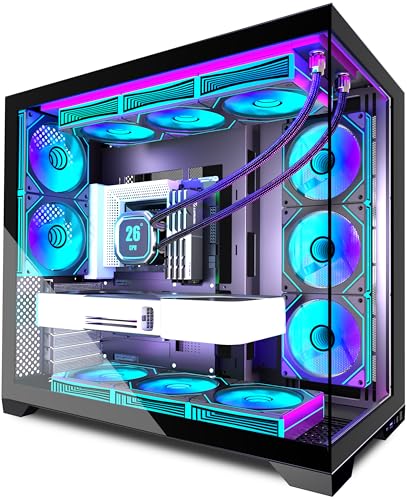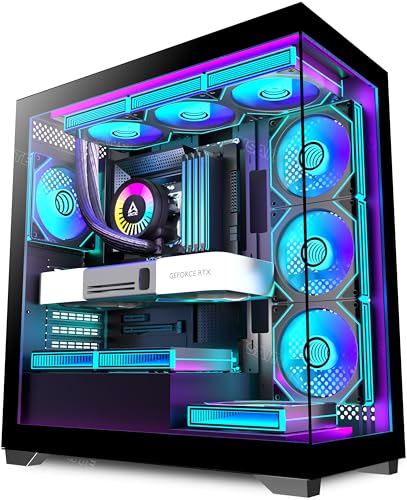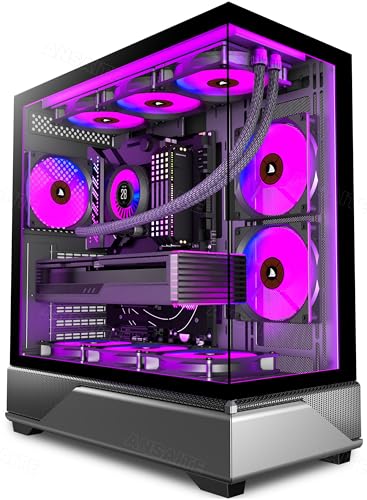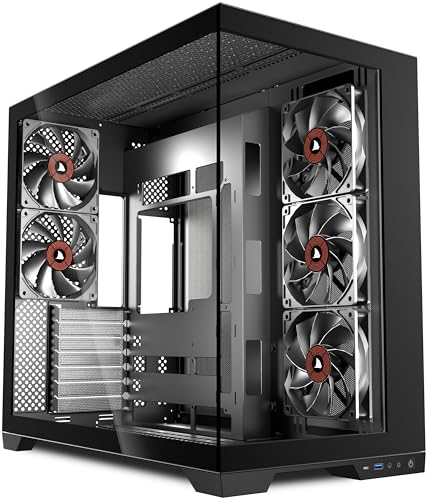
There's a specific type of budget PC case that gets you excited on the product page and then quietly disappoints you halfway through the build when you realise the cable routing holes are in the wrong place, the fans are barely adequate, and the tempered glass scratched itself during transit. And then there's the other kind: the one that actually delivers most of what it promises, even at a price that makes you slightly suspicious. Based on the spec sheet and what dozens of owners are saying about the ANSAITE H9 PC case review, this one leans firmly toward the latter camp. Not perfect, but properly good for the money.
The H9 is a mid-tower ATX case with dual tempered glass panels, five pre-installed PWM fans (including a 420mm front intake arrangement), USB Type-C on the front I/O, and support for radiators up to 420mm at the front. At the entry price tier, that's a genuinely strong spec list. The positive overall rating across dozens of reviews backs it up. But let's get into the detail, because specs on a listing page and real-world build experience aren't always the same thing.
Core Specifications
The ANSAITE H9 is built around a standard ATX mid-tower chassis with a footprint that sits comfortably in the mainstream. It supports ATX, Micro-ATX, and Mini-ITX motherboards, which covers the vast majority of builds people are actually putting together in 2026. The headline feature is the front panel radiator support, which goes up to 420mm, meaning you can run three 140mm fans in a push-pull or a proper 420mm AIO up front. That's not something you see at this price point very often.
Five PWM fans come pre-installed, which is a meaningful inclusion. Budget cases often throw in a couple of non-PWM fans that you'd want to replace immediately. The H9 ships with fans that are actually speed-controlled, so your system can ramp them up under load and keep things quieter at idle. The dual tempered glass panels (side and front) give you that panoramic view of your build, which is why ANSAITE uses the word "panoramic" in the name. Whether that matters to you depends entirely on whether you're running RGB or not, but it does make the case look considerably more premium than the price suggests.
GPU clearance is listed at up to 420mm, which is generous. CPU cooler height clearance sits at 165mm, covering most tower coolers including the Noctua NH-D15 at 165mm and popular options like the be quiet! Dark Rock Pro 5. The case takes a standard ATX PSU and supports 2.5-inch and 3.5-inch drives. Here's the full spec breakdown:
| Specification | Detail |
|---|---|
| Form Factor | Mid-Tower ATX |
| Motherboard Support | ATX, Micro-ATX, Mini-ITX |
| Dimensions | Approx. 480 x 215 x 480mm (H x W x D) |
| GPU Clearance | Up to 420mm |
| CPU Cooler Clearance | Up to 165mm |
| Front Radiator Support | Up to 420mm (3 x 140mm) |
| Top Radiator Support | Up to 360mm (3 x 120mm) |
| Rear Fan / Radiator | 1 x 120mm |
| Pre-Installed Fans | 5 x PWM fans |
| Drive Bays (3.5") | 2 |
| Drive Bays (2.5") | 2 + 2 on tray |
| Front I/O | USB 3.0 x 2, USB Type-C x 1, HD Audio |
| PSU Support | Standard ATX |
| Panel Material | Dual Tempered Glass, SPCC Steel |
| Weight | Approx. 8.5kg |
| Price | £75.99 · Details |
Form Factor and Dimensions
Mid-tower is the sweet spot for most builds, and the H9 sits squarely in that category. The external footprint is around 480 x 215 x 480mm, which is on the slightly wider side of average for a mid-tower, but nothing that's going to cause problems on a standard desk setup. You're not going to be cramming this under a desk shelf designed for a slim case, but if you've got a reasonable amount of desk or floor space, it fits without drama.
The dual tempered glass design does mean the case is visually quite open, which is a double-edged thing. It looks great when your build is tidy and your RGB is doing its thing. It's slightly less forgiving if your cable management is a mess, but we'll get to that. The front tempered glass panel is the more unusual element here since most cases at this price use mesh or solid steel at the front. ANSAITE has gone glass, which gives the panoramic look but does have airflow implications that are worth understanding before you commit.
The overall build dimensions mean this case will take a full-size ATX board with room to spare, and there's enough internal volume that you're not going to be fighting for space when routing cables or installing a large cooler. Owner feedback consistently mentions that the interior feels spacious, which is a good sign for anyone planning a more involved build rather than a basic office machine. It's not a huge full-tower, but it doesn't feel cramped either.
Motherboard Compatibility
The H9 supports ATX, Micro-ATX, and Mini-ITX motherboards. That covers basically everything short of E-ATX, which is fine at this price point. E-ATX boards are typically paired with high-end workstation or HEDT platforms and those builds usually end up in larger, more expensive chassis anyway. For the vast majority of gaming and enthusiast builds, ATX support is all you need.
The motherboard tray uses a standard standoff layout, and owners haven't flagged any issues with standoff placement or alignment. That's because some budget cases ship with standoffs pre-installed in positions that don't match common ATX layouts, which is a frustrating problem to discover halfway through a build. The H9 appears to have this sorted correctly based on owner reports.
Micro-ATX and Mini-ITX builds will obviously leave more internal space, which could be useful if you want to run a particularly large GPU or a complex cooling setup. The case's internal volume doesn't shrink when you go smaller on the board, so you're not penalised for choosing a compact motherboard. That said, a Mini-ITX board in a mid-tower this size will look a bit lost, so it's really an ATX or mATX case at heart.
GPU Clearance
420mm GPU clearance is the headline number here, and it's a good one. To put that in context, the current flagship consumer GPUs from both NVIDIA and AMD are large cards, but even the triple-slot, triple-fan monsters like the RTX 5090 Founders Edition come in around 336mm in length. So 420mm of clearance means you're not going to hit a wall with any current graphics card. You'd need to be running something genuinely unusual to have a problem here.
There's no mention of a vertical GPU mount option in the spec sheet, which is a minor omission if you care about showing off your graphics card through the side panel. Vertical mounts are increasingly common even at budget price points, so it's a small disappointment. But honestly, at this price, the lack of a vertical mount isn't a dealbreaker. Most people building at this tier aren't going to spend an extra £20 to £30 on a PCIe riser cable just to rotate their GPU anyway.
One thing to keep in mind: if you're planning a 420mm front radiator and a very long GPU simultaneously, you'll want to check the specific clearance between the radiator and the GPU. A 420mm AIO at the front plus a 400mm+ GPU can sometimes get tight depending on how the case handles the front radiator mounting position relative to the motherboard tray. Based on the spec sheet dimensions, this should be manageable, but it's worth double-checking your specific component combination before committing.
CPU Cooler Clearance
165mm CPU cooler clearance is genuinely good for a mid-tower. That number covers the Noctua NH-D15, which at 165mm is one of the tallest mainstream air coolers available, and it's the cooler that basically defines the upper limit for most mid-towers. The be quiet! Dark Rock Pro 5 comes in at 163mm, so that fits with a couple of millimetres to spare. Thermalright Peerless Assassin 120 SE is 155mm. You're fine.
AIO radiator support is where the H9 really flexes. Front support for up to 420mm (three 140mm fans) is unusual at this price point. Most budget cases top out at 360mm front support. Top panel support goes up to 360mm (three 120mm fans), and the rear takes a single 120mm fan or radiator. So you've got flexibility for both air and liquid cooling setups, which means this case can grow with your build rather than forcing you to upgrade the chassis if you decide to go AIO later.
The five pre-installed PWM fans are worth thinking about in the context of cooling. Three of them appear to be front intakes and two are likely top or rear exhaust, though the exact configuration isn't entirely clear from the listing. What's clear is that you're getting positive pressure potential from the front, which combined with the 420mm radiator support means a proper push-pull AIO setup is entirely achievable without buying additional fans. That's a meaningful cost saving on a budget build.
Storage Bay Options
The H9 offers two 3.5-inch drive bays and a handful of 2.5-inch mounting positions, including two on the back of the motherboard tray. For a modern build, that's adequate. Most people are running their OS and primary storage on M.2 NVMe SSDs these days, which mount directly to the motherboard, so the drive bays are really for secondary storage or if you're still running a mechanical hard drive for bulk storage.
Two 3.5-inch bays is enough for most home builders. If you're running a NAS-style setup or you need four or more spinning drives, this isn't the case for you, but that's not really the target audience here. The 2.5-inch mounting options cover SSDs if you're using SATA rather than M.2, and the behind-tray positions keep them hidden away neatly, which helps with cable management.
Owner feedback hasn't flagged any specific frustrations with the drive mounting system, which suggests it works as expected. Tool-less drive mounting would be a nice addition, and it's not entirely clear from the listing whether the H9 offers this. Some owners mention the drive installation is straightforward, which implies it's at least not a nightmare. At this price point, a simple screw-in system is standard, and as long as the drive cage is solid and well-positioned, that's perfectly fine.

Cable Management
This is where budget cases often fall apart, and it's one of the things owner feedback is most useful for assessing. The H9 has a PSU shroud, which immediately makes the bottom of the case look cleaner and hides the power supply and its cables from view through the side panel. That's a good start. Cable routing holes in the motherboard tray are present, and the rear panel clearance appears to be adequate for tucking cables away properly.
Several owners mention that cable management is manageable and the case doesn't fight you too hard. That's honest praise, not enthusiastic praise, and it's probably the right expectation to set. This isn't a Fractal Design Define 7 with its obsessive cable routing channels and velcro straps everywhere. But it's not the kind of case where you're wedging cables in gaps that are clearly too tight and hoping the side panel closes. The rear cavity has enough depth to route a 24-pin ATX cable and the CPU power cables without them bulging out and preventing the panel from closing.
Velcro strap inclusion isn't confirmed in the listing, but some owners mention the included accessories are decent for the price. If Velcro straps aren't included, a pack of cable ties or a few aftermarket Velcro straps costs almost nothing and sorts the problem immediately. The PSU shroud does a lot of heavy lifting visually, and as long as you take a bit of care routing the main cables through the cutouts, the finished build should look clean through the glass panels.
Airflow and Thermal Design
Here's the honest conversation about the front glass panel. Tempered glass at the front of a case looks brilliant. It also restricts airflow compared to a mesh front. Physics doesn't care how good something looks. The H9 has a panoramic glass front, which means your primary intake path is more restricted than it would be on a mesh-front case like the Fractal Design Meshify 2 or the Lian Li Lancool 216. If you're building a high-end system with a power-hungry CPU and GPU, that's worth thinking about seriously.
That said, the H9 mitigates this somewhat. Five pre-installed PWM fans means you've got real airflow moving through the case even with the glass front. The front panel does appear to have some ventilation gaps around the edges, which is common on glass-front designs, and the fans are speed-controlled so they can ramp up when thermals demand it. Owners haven't reported thermal disasters, which suggests the cooling is adequate for mainstream builds. But if you're running an RTX 5080 with a 13900K or similar heat-generating combination, a mesh-front case would serve you better thermally.
The top panel support for a 360mm radiator is a useful exhaust option. Running a 360mm AIO at the top as exhaust combined with the front fans as intake gives you a solid positive pressure setup that should keep temperatures reasonable. Dust filtration is present, which matters for long-term maintenance. A case that pulls in lots of air but has no dust filters is going to need cleaning every few weeks. The H9's filters should extend the time between cleanings to something more manageable. Overall, the thermal design is good for a glass-front case, but it's not going to compete with a dedicated mesh-front design on raw airflow numbers.
Front I/O and Connectivity
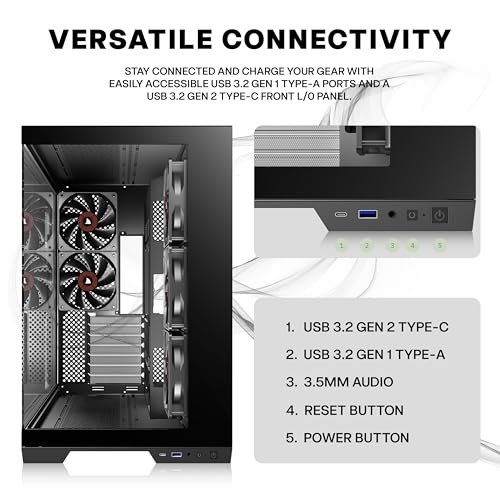
USB Type-C on the front I/O is a genuine selling point at this price. A lot of cases in the entry tier still ship with only USB Type-A ports on the front, which is increasingly annoying as more peripherals and devices use Type-C. Having it up front means you can plug in a modern phone, a controller, or a portable SSD without reaching around to the back of the machine. Small thing, but you notice it every time you need it.
The full front I/O complement is two USB 3.0 Type-A ports, one USB Type-C, and HD audio (headphone and microphone). That's a solid setup. The USB 3.0 ports will need a USB 3.0 header on your motherboard, and the Type-C will need either a USB 3.2 Gen 1 or Gen 2 Type-C header depending on what speed the case supports. Most modern ATX motherboards have these headers as standard, so it shouldn't be an issue for the majority of builds.
The power button placement and reset button are on the top of the case, which is the standard position for a mid-tower. Nothing unusual there. Some owners mention the power button has a satisfying tactile feel, which is a minor detail but one that contributes to the overall impression of quality. The front I/O panel as a whole feels like ANSAITE has paid attention to what people actually use rather than just ticking boxes on a spec sheet.
Build Quality and Materials
ANSAITE isn't a household name in the same way Fractal Design, Lian Li, or NZXT are. That's just a fact. So build quality is a legitimate concern when you're looking at a brand you haven't heard much about. The good news is that dozens of owner reviews with a positive overall rating is a decent signal that the case isn't falling apart on people. Owner reviews at this price point tend to be quite direct about build quality problems, and the feedback here is largely positive.
The steel used is SPCC (cold-rolled steel), which is standard for cases at this price. It's not going to be as thick as what you'd find in a premium Fractal or Corsair case, but owners aren't reporting flex or flimsiness. The tempered glass panels are the elements most likely to cause problems in transit or with rough handling, and there are a small number of mentions of glass arriving with minor marks, but nothing suggesting a systematic quality control issue. Tempered glass is tempered glass; it's tough but not indestructible, and careful handling during installation matters.
Panel alignment and fit are reported as good by most owners. Sharp edges are a concern with budget steel cases, and a handful of owners mention taking care during installation, which implies there are some edges that could catch you if you're not paying attention. That's not unusual at this price, and it's more a reminder to work carefully than a condemnation of the case. The overall finish is described as clean and the black powder coat looks good. For an entry-tier case, the build quality is solid enough that it's not going to embarrass a decent component build inside it.
How It Compares
The ANSAITE H9 sits in a competitive part of the market. At the entry price tier, it's up against some well-established options. The two most obvious comparisons are the Corsair 4000D Airflow and the Fractal Design Pop Air. Both are respected cases with strong reputations, and both are if you're shopping at this level.
The Corsair 4000D Airflow is a mesh-front design with strong airflow credentials. It supports up to 360mm radiators at the front and top, comes with two pre-installed fans, and has excellent cable management. It typically costs more than the H9, and it doesn't include as many fans out of the box. If airflow is your absolute priority, the 4000D Airflow wins on that front. But the H9 gives you more fans included, 420mm radiator support, and USB Type-C, all at a lower price point.
The Fractal Design Pop Air is another mesh-front option with Fractal's typically excellent build quality and cable management. It comes with two fans and supports 360mm radiators. Again, it's generally priced higher than the H9 and includes fewer fans. The Fractal's build quality edge is real, and the mesh front does better thermally than glass. But if you're budget-conscious and want a visually striking case with more fans included, the H9 makes a reasonable argument for itself.
| Feature | ANSAITE H9 | Corsair 4000D Airflow | Fractal Design Pop Air |
|---|---|---|---|
| Form Factor | Mid-Tower ATX | Mid-Tower ATX | Mid-Tower ATX |
| Front Panel | Tempered Glass | Mesh | Mesh |
| Included Fans | 5 x PWM | 2 x non-PWM | 2 x non-PWM |
| Max Front Radiator | 420mm | 360mm | 360mm |
| GPU Clearance | 420mm | 360mm | 341mm |
| CPU Cooler Height | 165mm | 170mm | 185mm |
| USB Type-C Front I/O | Yes | Yes | Yes |
| Tempered Glass Side | Yes | Yes | Yes |
| Price Tier | Entry | Mid-Range | Mid-Range |
| Airflow Design | Glass Front (limited) | Mesh Front (strong) | Mesh Front (strong) |

Final Verdict
The ANSAITE H9 is a case that punches above its weight in several meaningful ways. Five pre-installed PWM fans, 420mm radiator support at the front, 420mm GPU clearance, USB Type-C on the front panel, dual tempered glass, and a positive overall rating across dozens of real-world owners. At the entry price tier, that combination is genuinely impressive. This isn't a case that's cutting corners on the headline specs to look good on a listing page.
The honest caveat is the glass front. If you're building a system with a high-TDP CPU and a flagship GPU, the restricted intake airflow from the glass front panel is a real consideration. You'll want to either accept slightly warmer temperatures than a mesh-front case would give you, or compensate with a top-mounted exhaust radiator to move heat out quickly. For mainstream gaming builds with mid-range components, it's not a problem. For a 250W CPU plus a 350W GPU, you'd be better served by a mesh-front design.
Who's this for? Someone building their first proper gaming PC, or upgrading from an older case, who wants something that looks genuinely good and comes with enough fans to not immediately need to spend more money. The visual impact of dual tempered glass with five RGB-capable fans running is real, and at this price, it's hard to argue with the value on offer. The ATX standard compatibility means your motherboard choices are wide open, and the 420mm radiator support means you're not locked out of a serious liquid cooling upgrade later.
Who should skip it? Anyone prioritising maximum thermal performance over aesthetics should look at mesh-front alternatives. The Corsair 4000D Airflow is the obvious step up if airflow is your primary concern, and it's worth the extra spend if you're running a hot system. Similarly, if you're building a serious workstation or content creation rig that'll be under sustained load for hours, a case with better passive ventilation is the smarter long-term choice.
But for the target audience, which is most people building a gaming PC at a sensible budget, the ANSAITE H9 is a proper recommendation. It's well-reviewed, well-specced, and honestly good value. The few dozen owner reviews and a positive overall rating aren't lying to you. This case does what it says, and it looks good doing it.
What works. What doesn’t.
5 + 4What we liked5 reasons
- Five pre-installed PWM fans included, saving immediate extra spend
- 420mm front radiator support is unusually generous at this price tier
- USB Type-C on the front I/O is a practical, modern touch
- Dual tempered glass panels look genuinely premium for the money
- 420mm GPU clearance fits every current consumer graphics card
Where it falls4 reasons
- Glass front panel restricts intake airflow compared to mesh alternatives
- ANSAITE brand lacks the long-term reputation of Fractal or Corsair
- No vertical GPU mount option
- Minor sharp edge reports from a handful of owners during installation
Full specifications
6 attributes| Form factor | Mid-Tower |
|---|---|
| Fans included | 5 |
| MAX radiator MM | 420 |
| PSU support | ATX |
| Side panel | tempered glass |
| Supported motherboard | ATX, Micro-ATX, Mini-ITX |
If this isn’t right for you
2 options 8.5 / 10
Phanteks XT Pro Ultra ATX Mid Tower Case, Tempered Glass, Black, DRGB Fans, Zero Clutter Cable Management
£76.89 · Phanteks · Details

Got a motherboard yet?
4 reviewsIts Amazon listing lists ATX, Micro-ATX and Mini-ITX boards for this case. These ATX boards fit it.
Frequently asked
5 questions01Is the ANSAITE 420mm ATX PC Case- 5x Pre-Installed PWM Fans, Panoramic Mid-Tower Pc Case -USB Type-C,Large Dual Tempered Glass, Black,H9 good for airflow?+
It's decent but not class-leading on airflow, and that's specifically because of the glass front panel. Glass restricts intake airflow compared to mesh designs. The H9 mitigates this with five pre-installed PWM fans that can ramp up under load, and there are ventilation gaps around the front panel edges. For mainstream gaming builds with mid-range components, thermals are fine according to owner reports. For high-TDP builds running a 250W-plus CPU alongside a flagship GPU, you'd get better temperatures from a mesh-front alternative like the Corsair 4000D Airflow. The top panel supports a 360mm radiator as exhaust, which helps move heat out and partially compensates for the restricted front intake.
02What's the GPU clearance on the ANSAITE 420mm ATX PC Case- 5x Pre-Installed PWM Fans, Panoramic Mid-Tower Pc Case -USB Type-C,Large Dual Tempered Glass, Black,H9?+
The ANSAITE H9 supports GPUs up to 420mm in length. That covers every current consumer graphics card on the market, including triple-fan flagship models from NVIDIA and AMD which typically measure around 300mm to 340mm. You're very unlikely to hit this limit with any standard graphics card. There's no vertical GPU mount option, so all GPUs install in the standard horizontal orientation. If you're running a front 420mm radiator simultaneously with a very long GPU, double-check the specific clearance between the radiator and your GPU's length to make sure there's no conflict.
03Can the ANSAITE 420mm ATX PC Case- 5x Pre-Installed PWM Fans, Panoramic Mid-Tower Pc Case -USB Type-C,Large Dual Tempered Glass, Black,H9 fit a 360mm AIO?+
Yes, and it can actually do better than that. The front panel supports radiators up to 420mm, meaning you can fit a 420mm AIO (three 140mm fans) at the front, which is unusual at this price point. The top panel supports up to 360mm (three 120mm fans), so a 360mm AIO fits there as well. The rear supports a single 120mm fan or radiator. For most builds, a 360mm AIO at the top as exhaust works well with the included front fans as intake, giving a clean positive pressure setup. RAM clearance with a top-mounted radiator is against your specific motherboard and RAM height.
04Is the ANSAITE 420mm ATX PC Case- 5x Pre-Installed PWM Fans, Panoramic Mid-Tower Pc Case -USB Type-C,Large Dual Tempered Glass, Black,H9 easy to build in?+
Based on owner feedback, yes, reasonably so. The interior is reported as spacious, which helps when routing cables and installing components. The PSU shroud keeps the bottom of the case tidy and hides power supply cables from view. Cable routing holes in the motherboard tray are present and the rear panel clearance is adequate for standard cable bundles. A small number of owners mention taking care around some edges during installation, which is a common note on budget steel cases. Overall, the build experience is reported as straightforward rather than frustrating, which is the main thing you want at this price point.
05What warranty and returns apply to the ANSAITE 420mm ATX PC Case- 5x Pre-Installed PWM Fans, Panoramic Mid-Tower Pc Case -USB Type-C,Large Dual Tempered Glass, Black,H9?+
Specific warranty terms from ANSAITE aren't confirmed in the verified product data for this listing. When buying through Amazon UK, you're covered by Amazon's standard 30-day return window and the A-to-Z Guarantee, which protects your purchase if the item arrives damaged or not as described. For warranty queries beyond the return window, contact ANSAITE directly through the seller information on the Amazon listing.