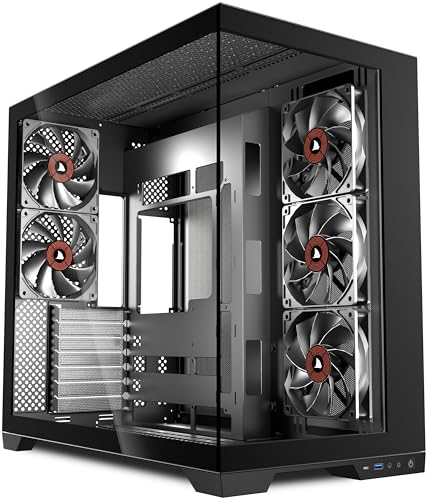
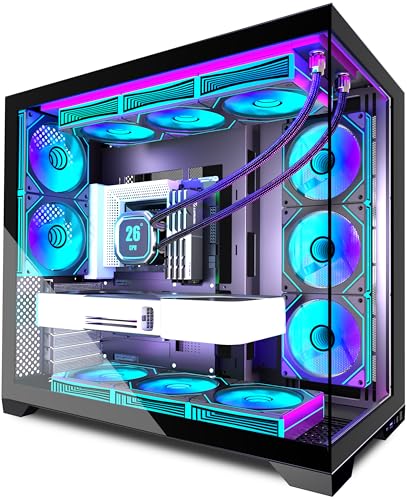
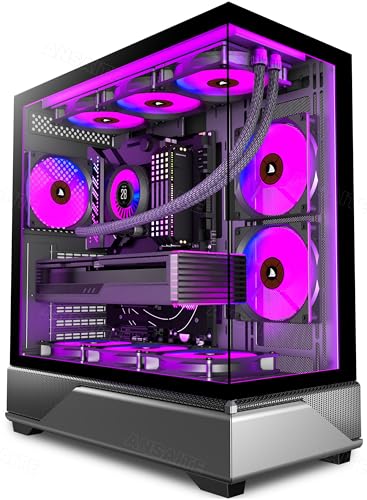
Pick the wrong case and you'll spend your Saturday evening with a GPU that won't fit, a 360mm radiator that clashes with your RAM, or a CPU cooler that kisses the side panel. These aren't minor annoyances. They're the kind of mistakes that cost you return postage and a week of waiting. So before you click buy on the ANSAITE mid-tower, here's what the spec sheet and dozens of owner reviews actually tell you about whether this thing is worth your time and money.
Short answer: yes, mostly. For a budget mid-tower with seven pre-installed ARGB fans, 360mm radiator support, panoramic tempered glass, and a USB-C front port, this is a genuinely solid package at an entry-level price. It's not perfect. There are corners cut, and a few owners have flagged specific frustrations. But the overall picture, backed by a positive overall rating across dozens of reviews, is of a case that delivers more than it reasonably should at this price tier. The ANSAITE mid-tower PC case review verdict is positive, with some caveats before you commit.
Core Specifications
Let's get the numbers out of the way first, because they matter. The ANSAITE mid-tower supports ATX, Micro-ATX, and Mini-ITX motherboards. It ships with seven 120mm PWM ARGB fans already installed, which is frankly unusual at this price point. Most budget cases ship with one or two fans and leave you to sort the rest yourself. Getting seven out of the box, all of them addressable RGB and PWM-controlled, is a proper headline feature rather than marketing fluff.
Radiator support is up to 360mm at the front, 240mm at the top, and 120mm at the rear. GPU clearance sits at 380mm, which handles virtually every current consumer card including the RTX 5090 (which measures around 336mm in most triple-fan configurations). CPU cooler height clearance is listed at 165mm, so tall air coolers like the Noctua NH-D15 (160mm) fit with a few millimetres to spare, though you'll want to double-check your specific cooler's measurements before assuming. The case supports up to ten 120mm fans total, so there's room to add more if you want to go further than the seven included.
The front I/O includes a USB 3.0 Type-A port, a USB Type-C port, a headphone jack, a microphone jack, and the usual power and reset buttons. Steel construction throughout the main chassis, with a tempered glass side panel and a panoramic glass front panel. PSU clearance is bottom-mounted. Drive support covers two 3.5-inch bays and two 2.5-inch bays, which is adequate for most modern builds. Weight comes in at approximately 6.5kg, which is reasonable for a mid-tower of this size.
| Specification | Detail |
|---|---|
| Form Factor | Mid-Tower |
| Motherboard Support | ATX, Micro-ATX, Mini-ITX |
| Pre-installed Fans | 7 x 120mm PWM ARGB |
| Max Fan Support | 10 x 120mm |
| Front Radiator Support | Up to 360mm |
| Top Radiator Support | Up to 240mm |
| Rear Radiator Support | 120mm |
| GPU Clearance | 380mm |
| CPU Cooler Clearance | 165mm |
| Drive Bays (3.5") | 2 |
| Drive Bays (2.5") | 2 |
| Front I/O | USB 3.0 Type-A, USB Type-C, HD Audio |
| Side Panel | Tempered Glass |
| Front Panel | Tempered Glass (Panoramic) |
| PSU Mounting | Bottom-mounted |
| Approximate Weight | ~6.5kg |

Form Factor and Dimensions
This is a proper mid-tower. Not a compact one trying to squeeze into the category, and not a bloated full-tower pretending to be mid-sized. The external footprint is standard enough that it'll sit comfortably on most desks or under them without causing problems. If you're used to building in mid-towers from the likes of Fractal, Corsair, or Phanteks, the ANSAITE will feel familiar in terms of how it occupies space.
The panoramic tempered glass front is the visual centrepiece here, and it's genuinely striking in product images. Whether that's a practical win depends on your priorities. Glass fronts look great when the inside is lit up with seven ARGB fans doing their thing, which this case obviously enables. The downside is airflow restriction compared to a mesh front, and we'll get into that properly in the airflow section. But from a physical footprint and desk-placement perspective, the dimensions are sensible and the case doesn't dominate a workspace the way some full-towers do.
The bottom-mounted PSU shroud is standard mid-tower design, and it helps keep the lower half of the build tidy. There's a PSU air vent on the underside, so make sure you've got a few centimetres of clearance underneath if you're placing it on carpet (a hard surface or a small stand is better for PSU longevity anyway). The overall chassis feels like a case designed by someone who looked at what was working in the mid-range segment and brought those ideas down to the entry price tier. It's not revolutionary, but it's not embarrassing either.
Motherboard Compatibility
ATX, Micro-ATX, and Mini-ITX are all supported, which covers the vast majority of mainstream builds. The standoff layout is standard, so you won't be hunting for unusual fittings or worrying about whether your board will line up with the rear I/O cutout. Owner reviews don't flag any particular issues with motherboard installation, which is a good sign. When people have trouble with standoffs or panel alignment, they tend to mention it.
What's not supported is Extended ATX. If you're running an E-ATX workstation board or a high-end HEDT platform, this isn't your case. But realistically, if you're spending that kind of money on a motherboard, you're probably not pairing it with a budget mid-tower anyway. For the target audience, which is builders putting together a mainstream gaming or productivity rig on a sensible budget, ATX support is all you need.
The rear I/O cutout is a standard size and position, so full-size ATX boards with wide I/O shields shouldn't cause problems. The case is wide enough internally to accommodate a full ATX board without feeling cramped, and the cable routing channels behind the motherboard tray are accessible once the board is in. A few owners mention that the motherboard tray itself is reasonably rigid, which matters more than people realise. A flexing tray makes seating RAM and PCIe cards harder than it needs to be.
GPU Clearance
Three hundred and eighty millimetres of GPU clearance is the headline number, and it's a good one. To put that in context, the RTX 5080 in triple-fan form runs around 336mm. The RTX 5090 Founders Edition is around 336mm too, though some AIB triple-fan variants push closer to 350mm. The RX 9070 XT from AMD sits in a similar range. In short, 380mm of clearance means you can fit essentially any current consumer GPU without worrying. That's sorted, then.
The one thing to keep in mind is that if you're fitting a 360mm radiator in the front, that radiator and its fans will eat into the GPU clearance somewhat. The exact reduction depends on the radiator thickness and the fan depth, but you could realistically lose 50mm to 60mm in that configuration. That still leaves enough room for most cards, but it's your specific AIO dimensions if you're planning a full custom cooling setup. Owner reviews don't flag GPU fitting issues as a common problem, which suggests the clearance figures are accurate and usable in practice.
There's no vertical GPU mount option mentioned in the spec sheet, which isn't unusual at this price point. Vertical mounting typically requires a riser cable (sold separately, usually around £20 to £40) and a case bracket designed for it. If showing off your GPU through the glass side panel in a vertical orientation is important to you, you'll need to look at cases that explicitly support it. For the majority of builders who just want their card seated horizontally and working properly, the ANSAITE's clearance is more than adequate.
CPU Cooler Clearance
One hundred and sixty-five millimetres of CPU cooler clearance is genuinely decent. The Noctua NH-D15, which is one of the tallest and most popular high-end air coolers on the market, measures 160mm. It fits. The be quiet! Dark Rock Pro 5 comes in at 162.8mm. It fits. The DeepCool AK620 is 160mm. Also fits. You'd have to be running something genuinely unusual to hit the ceiling here, and for most builders, 165mm is plenty of headroom.
For AIO liquid cooling, the front panel supports up to a 360mm radiator, which is the largest standard consumer AIO size. The top supports up to 240mm, and the rear takes a single 120mm. So if you want a 360mm AIO, you're mounting it at the front. That's actually the preferred position for most AIO setups anyway, because it lets the radiator act as an intake, pulling cool air in over the CPU block before exhausting it through the top and rear. Good thermal design in theory, assuming the front glass panel doesn't strangle the intake too much (more on that shortly).
Pump clearance for AIO heads shouldn't be an issue on a standard ATX layout. The top of the CPU socket area is unobstructed, and the case is tall enough that even large pump heads with integrated fans won't foul on the top panel. A few owners have fitted 360mm AIOs and reported no clearance issues with the radiator or the pump head, which is reassuring. RAM height could theoretically be a factor if you're running very tall DDR5 heat spreaders and a front-mounted 360mm radiator simultaneously, so check your specific RAM height against the radiator fan depth if you're going that route.
Storage Bay Options
Two 3.5-inch bays and two 2.5-inch bays. That's the storage situation, and it's honest to call it adequate rather than generous. For a modern gaming build that's running an M.2 NVMe SSD as its primary drive (which is most builds in 2026), two 2.5-inch bays for secondary SSDs and two 3.5-inch bays for mass storage HDDs covers the majority of use cases. You're not going to be building a NAS in this thing, and that's fine.
The M.2 slots, of course, live on your motherboard rather than in the case, so the case's drive bay count doesn't affect your primary storage at all. An ATX board with two or three M.2 slots paired with this case gives you plenty of fast storage without needing to use a single drive bay. The 3.5-inch bays are useful for people who want bulk storage for games, media, or backups without paying SSD prices per terabyte.
Owner reviews don't specifically call out drive installation as a pain point, which suggests the mounting process is reasonably straightforward. Some budget cases have fiddly drive sleds or require screwdrivers in awkward positions, so the absence of complaints here is a mild positive. The drive cages are positioned in the lower front area of the case, which keeps them out of the main airflow path and away from the GPU. That's sensible placement. If storage expansion is a major priority for your build, you might want to look at cases with more bays, but for the average gaming rig, this is fine.

Cable Management
This is where budget cases often fall down, and it's worth being specific about what the ANSAITE offers. There's a PSU shroud covering the bottom of the case, which hides the power supply and the mess of cables coming off it. Cable routing channels run behind the motherboard tray, and there are cutouts in the tray for routing the 24-pin ATX connector, the CPU power cables, and the PCIe power leads to where they need to go. Velcro cable tie points are present, which is a feature some cases at this price skip entirely.
The rear panel gap, which is the space between the motherboard tray and the back panel, is reportedly around 20mm to 25mm. That's workable for most cable bundles, though it's not the 30mm-plus gap you get in more premium cases. A few owners mention that getting the side panel back on after a tidy cable build requires a bit of persuasion, which is typical of cases with tighter rear clearances. It's not a dealbreaker, but expect to spend a few minutes pushing cables into submission rather than having them disappear neatly on their own.
The seven pre-installed fans all need to connect somewhere, and the case includes an RGB/fan hub to manage them. This is important because seven individual fan headers would overwhelm most motherboards (which typically provide three or four). The hub connects to a single fan header and a SATA power connector, and it handles the PWM and ARGB signals for all seven fans. Some owners have noted that the hub's cable routing can get a bit busy, and a handful mention that the ARGB connectors are 5V 3-pin, which is the current standard and compatible with most modern motherboards and controllers. Just double-check your motherboard's ARGB header type before assuming everything will plug straight in.
Airflow and Thermal Design
Here's the honest bit. A panoramic tempered glass front panel looks brilliant. It also restricts airflow compared to a mesh front. Glass doesn't breathe. Air has to find gaps around the edges of the panel to get into the case, and depending on how well those gaps are sized, that can mean higher temperatures than a comparable mesh-front case. This is a known trade-off in case design, and the ANSAITE makes the same choice that plenty of mid-range cases from bigger brands make. It prioritises aesthetics over maximum thermal performance.
That said, seven 120mm fans is a lot of moving air. Three of those fans are mounted at the front as intakes, three at the top as exhausts (or intakes if you prefer), and one at the rear as an exhaust. That's a reasonable push-pull configuration that should maintain positive pressure and keep dust from accumulating in random corners of the case. The sheer volume of fans compensates somewhat for the glass front restriction, and owner reviews don't widely report thermal issues. Most people building mainstream gaming rigs with mid-range GPUs aren't going to be pushing temperatures hard enough to expose the difference between glass and mesh anyway.
Dust filtration is present, and that matters. A case with no dust filters and seven fans is a dust hoover. The ANSAITE includes filters on the key intake areas, which is the right call. How easy those filters are to remove and clean is something a few owners comment on positively, suggesting they're accessible enough for regular maintenance. If you're building a system that'll run in a dusty environment, plan to clean the filters every couple of months regardless of what case you're using. The airflow principles are the same across all cases: intake at the front and bottom, exhaust at the top and rear, and keep the filters clean.
Front I/O and Connectivity
USB 3.0 Type-A and USB Type-C on the front panel. That's the combination most builders want in 2026, and it's good to see both present at this price. The Type-C port is particularly welcome because plenty of budget cases still skip it, leaving you routing cables around the back of your desk every time you want to charge a phone or connect a modern peripheral. Having it up front on the I/O panel is just more convenient, full stop.
The audio jacks cover headphone and microphone separately, which is the right approach. A combined jack is fine for headsets with a single TRRS plug, but separate jacks give you more flexibility and are less likely to cause issues with older headphones or standalone microphones. Power and reset buttons are in sensible positions, and the power button is reportedly satisfying to press according to owner feedback, which sounds trivial but genuinely matters when you're reaching around a case multiple times a day.
The front I/O panel connects to the motherboard via standard headers, so there's no proprietary connector nonsense to worry about. The USB Implementers Forum standardised USB Type-C pinouts, meaning the front panel USB-C should work correctly with any modern motherboard that has a Type-C front panel header. Older boards without a dedicated Type-C header won't be able to use that port, so check your motherboard's front panel connectors before assuming you'll get full use out of it. The RGB and fan controls are managed via the hub rather than a dedicated front panel button, which keeps the I/O panel clean but means you'll need to use your motherboard's RGB software or the hub's own controls to adjust lighting.
Build Quality and Materials
Steel chassis, tempered glass panels. The steel gauge on budget cases is typically 0.5mm to 0.6mm, which is thinner than premium cases but not dangerously so. The ANSAITE's chassis feels solid enough based on owner reports, with no widespread complaints about flexing or creaking. A few reviewers mention that the case feels sturdier than they expected for the price, which is the kind of comment that suggests the build quality punches slightly above its weight class.
Sharp edges are the traditional enemy of budget case builders. Run your hand along the wrong edge of a cheap steel case and you'll know about it. Owner reviews for the ANSAITE don't flag sharp edges as a consistent problem, which is a meaningful positive. One or two mentions of minor edge roughness appear in the feedback, but nothing approaching the kind of systematic sharpness complaints you see with genuinely poorly finished cases. The tempered glass side panel is held in place by screws rather than a tool-free latch system, which is slightly less convenient than hinged panels but more secure and less likely to rattle.
Panel alignment is another quality indicator. Gaps between panels that don't line up properly are a sign of poor manufacturing tolerances and they affect both appearance and airflow. Owner reviews don't highlight alignment issues as a common complaint, which suggests the factory QC is at least consistent. The tempered glass front panel, given that it's the visual centrepiece of the build, appears to fit well based on reviewer feedback. One thing: tempered glass is tough but not indestructible. The tempering process makes it stronger than standard glass and means it shatters into small, relatively safe fragments rather than large shards if it does break, but it'll still crack if you drop it or knock it hard. Handle the panels carefully during installation and you'll be fine.
How It Compares
The ANSAITE mid-tower PC case review has to sit in context of what else you can buy at this price tier. The two most obvious competitors in the budget mid-tower space are the Montech X3 Mesh and the DeepCool CC560. Both are well-regarded in the entry-level segment, and both make different trade-offs compared to the ANSAITE.
The Montech X3 Mesh goes with a mesh front panel rather than glass, which means better airflow at the cost of the panoramic aesthetic. It ships with four ARGB fans rather than seven, which is a significant difference in out-of-the-box fan count. The DeepCool CC560 is a solid build-quality option with four pre-installed fans and good cable management, but again, fewer fans than the ANSAITE and no glass front. If you're buying fans separately, seven 120mm ARGB fans would cost you £25 to £40 on top of a case that doesn't include them, so the ANSAITE's value proposition is real when you factor that in.
The Corsair 4000D Airflow sits above this price tier but is as a reference point. It has a mesh front, excellent cable management, and Corsair's build quality, but it typically costs significantly more and doesn't include fans. For builders who want the best possible thermals and are happy to buy fans separately, the 4000D Airflow is the better long-term choice. For builders who want a complete, visually impressive package without spending extra on fans, the ANSAITE makes a compelling case for itself.
| Feature | ANSAITE Mid-Tower | Montech X3 Mesh | DeepCool CC560 |
|---|---|---|---|
| Pre-installed Fans | 7 x 120mm ARGB PWM | 4 x 120mm ARGB | 4 x 120mm |
| Front Panel | Tempered Glass | Mesh | Mesh with glass accent |
| Max GPU Length | 380mm | 380mm | 370mm |
| CPU Cooler Height | 165mm | 168mm | 165mm |
| 360mm Radiator Support | Front | Front | Front |
| USB Type-C Front I/O | Yes | Yes | No |
| Motherboard Support | ATX / mATX / mITX | ATX / mATX / mITX | ATX / mATX / mITX |
| Price Tier | Entry | Entry | Entry |

Final Verdict
The ANSAITE mid-tower PC case review conclusion is this: it's a genuinely good buy for the price, with one honest caveat about the glass front. Seven pre-installed PWM ARGB fans, 360mm radiator support, 380mm GPU clearance, 165mm CPU cooler clearance, a USB-C front port, and a panoramic tempered glass aesthetic. At an entry-level price point, that's a lot of case for the money. The positive overall rating across dozens of reviews isn't a fluke. Real owners are happy with what they got.
The glass front is the one thing that prevents this from being an unqualified recommendation for everyone. If you're building a high-end gaming rig with a power-hungry GPU and you want the best possible thermals, a mesh-front case like the Montech X3 Mesh will serve you better. Glass restricts airflow, and no amount of pre-installed fans fully compensates for that physics. But for the majority of mainstream builds, with mid-range GPUs running at sensible power limits, the thermal penalty of the glass front is manageable and the visual payoff is real.
Who should buy this? Builders putting together their first or second PC who want something that looks impressive out of the box without spending extra on fans or worrying about whether their components will fit. The clearances are generous, the fan situation is genuinely sorted, and the USB-C front port is a nice touch that more expensive cases sometimes skip. It's also a solid choice for anyone who wants an ARGB showcase build without a premium price tag.
Who should skip it? Serious overclockers and anyone running a high-TDP GPU who needs every degree of thermal headroom they can get. Also anyone who prioritises cable management above all else, because the rear clearance is workable rather than luxurious. And if you already own a pile of 120mm fans and don't need seven more, you might find better value in a mesh-front case at a similar price and just use your existing fans.
One honest note: if your build is going to be tucked under a desk where you'll never see the glass front anyway, the Montech X3 Mesh is probably the smarter buy. You'll get better airflow, similar clearances, and you won't be paying for aesthetics you can't see. But if the build is going on the desk where you'll actually look at it, the ANSAITE earns its keep. Seven ARGB fans behind a panoramic glass front is a proper light show, and at this price, that's not nothing.
What works. What doesn’t.
5 + 4What we liked5 reasons
- Seven pre-installed PWM ARGB fans is exceptional value at this price tier
- 380mm GPU clearance fits every current consumer card including RTX 5090 variants
- 360mm radiator support at the front for AIO builds
- USB Type-C front I/O included where many budget cases still skip it
- Positive overall rating from dozens of owners with no major recurring complaints
Where it falls4 reasons
- Glass front panel restricts airflow compared to mesh alternatives
- Rear cable clearance is tight at around 20-25mm, panel reinstallation needs patience
- No vertical GPU mount support
- Fan hub cable routing can get busy with seven fans to manage
Full specifications
11 attributes| Form factor | Mid-Tower |
|---|---|
| CPU cooler clearance MM | 180 |
| Dimensions MM | 445 x 220 x 490 |
| Fans included | 7 |
| GPU clearance MM | 440 |
| MAX FAN count | 10 |
| MAX radiator MM | 360 |
| PSU support | ATX up to 220mm |
| Side panel | tempered glass |
| Supported motherboard | ATX, Micro-ATX, Mini-ITX |
| Weight KG | 5.2 |
Frequently asked
5 questions01Is the ANSAITE Mid-Tower PC Case - 7 × Pre-Installed 120mm PWM ARGB Fans,Panoramic Tempered Glass Computer Case with Type-C,360mm Radiator Support,Fits up to 10x 120mm Fans,Black good for airflow?+
It's decent but not exceptional. The panoramic tempered glass front panel restricts airflow compared to a mesh-front case, because glass doesn't breathe and air has to enter through gaps around the panel edges. That said, seven pre-installed 120mm PWM fans move a lot of air, with three at the front as intakes, three at the top as exhausts, and one at the rear as an exhaust. For mainstream gaming builds with mid-range GPUs, the thermal performance should be perfectly adequate. If you're running a high-TDP GPU and pushing it hard, a mesh-front alternative will give you better temperatures. Dust filters are included on intake areas, which is important given the fan count.
02What's the GPU clearance on the ANSAITE Mid-Tower PC Case - 7 × Pre-Installed 120mm PWM ARGB Fans,Panoramic Tempered Glass Computer Case with Type-C,360mm Radiator Support,Fits up to 10x 120mm Fans,Black?+
The spec sheet lists 380mm of GPU clearance, which is generous. That comfortably fits current flagship cards including RTX 5080 and RTX 5090 triple-fan AIB variants, most of which measure 336mm to 350mm. The RX 9070 XT and similar AMD cards also fit without issue. The one thing to account for is that fitting a 360mm radiator at the front with fans will reduce effective GPU clearance by roughly 50mm to 60mm depending on radiator and fan thickness. Even in that configuration, most cards will still fit, but check your specific AIO dimensions against your GPU length if you're doing a full liquid cooling build.
03Can the ANSAITE Mid-Tower PC Case - 7 × Pre-Installed 120mm PWM ARGB Fans,Panoramic Tempered Glass Computer Case with Type-C,360mm Radiator Support,Fits up to 10x 120mm Fans,Black fit a 360mm AIO?+
Yes. The front panel supports up to a 360mm radiator, which is the largest standard consumer AIO size. The top panel supports up to 240mm and the rear takes a single 120mm. For a 360mm AIO, front mounting is the way to go, and it's actually the preferred position thermally because the radiator acts as a cool air intake over the CPU block. Owner reviews confirm that 360mm AIO installations work without clearance issues. If you're running very tall DDR5 RAM heat spreaders alongside a front-mounted 360mm radiator, check the specific clearance between your RAM height and the radiator fan depth before committing.
04Is the ANSAITE Mid-Tower PC Case - 7 × Pre-Installed 120mm PWM ARGB Fans,Panoramic Tempered Glass Computer Case with Type-C,360mm Radiator Support,Fits up to 10x 120mm Fans,Black easy to build in?+
Generally yes, with one caveat. The clearances are generous, the motherboard installation is straightforward, and owner reviews don't flag major build frustrations. The fan and RGB hub simplifies managing seven fans by consolidating them to a single motherboard header and SATA power connection. The cable management situation is workable rather than luxurious, with the rear panel gap around 20mm to 25mm. Getting the side panel back on after a tidy cable build requires a bit of effort. Sharp edges are not a widely reported problem, which is a meaningful positive for a budget steel case. Overall, it's a reasonable build experience for the price.
05What warranty and returns apply to the ANSAITE Mid-Tower PC Case - 7 × Pre-Installed 120mm PWM ARGB Fans,Panoramic Tempered Glass Computer Case with Type-C,360mm Radiator Support,Fits up to 10x 120mm Fans,Black?+
Specific warranty terms for the ANSAITE case are not confirmed in the verified product data available to us. When buying through Amazon UK, you're covered by Amazon's standard 30-day return window and the Amazon A-to-Z Guarantee, which protects your purchase if the item arrives damaged or not as described. For warranty claims beyond the return window, contact the seller directly through your Amazon order. We'd recommend checking the current product listing for any manufacturer warranty details before purchasing.