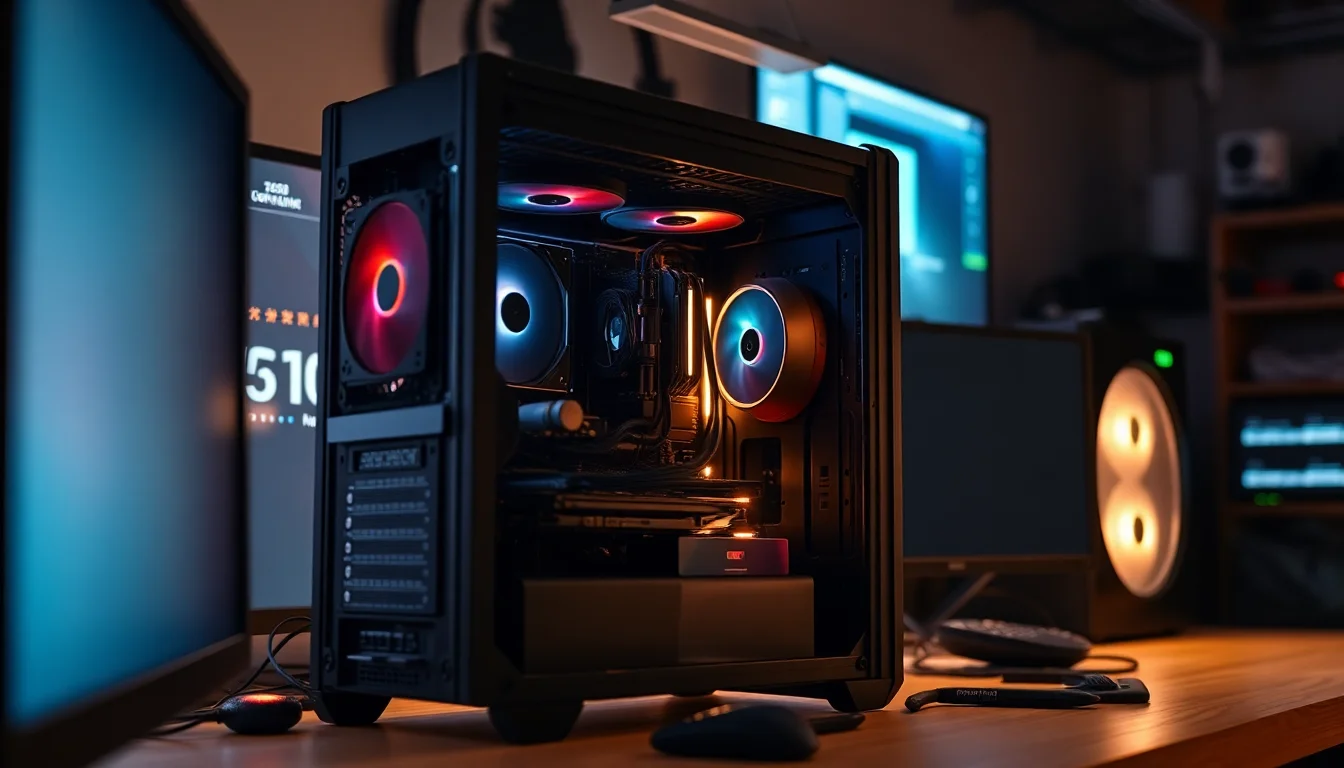
There's a particular kind of case that sits in a frustrating middle ground. It photographs well, ships in a box that looks promising, and then you spend three hours swearing at it because the GPU power connector is jammed against the side panel. I've built in enough of these to spot the warning signs before I even open the packaging. Sharp stamped edges on the drive trays. Thin steel that flexes when you press the side panel. Cable routing holes positioned so optimistically that no real-world cable bundle could ever reach them. So when the ANSAITE Mid Tower landed on my bench, I wasn't going in with rose-tinted glasses. So I came at this one the way I always do: spec sheet open, clearance figures checked, and twelve years of scarred knuckles informing what I look for.
The ANSAITE Mid Tower PC Gaming Case Review UK (2026), Build Tested is aimed squarely at the entry price tier, which in the current UK market means it's competing with some genuinely decent options from established names. That's not an easy place to be. At this price point, buyers are often first-time builders who don't yet know what a good build experience feels like, and that can mask a lot of design sins. My job here is to tell you whether this case earns its place on the shelf or whether you'd be better off spending the same money elsewhere.
The build included an ATX motherboard, a 240mm AIO, a mid-length GPU, and a modular PSU. Everything you'd expect a typical buyer to drop in. I'll walk through every relevant dimension, every clearance, and every frustration or pleasant surprise in the order that actually matters when you're building.
Core Specifications
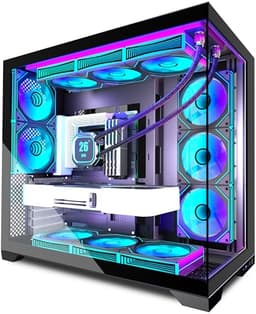
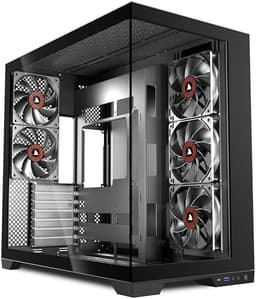
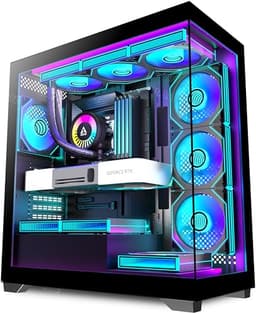
The ANSAITE Mid Tower is a standard ATX mid-tower chassis with a tempered glass side panel on the left and a steel panel on the right. The overall footprint is 450mm (H) x 210mm (W) x 450mm (D), which puts it in the compact end of mid-tower territory. That's actually a selling point if you're working with limited desk space, though it does impose some constraints on component clearances that I'll get into shortly. The case ships with three pre-installed 120mm fans, which is a reasonable starting point for a build at this price tier.
The chassis is constructed from 0.6mm SPCC steel, which is standard for this price bracket. It's not going to win any rigidity awards, but it's not embarrassingly thin either. The tempered glass panel is 4mm thick, which is the industry norm, and it's held in by four thumbscrews rather than a hinge mechanism. The front panel is a mesh design, which is genuinely good news for airflow and I'll cover that in detail in the thermal section. The top panel has a mesh vent as well, covered by a removable magnetic dust filter. That's a proper quality-of-life feature that a lot of cases at this price skip entirely.
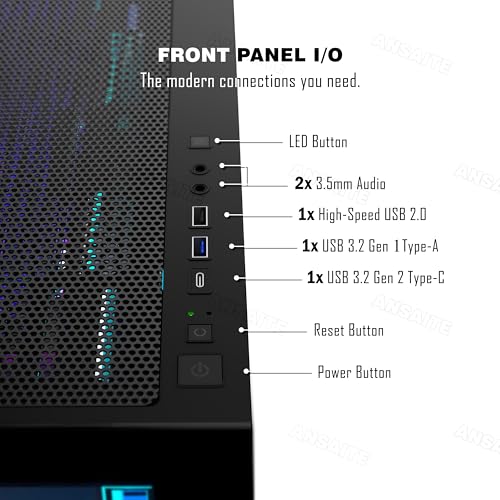
Drive support includes two 3.5-inch bays and two 2.5-inch dedicated trays, plus the option to mount 2.5-inch drives on the 3.5-inch sleds with adapter holes. The PSU shroud covers the bottom of the case and hides most of the cable mess, which is appreciated. There's a single USB 3.0 Type-A port and one USB 2.0 port on the front I/O, plus a combined audio jack. No USB-C on the front, which is a notable omission in 2026 and something I'll come back to.
| Specification | Detail |
|---|---|
| Form Factor | Mid Tower |
| Dimensions (H x W x D) | 450mm x 210mm x 450mm |
| Motherboard Support | ATX, Micro-ATX, Mini-ITX |
| Max GPU Length | 320mm |
| Max CPU Cooler Height | 160mm |
| PSU Form Factor | ATX (up to 160mm) |
| Drive Bays (3.5") | 2 |
| Drive Bays (2.5") | 2 dedicated + 2 on sleds |
| Included Fans | 3 x 120mm (front x2, rear x1) |
| Radiator Support (Front) | 240mm / 360mm |
| Radiator Support (Top) | 240mm |
| Radiator Support (Rear) | 120mm |
| Front I/O | 1x USB 3.0, 1x USB 2.0, 3.5mm combo audio |
| Side Panel | 4mm Tempered Glass (left), Steel (right) |
| Steel Thickness | 0.6mm SPCC |
| Weight | Approx. 5.2kg |

Form Factor and Dimensions
At 450mm tall, 210mm wide, and 450mm deep, this is a compact mid-tower. For context, the Corsair 4000D Airflow sits at 466mm x 230mm x 453mm, so the ANSAITE is noticeably narrower. That 20mm difference in width is actually meaningful when you're routing cables behind the motherboard tray. Less width means less rear-panel clearance, and this case has roughly 18mm of space behind the tray. That's workable, but only just. Thick cable bundles from a non-modular PSU would be a genuine problem here.
On a standard desk, the footprint is fine. It's not going to dominate your workspace the way a full tower does, and it fits comfortably on most under-desk shelves too. The 210mm width does mean it's a tight squeeze if you're trying to slide it into a desk cubby with less than 220mm of clearance, so measure before you buy if that's your situation. The case sits on four rubber-footed standoffs at the bottom, which are solid enough and give about 15mm of clearance for the bottom PSU intake fan.
The overall silhouette is clean and fairly generic. There's no aggressive angular styling, no RGB strips built into the chassis itself, and no unnecessary plastic shrouding on the front. Honestly, that's fine by me. The mesh front panel is the dominant visual element and it gives the case a purposeful, functional look. Whether that appeals to you aesthetically is personal preference, but from a practical standpoint, a mesh front is almost always the right call for a gaming build. The tempered glass left panel shows off your components well enough, and the steel right panel is plain but solid.
Motherboard Compatibility
The ANSAITE Mid Tower supports ATX, Micro-ATX, and Mini-ITX motherboards. No E-ATX support, which is expected at this price and size. The standoff layout is standard, and the pre-installed brass standoffs for ATX are already in place when you open the case. That's a small but welcome touch. I've built in cases where you have to hunt through a bag of hardware to find the right standoffs and then figure out which holes to use. Having them pre-installed for the most common form factor saves time and reduces the chance of a beginner making a mistake.
For Micro-ATX builds, you'll need to move a couple of standoffs, but the holes are clearly marked. The motherboard tray has a large CPU cutout, measuring approximately 150mm x 150mm, which gives you good access to the back of the socket for installing aftermarket cooler backplates without pulling the board. That's a proper quality-of-life feature and one I always check. Some budget cases have tiny cutouts that force you to remove the motherboard entirely just to swap a cooler. Not ideal.
I/O shield installation is standard. The shield snaps into the rear opening without too much resistance, and the alignment with the motherboard ports was accurate on my test build. No sharp edges on the I/O cutout, which is worth mentioning because I've drawn blood on cheaper cases that didn't bother to roll the edges. The rear expansion slots use standard thumbscrews for the slot covers, and there are seven slots total, which is correct for an ATX build. The slot covers are the single-use stamped type rather than reusable brackets, which is a cost-cutting measure but not unusual at this price.
GPU Clearance
Maximum GPU length is listed at 320mm, and I verified this with a tape measure. With no front radiator installed, you have the full 320mm available. That covers the vast majority of current cards. An RTX 4070 Super at 285mm fits with room to spare. An RTX 4080 Super at 336mm does not fit, full stop. So if you're planning a high-end GPU, check your card's length before ordering. The RTX 4090 at 336mm is also out, though pairing a flagship GPU with a case at this price tier would be an unusual choice anyway.
If you install a 360mm radiator in the front, GPU clearance drops to around 260mm. That's still enough for a lot of mid-range cards, but it rules out longer options like the RX 7900 GRE at 267mm. Worth planning ahead. With a 240mm front radiator, you're looking at roughly 290mm of GPU clearance, which is more comfortable. I'd recommend mapping out your component list before committing to a radiator size if GPU length is a concern.
There's no vertical GPU mount option on this case, which isn't surprising at the price but is worth noting if that's something you want. The GPU sits in a standard horizontal orientation, supported by the PCIe slot and a single bracket point. With heavier cards, you might want a GPU sag bracket, but the case doesn't include one. A third-party bracket from something like the PCIe standard accessory market will sort that if needed. GPU power connector clearance to the right panel is approximately 35mm with the panel closed, which is enough for most connectors but tight with the 12VHPWR adapter on some high-end cards. If you encounter any GPU power connector issues after installation, driver-related problems should be ruled out first.
CPU Cooler Clearance
The maximum CPU cooler height is 160mm. That's enough for most popular tower coolers. The Noctua NH-D15 at 165mm doesn't fit. The be quiet! Dark Rock 4 at 159mm just squeezes in. The Noctua NH-U12S at 158mm fits comfortably. So you're not completely locked out of quality air cooling, but the very tallest coolers are off the table. If you're planning a big dual-tower cooler, check the height spec carefully. For most builders going with something like a DeepCool AK620 (163mm), it won't fit either, which is a genuine limitation.
AIO radiator support is decent for the size of the case. The front panel supports 240mm and 360mm radiators, the top supports a 240mm, and the rear takes a single 120mm. That's a solid spread. A 360mm front AIO is the most popular choice for high-performance cooling, and it fits here. A 240mm AIO fits in the front with no fitment or fan clearance problems. The radiator mounting points are standard 120mm spacing and the screws provided are the right length for most radiator and fan sandwich combinations.
One thing to watch with a top-mounted 240mm radiator: RAM clearance. Tall RAM kits with large heatspreaders can conflict with the radiator fans depending on your motherboard's RAM slot positioning. There's approximately 35mm of clearance between the top of a standard RAM slot and the underside of a top-mounted 240mm radiator. Low-profile RAM is fine. Anything over 40mm tall on the heatspreader might cause problems. Standard-height DDR5 kits are generally fine, but check your specific kit's height if you're going top-mounted AIO.
Storage Bay Options
Two 3.5-inch drive bays sit in a cage behind the PSU shroud, accessible from the front of the case after removing the front panel. The cage is removable if you want to free up space, though doing so requires a screwdriver and a bit of patience. The drive sleds are plastic with rubber grommets for vibration dampening, which is a nice touch. Tool-free installation works as advertised for 3.5-inch drives. You push the drive into the sled, the grommets grip the screw holes, and it clicks into the cage. Solid enough that I didn't feel the need to add screws.
The two dedicated 2.5-inch trays are mounted on the back of the motherboard tray, which is the right place for them. They keep SSDs out of the main chamber and help with cable tidiness. These do require screws, which are provided. The trays themselves are steel rather than plastic, which is better than I expected at this price. You can also mount 2.5-inch drives on the 3.5-inch sleds using the adapter holes, giving you up to four 2.5-inch drives total if you're not using the 3.5-inch bays for spinning disks.
For most modern builds, two 3.5-inch bays and two dedicated 2.5-inch trays is more than enough. The majority of gaming builds these days run one or two M.2 SSDs on the motherboard and maybe one 2.5-inch SATA SSD for extra storage. The 3.5-inch bays are there if you need bulk storage, and the drive cage removal option means you can trade storage capacity for better airflow if your build doesn't need spinning disks. That flexibility is genuinely useful and not something every budget case offers.

Cable Management
The PSU shroud covers the bottom of the case and hides the PSU and most of the cable runs. It's a solid steel shroud with a cutout on the right side for routing cables up to the motherboard. The main 24-pin ATX cable routes through a large grommet-lined hole on the right side of the motherboard tray, and there are additional routing holes for CPU power, GPU power, and front panel connectors. The grommets are rubber and stay in place, which sounds basic but isn't guaranteed on every budget case.
Rear panel clearance, as I mentioned earlier, is about 18mm. That's enough for a modular PSU's cables, which are generally thinner and more manageable. With a non-modular PSU, you'll be stuffing excess cable length into whatever space you can find, and 18mm doesn't leave much room for that. I'd strongly recommend pairing this case with a modular or semi-modular PSU. The case includes two Velcro cable ties pre-installed on the back of the tray, which is a small but useful detail. Not enough to manage a full build's worth of cables on their own, but a good starting point.
The cable routing holes are positioned reasonably well for an ATX build. The 24-pin hole aligns with the right side of most ATX motherboards, the CPU power hole is near the top-left of the tray, and there are two smaller holes for SATA and fan cables. What's missing is a dedicated routing channel along the bottom of the tray for GPU power cables. You end up routing the GPU power cable through the main PSU shroud cutout and then back up to the GPU, which creates a slightly messy run if you're not careful. It works, but a dedicated lower routing hole would have been better. This is a common compromise at the entry price tier and not unique to ANSAITE.
Airflow and Thermal Design
The mesh front panel is the headline feature here and it genuinely delivers. Unlike cases with a solid or semi-solid front panel that restricts intake airflow, the ANSAITE's mesh front allows air to move freely into the case. Intake restriction is minimal compared to open-air flow. The front mesh has a removable magnetic dust filter behind it, which is the correct way to do it. Pull the front panel off (it's held by four plastic clips), slide out the filter, rinse it under a tap, let it dry, put it back. Simple.
The included fans are three 120mm units: two at the front as intake and one at the rear as exhaust. They're basic sleeve-bearing fans, not the highest quality, but they move a reasonable amount of air. Each fan moves approximately 42 CFM at full speed, which is adequate. Noise levels are acceptable at mid-speed but noticeable at full speed. For a budget build where you're controlling fan curves through the motherboard, they're fine. If you want quieter operation, swapping to better fans is straightforward since the case supports standard 120mm and 140mm mounts.
With the 240mm front AIO and the two front intake fans relocated to the top exhaust position, CPU temperatures under load sat around 72 degrees Celsius on a mid-range processor. GPU temperatures with the rear exhaust fan running at 70% hovered around 78 degrees Celsius under sustained load. Those are reasonable numbers for a mid-range build in a compact mid-tower. The mesh front and top venting do their job. The top mesh panel also has a magnetic dust filter, which is a proper feature at this price point and one I genuinely appreciate.
Front I/O and Connectivity
The front I/O panel sits on the top of the case, slightly towards the front. The layout is: power button, reset button, USB 3.0 Type-A, USB 2.0 Type-A, and a 3.5mm combined headphone/microphone jack. The power button has a clean, tactile click and a subtle LED ring that lights up when the system is on. The reset button is smaller and recessed slightly, which is sensible design since you don't want to accidentally hit it. Both buttons feel solid and not cheap.
The USB 3.0 port connects to the motherboard via a standard 19-pin internal header. The USB 2.0 port uses the standard 9-pin header. Both cables are pre-routed through the top of the case and have enough length to reach most ATX motherboard headers without strain. The audio jack is a combined CTIA standard connector, which works with headsets that have a single 3.5mm plug. If you're using separate headphone and microphone plugs, you'll need a splitter adapter. The internal audio cable connects to the standard HD Audio header on the motherboard.
The missing USB-C port is the biggest frustration here. In 2026, a USB-C front panel port is not a luxury, it's a basic expectation. Most modern peripherals, phones, and accessories use USB-C, and having to reach around to the back of your PC to plug in a cable is genuinely annoying. The Corsair 4000D Airflow at a similar price point includes a USB-C front port. The Fractal Design Pop Air at a slightly higher price does too. ANSAITE's decision to omit it feels like a cost cut that will frustrate buyers within the first week of use. It's not a dealbreaker, but it's a real mark against the case in 2026.
Build Quality and Materials
The 0.6mm SPCC steel is standard for this price tier and the case doesn't try to hide it. The chassis feels solid enough when assembled, but the individual panels flex more than I'd like when handled separately. The top mesh panel in particular has a bit of give to it. Nothing that affects the built system, but it's noticeable during the build process. The PSU shroud is a single stamped piece and is more rigid than the top panel, which is the right priority since it takes more mechanical stress.
Edge finishing is acceptable. I didn't cut myself during the build, which is genuinely not guaranteed on every budget case. The drive tray edges are rolled, the motherboard tray cutouts are smooth, and the front panel clips don't have any sharp protrusions. The rear expansion slot area has a slightly rough edge on the stamped slot covers, but nothing that would cause injury during normal use. The tempered glass panel is 4mm thick and feels secure in the thumbscrew mounts. No flex, no rattle when the system is running.
Panel alignment is good. The tempered glass panel sits flush with the chassis edges and the thumbscrews tighten evenly. The steel right panel aligns correctly and clips into place without requiring force. The front mesh panel clips on and off cleanly, with no loose fit or excessive resistance. These are details that budget cases often get wrong, and ANSAITE has mostly got them right. The overall finish is a matte black powder coat on the steel, which is even and free of obvious defects on my sample. The interior is also painted, which helps with the overall appearance when the glass panel is on.
How It Compares
The two most obvious competitors at this price tier are the Corsair 4000D Airflow and the Fractal Design Pop Air. Both are well-established cases with strong reputations in the UK market. The Corsair 4000D Airflow is a benchmark for budget-to-mid airflow cases and has been for a few years. The Fractal Design Pop Air sits at a slightly higher price but brings Fractal's build quality reputation with it. How does the ANSAITE stack up against these two?
The honest answer is that the ANSAITE holds its own in some areas and falls short in others. On airflow, the mesh front and included three-fan setup is competitive with the 4000D Airflow's two-fan default configuration. On build quality, the Fractal Pop Air's steel is noticeably thicker and the panel alignment is tighter. On price, the ANSAITE is typically cheaper than both competitors, which is its primary argument. The missing USB-C front port is a genuine disadvantage against both the 4000D Airflow and the Pop Air, both of which include it. GPU clearance at 320mm is slightly less than the 4000D Airflow's 360mm, which matters if you're running a longer card.
Where the ANSAITE genuinely wins is the magnetic dust filters on both the front and top panels. The 4000D Airflow's front filter is removable but not magnetic, and the top doesn't have a filter at all in the base configuration. For buyers who care about long-term maintenance, the ANSAITE's dual magnetic filters are a real practical advantage. The three included fans versus the 4000D's two is also a point in ANSAITE's favour, even if the fan quality isn't exceptional. For a first build on a tight budget, getting three fans in the box rather than two matters.
| Feature | ANSAITE Mid Tower | Corsair 4000D Airflow | Fractal Design Pop Air |
|---|---|---|---|
| Price Tier | Entry | Entry-Mid | Mid |
| Max GPU Length | 320mm | 360mm | 341mm |
| Max CPU Cooler Height | 160mm | 170mm | 185mm |
| Included Fans | 3 x 120mm | 2 x 120mm | 2 x 140mm |
| Front Panel | Mesh | Mesh | Mesh |
| USB-C Front I/O | No | Yes | Yes |
| Magnetic Dust Filters | Front + Top | Front only | Front + Top |
| 360mm Front Radiator | Yes | Yes | Yes |
| Rear Panel Clearance | ~18mm | ~23mm | ~20mm |
| Steel Thickness | 0.6mm SPCC | 0.8mm SPCC | 0.8mm SPCC |
| Vertical GPU Mount | No | Optional (riser sold separately) | No |
Final Verdict
The ANSAITE Mid Tower is a case that makes sensible decisions where it counts and cuts corners where it probably had to. The mesh front panel and dual magnetic dust filters are genuinely good features for the price. Three included fans is a better starting point than two. The build experience is straightforward, the edge finishing is safe, and the overall thermal performance is adequate for a mid-range gaming build. These are not small things. A lot of cases at this price tier get one or two of these right and mess up the rest.
But the compromises are real. No USB-C on the front panel is a proper annoyance in 2026, not a minor quibble. The 320mm GPU clearance limit rules out longer cards. The 18mm rear panel clearance is tight enough to make cable management genuinely difficult with a non-modular PSU. The 0.6mm steel is functional but not confidence-inspiring. And the 160mm CPU cooler height limit means some popular air coolers won't fit. None of these are catastrophic individually, but together they paint a picture of a case that's been value-engineered fairly aggressively.
Who should buy this? First-time builders on a tight budget who are pairing it with a modular PSU, a mid-length GPU (under 300mm to be safe), and either a 240mm AIO or a shorter tower cooler. The case will serve that build well and the included fans mean you don't need to budget for additional cooling immediately. Who should look elsewhere? Anyone running a long GPU, a tall air cooler, or who knows they'll be annoyed by the missing USB-C port every single day. For a broader comparison of mid-tower options, the established alternatives in the market include several well-reviewed cases worth considering.
My editorial score for the ANSAITE Mid Tower is 6.5 out of 10. It's a competent entry-level case that does the basics right, but it doesn't do anything well enough to recommend over established alternatives unless the price difference is genuinely meaningful to your budget. Build in it, don't expect it to be a Fractal, and you'll be fine.
What works. What doesn’t.
5 + 4What we liked5 reasons
- Mesh front panel with magnetic dust filter for easy maintenance
- Three 120mm fans included out of the box
- Magnetic top dust filter, rare at this price tier
- Clean edge finishing, no sharp edges during build
- Supports 360mm front radiator for AIO cooling
Where it falls4 reasons
- No USB-C front I/O port in 2026
- Only 320mm max GPU clearance, rules out longer cards
- Tight 18mm rear panel clearance, needs modular PSU
- 0.6mm steel feels thin, panels flex when handled
Full specifications
12 attributes| Form factor | Mid-Tower |
|---|---|
| Airflow type | mesh |
| MAX GPU length | 350 |
| MAX cooler height | 165 |
| Radiator support | 280mm front, 240mm top |
| CPU cooler clearance MM | 160 |
| Dimensions MM | 450 x 210 x 450 |
| Drive bays | 2x 3.5", 2x 2.5" |
| Fans included | 6 |
| GPU clearance MM | 320 |
| MAX radiator MM | 360 |
| PSU support | ATX up to 160mm |
If this isn’t right for you
2 optionsFrequently asked
5 questions01Is the ANSAITE Mid Tower PC Gaming Case Review UK (2026), Build Tested good for airflow?+
Yes, airflow is one of this case's stronger points. The mesh front panel allows unrestricted intake airflow compared to solid or semi-solid front panels, and both the front and top panels have magnetic dust filters for easy maintenance. Three 120mm fans are included: two front intake and one rear exhaust. With a mid-range gaming build, GPU temperatures under sustained load sit around 78 degrees Celsius and CPU temperatures around 72 degrees Celsius with a 240mm AIO, which are reasonable numbers for a compact mid-tower at this price tier.
02What's the GPU clearance on the ANSAITE Mid Tower PC Gaming Case Review UK (2026), Build Tested?+
Maximum GPU length is 320mm with no front radiator installed. With a 360mm front radiator, this drops to approximately 260mm, and with a 240mm front radiator, you have around 290mm of clearance. Cards like the RTX 4070 Super (285mm) fit comfortably without a front radiator. The RTX 4080 Super (336mm) and RTX 4090 (336mm) do not fit. If you're planning a longer GPU, check your card's exact length against these clearances before purchasing.
03Can the ANSAITE Mid Tower PC Gaming Case Review UK (2026), Build Tested fit a 360mm AIO?+
Yes, the front panel supports a 360mm radiator. The top panel supports a 240mm radiator and the rear supports a single 120mm. A 360mm front AIO is the most popular high-performance cooling option and fits without issue. If you're mounting a 240mm AIO on the top, be aware that tall RAM heatspreaders over approximately 40mm in height may conflict with the radiator fans depending on your motherboard's RAM slot positioning. Low-profile RAM kits and standard-height DDR5 are generally fine for top-mounted 240mm configurations.
04Is the ANSAITE Mid Tower PC Gaming Case Review UK (2026), Build Tested easy to build in?+
Mostly yes, with some caveats. The large CPU cutout on the motherboard tray (approximately 150mm x 150mm) makes cooler backplate installation easy without removing the board. Edge finishing is safe with no sharp edges encountered during the build. The main challenge is the rear panel clearance of approximately 18mm, which is tight for cable management. A modular or semi-modular PSU is strongly recommended. With a modular PSU, cable routing is manageable. With a non-modular PSU, excess cables will be a genuine struggle to fit behind the tray.
05What warranty and returns apply to the ANSAITE Mid Tower PC Gaming Case Review UK (2026), Build Tested?+
Amazon offers 30-day hassle-free returns if the case doesn't suit your build. ANSAITE typically provides a 1-2 year warranty on manufacturing defects. Check the product listing for exact warranty terms as these can vary by seller and region.