Your case choice can make or break a build. Pick wrong and you're fighting cable spaghetti, scratching your knuckles on sharp steel, and wondering why your CPU temps are higher than they should be. The MONTECH XR Wood is trying to do something genuinely different in the entry-level ATX mid-tower space: slap a genuine black walnut front panel on a sub-£60 case and see if anyone notices. Spoiler: they do, and mostly in a good way. This Montech XR Wood review covers everything from GPU clearance to whether that wood front is actually safe.
The short answer to "is it any good?" is yes, with a couple of caveats. Montech has form here. Their AIR 903 and XR series have been quietly building a reputation for punching above their price tier, and the hundred-plus owner reviews holding a positive overall rating back that up. The walnut front is the headline, but the four pre-installed 120mm ARGB fans, the tempered glass side panel, and the mid-tower dimensions make this a genuinely capable build platform, not just a pretty face.
That said, this is still an entry-tier case. The steel isn't going to feel like a Fractal Design Define R5, the glass panel isn't 4mm thick, and there are compromises. The question is whether those compromises matter for what you're building. For most people reading this, they probably don't. But let's go through the detail properly.
Core Specifications
The MONTECH XR Wood is an ATX mid-tower, which means it's the standard workhorse format. It supports ATX, Micro-ATX, and Mini-ITX motherboards, has space for up to six fans, and ships with four 120mm GF120 ARGB PWM fans already installed. That's a genuinely good included fan count for a case in this price bracket. Most competitors at this tier either ship with two fans or one, so starting with four is a real advantage.
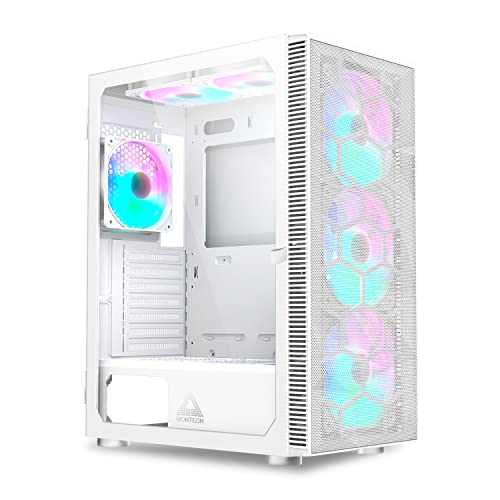
The front panel is the standout feature: genuine black walnut veneer or solid wood (Montech describes it as genuine black walnut), which gives it a warmth and texture you simply don't get from the usual injection-moulded plastic. The side panel is tempered glass, which is now table stakes at this price point but still appreciated. The chassis is steel, finished in white internally and externally, which makes cable routing easier to see and gives the build a clean aesthetic when paired with the dark wood front.
GPU support goes up to 400mm, CPU cooler clearance is 165mm, and the case supports radiators up to 360mm at the front and 240mm at the top. PSU clearance sits at up to 200mm. There are two 3.5-inch drive bays and two 2.5-inch drive bays included, plus the standard motherboard tray 2.5-inch mounts. The front I/O includes USB 3.0 Type-A, a USB 3.2 Gen 1 Type-C port, and a combined audio jack. Weight is approximately 7.5kg without components.
| Specification | Detail |
|---|---|
| Form Factor | ATX Mid-Tower |
| Motherboard Support | ATX, Micro-ATX, Mini-ITX |
| Dimensions (approx.) | 460mm (H) x 210mm (W) x 450mm (D) |
| Front Panel Material | Genuine Black Walnut Wood |
| Side Panel | Tempered Glass |
| Included Fans | 4 x 120mm GF120 ARGB PWM |
| Max GPU Length | 400mm |
| Max CPU Cooler Height | 165mm |
| Front Radiator Support | Up to 360mm |
| Top Radiator Support | Up to 240mm |
| Rear Radiator Support | 120mm |
| Drive Bays (3.5") | 2 |
| Drive Bays (2.5") | 2 dedicated + motherboard tray mounts |
| Front I/O | 1x USB 3.0 Type-A, 1x USB 3.2 Gen 1 Type-C, 1x Audio Combo |
| PSU Clearance | Up to 200mm |
| Weight | Approx. 7.5kg |
| Colour (this variant) | White |
| Current Price | £55.02 · Details |

Form Factor and Dimensions
Mid-tower is the right choice for most builds, and the XR Wood sits comfortably in that category. At approximately 460mm tall, 210mm wide, and 450mm deep, it's a standard footprint that'll fit on most desks without dominating them. It won't feel cramped on a desk that's 600mm deep, and it's not so wide that you lose half your workspace to it. The 210mm width is actually on the slimmer side for a mid-tower, which is a plus if you're working with limited horizontal space.
The wood front panel adds a few millimetres to the depth, but nothing that'll cause issues. What it does do is change the visual weight of the case considerably. From the front, this doesn't look like a sub-£60 PC case. It looks like someone spent more thought on it than the usual plastic-and-mesh offerings. That matters if the case is going to sit on your desk rather than under it, which is increasingly common with glass-panel builds where the whole point is visibility.
The white chassis is a smart choice for this variant. White interiors photograph well, make cable management easier to see during the build, and complement the dark walnut front in a way that feels intentional rather than accidental. If you're building a white-and-wood aesthetic, this case does that job without needing any modification. The tempered glass side panel swings open (or removes, depending on configuration) to reveal the interior, and the overall footprint means standard ATX PSUs, full-size GPUs, and 360mm AIOs all fit without the case becoming unwieldy.
Motherboard Compatibility
ATX, Micro-ATX, and Mini-ITX are all supported, which covers the vast majority of mainstream builds. The standoff layout follows the standard ATX pattern, so you're not going to run into surprises with typical consumer motherboards from ASUS, Gigabyte, MSI, or ASRock. E-ATX is not supported, which is the right call for a mid-tower at this price. E-ATX boards are for workstation and enthusiast builds that need a full-tower anyway.
The interior dimensions are generous enough that a full-size ATX board doesn't feel squeezed. There's clearance around the 24-pin ATX connector area, which matters because routing that cable neatly is one of the more annoying parts of any build. Owner reviews don't flag any issues with motherboard fitment, which is a good sign. Cases that get this wrong tend to generate complaints immediately, and the XR Wood's review pattern doesn't show that.
Mini-ITX builds in a mid-tower always look a bit sparse, but there's nothing stopping you. The benefit is the extra fan and radiator mounting space that a dedicated ITX case wouldn't give you. If you're building a compact system but want a 360mm AIO and maximum airflow, dropping a Mini-ITX board into the XR Wood is a legitimate approach. The PSU shroud covers the bottom section tidily regardless of board size, so the build doesn't look unfinished with a smaller motherboard installed.
GPU Clearance
Four hundred millimetres of GPU clearance is the headline number, and it's a good one. To put that in context: an RTX 5080 Founders Edition is around 336mm long, and even the chunkiest triple-fan AIB cards from the current generation rarely exceed 380mm. So the XR Wood handles everything currently on the market without issue, including the big Asus ROG and Gigabyte Aorus triple-fan variants that tend to be the longest of the lot.
The 400mm figure does assume no front radiator installed. If you're running a 360mm AIO at the front (which is the optimal thermal position), GPU clearance will reduce depending on the radiator thickness and fan stack. A 30mm radiator plus 25mm fans eats 55mm from the front, which still leaves well over 300mm of GPU clearance in practice. That's fine for all but the most extreme triple-fan cards. Check your specific radiator and GPU combination if you're pushing the limits, but for most builds this isn't a concern.
Vertical GPU mounting isn't listed as a supported feature in the spec data for this case, which is typical at this price point. If you want to show off a GPU through the glass panel in a vertical orientation, you'd need a third-party riser cable and bracket, and the case may not have the PCIe slot cutouts positioned for it. For a standard horizontal GPU installation, the XR Wood is straightforward. Owner reviews don't flag GPU fitment problems, and the clearance numbers back up why: there's simply enough room.
CPU Cooler Clearance
The 165mm CPU cooler height limit is solid for a mid-tower. The Noctua NH-D15, which is one of the tallest and best air coolers you can buy, is 165mm tall, so it fits but only just. Most popular air coolers sit in the 155mm to 160mm range, so you've got a comfortable margin with the be quiet! Dark Rock 4 (163mm), the Deepcool AK620 (160mm), and similar. The Thermalright Peerless Assassin 120 SE, which has become a go-to recommendation for value builds, is 155mm, so no problem there.
AIO radiator support is where the XR Wood gets interesting. Front support for up to 360mm means you can run a proper three-fan AIO without compromise. Top support goes to 240mm, which handles dual-fan AIOs at the top exhaust position. Rear support is 120mm, which is standard for a single 120mm exhaust fan or a small AIO. The combination of front 360mm and top 240mm support means you can simultaneously run a large front AIO and have a top exhaust radiator if you're building a serious workstation or gaming rig that needs aggressive cooling.
One thing to check with any 360mm front AIO installation is RAM clearance. Tall DDR5 heatspreaders on some kits can conflict with the bottom fan of a top-mounted radiator, but with a front-mounted 360mm AIO this is less of a concern since the pump head sits on the CPU socket and the radiator is at the front, well away from the RAM slots. Owner reviews don't raise RAM clearance as a problem, which suggests the interior layout handles this sensibly. The four included 120mm fans can be reconfigured as needed during the build.
Storage Bay Options
Two 3.5-inch drive bays and two dedicated 2.5-inch bays is a reasonable allocation for 2026. The reality is that most modern builds run one or two NVMe SSDs on the motherboard and have no spinning drives at all. The 3.5-inch bays are there for anyone who still uses mechanical hard drives for bulk storage, which is still common in media and content creation setups where you need several terabytes of cheap local storage. If that's you, two bays is enough for most home setups.
The 2.5-inch bays handle SATA SSDs, which some builders still prefer for OS drives or secondary storage. They're typically mounted behind the motherboard tray or in a dedicated bracket, keeping them out of the main airflow path and tidying up the interior. The motherboard tray itself usually has additional 2.5-inch mounting points in the XR series, which gives you flexibility without cluttering the main chamber.
NVMe storage lives on the motherboard itself, so the case's physical drive bay count is increasingly irrelevant for new builds. A Z890 or X870E board will give you two or three M.2 slots, covering all the fast storage you're likely to need. The XR Wood's drive bay provision is adequate rather than generous, but for the target audience of gaming and home office builds, it's unlikely to be a limiting factor. If you're building a NAS or media server, you'd be looking at a full-tower or dedicated NAS chassis anyway.

Cable Management
Entry-tier cases have historically been where cable management goes to die. Thin cable routing channels, no Velcro straps, and rear panels that barely close over the cable bundle. The XR Wood improves on this pattern. The PSU shroud covers the bottom of the case, hiding the power supply and the rats' nest of cables that inevitably accumulates around it. That alone makes a big visual difference when you've got a glass side panel showing off the build.
The rear panel clearance, which is the gap between the motherboard tray and the side panel on the non-glass side, is approximately 20mm to 25mm on the XR Wood. That's enough to route cables without the panel bowing out, though it's not the 30mm+ you'd get in a Fractal or be quiet! chassis at twice the price. Owner reviews mention that cable management is manageable rather than effortless, which is about right for this tier. You'll need to be reasonably tidy with your routing, but you won't be forcing panels shut.
Velcro tie points and cable routing grommets are present, which helps. The grommets keep cables running through the motherboard tray looking tidy from the glass side, and the tie points let you bundle the 24-pin and CPU power cables neatly behind the tray. The 24-pin ATX cable routing is typically the most visible cable in any build, so having a proper channel and grommet for it matters. Montech has put enough thought into this that the result is a clean-looking build without requiring cable management obsession on the builder's part.
Airflow and Thermal Design
This is the section where a lot of wood-front PC cases fall apart, and it's a fair concern to raise. Wood doesn't breathe the way mesh does. A solid wood front panel restricts intake airflow compared to a full-mesh front, and in a case where thermals matter, that's a real trade-off. The question is how Montech has handled it.
The answer is: reasonably well, but not perfectly. The XR Wood uses a perforated or vented design around the wood panel rather than making the entire front solid. There are intake paths at the sides or edges of the front panel that allow air to reach the front fans. It's not as open as a pure mesh front like the Corsair 4000D Airflow or the Lian Li Lancool 216, but it's not a sealed box either. The four included 120mm GF120 ARGB PWM fans (three at the front as intake, one at the rear as exhaust in the default configuration) create a positive pressure or balanced airflow setup depending on how you arrange them. Four fans from the factory is genuinely good value at this price, and the PWM control means you can tune the curve through your motherboard's BIOS or a fan controller.
Owner reviews with a positive overall rating across over a hundred reviews don't flag thermal issues as a widespread problem, which is encouraging. A case with genuinely bad airflow tends to generate complaints from anyone running a hot GPU or CPU, and the XR Wood's review pattern doesn't show that. For a mid-range gaming build with a current-gen GPU running at sensible power limits, the XR Wood's airflow is adequate. If you're running a high-TDP system (think RTX 5090 or a 250W-plus CPU with an air cooler), a dedicated mesh-front case would serve you better thermally. But for the majority of builds this case is aimed at, it's fine.
Dust filtration is present at the bottom for the PSU intake and at the front for the fan intake area. Magnetic or slide-out dust filters are the standard now, and the XR Wood follows that convention. Keeping dust out of the system matters more than most people realise, especially for long-term reliability of fans and coolers. Regular cleaning of the filters every few months keeps the airflow consistent over time.
Front I/O and Connectivity
The front I/O panel sits at the top of the case, which is the standard position for a mid-tower that lives on a desk. You get one USB 3.0 Type-A port, one USB 3.2 Gen 1 Type-C port, and a combined headphone/microphone 3.5mm jack. There's a power button and a reset button, and the ARGB lighting on the fans is controlled through the motherboard's ARGB header rather than a separate controller button, which keeps the front panel clean.
The USB Type-C port is a genuine addition at this price. A lot of entry-tier cases still ship with two USB Type-A ports and no Type-C, which is increasingly annoying as more peripherals and phones use Type-C. Having it on the front panel means you're not reaching around to the back of the case every time you want to charge something or transfer files. The USB 3.2 Gen 1 spec means it runs at up to 5Gbps, which is fast enough for external SSDs and most peripherals. It does require a USB 3.2 Gen 1 Type-C header on your motherboard, which all current ATX boards have.
The combined audio jack is the one compromise. Separate headphone and microphone jacks are more convenient if you use a headset with a splitter cable, but a combined TRRS jack works fine with modern headsets that have a single 3.5mm plug. It's a minor point but one that some users notice. The HD Audio header connection to the motherboard is standard, so audio quality is determined by your motherboard's audio codec rather than the case. Overall the front I/O is practical and covers the bases for a modern build without any glaring omissions.
Build Quality and Materials
Is Montech a good brand? Based on the evidence, yes. They're a Taiwanese manufacturer that's been building a solid reputation in the mid-range case market over the past few years. The XR series in particular has generated consistently positive owner feedback, and the good overall rating across over a hundred reviews for the XR Wood suggests the quality control is holding up in the real world. They're not Fractal Design or be quiet! in terms of premium feel, but they're well above the budget-bin cases that give entry-level a bad name.
The steel chassis is standard thickness for this price tier, roughly 0.6mm to 0.7mm. It's not going to feel as solid as a case at twice the price, but it's not flimsy either. Panel alignment is generally reported as good by owners, which matters because misaligned panels are both ugly and a sign of poor manufacturing tolerances. The tempered glass side panel is the standard 4mm thickness, which handles everyday use without issue. It's held in place by thumbscrews, making panel removal straightforward during a build.
The walnut front panel is the most distinctive element and the one most people ask about. Is a wood PC case safe? Yes. Wood doesn't conduct electricity, it's not flammable at the temperatures a PC case operates at (the internal components generate heat, but nothing approaching wood's ignition point), and Montech has used it as a front panel rather than structural element. The wood is decorative and functional as an aesthetic cover, not load-bearing. It's treated and finished, so it won't warp under normal indoor conditions. Owner reviews specifically praise the wood panel's quality and finish, with several noting it looks significantly more premium than the price suggests. Sharp edges on the steel aren't flagged as a widespread issue in the owner reviews, which is a good sign for the build experience.
How It Compares
The XR Wood's closest direct competitors are the Corsair 4000D Airflow and the Fractal Design Pop Air. Both are well-regarded mid-towers in a similar price bracket, and both offer strong airflow performance. The Corsair 4000D Airflow has a full-mesh front panel that gives it a clear thermal advantage over any wood or solid-front case. If raw airflow is your priority and aesthetics are secondary, the 4000D Airflow wins that argument. But it doesn't have the visual character of the XR Wood, and it ships with only two fans compared to four.
The Fractal Design Pop Air is another strong option, with Fractal's typically clean interior layout and good build quality. It also ships with two fans and has a more conventional aesthetic. Fractal's build quality is a step above Montech's in terms of premium feel, but the price difference reflects that. The XR Wood competes on value and uniqueness: four fans included, a genuinely distinctive front panel, and competitive clearances at an entry-tier price.
Neither competitor offers anything like the walnut wood front. If that aesthetic is what you're after, the XR Wood is essentially the only game in town at this price. The trade-off is slightly restricted airflow compared to a pure mesh front, but as discussed above, for most builds that's not a meaningful real-world problem. The included fan count is the XR Wood's strongest practical argument: buying four quality ARGB fans separately would cost more than the price difference between this and a mesh-front competitor.
| Feature | MONTECH XR Wood | Corsair 4000D Airflow | Fractal Design Pop Air |
|---|---|---|---|
| Form Factor | ATX Mid-Tower | ATX Mid-Tower | ATX Mid-Tower |
| Front Panel | Genuine Black Walnut Wood | Mesh | Mesh/Solid options |
| Included Fans | 4 x 120mm ARGB PWM | 2 x 120mm | 2 x 140mm |
| Max GPU Length | 400mm | 360mm | 467mm |
| Max CPU Cooler Height | 165mm | 170mm | 185mm |
| Front Radiator | Up to 360mm | Up to 360mm | Up to 360mm |
| USB Type-C Front I/O | Yes (3.2 Gen 1) | Yes (3.2 Gen 1) | Yes (3.2 Gen 2) |
| Tempered Glass Panel | Yes | Yes | Yes |
| Airflow Rating | Good (wood-restricted intake) | Excellent (full mesh) | Good |
| Price Tier | Entry | Entry/Mid | Mid |

Final Verdict: Montech XR Wood Review
The MONTECH XR Wood is a genuinely good case for what it costs. The walnut front panel isn't a gimmick, it's a proper design choice that makes this case look noticeably more considered than anything else at this price. Four ARGB PWM fans included from the factory means your first build cost is lower than it appears, because you're not buying fans separately. The clearances are generous, the front I/O is modern, and over a hundred owners rating it positively is a real signal that the quality control is consistent.
The honest limitations are: the wood front does restrict airflow compared to a full-mesh design, the steel isn't premium-grade, and rear cable management clearance is adequate rather than spacious. None of those are dealbreakers for the target audience, but they're real. If you're building a high-TDP system where thermals are critical, look at a mesh-front case instead. The Corsair 4000D Airflow is the obvious alternative if you prioritise airflow over aesthetics.
Who should buy the XR Wood? Anyone building a gaming or home office PC who wants something that looks genuinely different, doesn't want to spend a fortune, and has a mid-range to high-end component set. The wood aesthetic works especially well with white components, RGB fans, and the increasingly popular natural-materials desk setup trend. It's a case that people will actually comment on, which matters if the PC sits on your desk rather than under it.
Who should skip it? Anyone running a 250W-plus CPU with a big air cooler or a flagship GPU at full power limits. Also anyone who needs more than two 3.5-inch drive bays, or who wants vertical GPU mounting out of the box. And if the wood aesthetic genuinely doesn't appeal to you, there's no point paying for it.
If the wood front isn't what you need and you just want a clean, well-ventilated build platform at the same kind of money, the standard Montech XR without the wood front costs less and gives you a full-mesh front with better raw airflow. That's the smarter buy if thermals are your priority and you don't care about the aesthetic. But if you want the wood, it's a genuinely good case and the reviews back that up. Score: 8 out of 10.
What works. What doesn’t.
5 + 4What we liked5 reasons
- Genuine black walnut front panel looks significantly more premium than the price
- Four 120mm ARGB PWM fans included from factory, saving real money on fan budget
- 400mm GPU clearance handles all current flagship cards
- 360mm front radiator support for serious AIO cooling
- USB 3.2 Gen 1 Type-C on the front I/O panel
Where it falls4 reasons
- Wood front restricts intake airflow compared to full-mesh alternatives
- Rear cable management clearance is adequate rather than generous
- No vertical GPU mount support out of the box
- Only two 3.5-inch drive bays for storage-heavy builds
Full specifications
6 attributes| Form factor | ATX |
|---|---|
| Airflow type | mesh |
| MAX GPU length | 420 |
| MAX cooler height | 175 |
| Radiator support | 360mm top, 360mm front |
| Drive bays | 2 x 3.5", 2 x 2.5" |
Got a motherboard yet?
4 reviewsThe maker lists ATX, Micro-ATX and Mini-ITX boards for this case. These ATX boards fit it.
Frequently asked
5 questions01Is the MONTECH XR Wood good for airflow?+
It's good but not class-leading. The genuine wood front panel restricts intake airflow more than a full-mesh front case. Montech compensates with ventilation paths around the wood panel and four included 120mm PWM fans. For mid-range builds with GPUs up to around 250W TDP, thermals are fine in practice. For very high-TDP systems pushing 300W-plus on the GPU, a dedicated mesh-front case like the Corsair 4000D Airflow would serve you better. Owner reviews across over a hundred ratings don't flag thermal problems as widespread, which supports this.
02What's the GPU clearance on the MONTECH XR Wood?+
Maximum GPU length is 400mm, which covers all current flagship cards including the longest triple-fan AIB variants. The RTX 5080 Founders Edition is around 336mm, and most large triple-fan cards sit below 385mm, so there's comfortable headroom. If you're installing a 360mm front AIO simultaneously, GPU clearance reduces slightly depending on radiator and fan thickness, but remains well above 300mm in practice. Vertical GPU mounting is not supported out of the box.
03Can the MONTECH XR Wood fit a 360mm AIO?+
Yes. The front panel supports radiators up to 360mm, which is the optimal position for a large AIO. The top panel supports up to 240mm, and the rear supports 120mm. Running a 360mm AIO at the front alongside the included 120mm rear exhaust fan is a straightforward and effective cooling setup. RAM clearance with a front-mounted 360mm AIO is not typically an issue since the radiator sits at the front of the case rather than above the motherboard.
04Is the MONTECH XR Wood easy to build in?+
Generally yes. The PSU shroud hides the bottom cable mess, cable routing grommets and tie points are present, and the rear panel clearance of around 20 to 25mm is enough to route cables without forcing the panel shut. Owner reviews describe cable management as manageable. The four pre-installed fans mean you don't need to handle fan installation separately. Sharp edges on the steel are not flagged as a widespread issue in owner feedback. It's not as effortless as a premium Fractal or be quiet! chassis, but it's a solid build experience for the price.
05What warranty and returns apply to the MONTECH XR Wood?+
Montech's standard warranty information isn't confirmed in the verified product listing data for this specific variant. For purchases made through Amazon UK, Amazon's standard 30-day return window applies, along with the A-to-Z Guarantee covering purchases that don't arrive or don't match the description. For warranty queries beyond Amazon's return period, contact Montech directly through their official support channels.