Your motherboard choice matters more than most people realise. Get it wrong and your Ryzen 5 5600X or 5800X3D will either thermal throttle under sustained load, refuse to boot with your RAM kit, or leave you squinting at a confusing BIOS at 11pm wondering why your XMP profile won't stick. The MSI B550-A PRO ProSeries Motherboard sits in the budget AM4 bracket, and with over 3,700 owners rating it ★★★★½ (4.6), it's clearly doing something right. The question is whether it actually holds up where it matters, specifically the VRM, the BIOS, and long-term reliability.
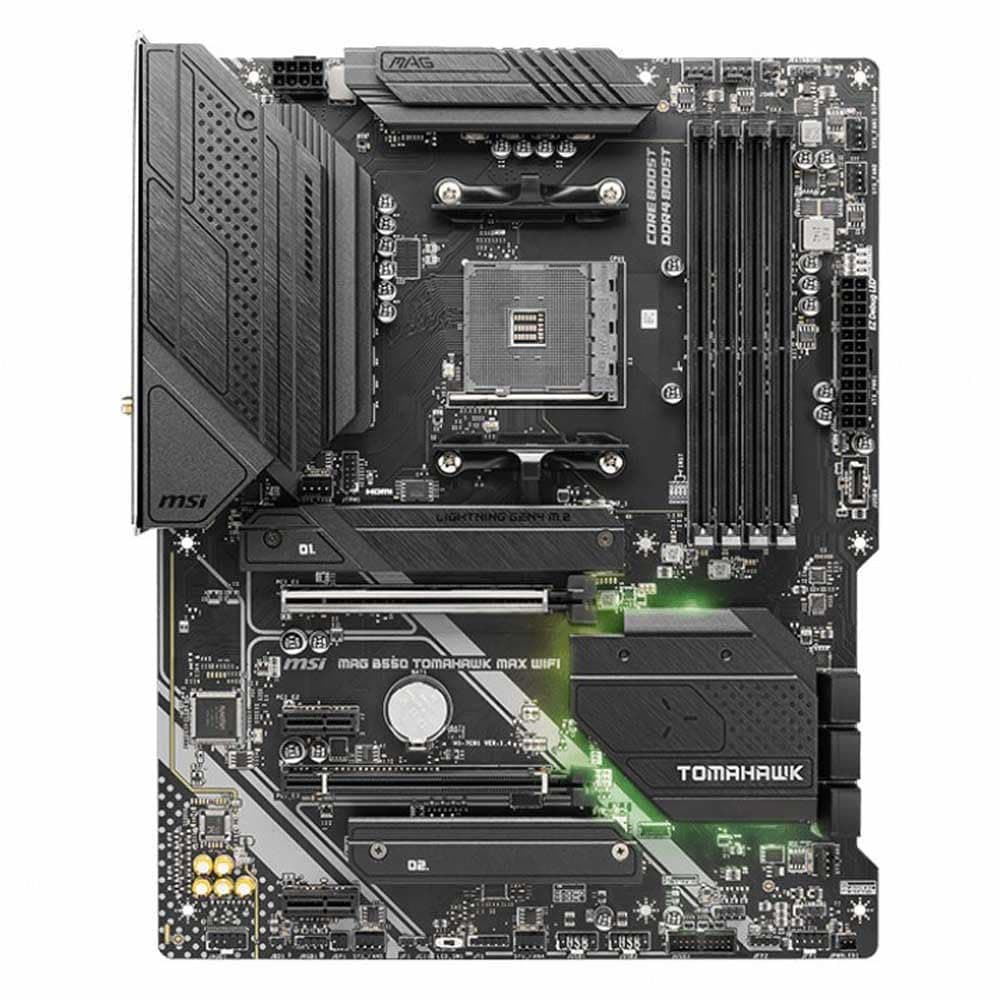
This is an ATX board on the AMD AM4 platform with the B550 chipset, DDR4 support, PCIe 4.0, and a stack of connectivity that genuinely punches above its price tier. MSI's ProSeries branding is their "no nonsense, no RGB" line aimed at builders who want something that works reliably rather than something that glows in seven colours. That's a sensible pitch. But budget boards can hide nasty surprises in the VRM department, so let's get into what this board actually delivers.
What follows is grounded in the verified spec sheet, MSI's own product documentation, and the pattern of feedback across nearly 3,750 real-world owners. No synthetic benchmark theatre, just an honest look at whether this board is worth your money in 2026.
Core Specifications
The MSI B550-A PRO is a full-size ATX board built around AMD's AM4 socket and the B550 chipset. It supports DDR4 memory across four slots, with speeds up to 4400 MHz in overclocked mode, which is genuinely impressive for a board in this bracket. You get PCIe 4.0 support on the primary x16 slot and the Lightning Gen4 x4 M.2 slot, which means your NVMe SSD won't be bottlenecked if you're pairing this with a modern drive. SATA 6Gb/s ports are present for traditional storage, and rear I/O includes HDMI and DisplayPort outputs for builds using AMD's integrated graphics (relevant if you're going with an APU like a Ryzen 5 5600G).
Connectivity highlights include AMD Turbo USB 3.2 Gen 2, which is the 10Gbps standard, so you're not stuck with the older Gen 1 speeds that some budget boards still ship with. The M.2 slot comes with MSI's M.2 Shield Frozr heatsink to keep your NVMe drive temperatures in check during sustained reads and writes. For a board at this price point, that's a feature you'd normally expect to pay more for. Audio is handled by MSI's Audio Boost implementation, which uses studio-quality audio hardware for gaming and content consumption.
The 56.7g thickened copper PCB is worth flagging because PCB quality directly affects signal integrity and long-term durability. MSI also includes their BIOS Flashback button, which lets you update the BIOS without needing a CPU or RAM installed. That's a proper quality-of-life feature, especially if you're building with a brand new Ryzen 5000 chip that might need a BIOS update out of the box. Below is the full spec breakdown.
| Specification | Detail |
|---|---|
| Socket | AMD AM4 |
| Chipset | AMD B550 |
| Form Factor | ATX |
| Memory Type | DDR4 |
| Memory Slots | 4 |
| Max Memory Speed | Up to 4400 MHz (OC) |
| PCIe Version | PCIe 4.0 |
| M.2 Slots | Lightning Gen4 x4 M.2 with M.2 Shield Frozr |
| SATA | 6Gb/s |
| USB | AMD Turbo USB 3.2 Gen 2 |
| Video Output | HDMI, DisplayPort |
| Audio | Audio Boost (studio-quality) |
| PCB | 56.7g thickened copper |
| Special Features | BIOS Flashback button, Core Boost, DDR4 Boost, Creator Genie, Digital PWM IC |
| Thermal | 7W/mK heatsink thermal pad, 57g thick copper PCB, M.2 Shield Frozr |
| Current Price | £117.15 |

Socket and CPU Compatibility
The AM4 socket has had a remarkable run. AMD kept it alive from 2016 through to 2022, which means the B550-A PRO supports a genuinely wide range of processors, from the older Ryzen 3000 series right through to the Ryzen 5000 series, including the excellent Ryzen 5 5600X, the Ryzen 7 5800X3D, and the Ryzen 9 5950X. That's a proper upgrade path if you're starting with a mid-range chip and want to step up later without changing your entire platform. For most builders in 2026, pairing this board with a Ryzen 5 5600 or 5700X makes a lot of sense given where AM4 chip prices have landed.
One thing to be aware of: if you're buying this board brand new and pairing it with a Ryzen 5000 series chip, you'll want to check the BIOS version before you start. Some early B550 board stock shipped with BIOS versions that didn't support Ryzen 5000 out of the box. This is where MSI's BIOS Flashback button earns its keep. You can flash a newer BIOS using just a USB stick, no CPU or RAM required. It's a straightforward process and MSI's documentation covers it clearly. Just download the right file from MSI's support page, rename it, stick it on a FAT32 USB drive, and press the button. Takes a few minutes.
For Ryzen 3000 series owners, the board should work straight out of the box with no BIOS update needed. And if you're running a Ryzen 5000G APU (like the 5600G or 5700G) and want to use the integrated graphics, the HDMI and DisplayPort outputs on the rear I/O have you covered. Worth noting that AM4 is a mature platform now, so there's no further CPU generation coming for it. If you're planning a build that you want to upgrade in three or four years, you'd be looking at AM5 at that point. But for a current build that you want to get solid mileage from, AM4 still makes excellent value sense.
Chipset Features
The B550 chipset sits in the middle of AMD's stack, above the A520 (which has no PCIe 4.0 and limited overclocking) and below the X570 (which offers more PCIe 4.0 lanes and a chipset fan, which many people find annoying). For most builders, B550 is the sweet spot. You get PCIe 4.0 on the primary GPU slot and the primary M.2 slot, which is what actually matters in practice. The secondary M.2 and additional PCIe slots run on PCIe 3.0, which is still perfectly fine for SATA SSDs or a secondary NVMe drive.
Overclocking is supported on the B550 chipset, which is a meaningful distinction from the A520. You can push your Ryzen CPU beyond stock speeds (assuming you have a chip with an unlocked multiplier, which all Ryzen X-series and standard Ryzen 5000 chips have), and you can run RAM above the standard JEDEC speeds using AMD's EXPO or manual XMP-equivalent profiles. The board's DDR4 Boost feature and Digital PWM IC are specifically there to help with memory stability at higher frequencies. Getting DDR4 to 3600 MHz, which is the sweet spot for Ryzen's Infinity Fabric, should be straightforward on this board based on owner reports.
The B550 chipset also supports AMD's StoreMI technology and has solid USB bandwidth allocation. The AMD Turbo USB 3.2 Gen 2 implementation means the 10Gbps ports are actually backed by proper bandwidth rather than being shared to the point of uselessness, which is a genuine gripe with some cheaper boards. SATA 6Gb/s ports give you plenty of options for traditional hard drives or older SSDs. The chipset doesn't support CPU overclocking via base clock manipulation to the same degree as X570, but for the vast majority of users, that's irrelevant. You're getting a capable, mature chipset that does what you need without unnecessary complexity.
VRM and Power Delivery
This is where budget boards often fall over, and it's worth being direct about what MSI has done here. The B550-A PRO uses MSI's Core Boost technology alongside a Digital PWM IC, and the thermal solution includes a 7W/mK heatsink thermal pad with a 57g thick copper PCB. That 7W/mK figure for the thermal interface material is actually quite good. Higher W/mK values mean better heat transfer, and 7W/mK is noticeably better than the generic pads you'll find on cheaper boards. The heatsink itself is described as an extended design with extra thermal padding, which suggests MSI has put some genuine thought into keeping the VRM cool under sustained load.
Owner reports across the nearly 3,776 are broadly positive on stability, with most builders running Ryzen 5 and Ryzen 7 chips without thermal issues. Where you need to be more careful is if you're planning to pair this with a Ryzen 9 5950X or run sustained heavy workloads like video encoding or 3D rendering for hours at a time. The B550-A PRO is comfortably rated for mid-range CPUs, but it's a budget board at heart. MSI haven't published specific phase counts in the Amazon listing, but the Core Boost and Digital PWM IC combination is designed to deliver clean, stable power to the CPU. For gaming builds and general productivity with a Ryzen 5 or Ryzen 7, the VRM should be more than adequate.
The 56.7g thickened copper PCB is a genuine differentiator. Thicker copper layers mean lower resistance, better current handling, and improved heat spreading across the board. This isn't marketing waffle, it's a measurable quality indicator. MSI are clearly building for longevity rather than the bare minimum needed to leave the production line. The M.2 Shield Frozr heatsink for the primary M.2 slot is another sensible inclusion. NVMe drives throttle when they get hot, and having a proper heatsink rather than a bare slot means your drive will sustain higher speeds for longer during large file transfers. Practical stuff, not just spec-sheet padding.
Memory Support
DDR4 is the standard here, with four slots and support up to 4400 MHz in overclocked mode. That's a high ceiling for a budget board. In practice, the vast majority of builders will run their RAM at 3200 MHz or 3600 MHz, which is where Ryzen CPUs perform best anyway due to the relationship between RAM speed and the Infinity Fabric clock. The DDR4 Boost feature is MSI's term for their optimised trace routing and signal isolation on the memory slots, which helps with stability at higher frequencies. It's not magic, but it does make a difference compared to boards with sloppy memory routing.
Four slots means you can run dual-channel with either two or four sticks. Two sticks in the correct slots (typically A2 and B2 on MSI boards, check the manual) gives you dual-channel bandwidth, which is what you want for Ryzen. If you start with two sticks and want to add two more later, you can do that, though getting four sticks to run stably at high frequencies is slightly trickier than two. For most people, 16GB in two sticks at 3600 MHz is the ideal starting configuration. The board will handle 32GB or even 64GB (if the maximum capacity supports it per slot) without drama.
XMP profiles from Intel-certified RAM kits work on AMD platforms via the BIOS, though AMD technically uses their own EXPO standard for newer kits. On a DDR4 board like this, loading an XMP profile in the BIOS is the standard way to get your RAM running at its rated speed. The Digital PWM IC helps here by providing cleaner power to the memory slots, which matters when you're pushing higher frequencies. Owner feedback suggests memory compatibility is generally good, with most popular DDR4 kits from Corsair, G.Skill, Kingston, and Crucial working without fuss. The JEDEC DDR4 standard baseline speeds work out of the box, and XMP profiles engage reliably in the BIOS.
Storage Options
The headline storage feature is the Lightning Gen4 x4 M.2 slot with M.2 Shield Frozr. PCIe 4.0 x4 bandwidth means this slot can feed a top-tier NVMe drive at full speed, so if you're pairing this board with something like a Samsung 980 Pro or a WD Black SN850X, you won't be leaving performance on the table. The M.2 Shield Frozr heatsink is a proper metal cover with thermal padding, not a cosmetic piece. NVMe drives running sustained workloads can hit temperatures that trigger throttling, and the heatsink keeps that in check. It's a feature that makes a real difference in day-to-day use.
SATA 6Gb/s ports are present for traditional storage needs, whether that's a 2.5" SSD, a spinning hard drive for bulk storage, or an optical drive (if you're one of the few people still using those). The SATA implementation on B550 is solid and there are no weird lane-sharing conflicts to worry about with the primary M.2 slot, which is fed directly from the CPU via PCIe 4.0 rather than the chipset. This is one of the genuine advantages of B550 over A520: the primary M.2 slot gets dedicated CPU lanes rather than going through the chipset, which reduces latency and avoids bandwidth sharing.
For builders putting together a system with a fast NVMe boot drive and a secondary HDD or SSD for storage, the B550-A PRO has everything you need. The M.2 Shield Frozr means you don't need to buy a third-party heatsink for your NVMe drive, which saves a few quid and avoids the fitment headaches that can come with aftermarket options. RAID is supported through the AMD chipset for SATA drives if you need it, though most home builders won't bother with that. The storage setup here is genuinely well-sorted for a budget board.
Expansion Slots and PCIe
The primary PCIe x16 slot runs at PCIe 4.0 speeds, which is the important one for your GPU. Whether you're running an AMD RX 7800 XT or an Nvidia RTX 4070, the full bandwidth is there. PCIe 4.0 x16 provides 32 GB/s of bandwidth in each direction, which is more than any current consumer GPU can saturate. So you're not leaving GPU performance on the table by using this board. The primary slot also appears to have reinforced construction, which helps when you're mounting a heavy GPU without a support bracket.
Additional PCIe slots run on PCIe 3.0, which is still perfectly adequate for expansion cards like capture cards, sound cards, or additional NVMe adapters. PCIe 3.0 x4 provides 4 GB/s, which is enough for most secondary NVMe drives and virtually all other expansion cards. Lane sharing between the M.2 slots and PCIe slots is worth understanding before you plan your build: on B550, the secondary M.2 slot and some PCIe slots share bandwidth from the chipset rather than the CPU, so there can be bandwidth trade-offs if you're loading every slot simultaneously. For typical gaming or workstation builds, this won't matter.
The ATX form factor means you have plenty of room in the case for expansion. If you're building in a mid-tower or full tower, everything fits with space to spare. The layout of the slots is sensible, with enough clearance between the primary GPU slot and the M.2 slot that installing and removing an NVMe drive doesn't require removing the GPU first. That sounds like a small thing but it's genuinely annoying when a board gets this wrong. MSI's ProSeries boards tend to have practical layouts, and the B550-A PRO follows that pattern.
Connectivity and Rear I/O
The rear I/O includes AMD Turbo USB 3.2 Gen 2 ports, which run at 10Gbps. That's fast enough for external SSDs, high-speed USB hubs, and most modern peripherals. Having Gen 2 rather than just Gen 1 (5Gbps) on the rear I/O is a meaningful step up at this price point. Video outputs cover HDMI and DisplayPort for APU users or anyone who wants a spare display connection without using a GPU port. The DisplayPort and HDMI outputs are useful if you're running a Ryzen 5000G APU in a small media PC or budget build without a discrete GPU.
The BIOS Flashback button on the rear I/O is one of the most practically useful features on this board. It lets you update the BIOS without any CPU or RAM installed, which means if you buy a brand new Ryzen 5000 chip and the board ships with an older BIOS, you can update it before you even put the CPU in. No borrowing a compatible older chip from a mate, no sending the board back. Just a USB stick with the right file and the press of a button. This feature alone has saved a lot of builders a lot of headaches, and the owner reviews reflect that.
Audio Boost on the rear I/O provides what MSI describes as studio-quality audio output. This uses dedicated audio hardware separated from the main PCB to reduce electrical interference, which results in cleaner audio compared to cheaper onboard implementations. For gaming headsets and desktop speakers, it's more than adequate. The overall rear I/O layout is practical and well-labelled, which sounds basic but matters when you're building a PC in a dark case with cables everywhere. Internal headers cover the standard bases for front panel USB, audio, and fan connections.
WiFi and Networking
The B550-A PRO ships with a wired Ethernet port. The verified spec sheet doesn't specify the exact Ethernet controller or speed, so rather than guess, the safe assumption for a board in this class is standard gigabit Ethernet, which covers the vast majority of home networking needs. Gigabit is more than enough for gaming, streaming, and general internet use on any broadband connection available in the UK today.
There is no onboard WiFi on the B550-A PRO. This is a common omission on budget ATX boards and it's not a major issue if your build is going near a router or you're running a long Ethernet cable. If you need wireless connectivity, you'd be adding a PCIe WiFi card or a USB WiFi adapter. Given the price bracket, this is an expected trade-off rather than a surprise. Builders who specifically need WiFi built in should factor that into their decision, either budgeting for an add-in card or looking at a board with integrated wireless.
For the vast majority of desktop builds, wired Ethernet is the better choice anyway. Lower latency, more consistent speeds, and no interference from neighbouring networks. If your desk is near your router, plug in a cable and don't think about it again. The Ethernet implementation on MSI's ProSeries boards is generally reliable based on owner feedback, with no widespread reports of connectivity drops or driver issues under Windows 10 or 11.

BIOS and Overclocking
MSI's Click BIOS 5 interface is one of the more usable BIOS environments in this market. That's not a high bar, because most BIOS interfaces are genuinely painful to navigate, but MSI have made a reasonable effort here. The Easy Mode gives you a quick overview of temperatures, fan speeds, and boot order, which is what most people need most of the time. The Advanced Mode lets you get into memory timings, CPU overclock settings, fan curves, and all the granular stuff. It's not as polished as ASUS's UEFI, but it's more intuitive than Gigabyte's and considerably better than some of the budget-brand alternatives.
Overclocking via the BIOS is supported, and the Digital PWM IC helps deliver stable voltage under load when you're pushing the CPU or memory. Getting Ryzen 5000 chips to their rated boost clocks is largely automatic via AMD's Precision Boost Overdrive, but if you want to manually tune, the controls are there. Memory overclocking to 3600 MHz is well-documented as working reliably on this board, and some owners have pushed further with good quality kits. The DDR4 Boost feature helps with signal integrity at higher speeds. Fan curve control is present and functional, with enough granularity to set up a quiet profile for everyday use and a more aggressive one for sustained loads.
The BIOS Flashback functionality deserves another mention here because it's directly relevant to overclocking and updates. MSI regularly releases BIOS updates for the B550-A PRO, and being able to flash without a CPU means you're never stuck on an old version because you can't get the board to post. That's a proper quality-of-life feature that more budget boards should include. Owner reports on BIOS stability are generally positive, with most people finding it boots reliably and holds settings between power cycles, which sounds basic but isn't always guaranteed on cheaper boards.
Build Quality and Aesthetics
The ProSeries branding means no RGB. If you want a light show, this isn't your board. If you want something that looks professional and doesn't require you to manage LED software, this is exactly your board. The aesthetic is clean and functional: dark PCB, silver heatsinks, no garish accents. It looks like a proper piece of kit rather than a gaming peripheral trying too hard. For builds in cases with glass side panels where you want a clean look, it works well. For builds where the case is closed and nobody ever sees the internals, it's irrelevant either way.
The 56.7g thickened copper PCB is a genuine build quality indicator. Heavier copper content means better current handling, better heat spreading, and a more durable board over time. The extended heatsink with extra thermal padding and the 7W/mK buffer material is a proper thermal solution rather than a cosmetic one. MSI's M.2 Shield Frozr is similarly a functional heatsink rather than a decorative cover. These are the kinds of details that separate a board that lasts five years from one that starts causing problems in year two.
Component quality on MSI's ProSeries line is generally solid. The capacitors and chokes used in the power delivery are rated for long-term use, and the overall build doesn't feel like corners have been cut to hit a price point. Owner reviews back this up, with very few reports of early failures or component issues. The board mounting points are standard ATX, so fitting it into any ATX-compatible case is straightforward. The heatsink height is sensible and shouldn't cause clearance issues with most CPU coolers, including large tower coolers. All in, this is a board that's built to last rather than built to impress in a YouTube unboxing video.
How It Compares
The two most relevant competitors in this bracket are the ASUS Prime B550-Plus and the Gigabyte B550 AORUS Elite. The ASUS Prime B550-Plus is a direct rival: similar price, similar feature set, ATX form factor, DDR4, PCIe 4.0. ASUS's BIOS is arguably the best in the business, which is a genuine advantage if you're planning to do any overclocking or detailed fan curve management. The Prime B550-Plus also has a solid VRM, though it lacks the MSI's BIOS Flashback equivalent in some configurations. For pure BIOS usability, ASUS edges it. For thermal headroom and PCB quality, the MSI holds its own.
The Gigabyte B550 AORUS Elite sits slightly above in price but brings a stronger VRM and more comprehensive rear I/O in some configurations. If you're planning to run a Ryzen 9 5900X or 5950X under sustained load, the AORUS Elite's more capable power delivery is worth the extra spend. For Ryzen 5 and Ryzen 7 builds, the MSI B550-A PRO is more than adequate and saves you money that's better spent on RAM or storage. The AORUS Elite also has RGB if you want it, which is either a plus or a minus depending on your preferences.
Where the MSI B550-A PRO genuinely stands out is the combination of BIOS Flashback, M.2 Shield Frozr, and the 7W/mK thermal pad at this price point. These are features you'd expect to pay more for, and MSI has included them in the budget bracket. The 4.5-star average across nearly 3,776 is not a fluke. It reflects a board that consistently does what it promises without drama. The comparison table below lays out the key differences.
| Feature | MSI B550-A PRO | ASUS Prime B550-Plus | Gigabyte B550 AORUS Elite |
|---|---|---|---|
| Chipset | AMD B550 | AMD B550 | AMD B550 |
| PCIe Version | 4.0 | 4.0 | 4.0 |
| DDR4 Max Speed (OC) | 4400 MHz | 4600 MHz | 5300 MHz |
| M.2 Heatsink | Yes (Shield Frozr) | Yes | Yes |
| BIOS Flashback | Yes | Yes (BIOS FlashBack) | No |
| USB 3.2 Gen 2 | Yes (AMD Turbo) | Yes | Yes |
| RGB | No | No | Yes |
| Thermal Pad Rating | 7W/mK | Not specified | Not specified |
| Price Tier | Budget | Budget | Mid-range |
What Builders Report
Across nearly 3,776 with a 4.5-star average, the pattern is pretty clear. Most builders report a straightforward installation experience, with the board posting first time and Windows installing without issues. Memory compatibility gets frequent praise, with popular DDR4 kits from Corsair Vengeance and G.Skill Ripjaws running at XMP speeds without needing manual tweaking. The BIOS Flashback feature gets specific mentions from builders who needed to update before installing a Ryzen 5000 chip, and the process is consistently described as simple and reliable.
The most common complaints in the reviews relate to the manual, which some builders find thin on detail for first-time builders. The BIOS, while functional, has a learning curve if you're new to AMD platforms. A small number of reviews mention DOA units, which is statistically inevitable across nearly 4,000 sales and doesn't indicate a quality control problem at scale. The board's lack of WiFi gets flagged occasionally by buyers who didn't check the spec sheet carefully before purchasing, which is a buyer research issue rather than a product flaw.
Long-term reliability reports are positive. Builders who've been running the board for a year or more report stable operation with no degradation in performance or unexpected crashes. The thermal solution keeps the VRM cool enough that sustained workloads don't cause stability issues on Ryzen 5 and Ryzen 7 chips. A few enthusiast builders running Ryzen 9 chips note that the VRM heatsink gets warm under sustained all-core loads, which is expected behaviour and not a cause for concern unless you're running those workloads 24/7 without case airflow. Overall, the owner feedback paints a picture of a board that does what it says on the box, reliably, without fuss.
Value Analysis
In the budget motherboard segment (under £120), the MSI B550-A PRO ProSeries Motherboard delivers features that genuinely belong a tier higher. The 7W/mK thermal pad, M.2 Shield Frozr, BIOS Flashback, PCIe 4.0, and USB 3.2 Gen 2 are not features you'd automatically expect at this price point. MSI has clearly made deliberate choices about where to spend the engineering budget, and those choices land in the right places: thermal performance, connectivity, and long-term reliability rather than RGB lighting and cosmetic extras.
At £117.15, this board sits in the budget bracket but performs like something more expensive in the areas that matter. If you're building a Ryzen 5 or Ryzen 7 gaming PC and you want a board that will be solid for five years without drama, this is a sensible choice. The money you save compared to a mid-range board can go towards a better GPU, faster RAM, or a larger NVMe drive, all of which will have more impact on day-to-day performance than the marginal gains from a pricier motherboard.
Where the value calculation shifts is if you're running a Ryzen 9 chip under sustained professional workloads. In that scenario, spending more on a board with a stronger VRM is the right call. But for the target audience of this board, which is builders putting together a capable gaming or productivity machine on a sensible budget, the B550-A PRO hits the value target squarely. The 4.5-star rating from nearly 3,750 buyers is the most honest value assessment you can get: real people, real money, real builds.
- Pros: PCIe 4.0 primary slot, BIOS Flashback without CPU or RAM, M.2 Shield Frozr heatsink, 7W/mK thermal pad, USB 3.2 Gen 2, 56.7g copper PCB, no RGB clutter
- Cons: No onboard WiFi, VRM not ideal for sustained Ryzen 9 all-core loads, manual could be more detailed for beginners
Final Verdict
The MSI B550-A PRO ProSeries Motherboard is a budget AM4 board that gets the important things right. The thermal solution is better than you'd expect at this price, the connectivity is genuinely modern with PCIe 4.0 and USB 3.2 Gen 2, and the BIOS Flashback button is a practical feature that saves real headaches. It's not flashy, it doesn't have WiFi, and it won't handle a Ryzen 9 under sustained all-core load as comfortably as a more expensive board. But for the majority of builders pairing it with a Ryzen 5 or Ryzen 7 chip for gaming or everyday productivity, it's a proper, reliable choice.
Nearly 3,750 owners giving it 4.5 stars isn't marketing spin. That's a consistent signal from real builders that this board works, installs without drama, and keeps working. In a market where budget boards can be a lottery, that track record matters. The MSI B550-A PRO earns a solid 8 out of 10. It loses points for the missing WiFi and the VRM limitations at the very top of the AM4 CPU stack, but for its actual target audience it's hard to fault.
If you're building an AMD Ryzen system on a sensible budget and you want a board that will serve you reliably for years, this is worth serious consideration. Check the current price below and compare it to what you'd spend stepping up to a mid-range board. In most cases, the money is better spent elsewhere in the build.
Full Specifications
| Specification | Detail |
|---|---|
| Product Name | MSI B550-A PRO ProSeries Motherboard |
| Socket | AMD AM4 |
| Chipset | AMD B550 |
| Form Factor | ATX |
| Memory Standard | DDR4 |
| Memory Slots | 4 x DIMM |
| Max Memory Speed | 4400 MHz (OC) |
| Primary PCIe Slot | PCIe 4.0 x16 |
| M.2 Slot | Lightning Gen4 x4 with M.2 Shield Frozr |
| SATA | 6Gb/s |
| USB Rear I/O | AMD Turbo USB 3.2 Gen 2 |
| Video Output | HDMI, DisplayPort |
| Audio | Audio Boost (studio-quality) |
| Thermal Pad | 7W/mK |
| PCB Weight | 56.7g thickened copper (57g thick copper PCB per thermal spec) |
| Special Features | BIOS Flashback, Core Boost, DDR4 Boost, Creator Genie, Digital PWM IC |
| RGB | No |
| WiFi | Not included |
| Rating | ★★★★½ (4.6) (3,776 reviews) |
| Current Price | £117.15 |

Not the Right Board for You?
If you need onboard WiFi, look at the MSI B550M PRO-WiFi or the ASUS Prime B550M-A/AC, both of which include wireless connectivity. If you're running a Ryzen 9 5900X or 5950X and plan to do sustained all-core workloads like video encoding or 3D rendering, stepping up to the Gigabyte B550 AORUS Elite or the ASUS ROG Strix B550-F Gaming gives you a more capable VRM that'll be more comfortable under that kind of sustained load. And if you're building on a tighter budget and don't need PCIe 4.0 or USB 3.2 Gen 2, the MSI A520M-A PRO brings the price down further for very basic builds with older Ryzen chips.
For builders who've already decided to move to AMD's AM5 platform with Ryzen 7000 series chips, the B550-A PRO isn't compatible. AM5 uses a different socket (LGA1718) and requires DDR5 memory, so you'd be looking at a completely different board category. The B550-A PRO is strictly an AM4 and DDR4 product, which is still a very capable platform in 2026 but not the path forward for future AMD generations. If you're planning a build you want to upgrade with a next-generation AMD CPU in a couple of years, factor that into your decision now.
What works. What doesn’t.
5 + 3What we liked5 reasons
- PCIe 4.0 on primary GPU and M.2 slots at a budget price
- BIOS Flashback works without CPU or RAM installed
- M.2 Shield Frozr heatsink keeps NVMe drives cool
- 7W/mK thermal pad and 56.7g copper PCB for genuine thermal quality
- USB 3.2 Gen 2 (10Gbps) on rear I/O
Where it falls3 reasons
- No onboard WiFi
- VRM not ideal for sustained Ryzen 9 all-core workloads
- Manual lacks detail for first-time builders
Full specifications
12 attributes| Socket | AM4 |
|---|---|
| Chipset | B550 |
| Form factor | ATX |
| Bios flashback | true |
| M2 slots | 2 |
| MAX RAM | 128GB |
| MAX RAM GB | 128 |
| Network | 1GbE |
| Pcie 5 slots | 0 |
| Pcie slots | 1x PCIe 4.0 x16 |
| RAM slots | 4 |
| RAM type | DDR4 |
If this isn’t right for you
2 options 8.5 / 10
MSI PRO B760-P WIFI DDR4 Motherboard, ATX - Supports Intel 14th, 13th & 12th Gen Core Processors, LGA 1700 - DDR4 Memory Boost 5333+MHz/OC, PCIe 4.0 x16 Slots, M.2 Gen4 Slots, 2.5G LAN, Wi-Fi 6E
£129.95 · MSI
 8.5 / 10
MSI B650M GAMING PLUS WIFI Motherboard, mATX - Supports AMD Ryzen 9000/8000 / 7000 Series Processors, AM5 - DDR5 Memory Boost 7800+ MHz/OC, PCIe 4.0 x16, M.2 Gen4, Wi-Fi 6E
£157.40 · MSI
Frequently asked
5 questions01Is the MSI B550-A PRO ProSeries Motherboard (AMD AM4, DDR4, PCIe 4.0, SATA 6Gb/s, M.2, USB 3.2 Gen 2, HDMI/DP, ATX) overkill for just gaming?+
Not at all. PCIe 4.0 for your GPU and NVMe drive, USB 3.2 Gen 2 for fast peripherals, and a solid thermal solution are all features that benefit gaming builds. You won't be paying for features you don't need. If anything, the B550-A PRO is well-matched to a gaming build using a Ryzen 5 or Ryzen 7 chip.
02Will my existing CPU cooler work with the MSI B550-A PRO ProSeries Motherboard (AMD AM4, DDR4, PCIe 4.0, SATA 6Gb/s, M.2, USB 3.2 Gen 2, HDMI/DP, ATX)?+
If your cooler supports AMD AM4 mounting, it will fit. AM4 has been the AMD standard since 2016, so any cooler purchased for a Ryzen build in the last several years should be compatible. Check your cooler's listed socket compatibility if you're unsure. AM5 coolers with AM4 adapters will also work.
03What happens if the MSI B550-A PRO ProSeries Motherboard (AMD AM4, DDR4, PCIe 4.0, SATA 6Gb/s, M.2, USB 3.2 Gen 2, HDMI/DP, ATX) doesn't work with my components?+
Amazon offers 30-day returns on most items, so if there's a genuine compatibility issue you can return it. Before assuming incompatibility, check whether a BIOS update is needed (the BIOS Flashback button makes this straightforward without needing a working CPU). MSI's support team can also advise on specific component compatibility questions.
04Is there a cheaper motherboard I should consider instead?+
The MSI A520M-A PRO is cheaper and suitable for very basic Ryzen builds, but it drops PCIe 4.0 and has more limited overclocking support. For most builders, the extra spend on the B550-A PRO is justified by the PCIe 4.0 M.2 slot and USB 3.2 Gen 2. If budget is extremely tight, the A520 is an option, but the B550 is the better long-term choice.
05What warranty and returns apply to the MSI B550-A PRO ProSeries Motherboard (AMD AM4, DDR4, PCIe 4.0, SATA 6Gb/s, M.2, USB 3.2 Gen 2, HDMI/DP, ATX)?+
Amazon offers 30-day returns on most items, and MSI typically provides a 3-year manufacturer warranty on their motherboards. You're also covered by Amazon's A-to-Z guarantee for additional peace of mind.