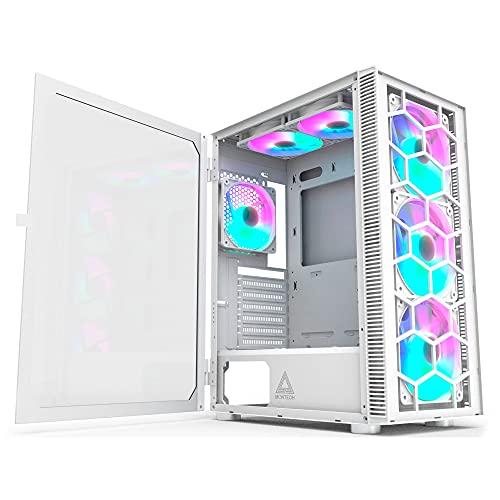
Picking a case is one of those decisions that looks simple until you're three hours into a build, swearing at a cable that won't reach, with a radiator that's two millimetres too long and a side panel that won't sit flush. The Montech X3 Glass in white is aimed squarely at builders who want tempered glass looks at an entry price, and based on the spec sheet and what the few dozen owners who've reviewed it actually say, it largely delivers. Not perfectly, but largely.
This is a Montech X3 Glass review for people who want a straight answer: yes, it's a decent case at this price tier. The clearances are generous, the included DRGB fans are a genuine bonus rather than an afterthought, and the white finish looks properly clean in photos and in person according to owners. The build experience has a couple of rough edges, literally and figuratively, but nothing that should put you off if you're building a mid-range system and don't want to spend more than you need to.
Core Specifications
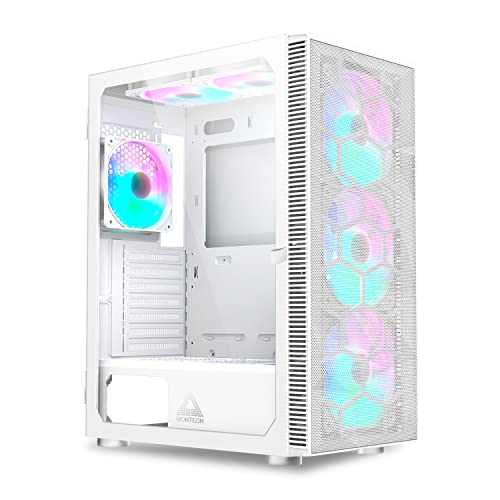
The X3 Glass is a midi-tower, which means it sits in the sweet spot for most ATX builds. It's not trying to be compact and it's not a full-tower beast. The external dimensions come in at 210mm wide, 490mm tall, and 450mm deep, which is a pretty standard footprint for this class. Steel construction throughout the main chassis, with a tempered glass side panel on the left and a steel panel on the right. The white variant has a painted finish on the exterior panels that owners generally describe as clean and consistent, though a couple mention it shows fingerprints more readily than the black version.
Fan support is where Montech has been genuinely generous here. You get mounts for up to six 120mm fans or a mix of 120mm and 140mm depending on position. Three DRGB fans are included in the box, which at this price is actually a meaningful saving over buying them separately. The case supports radiators up to 360mm at the front and 240mm at the top, with a 120mm exhaust mount at the rear. That covers the vast majority of AIO coolers you'd consider pairing with a build at this budget level.
Dust filtration is present on the front, bottom, and top, which is more coverage than some rivals at this price bother with. The PSU shroud keeps the bottom half of the case tidy, and there's a dedicated SSD mounting area behind the motherboard tray. Weight is around 6.5kg without components, which feels solid without being unwieldy. Below is the full spec breakdown.
| Specification | Detail |
|---|---|
| Form Factor | Midi-Tower |
| Dimensions (W x H x D) | 210mm x 490mm x 450mm |
| Motherboard Support | ATX, Micro-ATX, Mini-ITX |
| Max GPU Length | 380mm |
| Max CPU Cooler Height | 165mm |
| Front Radiator Support | Up to 360mm |
| Top Radiator Support | Up to 240mm |
| Rear Fan Mount | 1x 120mm |
| Included Fans | 3x DRGB fans (front intake) |
| Drive Bays (3.5") | 2 |
| Drive Bays (2.5") | 2 dedicated + 2 on HDD trays |
| Front I/O | 2x USB 3.0 Type-A, 1x USB 3.2 Gen 1 Type-C, HD Audio |
| Side Panel | Tempered Glass (left), Steel (right) |
| PSU Shroud | Yes |
| Cable Routing Grommets | Yes |
| Weight | ~6.5kg |
| Colour | White |
| Price | £77.65 · Details |

Form Factor and Dimensions
At 210mm wide and 450mm deep, the X3 Glass sits comfortably on a standard desk without dominating it. It's not one of those cases that needs its own postcode. The 490mm height is enough to accommodate a 360mm front radiator without the case looking disproportionately tall, which is a balance some cheaper midi-towers get wrong by going too short and then compromising on clearances to compensate.
The footprint works well for the classic desktop-beside-the-monitor setup, and it's slim enough that if you're putting it on the floor, it won't stick out awkwardly from under a desk. The white finish does make it a bit more of a statement piece than the black version, so if you're going for a clean white build with matching components, this is a sensible starting point. A few owners have specifically mentioned buying it to match white motherboards and GPU shrouds, and the finish holds up well in that context.
One thing that comes up occasionally in owner feedback is that the case feels slightly less substantial than some competitors at a similar price. That's partly the nature of the price tier and partly a perception thing with white finishes, which can read as lighter than they are. The steel chassis itself is reasonable quality for what you're paying. It's not going to flex alarmingly when you pick it up, but you shouldn't expect the rigidity of a case costing twice as much either. For a static desktop build, it doesn't matter. If you're moving it around a lot, handle it with a bit of care.
Motherboard Compatibility
The X3 Glass supports ATX, Micro-ATX, and Mini-ITX motherboards. Full E-ATX is not supported, which is the right call for a case this size. Trying to squeeze an E-ATX board into a chassis with 210mm of internal width would be a nightmare, and Montech hasn't bothered pretending otherwise. If you're running E-ATX, you're in the wrong case category entirely and probably already know it.
The standoff layout is pre-installed for ATX, which is the most common configuration. For Micro-ATX and Mini-ITX builds, you'll need to check which standoffs need moving, but that's standard practice across virtually every case at this price. The motherboard tray itself has a reasonably sized cutout behind the CPU socket area, which matters for installing aftermarket coolers without removing the motherboard. It's not the biggest cutout in class, but several owners have confirmed it's workable for most mainstream cooler brackets.
Cable routing holes around the motherboard area are grommeted with rubber, which keeps things looking tidy once the side panel goes on. The positioning of those holes is sensible rather than inspired: the main 24-pin ATX power hole is where you'd expect it, the CPU power holes are positioned for both top and side routing depending on your board layout, and there's enough room to route GPU power cables without them pulling awkwardly across the front of the board. Nothing revolutionary, but competently done for the price.
GPU Clearance
Montech rates the X3 Glass at 380mm maximum GPU length. That's a solid number for this class of case. To put it in context, an Nvidia RTX 4070 Founders Edition measures around 240mm, and even the longer AIB partner cards for the 4070 Ti and 4080 tend to sit in the 320mm to 340mm range. So you've got genuine headroom here, not just theoretical clearance that evaporates the moment you pick a real card.
The PSU shroud does eat into the lower portion of the case, but it doesn't affect GPU clearance in any meaningful way since modern cards sit in the upper PCIe slots. What matters more is the front-to-back depth, and at 450mm, the X3 Glass has enough room that a long GPU won't be fighting with the front panel fans or a front-mounted radiator. A few owners running 360mm front radiators alongside longer GPUs have confirmed there's no conflict, though you'll want to double-check your specific radiator thickness if you're pushing the limits.
Vertical GPU mounting is not natively supported on the X3 Glass, which is a common omission at this price point. If showing off your GPU through the side panel is the whole point of the build, you'd need a third-party riser cable and bracket, and at that stage you're adding cost and complexity that probably doesn't make sense given the case's price positioning. For a standard horizontal mount, though, everything works cleanly. The PCIe slot covers are the standard screwed type rather than tool-free, which is mildly annoying but hardly a dealbreaker.
CPU Cooler Clearance
165mm of CPU cooler clearance is the headline number, and that's genuinely good for a midi-tower at this price. For reference, the popular Noctua NH-D15 stands at 165mm, which means it fits with zero margin. Most builders going for a big air cooler will be looking at something in the 150mm to 165mm range, so you're covered. Anything taller and you'd need to be looking at a bigger chassis anyway.
For AIO liquid cooling, the front panel supports radiators up to 360mm, the top supports up to 240mm, and the rear takes a single 120mm. That gives you real flexibility. A 360mm AIO at the front is the most popular configuration for this case based on owner feedback, and it works well with the three included fans acting as intake while the AIO pump exhausts through the radiator. Some owners run the included fans as front intake with the AIO at the top, which is also a valid setup depending on your component layout and whether you want to prioritise GPU or CPU cooling.
One thing to be aware of with top-mounted radiators: RAM clearance can be tight depending on your specific radiator and how far the fans hang down. Tall RAM with large heatspreaders, anything over about 40mm, may cause clearance issues with a top-mounted 240mm radiator. If you're running standard-height RAM or low-profile sticks, you won't have a problem. But if you've got chunky RGB RAM towers, factor that in before committing to a top radiator mount. A couple of owners have flagged this, though it's not unique to the X3 Glass.
Storage Bay Options
The X3 Glass gives you two 3.5-inch bays for traditional hard drives, sitting in a cage behind the PSU shroud. They're tool-less in theory, though owner feedback suggests the tool-less mechanism is functional rather than slick. A couple of reviewers mention it takes a bit of fiddling to get drives to click in properly. Nothing that'll have you reaching for a hammer, but don't expect the satisfying snap of a premium case. For SSDs, there are two dedicated 2.5-inch mounting points on the back of the motherboard tray, plus the option to use the HDD tray slots for 2.5-inch drives if you want them behind the shroud.
M.2 storage is handled by your motherboard rather than the case, which is standard across virtually all cases at this price. If your board has two or three M.2 slots, as most modern ATX boards do, you're not losing anything by not having dedicated case-side M.2 mounting. The storage situation in the X3 Glass is therefore pretty typical: adequate for most builds, with two HDDs and two to four SSDs covered depending on how you configure the trays.
The HDD cage is removable, which is useful if you want to free up space for a longer front radiator or just prefer a cleaner look inside the case. This is a feature that some cases at this price omit, so it's a small but genuine plus. If you're going all-SSD with a couple of M.2 drives on the board, you can pull the cage entirely and give yourself a noticeably more open interior. A few owners have done exactly this and noted it makes cable routing considerably easier.

Cable Management
The PSU shroud covers the bottom section of the case and hides most of the mess, which is the single biggest quality-of-life feature in any budget case. Behind the motherboard tray, Montech has included cable routing channels with Velcro straps, and the rear panel clearance is around 20mm to 25mm. That's workable. Not luxurious, but workable. You can get a tidy build done back there without the rear panel bowing out when you try to close it, which is the real test.
The rubber grommets on the cable routing holes are present and correct, which keeps things looking clean from the glass side. The main 24-pin cable feeds through a large grommet near the right edge of the motherboard area, and the CPU power cables have their own routing holes near the top. The GPU power cables can be routed either through the PSU shroud or around the side, depending on your preference and how long your cables are. Modular PSU cables make a real difference here: if you're using a non-modular PSU, expect to spend more time wrestling cables into the rear cavity.
A few owners mention that the cable management, while functional, isn't the X3 Glass's strongest suit. The Velcro strap positions are sensible but not as numerous as you'd find in cases like the Fractal Design Focus 2, which has more tie points and a slightly deeper rear cavity. For a first build or a clean mid-range system, the X3 Glass is absolutely manageable. If you're the type who spends four hours getting every cable to sit perfectly flat, you might find yourself wishing for a bit more room to work with. But for most people? You'll get it sorted without too much grief.
Airflow and Thermal Design
This is the Montech X3 Glass, not the mesh version, and that distinction matters for airflow. Tempered glass panels look great but they don't breathe. The front panel on the X3 Glass has ventilation around the edges rather than a full mesh face, which means airflow is restricted compared to the mesh-fronted alternatives at this price. Montech includes three DRGB fans as front intake, which helps push air through despite the restricted front panel, but you're not getting the unrestricted intake of something like the Fractal Design Focus 2 or the DeepCool CC560.
In practical terms, the thermal performance is decent rather than outstanding. Owner feedback doesn't include horror stories about thermal throttling or unusually hot components, which suggests the included fans are doing their job adequately. But if you're building with a high-end CPU and GPU that generate serious heat, and you care about squeezing every degree out of your cooling setup, the mesh-front version of this case or a competitor with better front ventilation would serve you better. The X3 Glass is a good-looking case that performs acceptably on thermals, not a thermally-optimised case that also happens to look good.
The three included DRGB fans are a genuine highlight at this price. Three fans in the box means you're not immediately spending another £20 to £30 on fans before you've even installed a component. They're not Noctua-quality and nobody's pretending they are, but owner feedback is broadly positive on both their noise levels and their RGB effect. The DRGB sync works with most major motherboard RGB headers, which is what you'd expect from a case sold in 2026. Dust filters on the front, bottom, and top mean you're not going to be cleaning out the case every month, though the filters themselves are basic mesh rather than anything particularly fine-grained.
Front I/O and Connectivity
The front I/O sits at the top of the case, which is the sensible placement for a floor-standing or desk-mounted tower. You get two USB 3.0 Type-A ports, one USB 3.2 Gen 1 Type-C port, and a combined HD Audio jack for headphones and microphone. The Type-C port is a meaningful inclusion at this price; plenty of cases in the entry tier still ship with only Type-A ports, and having Type-C available for fast data transfer or charging is genuinely useful in 2026.
The power button is prominent and satisfying to press according to owner feedback, which sounds like a small thing but isn't when you're hitting it every day. The reset button is smaller and recessed slightly, which is the right call: you don't want to accidentally reset mid-game. The RGB and fan controller button is also present on the front panel, letting you cycle through lighting modes without needing software, which is handy if you're not using a motherboard with full RGB control.
One thing that doesn't appear on the X3 Glass is a second Type-C port or a USB 3.2 Gen 2x2 port, but at this price that's not a reasonable expectation. The internal header for the front Type-C is USB 3.2 Gen 1, which connects to the relevant header on your motherboard. If your board doesn't have a front panel Type-C header, the port simply won't function, so check your motherboard spec before assuming you'll have access to it. Most modern ATX boards include this header, but it's less universal on budget Micro-ATX boards.
Build Quality and Materials
The steel chassis is the foundation of the X3 Glass, and it's adequate for the price without being exceptional. The panels feel reasonably rigid when the case is assembled, but the side panels, particularly the tempered glass one, need to be handled with care during installation. The glass panel attaches with thumbscrews and sits in a channel at the bottom, which is a common design. A handful of owners mention the glass panel alignment is slightly fiddly to get right first time, but once it's seated it sits flush and looks clean.
Sharp edges are the most common complaint in the owner reviews. Not dangerously sharp, but sharp enough that a couple of reviewers mention catching their hands during cable routing. This is unfortunately common across budget cases, and Montech isn't the worst offender in this regard, but it's something to be aware of. Cable routing in particular involves reaching into corners where the steel edges aren't always perfectly rolled. Work gloves are cheap, and if you're building on a budget, keeping a pair nearby is sensible regardless of which case you choose.
The white paint finish gets consistent praise in owner reviews. It's not a powder coat, but it's applied evenly and holds up well to handling during the build process. A few owners mention minor scratches appearing on the interior panels after installation, which is typical of painted steel at this price. The exterior finish is more robust. The tempered glass panel is a genuine 4mm panel rather than the thin acrylic some budget cases try to pass off as glass, and it gives the build a proper premium look from the outside even if the internal construction is more modest. Overall, the build quality is appropriate for the entry price tier: not a case you'd hand down to your grandchildren, but solid enough for a daily driver build that'll sit on your desk for the next few years.
How It Compares
The main competition for the Montech X3 Glass in this price bracket comes from the Fractal Design Focus 2 and the DeepCool CC560. The Focus 2 is the airflow benchmark at this price: its mesh front panel delivers significantly better intake airflow than the X3 Glass's glass-and-vent design, and its cable management is a step above. If thermals are your primary concern and you don't mind a more understated look, the Focus 2 is the better choice. But it doesn't come with any fans in the box, which means you're adding cost immediately.
The DeepCool CC560 is a closer competitor. It includes four fans, has a mesh front panel option, and comes in at a similar price. Its fan count advantage is real, but the RGB implementation is less refined than Montech's DRGB system, and the CC560's build quality has attracted more mixed feedback than the X3 Glass. For builders who prioritise airflow over aesthetics, the CC560 is a strong alternative. For builders who want a clean white glass look with decent included fans and reasonable thermals, the X3 Glass has the edge on aesthetics.
The Corsair 4000D Airflow is the premium comparison point: better build quality, better airflow, better cable management. But it costs considerably more and doesn't include fans. If your budget stretches to the 4000D, it's a better case. If it doesn't, the X3 Glass is a sensible alternative that doesn't embarrass itself in the comparison. You're giving up some build quality and airflow performance for included fans and a lower price, which is a reasonable trade at this tier.
| Feature | Montech X3 Glass | Fractal Design Focus 2 | DeepCool CC560 |
|---|---|---|---|
| Form Factor | Midi-Tower | Midi-Tower | Midi-Tower |
| Front Panel | Tempered Glass | Mesh | Mesh / Glass |
| Included Fans | 3x DRGB | None | 4x ARGB |
| Max GPU Length | 380mm | 467mm | 370mm |
| Max CPU Cooler Height | 165mm | 169mm | 165mm |
| Front Radiator Support | 360mm | 360mm | 360mm |
| USB Type-C Front I/O | Yes (Gen 1) | Yes (Gen 2) | Yes (Gen 1) |
| PSU Shroud | Yes | Yes | Yes |
| Price Tier | Entry | Entry to Mid | Entry |

Final Verdict: Montech X3 Glass Review
The Montech X3 Glass is a good case for what it costs. It's not trying to be the Corsair 4000D or the Lian Li Lancool III, and it doesn't need to be. What it does is offer a clean white tempered glass look, generous clearances for both air and liquid cooling, three included DRGB fans, and a front I/O that includes Type-C, all at an entry price. That's a reasonable package, and the positive overall rating from dozens of owners confirms that most people who buy it are happy with it.
The caveats are real but manageable. Airflow is the weakest point: the glass front panel restricts intake compared to mesh alternatives, and if you're pushing a hot chip hard, you'll want to supplement the included fans or consider a mesh-front case instead. The cable management is functional but not luxurious. And a few sharp edges during the build process are a mild annoyance rather than a genuine problem. None of these are dealbreakers at this price.
Who should buy this? Anyone building a mid-range gaming PC who wants a white glass aesthetic, needs 360mm AIO support, and doesn't want to spend separately on fans. First-time builders will find the clearances forgiving and the layout sensible. Experienced builders who want a secondary or budget build case will get the job done without frustration.
Who should skip it? If thermals are critical, go for the Fractal Design Focus 2 and buy a fan pack separately. If you're building with a power-hungry CPU and GPU combination and you're serious about temperatures, the mesh front makes a measurable difference and you'll thank yourself later. And if you're on an even tighter budget, the black version of the X3 Glass occasionally comes in cheaper than the white variant, which is the smarter buy if the colour doesn't matter to you.
As a Montech X3 Glass review verdict: seven out of ten. Solid, sensible, good value. Not the best case at this price for airflow, but one of the better-looking ones, and the included fans tip the value equation in its favour.
What works. What doesn’t.
5 + 4What we liked5 reasons
- Three DRGB fans included in the box, a genuine saving at this price
- 380mm GPU clearance handles all current mainstream cards comfortably
- 165mm CPU cooler clearance fits most large air coolers including the Noctua NH-D15
- Front USB Type-C port included as standard
- Clean white finish with genuine 4mm tempered glass panel
Where it falls4 reasons
- Glass front panel restricts airflow compared to mesh-front competitors
- Some sharp internal edges reported during cable routing
- Cable management rear cavity is workable but not generous
- No vertical GPU mount support without third-party accessories
Full specifications
11 attributes| Form factor | Mid-Tower |
|---|---|
| CPU cooler clearance MM | 160 |
| Dimensions MM | 370 x 210 x 480 |
| Fans included | 6 |
| GPU clearance MM | 305 |
| MAX FAN count | 6 |
| MAX radiator MM | 240 |
| PSU support | ATX up to 160mm |
| Side panel | tempered glass |
| Supported motherboard | ATX, Micro-ATX, Mini-ITX |
| Weight KG | 6.1 |
Got a motherboard yet?
4 reviewsThe maker lists ATX, Micro-ATX and Mini-ITX boards for this case. These ATX boards fit it.
Frequently asked
5 questions01Is the Montech X3 Glass Midi-Tower, DRGB, Tempered Glass -weiß good for airflow?+
It's decent but not outstanding. The glass front panel restricts intake airflow compared to mesh-front cases at the same price, such as the Fractal Design Focus 2 or DeepCool CC560 mesh variant. Montech compensates by including three DRGB front intake fans, which helps push air through the limited front ventilation. For a mid-range gaming build, thermals are manageable. For a high-TDP system where you're pushing a power-hungry CPU and GPU hard, a mesh-front case would serve you better. Dust filters are present on the front, bottom, and top, which is good coverage for this price tier.
02What's the GPU clearance on the Montech X3 Glass Midi-Tower, DRGB, Tempered Glass -weiß?+
Montech rates the X3 Glass at 380mm maximum GPU length. That covers virtually all current mainstream and high-end graphics cards, including long triple-fan AIB partner cards for the RTX 4070 Ti and RX 7900 XT, which typically measure between 320mm and 340mm. If you're running a front 360mm radiator simultaneously, check your specific radiator depth to ensure there's no conflict, though owner feedback confirms most standard AIO configurations leave adequate clearance. Vertical GPU mounting is not natively supported and would require a third-party riser cable and bracket.
03Can the Montech X3 Glass Midi-Tower, DRGB, Tempered Glass -weiß fit a 360mm AIO?+
Yes. The front panel supports radiators up to 360mm, which is the most popular AIO size for mid-range and high-end builds. The top panel supports up to 240mm, and the rear takes a single 120mm fan or radiator. A 360mm front-mounted AIO is the most common configuration owners use, with the three included DRGB fans either relocated to other positions or replaced by the AIO fans. If you're considering a top-mounted 240mm radiator, be aware that tall RAM with large heatspreaders over approximately 40mm may cause clearance issues with the radiator fans.
04Is the Montech X3 Glass Midi-Tower, DRGB, Tempered Glass -weiß easy to build in?+
Generally yes, with a couple of caveats. The clearances are generous, the PSU shroud keeps the build looking tidy, and the cable routing grommets are properly rubber-lined. The main frustrations reported by owners are some sharp internal edges during cable routing, which are worth being cautious about, and a tool-less HDD mounting mechanism that takes a bit of fiddling to get right. The rear cable management cavity offers around 20mm to 25mm of clearance, which is functional for most builds. Using a modular PSU makes cable management noticeably easier. Overall, a competent first build is achievable without major headaches.
05What warranty and returns apply to the Montech X3 Glass Midi-Tower, DRGB, Tempered Glass -weiß?+
Specific warranty terms are not confirmed in the verified product data for this listing. When purchasing through Amazon UK, you are covered by Amazon's standard 30-day return policy and the A-to-Z Guarantee, which protects you if the item arrives damaged or not as described. For manufacturer warranty queries, contact Montech directly through their official channels. Always retain your proof of purchase.