Pick the wrong motherboard and your whole build pays for it. Not just now, but six months down the line when you're trying to figure out why your RAM won't post at its rated speed, or why your NVMe drive keeps dropping out, or why the BIOS update bricked the board before you even got Windows installed. It's the kind of regret you feel when you're staring at a dead system at 11pm on a Sunday.
The MSI B850 GAMING PLUS WIFI is aimed squarely at people who want a proper AM5 platform without paying X870 money. It's a mid-range ATX board that supports AMD Ryzen 9000, 8000, and 7000 series processors, brings DDR5 memory, PCIe 5.0, Wi-Fi 7, and a 12-phase VRM setup to the table. On paper, that's a lot for the price bracket. But paper specs are easy. The question is whether MSI has actually delivered something worth your money, or just ticked boxes.
It's rated ★★★★☆ (4.4) on Amazon, so there's clearly something going right here. But high ratings don't mean no problems, and there are a few things worth knowing before you commit. So here's the full picture, based on the specs and where this board sits in AMD's lineup.
Core Specifications
Let's get the fundamentals down first. The B850 GAMING PLUS WIFI is an ATX form factor board built on AMD's B850 chipset, using the AM5 socket. It supports Ryzen 7000, 8000, and 9000 series processors, which gives you a decent range of CPU options both now and for future upgrades. Four DDR5 DIMM slots handle your memory, with overclocking headroom up to 8200+ MT/s (OC) in a 1DPC 1R configuration.
Storage is covered by three M.2 slots: one PCIe Gen 5 x4 running at 128Gbps, one PCIe Gen 4 x4 at 64Gbps, and one PCIe Gen 4 x2 at 32Gbps. The primary GPU slot is PCIe 5.0 x16 with Steel Armor reinforcement. Those Gen 5 figures need a Ryzen 7000 or 9000 chip. With a Ryzen 8000 APU, MSI says the x16 slot runs at PCIe 4.0 x8 (8700, 8600, 8400) or x4 (8500, 8300), and the Gen 5 M.2 slot drops to Gen 4. Networking comes via a full-speed Wi-Fi 7 module with Bluetooth 5.4, plus a 5Gbps wired LAN port. Rear I/O includes two USB 10Gbps Type-C ports and 7.1 HD Audio with Audio Boost. That's a lot of connectivity for a board in this price range, and I'll get into each area in detail below.
One thing to flag upfront: if you're coming from an older platform, this board is DDR5-only. There's no DDR4 compatibility, which is standard for AM5 but still catches people out. Make sure your memory budget accounts for DDR5 pricing before you commit to this build path.
| Specification | Detail |
|---|---|
| Form Factor | ATX |
| Socket | AM5 |
| Chipset | AMD B850 |
| Supported CPUs | AMD Ryzen 9000 / 8000 / 7000 |
| Memory Slots | 4 x DDR5 DIMM |
| Memory Speed (OC) | 8200+ MT/s (1DPC 1R) |
| PCIe x16 Slot | 1 x PCIe 5.0 x16 (Steel Armor) |
| M.2 Slots | 1 x Gen 5 x4 (128Gbps), 1 x Gen 4 x4 (64Gbps), 1 x Gen 4 x2 (32Gbps) |
| Wi-Fi | Wi-Fi 7 |
| Bluetooth | 5.4 |
| LAN | 5Gbps |
| Rear USB | 2 x USB 10Gbps Type-C, 1 x USB 10Gbps Type-A, 1 x USB 5Gbps Type-A, 4 x USB 2.0 |
| Audio | 7.1 HD Audio with Audio Boost |
| VRM | 12 Duet Rail Power System (P-PAK) |
| Price | £144.99 |

Socket and CPU Compatibility
The AM5 socket is AMD's current-generation platform, and it's a good one to be on right now. Unlike Intel's habit of changing sockets every couple of years, AMD has committed to AM5 longevity, which means the board you buy today should still accept future Ryzen processors as they arrive. The B850 GAMING PLUS WIFI officially supports Ryzen 7000, 8000, and 9000 series chips out of the box, which covers everything from budget Ryzen 5 7600 builds right up to the Ryzen 9 9950X if you want to go all-in.
The headline feature here is support for Ryzen 9000 processors. MSI's Core Boost architecture is specifically designed to handle the power demands of these chips, which is important because the newer Ryzen 9000 parts can be demanding on VRM setups that aren't up to the job. The 12-phase power delivery system on this board is built with that in mind, and we'll get into the specifics of that in the VRM section. But from a compatibility standpoint, you're not going to hit any nasty surprises when pairing this with a Ryzen 9 9900X or similar.
One thing worth knowing: if you're buying a brand new Ryzen 9000 chip and this is a board that's been sitting in a box for a while, you may need to check the BIOS version before first boot. The rear panel has a Flash BIOS button, so you can update from a USB stick even if the installed BIOS won't boot your new chip. The AM5 ecosystem has matured enough that BIOS compatibility is less of a lottery than it was in the early AM5 days, but it's still a step worth not skipping. Check MSI's official product page for the latest supported BIOS version before you build.
Chipset Features
The B850 chipset sits in the middle of AMD's current lineup, below the flagship X870E and X870. What does that mean in practice? You get overclocking support (both CPU and memory), PCIe 5.0 on the primary x16 slot, and a reasonable allocation of USB and storage lanes. It's not the fully unlocked platform that X870E provides, but for most builds, the difference is academic rather than meaningful.
Memory overclocking is fully supported on B850, which is a bigger deal than it sounds. AMD's EXPO profiles (their equivalent of Intel's XMP) work properly on this platform, meaning you can buy a DDR5-6000 or DDR5-6400 kit and expect it to actually run at that speed with a simple profile enable in the BIOS. Going higher, up to 8200+ MT/s, requires more manual tuning and the right memory kit, but the headroom is there if you want it. For most people, setting an EXPO profile and forgetting about it is the way to go, and B850 handles that without drama.
VRM and Power Delivery
This is the section I always care about most, because a weak VRM is the kind of thing that doesn't bite you immediately. It bites you six months in, when your CPU starts thermal throttling under sustained loads, or worse, when it causes stability issues that are an absolute nightmare to diagnose. So let's talk about what MSI has actually done here.
The B850 GAMING PLUS WIFI uses a 12+2+1 Duet Rail Power System, fed by two 8-pin CPU power connectors. This is paired with 7W/mK MOSFET thermal pads, extra choke thermal pads and an extended heatsink design, all there to pull heat away from the VRM components rather than leave them sitting there hoping for the best. MSI has also added a chipset heatsink.
The combo fan header (rated at 3A) for pump and system use is a nice touch too, especially if you're running an AIO cooler where you want to control both the pump and fans from a single header.
Memory Support
Four DDR5 DIMM slots, supporting up to 8200+ MT/s in overclocked mode. That's the headline. But there's more nuance to it than that, because DDR5 overclocking behaviour varies depending on how many sticks you're using and whether they're single or double rank. The 8200+ MT/s figure applies to a 1DPC 1R configuration, meaning one stick per channel, single rank. If you're running four sticks or double-rank modules, your ceiling will be lower, which is completely normal for any DDR5 platform.
For most people, the sweet spot is two sticks of DDR5-6000 or DDR5-6400 running in dual channel. AMD's Ryzen processors (particularly Zen 4 and Zen 5 architecture chips) have a known relationship with memory frequency and the Infinity Fabric clock, and DDR5-6000 is generally considered the optimal point where you get maximum memory bandwidth without the Infinity Fabric running out of sync.
AMD's EXPO memory profiles are supported. The board's four slots take up to 256GB in total, which is more than enough headroom for gaming, content creation, or workstation use.
Storage Options
Three M.2 slots is good. Three M.2 slots where the top one is PCIe Gen 5 x4 is better. The primary M.2 slot on this board runs at up to 128Gbps, which puts it in the same territory as the fastest consumer NVMe drives currently available. Gen 5 SSDs are still expensive and their real-world advantage over Gen 4 drives is debatable for most workloads, but having the slot means you're not artificially limited if you want to use one now or upgrade to one later.
The second M.2 slot runs at PCIe Gen 4 x4 (64Gbps), which is where most people will be putting their primary drive anyway. Gen 4 NVMe SSDs are the current sweet spot for price and performance, and 64Gbps gives them full bandwidth. The third slot is PCIe Gen 4 x2 (32Gbps), which is fine for a secondary storage drive or a less demanding use case. It's not the fastest slot, but it's a useful third option.
The primary Gen 5 slot is covered by MSI's EZ M.2 Shield Frozr II, which is a heatsink designed to prevent thermal throttling on fast NVMe drives. Gen 5 SSDs in particular run hot under sustained writes, so having thermal management built in rather than leaving the drive exposed is a genuine benefit. The EZ part of the name refers to the tool-free installation mechanism, which makes swapping drives easier than the fiddly screw systems on older boards. It's a small quality-of-life improvement, but it's the kind of thing you appreciate when you're elbow-deep in a case.
Expansion Slots and PCIe
The primary PCIe x16 slot runs at PCIe 5.0, delivering 128GB/s of bandwidth. That's the slot your GPU goes in, and it's reinforced with Steel Armor, which is MSI's name for the metal shielding around the slot. This matters more than it sounds, because heavy GPUs (and we're talking about some seriously chunky cards) can physically stress an unprotected PCIe slot over time. Steel Armor protects both the slot itself and provides better grounding for the card.
For gaming, PCIe 5.0 x16 means little right now. Current GPUs don't saturate PCIe 4.0 x16 bandwidth, let alone Gen 5. But future-proofing is future-proofing, and having the headroom means this board won't be a bottleneck for the next generation of graphics cards. It's the right thing to have on a board you're planning to keep for four or five years.
Beyond the primary x16 slot, MSI lists three more full-length slots, all wired from the chipset: one PCIe 4.0 slot running at up to x4 (x2 when either of the others is in use) and two PCIe 3.0 x1. That PCIe 4.0 slot is the "4.0 x16" in the product name: x16 in size, x4 electrically. It's secondary expansion for things like capture cards, sound cards, or additional NVMe adapters. The ATX form factor gives you the physical space for multiple expansion cards, which is one of the reasons to choose ATX over micro-ATX for a build where you might want to add peripherals later.
Connectivity and Rear I/O
The rear I/O panel includes two USB 10Gbps Type-C ports, which is one of the things that separates a genuinely useful board from one that just looks good on a spec sheet. USB Type-C at 10Gbps is fast enough for external SSDs and modern peripherals. Having them on the rear panel rather than just as an internal header means you can actually use them for day-to-day connectivity without running a cable out the front of your case.
The 7.1 HD Audio with Audio Boost is worth a mention too. It runs on a Realtek ALC897 codec, and Audio Boost is MSI's implementation of audio isolation, keeping the audio circuitry separated from the rest of the PCB to reduce electrical interference. It won't replace a dedicated sound card for audiophile use cases.
Beyond those highlighted ports, MSI lists the rest of the rear panel: four USB 2.0 ports, one USB 10Gbps Type-A and one USB 5Gbps Type-A, plus S/PDIF out, the 5Gbps LAN port, the Wi-Fi 7 antenna connectors, and Clear CMOS and Flash BIOS buttons. Video output is a single DisplayPort 1.2 (up to 4K 60Hz), which only works with a processor that has integrated graphics. There's no HDMI.

Wi-Fi and Networking
This is the Wi-Fi 7 board. MSI also sells a B850 GAMING PLUS WIFI6E with a Wi-Fi 6E module instead, so check the name on the box. Wi-Fi 7 is the big networking story here. The Wi-Fi 7 standard (802.11be) brings multi-link operation, higher channel bandwidth, and significantly better throughput than Wi-Fi 6E, particularly in congested environments. For gaming, the low latency improvements are more immediately noticeable than the raw speed gains. And yes, you'll need a Wi-Fi 7 router to get the full benefit, but the module is backwards compatible with Wi-Fi 6E and Wi-Fi 6 networks, so it works fine on existing kit.
Bluetooth 5.4 comes bundled with the Wi-Fi module, which covers wireless controllers, headsets, keyboards, and anything else you're connecting wirelessly. Bluetooth 5.4 brings improvements in reliability and connection stability over earlier versions. Nothing earth-shattering, but it's a recent version, which matters for longevity.
The 5Gbps wired LAN is where things get interesting, particularly if you have a multi-gig capable router or switch, or if you're doing any kind of NAS work or large file transfers over your local network. For pure gaming, the difference between 2.5G and 5G LAN is negligible, but for a home server, content creation workflow, or anyone who moves large files around regularly, 5Gbps wired is a real step up. It's the kind of spec that makes this board genuinely useful for a wider range of use cases than just gaming.
BIOS and Overclocking
MSI's Click BIOS keeps things simple: you get an Easy mode for basic settings and an Advanced mode where everything is accessible without feeling like you need a treasure map. Fan curves are easy to set up, memory profiles are a single toggle to enable, and the OC options are clearly labelled.
One thing to know: memory training on first boot can take a while, particularly with higher-end DDR5 kits. This is a DDR5 platform trait rather than an MSI-specific problem, but it's worth knowing that your first boot after installing new memory might involve a couple of reboots while the board figures out the optimal training parameters. Once it's done, it's done, and subsequent boots are fine. But if your board reboots twice on first power-up, don't panic.
Overclocking headroom on B850 is solid. Memory overclocking is fully supported, and the 8200+ MT/s ceiling gives enthusiasts plenty to work with. CPU overclocking is available within the platform's limits, though Ryzen 9000 chips with Precision Boost Overdrive (PBO) tend to respond better to PBO tuning than traditional manual overclocking anyway. The BIOS provides all the PBO settings you'd want, including curve optimiser per-core tuning, which is the real overclocking tool for modern Ryzen processors. The fan controls offer per-header curve customisation across all six fan headers, with the combo pump/fan header particularly useful for AIO cooler setups.
Build Quality and Aesthetics
Heatsink coverage is broad. The extended heatsink design covers the VRM area, the EZ M.2 Shield Frozr II heatsink sits over the primary M.2 slot, and there's a chipset heatsink too. Underneath is a 6-layer, server-grade PCB with 2oz copper.
The PCB itself has a clean dark aesthetic that works in most build themes. Steel Armor on the primary PCIe slot adds both structural integrity and a visual quality cue. The overall impression is of a board that's been thought about rather than just assembled from a checklist of parts.
The EZ M.2 mechanism deserves a specific mention because it's a genuine quality-of-life improvement. Tool-free M.2 installation sounds like a minor thing until you've fumbled with a tiny screw and a standoff inside a case three times in a row. MSI's implementation here makes installing and swapping NVMe drives much less of a faff. Small thing, but the kind of small thing that makes you think the engineers actually use their own products.
Value Analysis
In the mid-range motherboard segment, the B850 GAMING PLUS WIFI brings a strong feature list: Wi-Fi 7, 5Gbps LAN, a Gen 5 M.2 slot, and a 12-phase VRM on 7W/mK thermal pads. That list, together with a 4.4-star Amazon rating, suggests MSI has hit a real sweet spot.
The comparison to make is against X870 boards, which sit above B850 in AMD's lineup. X870 brings some extra USB bandwidth, but for most gaming and productivity builds, the practical difference is minimal. If you're building a workstation that needs maximum PCIe lane count or you're doing something very specific with multiple high-bandwidth devices simultaneously, X870 or X870E might be worth the premium. For everyone else, B850 delivers the platform features that matter without the price premium for features you'll never use.
At £144.99, this board sits in a position where it's hard to argue against it for an AM5 build that you want to last. The connectivity is genuinely current-gen rather than last-gen with a new coat of paint, and the storage options cover everything from budget Gen 4 drives to the fastest Gen 5 SSDs on the market. If you're building a Ryzen 9000 system and you don't want to pay X870 prices, this is where the value actually lives right now.
- Pros: Wi-Fi 7 and 5Gbps LAN at mid-range pricing; Gen 5 M.2 slot; 12-phase VRM with 7W/mK thermal pads; EZ M.2 tool-free installation; six fan headers including a combo pump header; 4.4-star Amazon rating
- Cons: DDR5-only (expected for AM5, but budget accordingly); memory training quirks on first boot with some kits
Full Specifications
For anyone who wants the complete picture before making a decision, here's the full specification breakdown.
| Category | Specification |
|---|---|
| Manufacturer | MSI |
| Model | B850 GAMING PLUS WIFI |
| Form Factor | ATX |
| Socket | AM5 |
| Chipset | AMD B850 |
| CPU Support | AMD Ryzen 9000 / 8000 / 7000 |
| Memory Type | DDR5 (4 x DIMM SMT) |
| Max Memory Speed (OC) | 8200+ MT/s (1DPC 1R) |
| Max Memory | 256GB (4 x DDR5 UDIMM) |
| VRM | 12 Duet Rail Power System (P-PAK) with Core Boost |
| MOSFET Thermal Pads | 7W/mK |
| Heatsink | Extended VRM heatsink + chipset heatsink + EZ M.2 Shield Frozr II |
| Fan Header (Combo) | 3A combo pump/system header |
| PCIe x16 (Primary) | PCIe 5.0 x16 with Steel Armor (128GB/s) |
| Expansion Slots | 1 x PCIe 4.0 (x4, x2 when sharing), 2 x PCIe 3.0 x1 |
| M.2 Slot 1 | PCIe Gen 5 x4 (128Gbps) with EZ M.2 Shield Frozr II |
| M.2 Slot 2 | PCIe Gen 4 x4 (64Gbps) |
| M.2 Slot 3 | PCIe Gen 4 x2 (32Gbps) |
| SATA | 4 x SATA 6Gb/s (RAID 0/1) |
| Wi-Fi | Wi-Fi 7 (802.11be) |
| Bluetooth | 5.4 |
| LAN | 5Gbps |
| Rear USB | 2 x USB 10Gbps Type-C, 1 x USB 10Gbps Type-A, 1 x USB 5Gbps Type-A, 4 x USB 2.0 |
| Video Output | 1 x DisplayPort 1.2 (needs a CPU with graphics), no HDMI |
| Audio | 7.1 HD Audio with Audio Boost |
| Warranty | 3 years (MSI UK) |
| Current Price | £144.99 |
| Rating | ★★★★☆ (4.4) (370 reviews) |
For the internal header list and front USB headers, MSI's product page has the full detail.
Final Verdict
The MSI B850 GAMING PLUS WIFI is one of those boards that makes you think the product team actually looked at what people building AM5 systems need, rather than just copying last year's spec sheet with a new sticker. You get Wi-Fi 7 and 5Gbps LAN at mid-range pricing. A Gen 5 M.2 slot with its own heatsink, a 12-phase VRM on 7W/mK thermal pads, and Easy and Advanced BIOS modes. It's a lot to get right simultaneously.
Is it perfect? No. The memory training quirks on first boot are a known DDR5 platform characteristic but they're still mildly annoying. And the only video output is a single DisplayPort, with no HDMI, which matters if you plan to run off integrated graphics. But none of these are dealbreakers. They're the kind of minor friction points you find on any board, and they're significantly outweighed by what you're getting for the price.
Who should buy this? Anyone building an AM5 system with a Ryzen 7000, 8000, or 9000 series chip who wants a solid, well-connected foundation without stepping up to X870 pricing. Particularly good for: people who want Wi-Fi 7 without paying a premium for it, anyone who'll benefit from 5Gbps LAN, and builders who want the Gen 5 M.2 slot for future storage upgrades. Who should look elsewhere? If you need maximum PCIe lanes for a multi-GPU or high-bandwidth workstation setup, look at X870E. If you're on a tight budget and don't need the newest connectivity, a B650 board saves money. But for most AM5 builds, this is where the value genuinely sits.
Overall score: 8.5 out of 10. Solid VRM, genuinely current-gen connectivity, competitive pricing.

Not the Right Board for You?
If the B850 GAMING PLUS WIFI doesn't quite fit your build, here's where to look instead:
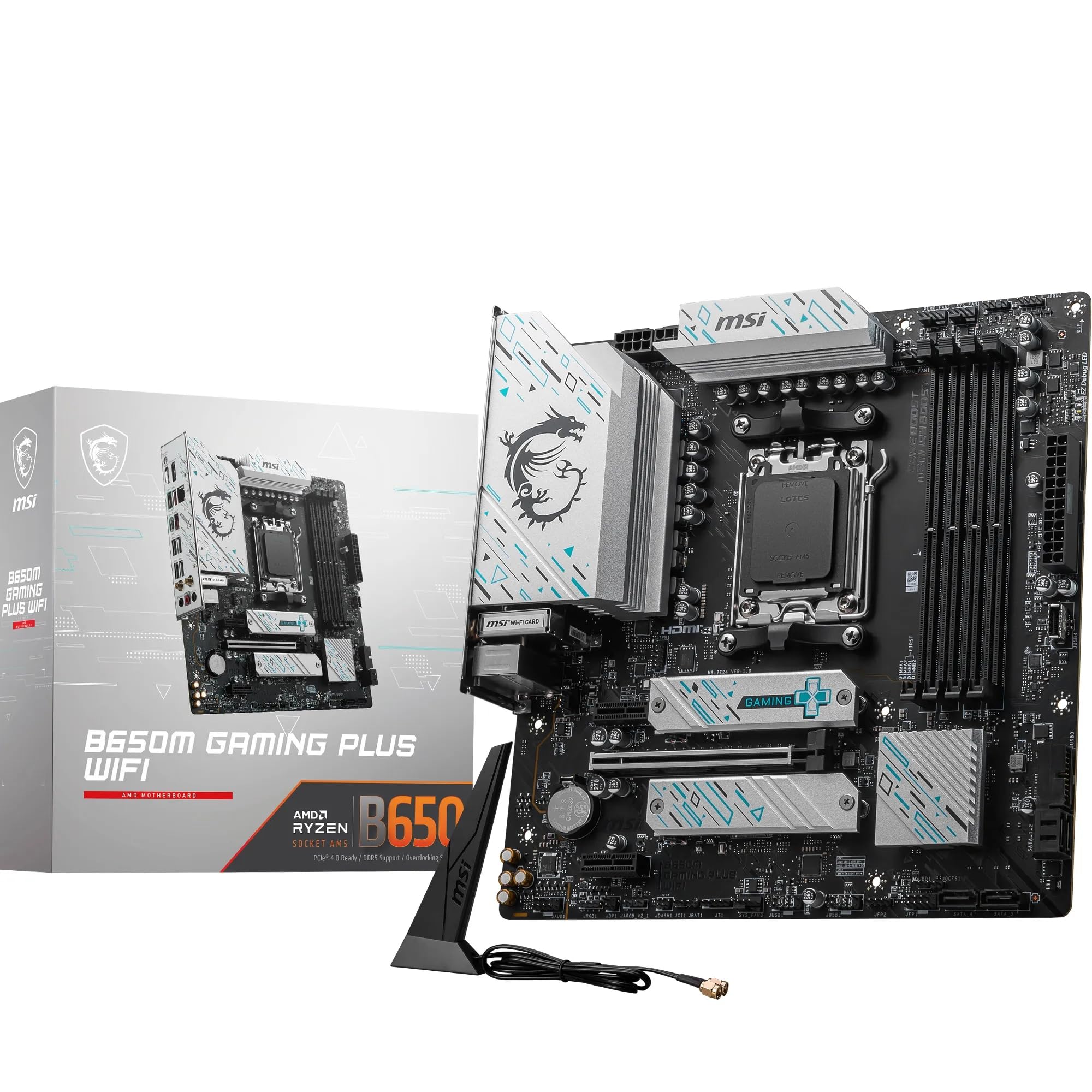
- Tighter budget: A B650 board, such as the MSI B650 GAMING PLUS WIFI, saves money for builds where the newest connectivity specs don't matter.
- Maximum platform capability: An X870E board from MSI, ASUS, or Gigabyte gives you the full AMD flagship chipset with maximum PCIe 5.0 lane allocation and USB4 support. Significantly more expensive, but the right choice for workstation builds or anyone who genuinely needs everything unlocked.
- Intel alternative: If you're open to switching platforms entirely, Intel's Z890 boards on LGA1851 with Core Ultra 200S processors are competitive, though the AM5 ecosystem's upgrade path and current Ryzen 9000 performance make AMD the more compelling choice for most new builds right now.
This article is based on verified product specifications from MSI and Amazon. We research products thoroughly but do not conduct lab testing. Prices change; use the live price link above for the current figure. This article contains affiliate links. If you purchase via our links, we may earn a small commission at no extra cost to you.
What works. What doesn’t.
6 + 3What we liked6 reasons
- Wi-Fi 7 and 5Gbps LAN on a mid-range board
- 12-phase Duet Rail VRM with 7W/mK thermal pads and an extended heatsink, built for Ryzen 9000 processors
- PCIe Gen 5 x4 M.2 slot with EZ M.2 Shield Frozr II heatsink future-proofs storage without forcing an immediate premium drive purchase
- EXPO memory profiles enable DDR5-6000 and DDR5-6400 kits with a single BIOS toggle
- MSI Click BIOS includes per-core PBO tuning and fan curve controls
- Steel Armor on the primary PCIe x16 slot provides structural protection for heavy modern graphics cards
Where it falls3 reasons
- DDR5-only platform means memory costs must be factored into the total build budget from the start
- Memory training on first boot can cause unexpected reboots, particularly with kits not on MSI's QVL
- The third M.2 slot runs at PCIe Gen 4 x2 rather than full Gen 4 x4, limiting bandwidth on that slot
Full specifications
12 attributes| Socket | AM5 |
|---|---|
| Chipset | B850 |
| Form factor | ATX |
| Bios flashback | true |
| M2 slots | 3 |
| MAX RAM | 256GB |
| MAX RAM GB | 256 |
| Network | 5GbE + Wi-Fi 7 |
| Pcie 5 slots | 1 |
| Pcie slots | 1x PCIe 5.0 x16 |
| RAM slots | 4 |
| RAM type | DDR5 |
If this isn’t right for you
2 options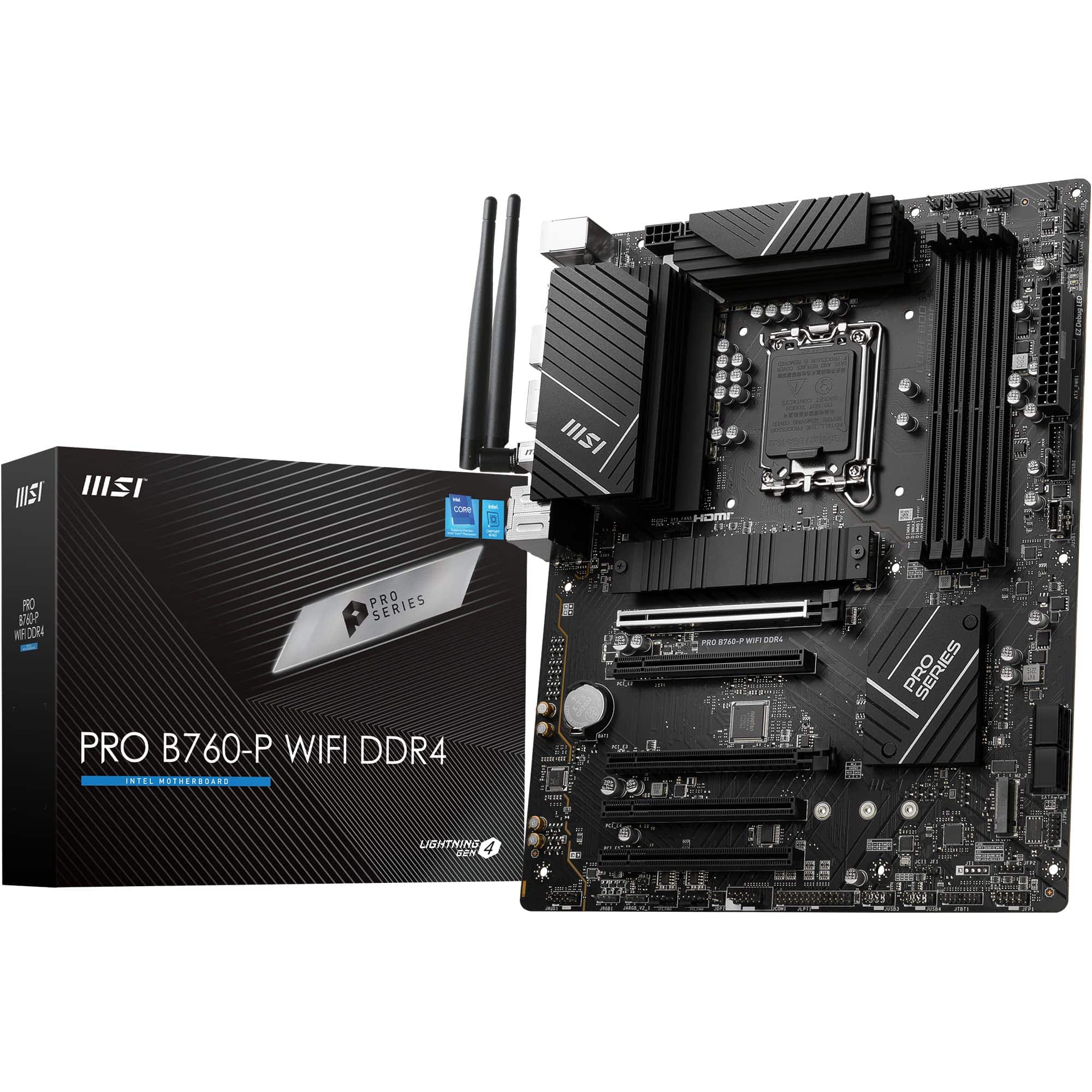 8.5 / 10
MSI PRO B760-P WIFI DDR4 Motherboard, ATX - Supports Intel 14th, 13th & 12th Gen Core Processors, LGA 1700 - DDR4 Memory Boost 5333+MHz/OC, PCIe 4.0 x16 Slots, M.2 Gen4 Slots, 2.5G LAN, Wi-Fi 6E
£129.95 · MSI
 8.5 / 10
MSI B650M GAMING PLUS WIFI Motherboard, mATX - Supports AMD Ryzen 9000/8000 / 7000 Series Processors, AM5 - DDR5 Memory Boost 7800+ MHz/OC, PCIe 4.0 x16, M.2 Gen4, Wi-Fi 6E
£157.40 · MSI
Frequently asked
7 questions01Does the MSI B850 GAMING PLUS WIFI support Ryzen 9000 series processors out of the box?+
Yes, the board officially supports AMD Ryzen 9000, 8000, and 7000 series processors. Confirm the installed BIOS version against MSI's compatibility list before your first boot, particularly if the board has been in stock for some time. If it needs an update, the rear-panel Flash BIOS button lets you do it from a USB stick.
02Is DDR5 memory required for this motherboard?+
Yes, the B850 GAMING PLUS WIFI is DDR5-only. The AM5 platform does not support DDR4, so you will need DDR5 modules. The board has four DIMM slots, takes up to 256GB, and can run memory at up to 8200+ MT/s in an overclocked one-stick-per-channel, single-rank configuration. For most builds, two sticks of DDR5-6000 or DDR5-6400 running EXPO profiles is the practical sweet spot.
03Why does the board reboot multiple times on first power-up?+
This is DDR5 memory training behaviour rather than a fault. On first boot, the board runs through training routines to determine optimal timing parameters for your memory kit. Depending on the kit and the speed profile selected, this can cause two or three reboots before the system fully posts. It is normal, it completes automatically, and subsequent boots proceed without issue. If you experience ongoing instability, enabling your kit's EXPO profile in the BIOS is usually the first thing to try.
04What is the practical difference between B850 and X870 for a typical gaming build?+
For most gaming and general productivity workloads, the difference is minimal. X870 adds extra USB bandwidth, which matters for workstation configurations with multiple high-bandwidth devices running simultaneously. For a gaming PC with a single GPU, two or three NVMe drives, and standard peripherals, B850 provides everything you need at a lower price. The B850 GAMING PLUS WIFI in particular closes the gap further by including Wi-Fi 7 and 5Gbps LAN that you would typically associate with X870-tier boards.
05Does the Wi-Fi 7 module require a Wi-Fi 7 router to function?+
No. The Wi-Fi 7 module is backwards compatible with Wi-Fi 6E and Wi-Fi 6 networks. You will only get the full benefit of Wi-Fi 7 features such as multi-link operation and higher channel bandwidth if your router also supports Wi-Fi 7, but the module works correctly on existing Wi-Fi 6E and Wi-Fi 6 infrastructure. Bluetooth 5.4 is included alongside the Wi-Fi module.
06Can this board handle a Ryzen 9 9950X without VRM throttling?+
The board is built for it: MSI lists Ryzen 9000 support, and the 12+2+1 Duet Rail Power System is cooled by 7W/mK MOSFET thermal pads, extra choke thermal pads and an extended heatsink. MSI doesn't publish a sustained-load VRM rating, though, so decent case airflow over the VRM area is still worth having with a 16-core chip like the 9950X.
07How many M.2 slots does the B850 GAMING PLUS WIFI have and what speeds do they support?+
There are three M.2 slots. The primary slot runs at PCIe Gen 5 x4 and supports up to 128Gbps, making it compatible with the fastest current consumer NVMe drives. The second slot runs at PCIe Gen 4 x4 for up to 64Gbps, which is the current sweet spot for price-to-performance NVMe drives. The third slot runs at PCIe Gen 4 x2 for up to 32Gbps, suitable for secondary or less demanding storage. The primary slot is covered by MSI's EZ M.2 Shield Frozr II heatsink for thermal management.