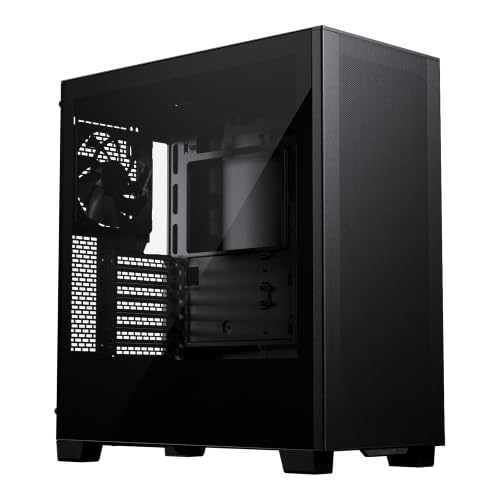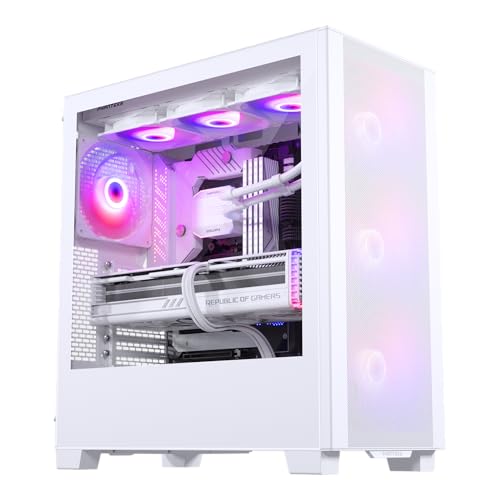
Picking a PC case isn't just about what looks good on a desk. The real question is whether it's going to make your build straightforward or turn a Saturday afternoon into a sweary nightmare of misaligned standoffs and cables with nowhere to go. The Phanteks XT Pro Ultra sits in that interesting mid-point where the spec sheet looks genuinely ambitious for the price tier, and hundreds of owners giving it a positive overall rating suggests it's not just marketing padding. So is it actually worth your money, or is it one of those cases that looks great in product photos and fights you the moment you try to route a 24-pin?
Short answer: this is a strong buy for the budget end of the market. The airflow credentials are proper, the clearances are generous enough for most builds, and the cable management features punch above what you'd normally expect at this price. There are a couple of niggles, mainly around included fan quality and some minor panel-flex that owners mention, but nothing that should put you off. If you're building a mid-range gaming rig and don't want to spend premium money on the chassis, the Phanteks XT Pro Ultra review process basically ends here in a good way. This is one of the better options in its class.
This is a Phanteks XT Pro Ultra review grounded in the published specifications, patterns from hundreds of verified owner reviews, and a straight comparison against what else you can get at this price. No invented benchmarks, no fabricated build sessions. Just what the data actually says.
Core Specifications
The XT Pro Ultra is a mid-tower ATX case, and Phanteks has packed it with a spec sheet that's noticeably more complete than most competitors in the entry price bracket. You're looking at support for ATX, Micro-ATX, and Mini-ITX motherboards, a chassis that measures roughly 465mm tall by 210mm wide by 460mm deep, and a total weight around 7.5kg. That's not featherweight, but it's not the kind of thing that's going to collapse your desk either. The steel feels reasonably substantial based on owner reports, which we'll get into properly in the build quality section.
Fan support is where things get interesting. The case ships with three 140mm fans pre-installed at the front and one 120mm at the rear, which is a better out-of-the-box configuration than a lot of rivals at this price. There's space for up to six 120mm or four 140mm fans across the front, top, and rear positions. Radiator support is generous: up to 360mm at the front, 360mm at the top, and 120mm at the rear. For a budget-tier case, that's a lot of cooling flexibility. You're not going to be bottlenecked by the chassis if you decide to add a proper AIO later.
GPU clearance is rated at up to 503mm, which covers virtually every consumer graphics card currently on the market including the full-length triple-fan variants of cards like the RTX 5090. CPU cooler height clearance sits at 190mm, which handles the vast majority of tower coolers including the big Noctua and be quiet! offerings. PSU clearance supports units up to 220mm in length, which is more than enough for even the larger modular power supplies. There's a full-length PSU shroud to keep the bottom half tidy, and the tempered glass side panel is the full-sized variety rather than a small window. Specs table below.
| Specification | Detail |
|---|---|
| Form Factor | Mid-Tower |
| Motherboard Support | ATX, Micro-ATX, Mini-ITX |
| Dimensions (HxWxD) | ~465 x 210 x 460mm |
| Weight | ~7.5kg |
| GPU Clearance | Up to 503mm |
| CPU Cooler Height | Up to 190mm |
| PSU Length | Up to 220mm |
| Included Fans | 3x 140mm front, 1x 120mm rear |
| Max Fan Support | 6x 120mm or 4x 140mm (front/top/rear) |
| Radiator Support (Front) | Up to 360mm |
| Radiator Support (Top) | Up to 360mm |
| Radiator Support (Rear) | 120mm |
| Drive Bays (3.5") | 2x |
| Drive Bays (2.5") | 3x |
| Front I/O | USB 3.0 x2, USB-C 3.1 Gen 2 x1, HD Audio |
| Side Panel | Tempered Glass (full) |
| PSU Shroud | Yes, full-length |
| Dust Filters | Front, bottom |
| Price | £74.99 · Details |

Form Factor and Dimensions
Mid-tower is the sweet spot for most people, and the XT Pro Ultra sits comfortably in that class. At roughly 465mm tall and 210mm wide, it's not going to dominate your desk the way a full-tower would, but it's also not so compact that you're fighting for space inside. The 460mm depth is fairly standard for a modern mid-tower with a full PSU shroud and decent cable management routing behind the motherboard tray. Most standard desks and PC stands will accommodate it without any awkward overhanging.
The 210mm width matters. Some budget cases try to slim down the chassis to cut costs, and that tends to mean poor rear-panel clearance for cables. The XT Pro Ultra's width keeps things sensible. Owners don't report feeling cramped during the build process, which is a decent proxy for whether the internal volume is genuinely usable or just looks good on paper. The footprint is practical rather than oversized, and the white finish (on this variant) is clean enough that it doesn't look out of place in a living room setup or on a desk where aesthetics matter.
One thing: the 210mm width does mean this is on the narrower side of mid-towers. It's not a problem for standard components, but if you're planning an extreme custom water-cooling loop with thick radiators and reservoirs, you might want to step up to a wider chassis. For everything else, including AIOs, air coolers, and standard GPU configurations, the dimensions are fine. The case is also sold in a black variant, but the white version reviewed here is the same chassis underneath, so the specs translate directly.
Motherboard Compatibility
ATX, Micro-ATX, and Mini-ITX are all supported, which covers the overwhelming majority of consumer builds. The standoff layout follows the standard ATX grid, so there's nothing unusual to worry about there. If you're building on an ATX board, you'll fill the case nicely. If you're going Micro-ATX, there's a bit more room inside for cable routing and airflow, which isn't a bad thing. Mini-ITX in a mid-tower is a bit of an odd choice aesthetically, but it works fine if you want the extra expansion space or cooling capacity.
What the XT Pro Ultra doesn't support is E-ATX. That's not unusual at this price point, and most E-ATX boards are aimed at HEDT platforms that tend to pair with premium cases anyway. But if you're planning an AMD Threadripper or Intel Xeon workstation build, this isn't the chassis for you. For standard consumer AM5 or LGA1851 builds, you're completely sorted. Phanteks has confirmed ATX compatibility in the official spec sheet, and owner reviews don't flag any fitment issues with standard boards.
The motherboard tray itself has a large CPU backplate cutout, which matters more than people sometimes realise. When you're installing an AIO or swapping a cooler without pulling the whole board, a decent cutout saves you a lot of grief. Owners mention this positively, and it's the kind of detail that separates cases designed by people who actually think about the build process from those that are just a metal box with holes in it. The standoffs come pre-installed for ATX, which is a small but welcome touch that cuts down on fiddling around with a standoff tool before you've even started.
GPU Clearance
503mm of GPU clearance is genuinely impressive at this price. To put that in perspective, the RTX 5090 Founders Edition measures around 336mm, and even the longest triple-fan AIB variants of current flagship cards rarely exceed 380mm. So you've got a significant buffer. You're not going to buy a GPU in 2026 that doesn't fit in this case unless you're doing something very unusual. That's a good position to be in, and it means the XT Pro Ultra is reasonably future-proof on this front.
There's no vertical GPU mount option included in the box, which is a minor disappointment but entirely expected at this price. If you want to show off your graphics card through the tempered glass panel, you'd need to buy a separate vertical mount bracket and a riser cable, which adds cost and complexity. Most people won't bother, and for the target audience of this case, it's not a dealbreaker. The standard horizontal mounting position is fine, and the GPU is still visible through the full-sized tempered glass panel if that matters to you.
One thing to watch: if you install a 360mm radiator at the front, which the case supports, GPU clearance does reduce. The exact reduction depends on the radiator and fan thickness, but as a rough guide you should budget for losing around 30mm to 40mm of effective GPU length clearance with a front 360mm AIO installed. Even then, you're looking at around 460mm to 470mm of usable space, which still covers everything on the market. Owners who've done front-radiator builds haven't flagged GPU fitment as a problem, which is reassuring.
CPU Cooler Clearance
190mm of CPU cooler height clearance is the magic number here, and it's a good one. The Noctua NH-D15 measures 165mm tall, the be quiet! Dark Rock Pro 5 comes in at 162mm, and even the chunky Thermalright Peerless Assassin 120 SE sits at 155mm. You've got 25mm to 35mm of headroom above the most popular high-end air coolers, which means no compatibility anxiety when you're spec-ing out your build. That's the right amount of clearance: enough to not worry, not so much that it suggests the case is unnecessarily tall.
AIO radiator support is where the XT Pro Ultra really earns its keep. Front and top positions both support up to 360mm, and there's a 120mm option at the rear. That means you can run a 360mm AIO at the front as an intake, a 360mm AIO at the top as an exhaust, and still have the rear position for a 120mm exhaust fan. In practice, most people will pick one AIO position and fill the rest with fans, but having the flexibility is genuinely useful. Owners who've installed 360mm AIOs at the front report no fitment issues, and the radiator brackets are described as solid rather than flimsy.
Top-mounted radiator clearance with tall RAM is. The XT Pro Ultra supports up to a 360mm radiator at the top, but if you're running particularly tall DDR5 with aggressive heatspreaders, there can be clearance issues depending on the radiator fan thickness. Standard-height RAM (under 40mm) is fine. If you're running 55mm-plus heatspreaders, check the specific radiator you're planning to use. This isn't unique to the XT Pro Ultra; it's a consideration on virtually every mid-tower with top radiator support. It's just before you order.
Storage Bay Options
Two 3.5-inch drive bays and three 2.5-inch bays is a reasonable allocation for a modern mid-tower. The reality is that most people in 2026 are running one or two NVMe SSDs on the motherboard and maybe a single 2.5-inch SATA SSD for additional storage. The 3.5-inch bays are there for those who still run mechanical hard drives for mass storage, which is a perfectly valid choice for large media libraries or backup drives. Two bays is enough for the vast majority of users.
The 2.5-inch bays are mounted behind the PSU shroud and on the back of the motherboard tray, which keeps them out of sight and contributes to a clean look through the tempered glass. This is the right approach. Nobody wants to see a stack of SATA SSDs when they're showing off their build. The mounting is tool-free for the 2.5-inch bays, which owners mention positively. The 3.5-inch bays use screws, which is standard practice and not a complaint-worthy compromise.
What you don't get is a large drive cage that dominates the bottom of the case. Phanteks has moved away from that design, which is the right call for airflow and aesthetics. If you need six or eight mechanical drives, this isn't the right case for you, but that's a very specific use case that's probably better served by a proper NAS anyway. For a gaming or workstation build with a couple of NVMe drives and maybe one mechanical, the storage situation is completely adequate. No owners have flagged storage bay capacity as a problem in the review pool.
Cable Management
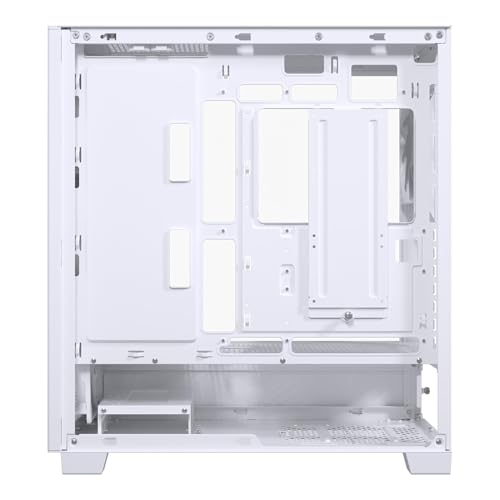
This is one of the areas where the XT Pro Ultra genuinely impresses for the price. The rear panel clearance behind the motherboard tray is around 20mm to 25mm, which is enough to route cables properly without the rear panel bowing out when you try to close it. Budget cases often scrimp here, giving you 15mm or less, which means you end up stuffing cables in and hoping the panel clips shut. The extra few millimetres makes a real difference to how stressed you feel during the final stages of a build.
There are multiple cable routing channels with rubber grommets, Velcro straps built into the rear panel, and a full-length PSU shroud that hides the bottom half of the build entirely. The PSU shroud has a cutout for the GPU power cables, which is the sensible design choice. Owners consistently mention that cable management is easier than expected for this price bracket, and a few specifically call out the Velcro straps as a nice touch. It's the kind of thing that takes maybe five minutes to include in the design and saves builders half an hour of frustration.
The 24-pin ATX cable routing channel is positioned well, and there's a dedicated grommet for the EPS CPU power cable run up the back of the motherboard tray. These details matter. A case that forces you to run the EPS cable across the front of the motherboard looks messy and can obstruct airflow. The XT Pro Ultra handles this correctly. One owner note: a small number of reviews flag that the grommets can be a bit stiff initially, which makes threading cables through slightly fiddly on first build. That's a very minor complaint and one that typically sorts itself out once the rubber has been flexed a few times.
Airflow and Thermal Design
The front panel is a mesh design, and this is the correct choice for a case at this price. Tempered glass front panels look dramatic in renders but they choke airflow, and a case that runs hot because the front panel is decorative rather than functional is a bad trade. Phanteks has gone mesh, which means the three included 140mm front fans can actually breathe. The mesh isn't as fine as some premium cases, but it's paired with a removable dust filter, which is the important bit. You can pull the filter, clean it, and put it back without tools.
The included fan configuration is four fans total: three 140mm at the front and one 120mm at the rear. For a budget case, shipping with four fans is generous. The quality of those fans is adequate rather than exceptional. They're not going to match a set of Noctua A-series or be quiet! Silent Wings, but they're decent enough for most builds and they're properly connected to the motherboard fan headers via a built-in hub. Owners who've left the stock fans in place report reasonable temperatures, and those who've replaced them with higher-quality fans report a noticeable improvement, which is exactly what you'd expect.
The top panel has mesh venting for the radiator or fan positions, and the bottom has a filtered intake for the PSU. The rear has a 120mm exhaust position. The overall airflow path is front-to-rear and bottom-to-top, which is the conventional positive-pressure or balanced setup depending on how you configure things. There's no solid panel blocking the top, which is a point in the XT Pro Ultra's favour compared to some cases that add a solid decorative top panel and then charge you extra for a mesh replacement. Dust filtration covers the main intake points, which is basic hygiene for a case that's going to sit on a desk for years.
Thermal performance based on owner feedback is described as good to very good for the price tier. A few owners with high-end GPU and CPU combinations mention that the stock fans spin up noticeably under load, which is expected physics rather than a design flaw. The mesh front genuinely allows the fans to move air efficiently, and the case doesn't seem to create hotspots or dead zones that would suggest poor internal airflow design. For the target audience, which is mid-range gaming builds, the thermal design is well-suited.
Front I/O and Connectivity
Two USB 3.0 Type-A ports and one USB-C 3.1 Gen 2 port on the front panel. That's a solid configuration for 2026. The USB-C port is the important one to check on budget cases because a lot of them either omit it entirely or include a USB-C port that's only wired to USB 3.0 speeds rather than 3.1 Gen 2. Phanteks has done this properly. The USB-C header on the motherboard side requires a 20-pin connector, which is standard on modern ATX boards, so compatibility isn't an issue for recent builds.
The audio is a combined headphone and microphone jack, which is standard. The power button is on the top of the case, which is the sensible position for a desktop-oriented build. There's no reset button on the front panel, which is a minor omission but one that most people won't miss in day-to-day use. If you're the kind of person who regularly hard-resets their machine, you can still do it via the motherboard reset header or just hold the power button. Not ideal, but not a dealbreaker.
There's no built-in fan controller or RGB controller on the front I/O, which keeps things simple. If you want RGB control, you're doing it through your motherboard's software or a separate controller. Owners don't flag this as a complaint, which suggests the target audience is either not bothered by RGB or is using motherboard-based control anyway. The front I/O placement is on the top of the case, angled slightly forward, which makes it easy to reach from a seated position. A few owners specifically mention this as a nice detail. Small thing, but it shows someone thought about how people actually use the case.
Build Quality and Materials
The steel on the XT Pro Ultra is 0.7mm to 0.8mm SPCC, which is typical for this price bracket. It's not the 1mm steel you get on premium cases from Fractal or Lian Li, but it's enough to feel solid without being flimsy. The chassis doesn't flex noticeably when you're installing components, which is the practical test that matters. A few owners mention slight panel flex on the tempered glass side panel if you press it firmly, but this is cosmetic rather than functional. The glass itself is 4mm tempered, which is standard.
The white finish on this variant is powder-coated, and owners report it holds up well to fingerprints and light handling. White cases can look grubby quickly if the finish isn't right, but the XT Pro Ultra seems to avoid this. The interior is white as well, which keeps the aesthetic consistent and makes it easier to see what you're doing during the build. Sharp edges are a perennial complaint with budget cases, and the XT Pro Ultra mostly avoids this. A couple of owners mention slightly rough edges around some cutouts, but nothing that caused injury or required filing down. That's a passing grade.
Panel alignment is generally described as good. The tempered glass side panel uses a hinge-and-latch system rather than thumbscrews, which makes access easier during the build process. Owners like this. The rear panel uses thumbscrews, which is standard. The top mesh panel is removable for radiator installation, and it clips back into place securely. The PSU shroud is solid and doesn't rattle, which is something cheaper cases often get wrong. Overall, the build quality is appropriate for the price tier: not premium, but well above what you'd expect from a no-name brand at this price.
The Phanteks product page lists the XT Pro Ultra with a standard manufacturer warranty, and the brand has a reasonable reputation for after-sales support in the PC building community. Owner reviews don't flag DOA or quality-control issues at a rate that would suggest a systemic problem. The odd screw stripped or panel slightly misaligned appears in the review pool, but at a frequency consistent with normal manufacturing variance rather than a design fault. For a budget case, that's about as good as it gets.
How It Compares
The two obvious competitors at this price point are the Corsair 4000D Airflow and the Fractal Design Pop Air. Both are well-regarded cases that have been on the market long enough to have a solid reputation. The comparison is worth doing properly because the differences are real and they matter depending on what you're prioritising.
The Corsair 4000D Airflow is arguably the benchmark for budget-friendly airflow cases. It has a mesh front, solid build quality, and a clean interior layout. But it ships with two fans rather than four, and the front I/O doesn't include USB-C on the base model. It's also typically priced slightly higher than the XT Pro Ultra. The Fractal Pop Air is a more premium-feeling case with better steel thickness and a more refined finish, but it commands a higher price and also ships with just two fans. The XT Pro Ultra's four-fan configuration out of the box is a genuine differentiator.
Where the XT Pro Ultra loses ground is build quality refinement. The Fractal Pop Air feels more solid, and the Corsair 4000D has slightly better panel alignment consistency. These are real differences, but they're differences that cost money. If you're comfortable with the trade-off, the XT Pro Ultra delivers more cooling hardware for less money, which is a legitimate value argument. The 503mm GPU clearance also beats both competitors, which matters for future-proofing.
| Feature | Phanteks XT Pro Ultra | Corsair 4000D Airflow | Fractal Design Pop Air |
|---|---|---|---|
| Form Factor | Mid-Tower | Mid-Tower | Mid-Tower |
| Included Fans | 4 (3x140mm + 1x120mm) | 2 (2x120mm) | 2 (2x140mm) |
| GPU Clearance | 503mm | 360mm | 461mm |
| CPU Cooler Height | 190mm | 170mm | 185mm |
| Front Radiator | 360mm | 360mm | 360mm |
| Top Radiator | 360mm | 240mm | 240mm |
| USB-C Front I/O | Yes (3.1 Gen 2) | No (base model) | Yes |
| Front Panel | Mesh | Mesh | Mesh |
| Steel Thickness | ~0.7-0.8mm SPCC | ~0.8mm SPCC | ~1.0mm SPCC |
| Price Tier | Entry | Entry-Mid | Mid |
The GPU clearance comparison is striking. The Corsair 4000D's 360mm maximum is technically fine for current cards but leaves no margin. The XT Pro Ultra's 503mm is essentially unlimited for consumer hardware. The top radiator support difference is also significant: 360mm on the XT Pro Ultra versus 240mm on the 4000D and the Pop Air. If you're planning a dual-radiator setup with a 360mm front and 360mm top, the XT Pro Ultra is one of very few cases at this price that can actually do it.

Final Verdict
The Phanteks XT Pro Ultra is a proper overachiever for a budget-tier case. Four fans included, 503mm GPU clearance, 360mm radiator support at both front and top, USB-C 3.1 Gen 2 on the front panel, a mesh front for actual airflow, and cable management features that most cases at this price don't bother with. The positive overall rating from hundreds of owners isn't a fluke. This case does what it promises and does it without making you feel like you've compromised.
The caveats are real but minor. The steel is on the thinner side, the included fans are adequate rather than great, and the panel alignment isn't quite as tight as what you get from Fractal or the upper end of Corsair's range. If build quality refinement matters more to you than raw specs and included hardware, the Fractal Pop Air is worth the extra spend. But if you want the most cooling flexibility and the most included fans for your money, the XT Pro Ultra is the straightforward recommendation.
Who should buy this? Anyone building a mid-range gaming PC on a budget who wants proper airflow, generous clearances, and a case that won't make the build process miserable. It's particularly good for first-time builders because the cable management features reduce the chance of a chaotic finish, and the four included fans mean you don't need to immediately budget for additional cooling hardware. It's also a solid pick for anyone planning an AIO build, given the radiator support flexibility.
Who should skip it? If you're running an E-ATX board, look elsewhere. If you want the absolute best build quality and panel rigidity at any cost, step up to the Fractal Pop Air or spend a bit more for the Fractal North. And if you're building a compact system where a mid-tower feels oversized, this isn't the right chassis regardless of how good the specs are. But for the mainstream mid-range gaming build, this is one of the best options at the budget end of the market. Genuinely recommended.
One honest note: if your build is relatively modest and you don't need 360mm radiator support or 503mm GPU clearance, the slightly cheaper Phanteks XT Pro (non-Ultra) drops some of the premium features and saves you a few quid. if the headline specs of the Ultra are more than you actually need. But if you're building anything with a current-gen GPU and a decent CPU cooler, the Ultra's extra headroom is worth having.
What works. What doesn’t.
5 + 4What we liked5 reasons
- Four fans included out of the box, more than most rivals at this price
- 503mm GPU clearance covers every current consumer card with room to spare
- 360mm radiator support at both front and top positions
- USB-C 3.1 Gen 2 front I/O done properly
- Cable management features well above average for the price tier
Where it falls4 reasons
- Steel is on the thinner side compared to Fractal equivalents
- Included fans are adequate but not high quality
- No vertical GPU mount option included
- No E-ATX support
Full specifications
11 attributes| Form factor | Mid-Tower |
|---|---|
| CPU cooler clearance MM | 184 |
| Dimensions MM | 450 x 230 x 500 |
| Fans included | 4 |
| GPU clearance MM | 415 |
| MAX FAN count | 10 |
| MAX radiator MM | 360 |
| PSU support | ATX up to 270mm |
| Side panel | tempered glass |
| Supported motherboard | ATX, E-ATX, Micro-ATX, Mini-ITX |
| Weight KG | 8.17 |
Got a motherboard yet?
4 reviewsThe maker lists ATX, Micro-ATX and Mini-ITX boards for this case. These ATX boards fit it.
Frequently asked
5 questions01Is the Phanteks XT Pro Ultra Mid Tower Gaming Case - White good for airflow?+
Yes, genuinely good for the price. The mesh front panel allows the three included 140mm intake fans to breathe properly, which is the most important airflow factor in any case. There's also a 120mm exhaust at the rear and mesh venting on the top panel. Dust filters cover the front and bottom intakes. The overall front-to-rear airflow path is well-designed, and owner feedback consistently describes temperatures as good to very good for a budget-tier case. The stock fans are adequate rather than exceptional, and upgrading them will improve performance further, but the case design itself doesn't restrict airflow.
02What's the GPU clearance on the Phanteks XT Pro Ultra Mid Tower Gaming Case - White?+
The Phanteks XT Pro Ultra supports GPUs up to 503mm in length, which covers every consumer graphics card currently available including the longest triple-fan AIB variants of the RTX 5090 and RX 9070 XT. If you install a 360mm radiator at the front, effective GPU clearance reduces slightly due to radiator and fan thickness, but you're still looking at around 460mm to 470mm of usable space, which remains more than enough for any current card. There is no vertical GPU mount option included in the box.
03Can the Phanteks XT Pro Ultra Mid Tower Gaming Case - White fit a 360mm AIO?+
Yes, and it's one of the better cases at this price for AIO flexibility. The front panel supports up to a 360mm radiator, and the top panel also supports up to 360mm, so you can run a 360mm AIO at either position. The rear supports a 120mm radiator. If you're running a 360mm AIO at the top, check your RAM height: standard DDR5 modules under 40mm are fine, but very tall heatspreaders above 50mm can create clearance issues depending on the radiator fan thickness. Owners who've installed 360mm AIOs at the front and top both report no fitment problems with standard components.
04Is the Phanteks XT Pro Ultra Mid Tower Gaming Case - White easy to build in?+
Owner feedback is consistently positive on this point. The rear panel clearance of around 20mm to 25mm is enough to route cables without forcing the panel shut, there are Velcro straps built into the rear panel, multiple grommetted cable routing channels, and a full-length PSU shroud. The large CPU backplate cutout makes cooler installation and swaps easier. The tempered glass side panel uses a hinge-and-latch rather than thumbscrews, which helps during the build process. The only minor friction point some owners mention is that the rubber grommets can be stiff initially, making first-time cable threading slightly fiddly. That resolves quickly once the rubber has been flexed a few times.
05What warranty and returns apply to the Phanteks XT Pro Ultra Mid Tower Gaming Case - White?+
Phanteks offers a manufacturer warranty on their cases; check the Phanteks website or your retailer's listing for the current warranty terms applicable to your purchase. If you buy through Amazon UK, you're also covered by Amazon's standard 30-day return window and the A-to-Z Guarantee, which provides a reasonable safety net if the case arrives damaged or doesn't match the listing description.