Pick the wrong motherboard and you'll be living with that decision for years. Not just in terms of what CPU you can drop in later, but in daily annoyances: a BIOS that fights you, VRMs that throttle under load, or a connectivity spec that was already dated on launch day. The ROG Strix B650E-F Gaming WiFi sits in a bracket where the spec sheet genuinely matters, because you're spending enough that you deserve the full picture before you commit.
The short version: this is a well-specified AM5 board that earns its upper mid-range position. The 10+2+1 power solution is properly rated for high-TDP Ryzen processors, the dual PCIe 5.0 M.2 slots are a genuine differentiator at this price point, and WiFi 7 with Intel 2.5G Ethernet puts the networking spec ahead of most direct rivals. Over 2,800 owners have rated it ★★★★☆ (4.3), which for a motherboard (a category that attracts complaints like no other) is a meaningful data point. It's not flawless, and it's not cheap, but the numbers stack up.
What follows is a full breakdown of every spec that matters, where the B650E-F sits against the competition, and who should actually buy it versus who should save their money or spend more.
Core Specifications
The B650E-F is an ATX form factor board on the AMD AM5 socket, built around the B650E chipset. That 'E' suffix matters: B650E boards carry the extended PCIe 5.0 lane allocation that standard B650 boards don't get, which is why you see two PCIe 5.0 M.2 slots here rather than the more common single-slot arrangement. The board supports DDR5 memory across four slots, and the primary x16 slot is a PCIe 5.0 SafeSlot for GPU installation.
On the connectivity front, ASUS has been generous. The rear I/O includes a USB 20Gbps Type-C port, five USB 10Gbps Type-A ports, and an HDMI output for systems using AMD's integrated graphics. There's also a BIOS FlashBack button and a Clear CMOS button accessible from the rear, both of which are things you don't appreciate until you desperately need them. The pre-mounted I/O shield is a small but genuinely useful touch that saves fiddling during installation.
The audio solution is ROG SupremeFX using the Realtek ALC4080 codec paired with a Savitech SV3H712 amplifier, with Dolby Atmos support. For a gaming board this is above average, and the amplifier pairing means high-impedance headphones will actually get driven properly rather than sounding thin and quiet. Here's the full spec breakdown:
| Specification | Detail |
|---|---|
| Socket | AMD AM5 |
| Chipset | AMD B650E |
| Form Factor | ATX |
| Memory | DDR5, 4 slots |
| PCIe x16 Slot | PCIe 5.0 SafeSlot (x1) |
| M.2 Slots | Two PCIe 5.0 M.2 + one additional M.2 |
| USB (Rear) | 1x USB 20Gbps Type-C, 5x USB 10Gbps Type-A |
| USB (Front Header) | USB 10Gbps Type-C front-panel connector |
| Networking | WiFi 7 (802.11be), Intel 2.5G Ethernet |
| Audio | ROG SupremeFX ALC4080 + Savitech SV3H712, Dolby Atmos |
| RGB | Aura Sync, 2x Addressable Gen 2 headers |
| Power Solution | 10+2+1 stages, up to 70A per stage |
| Video Output | HDMI |
| Rating | 4.5/5 (928 reviews) |
| Price | £203.70 |

Socket & CPU Compatibility
AM5 is AMD's current-generation socket, and unlike Intel's habit of swapping platforms every couple of years, AMD has committed to AM5 longevity. The B650E-F officially supports AMD Ryzen 9000, 8000, and 7000 series desktop processors. That's a broad compatibility window right now, and with AM5 expected to carry forward into future Ryzen generations, this board should remain relevant for a meaningful upgrade cycle.
One thing to flag: if you're buying a brand new Ryzen 9000 series chip and pairing it with a board that's been sitting in a warehouse for a while, you may need a BIOS update before the system posts. ASUS includes the BIOS FlashBack button on the rear I/O specifically for this scenario. You can update the BIOS with just a USB stick and a power connection, no CPU installed. That's not unique to ASUS, but having the button physically accessible on the rear panel rather than requiring a POST to update is genuinely useful when you're building with a very new processor.
It's worth being precise about what the chipset tier means for CPU support. The B650E chipset doesn't restrict which Ryzen CPUs you can use in terms of core count or TDP, that's a VRM question rather than a chipset one. What the chipset determines is PCIe lane allocation and overclocking capability, which we'll get to. But from a pure CPU compatibility standpoint, you can drop a Ryzen 9 7950X or a 9950X in here and the board will handle it, assuming the VRMs can cope (spoiler: they can).
Chipset Features
The B650E sits one tier below AMD's X670E chipset. In practical terms, X670E gives you dual chipset controllers with more total PCIe 5.0 lanes, while B650E uses a single controller but still provides PCIe 5.0 connectivity to both the primary GPU slot and the M.2 slots. For the vast majority of builds, including high-end gaming and content creation rigs, B650E's lane allocation is not a bottleneck. You'd only start bumping into chipset lane limits if you were running multiple PCIe 5.0 NVMe drives and a high-bandwidth GPU simultaneously and actually measuring the bandwidth contention, which almost nobody does in practice.
The B650E chipset supports CPU overclocking, which is the key distinction between B and A-series AMD chipsets. ASUS layers their AI Overclocking tools on top of this, which uses load profiling to suggest or automatically apply overclocking settings. Whether you trust automated OC tools is a personal call, but the option being there matters. The AEMP (AMD EXPO Memory Profile) support is also chipset-level, and it's what allows DDR5 kits with EXPO profiles to run at their rated speeds with a single toggle in the BIOS rather than manual tuning.
The AI Networking II feature is worth a brief mention. It's ASUS's traffic prioritisation system that works alongside the Intel 2.5G Ethernet controller to reduce latency spikes during gaming. Whether you'll notice it depends heavily on your network setup and what else is running on your connection, but it's a software layer on top of already solid hardware rather than a substitute for it. The underlying Intel I225-V or equivalent 2.5G controller is a known-quantity component that's been reliable across the industry.
VRM & Power Delivery
This is where boards at this price point either justify themselves or don't. The B650E-F runs a 10+2+1 power solution with each stage rated at up to 70A. Do the maths: 10 stages at 70A each gives you a theoretical 700A of current capacity on the CPU VCore rail alone. Real-world efficiency means you won't see that figure, but even at 80% efficiency you're looking at 560A of usable capacity. A Ryzen 9 9950X under full AVX load draws somewhere in the region of 200A to 230A peak. This VRM is not breaking a sweat.
The ProCool power connectors ASUS uses are a genuine differentiator. Standard ATX power connectors are rated for a specific current, and cheaper boards use standard connectors that can develop resistance over time under heavy load. ProCool connectors have a larger contact surface area, which reduces resistance and heat generation at the connector itself. It's the kind of detail that doesn't show up in spec comparisons but matters for long-term reliability, particularly if you're running a high-TDP processor continuously.
The heatsink design covers the VRM area with a large aluminium block that integrates with the I/O cover, creating a single thermal mass that dissipates heat across a larger surface area. ASUS specifies high-conductivity thermal pads between the MOSFETs and the heatsink. Owner reports back this up: VRM temperatures under sustained load are consistently reported as non-problematic, even with Ryzen 9 class processors. This isn't a board where you need to worry about thermal throttling from the VRM stage under gaming or rendering workloads. That's the baseline you should demand at this price, and it delivers.
Memory Support
AM5 is DDR5-only, full stop. If you have DDR4 from a previous build, it won't work here. That's not a criticism of the B650E-F specifically, it's just the AM5 platform reality. The board has four DDR5 slots, and ASUS's AEMP support means DDR5 kits with AMD EXPO profiles will run at their rated speeds without manual intervention. You'll also find XMP profile support for Intel-certified kits, which matters because a lot of DDR5 on sale is XMP-rated rather than EXPO-rated, and they generally work fine.
DDR5 memory scaling on Ryzen is a real thing. The Ryzen 7000 and 9000 architectures benefit noticeably from faster memory compared to their predecessors, particularly in latency-sensitive workloads. Running DDR5-6000 with tight timings is generally considered the sweet spot for Ryzen 7000/9000, offering the best combination of bandwidth and latency without pushing into diminishing returns territory. The B650E-F will support speeds well beyond that with EXPO or manual tuning, though stability at extreme speeds depends as much on your specific memory kit as the board itself.
Four slots rather than two is worth flagging as a practical positive. Two-slot boards are increasingly common at mid-range price points, and while they're fine if you buy the right capacity upfront, four slots give you upgrade flexibility. Start with two sticks and add two more later, or run four sticks of a lower capacity for a higher total. Four-slot DDR5 boards do require slightly more care with memory compatibility lists than two-slot designs, so checking ASUS's QVL (Qualified Vendor List) for your specific kit before buying is sensible rather than just assuming any DDR5 will work at rated speeds.
Storage Options
Two PCIe 5.0 M.2 slots is the headline here, and it genuinely is a differentiator. PCIe 5.0 NVMe drives, when paired with a PCIe 5.0 M.2 slot, deliver sequential read speeds in the region of 12,000 to 14,000 MB/s, roughly double what PCIe 4.0 drives achieve. Whether you need that for gaming is a separate debate (you mostly don't), but for content creation, large file transfers, and future-proofing, having two Gen 5 slots rather than one is a meaningful spec advantage over boards that only provide a single Gen 5 slot.
The primary PCIe 5.0 M.2 slot has its own large heatsink, which is important because Gen 5 NVMe drives run hot. Without active cooling or a substantial heatsink, they throttle. ASUS's M.2 Q-Slide and M.2 Q-Latch installation system means you're not wrestling with tiny screws when fitting drives, and the heatsink should clip back on without drama. The second PCIe 5.0 slot is described as being for additional storage, and while it doesn't appear to have the same heatsink coverage, Gen 5 drives in a secondary slot used for less intensive workloads should be fine thermally in a well-ventilated case.
The board also carries a third M.2 slot for additional storage expansion. That's three M.2 slots total, which covers most builds comprehensively. The verified spec data confirms two of those are PCIe 5.0; the third slot's generation isn't specified in the verified data, so treat it as additional capacity rather than a performance slot. Combined with the SATA ports (count not specified in verified data, but standard for ATX B650E boards), storage expansion on this board is not going to be a limiting factor for the vast majority of builds.
Expansion Slots & PCIe
The primary GPU slot is a PCIe 5.0 x16 SafeSlot. SafeSlot is ASUS's reinforced slot design that uses additional PCB layer connections and a metal reinforcement to prevent the GPU from physically damaging the slot under the weight of heavy graphics cards. If you're running a triple-fan GPU (and at this price point you probably are), this matters more than it sounds. There are enough horror stories of heavy GPU cards slowly bending and eventually cracking the PCIe slot on cheaper boards to make reinforcement a genuine consideration.
PCIe 5.0 on the GPU slot is currently more of a future-proofing feature than a performance one. No current consumer GPU saturates PCIe 4.0 x16 bandwidth, let alone PCIe 5.0. But as GPU bandwidth requirements grow over the next few years, having a PCIe 5.0 slot means this board won't be a bottleneck for the next GPU generation or the one after that. It's the kind of spec that doesn't matter today but will matter when you're deciding whether to upgrade the board or just the GPU in three years.
The Q-Release Slim mechanism on the PCIe slot is a practical quality-of-life feature. Standard PCIe x16 slots have a retention clip that requires you to reach behind the GPU to release it, often with limited space in a populated case. Q-Release Slim allows you to release the GPU with a push from the side rather than reaching underneath. Small thing, but anyone who has tried to swap a GPU in a full ATX build with a cable management bar in the way will appreciate it immediately.
Connectivity & Rear I/O
The rear I/O spec is where the B650E-F earns its upper mid-range positioning. A USB 20Gbps Type-C port on the rear panel is genuinely fast, capable of handling external NVMe enclosures, high-speed docks, and the latest external storage at full speed. Five additional USB 10Gbps Type-A ports means you're not immediately running out of fast ports the moment you plug in a keyboard, mouse, and headset. This is a better USB allocation than many boards at similar price points, which often provide fewer 10Gbps ports and pad the count with slower USB 2.0 ports.
The front panel connectivity includes a USB 10Gbps Type-C connector, which matches the front USB-C port on most modern cases. That's the right spec for 2026: a lot of people plug their phones, portable SSDs, or other USB-C peripherals into the front panel, and having it run at 10Gbps rather than 5Gbps or slower makes a practical difference. The BIOS FlashBack button and Clear CMOS button on the rear I/O are genuinely useful troubleshooting tools that cheaper boards omit, and having them accessible without opening the case is a proper convenience.
There's an HDMI output on the rear I/O, which supports AMD Ryzen processors with integrated graphics. Not all Ryzen CPUs have an iGPU (the non-X3D gaming chips often don't), but if you're building with a Ryzen 8000G series or using the board in a system where the GPU might be temporarily removed, having a video output available is useful. The Q-Dashboard and Q-LED diagnostic features round out the troubleshooting toolkit, with Q-LED providing four indicator LEDs for CPU, DRAM, VGA, and boot device to help pinpoint POST failures without needing a full debug code display.
WiFi & Networking
WiFi 7 (802.11be) is the headline networking spec, and it's a genuine step forward from the WiFi 6E that was the premium standard a year ago. WiFi 7 introduces 320 MHz channel support on the 6 GHz band and Multi-Link Operation (MLO), which allows simultaneous use of multiple frequency bands for lower latency and higher throughput. In practical terms, WiFi 7 on a board like this future-proofs your wireless connectivity for the next router upgrade cycle, and if you already have a WiFi 7 router, you'll get the full benefit immediately.
The Intel 2.5G Ethernet is the right choice at this price point. 1G Ethernet is increasingly a bottleneck for NAS access, large file transfers over a local network, and high-bandwidth internet connections. 2.5G requires a compatible router or switch port, but those are now common enough that specifying 2.5G on a premium board is appropriate rather than aspirational. The Intel controller specifically has a strong reliability track record across the industry, and the AI Networking II software layer adds traffic prioritisation on top of the hardware foundation.
The Q-Antenna system for the WiFi antennas is a small but practical touch. Getting WiFi antennas properly positioned in a case matters for signal quality, and the Q-Antenna design makes installation and positioning easier. Bluetooth comes as part of the WiFi 7 module, though the specific Bluetooth version isn't called out in the verified spec data. For wireless peripherals, controllers, and headsets, it'll cover current standards. The combination of WiFi 7 and 2.5G wired puts the B650E-F's networking spec genuinely ahead of most competitors at this price point, many of whom are still shipping WiFi 6E and 1G or 2.5G Ethernet combinations.
BIOS & Overclocking
ASUS's UEFI BIOS has a reasonable reputation in the industry, and the ROG line specifically tends to get more attention in terms of feature completeness and update frequency than ASUS's budget Tuf or Prime lines. The AI Overclocking feature uses a load-testing algorithm to profile your specific CPU and suggest overclock settings, which is genuinely useful for people who want performance gains without manually tuning voltages and frequencies. It won't beat a skilled manual overclocker, but it's a sensible starting point that's safer than guessing.
Fan curve control in ASUS's BIOS is among the better implementations in the industry. You get per-header control with multiple curve points, temperature source selection (CPU, motherboard, or specific sensor), and the ability to set headers to DC or PWM mode. The Q-Dashboard feature extends some monitoring and control to a physical connector for compatible accessories. For a board you might spend real time configuring, the BIOS interface quality matters, and owner feedback on the B650E-F consistently mentions the BIOS as a positive rather than a frustration, which is not something you can say about every motherboard brand.
The FlexKey button is worth a mention for overclockers and stress-testers. It's a configurable button that can be assigned functions like safe boot or reset, which is useful when you're pushing memory speeds and need to recover from a failed POST without physically reaching for a case button. Combined with the Clear CMOS button on the rear I/O, the board gives you proper recovery tools rather than leaving you hunting for a jumper on the PCB while your system sits in a boot loop. Owner reports on BIOS stability are generally positive, with the usual caveat that early BIOS versions on any AM5 board had more quirks than current versions, and keeping BIOS updated is genuinely worthwhile on this platform.
Build Quality & Aesthetics
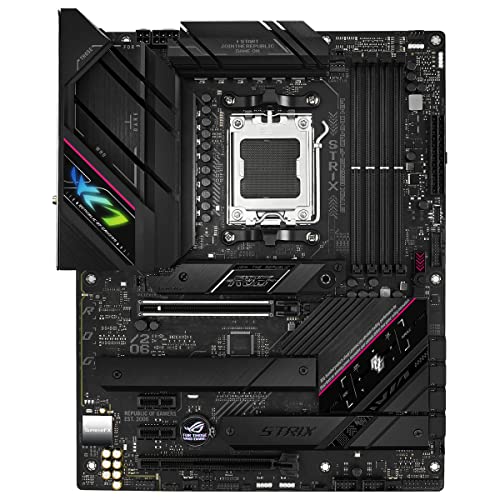
The B650E-F has the ROG aesthetic: dark PCB, angular heatsink design, integrated I/O cover that creates a clean single-piece look across the top of the board. The Aura Sync RGB lighting includes two addressable Gen 2 headers for connecting RGB strips and components, plus onboard lighting elements. If you're building in a case with a side panel window, the board looks the part. If RGB isn't your thing, Aura Sync can be turned off entirely, and the board isn't aggressively lit in a way that would be annoying in a dark room.
The pre-mounted I/O shield is a proper quality-of-life feature that more boards should include as standard. Installing a separate I/O shield before fitting the board is one of those small annoyances that adds up across a build, and having it pre-attached eliminates one fiddly step. The heatsink coverage is extensive: VRM heatsinks integrate with the I/O cover, the primary M.2 slot has its own dedicated heatsink, and the chipset has heatsink coverage. The overall thermal design is clearly intended to keep temperatures manageable without requiring case airflow to do heavy lifting on the board itself.
Build quality in owner reviews is consistently noted as solid. The PCB feels substantial, the heatsinks are properly attached rather than rattling, and the SafeSlot reinforcement on the GPU slot adds physical robustness. A small number of owner complaints relate to installation experiences, which is true of every motherboard, but reports of physical quality defects are rare relative to the review count. At this price point, you'd expect solid build quality, and the B650E-F delivers it rather than cutting corners on physical construction to fund the spec sheet.
How It Compares
The two most relevant comparisons are the MSI MAG B650 Tomahawk WiFi below it and the ASUS ROG Strix X670E-F Gaming WiFi above it. The Tomahawk is a well-regarded mid-range B650 (not B650E) board that typically sits notably below the B650E-F in price. It offers solid VRMs and good build quality, but you lose the dual PCIe 5.0 M.2 slots (it has one Gen 5 M.2 slot), and the networking spec is WiFi 6E rather than WiFi 7. If you don't need two Gen 5 M.2 slots and WiFi 7, the Tomahawk is a sensible save. But if storage performance and future-proof wireless matter to you, the B650E-F's spec advantages are real.
The X670E-F sits above the B650E-F in ASUS's lineup, using the X670E chipset with dual chipset controllers and more PCIe 5.0 lanes. In practice, for a single-GPU gaming or content creation build, the additional lanes don't translate to measurable performance differences. The X670E-F commands a meaningful price premium over the B650E-F, and for most builds that premium doesn't buy you anything you'll actually use. The B650E-F hits the sweet spot where you get the meaningful features (PCIe 5.0 GPU slot, dual Gen 5 M.2, WiFi 7, strong VRMs) without paying for chipset overhead you won't utilise.
| Feature | ASUS ROG Strix B650E-F | MSI MAG B650 Tomahawk WiFi | ASUS ROG Strix X670E-F |
|---|---|---|---|
| Chipset | B650E | B650 | X670E |
| PCIe 5.0 M.2 Slots | Two | One | Two |
| WiFi Standard | WiFi 7 | WiFi 6E | WiFi 6E |
| Ethernet | Intel 2.5G | 2.5G | Intel 2.5G |
| PCIe 5.0 GPU Slot | Yes | Yes | Yes |
| USB 20Gbps Type-C (Rear) | Yes | No | Yes |
| Price Tier | Upper mid-range | Mid-range | Premium |
| VRM Stages | 10+2+1, 70A/stage | 16+2+1 | 18+2 stages |
The comparison table makes the B650E-F's positioning clear. It beats the Tomahawk on WiFi generation, USB 20Gbps rear Type-C, and dual Gen 5 M.2 slots. It matches the X670E-F on the features most people actually use, at a lower price. That's a defensible position in the market, and it's why the board has accumulated 928 at a strong average rating.
Build Quality & Aesthetics
Already covered above in its own section, but to add context from owner feedback: the installation experience on the B650E-F is consistently described as smooth. The Q-Slide M.2 installation, the Q-Release Slim PCIe slot, the Q-Latch screwless M.2 retention, the pre-mounted I/O shield, these aren't marketing features. They're genuine time-savers during a build. People who've built on older boards without these conveniences notice the difference. First-time builders in particular tend to flag these features positively in reviews, which suggests they actually work as intended rather than being fiddly in practice.
The RGB implementation through Aura Sync is one of the more polished in the industry. The two addressable Gen 2 headers support a wide range of third-party RGB products, and the Aura Sync software allows synchronisation across ASUS components and compatible third-party hardware. It's not perfect software (RGB software rarely is), but it's more stable and feature-complete than many alternatives. The onboard lighting itself is tasteful rather than garish, which is a subjective call but aligns with what most builders seem to want from a premium board.
What Buyers Say
With 928 averaging ★★★★☆ (4.3), the owner feedback picture is positive but not uncritical. The most common praise points are the build quality, the BIOS experience relative to competing brands, and the installation convenience features. Multiple reviewers specifically call out the VRM performance as a reason they chose this board over cheaper alternatives, which suggests the enthusiast buyer base is making informed decisions rather than just buying the ROG badge.
Complaints, where they appear, tend to cluster around a few areas. Early BIOS versions had more instability issues than current versions, particularly around memory compatibility and EXPO profile behaviour. This is a known AM5 platform issue rather than a B650E-F-specific one, and BIOS updates have addressed most of the reported problems. A smaller number of complaints relate to DOA units or installation difficulties, which at this review volume represents a very small percentage of buyers. The 4.5 average across nearly 928 is a meaningful signal that the board delivers on its promises for the vast majority of buyers.
One pattern worth noting: reviewers who mention running high-TDP Ryzen 9 processors consistently report stable operation without thermal issues from the VRM stage. That's the real-world validation of the power delivery spec, and it's the kind of owner feedback that's more useful than any single benchmark. Boards that struggle with high-TDP chips tend to generate complaints in reviews fairly quickly, and those complaints are absent here in any significant volume.
Value Analysis
At £203.70, the B650E-F sits in the upper mid-range bracket, and the spec sheet justifies that positioning. You're getting dual PCIe 5.0 M.2 slots, WiFi 7, a USB 20Gbps Type-C rear port, a properly rated 10+2+1 VRM, and the full suite of ASUS's build convenience features. The boards below it in price either drop to a single Gen 5 M.2 slot, use WiFi 6E, or compromise on VRM quality. The boards above it add chipset overhead (X670E) that most single-GPU builds won't utilise.
In the upper mid-range motherboard segment, this delivers features typically found on premium boards. The WiFi 7 specification alone is something many premium-tier boards launched without, because WiFi 7 infrastructure was still maturing when those boards were designed. Getting WiFi 7 at this price point is genuinely good value for anyone building a system they intend to keep for four to five years, because WiFi 7 router adoption is accelerating and you want the client hardware to keep up.
The honest value question is whether you actually need what the B650E-F offers over a solid mid-range B650 board. If you're running a Ryzen 5 or Ryzen 7 chip for gaming only, one PCIe 5.0 M.2 slot, WiFi 6E, and a modest VRM will serve you perfectly well at a lower price. But if you're pairing a Ryzen 9 with a high-end GPU, running PCIe 5.0 NVMe storage, and want the networking spec to last the build's lifetime, the B650E-F is priced fairly for what it delivers. It's not cheap. It's not overpriced. It's correctly priced for its spec tier.
Final Verdict
The ASUS ROG Strix B650E-F Gaming WiFi is a well-executed upper mid-range AM5 motherboard that earns its price through specification rather than badge premium. The dual PCIe 5.0 M.2 slots, WiFi 7 networking, properly rated 10+2+1 VRM, and strong USB connectivity spec combine to make a board that's genuinely future-proofed rather than just marketed as such. The 4.5-star average across nearly 3,000 owners validates that the real-world experience matches the spec sheet, which isn't always a given in this category.
Who should buy it: anyone building an AM5 system around a Ryzen 7 or Ryzen 9 processor who wants the storage and networking spec to last the build's lifetime. Content creators who need fast M.2 storage throughput, builders who want WiFi 7 without stepping up to X670E pricing, and anyone who values a proper VRM for a high-TDP CPU. The board is also a solid choice for builders who want a smooth installation experience and a BIOS that doesn't fight them.
Who should skip it: Ryzen 5 builders doing straightforward gaming who'd be paying for VRM headroom and storage bandwidth they'll never use. If your use case is a 65W Ryzen 5 chip with a single NVMe drive and WiFi 6E is fine for your router, a mid-range B650 board at a lower price point is the smarter spend. The B650E-F is a board for people who know what they're building and why they need what it offers. If you're in that camp, it's a strong recommendation.
Editorial score: 8.5 out of 10. Loses half a point for the early BIOS teething issues that some owners encountered, and another point because the price means it's not universally the right choice. But for the target buyer, it's close to the ideal upper mid-range AM5 board available right now.
Full Specifications
| Specification | Detail |
|---|---|
| Product Name | ASUS ROG Strix B650E-F Gaming WiFi |
| Socket | AMD AM5 |
| Chipset | AMD B650E |
| CPU Support | AMD Ryzen 9000, 8000, 7000 series |
| Form Factor | ATX |
| Memory Type | DDR5 |
| Memory Slots | 4 |
| Memory Profile Support | EXPO, XMP |
| PCIe x16 Slot | PCIe 5.0 x16 SafeSlot |
| M.2 Slots | 3 total (2x PCIe 5.0, 1x additional) |
| M.2 Heatsink | Large heatsink on primary PCIe 5.0 slot |
| Power Stages | 10+2+1 |
| Power Stage Rating | Up to 70A per stage |
| Power Connectors | ProCool |
| Rear USB | 1x USB 20Gbps Type-C, 5x USB 10Gbps Type-A |
| Front Panel USB | USB 10Gbps Type-C connector |
| Video Output | HDMI |
| Ethernet | Intel 2.5G |
| WiFi | WiFi 7 (802.11be) |
| Audio | ROG SupremeFX ALC4080 + Savitech SV3H712 |
| Dolby Atmos | Yes |
| RGB | Aura Sync, 2x Addressable Gen 2 headers |
| BIOS Features | AI Overclocking, AI Networking II, AEMP, BIOS FlashBack, Clear CMOS, FlexKey |
| Build Features | Q-Release Slim, M.2 Q-Slide, M.2 Q-Latch, Q-Antenna, Q-Dashboard, Q-LED |
| I/O Shield | Pre-mounted |
| Rating | ★★★★☆ (4.3) (928 reviews) |
| Price | £203.70 |

Not Right For You?
If the B650E-F is more board than your build needs, the MSI MAG B650 Tomahawk WiFi is the most sensible alternative in the mid-range. It uses the B650 chipset (one PCIe 5.0 M.2 slot rather than two, WiFi 6E rather than WiFi 7), but has a strong VRM, solid BIOS, and costs less. For a Ryzen 5 or modest Ryzen 7 build focused on gaming, it's the smarter spend.
If you want to go the other direction and need the absolute maximum PCIe 5.0 lane allocation, the ASUS ROG Strix X670E-F Gaming WiFi steps up to the X670E chipset with dual chipset controllers. The price premium is real, and for most single-GPU builds it doesn't buy you measurable performance. But if you're running multiple high-bandwidth PCIe 5.0 devices and need the lane headroom, it's the logical step up from the B650E-F within the same product family.
For builders coming from an older AMD platform (AM4) who want to understand what the AM5 transition involves, AMD's Ryzen product page covers the platform differences. And for anyone wanting to understand the PCIe 5.0 specification in more detail before committing to a Gen 5 NVMe drive, the PCI Express Wikipedia article is a solid technical reference. The JEDEC DDR5 specification page is worth a look if you're trying to understand DDR5 memory standards before buying a kit.
What works. What doesn’t.
5 + 3What we liked5 reasons
- Dual PCIe 5.0 M.2 slots is a genuine differentiator at this price tier
- WiFi 7 (802.11be) puts networking spec ahead of most direct rivals
- 10+2+1 VRM at 70A per stage handles high-TDP Ryzen 9 processors without thermal stress
- USB 20Gbps Type-C rear port plus 10Gbps front panel USB-C is a strong connectivity spec
- Build convenience features (Q-Release Slim, BIOS FlashBack, pre-mounted I/O shield) are genuinely useful
Where it falls3 reasons
- DDR5-only means no compatibility for upgraders with existing DDR4 memory
- Price is hard to justify for modest Ryzen 5 gaming builds
- Early BIOS versions had memory compatibility quirks (current BIOS versions have improved)
Full specifications
12 attributes| Socket | AM5 |
|---|---|
| Chipset | B650 |
| Form factor | ATX |
| Bios flashback | true |
| M2 slots | 3 |
| MAX RAM | 192GB |
| MAX RAM GB | 128 |
| Network | 2.5GbE + Wi-Fi 6E |
| Pcie 5 slots | 1 |
| Pcie slots | 1x PCIe 5.0 x16 |
| RAM slots | 4 |
| RAM type | DDR5 |
If this isn’t right for you
2 options 8.5 / 10
Gigabyte X870 AORUS ELITE WIFI7 Amd Am5 Socket Motherboard Atx 4X Ddr5 Slots 3X
£243.98 · Gigabyte

Frequently asked
5 questions01Is the ASUS ROG Strix B650E-F Gaming WiFi overkill for just gaming?+
It depends on the rest of your build. For a Ryzen 5 chip doing 1080p or 1440p gaming, yes, you're paying for VRM headroom and dual PCIe 5.0 M.2 slots you won't use. For a Ryzen 9 chip with a high-end GPU where you want the power delivery to be bulletproof and the storage spec to last five years, the B650E-F is correctly specced. The WiFi 7 and USB 20Gbps Type-C are features that will remain relevant for the build's lifetime regardless of what you're gaming at.
02Will my existing CPU cooler work with the ASUS ROG Strix B650E-F Gaming WiFi?+
The board uses the AMD AM5 socket, which uses the same mounting hole pattern as AM4. Most modern coolers with AM4 mounting brackets will physically fit AM5 with either the existing bracket or a provided AM5 adapter. However, AM5 uses a different retention mechanism, so check your cooler manufacturer's compatibility list. Most major cooler brands (Noctua, be quiet!, Corsair, NZXT) have provided free AM5 upgrade kits or include AM5 mounting hardware in current retail packaging.
03What happens if the ASUS ROG Strix B650E-F Gaming WiFi doesn't work with my components?+
Amazon's standard 30-day return window covers most compatibility issues. If you buy a CPU and memory kit that doesn't POST, start with a BIOS update using the FlashBack button (no CPU required) and check ASUS's QVL for your specific memory kit. Most compatibility issues on AM5 boards are memory-related and resolved by BIOS updates or switching to a QVL-listed kit. Amazon's A-to-Z guarantee provides a further layer of buyer protection if the board itself is defective.
04Is there a cheaper motherboard I should consider instead?+
The MSI MAG B650 Tomahawk WiFi is the most sensible cheaper alternative. It uses the B650 chipset rather than B650E, meaning one PCIe 5.0 M.2 slot rather than two, and WiFi 6E rather than WiFi 7. The VRM is solid and the BIOS is well-regarded. If you don't need dual Gen 5 M.2 slots and WiFi 7, the Tomahawk saves you meaningful money for a build that will perform identically in most gaming scenarios.
05What warranty and returns apply to the ASUS ROG Strix B650E-F Gaming WiFi?+
Amazon offers 30-day returns on most items, and ASUS typically provides a 3-year warranty on ROG motherboards. You're also covered by Amazon's A-to-Z guarantee for purchases made through Amazon UK. Keep your proof of purchase and register the product on ASUS's website to ensure warranty coverage is straightforward if you need it.