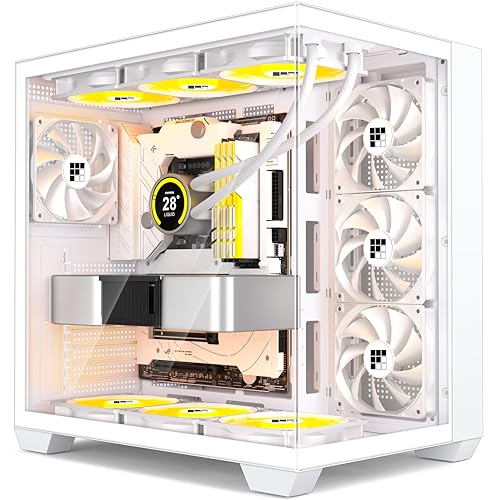
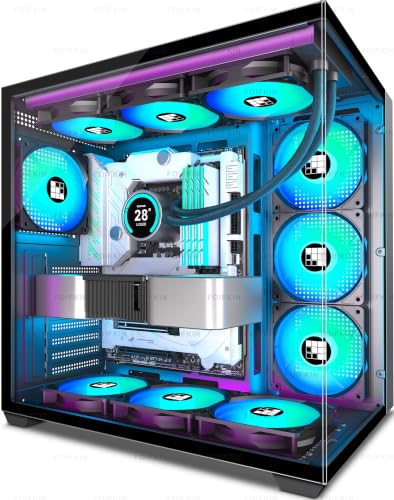
Panel material choices in PC cases aren't just an aesthetic argument. They're a thermal argument. A solid glass or acrylic front looks dramatic in product shots, but it chokes intake airflow in a way that shows up clearly in load temperatures. The FOIFKIN M1 takes a different approach: a wooden grille front panel, which is either the most interesting design decision you'll see at this price point, or a gimmick, depending on how well it actually moves air. Given that the case ships with four pre-installed PWM ARGB fans and targets the budget end of the ATX mid-tower market, the answer matters quite a bit.
The FOIFKIN M1 PC Case sits in a crowded entry-level bracket where plenty of cases look the part but fall short on the details that matter when you're actually building. Clearances, cable routing space, front I/O quality, and whether the included fans are worth keeping or binning immediately are the questions worth asking. The spec sheet gives us a lot to work with, and dozens of owner reviews with a positive overall rating add useful real-world colour. So let's get into what the numbers actually say.
Dimensions are 370 x 220 x 450 mm, which puts this squarely in standard mid-tower territory. It supports ATX, mATX, and Mini-ITX motherboards, takes GPUs up to 330mm, CPU coolers up to 174mm tall, and has space for a 240mm or 280mm radiator up top. That's a reasonable set of clearances for the money. Whether the execution matches the spec is the more interesting question.
Core Specifications
The FOIFKIN M1 is an ATX mid-tower with dimensions of 370 x 220 x 450 mm. That 220mm width is fairly typical for the class, and the 450mm height gives enough internal volume to accommodate most standard builds without feeling cramped. The front panel is the headline feature here: a wooden grille design that FOIFKIN claims balances aesthetics with airflow, paired with a tempered glass side panel to show off any ARGB lighting inside.
Fan support is one of the stronger points on paper. Four PWM ARGB fans come pre-installed, and the spec confirms compatibility with a 5V 3-pin addressable RGB header on the motherboard, so you'll need to check your board has one before assuming plug-and-play lighting control. The top of the chassis accepts a 240mm or 280mm radiator, which covers most popular AIO options at this price tier. Front radiator support is listed at 240mm. The PSU is limited to 170mm in length, which rules out some longer units but covers the vast majority of standard ATX power supplies on the market.
Storage comes in at two HDD mounts and two SSD mounts, which is adequate for most builds but won't satisfy anyone planning a multi-drive NAS-style setup. Seven expansion slots handle dual-slot GPUs and leave room for add-in cards. The front I/O includes a Type-C 3.0 port, one USB 3.0, one USB 2.0, combined microphone and audio, plus power and restart buttons. That's a decent spread for the price.
| Specification | Detail |
|---|---|
| Form Factor | ATX Mid-Tower |
| Dimensions | 370 x 220 x 450 mm |
| Motherboard Support | ATX, mATX, Mini-ITX |
| GPU Length Limit | 330mm |
| CPU Cooler Height Limit | 174mm |
| PSU Length Limit | 170mm |
| Top Radiator Support | 240mm / 280mm |
| Front Radiator Support | 240mm |
| Included Fans | 4x PWM ARGB |
| Drive Bays | 2x HDD, 2x SSD |
| Expansion Slots | 7 |
| Front I/O | 1x USB-C 3.0, 1x USB 3.0, 1x USB 2.0, Audio/Mic, Power, Reset |
| Front Panel | Wooden grille |
| Side Panel | Tempered glass |
| Price | £79.99 · Details |
Form Factor and Dimensions
At 370 x 220 x 450 mm, the FOIFKIN M1 is a proper mid-tower. Not a compact one, not a full tower trying to squeeze into the mid-tower category. It'll sit on a standard desk without dominating it, and it's narrow enough to fit under most monitor setups without blocking your view. The 220mm width does mean this isn't a particularly wide chassis, which has implications for cable management space behind the motherboard tray, but more on that later.
The footprint is sensible for the target market. Budget builders tend to work on smaller desks, and a case that doesn't sprawl is a genuine practical advantage. The 450mm height is tall enough to clear most standard ATX builds comfortably, and it means you're not fighting for vertical space when routing CPU power cables or fitting a tall RAM kit. Compare this to something like the Lian Li Lancool 205, which runs slightly wider and taller, and you get a sense of where FOIFKIN has positioned the M1: compact-ish, but not aggressively so.
The wooden front panel is the obvious talking point. It's not a veneer slapped over a mesh grille. It's a grille design made to look like wood, which is either charming or odd depending on your taste. What matters thermally is whether it actually lets air through, and a grille-style front is inherently more open than a solid glass panel. Owner feedback consistently mentions that the case runs cooler than they expected given the price, which suggests the airflow story is at least partly working. The transparent side panel is standard tempered glass, showing off ARGB lighting without the distortion you sometimes get from cheaper acrylic alternatives.
Motherboard Compatibility
The FOIFKIN M1 PC Case supports ATX, mATX, and Mini-ITX motherboards. That covers the vast majority of consumer builds, from a budget B650 mATX board all the way up to a full-size ATX Z890 platform. E-ATX is not listed, so if you're running a high-end workstation board with an extended layout, this isn't the case for you. For everyone else, the standoff layout should be straightforward.
ATX support in a 370 x 220 x 450 mm chassis is worth a quick sanity check. A standard ATX board is 305 x 244 mm, and the case is 220mm wide internally. That's a tighter fit than wider mid-towers, but it's a well-established form factor that manufacturers design around, and there's no indication from the spec or owner reviews that full ATX boards cause fitment problems here. The case is designed for it.
Mini-ITX support is a nice inclusion, though building a small-form-factor board in a mid-tower is a choice that usually comes down to wanting more cooling headroom than a proper ITX case offers. If you're pairing a Mini-ITX board with a beefy GPU and a 240mm AIO, the M1's clearances make more sense than cramming everything into a sub-10-litre chassis. The standoff positions for all three form factors should be pre-installed or included in the hardware pack, which is standard practice at this price point. Owner reviews don't flag any standoff issues, which is a good sign.
GPU Clearance
The GPU length limit is 330mm, and that's the figure that matters most here. Most current mid-range and high-end GPUs land within that window. An RTX 4070 Super, for instance, typically runs around 285 to 304mm depending on the AIB partner. An RX 7800 XT is similar. Even the chunkier RTX 4080 Super variants from ASUS or MSI tend to sit at 336 to 348mm, which would exceed the 330mm limit. So if you're pairing this case with a top-tier card, measure before you buy.
The 330mm limit is honest and reasonable for a case at this price. It's not a premium enclosure designed to house a three-slot 340mm flagship GPU. It's aimed at mid-range builds, and the clearance reflects that. The seven expansion slots give you room for a dual-slot card plus any extras like a capture card or sound card, which covers most gaming builds without issue.
There's no mention of a vertical GPU mount option in the spec sheet, so don't expect one. Vertical mounting at this price is rare anyway, and the PCIe riser cable required adds cost that doesn't make sense at the entry level. What you do get is a straightforward horizontal mounting setup that should accommodate most popular GPUs without drama. Owner reviews don't flag any clearance surprises, which is reassuring. The 330mm figure appears to be a genuine measurement rather than an optimistic estimate.
CPU Cooler Clearance
CPU cooler height clearance is listed at 174mm. That's a solid figure for the class. Most popular air coolers sit well within that limit. A Noctua NH-D15 runs to 165mm, a DeepCool AK620 to 160mm, and a be quiet! Dark Rock 4 to 159mm. You've got genuine headroom for a proper dual-tower cooler, which is worth noting because some budget cases advertise 155mm or 160mm limits and then quietly cause problems with taller RAM kits pushing against the cooler.
AIO support is where it gets more interesting. The spec confirms a 240mm cooler can be fitted, and the top panel supports 240mm and 280mm radiators. Front-mounted AIO support is listed at 240mm. So you can run a 240mm AIO either front or top, or a 280mm up top if you prefer that format. What you can't do is mount a 360mm radiator anywhere, which is a genuine limitation if you're planning a high-end cooling loop. For the target market of mid-range gaming builds, 240mm or 280mm AIO support is entirely adequate.
The combination of 174mm air cooler clearance and 240mm/280mm AIO support means the M1 isn't forcing you into a specific cooling strategy. That's good. Budget cases that only comfortably fit a 120mm tower cooler and a 120mm AIO are frustrating to build in, because you end up compromising on cooling to fit the case rather than choosing the cooler that suits your CPU. Here, you've got real options. Owner reviews mention successful builds with 240mm AIOs fitted to the top without clearance issues, which matches what the spec suggests.
Storage Bay Options
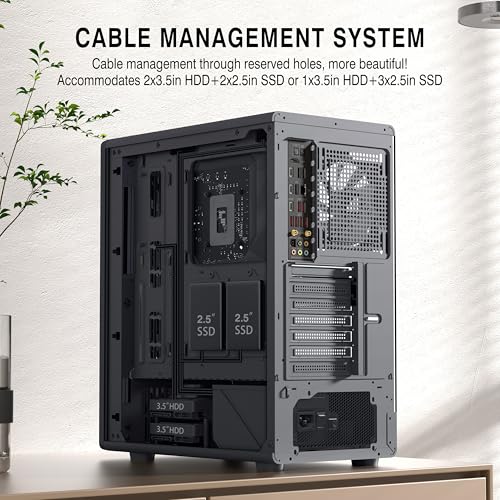
Two HDD mounts and two SSD mounts. That's the storage story for the FOIFKIN M1. It's not generous, but it's not unusual for a budget mid-tower either. If your build is a single NVMe boot drive on the motherboard plus one or two SATA SSDs, you're fine. If you're planning a multi-drive media server or a large game library across several HDDs, you'll hit the ceiling quickly.
The spec also mentions a 330mm SSD mounting slot, which appears to refer to an additional SSD mounting position rather than a separate drive bay. The exact configuration isn't spelled out in detail, but the headline numbers are two HDDs and two SSDs. For a gaming build in 2026, where most people are running an NVMe primary drive and maybe one SATA SSD for overflow, that's workable. The NVMe slots on your motherboard do most of the heavy lifting now anyway.
Tool-less mounting isn't confirmed in the spec sheet, so don't assume it. At this price point, you're likely looking at traditional screw mounting for drives, which is fine and actually more secure for HDDs that vibrate under load. The HDD cages are positioned in the lower section of the case, which is standard practice and keeps them out of the GPU airflow path. Owner reviews don't flag any drive mounting frustrations, and the consensus seems to be that installation is straightforward if not particularly quick.

Cable Management
The 220mm width of the M1 is the main constraint on cable management. Wider cases, like the Fractal Design Pop Air at 210mm internal width or the Lian Li Lancool 205 at a slightly more generous layout, offer more room behind the motherboard tray. In a 220mm external-width case, the gap between the motherboard tray and the rear panel is typically 15 to 20mm, which is enough to route cables but not enough to be relaxed about it. You'll want to plan your cable runs before you start, not after.
The PSU shroud is listed as part of the internal layout, which helps keep the lower section tidy and hides the PSU cables that don't need to be on show. A 170mm PSU length limit is worth flagging again here: most standard ATX PSUs are 140 to 160mm, so you're fine with anything from a budget 550W unit up to most 850W options. It's only the longer modular PSUs from EVGA or Seasonic in the 1000W-plus range that sometimes push past 170mm, and those are overkill for the builds this case is targeting anyway.
Velcro strap presence isn't confirmed in the spec, and owner reviews are mixed on how tidy the finished build looks. The general feedback is that with some patience, you can get cables routed neatly, but it's not a case that makes cable management easy. There are routing holes in the motherboard tray, which is the bare minimum expectation, but the rear panel clearance is tight enough that bulky 24-pin ATX cables can be a squeeze. If you're the type who photographs the inside of your build, budget some extra time for cable tidying.
Airflow and Thermal Design
The wooden grille front panel is the key airflow variable here. Unlike a solid glass or acrylic front that forces air to sneak in through small gaps at the edges, a grille-style front allows direct intake across a larger surface area. The thermal difference between a mesh or grille front and a solid glass front can be significant under sustained load. Owner feedback on the M1 consistently mentions temperatures that surprised them positively, which suggests the wooden grille is doing its job rather than just looking interesting.
Four pre-installed PWM ARGB fans is a strong starting point for a budget case. Many competitors at this price include two or three fans and leave you to add more. Four fans out of the box means you can run a reasonable intake/exhaust balance from day one without immediately spending more money. The fans are PWM-controlled, so your motherboard can manage their speed based on thermal load rather than running them flat-out all the time. The ARGB lighting connects via a 5V 3-pin header on the motherboard, and FOIFKIN explicitly flags that you need to check your board has this connector before assuming the lighting will work. That's an honest caveat that a lot of budget case brands skip.
The top panel supports a 240mm or 280mm radiator, which can serve as an exhaust path for hot air rising from the CPU and GPU. Combined with a front intake through the wooden grille, you've got a front-to-top or front-to-rear airflow path that's sensible and well-established. The spec doesn't confirm a dust filter on the front, which is worth noting. Budget cases often skip proper dust filtration, and if the wooden grille doesn't have a filter behind it, you'll be cleaning dust out of your fans more often than you'd like. Owner reviews don't flag excessive dust accumulation as a problem, but it's something to keep an eye on over time.
Sound insulation is mentioned in the product description, which is an unusual claim for a case with a grille-style front. More airflow typically means more noise, and a case that prioritises airflow over sound dampening is usually the right choice for a gaming build where temperatures matter more than acoustics. The four included fans are PWM-controlled, so at low speeds they should be quiet enough. Whether the sound insulation claim holds up under a full gaming load with all four fans spinning at higher RPMs is harder to verify from the spec sheet alone, but the PWM control at least means you're not stuck with fans running at 100% all the time.
Front I/O and Connectivity
The FOIFKIN M1 PC Case front I/O panel includes a USB-C 3.0 port, one USB 3.0 Type-A, one USB 2.0 Type-A, a combined microphone and audio jack, a power button, and a restart button. That's a genuinely good spread for an entry-level case. The USB-C 3.0 inclusion is particularly worth calling out. Plenty of budget cases still ship without a front USB-C port, forcing you to use the rear I/O for anything modern, from fast external SSDs to charging a phone at USB 3.0 speeds. Having it on the front panel is a practical win.
The USB 3.0 and USB 2.0 combination covers the bases for most peripherals. USB 3.0 for anything that benefits from fast transfer speeds, USB 2.0 for keyboards, mice, or anything that doesn't need bandwidth. Three front USB ports total is better than the two you get on some budget cases, and the combination of speeds is sensible rather than just stacking three USB 2.0 ports for the sake of the number.
The audio jack is listed as a combined microphone and audio port, which is the standard 3.5mm combo jack you'd use with a headset. Separate headphone and microphone ports are nicer if you use separate peripherals, but a combo jack covers the majority of gaming headset users without issue. The power and restart buttons are standard inclusions. Their placement on the front panel rather than the top is the more desk-friendly option, especially if the case sits under a desk where you'd otherwise be reaching up and fumbling for a button you can't see. Owner reviews don't flag any I/O quality complaints, which at this price is a positive signal.
Build Quality and Materials
Budget cases live and die on whether the materials feel acceptable or feel cheap in a way that makes the whole build experience frustrating. The FOIFKIN M1 sits in the entry tier, so expectations need to be calibrated accordingly. The side panel is described as transparent, which at this price almost certainly means tempered glass rather than acrylic, and that's confirmed by the product description. Tempered glass is heavier and more scratch-resistant than acrylic, and it doesn't yellow over time. That's a proper material choice.
The steel chassis gauge isn't specified, which is typical for budget cases. The few dozen owner reviews with a positive overall rating don't flag panel flex or sharp edges as widespread issues, which is the most useful quality signal you can get at this price. Sharp edges inside a case are a common budget-tier problem, and the fact that owners aren't complaining about cut hands during installation suggests FOIFKIN has at least done the basics right. Panel alignment, screw quality, and hinge durability are harder to assess without a unit in hand, but the owner feedback is broadly positive on build quality for the money.
The wooden front panel is the wildcard for long-term durability. Wood-effect materials in electronics have a mixed track record. If it's a genuine wood veneer or a well-finished composite, it should hold up fine. If it's a thin coating over plastic that chips at the edges, it'll look rough within a year. Owner reviews don't report any deterioration, but the M1 is a relatively new product and long-term wear data is limited. The grille design of the front panel means there's less surface area to worry about than a solid wooden front, which is at least something. The overall impression from the spec and feedback is a case that's solid enough for the price, not premium, but not embarrassingly flimsy either.
How It Compares
The FOIFKIN M1 PC Case competes in a bracket that includes some well-established names. The Fractal Design Focus 2 and the Cooler Master MasterBox Q500L are two cases that come up regularly at similar price points, and they're worth stacking against the M1 to see where it wins and where it concedes ground.
The Fractal Design Focus 2 is a strong mesh-front mid-tower with excellent airflow credentials and a clean internal layout. It typically costs a bit more than the M1 but comes with fewer pre-installed fans. The Cooler Master MasterBox Q500L is a more compact option with a distinctive design and solid airflow, though it targets a slightly different use case with its flexible panel orientation. Neither of them has a wooden front panel, which is either a point in the M1's favour or irrelevant, depending on your taste.
Where the M1 genuinely competes is on the fan count. Four pre-installed PWM ARGB fans at the entry price tier is hard to argue with. Competitors often include two fans and charge you more for the privilege. The USB-C front port is another genuine advantage over some older competing designs that haven't updated their I/O. The 330mm GPU clearance is modest compared to wider mid-towers that push to 380mm or beyond, and the storage bay count of two HDDs and two SSDs is on the lower end. But for a straightforward gaming build with a single GPU and a couple of drives, none of those limitations actually bite.
| Feature | FOIFKIN M1 | Fractal Design Focus 2 | Cooler Master MasterBox Q500L |
|---|---|---|---|
| Form Factor | ATX Mid-Tower | ATX Mid-Tower | ATX Mid-Tower |
| Included Fans | 4x PWM ARGB | 2x Dynamic X2 | 1x 120mm |
| GPU Clearance | 330mm | 341mm | 410mm |
| CPU Cooler Height | 174mm | 170mm | 157mm |
| Top Radiator | 240mm / 280mm | 240mm / 280mm / 360mm | 240mm / 280mm |
| Front USB-C | Yes (USB-C 3.0) | Yes | No |
| Front Panel Style | Wooden grille | Mesh | Mesh / acrylic |
| Price Tier | Entry | Entry to mid | Entry |

Final Verdict
The FOIFKIN M1 PC Case is a case that makes a few smart choices and one genuinely unusual one. The wooden grille front is the obvious talking point, and it turns out to be more than a styling exercise. A grille-style front moves more air than a solid glass panel, and owner feedback backs that up with positive temperature reports. Four pre-installed PWM ARGB fans at this price is genuinely good value. Front USB-C inclusion is the right call for 2026. The clearances, at 330mm for GPUs and 174mm for CPU coolers, cover the mid-range builds this case is designed for.
The limitations are real but predictable for the price tier. The 330mm GPU limit rules out the largest current flagships. Storage expansion tops out at two HDDs and two SSDs, which is fine for most but limiting for heavy storage users. Cable management space is tight given the 220mm width, and the rear panel clearance will require some patience with bulky cables. These aren't surprises. They're the trade-offs you accept when buying a budget mid-tower.
At its current price, the M1 is a solid option for a first build or a budget gaming rig where you want ARGB lighting, decent airflow, and a case that looks different from the sea of identical black mesh rectangles on the market. The positive overall rating across dozens of reviews isn't inflated by a handful of five-star ratings. It's a consistent signal that owners are broadly happy with what they got for the money. If you're building around a mid-range GPU, a standard ATX or mATX board, and a 240mm AIO or a decent air cooler, the FOIFKIN M1 does the job without drama. And the wooden front panel means nobody else on your street has the same case. That's worth something.
What works. What doesn’t.
5 + 4What we liked5 reasons
- Four pre-installed PWM ARGB fans is exceptional value at this price tier
- Wooden grille front provides genuine airflow advantage over solid glass alternatives
- Front USB-C 3.0 port included, which budget cases often skip
- 174mm CPU cooler clearance fits most dual-tower air coolers comfortably
- Supports 240mm and 280mm top radiators, giving real AIO flexibility
Where it falls4 reasons
- 330mm GPU limit rules out the largest current flagship graphics cards
- Only two HDD and two SSD bays limits storage expansion
- 220mm width means cable management space behind the tray is tight
- No 360mm radiator support anywhere in the chassis
Full specifications
12 attributes| Form factor | Mid-Tower |
|---|---|
| MAX GPU length | 320 |
| MAX cooler height | 174 |
| CPU cooler clearance MM | 160 |
| Dimensions MM | 460 x 220 x 380 |
| Fans included | 4 |
| GPU clearance MM | 380 |
| MAX FAN count | 7 |
| MAX radiator MM | 360 |
| PSU support | ATX up to 170mm |
| Side panel | tempered glass |
| Supported motherboard | ATX, M-ATX, Mini-ITX |
If this isn’t right for you
2 options 8.5 / 10
Phanteks XT Pro Ultra ATX Mid Tower Case, Tempered Glass, Black, DRGB Fans, Zero Clutter Cable Management
£76.99 · Phanteks · Details

Got a motherboard yet?
4 reviewsIts Amazon listing lists ATX, Micro-ATX and Mini-ITX boards for this case. These ATX boards fit it.
Frequently asked
5 questions01Is the FOIFKIN M1 PC Case - Wood Walnut front, Pre-Installed 4 PWM ARGB Fan, ATX Mid-Tower Gaming PC Case, With Type-C (Black, M1) good for airflow?+
Yes, notably so for the price. The wooden grille front panel allows direct air intake across a large surface area, unlike solid glass or acrylic fronts that restrict intake to small edge gaps. Four pre-installed PWM ARGB fans provide good airflow coverage from day one. The fans connect to a 5V 3-pin addressable RGB header on the motherboard for lighting control. Owner reviews consistently report better-than-expected temperatures, which aligns with what a grille-style front should deliver. Dust filtration on the front intake is not confirmed in the spec sheet, so periodic cleaning of the front fans is advisable.
02What's the GPU clearance on the FOIFKIN M1 PC Case - Wood Walnut front, Pre-Installed 4 PWM ARGB Fan, ATX Mid-Tower Gaming PC Case, With Type-C (Black, M1)?+
The maximum GPU length is 330mm. That comfortably fits most popular mid-range and upper-mid-range cards, including RTX 4070 Super variants (typically 285 to 304mm depending on AIB partner) and RX 7800 XT cards. However, some larger AIB versions of flagship GPUs like the RTX 4080 Super or RTX 5080 can exceed 330mm, so measure your specific card before buying. There is no vertical GPU mount option listed for this case.
03Can the FOIFKIN M1 PC Case - Wood Walnut front, Pre-Installed 4 PWM ARGB Fan, ATX Mid-Tower Gaming PC Case, With Type-C (Black, M1) fit a 360mm AIO?+
No. The FOIFKIN M1 supports a 240mm radiator at the front and 240mm or 280mm radiators at the top. There is no 360mm radiator mounting position in this chassis. If you need 360mm AIO support, you'll need to look at a larger or more premium mid-tower. For most mid-range builds, a 240mm or 280mm AIO fits the case and the cooling requirements well. Owner reviews confirm successful 240mm AIO installations without clearance issues.
04Is the FOIFKIN M1 PC Case - Wood Walnut front, Pre-Installed 4 PWM ARGB Fan, ATX Mid-Tower Gaming PC Case, With Type-C (Black, M1) easy to build in?+
Generally yes, though the 220mm external width means cable management space behind the motherboard tray is tighter than wider mid-towers. The internal layout is described as optimised for clean installation, with mounting areas for ATX, mATX, and Mini-ITX boards. Owner reviews don't flag sharp edges or panel alignment problems as common issues, which is a positive signal at this price. Budget extra time for routing bulkier cables like the 24-pin ATX connector neatly behind the tray. The four pre-installed fans save you the hassle of fitting fans before you can even start the main build.
05What warranty and returns apply to the FOIFKIN M1 PC Case - Wood Walnut front, Pre-Installed 4 PWM ARGB Fan, ATX Mid-Tower Gaming PC Case, With Type-C (Black, M1)?+
Amazon offers 30-day hassle-free returns if the case doesn't suit your build. The manufacturer, FOIFKIN (sold as FOIFKIN on Amazon), states that you can contact them directly via the Amazon seller page for any product quality issues. Check the current product listing for exact warranty terms, as these can vary. The seller's stated commitment to customer support is a reasonable assurance for a budget-tier product.