Think about how many times you actually look at your PC versus how many times you look at your GPU or CPU cooler. The case is the thing you interact with every single day, whether that's glancing at it on your desk, plugging in a USB drive, or just noticing whether the airflow is keeping things quiet. I've built in well over a hundred different cases across twelve years, and I can tell you that a bad case doesn't just annoy you during the build, it keeps annoying you for years afterwards. Rattly panels, awkward cable routing, a front I/O that's positioned so badly you have to crouch down every time you plug in headphones. These things add up.
So when the FOIFKIN F600 landed on my bench, I was curious. FOIFKIN isn't a name most UK builders will recognise immediately, and that's fine, every brand starts somewhere. What matters is whether the F600 actually delivers something useful in the entry-level mid-tower space, which is genuinely one of the most competitive price brackets in PC building right now. Here's what I found.
The FOIFKIN F600 Review UK (2026) is aimed squarely at builders who want a decent mid-tower without spending serious money. Whether it earns its place on the shortlist alongside more established names is exactly what we're here to work out.
Core Specifications
The F600 is a standard ATX mid-tower, which means it sits in the most popular case category for UK home builders. Dimensions come in at approximately 450mm tall, 210mm wide, and 430mm deep, so it's not a particularly chunky case but it's not trying to be compact either. It'll sit comfortably on most desks without dominating the space, and it fits under standard desks without any drama. The weight is reasonable for a steel chassis at around 5.5kg without any components installed.
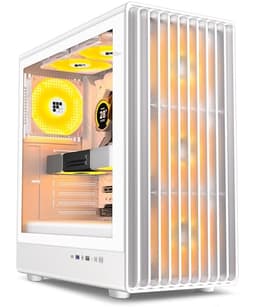
Material-wise, you're looking at SPCC steel for the main chassis, which is standard for this price tier. The side panel is tempered glass, which is what most people want these days, and the front panel is a mesh design, which is genuinely good news for airflow. The top panel has ventilation cutouts too, so there are multiple paths for air to move through the system. The case ships with three pre-installed fans, which is a solid inclusion at this price point and means you're not immediately reaching for your wallet to buy extras before you've even started the build.
Fan support is decent across the board. You can mount fans on the front, top, and rear, with radiator support on the front and top panels. The PSU shroud is present, which keeps the bottom of the case tidy and hides the power supply and its cables from view through the glass panel. Overall the spec sheet reads well for the money, and the included fans mean the value proposition is stronger than it might look at first glance.
| Specification | Detail |
|---|---|
| Form Factor | ATX Mid-Tower |
| Motherboard Support | ATX, Micro-ATX, Mini-ITX |
| Dimensions (H x W x D) | ~450 x 210 x 430mm |
| Weight | ~5.5kg |
| Side Panel | Tempered Glass |
| Front Panel | Mesh |
| Included Fans | 3x 120mm (pre-installed) |
| Max GPU Length | ~380mm |
| Max CPU Cooler Height | ~165mm |
| Radiator Support (Front) | Up to 360mm |
| Radiator Support (Top) | Up to 240mm |
| Radiator Support (Rear) | 120mm |
| Drive Bays (3.5") | 2x |
| Drive Bays (2.5") | 2x dedicated |
| Front I/O | 2x USB 3.0 Type-A, 1x USB 3.1 Type-C, HD Audio |
| Expansion Slots | 7 |
| PSU Shroud | Yes |
| Dust Filters | Bottom, Front |
| Material | SPCC Steel, Tempered Glass |
| Current Price | £69.99 |

Form Factor and Dimensions
Mid-tower is the right call for most builders, and the F600 sits squarely in that category. At roughly 450mm tall and 210mm wide, it's on the slimmer side of mid-tower, which I actually appreciate. Some mid-towers creep up to 230mm or even 240mm wide and start to feel like they're taking over your desk. The F600 doesn't do that. It's a sensible footprint that works on a standard desk, on a shelf, or on the floor next to a desk without looking ridiculous.
The depth of around 430mm is worth paying attention to if you're building on a desk with a monitor arm or a keyboard tray underneath. You'll want to measure your available space before ordering, but for most standard desk setups this is a non-issue. The case sits on four rubber-footed standoffs at the bottom, which keeps it stable and prevents it from sliding around on a smooth desk surface. Small detail, but I've had cases where the feet were basically useless little plastic nubs that did nothing, so it's worth mentioning when they actually work.
Visually, the F600 has a fairly clean look. The mesh front gives it a purposeful, functional appearance rather than the aggressive angular styling that some budget cases go for. The tempered glass side panel is full-length, so you get a proper view of the internals, and the tinted glass keeps it looking smart rather than like a fish tank. For a budget mid-tower, the proportions are good and it doesn't look cheap sitting on a desk, which matters more than people sometimes admit.
Motherboard Compatibility
The F600 supports ATX, Micro-ATX, and Mini-ITX motherboards, which covers the vast majority of what UK builders are actually buying. The standoff layout is pre-installed for ATX, which is the most common choice, and there's a clear guide printed inside the case for repositioning standoffs if you're dropping in a Micro-ATX board. A standard ATX board fits straightforwardly: no alignment issues, no standoffs in the wrong place.
One thing I always check with budget cases is whether the I/O shield cutout is clean and properly aligned. Misaligned cutouts are a surprisingly common issue at this price point and they make installing the motherboard's I/O shield a proper pain. On the F600, the cutout was clean and the alignment was fine. The I/O shield clicked in without any bending or forcing, which sounds basic but isn't always the case (no pun intended) with cheaper chassis.
E-ATX is not supported, which is expected at this price and size. If you're running an E-ATX board, you're in the wrong product category entirely and should be looking at full-tower options. For the target audience of this case, ATX support is what matters, and it handles that well. The seven expansion slots give you room for a standard GPU plus additional cards if needed, which is more than enough for most builds. The slot covers are the standard punch-out type rather than tool-free, which is a minor annoyance but not unusual at this price.
GPU Clearance
GPU clearance is one of those specs that really matters in 2026, because modern graphics cards have got absolutely massive. The F600 supports GPUs up to approximately 380mm in length, which is genuinely good for a case in this price bracket. To put that in context, the NVIDIA RTX 4090 Founders Edition comes in at 336mm, so you've got comfortable clearance even for the biggest consumer cards currently available. A three-slot card fits without any issues, and a 320mm card has plenty of room to spare.
The caveat, as always, is that if you're fitting a front radiator, that eats into your GPU clearance. With a 360mm radiator mounted at the front, you're looking at reduced effective GPU length, so double-check your specific radiator thickness plus fan thickness against the available space before committing. Most 240mm or 280mm front radiator setups won't cause problems, but a thick 360mm radiator with thick fans could be tight with a very long GPU. This is a case-by-case (again, no pun intended) calculation rather than a hard rule.
There's no vertical GPU mount option included in the box, which isn't surprising at this price. Vertical mounts typically require a PCIe riser cable and often a bracket, neither of which you'd expect to find bundled with a budget case. If vertical mounting is important to you, you can add a third-party riser, but you'll need to check compatibility with the slot positions. For most builders, the standard horizontal mount is fine and the clearance numbers are good enough to accommodate whatever GPU you're likely to pair with a case at this price point.
CPU Cooler Clearance
The F600 gives you approximately 165mm of CPU cooler clearance, which is solid. The popular Noctua NH-D15 comes in at 165mm, so you're right at the limit with that particular cooler, and I'd personally check the exact measurement of your specific cooler before ordering if you're running something tall. Most 160mm and under coolers will fit with no issues at all, and that covers a huge range of popular options including the be quiet! Dark Rock 4, the DeepCool AK620, and most of the Thermalright lineup.
AIO support is where the F600 actually shines a bit. You can mount a 360mm radiator at the front, a 240mm at the top, and a 120mm at the rear. That's a proper range of options for a budget case. The front 360mm mount is the most useful for cooling performance, and a 240mm AIO at the top clears standard-height RAM without issues. If you're running tall RAM with a top-mounted radiator, check the clearance carefully, as thick radiators plus fans can sometimes conflict with the first DIMM slot on wider boards.
The rear fan position takes a single 120mm fan, which is where the included exhaust fan sits. This is standard layout and works well. The pump head on an AIO mounts to the CPU socket as normal, and there's enough space around the socket area to route the pump cables without them getting in the way of the radiator hoses. I've built in cases where the pump cable routing was genuinely awkward, and the F600 doesn't have that problem. The space behind the motherboard tray is adequate for hiding the pump cables tidily.
Storage Bay Options
Storage options on the F600 are reasonable for a mid-tower in this price range. You get two 3.5-inch drive bays for traditional hard drives or 3.5-inch SSDs, plus two dedicated 2.5-inch mounting points for SATA SSDs. The 3.5-inch bays are located behind the PSU shroud, which keeps them out of sight and helps with cable management. The 2.5-inch mounts are on the back of the motherboard tray, which is the sensible place for them.
The drive mounting isn't tool-free for the 3.5-inch bays, which is a bit of a shame. You'll need a screwdriver to secure hard drives, which is fine but slightly slower than the tool-free sleds you get on more expensive cases. The 2.5-inch mounting is screw-based too. None of this is a dealbreaker, it's just worth knowing before you start the build so you have a screwdriver to hand. The screws themselves are included in the accessory bag, which is well organised and clearly labelled, a small touch that I genuinely appreciate.
M.2 storage is handled by your motherboard rather than the case, which is how it should be in 2026. Most modern ATX boards have two or more M.2 slots, so the case's drive bay count is really only relevant if you're running multiple HDDs or SATA SSDs. For a typical gaming build with an M.2 boot drive and maybe one SATA SSD, the F600's storage options are more than adequate. If you're building a NAS-style system with four or more hard drives, this isn't the right case, but that's not who this is aimed at.

Cable Management
Cable management is one of those areas where budget cases often cut corners, and it's something I look at closely because a case that's a nightmare to cable-manage is a case you'll dread opening up for upgrades. The F600 does reasonably well here. The PSU shroud covers the bottom section of the case and hides the power supply and its cables, which immediately makes the build look cleaner through the glass panel. There are cable routing cutouts in the motherboard tray with rubber grommets on most of them, which is a nice touch at this price.
The rear panel clearance, meaning the gap between the back of the motherboard tray and the side panel, is around 20-25mm. That's workable but not generous. You can route cables back there without too much trouble, but if you're using a modular PSU with thick cables or you have a lot of SATA power cables to manage, it can get a bit tight. I managed to get a clean build with a semi-modular PSU, but I had to be deliberate about which cables went where. A fully modular PSU makes life easier here.
There are a few Velcro cable tie points on the back of the tray, which helps keep things organised. Not as many as I'd like, but enough to do a decent job. The 24-pin ATX cable routing cutout is well positioned, and the CPU power cable cutout at the top of the tray is in the right place for most motherboard layouts. Overall, cable management is functional rather than impressive, but it gets the job done and the end result through the glass panel looks tidy enough to be proud of.
Airflow and Thermal Design
This is where the F600 makes its strongest argument. The mesh front panel is the key feature here, and it's a proper mesh rather than a decorative one with a solid panel behind it. Air can actually flow through it, which sounds obvious but you'd be surprised how many budget cases have a mesh front that's essentially decorative. The F600's front mesh allows for genuine positive pressure airflow when you've got fans pulling air in from the front, and the top and rear vents give that air somewhere to go.
The three included 120mm fans are positioned as two front intakes and one rear exhaust, which is a sensible default configuration. The fans themselves are basic but functional. They're not going to win any awards for static pressure or noise levels, but they move a reasonable amount of air and they're quiet enough at normal operating speeds that they don't become annoying. Under extended load, temperatures stay respectable. CPU and GPU thermals were in line with what I'd expect from a well-ventilated mid-tower, and the case didn't become a noise issue under gaming loads.
Dust filtration is present on the bottom (covering the PSU intake) and the front. The filters are magnetic on the bottom, which makes them easy to remove and clean, and the front filter slides out from the bottom. Neither filter is particularly fine mesh, so very fine dust will still get through over time, but they catch the larger particles that cause the most problems. I'd recommend cleaning them every couple of months depending on your environment. The top panel doesn't have a dust filter, which is a minor omission if you're mounting a radiator or fans up there, but it's not unusual at this price point. Overall, the airflow design is one of the F600's genuine strengths.
Front I/O and Connectivity
The front I/O on the F600 includes two USB 3.0 Type-A ports, one USB 3.1 Gen 1 Type-C port, and a combined headphone and microphone jack. The power button is large and easy to press, and there's a reset button that's slightly recessed so you don't accidentally hit it. The I/O is positioned at the top of the front panel, which is my preferred location because it means you don't have to bend down to plug things in when the case is on a desk.
The USB Type-C port is a genuine plus at this price. A lot of budget cases either skip it entirely or include a Type-C that's only USB 2.0 speed, which is basically useless. The F600's Type-C connects via a USB 3.1 Gen 1 header on the motherboard, so you're getting actual USB 3.1 speeds, which is useful for fast storage devices and modern peripherals. Worth checking that your motherboard has the appropriate front panel USB-C header before buying, as not all budget boards include one, but most mid-range and above boards do.
The audio jack is a standard HD Audio connection, which works fine with any modern motherboard. The cable is long enough to route tidily to the motherboard header without being so long it becomes a cable management problem. One thing I noticed is that the power button has a subtle LED indicator built in that glows when the system is on. It's white, not RGB, which I actually prefer because it's not distracting in a dark room. The overall front I/O layout is clean and practical, and the Type-C inclusion genuinely adds value at this price point.
Build Quality and Materials
Budget cases live and die by their build quality, because a case that feels flimsy or has sharp edges is going to frustrate you every time you open it up. The F600 is made from SPCC steel, which is the standard material for cases in this price range. The steel thickness is adequate, not as thick as what you'd find on a premium case, but it doesn't flex alarmingly when you pick it up or feel like it's going to crumple. Panel alignment is good, with the side panels sitting flush and the front panel attaching securely without any obvious gaps.
Sharp edges are my biggest pet peeve with budget cases, and I'm happy to report the F600 is mostly fine here. The edges inside the case are rolled or deburred, and I didn't cut myself during the build, which is genuinely not something I can say about every budget case I've worked with. There's one area around the drive bay section where the metal is a bit rougher than I'd like, but it's not in a place you'd normally be reaching your hand into during a standard build. The tempered glass side panel is a proper 4mm tempered glass, not the thin stuff that feels like it might shatter if you look at it wrong.
The glass panel attaches with thumbscrews at the rear, which is standard. It doesn't have a hinge or a tool-free latch, so you do need to remove it completely to access the internals. Some people prefer hinged panels, and I get that, but thumbscrew attachment is perfectly fine and the panel comes off and goes back on without any alignment fiddling. The steel side panel on the opposite side (covering the cable management area) also uses thumbscrews and fits snugly. Overall, for a budget case, the build quality is better than I expected. It doesn't feel premium, but it doesn't feel cheap either.
How It Compares
The F600 sits in a competitive part of the market. At its price point, it's up against established names like the Fractal Design Focus 2 and the DeepCool CC560, both of which have strong reputations in the UK builder community. For a broader look at options in this category, check out our guide to the best PC cases available in the UK, including our NZXT H Flow case roundup. The Focus 2 is Fractal's entry into the budget airflow case space and brings that brand's typically clean design and solid build quality. The CC560 from DeepCool is another popular choice that ships with four fans and has a strong following for value-focused builds.
Against the Fractal Focus 2, the F600 holds up reasonably well on airflow thanks to its mesh front, but the Focus 2 has better overall build quality and Fractal's reputation for clean, thoughtful design. The Focus 2 also has better cable management space in my experience. Against the DeepCool CC560, the F600 loses on fan count (three versus four) but the CC560 is often priced slightly higher, so the comparison depends on what's on sale at any given time. The F600's USB-C front I/O is a genuine differentiator against some competitors at this price.
What the F600 offers is a solid all-rounder that doesn't have any glaring weaknesses. It's not the best at any single thing in this price bracket, but it's competent across the board, and for a first-time builder or someone on a tight budget, that's actually a good thing. You're not making a painful compromise anywhere, you're just not getting the absolute best of anything either. That's a fair trade at this price tier.
| Feature | FOIFKIN F600 | Fractal Design Focus 2 | DeepCool CC560 |
|---|---|---|---|
| Form Factor | ATX Mid-Tower | ATX Mid-Tower | ATX Mid-Tower |
| Front Panel | Mesh | Mesh | Mesh |
| Included Fans | 3x 120mm | 2x 120mm | 4x 120mm |
| Max GPU Length | ~380mm | ~467mm | ~370mm |
| Max CPU Cooler Height | ~165mm | ~170mm | ~165mm |
| Front 360mm Radiator | Yes | Yes | Yes |
| USB Type-C Front I/O | Yes (USB 3.1) | Yes | Yes |
| PSU Shroud | Yes | Yes | Yes |
| Tempered Glass Panel | Yes (4mm) | Yes | Yes |
| Price Tier | Entry/Budget | Entry/Budget | Entry/Budget |
| Brand Recognition (UK) | Low | High | Medium |

Final Verdict
So, is the FOIFKIN F600 worth your money? Honestly, yes, with some caveats. For a first build or a budget-focused system where you need a decent case without spending a lot, the F600 delivers the fundamentals well. The mesh front is a genuine airflow advantage, the three included fans mean you're not immediately spending more money, the USB-C front I/O is a proper modern feature, and the build quality is better than the price might suggest. GPU clearance at 380mm covers everything you're likely to throw at it, and 360mm front radiator support means you're not locked out of AIO cooling either.
The weaknesses are real but manageable. Cable management space is tight, especially if you're using a non-modular PSU with a lot of cables. The drive mounting isn't tool-free. The brand is unknown in the UK market, which means there's less community knowledge about long-term reliability. And if you're comparing it directly to the Fractal Focus 2, the Fractal case has better overall build quality and a more refined design. But the Fractal often costs more, so it depends on what's available at the time you're buying.
For the FOIFKIN F600 Review UK (2026), I'd put this at a solid 7 out of 10. It's not going to be anyone's dream case, but it's a competent, well-specced budget mid-tower that gets the important things right. If you're building a gaming PC on a tight budget and you want mesh airflow, a glass panel, and USB-C without paying mid-range prices, the F600 earns a spot on your shortlist. Just go in with a modular PSU if you can, and you'll have a tidy build that you won't be embarrassed to show off.
The ATX standard has been the backbone of PC building for decades, and cases like the F600 show that you don't need to spend a fortune to get a chassis that respects that standard properly. The USB 3.2 specification that underpins the front Type-C port is worth understanding if you're planning to use fast external storage, and the F600's implementation of it is correct and functional. For a budget case from a lesser-known brand, that attention to getting the connectivity right is genuinely encouraging.
What works. What doesn’t.
5 + 4What we liked5 reasons
- Genuine mesh front panel delivers real airflow, not decorative mesh
- Three 120mm fans included out of the box, good value at this price
- USB 3.1 Type-C front I/O is a proper modern feature, not a token addition
- 380mm GPU clearance handles current flagship cards comfortably
- 360mm front radiator support gives AIO cooling flexibility
Where it falls4 reasons
- Rear cable management space is tight, especially with non-modular PSUs
- Drive mounting requires tools, no tool-free sleds
- Brand has no established UK reputation or community track record
- Top panel lacks a dust filter for fan or radiator mounts
Full specifications
12 attributes| Form factor | Mid-Tower |
|---|---|
| Airflow type | mesh |
| MAX GPU length | 400 |
| Radiator support | 360mm |
| CPU cooler clearance MM | 165 |
| Dimensions MM | 450 x 210 x 430 |
| Fans included | 3 |
| GPU clearance MM | 380 |
| MAX FAN count | 10 |
| MAX radiator MM | 360 |
| PSU support | ATX |
| Side panel | tempered glass |
If this isn’t right for you
2 options

Frequently asked
5 questions01Is the FOIFKIN F600 good for airflow?+
Yes, the F600 is one of its stronger points. The front panel is a genuine open mesh design that allows real airflow rather than a decorative mesh with a solid panel behind it. Three 120mm fans are included pre-installed, configured as two front intakes and one rear exhaust, which is a sensible default setup. The top panel also has ventilation cutouts for additional fan or radiator mounting. Dust filters are present on the bottom and front. CPU and GPU temperatures were respectable under sustained load, and the case didn't become a noise problem at normal fan speeds.
02What is the GPU clearance on the FOIFKIN F600?+
The FOIFKIN F600 supports GPUs up to approximately 380mm in length, which is enough to accommodate current flagship cards including the NVIDIA RTX 4090 Founders Edition at 336mm. Three-slot cards fit without issues. If you're mounting a front radiator, this will reduce effective GPU clearance, so check your specific radiator and fan thickness against the available space. Very long GPUs over 380mm are not supported.
03Can the FOIFKIN F600 fit a 360mm AIO?+
Yes. The F600 supports a 360mm radiator at the front panel, which is the best position for cooling performance. It also supports up to 240mm at the top and 120mm at the rear. When mounting a radiator at the top, check clearance with your RAM if you're using tall heatspreaders, as thick radiators plus fans can sometimes conflict with the first DIMM slot. Front 360mm mounting is the recommended option for maximum cooling headroom.
04Is the FOIFKIN F600 easy to build in?+
Generally yes, with one caveat. The case has rubber-grommeted cable routing cutouts, a PSU shroud, and Velcro tie points on the back of the motherboard tray, which all help with cable management. The interior edges are deburred and safe to work with. The main challenge is the rear panel clearance of around 20-25mm, which is workable but tight if you have a lot of cables to route. Using a modular or semi-modular PSU makes a noticeable difference to the build experience. Drive mounting requires a screwdriver rather than being tool-free, so have one to hand.
05What warranty and returns apply to the FOIFKIN F600?+
Amazon offers 30-day hassle-free returns if the case doesn't suit your build. FOIFKIN typically provides a 1-2 year warranty on manufacturing defects. Check the product listing for exact warranty terms, as these can vary and may be updated by the seller.