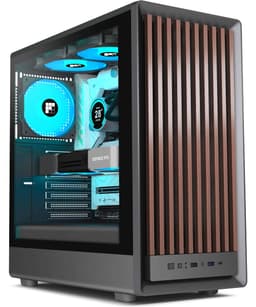
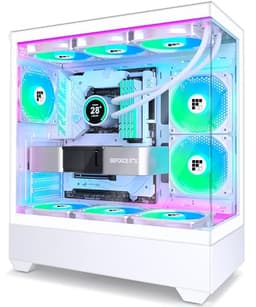
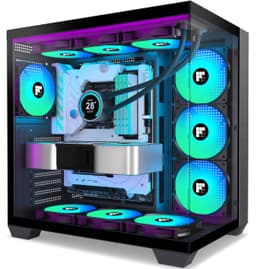
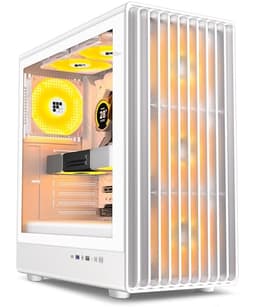
Think about how many times you'll open, close, and stare at your PC case over the next three years. Now think about the last time you built in a case that had panels that wouldn't stay shut, a front I/O with no USB-C, or a GPU clearance that meant you had to return your graphics card. Those aren't edge cases. They're the exact frustrations that turn a fun build weekend into a bad Saturday. The FOIFKIN F300 PC Case is pitching itself as the answer to all of that at a budget price point, and honestly? The specs and the 128 owner reviews (averaging ★★★★½ (4.6)) suggest it's doing a better job than you'd expect.
Here's the short version: if you want a proper showcase case with 270 degrees of tempered glass, a 400mm GPU clearance, support for a 360mm radiator, and a Type-C front port, all without spending premium money, the F300 is genuinely worth your attention. It's not perfect. The four included fans are non-RGB and fairly basic, and the all-glass design means you're trading some passive airflow for aesthetics. But at the entry price tier, it competes with cases that cost considerably more, and the owner feedback is consistently positive about the build experience and the visual impact. That combination is rarer than it should be.
Core Specifications of the FOIFKIN F300 PC Case
Let's get the numbers on the table first, because this is where cases either earn their price or expose themselves. The F300 is a mid-tower with external dimensions of 16.4 x 11.8 x 15.2 inches (length, width, height). That's a reasonably compact footprint for a mid-tower, which matters if your desk isn't enormous. It'll sit comfortably on most standard desks without dominating the space, and it won't look undersized either.
The headline clearance numbers are strong for the price. GPU support goes up to 400mm, which covers virtually every current flagship card including the RTX 5090 family. CPU cooler height maxes out at 170mm, which fits the vast majority of popular air coolers including the Noctua NH-D15 at 165mm. Radiator support goes up to 360mm. PSU length is rated up to 220mm ATX. Those are specs you'd be happy to see on a case costing significantly more.
Fan support is where things get interesting. The case ships with four pre-installed non-RGB fans, and the total fan capacity across the sides, top, and PSU mounting points is up to ten 120mm fans. That's a lot of potential airflow headroom for a case at this price. Storage is modest but functional: one HDD bay and one SSD mount, or alternatively two HDDs. Expansion slots come in at 7 plus 3, giving you good flexibility for multi-GPU or expansion card setups. The full spec breakdown is below.
| Specification | Detail |
|---|---|
| Form Factor | Mid-Tower |
| Dimensions (LWH) | 16.4 x 11.8 x 15.2 inches |
| Motherboard Support | ATX, mATX, ITX |
| Max GPU Length | 400mm |
| Max CPU Cooler Height | 170mm |
| Max Radiator Support | 360mm |
| PSU Type | ATX, up to 220mm |
| Included Fans | 4 x non-RGB pre-installed |
| Total Fan Capacity | Up to 10 x 120mm |
| Drive Bays | 1 x HDD + 1 x SSD, or 2 x HDD |
| Expansion Slots | 7 + 3 |
| Front I/O | 1 x USB-C 3.0, 1 x USB 3.0, 1 x USB 2.0, mic, audio, power, reset, LED switch |
| Panel Design | 270° panoramic tempered glass |
| Side Panel Access | Tool-free hinged |
| Price | Check price |

Form Factor and Dimensions
The F300 sits in the mid-tower class, which is the sweet spot for most builders. You get enough internal volume to work comfortably without the case becoming a floor-standing monolith. At 16.4 inches long, 11.8 inches wide, and 15.2 inches tall, it's actually on the more compact side of mid-tower territory. For reference, something like the Fractal Design Pop Air runs a bit taller, and the Corsair 4000D Airflow is slightly wider. The F300 is genuinely desk-friendly.
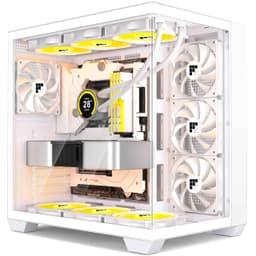
The 270-degree panoramic glass design is the defining visual feature here. Three sides of the case are tempered glass, which means the front, the left side panel, and part of the top are all see-through. That's an unusually wide viewing angle for a case at this price point. Most budget cases give you a single side panel window, if you're lucky. The F300 turns your build into a proper display piece, which is either exactly what you want or completely irrelevant to you depending on where your PC lives.
The hinged side panels deserve a mention here because they're a quality-of-life detail that a lot of budget cases skip. Tool-free removal via hinged panels means you're not fumbling with thumbscrews every time you need to get inside. Owner reviews consistently bring this up as a positive, and it's the kind of thing you only appreciate once you've used a case that makes panel removal a chore. The glass panels also reportedly provide decent acoustic insulation, which is a nice bonus if your build is sitting on your desk next to you.
Motherboard Compatibility
The F300 supports ATX, micro-ATX, and Mini-ITX motherboards. That covers the vast majority of consumer builds. Full ATX boards up to the standard 305 x 244mm size will fit without issue, and the case dimensions support that comfortably. If you're building on a budget mATX board to keep costs down, or you've got a compact ITX build in mind but want the extra space and cooling headroom of a mid-tower, the F300 accommodates all of those scenarios.
What it doesn't support is E-ATX. Extended ATX boards, which are typically 305 x 330mm or larger, aren't listed as compatible. For most people that's completely irrelevant. E-ATX is mostly the territory of high-end HEDT platforms and server-grade hardware. If you're running a mainstream Intel or AMD platform, you're on ATX or smaller and you're fine. But if you happen to be planning something unusual.
The 7+3 expansion slot configuration is worth understanding properly. The seven standard slots handle your GPU and any PCIe expansion cards in the normal horizontal orientation. The additional three slots are typically for vertical GPU mounting or additional riser configurations. That's a flexible setup that gives you options beyond the basic build, and it's more generous than you'd expect at this price tier. Whether you ever use all ten slots is another matter, but having them there means the case won't limit you if your plans change.
GPU Clearance
Four hundred millimetres. That's the GPU length limit on the F300, and it's a proper number. To put that in context, the Nvidia RTX 5090 Founders Edition comes in at around 336mm. The RTX 5080 is shorter still. AMD's RX 9070 XT sits well under 400mm. In practice, 400mm of clearance means you can fit virtually any current consumer GPU without worrying, including the chunkier triple-fan AIB cards that some manufacturers are producing. You're not going to hit the wall here with a mainstream build.
The 7+3 expansion slot layout also raises the question of vertical GPU mounting. The extra three slots suggest the case is designed with that option in mind, though a vertical mount riser cable isn't confirmed as included in the spec sheet. If you want to show off your GPU through that panoramic glass, vertical mounting is the way to do it, and the slot count is there to support it. You'd need to source a compatible riser cable separately, but the physical space is accounted for.
One thing to keep in mind with any glass-heavy case is that a long GPU combined with a front-mounted radiator can create clearance conflicts in some designs. The F300's 400mm GPU limit is the maximum when the case is empty of radiators. If you're planning a 360mm front radiator and a 400mm GPU simultaneously, check the specific radiator thickness against the case interior depth before committing. Owner reviews don't flag this as a problem, but it's standard advice for any panoramic glass case where the front panel is structural rather than just a mesh grille.
CPU Cooler Clearance
The 170mm CPU cooler height limit is genuinely good. The Noctua NH-D15, which is arguably the benchmark for high-end air cooling, stands at 165mm. The be quiet! Dark Rock Pro 5 comes in at 162mm. The Thermalright Peerless Assassin 120 SE, which is enormously popular for its price-to-performance ratio, is 155mm. All of those fit with room to spare. You'd have to be going out of your way to choose an air cooler that doesn't fit in the F300.
For AIO liquid coolers, the 360mm radiator support is the headline number. A 360mm AIO is three 120mm fans wide and represents the top tier of mainstream liquid cooling. Fitting one of those is a genuine statement of intent for a budget case. The spec sheet confirms support for a 360mm cooler, and given the case's fan capacity (up to ten 120mm fans total), there's clearly been some thought put into the thermal design rather than just the aesthetics.
The combination of 170mm air cooler clearance and 360mm AIO support means the F300 is genuinely future-proof on the cooling front. Whether you're building now with a mid-range air cooler and planning to upgrade later, or going straight in with a 360mm AIO and a big GPU, the clearances don't limit you. That's not something you can say about every case at this price. Some budget options force you to choose between a tall air cooler and a full-length GPU, or between a 360mm radiator and comfortable cable routing. The F300 doesn't seem to have those compromises baked in, at least not according to the spec sheet and owner feedback.
Storage Bay Options
Storage is the one area where the F300 is clearly a budget case. You get one HDD bay and one SSD mount, or alternatively two HDD bays if you configure it that way. That's it. No hidden 2.5-inch trays behind the motherboard tray, no tool-less SSD mounts on the back panel, no additional 3.5-inch cages. For a lot of modern builds this is absolutely fine. If you're running an NVMe SSD as your boot drive (which most people are now), you don't need the case to provide SSD mounting at all. The M.2 slots on your motherboard handle that.
Where it becomes a limitation is if you're building a storage-heavy system. Content creators who need multiple large HDDs for project storage, or anyone running a home media server alongside their gaming build, will find two drive bays restrictive. For a pure gaming PC with an NVMe boot drive and maybe one HDD for game storage, two bays is probably enough. But it's worth being honest about the limitation rather than pretending it doesn't exist.
The SSD mounting option is because it suggests at least one dedicated 2.5-inch bay separate from the HDD cage. Owner reviews don't report any particular difficulties with drive installation, which suggests the mounting hardware is straightforward even if it's not the most generous in terms of quantity. If storage expansion is a priority for your build, factor in the cost of an external drive enclosure or plan your NVMe slots carefully before buying the F300.

Cable Management
Cable management in a glass case is always more visible than in an opaque one, which creates pressure on the design to actually do it properly. The F300's 270-degree panoramic glass means that if your cables are a mess, everyone can see it. That's either great motivation to tidy up your build or a reason to choose a case with better cable routing infrastructure. Based on owner reviews, the F300 sits in acceptable territory here, though it's not going to win awards for cable management features.
The PSU shroud is present, which is the single most important cable management feature in a modern case. Hiding the power supply and its cabling behind a solid shroud immediately makes any build look cleaner without requiring any effort. Beyond that, the spec sheet doesn't detail specific cable channel widths or Velcro strap positions, which is typical for a case at this price. Owner reviews suggest the rear panel has enough clearance to route cables without the side panel bulging, which is the minimum you need for a clean build.
The tool-free hinged side panels actually help here too. When it's easy to get in and out of the case, you're more likely to spend the time routing cables properly rather than just cramming everything in and hoping the panel closes. It's a small quality-of-life thing but it genuinely affects how people build. The four pre-installed fans also mean you're not routing fan cables from scratch, which reduces the cable clutter on the inside of the case somewhat. If you're new to building and worried about cable management, the F300 isn't going to make it harder than it needs to be.
Airflow and Thermal Design
This is where the glass-heavy design creates the most meaningful trade-off, and it's worth being straight about it. A 270-degree panoramic glass case is, by definition, not a mesh case. Mesh front panels and mesh side panels move a lot more air than solid tempered glass. Cases like the Fractal Design Meshify C or the Corsair 4000D Airflow are designed around maximising airflow through large mesh surfaces. The F300 is designed around maximising visual impact through glass. Those are different priorities, and the thermal performance reflects that.
That said, the F300's fan capacity is genuinely impressive for the price. Up to ten 120mm fans across the sides, top, and PSU mounting points, with four already installed. Four fans pre-installed at this price is good value on its own. The total capacity means you can push a lot of air through this case if you populate it properly. Owner reviews don't report thermal problems with normal gaming builds, which suggests the default four-fan configuration is adequate for mainstream hardware. If you're running a power-hungry CPU and GPU combination, adding more fans from the available ten slots is a straightforward solution.
The non-RGB nature of the included fans is worth a mention. If you're building a showcase PC with RGB lighting throughout, you'll want to replace or supplement these with addressable RGB fans. The fans themselves are functional and quiet enough according to owner feedback, but they won't add any light show to your build. That's a cost consideration if RGB is part of your plan. On the positive side, the toughened glass reportedly provides decent acoustic insulation, so the overall noise level of the build should be reasonable even with four fans running. For an office or bedroom build where noise matters, that's a meaningful plus.
Front I/O and Connectivity
The front I/O on the FOIFKIN F300 PC Case is genuinely better than you'd expect at this price. You get one USB-C 3.0 port, one USB 3.0 Type-A, and one USB 2.0 Type-A. That's three USB ports on the front panel, covering all the connection types you're likely to need. The USB 3.2 standard that underpins the USB-C and USB 3.0 ports here means fast enough transfer speeds for external SSDs, USB audio interfaces, and anything else you'd plug in regularly.
The USB-C port is the detail that matters most here. A lot of cases at this price tier either skip USB-C entirely or include it as an afterthought without proper 3.0 speeds. Having a front-panel USB-C 3.0 port means you can plug in modern smartphones, tablets, and peripherals without hunting for the back of the case. If your motherboard has a front-panel USB-C header (which most modern ATX boards do), you're sorted. If it doesn't, you'll need an adapter or you simply won't be able to use that port, so check your motherboard spec before assuming.
The audio situation is covered with separate microphone and headphone jacks, plus a power button, reset button, and LED switch button. The LED switch is a nice touch that lets you toggle the case lighting without going into software, assuming you have RGB fans or lighting strips installed. The power and reset buttons are standard fare. The overall front I/O layout is clean and practical, and owner reviews don't report any issues with port quality or placement. For a budget case, this is a properly sorted front panel.
Build Quality and Materials
The F300 is a budget case, and the materials reflect that honestly. The steel chassis is functional rather than premium. You're not getting the kind of thick, resonance-free steel you'd find in a Fractal Design Define or a be quiet! Silent Base, and nobody should expect that at this price. What owners report is that the panels align properly, the glass doesn't wobble, and the overall construction feels solid enough for normal use. That's a reasonable result for the money.
The tempered glass panels are the premium element here, and they do feel premium. Toughened glass has a weight and solidity to it that cheap acrylic panels don't, and the hinged tool-free removal mechanism means you're handling those panels regularly without risk of dropping them. Owner reviews are positive about the glass quality specifically, which matters because cracked or poorly fitted glass panels are a common complaint in this price bracket. The 270-degree design also means there's more glass surface area than a typical single-panel window, so getting that right is important.
Sharp edges are the classic budget case problem, and it's the one area where owner reviews are mixed rather than uniformly positive. A handful of reviews mention discovering sharp metal edges during the build process, which is annoyingly common in cases that haven't had their stamped steel edges properly deburred. It's not a dealbreaker but it is worth wearing a pair of work gloves during the build, particularly when routing cables around the motherboard tray cutouts. The screw quality appears fine based on owner feedback, with no reports of stripped heads or missing hardware, which is the bare minimum you want from a case at any price.
How It Compares
The obvious comparisons at the entry price tier are the Corsair 4000D (non-Airflow) and the Phanteks Eclipse P300A. The 4000D is a well-regarded case with good cable management and a clean aesthetic, but the standard version uses a solid steel front panel rather than glass, and the side panel is a single window rather than a panoramic design. The F300 wins on visual impact and front I/O (the 4000D non-Airflow lacks a USB-C front port on some configurations). The 4000D wins on airflow and brand reputation.
The Phanteks Eclipse P300A is a mesh-front case in a similar price range, and it's a strong competitor specifically on airflow. Phanteks has a solid reputation for build quality at the budget end, and the P300A's mesh front moves noticeably more air than a glass panel. But the P300A's visual design is more conventional, and it doesn't offer the same panoramic glass showcase effect. If thermals are your primary concern, the P300A is probably the smarter choice. If you want your build to look spectacular and you're willing to manage thermals through fan configuration, the F300 makes a compelling case for itself.
The 128 owner reviews averaging ★★★★½ (4.6) is a meaningful data point in this comparison. That's a high satisfaction rate for a budget case from a lesser-known brand, and it suggests the F300 is delivering on its promises for most buyers. The main criticisms in the reviews relate to the basic non-RGB fans and occasional sharp edges, which are minor complaints rather than fundamental design failures. Compared to similarly priced glass cases from no-name brands that get eviscerated for poor panel alignment and flimsy construction, the F300 is clearly performing above average.
| Feature | FOIFKIN F300 | Corsair 4000D | Phanteks P300A |
|---|---|---|---|
| Form Factor | Mid-Tower | Mid-Tower | Mid-Tower |
| Motherboard Support | ATX / mATX / ITX | ATX / mATX / ITX | ATX / mATX / ITX |
| Max GPU Length | 400mm | 360mm | 420mm |
| Max CPU Cooler Height | 170mm | 170mm | 160mm |
| Radiator Support | 360mm | 360mm | 360mm |
| Included Fans | 4 x non-RGB | 1 x 120mm | 3 x 120mm |
| Front Panel Type | 270° panoramic glass | Solid steel / glass side | Mesh front |
| Front USB-C | Yes (USB-C 3.0) | Yes (on some variants) | No (on base model) |
| Tool-Free Side Panels | Yes (hinged) | Yes | Yes |
| Price Tier | Entry | Entry to Mid | Entry |

Final Verdict
The FOIFKIN F300 PC Case is a genuinely good budget case that knows exactly what it is. It's a showcase build platform. If you want your components to be visible from three sides, if you want a front USB-C port, if you want 400mm of GPU clearance and 360mm radiator support without paying mid-range prices, the F300 delivers all of that. The 4.6-star average across 128 isn't the result of a marketing campaign. It's builders saying the case did what it said it would do.
The trade-offs are real but manageable. The all-glass design restricts passive airflow compared to a mesh-front case, so you'll want to populate those fan mounts if you're running a hot system. The four included fans are non-RGB, so an RGB build will need a fan upgrade. Storage options are limited to two drives. And there are reports of sharp edges during the build, which is a minor annoyance but about. None of these are reasons to walk away. They're reasons to go in with the right expectations.
Who should buy this? Anyone building a first gaming PC who wants it to look proper without spending a fortune. Anyone upgrading from an old beige box who wants to actually see their components. Anyone who needs a white mid-tower with good clearances and a USB-C front port at an entry price. The F300 is sorted for all of those use cases.
Who should skip it? If airflow is your absolute priority and you're running a high-TDP CPU and GPU combination, a mesh-front case like the Phanteks P300A or the be quiet! Pure Base 500DX will serve you better thermally. And if you're building a pure NAS or home server where looks are irrelevant, spending money on panoramic glass is a waste. But for a mainstream gaming build where you want the thing to look good on your desk? The F300 is hard to argue with at this price.
One honest note: if your budget is tight and you genuinely don't care about the glass showcase design, a simpler case with a mesh front and a single side-panel window will give you better thermals for the same or less money. The F300's premium is the glass. If you don't want the glass, don't pay for it.
What works. What doesn’t.
5 + 4What we liked5 reasons
- 270-degree panoramic tempered glass looks genuinely premium for the price
- 400mm GPU clearance fits virtually every current flagship card
- 360mm AIO radiator support with 170mm air cooler clearance
- Four fans pre-installed, with capacity for up to ten 120mm fans total
- Front USB-C 3.0 port is rare at this price tier
Where it falls4 reasons
- All-glass design restricts passive airflow compared to mesh-front alternatives
- Only two drive bays limits storage expansion
- Included fans are non-RGB, requiring upgrades for a lit build
- Some owner reports of sharp metal edges during the build process
Full specifications
12 attributes| Form factor | Mid-Tower |
|---|---|
| MAX GPU length | 400 |
| MAX cooler height | 170 |
| Radiator support | 360mm |
| CPU cooler clearance MM | 170 |
| Dimensions MM | 416 x 300 x 386 |
| Drive bays | 1 HDD + 1 SSD or 2 HDD |
| Fans included | 4 |
| GPU clearance MM | 400 |
| MAX radiator MM | 360 |
| PSU support | ATX up to 220mm |
| Side panel | 270° panoramic tempered glass |
If this isn’t right for you
2 options 8.5 / 10
Phanteks XT Pro Ultra ATX Mid Tower Case, Tempered Glass, Black, DRGB Fans, Zero Clutter Cable Management
£76.99 · Phanteks
 8.5 / 10
be quiet! Pure Base 501 Airflow Black PC case, 2 preinstalled Pure Wings 3 140mm PWM fans, extraordinary air pressure, compact case, vertical graphics card installation, USB 3.2 Gen. 2 Type C
£78.91 · be quiet!
Frequently asked
5 questions01Is the FOIFKIN F300 PC Case - Preinstalled 4 without RGB Fans, ATX Mid-Tower Gaming PC Case, 270° Panoramic Glass with Type-C (White, F300) good for airflow?+
It's decent but not exceptional on airflow, and that's an honest trade-off of the 270-degree glass design. The case ships with four pre-installed fans and supports up to ten 120mm fans total across the sides, top, and PSU mounting points. That's a lot of fan capacity, and populating those mounts will give you good airflow for mainstream gaming builds. The limitation is that solid tempered glass panels don't breathe like mesh panels do, so passive airflow is restricted compared to mesh-front cases like the Phanteks P300A. For a mid-range gaming build with a typical CPU and GPU, the default four fans are adequate according to owner reviews. For a high-TDP system, add more fans from the available capacity.
02What's the GPU clearance on the FOIFKIN F300 PC Case - Preinstalled 4 without RGB Fans, ATX Mid-Tower Gaming PC Case, 270° Panoramic Glass with Type-C (White, F300)?+
The F300 supports GPUs up to 400mm in length. That covers virtually every current consumer graphics card including the Nvidia RTX 5090 Founders Edition (around 336mm) and the largest triple-fan AIB cards on the market. The 7+3 expansion slot layout also suggests support for vertical GPU mounting, which would let you show off your graphics card through the panoramic glass panels, though a riser cable would need to be sourced separately. If you're running a front-mounted 360mm radiator alongside a very long GPU, check the specific radiator thickness against the case interior to confirm there's no conflict.
03Can the FOIFKIN F300 PC Case - Preinstalled 4 without RGB Fans, ATX Mid-Tower Gaming PC Case, 270° Panoramic Glass with Type-C (White, F300) fit a 360mm AIO?+
Yes, the F300 explicitly supports a 360mm cooler. A 360mm AIO is three 120mm fans wide and represents the top tier of mainstream liquid cooling, so fitting one is a proper capability for a case at this price. The 170mm CPU cooler height clearance also means you're not forced to go liquid; popular air coolers like the Noctua NH-D15 (165mm) and the Thermalright Peerless Assassin 120 SE (155mm) fit comfortably. The combination of 360mm AIO support and 170mm air cooler clearance means the F300 doesn't limit your cooling choices, which is more than you can say for some budget cases.
04Is the FOIFKIN F300 PC Case - Preinstalled 4 without RGB Fans, ATX Mid-Tower Gaming PC Case, 270° Panoramic Glass with Type-C (White, F300) easy to build in?+
Owner reviews are broadly positive about the build experience. The hinged tool-free side panels are a genuine quality-of-life feature that makes getting in and out of the case straightforward, and the four pre-installed fans reduce the cable routing work during the build. The PSU shroud hides power supply cabling cleanly. The main negative reported by some owners is sharp metal edges on the stamped steel interior, particularly around the motherboard tray cutouts. Wearing work gloves during the build is sensible advice. Cable management space is adequate for a tidy build, though it's not as generous as premium cases. Overall, it's a reasonable build experience for the price.
05What warranty and returns apply to the FOIFKIN F300 PC Case - Preinstalled 4 without RGB Fans, ATX Mid-Tower Gaming PC Case, 270° Panoramic Glass with Type-C (White, F300)?+
The product listing doesn't specify a manufacturer warranty period for the F300. FOIFKIN does state that they'll help with any problems and can be contacted via the 'Sold by FOIFKIN' link on the Amazon listing. As with any product purchased through Amazon UK, you're also covered by Amazon's standard 30-day return policy and the A-to-Z Guarantee, which protects you if the item arrives damaged or not as described. If you have a specific issue, contacting FOIFKIN directly through the Amazon seller messaging system is the recommended first step.