
Buying a prebuilt is a transaction. You hand over money, you get a working PC. No sourcing parts, no compatibility nightmares, no three evenings watching tutorial videos about BIOS settings. The question isn't whether that convenience has value. It does. The question is whether the specific machine you're buying is worth what they're charging for it, or whether you're paying a fat convenience premium for components that were already cheap before they marked them up.
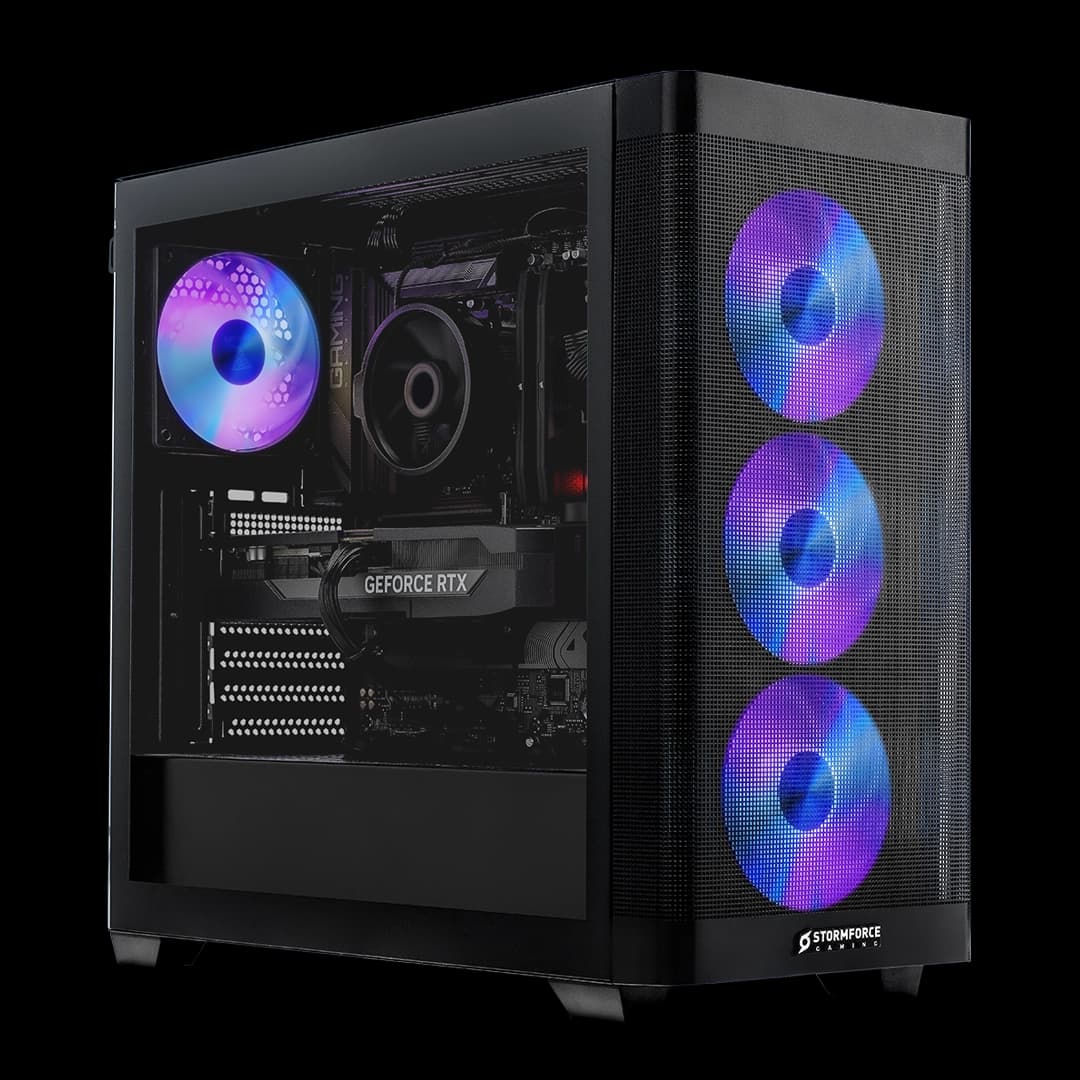
The Stormforce Gaming Onyx i3-13100F GTX 1650 sits at the budget end of the prebuilt market. That means it needs to be honest about what it is. Not a gaming powerhouse. Not a content creation workstation. A sensible, affordable entry point that gets Windows 11 running on your desk without requiring you to know what DDR4 timings are. Whether it pulls that off depends on the parts inside, and that's exactly what we're going to dig into.
This is a spec-sheet and component-knowledge review. We haven't had a unit on a bench. What we have done is pull apart every spec Stormforce Gaming lists, cross-reference it against what those components actually do in the real world, and compare the whole package against what you'd spend building something similar yourself. If you're searching for an Onyx i3-13100F GTX 1650 review, you're in the right place.
Core Specifications
Stormforce Gaming lists the Onyx with an Intel Core i3-13100F processor, a GTX 1650 graphics card, 16GB of DDR4 RAM, and 1TB of NVMe SSD storage. The machine runs on an H610 motherboard, lives inside a Coolermaster MB320L chassis, and ships with a 350W PSU and Windows 11 pre-installed. Stormforce Gaming backs it with a 3-year collect, repair and return warranty covering all parts and labour, plus free fast UK delivery.
On paper, that's a coherent budget build. The i3-13100F is a quad-core chip with hyperthreading, so you get eight threads to work with. The GTX 1650 is NVIDIA's entry-level discrete GPU. The 16GB of DDR4 is genuinely decent for this price tier. And 1TB of NVMe storage is better than you'd have got in a budget prebuilt a couple of years ago when 256GB SSDs were still common in this bracket. So far, so reasonable.
Where you start to feel the budget constraints is the 350W PSU and the H610 motherboard. Neither is a disaster, but both put a ceiling on what this machine can become if you decide to upgrade it later. The H610 chipset doesn't support overclocking (not that the i3-13100F is unlocked anyway), and 350W is tight if you ever want to swap in a more power-hungry GPU. More on that in the upgrade section. For now, here's the full spec breakdown.
| Component | Specification |
|---|---|
| CPU | Intel Core i3-13100F |
| GPU | NVIDIA GTX 1650 |
| RAM | 16GB DDR4 |
| Storage | 1TB NVMe SSD |
| Motherboard | H610 |
| Case | Coolermaster MB320L |
| PSU | 350W |
| Operating System | Windows 11 (pre-installed) |
| Warranty | 3-year collect, repair and return (parts and labour) |
| Delivery | Free fast UK delivery |
| Price | Check price |
CPU & Performance
The Intel Core i3-13100F is a 13th-gen Raptor Lake chip with four cores, eight threads, and a boost clock of up to 4.5GHz. The "F" suffix means it has no integrated graphics, which is why the GTX 1650 is non-negotiable in this build rather than optional. That's actually fine. Cutting the iGPU is how Intel shaved cost off the chip, and for a gaming PC it doesn't matter because you've got a dedicated GPU doing the work anyway.
What does the i3-13100F actually mean for day-to-day use? For web browsing, office work, video streaming, and light content creation, it's genuinely comfortable. Eight threads handle multitasking well enough that you won't be sitting watching a spinner every time you switch between a browser with fifteen tabs and a spreadsheet. For gaming, the CPU is rarely the bottleneck at 1080p with a GTX 1650, because the GPU will hit its limit first. That's almost a compliment, in a roundabout way. The processor won't hold the graphics card back.
Where the i3-13100F shows its limits is in CPU-heavy workloads. Video encoding, 3D rendering, streaming while gaming, heavy compilation work. These tasks want more cores, and a quad-core chip, even a fast one, starts to feel it under sustained load. If you're buying this for general gaming and everyday computing, the CPU is absolutely adequate. If you're planning to stream your gameplay at the same time, you might find it a bit of a squeeze. Intel's own specification page confirms the 12MB L3 cache, which helps with gaming frame consistency more than raw clock speed would suggest.
GPU & Gaming Performance
The GTX 1650 is where this machine's gaming ambitions get real. And real means modest. The NVIDIA GTX 1650 is an entry-level discrete GPU. It has 4GB of GDDR6 VRAM (depending on the specific revision Stormforce Gaming sources), and it's built on the Turing architecture. It can run a huge library of games, but it does so at 1080p with medium to high settings, not maxed out, and not at very high frame rates in demanding titles.
Think about what that looks like practically. Older and less demanding titles, things like Fortnite, Rocket League, Minecraft, CS2 on lower settings, older Call of Duty titles, indie games, will run perfectly well. You'll get playable frame rates and a genuinely enjoyable experience. Step into more demanding modern releases, open-world games with dense environments, newer AAA titles pushing cutting-edge rendering, and you'll need to drop settings to medium or even low to stay smooth. That's the honest reality of a GTX 1650 in 2025.
Ray tracing is largely off the table. The GTX 1650 doesn't have dedicated RT cores in the same way RTX cards do, so enabling ray tracing in games that support it will crater performance to unplayable levels. That's not a knock on this specific machine. It's just the nature of the GPU tier. If ray tracing matters to you, you need to be looking at an RTX 3060 or above, which means a different budget entirely. What the GTX 1650 does offer is reasonable 1080p gaming for a wide range of titles without demanding a huge amount of power, which is part of why it can survive in a system with a 350W PSU.
Memory & Storage
Sixteen gigabytes of DDR4 RAM is genuinely good news for a budget prebuilt. A lot of machines at this price point still ship with 8GB, which in 2025 is starting to feel genuinely limiting, especially with Windows 11 eating into available memory before you've even opened a browser. Stormforce Gaming listing 16GB here is a proper practical advantage. You won't be hitting RAM bottlenecks in everyday gaming or general use.
The H610 motherboard is worth a mention here. The LGA 1700 platform on H610 supports DDR4, and the board will almost certainly have two DIMM slots. If 16GB is currently installed as a single stick (which is possible at this price point), you'd want to add a matching stick to enable dual-channel mode, which makes a meaningful difference to memory bandwidth. If it's already two 8GB sticks running in dual-channel, you're sorted. Stormforce Gaming doesn't specify the channel configuration in the verified data, so it's worth checking when you receive the machine.
The 1TB NVMe SSD is a proper highlight. NVMe storage is significantly faster than the old SATA SSDs that used to dominate budget prebuilts, and it makes a real difference to boot times, application loading, and game load screens. Windows 11 boots quickly from NVMe, and 1TB gives you room to install a decent library of games without immediately running out of space. That's more than you'd get from a lot of competitors at this price tier. No spinning hard drive to contend with either, which is a relief. HDDs in prebuilts always felt like a false economy.
Cooling Solution
Stormforce Gaming doesn't specify the exact CPU cooler in the verified data, so we're not going to invent one. What we do know is that the i3-13100F has a rated TDP of 60W in its base configuration, which is relatively manageable. It's not a power-hungry chip that demands exotic cooling. A decent box cooler or a budget tower cooler will keep it running within spec under normal gaming loads without drama.
The Coolermaster MB320L case is the thermal wild card here. Coolermaster's MB320L is a micro-ATX chassis with mesh panelling on the front, which is a positive sign for airflow. Mesh fronts allow air to actually reach the intake fans rather than being strangled by a solid panel. How many case fans Stormforce Gaming includes in the build isn't specified in the verified data, but the case itself supports up to three 120mm fans, so there's room to add cooling if you want it down the line.
For the typical workload this machine is aimed at, light to moderate gaming, web browsing, office work, the cooling setup should be adequate. The GTX 1650 is a low-power GPU that doesn't generate enormous heat, and the i3-13100F isn't a furnace. Where you'd start to notice thermal management more is if you pushed both components hard simultaneously for extended periods. That's not a scenario this machine is really designed for, but it's worth being aware of if you're planning intensive sessions.
Case & Build Quality
The Coolermaster MB320L is a decent chassis for this price tier. Coolermaster is a proper brand with a long track record in PC cases, and the MB320L is one of their budget micro-ATX offerings. The mesh front panel is a genuine plus for airflow, and the case has a relatively clean internal layout that makes cable management easier than some of the truly bargain-basement alternatives you see in budget prebuilts. The tempered glass side panel (the case supports this configuration) lets you see the internals, which matters if there's RGB lighting inside.
Build quality in prebuilts at this price point is always a compromise. You're not getting the fit and finish of a premium boutique build. Panels might have slightly more flex than you'd like, and the internal finishing won't be what you'd see in a case costing twice as much. But Coolermaster's budget cases tend to be functional and reasonably solid rather than genuinely flimsy. The MB320L has a decent reputation as a value chassis that doesn't embarrass itself.
Cable management inside a prebuilt is often where things get ugly. Budget builds sometimes have cables routed wherever they fit rather than wherever they should go, which can restrict airflow and just looks a mess if you open the side panel. Stormforce Gaming doesn't publish build photos showing internal cable routing, so we can't tell you definitively how tidy this one is. What we can say is that the MB320L has cable routing channels and tie-down points that make a clean build achievable, so if the assembler bothered to use them, it should look reasonable.
Connectivity & Ports
Stormforce Gaming doesn't break down the specific port configuration in the verified data, so we're not going to make up a USB port count or claim specific video outputs. What the H610 motherboard platform typically provides is a rear I/O with USB-A ports, at least one USB 3.2 Gen 1 connection, audio jacks, and display outputs. The GTX 1650 will handle video output, typically through DisplayPort and HDMI connections on the card itself. For the specific rear I/O layout, Stormforce Gaming's product page is the place to check.
The Coolermaster MB320L case has a front panel I/O, which on this chassis typically includes USB-A ports and a headphone/microphone combo jack. That's useful for plugging in peripherals without reaching around to the back of the machine every time. Again, for the exact front panel spec, the Stormforce Gaming product listing is your authoritative source.
Networking on H610 boards is usually handled by a wired Ethernet port on the rear I/O. Whether this build includes a Wi-Fi card isn't specified in the verified data, so if wireless connectivity matters to you, it's worth confirming with Stormforce Gaming directly before purchasing. A budget prebuilt at this price point may or may not include a Wi-Fi adapter, and that's the kind of detail that genuinely matters if your desk isn't near a router. Wired Ethernet is always preferable for gaming anyway, lower latency and more stable, but the option to go wireless is worth knowing about.
Pre-installed Software & OS
Windows 11 comes pre-installed, which is exactly what you want. No faffing about with USB installation drives, no product keys to track down, no activation headaches. You turn it on and it works. That's a genuine part of the value proposition of a prebuilt, and Stormforce Gaming delivers it here. Windows 11 Home is the standard tier for consumer machines, and it's perfectly adequate for gaming and everyday use.
Stormforce Gaming doesn't specify what additional software they install beyond the operating system. Some prebuilt manufacturers load machines with third-party bloatware, trial software, and branded utilities that serve the manufacturer more than the user. Others ship relatively clean installs. Without specific information from the verified data about what Stormforce Gaming includes, we can't tell you definitively. What we can say is that any unwanted software on a Windows 11 machine is removable, and a clean-up takes maybe twenty minutes if you know what you're doing.
Windows 11 itself has its own quirks. The interface changes from Windows 10 are still dividing opinion, and some users find the Start menu redesign annoying. But for gaming, Windows 11 includes DirectStorage support (relevant for compatible games and NVMe drives), Auto HDR, and generally good driver support across the board. If you're coming from Windows 10, the adjustment period is real but short. And since this machine ships with it pre-installed and activated, there's no cost argument for preferring Windows 10 here.
Upgrade Potential
This is where budget prebuilts often disappoint, and the Onyx is no exception. The 350W PSU is the biggest constraint. A GTX 1650 draws very little power, which is why 350W works fine right now. But if you decide in a year or two that you want to swap in something like an RTX 3060 or an RX 6600, you're looking at cards that want 170W or more on their own. Add the CPU, storage, and system draw, and 350W starts to look genuinely inadequate. A PSU upgrade would likely be necessary alongside any meaningful GPU upgrade, which adds cost and complexity.
The H610 motherboard is the other limiting factor. H610 is Intel's entry-level chipset for the 13th gen platform. It supports the i3-13100F fine, but it doesn't support overclocking, and it has limited PCIe lanes compared to higher-end chipsets. You do get the benefit of being on the LGA 1700 socket, which is compatible with Intel's 12th and 13th gen processors, so a CPU upgrade within that family is theoretically possible. Going from an i3-13100F to an i5-13600K, for example, would require a BIOS update and ideally a better cooler, but the socket compatibility is there.
RAM upgrades are straightforward. DDR4 is widely available and cheap. If the machine ships with a single 16GB stick, adding a second matching stick for dual-channel operation is an easy and relatively inexpensive improvement. The H610 board will have a second DIMM slot available. Storage is similarly expandable. The H610 platform supports at least one M.2 slot, and there may be SATA ports available for additional drives. The 1TB NVMe is a solid starting point, but if you're a heavy game installer, you'll want more storage eventually, and adding it shouldn't be complicated.
How It Compares
At the budget end of the prebuilt market, the Onyx i3-13100F GTX 1650 is competing against two things simultaneously. Other prebuilt machines at a similar price, and the option of building something yourself. The DIY comparison is interesting. An i3-13100F, a GTX 1650, 16GB of DDR4, and a 1TB NVMe SSD sourced individually would cost you a meaningful amount in parts alone, before you factor in an H610 motherboard, a case, a PSU, Windows 11 licence, and the time to actually put it together. Prebuilt convenience at this tier often makes more financial sense than people expect.
Against other prebuilts, the 16GB of RAM and the 1TB NVMe SSD are genuine differentiators. Plenty of budget prebuilts at this price point still ship with 8GB of RAM and either a smaller SSD or a hybrid HDD/SSD setup. Stormforce Gaming's decision to include proper storage and adequate memory is a sensible one that improves the out-of-box experience. The 3-year collect, repair and return warranty is also worth calling out. That's a proper warranty, not a one-year limited affair, and it covers parts and labour. For a budget machine, that's reassuring.
Where the Onyx falls short of more expensive prebuilts is obvious. A machine with an RTX 3060 will run modern games dramatically better. A machine with an i5 or i7 will handle CPU-heavy workloads more comfortably. But those machines cost significantly more. The Onyx isn't trying to be those machines. It's trying to be a functional, warranted, Windows 11 gaming PC that doesn't require you to know anything about PC building. On those terms, it's a reasonable offer.
| Feature | Onyx i3-13100F GTX 1650 | Typical Budget Prebuilt (GTX 1650, 8GB RAM) | DIY Equivalent Build |
|---|---|---|---|
| CPU | Intel i3-13100F (13th gen, 4C/8T) | Varies (often older gen i3/Ryzen 3) | Same chip, self-sourced |
| GPU | GTX 1650 | GTX 1650 | GTX 1650 or similar |
| RAM | 16GB DDR4 | 8GB DDR4 (common at this tier) | 16GB DDR4 |
| Storage | 1TB NVMe SSD | Often 256GB to 512GB SSD or HDD | 1TB NVMe SSD |
| Warranty | 3-year collect, repair, return | Typically 1 year | Component warranties only (2 to 3 years each) |
| Windows 11 | Pre-installed | Usually included | Additional cost |
| Assembly required | None | None | Yes, full build |
| Upgrade headroom | Limited by 350W PSU | Varies | Depends on chosen components |
Final Verdict
The Stormforce Gaming Onyx i3-13100F GTX 1650 is an honest budget gaming PC. It doesn't pretend to be something it isn't. The GTX 1650 will run a huge library of games at 1080p on medium to high settings. The i3-13100F is a capable processor for everyday computing and gaming. The 16GB of DDR4 RAM is properly generous for this price tier. And the 1TB NVMe SSD is a real practical advantage over budget prebuilts that still ship with spinning drives or tiny SSDs. Stormforce Gaming gets the fundamentals right where some competitors get them wrong.
The compromises are real and worth being clear about. The 350W PSU limits your upgrade path significantly. The H610 motherboard is a budget chipset. The GTX 1650 is a 2019 GPU that's showing its age in demanding modern titles. If you want to play the latest AAA games at high settings and high frame rates, this machine will frustrate you. If you want to play Rocket League, Fortnite, older Call of Duty titles, indie games, and a wide range of less demanding titles, while also having a perfectly functional everyday Windows 11 PC for work and browsing, this machine will serve you well.
The 3-year collect, repair and return warranty covering all parts and labour is genuinely good. That's Stormforce Gaming standing behind their product in a meaningful way, and for a budget machine where you might worry about longevity, it's reassuring. Free fast UK delivery is a nice touch too. So who should buy this? Someone who wants to get into PC gaming without spending a fortune, who doesn't want to build their own machine, and who has realistic expectations about what a budget GPU can do. Who should skip it? Anyone who wants to play the latest demanding games at proper settings, or who plans to upgrade the GPU soon and doesn't want to replace the PSU at the same time. For the right buyer, at the current price of Check price, this is a reasonable deal.
What works. What doesn’t.
6 + 6What we liked6 reasons
- 16GB of DDR4 RAM is genuinely generous for the budget prebuilt tier, where 8GB is still common
- 1TB NVMe SSD offers fast boot times, quick application loading, and enough space for a decent game library
- 3-year collect, repair and return warranty covering all parts and labour provides meaningful long-term reassurance
- Intel Core i3-13100F handles everyday computing, web browsing, and 1080p gaming without being the bottleneck
- Coolermaster MB320L chassis includes a mesh front panel that supports better airflow than solid-panel alternatives
- Windows 11 arrives pre-installed and activated, removing setup friction for first-time PC buyers
Where it falls6 reasons
- GTX 1650 is a 2019 entry-level GPU that struggles with demanding modern titles and cannot practically run ray tracing
- 350W PSU severely restricts future GPU upgrade options and would likely require replacement alongside any meaningful graphics upgrade
- H610 motherboard is a budget chipset with no overclocking support and limited PCIe lane provision
- No specification of Wi-Fi included, meaning wireless connectivity is uncertain and may require a separate purchase
- Potential single-channel RAM configuration cannot be confirmed from the listed specs, which could limit memory bandwidth
- CPU is a quad-core chip that will show strain under CPU-heavy tasks such as simultaneous streaming and gaming
Full specifications
12 attributes| CPU | Intel i3-13100F |
|---|---|
| GPU | GTX 1650 |
| RAM | 16GB DDR4 RAM |
| Storage | 1TB Storage |
| Case | Coolermaster MB320L |
| Case size | micro-atx |
| Motherboard | H610 Motherboard |
| OS | Installed Windows 11 |
| PSU | 350w PSU |
| RAM GB | 16 |
| RAM type | DDR4 |
| Storage GB | 1000 |
If this isn’t right for you
2 options 7.0 / 10
27 Inch All-in-One Computer FHD Desktop PC, Core i7 (Up to 3.0GHz), 16GB RAM, 512GB SSD, Rotatable Screen, Hidden Webcam, Dual-Band WiFi 6 & Bluetooth 5.3, All-in-One PC for Business & Creative Work
£499.98 · SUKOTOP
 7.0 / 10
CyberPowerPC Regiment Gaming PC - AMD Ryzen 5 5500, Nvidia RTX 3050, 8GB RAM, 500GB NVMe SSD, 650W PSU, Wi-Fi, Windows 11, Sylph
£629.00 · CyberPowerPC
Frequently asked
7 questions01What games can the GTX 1650 in the Stormforce Gaming Onyx realistically run?+
The GTX 1650 is well suited to older and less demanding titles including Fortnite, Rocket League, Minecraft, CS2 on lower settings, and a wide range of indie games. More demanding modern AAA titles can be run but typically require medium or low settings to maintain smooth frame rates at 1080p. Ray tracing is not a practical option on this GPU.
02Can the PSU in the Onyx i3-13100F GTX 1650 support a future GPU upgrade?+
The 350W PSU works fine with the GTX 1650 because that card draws very little power. However, if you plan to upgrade to a more capable GPU such as an RTX 3060 or RX 6600, the PSU would almost certainly need to be replaced at the same time, as those cards draw significantly more power. Factor that cost into any upgrade planning.
03Does the Stormforce Gaming Onyx include Wi-Fi?+
Stormforce Gaming does not specify Wi-Fi in the verified product data for this configuration. The H610 motherboard will include a wired Ethernet port, but wireless connectivity is not confirmed. If Wi-Fi is important to you, it is worth checking directly with Stormforce Gaming before purchasing.
04Is the RAM in the Onyx running in dual-channel mode?+
Stormforce Gaming lists 16GB of DDR4 RAM but does not confirm whether it is installed as a single 16GB stick or two 8GB sticks. Dual-channel configuration, which requires two matched sticks, offers meaningfully better memory bandwidth. When you receive the machine, it is worth checking how the RAM is installed, as adding a matching stick to enable dual-channel is a straightforward and inexpensive improvement if needed.
05What warranty does the Stormforce Gaming Onyx come with?+
The Onyx i3-13100F GTX 1650 is covered by a 3-year collect, repair and return warranty that covers all parts and labour. Stormforce Gaming arranges collection of the machine if a fault develops, carries out the repair, and returns it to you. This is notably more comprehensive than the one-year warranties common at this price tier.
06Can the CPU in this machine be upgraded later?+
The Intel Core i3-13100F uses the LGA 1700 socket, which is compatible with Intel 12th and 13th generation processors. A CPU upgrade within that family is theoretically possible, but would require a BIOS update and potentially a better cooler. The H610 motherboard does not support overclocking, so an unlocked processor such as an i5-13600K would not benefit from its full potential on this platform.
07How does the Stormforce Gaming Onyx compare to building a similar PC yourself?+
The components in the Onyx, an i3-13100F, GTX 1650, 16GB DDR4, and 1TB NVMe SSD, sourced individually represent a meaningful cost before you add a motherboard, case, PSU, and a Windows 11 licence. For buyers who are not confident building their own machine, the prebuilt route with this specification often makes more financial sense than is commonly assumed, particularly when the 3-year warranty and free delivery are included.