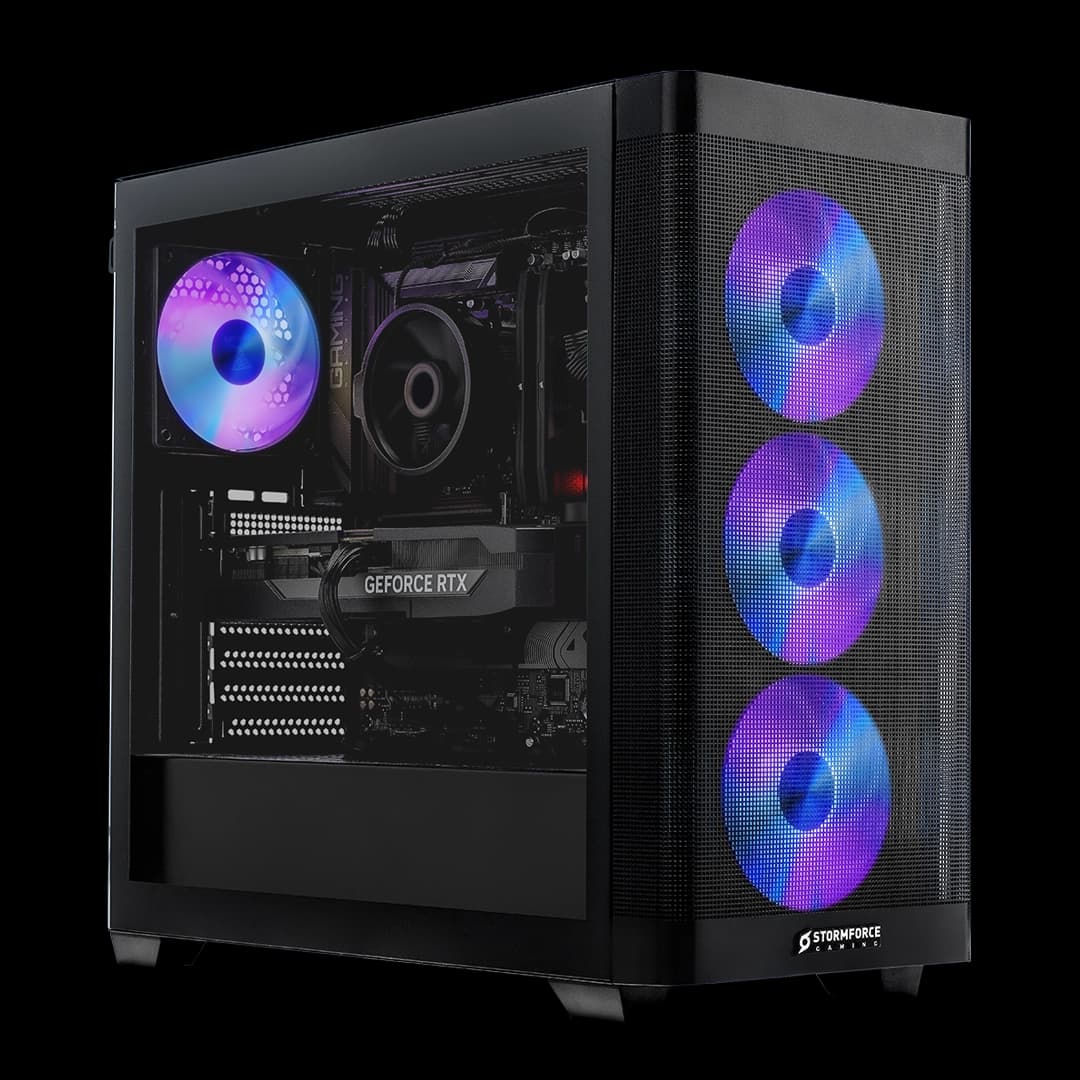
Most prebuilt gaming PCs are a bit like a supermarket ready meal: technically it does the job, but you know deep down someone made compromises you're going to regret later. Cheap PSU here, bargain-bin motherboard there, RAM running at half speed because nobody bothered to enable XMP. So when a machine shows up with an RTX 5070 Ti and a 360mm AIO liquid cooler, the first thing worth asking isn't "is it fast?" (it obviously is) but "did they actually build it properly?" That's the question that separates a genuinely good prebuilt from an expensive box of disappointment.
The Stormforce Gaming Zenith Prime Intel sits firmly in premium territory, and at £2,499.99 it's not messing about. You're getting an Intel Core i7-13700KF, an RTX 5070 Ti with 16GB of VRAM, 32GB of DDR4, a 2TB NVMe SSD, and a 360mm AIO cooler inside a Cougar Duoface Pro RGB case. On paper, that's a serious machine. The question is whether the full package holds up, or whether Stormforce has quietly skimped somewhere to hit a price point. Based on the spec sheet and what we know about these components, here's the honest answer.
This is a Zenith Prime Intel review, and we're going to go through every major component, compare it against what a self-build at equivalent spec would cost you, and tell you exactly who should buy this and who should probably look elsewhere. No waffle, no press-release padding. Just the stuff that actually matters.
Core Specifications
Strip away the marketing and here's what you're actually getting. The processor is an Intel Core i7-13700KF, a 16-core chip (eight performance cores, eight efficiency cores) from Intel's 13th-generation Raptor Lake lineup. It's a strong processor, and the KF suffix means it's unlocked for overclocking and lacks integrated graphics, which is fine since the RTX 5070 Ti is doing all the display work anyway. Paired with that is 32GB of DDR4 at 3200MHz, which is a sensible amount of RAM for gaming and multitasking, though the speed is for reasons we'll get into later.
The GPU is NVIDIA's RTX 5070 Ti with 16GB of GDDR7 VRAM, which is genuinely one of the more capable cards available right now. This sits in the upper tier of NVIDIA's current lineup, below the RTX 5080 and 5090 but well above the mainstream cards. Storage is handled by a 2TB M.2 NVMe SSD, which is a proper fast drive rather than a slow SATA alternative, and 2TB is a genuinely useful amount of space for a gaming PC. The case is a Cougar Duoface Pro RGB ATX chassis, and the cooling setup is a 360mm AIO liquid cooler with a triple-fan radiator. The PSU is a 750W unit with 80+ Bronze certification. Windows 11 Home comes pre-installed.
One thing to flag upfront: the B760 motherboard. It's a capable platform and handles the i7-13700KF without issue, but B760 does have some limitations compared to a Z790 board, particularly around overclocking headroom and some connectivity options. For most buyers that won't matter at all, but if you were planning to push the CPU hard with manual overclocking, it's the board will cap what's possible. For gaming and productivity use, though, B760 is absolutely fine and it's a common choice in prebuilts at this tier.
| Specification | Detail |
|---|---|
| CPU | Intel Core i7-13700KF (16-core) |
| GPU | NVIDIA GeForce RTX 5070 Ti 16GB |
| RAM | 32GB DDR4 3200MHz |
| Storage | 2TB M.2 NVMe SSD |
| Motherboard | B760 |
| Cooler | 360mm AIO Liquid Cooler (triple-fan radiator) |
| Case | Cougar Duoface Pro RGB ATX |
| PSU | 750W 80+ Bronze |
| Connectivity | WiFi 6, Ethernet |
| Operating System | Microsoft Windows 11 Home |
| Price | £2,499.99 |

CPU & Performance: The i7-13700KF Explained
The Intel Core i7-13700KF is a chip that needs very little introduction if you've been paying attention to the CPU market over the last few years. It's a 16-core processor built on Intel's hybrid architecture, combining eight P-cores (performance cores) for heavy lifting with eight E-cores (efficiency cores) that handle background tasks and lighter workloads. Intel's own specifications list a maximum boost clock of 5.4GHz on the P-cores, which is genuinely fast for single-threaded work. Gaming, content creation, streaming while gaming, running a bunch of browser tabs alongside a game, this chip handles all of it without breaking a sweat.
For gaming specifically, the i7-13700KF is more than capable. Modern games rarely saturate more than eight to ten threads meaningfully, so the extra E-cores are more useful for background tasks than raw frame rate gains, but the P-core performance is strong enough that CPU bottlenecking won't be your problem here. The real bottleneck in most scenarios will be the GPU, and at 1440p and 4K that's exactly where you want the bottleneck to be. The CPU staying out of the way is the whole point.
It's also worth being clear about the KF designation. The K means it's unlocked for overclocking, but as mentioned, the B760 motherboard limits what you can actually do with that. The F means no integrated graphics. Neither of these is a problem for this build's intended purpose, but it does mean if your GPU ever fails and you need to limp along on integrated graphics temporarily, you can't. You'd need a discrete card in the machine. Minor point, but. In productivity terms, the 16-core configuration makes this a solid workstation chip too, and anyone doing video editing, 3D rendering, or heavy multitasking alongside gaming will find it holds up well.
GPU & Gaming Performance: What the RTX 5070 Ti Actually Means
The RTX 5070 Ti is the headline act here, and it's a proper one. NVIDIA's 50-series cards are built on the Blackwell architecture, and the 5070 Ti slots in as a high-end card that can handle 4K gaming in most titles, while absolutely dominating at 1440p. The 16GB of GDDR7 VRAM is a meaningful upgrade over the GDDR6X found on older generation cards, with higher bandwidth that helps at higher resolutions and in VRAM-hungry titles. If you're running games at 4K with maximum settings and ray tracing enabled, 16GB is the kind of buffer that keeps you from hitting texture streaming issues that plagued cards with less VRAM.
Ray tracing support is baked in at a hardware level, and the 5070 Ti has enough RT cores to make ray tracing playable in a way that older mid-range cards really couldn't claim. Combined with DLSS 4 support (NVIDIA's AI-powered upscaling technology), you're looking at a card that can use frame generation and super resolution to push frame rates well beyond what the raw rasterisation performance would suggest. For anyone who's been on a previous-generation mid-range card, the jump here is significant. This isn't a "technically it supports ray tracing" situation. It actually runs it properly.
At 1440p, which is probably the sweet spot resolution for a machine at this price, the RTX 5070 Ti should handle virtually any current title at maximum settings with comfortable frame rates. At 4K, you'll get excellent results in most games, with some of the more demanding titles benefiting from DLSS quality mode to maintain smooth performance. The 16GB VRAM buffer is particularly future-friendly here. Games are getting more VRAM-hungry, and having that headroom means this card won't feel artificially limited in two or three years' time the way some 8GB and 10GB cards are already starting to feel pinched.
Memory & Storage: Solid Choices, One Thing to Check
Thirty-two gigabytes of RAM is the right amount for a gaming PC in 2026. Eight gigabytes is genuinely not enough anymore for modern titles, 16GB is fine but starts to feel tight if you're running a game, Discord, a browser, and OBS simultaneously, and 32GB gives you proper breathing room. The DDR4 3200MHz spec is worth a mention though. DDR4 3200 is the rated speed, but there's a well-known quirk with Intel platforms where RAM ships at JEDEC default speeds (often 2133 or 2400MHz) unless XMP (Extreme Memory Profile) is enabled in the BIOS. Stormforce Gaming's spec sheet lists 3200MHz, so it should be configured correctly out of the box, but if you ever reset the BIOS or do a CMOS clear, double-check that XMP is still enabled. Running DDR4 at half speed is a surprisingly common prebuilt gotcha.
The 2TB M.2 NVMe SSD is a genuinely good storage choice. NVMe drives connect via PCIe rather than the older SATA interface, which means substantially faster sequential read and write speeds. In practical terms, that translates to faster game load times, quicker Windows boot, and snappier file transfers. Two terabytes is also a real amount of space. Modern AAA games regularly hit 80 to 100GB each, so a 1TB drive fills up faster than you'd expect. With 2TB you can have a decent library installed without constantly managing what's on and off the drive.
Upgrade potential on the storage side depends on what the B760 motherboard provides in terms of free M.2 slots, which isn't specified in the verified data. Most B760 boards offer two or three M.2 slots, so there's likely room to add more NVMe storage later if needed. RAM-wise, 32GB is plenty for now, but if you wanted to go to 64GB for content creation work, the B760 platform supports it. Just make sure you're buying DDR4 to match the existing kit, not DDR5, since the i7-13700KF platform uses DDR4 in this configuration.
Cooling Solution: The 360mm AIO Is the Right Call
A 360mm AIO liquid cooler is a proper cooling solution, and it's one of the better things about this build. The i7-13700KF is a high-performance chip that runs hot under sustained load, particularly with all 16 cores active during something like a video render or a CPU-intensive game. A 120mm tower cooler, which you'll find on cheaper prebuilts, would genuinely struggle to keep the chip at sensible temperatures under prolonged load. A 240mm AIO is adequate. A 360mm AIO with a triple-fan radiator is actually good, and it means the CPU has the thermal headroom to maintain its boost clocks without throttling back.
Thermal throttling is one of those things that doesn't show up in the spec sheet but absolutely shows up in real-world performance. When a CPU gets too hot, it reduces its clock speed to protect itself, and suddenly your "16-core i7" is performing like something much slower. A 360mm radiator with three 120mm fans has enough surface area to keep the chip cool even during extended workloads, which is exactly what you want in a machine at this price. It also means the fans don't have to spin at full speed constantly to keep up, which generally means quieter operation under moderate loads.
The Cougar Duoface Pro case also plays into the thermal picture. Cougar's Duoface Pro is a well-regarded mid-tower with a dual-front-panel design that allows for either a mesh front (maximum airflow) or a glass panel depending on your preference. Mesh front panels are significantly better for airflow than solid glass, so if thermals are a priority, the mesh option is the one to use. The integrated RGB fans add to the aesthetic, and the case has enough internal volume to accommodate the 360mm radiator without the kind of cable-cramming that causes airflow issues in smaller enclosures.
Case & Build Quality: Cougar Does the Business
The Cougar Duoface Pro RGB is a genuinely well-regarded case, not a no-name budget chassis with a Cougar sticker on it. Cougar has been making PC cases for long enough to know what builders actually want, and the Duoface Pro's dual-front-panel design is a clever feature that lets you choose between a mesh front for airflow or a tempered glass front for aesthetics. Most prebuilt manufacturers stick a glass panel on everything because it photographs well, so the fact that Stormforce has chosen a case with a proper mesh option available is a good sign that someone thought about thermals rather than just marketing shots.
The case supports ATX motherboards, which the B760 board here is, and has space for a 360mm radiator up front or on top depending on configuration. Internal cable management in prebuilts is always a bit of a lottery. Factory builders are working to time targets and the results vary. The Duoface Pro has cable routing channels and a PSU shroud that helps hide the mess, but whether the actual cable routing inside a specific machine is tidy depends on who built it on the day. It's not something we can verify from the spec sheet, and it's honestly not something that affects performance, just aesthetics if you open the side panel.
The tempered glass side panel means you can see the RGB fans and the AIO, which is the whole point of building in a case like this. The integrated RGB fans are controlled via the motherboard's RGB headers, so you can sync them with other RGB components through software if you want. Or just leave them on whatever default pattern they came with. Neither option makes the PC faster, but at this price point people are paying for the full package, and the Cougar Duoface Pro delivers a premium look without being a flimsy showpiece.

Connectivity & Ports
Stormforce Gaming lists WiFi 6 and Ethernet as the networking options on the Zenith Prime Intel. WiFi 6 (802.11ax) is a proper modern wireless standard, offering faster speeds and better performance in environments with lots of connected devices compared to older WiFi 5. For gaming, the latency difference between WiFi 6 and a wired Ethernet connection is smaller than it used to be, though if you can run a cable, you still should. Having both options is exactly right for a desktop at this price, and it means you're not forced into one or the other based on your room setup.
The specific port configuration on the front and rear of the case isn't detailed in the verified spec data, so we won't speculate about exact USB port counts or video output configurations. What we can say is that a B760 motherboard typically provides a solid rear I/O panel with multiple USB-A and USB-C ports, and the Cougar Duoface Pro's front panel includes USB connectivity for easy device access. The RTX 5070 Ti will handle display outputs, and NVIDIA's current cards support multiple monitors simultaneously. If you need specifics on port counts, Stormforce Gaming's product page is the place to check.
For most gaming setups, WiFi 6 and Ethernet together with the motherboard's rear I/O will cover everything you need. Peripherals, headsets, external drives, a second monitor, maybe a capture card if you stream, the B760 platform has the connectivity to handle a full gaming setup without needing a USB hub on day one. It's not a complicated machine to live with from a connectivity standpoint, which is honestly how it should be.
Pre-installed Software & OS
Windows 11 Home comes pre-installed, which is the standard choice for a consumer gaming PC and entirely appropriate here. Windows 11 Home gives you everything a gamer needs: DirectX 12 Ultimate support, Auto HDR, DirectStorage (which works with NVMe drives like the one in this build to reduce game load times), and full compatibility with the current game library. The main thing Windows 11 Home lacks compared to Pro is BitLocker encryption, remote desktop hosting, and some enterprise features that the overwhelming majority of gaming PC buyers will never need.
Prebuilt PCs sometimes come loaded with trial software, manufacturer utilities, and other bits that clog up the startup process and slow things down. Stormforce Gaming's approach to pre-installed software isn't detailed in the verified spec data, so we can't say definitively what's on the drive beyond Windows 11 Home itself. What we can say is that a clean Windows install takes about 20 minutes if you want to start fresh, and for a machine at this price it's worth doing if the pre-installed environment feels cluttered. NVIDIA's drivers will need to be current regardless, and Windows Update will handle most of the rest.
One thing about Windows 11 Home specifically is that it does require a Microsoft account for setup by default, though there are workarounds if you prefer a local account. It also enforces some telemetry settings that Windows 10 didn't push as hard. None of this is unique to Stormforce's machine, it's just Windows 11 Home being Windows 11 Home. For gaming purposes it's fine, and the DirectStorage integration with the NVMe SSD is a genuine practical benefit for titles that support it.
Upgrade Potential: Room to Grow
One of the things that separates a good prebuilt from a dead end is whether you can improve it over time. The Zenith Prime Intel is built on a B760 platform with an LGA1700 socket, which is Intel's 12th and 13th generation platform. That means if you wanted to swap the i7-13700KF for a higher-spec 13th-gen chip, you could, though given the i7-13700KF is already near the top of the stack it's not a compelling upgrade path. What you can't do is drop in a 14th or future Intel generation chip, because Intel moved to a new socket with later generations. So the CPU is effectively where it is for the life of this build.
RAM is more interesting. The B760 board supports DDR4, and you're currently at 32GB. If you wanted to go to 64GB for heavy content creation or professional workloads, that's a straightforward upgrade. Just match the speed (DDR4 3200) and check the board's QVL (qualified vendor list) to avoid compatibility headaches. Storage is similarly expandable. The 2TB NVMe SSD is a great starting point, and assuming the B760 board has additional M.2 slots (which most do), adding a second NVMe drive later is easy and relatively cheap.
The GPU is the most likely upgrade target over the machine's lifetime, and the 750W Bronze PSU is worth thinking about in that context. The RTX 5070 Ti has a TDP that the 750W PSU handles comfortably. If you were to upgrade to an RTX 5080 or 5090 in a few years, a 750W PSU might be tight depending on the specific power requirements of future cards. It's not a problem today, but it's something to factor in if you're buying this machine with a long-term GPU upgrade in mind. The 80+ Bronze efficiency rating is acceptable, not exceptional, and a higher-tier PSU would have been a nice touch at this price point, but it's not a dealbreaker for the current configuration.
How It Compares: Prebuilt vs. DIY and the Market Context
The honest comparison that matters most at this price is against a self-build at equivalent spec. If you were to buy an i7-13700KF, an RTX 5070 Ti 16GB, 32GB of DDR4 3200, a 2TB NVMe SSD, a B760 motherboard, a 360mm AIO, a Cougar Duoface Pro case, and a 750W Bronze PSU separately, you'd be looking at component costs that, depending on current pricing and where you shop, sit in a similar ballpark to the Zenith Prime Intel's asking price. The convenience premium on a well-specced prebuilt has genuinely compressed in recent years, and Stormforce isn't charging you a fortune for the assembly and warranty.
What you get with the prebuilt that you don't get with a self-build is a warranty on the complete system. If something goes wrong, you're dealing with one company, not trying to work out whether it's the motherboard, the RAM, or the PSU causing the problem. For buyers who aren't comfortable diagnosing PC faults, that's worth real money. For experienced builders who enjoy the process, the DIY route still makes sense, but for everyone else the Zenith Prime Intel is a fair deal rather than a rip-off.
Against other prebuilts at a similar price, the Zenith Prime Intel competes well on paper. The 360mm AIO is more cooling than most competitors bother with, the Cougar case is a genuine quality chassis rather than a white-label box, and the RTX 5070 Ti is the right GPU for this price tier. Where it's slightly less impressive is the DDR4 platform (some competitors are now shipping DDR5 builds) and the B760 board rather than a Z790, but those are compromises that don't meaningfully affect gaming performance for the target buyer. The spec sheet is honest about what you're getting, and there are no obvious cut-corner surprises hiding in it.
| Feature | Zenith Prime Intel | Equivalent DIY Build | Budget Prebuilt Tier |
|---|---|---|---|
| CPU | Intel Core i7-13700KF (16-core) | Same, purchased separately | Typically i5-13600K or lower |
| GPU | RTX 5070 Ti 16GB | Same, purchased separately | RTX 4070 / 5060 Ti range |
| RAM | 32GB DDR4 3200 | Same or DDR5 option available | 16GB DDR4 common |
| Storage | 2TB NVMe SSD | Same, often cheaper per GB | 1TB NVMe typical |
| Cooling | 360mm AIO | Your choice, budget dependent | 240mm AIO or tower cooler |
| Case | Cougar Duoface Pro RGB | Your choice | Generic mid-tower |
| PSU | 750W 80+ Bronze | Often Gold-rated at this spend | 650W Bronze typical |
| Warranty | Stormforce Gaming warranty | Per-component warranties | Varies by retailer |
| Price | £2,499.99 | Similar, varies with deals | Significantly less |

Final Verdict: Who Should Buy the Zenith Prime Intel
The Zenith Prime Intel is a properly good prebuilt gaming PC. That's not a sentence we throw around lightly, because most machines at this price have at least one obvious compromise that makes you wince. Here, the compromises are minor. The DDR4 platform is older than DDR5, the B760 board limits overclocking ambitions, and a 750W Bronze PSU is adequate rather than generous. But none of those things will affect your gaming experience in any meaningful way today, and the things Stormforce got right, the 360mm AIO, the RTX 5070 Ti, the 2TB NVMe, the Cougar Duoface Pro case, are the things that actually matter.
This machine is built for 1440p gaming at maximum settings and is genuinely capable at 4K in most titles. The i7-13700KF won't bottleneck the RTX 5070 Ti, the cooling solution means sustained performance without thermal throttling, and 32GB of RAM is the right amount for a gaming PC in 2026. If you're coming from a previous-generation mid-range machine, a console, or a laptop, the jump in performance is going to feel significant. The RTX 5070 Ti's ray tracing capability and DLSS 4 support mean you're not just buying raw rasterisation performance, you're buying a card that handles the way modern games are actually being built.
Who should skip it? If you're an experienced builder who enjoys the process and has time to shop around for deals, a self-build at equivalent spec might save you some money and let you choose a Gold-rated PSU and a Z790 board if those matter to you. And if you don't need the RTX 5070 Ti specifically, if 1080p gaming or entry-level 1440p is your target, there are prebuilts with RTX 5060 Ti or RTX 4070 class GPUs that will do the job for considerably less money. Don't spend premium-tier money on a machine if your monitor tops out at 1080p 60Hz. The Zenith Prime Intel deserves a display that can actually use what it's got.
But for the buyer who wants a capable, well-built, genuinely fast gaming PC without the hassle of sourcing components and troubleshooting a self-build, the Zenith Prime Intel is one of the more honest offerings in this bracket. The spec sheet doesn't hide anything embarrassing, the component choices are sensible, and the Cougar Duoface Pro is a proper case rather than a flimsy showpiece. At £2,499.99, it earns its price tag.
What works. What doesn’t.
6 + 6What we liked6 reasons
- RTX 5070 Ti with 16GB GDDR7 VRAM is a genuinely capable high-end GPU for 1440p and 4K gaming
- 360mm AIO liquid cooler gives the i7-13700KF proper thermal headroom, reducing the risk of throttling under sustained load
- 2TB M.2 NVMe SSD is a generous and fast storage allocation that avoids the space pressure of smaller drives
- Cougar Duoface Pro RGB is a quality chassis with a dual-front-panel design that prioritises airflow as well as aesthetics
- 32GB of DDR4 is the right amount of RAM for a gaming PC in 2026, covering gaming and multitasking comfortably
- Single-system warranty from Stormforce Gaming simplifies fault diagnosis compared to managing multiple per-component warranties
Where it falls6 reasons
- DDR4 platform is a generation behind DDR5, which some competitors now offer at this price tier
- B760 motherboard restricts overclocking despite the i7-13700KF being an unlocked KF chip
- 750W 80+ Bronze PSU is adequate for the current configuration but leaves limited headroom for future high-power GPU upgrades
- CPU socket is LGA1700 with no upgrade path beyond 13th-generation Intel chips, limiting future CPU flexibility
- Front and rear port configuration is not fully detailed in official spec data, requiring a check of the product page for specifics
- RAM XMP configuration should be verified after any BIOS reset, as running DDR4 at JEDEC default speeds is a common prebuilt pitfall
Full specifications
12 attributes| CPU | Intel Core i7-13700KF |
|---|---|
| GPU | NVIDIA GeForce RTX 5070 Ti 16GB |
| RAM | 32GB DDR4 3200 |
| Storage | 2TB M.2 NVMe SSD |
| Case | Cougar DuoFace Pro RGB ATX |
| Connectivity | WiFi 6, Ethernet |
| Cooling | 360mm AIO Liquid Cooler |
| Launch year | 2026 |
| Motherboard | B760 ATX |
| Motherboard chipset | B760 |
| OS | Microsoft Windows 11 Home |
| Other | Chipset: B760 ATX |
If this isn’t right for you
2 options

Frequently asked
7 questions01What resolution is the Stormforce Zenith Prime Intel best suited to?+
The RTX 5070 Ti is genuinely capable at 1440p with maximum settings in virtually all current titles, and performs well at 4K in most games, particularly with DLSS 4 quality mode enabled. The machine is not a good fit for 1080p 60Hz gaming, as that resolution does not make use of the GPU's capabilities.
02Can the B760 motherboard support overclocking the i7-13700KF?+
The B760 chipset does not support full CPU overclocking, so while the i7-13700KF has an unlocked KF designation, the board limits what you can do with that. For gaming and productivity use the chip performs well at its stock configuration, but buyers intending heavy manual overclocking would need a Z790 board.
03Does the machine come with Windows 11 pre-installed and is it a full licence?+
Yes, Windows 11 Home comes pre-installed. This is a genuine retail licence tied to the machine. Windows 11 Home covers everything most gaming PC buyers need, including DirectX 12 Ultimate, DirectStorage, and Auto HDR, though it lacks some enterprise features found in the Pro edition.
04What should I check regarding RAM speed after receiving the machine?+
Stormforce Gaming specifies 32GB DDR4 at 3200MHz. On Intel platforms, RAM ships at lower JEDEC default speeds unless XMP is enabled in the BIOS. If you ever perform a BIOS reset or CMOS clear, verify that XMP is still active to ensure the RAM is running at its rated 3200MHz rather than a slower default speed.
05Is the 750W PSU sufficient if I upgrade the GPU in the future?+
The 750W 80+ Bronze PSU handles the RTX 5070 Ti comfortably in the current configuration. However, if you plan to upgrade to a higher-power card such as an RTX 5080 or 5090 in future, you may need to upgrade the PSU alongside it, as power requirements for top-tier GPUs can exceed what a 750W unit supplies safely.
06Can I add more storage or RAM to this machine?+
Yes. The B760 platform supports DDR4 RAM up to 64GB, so upgrading from 32GB is straightforward provided you match the DDR4 specification. Most B760 motherboards include multiple M.2 slots, meaning a second NVMe SSD can typically be added without replacing the existing drive. Check the specific motherboard's documentation for slot availability before purchasing additional drives.
07Does the Cougar Duoface Pro case support good airflow or is it primarily aesthetic?+
The Cougar Duoface Pro is a dual-front-panel case that can be configured with either a mesh front for maximum airflow or a tempered glass panel for aesthetics. The mesh front option provides meaningfully better airflow than a solid glass front, and using it is recommended if thermals are a priority. The 360mm AIO radiator and triple-fan setup further support good thermal management.