Prebuilt PCs get a bad reputation in enthusiast circles, and sometimes that reputation is earned. Cheap PSUs, slow storage, RAM running at half its rated speed because nobody bothered to enable XMP. But not every prebuilt is a parts-bin disaster. The question worth asking about any machine at this price tier isn't "why didn't I just build it myself?" It's "what am I actually getting for the convenience premium, and does the component list hold up under scrutiny?" With the Stormforce Gaming Lunar Origin AMD, the answers are more interesting than you might expect.
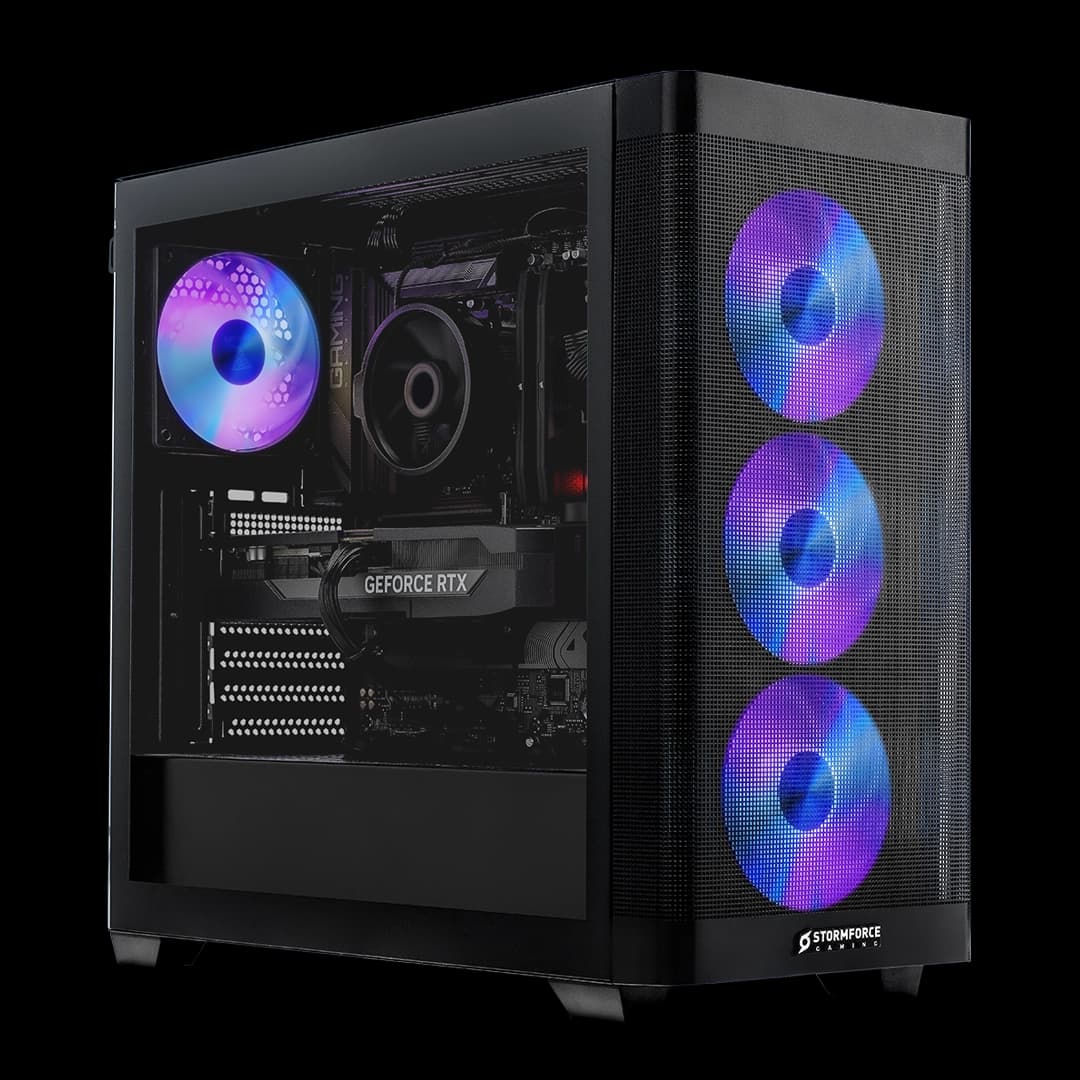
This is a mid-range gaming desktop built around AMD's Ryzen 5 5500 and NVIDIA's RTX 5050 8GB, sitting in a compact Cougar FV150 Mini mATX white case with WiFi 6, a 650W Bronze PSU, and Windows 11 Home included. On paper that's a solid enough list. The RTX 5050 is the headline here, and it's a genuinely current-generation GPU in a machine that doesn't look like it's trying to bankrupt you. Whether the rest of the build justifies the asking price is what this lunar origin amd review is here to sort out.
There are no owner reviews to draw on yet. This is a newer listing with no ratings. So the authority here comes entirely from the spec sheet, what we know about each component, and honest comparison against what a self-build at similar money would look like. That's fine. The specs say plenty.
Core Specifications
The Lunar Origin AMD is built on an A520 chipset motherboard, which is AMD's entry-level AM4 platform. That's the first thing to understand about this machine. The A520 is a cost-reduction measure. It doesn't support PCIe Gen 4 for the CPU lanes (though M.2 slots can still run Gen 4 depending on the board), it doesn't support CPU overclocking, and it's a dead-end platform in terms of future CPU upgrades beyond the existing AM4 lineup. None of that is a dealbreaker at this price, but it shapes what the machine is and isn't.
The Ryzen 5 5500 is a six-core, twelve-thread processor based on AMD's Zen 3 architecture. It's a capable chip for gaming and everyday workloads, even if it's not the newest thing on the market. Paired with 16GB of DDR4 running at 3200MHz, you've got a system that can handle modern gaming, streaming, and general productivity without breaking a sweat. The 1TB M.2 NVMe SSD is a proper fast drive, not a SATA afterthought. And the RTX 5050 8GB is the GPU that makes this build interesting, because it's a current-generation Blackwell card in a machine that doesn't demand a second mortgage.
The 650W Bronze PSU is adequate for this hardware combination. The RTX 5050 is not a power-hungry card, and the Ryzen 5 5500 is similarly sensible on draw. Bronze efficiency isn't glamorous, but it gets the job done. The Cougar FV150 Mini is a compact mATX case, which keeps the footprint small. Windows 11 Home is included, so there's no additional OS cost to factor in. Here's the full spec breakdown:
| Component | Specification |
|---|---|
| CPU | AMD Ryzen 5 5500 |
| GPU | NVIDIA RTX 5050 8GB |
| RAM | 16GB DDR4 3200 |
| Storage | 1TB M.2 NVMe SSD |
| Motherboard | A520 chipset |
| Case | Cougar FV150 Mini mATX White |
| PSU | 650W Bronze White |
| Cooling | Optimised Air Cooling |
| Networking | WiFi 6, Ethernet |
| Operating System | Microsoft Windows 11 Home |

CPU and Performance
The AMD Ryzen 5 5500 is built on the Zen 3 architecture, which was AMD's high-water mark before they moved to Zen 4 and the AM5 platform. Six cores, twelve threads, with a 4.2GHz boost clock. For gaming, that's genuinely enough. Most modern games don't scale meaningfully beyond six cores, and Zen 3's strong single-threaded performance means the 5500 doesn't bottleneck a mid-range GPU in the way that older six-core chips sometimes did. You're not going to feel CPU-limited playing most titles at 1080p or 1440p with this chip.
Where the 5500 shows its age is in productivity workloads. Video editing, 3D rendering, heavy multitasking with lots of browser tabs and background apps running simultaneously. It handles all of that fine, but if you're doing serious creative work, a Ryzen 5 7600 on AM5 would pull ahead noticeably. The 5500 is a gaming chip in a gaming PC, and in that context it makes sense. Stormforce Gaming has paired it with a GPU that suits its performance tier, so there's no obvious mismatch here.
The A520 chipset does mean you can't overclock the CPU, but the 5500 isn't an unlocked chip anyway (that would be the 5500X or 5600X). So you're not losing anything you could have used. What you do lose with A520 is upgrade flexibility. If you wanted to drop in a Ryzen 9 5950X later, A520 boards sometimes have BIOS limitations that prevent it. In practice, most people who buy a prebuilt at this price aren't planning CPU swaps. But if you are, the platform choice matters and A520 is the least flexible option in the AM4 family.
GPU and Gaming Performance
The NVIDIA RTX 5050 8GB is the most interesting component in this build, because it's a current-generation Blackwell GPU. NVIDIA's 50-series brought architectural improvements over the 40-series, and the 5050 sits at the accessible end of that lineup. Eight gigabytes of VRAM is the current minimum you want for modern gaming, and the fact that Stormforce Gaming is shipping a 5050 rather than a leftover 4060 gives this machine a longer shelf life than you might expect from a prebuilt at this price point.
At 1080p, the RTX 5050 handles modern titles at high to ultra settings without complaint. Games like Cyberpunk 2077, Alan Wake 2, and similar demanding titles run well at 1080p. At 1440p, you'll need to dial some settings back in the most demanding titles, but for the majority of the game library you're still looking at playable, often very good, frame rates. DLSS 4 with Frame Generation is supported on Blackwell cards, which means in supported titles you can push performance significantly beyond the raw rasterisation numbers. That's a genuine advantage over older GPU generations at this tier.
Ray tracing is possible but treat it as a bonus rather than a core feature at this GPU tier. The 5050 can do ray tracing in lighter implementations, but turning it on fully in something like Cyberpunk at 1440p will hurt. With DLSS Quality mode and ray tracing on medium, you can get a reasonable experience in supported titles. For 4K, the 5050 isn't the right tool. It'll run 4K, but you'd be sacrificing too much to get playable frame rates in demanding games. This is a 1080p primary, 1440p capable GPU, and that's fine for what this machine costs.
Memory and Storage
Sixteen gigabytes of DDR4 at 3200MHz is the right amount for a gaming PC in 2026. Not the minimum, not overkill. Some games are starting to push into 12GB territory under load, and having 16GB means you're not scrambling for headroom. The DDR4 3200 speed is appropriate for the Ryzen 5 5500, which runs well with memory in this range. AMD's Zen 3 architecture has a sweet spot around 3600MHz to 3800MHz for the Infinity Fabric, but 3200MHz is close enough that you won't notice a meaningful difference in practice.
The 1TB M.2 NVMe SSD is the storage solution here, and it's the right call. NVMe drives load games and applications dramatically faster than SATA SSDs, and the difference versus a spinning hard drive is night and day. Boot times, game load screens, application launches. All of it benefits from a fast NVMe drive. One terabyte is enough to hold your OS, a decent game library, and your applications, though modern games are getting large enough that you'll start feeling the pinch if you install a lot of them simultaneously. A second drive is the obvious upgrade path.
What Stormforce Gaming doesn't specify publicly is how many M.2 slots the A520 board has available, or how many SATA ports are free. A520 boards typically offer one or two M.2 slots total, and often one is occupied by the boot drive. SATA ports are usually available for adding a secondary HDD or SSD if you need more bulk storage. The 16GB RAM configuration almost certainly uses two sticks in dual-channel, which is what you want. Single-channel DDR4 would cost you a noticeable chunk of gaming performance, so dual-channel is the setup to hope for and the one Stormforce Gaming's standard build process would logically use.
Cooling Solution
Stormforce Gaming describes this as "Optimised Air Cooling", which is their terminology for the cooling setup rather than a specific cooler model. Air cooling on a Ryzen 5 5500 is entirely appropriate. The 5500 has a 65W TDP, which is well within what a decent tower cooler can handle without drama. The Ryzen 5 5500 doesn't generate the kind of heat that demands liquid cooling, and anyone trying to sell you an AIO on a 65W chip is selling you something you don't need.
The Cougar FV150 Mini case is a compact mATX chassis, which means airflow management matters more than it would in a full tower. Compact cases can trap heat if the fan configuration isn't thought through. Stormforce Gaming's "optimised" language suggests they've considered this, but without a specific fan count or configuration being published, it's hard to say exactly what you're getting. What the case form factor does tell you is that there's a physical limit to how many fans you can fit. mATX cases typically support two to three fans, which is sufficient for this hardware.
Under sustained load, the Ryzen 5 5500 paired with appropriate air cooling should stay well within safe thermal limits. The RTX 5050 manages its own thermals via its onboard cooler. The concern in a compact case is whether the hot air exhausted by the GPU has somewhere to go, and whether the CPU cooler is getting enough fresh air. A well-configured mATX case handles this fine. The real-world thermal story for this build should be uneventful, which is exactly what you want from a machine that's going to sit on a desk and run for years.
Case and Build Quality
The Cougar FV150 Mini is a proper small-form-factor mATX case, not a generic white box with a Stormforce sticker on it. Cougar makes real PC cases with real build quality, and the FV150 Mini has a clean aesthetic that suits the white theme running through this build. The white PSU, white case, it's a cohesive look. Whether that matters to you depends on where you're putting it, but it's a nicer outcome than the beige-and-black generic cases that used to ship with prebuilts.
mATX builds have to be more deliberate about cable management than full-tower builds, because there's simply less space to hide things. Prebuilt manufacturers vary enormously in how much care they take here. A messy cable run in a compact case can restrict airflow meaningfully. Stormforce Gaming has been building gaming PCs long enough to know this, and their builds generally don't look like they were assembled by someone who'd never seen a cable tie. But without being able to look inside a specific unit, the honest answer is that build quality in prebuilts at this price tier is usually acceptable rather than exceptional.
The white colourway is a genuine design choice rather than an afterthought. The Cougar FV150 Mini has a mesh front panel design on the white version, which helps airflow compared to solid-panel cases. That's a practical benefit, not just an aesthetic one. The case is compact enough to sit on a desk without dominating it, which matters if you're working in a smaller space. Overall the case choice is sensible and the build quality from Cougar is reliable. It's not a premium boutique chassis, but it's not a liability either.

Connectivity and Ports
The Lunar Origin AMD ships with WiFi 6 and Ethernet, which covers both wireless and wired networking. WiFi 6 is the current mainstream standard, offering real-world throughput improvements over WiFi 5 and better performance in congested environments with multiple devices. If you're gaming wirelessly, WiFi 6 is the minimum you'd want in a new machine in 2026. For anything competitive, a wired Ethernet connection is still preferable, and having both options available means you're not forced into one or the other.
The specific USB port configuration on the front and rear panels isn't detailed in Stormforce Gaming's published spec data, so it wouldn't be accurate to list exact port counts here. What the A520 platform and the Cougar FV150 Mini case together suggest is a standard rear IO with USB-A ports, and a front panel with at least a couple of USB-A connections. The case has a front panel IO by design. If the exact port layout matters for your setup, checking the Stormforce Gaming product page directly is the right move before buying.
Video output is handled by the RTX 5050's own outputs. NVIDIA's current-generation cards support HDMI 2.1 and DisplayPort 2.x, which covers 4K at high refresh rates and 1440p at very high refresh rates. That's more display bandwidth than most people at this price tier will use, but it means the GPU won't become the limiting factor if you upgrade your monitor later. The networking side of things is properly sorted with WiFi 6 and Ethernet both present. That's the connectivity story: well covered on networking, details on USB and video output best confirmed with Stormforce Gaming directly.
Pre-installed Software and OS
Windows 11 Home is included, which means you're not paying for an OS separately or dealing with a trial version that expires. That's worth factoring into any value comparison against a self-build, because a legitimate Windows 11 Home licence adds to the cost of a DIY build. Stormforce Gaming includes it as part of the package, and it's the full retail version, not a stripped OEM version that limits your ability to transfer the licence.
Windows 11 Home is the right OS for a gaming PC at this price. Windows 11 Pro adds features like BitLocker encryption, Remote Desktop hosting, and Hyper-V virtualisation. If you need those, you'd know. For gaming and general use, Home is identical in every way that matters. The gaming features, DirectStorage support, Auto HDR, and Xbox Game Pass integration are all present in Home. There's no performance difference between Home and Pro in games.
Stormforce Gaming doesn't advertise a specific bloatware load, and their builds generally don't come stuffed with trial software the way some larger prebuilt manufacturers do. The machine should arrive ready to use with Windows 11 set up and drivers installed. NVIDIA's GeForce Experience or the newer NVIDIA app will be present for GPU driver management, which is useful for keeping drivers current and accessing DLSS and other features. Beyond that, the software situation should be relatively clean. A fresh Windows install is always an option if you want a completely bare setup, but it probably won't be necessary.
Upgrade Potential
This is where the A520 chipset and the AM4 platform have a complicated story to tell. On the positive side, AM4 has a massive library of compatible CPUs. You could, in theory, drop in a Ryzen 9 5950X or a Ryzen 7 5800X3D for a significant performance uplift. The Zen 3 architecture tops out with the 5950X on AM4, and the 5800X3D with its 3D V-Cache is one of the best gaming CPUs ever made for AM4. So CPU upgrade options exist and they're good options.
The caveat is the A520 board. Not all A520 boards support the full range of AM4 CPUs, and some have BIOS limitations that cap compatibility below the top-end chips. Stormforce Gaming doesn't publish the specific motherboard model, which makes it hard to say definitively what the CPU upgrade ceiling is. Before committing to a CPU upgrade down the line, you'd want to check which board is actually in the machine and whether the manufacturer has released BIOS updates for the higher-end AM4 chips.
RAM is upgradeable from 16GB to whatever the board supports, typically 32GB or 64GB on most A520 boards. If the machine ships with two sticks of 8GB in dual-channel (the logical configuration), you'd need to replace both sticks to upgrade, rather than just adding more. Storage is the easiest upgrade: adding a second NVMe drive or a SATA SSD for bulk game storage is straightforward. The 650W PSU has enough headroom for the current hardware and then some, so if you wanted to swap the RTX 5050 for a more powerful GPU later, the PSU shouldn't be the limiting factor for mid-range cards. The compact mATX case does limit how large a GPU you can physically fit, so checking GPU length compatibility before any graphics upgrade is essential.
How It Compares
The honest comparison for any prebuilt is against a self-build at the same spec. A Ryzen 5 5500, RTX 5050 8GB, 16GB DDR4 3200, 1TB NVMe, A520 board, 650W PSU, and a case sourced individually would cost you more than you might expect, because component prices have firmed up and the RTX 5050 is a new card. Add Windows 11 Home on top and the self-build price advantage narrows considerably. You'd still likely save some money going DIY, but the gap at this spec level isn't the dramatic saving it used to be when GPU prices were lower.
Against other prebuilts at similar money, the RTX 5050 is the differentiator. Many competing builds at this price tier are still shipping RTX 4060 configurations. The RTX 5050 offers architectural advantages through the Blackwell generation, including DLSS 4 with Multi Frame Generation in supported titles. Whether that translates to a meaningful real-world advantage depends on the specific games you play and whether they support DLSS 4, but it does mean the Lunar Origin AMD has a newer GPU generation than most of its direct competition.
The A520 platform is where the Lunar Origin AMD gives ground to some rivals. Competing builds at this price sometimes use B550 or even B650 boards, which offer better upgrade paths and more features. B550 in particular supports PCIe Gen 4 for the CPU lanes and has broader CPU compatibility. If Stormforce Gaming had used a B550 board here, the upgrade story would be considerably better. The A520 choice is a cost reduction that shows up in the spec sheet, and it's a genuine compromise to be aware of.
| Feature | Lunar Origin AMD | Typical RTX 4060 Prebuilt | Typical B550 Prebuilt (Same Price) |
|---|---|---|---|
| CPU | Ryzen 5 5500 (Zen 3) | Ryzen 5 5600 or similar | Ryzen 5 5600 or similar |
| GPU | RTX 5050 8GB (Blackwell) | RTX 4060 8GB (Ada) | RTX 4060 8GB (Ada) |
| GPU Generation | Current (50-series) | Previous (40-series) | Previous (40-series) |
| DLSS Version | DLSS 4 with MFG | DLSS 3 | DLSS 3 |
| Motherboard Chipset | A520 | Varies | B550 |
| CPU Overclocking | No | Varies | Yes (with unlocked CPU) |
| RAM | 16GB DDR4 3200 | 16GB DDR4 | 16GB DDR4 |
| Storage | 1TB NVMe SSD | 1TB NVMe SSD | 1TB NVMe SSD |
| WiFi | WiFi 6 | Varies (sometimes absent) | Varies |
| OS Included | Windows 11 Home | Usually yes | Usually yes |

Final Verdict
The Stormforce Gaming Lunar Origin AMD is a solid mid-range gaming PC with one standout feature and one genuine compromise. The RTX 5050 8GB is the right GPU for this price tier in 2026, and getting a current-generation Blackwell card in a prebuilt at this price point is genuinely good value. DLSS 4 support, 8GB of VRAM, and the architectural improvements that come with the 50-series make this a machine that should stay relevant for gaming at 1080p and 1440p for a few years. That's the headline, and it's a good one.
The compromise is the A520 chipset. It's a cost-saving measure that limits future CPU upgrade options and lacks some of the features you'd get from a B550 board. For most people buying a prebuilt gaming PC, this won't matter at all. They'll use the machine as-is and never think about the motherboard chipset. But if you're the kind of person who plans to upgrade components over time, the A520 platform is a less flexible foundation than B550 would have been. The Ryzen 5 5500 is capable and appropriate for this GPU, the 16GB DDR4 3200 is the right amount of memory, and the 1TB NVMe SSD is a proper fast drive rather than a SATA compromise.
This lunar origin amd review comes down to who you are as a buyer. If you want a current-generation GPU in a compact white gaming PC, ready to plug in and play, with WiFi 6 and Windows 11 included, the Lunar Origin AMD delivers that cleanly. The Cougar FV150 Mini case looks decent, the 650W PSU has headroom, and the cooling setup is appropriate for the hardware. Stormforce Gaming isn't a fly-by-night assembler; they've been building gaming PCs long enough to know where the corners are and which ones not to cut.
If you don't need the RTX 5050 specifically, and you're primarily gaming at 1080p on a 60Hz or 75Hz monitor, there are cheaper options that would serve you just as well. A machine built around an RTX 4060 at a lower price point would cover 1080p gaming without breaking the budget. The Lunar Origin AMD earns its price tag through the GPU generation upgrade, and if you're not going to use DLSS 4 or you're not planning to game at 1440p, that premium is harder to justify. But if 1440p gaming and current-gen GPU architecture matter to you, this is a properly put-together machine at a fair price for what it contains.
Editorial score: 7.5 out of 10. Good GPU, sensible build, honest compromise on the motherboard. Recommended for 1080p to 1440p gaming buyers who want current-generation hardware without the hassle of a self-build.
What works. What doesn’t.
6 + 6What we liked6 reasons
- RTX 5050 8GB is a current-generation Blackwell GPU, giving the build a longer shelf life than most prebuilts at this price tier
- DLSS 4 with Multi Frame Generation support in compatible titles provides a meaningful performance uplift over previous-generation GPU options
- 1TB M.2 NVMe SSD is a proper fast drive rather than a slower SATA alternative
- WiFi 6 and Ethernet both included as standard, covering wired and wireless networking without compromise
- Windows 11 Home licence included, reducing the effective cost compared with a self-build
- Cougar FV150 Mini is a recognised mATX chassis with a mesh front panel that aids airflow
Where it falls6 reasons
- A520 chipset is the least capable in the AM4 family, with no CPU overclocking support and potentially limited compatibility with higher-end AM4 processors
- Ryzen 5 5500 is a previous-generation chip; competing prebuilts at similar prices sometimes include the Ryzen 5 5600
- Specific motherboard model is not published, making it difficult to confirm exact CPU upgrade ceiling or available expansion slots
- Compact mATX case restricts future GPU upgrade options due to physical length limitations
- 650W Bronze efficiency PSU is adequate but not a high-quality unit; Gold-rated alternatives would be preferable
- No customer reviews or independent test data available to verify real-world thermal or noise performance
Full specifications
12 attributes| CPU | AMD Ryzen 5 5500 |
|---|---|
| GPU | NVIDIA RTX 5050 8GB |
| RAM | 16GB DDR4 3200 |
| Storage | 1TB M.2 NVMe SSD |
| Case | Cougar FV150 Mini mATX White |
| Case size | mid-tower |
| Connectivity | WiFi 6, Ethernet |
| Cooling | Optimised Air Cooling |
| Ethernet | 1GbE |
| Launch year | 2025 |
| MAX RAM GB | 64 |
| Motherboard | A520 |
If this isn’t right for you
2 options 8.0 / 10
Recon Pro AMD
 7.8 / 10
Recon Prime Intel
Frequently asked
7 questions01What GPU does the Stormforce Gaming Lunar Origin AMD use?+
It uses the NVIDIA RTX 5050 8GB, which is a current-generation Blackwell card. This GPU supports DLSS 4 with Multi Frame Generation in compatible titles and is suited to 1080p and 1440p gaming.
02Can I overclock the CPU in the Lunar Origin AMD?+
No. The build uses an A520 chipset motherboard, which does not support CPU overclocking. The Ryzen 5 5500 itself is also a locked processor, so overclocking is not possible regardless of the board.
03Is the Lunar Origin AMD suitable for 1440p gaming?+
Yes, with some caveats. The RTX 5050 handles most games at 1440p at medium to high settings. In the most demanding titles you may need to reduce settings, but DLSS 4 support in compatible games can recover frame rates meaningfully.
04Can I upgrade the CPU in this machine later?+
Potentially yes, as AM4 has a broad CPU library including the Ryzen 7 5800X3D and Ryzen 9 5950X. However, A520 boards can have BIOS limitations that restrict compatibility with higher-end AM4 chips. Stormforce Gaming does not publish the specific board model, so you would need to confirm compatibility before planning a CPU upgrade.
05Does the Lunar Origin AMD come with Windows 11 included?+
Yes, Windows 11 Home is included as part of the package. This means no additional operating system cost is needed, which is worth factoring in when comparing the price against a self-build.
06How does the Lunar Origin AMD compare with a prebuilt featuring an RTX 4060?+
The Lunar Origin AMD uses the newer RTX 5050 from NVIDIA's Blackwell generation, which supports DLSS 4 with Multi Frame Generation. Many competing prebuilts at similar prices still ship with the RTX 4060, which is from the previous Ada Lovelace generation and supports DLSS 3. The 5050 offers a newer architecture and better future compatibility with DLSS features, though raw rasterisation differences at this tier are modest.
07What storage does the Lunar Origin AMD include, and can it be expanded?+
The machine ships with a 1TB M.2 NVMe SSD, which is faster than a SATA SSD. Expansion is possible via additional M.2 slots or SATA ports on the A520 board, though the exact number of available slots depends on the specific board model Stormforce Gaming uses, which is not publicly listed. Adding a second drive for bulk game storage is a straightforward upgrade on most A520 boards.