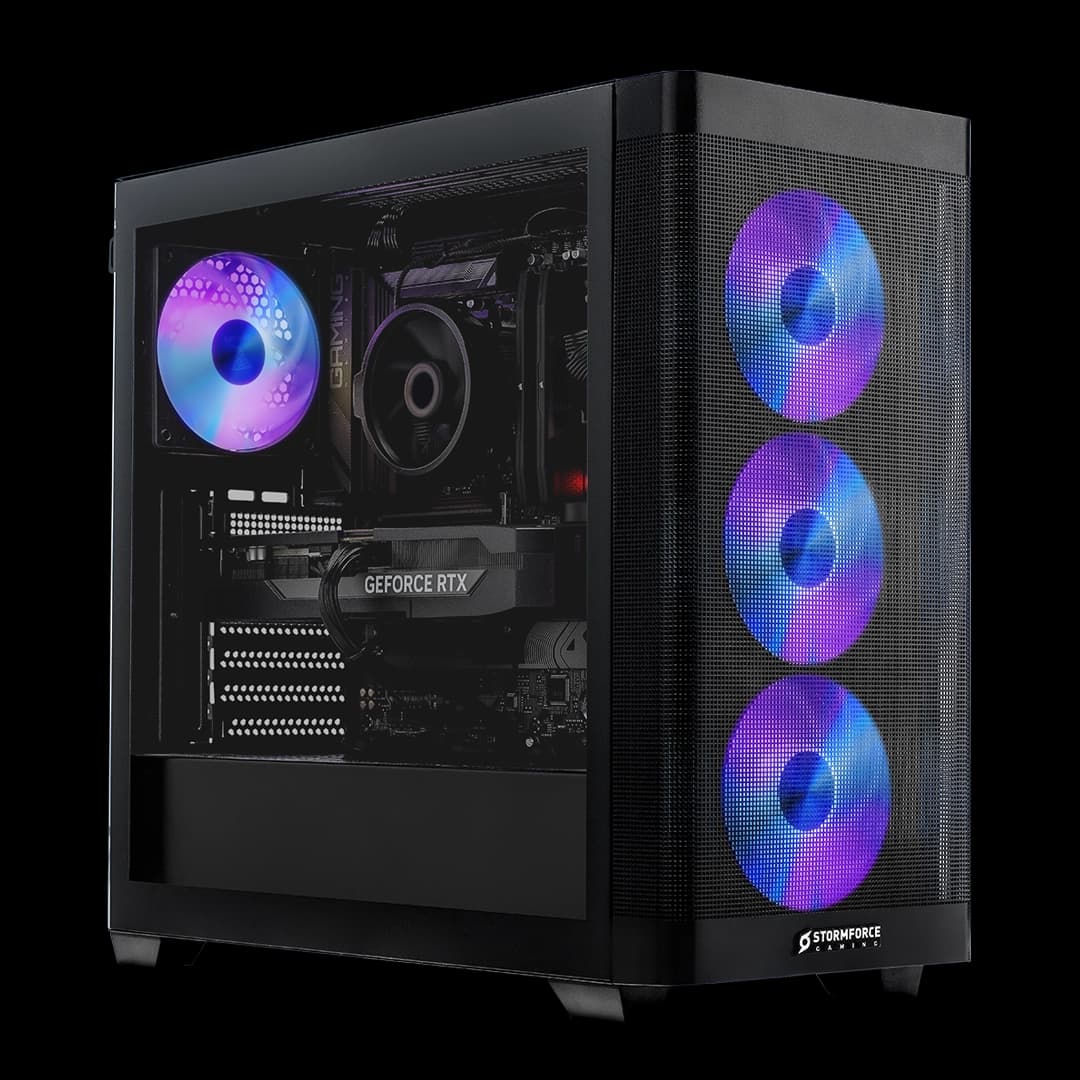
Prebuilt gaming PCs get a bad reputation in certain corners of the internet, and honestly, some of it is deserved. Cheap PSUs, throttling thermals, RAM running at half its rated speed because nobody bothered to enable XMP. But that reputation is increasingly outdated, and machines like the Stormforce Gaming Halo Origin AMD are exactly why. This isn't a budget box stuffed with cut-corner components. It's a premium build aimed squarely at people who want a capable gaming PC without spending a weekend watching cable management tutorials on YouTube.
The core question with any prebuilt at this price tier isn't "is the hardware good?" It's "am I paying a sensible premium over building it myself, and are the components actually worth having?" So that's the lens this review uses. We've gone through the spec sheet in detail, compared the component choices against what you'd pick yourself for a self-build, and looked at where Stormforce Gaming has made smart choices and where there are things worth knowing before you buy. The Halo Origin AMD review below covers all of it.
The headline components are an AMD Ryzen 7 7700, an NVIDIA RTX 5070 12GB, 32GB of DDR5 6000 RAM, and a 1TB Gen 4 NVMe SSD, all wrapped in a Phanteks XT View ARGB case with a white aesthetic throughout. At the premium price tier this sits in, those are genuinely competitive specs. Let's see if the rest of the build holds up to scrutiny.
Core Specifications
The component list here reads like a sensible enthusiast build rather than a prebuilt that's been value-engineered to death. The Ryzen 7 7700 is a proper desktop CPU, not a laptop chip or a cut-down OEM variant. The RTX 5070 12GB is NVIDIA's current-generation card sitting in a very comfortable sweet spot for 1440p gaming. And the DDR5 6000 RAM is actually running at its rated speed on a B850 motherboard that supports high-speed memory natively, which is more than you can say for some prebuilts that spec DDR5 but ship it running at 4800MHz.
The B850 ATX White motherboard deserves a mention on its own because it's a meaningful choice. B850 boards sit above the entry-level B650 and offer better power delivery, support for faster memory, and more capable storage controllers. For a machine that's going to run a Ryzen 7 7700 and potentially get upgraded down the line, that's the right foundation. A lot of prebuilt manufacturers at this price point cut corners on the motherboard and hope you won't notice. This one doesn't.
The 650W Bronze PSU is the component I'd scrutinise most carefully on any prebuilt, and here it's adequate but not generous. An RTX 5070 is not a power-hungry card by high-end standards, and the Ryzen 7 7700 is a fairly efficient chip, so 650W covers the current configuration comfortably. If you're planning a future GPU upgrade to something more demanding, that headroom gets tighter. Bronze efficiency is fine for most people. It's not the premium 80+ Gold unit you might spec yourself, but it's not the no-name PSU lottery you sometimes see in cheaper prebuilts either.
| Component | Specification |
|---|---|
| CPU | AMD Ryzen 7 7700 |
| GPU | NVIDIA RTX 5070 12GB White |
| RAM | 32GB DDR5 6000 White |
| Storage | 1TB Gen 4 M.2 NVMe SSD |
| Motherboard | B850 ATX White |
| Cooling | 240mm AIO Liquid Cooler White |
| Case | Phanteks XT View ARGB ATX White |
| PSU | 650W Bronze White |
| Operating System | Microsoft Windows 11 Home |
| Connectivity | WiFi 7, Ethernet, Bluetooth |
| Price | £2,249.99 |
CPU & Performance
The AMD Ryzen 7 7700 is built on AMD's Zen 4 architecture, which brought meaningful improvements in instructions-per-clock over Zen 3, along with native DDR5 support and PCIe 5.0 lanes. Stormforce Gaming's spec sheet lists eight cores and 16 threads, a base clock of 3.8GHz, a boost clock up to 5.3GHz, and 32MB of L3 cache. That's a chip that handles gaming, streaming, and productivity tasks without complaint. It's not the absolute top of the Ryzen 7000 stack, but it's also not a compromise.
For gaming specifically, the Ryzen 7 7700 hits a sweet spot. Most games don't meaningfully benefit from more than eight cores, and the 5.3GHz boost clock means single-threaded performance is strong. Where you'd notice the difference between this and something like a Ryzen 9 7900X is in heavily multi-threaded workloads: video editing, 3D rendering, compiling code. For pure gaming paired with an RTX 5070, the Ryzen 7 7700 is not going to be your bottleneck. The GPU is doing the heavy lifting in most gaming scenarios, and the CPU feeds it frames without breaking a sweat.
The pairing with 32GB of DDR5 6000 RAM is worth calling out specifically. The Ryzen 7000 series uses an Infinity Fabric architecture where memory speed has a real impact on performance. Running DDR5 at 6000MHz hits the optimal ratio for the Infinity Fabric clock, which translates to better frame pacing and lower latency compared to a system running the same CPU with slower memory. This is the kind of detail that separates a well-configured prebuilt from one that's just thrown together. Stormforce Gaming has clearly paid attention to it here.
GPU & Gaming Performance
The NVIDIA RTX 5070 12GB is the centrepiece of this build, and it's a genuinely good card for the money at this tier. NVIDIA's RTX 5000 series brings Blackwell architecture, which improves on Ada Lovelace in rasterisation performance, ray tracing efficiency, and AI-driven features. The 12GB of VRAM is sufficient for 1440p gaming with high texture settings, and Stormforce Gaming's own spec table positions this card as ideal for 1440p gaming, which is accurate.
Where the RTX 5070 really earns its place is in DLSS 4 support. NVIDIA's fourth-generation Deep Learning Super Sampling uses AI to reconstruct frames and boost effective frame rates without the visual quality hit that older upscaling methods produced. In practical terms, this means you can run demanding titles at native 1440p with ray tracing enabled and use DLSS 4 Quality mode to keep performance high. The combination of Blackwell's hardware ray tracing improvements and DLSS 4 makes this a much better ray tracing experience than the RTX 3070 or even RTX 4070 offered at the same tier. It's a proper generational step.
At 4K, the RTX 5070 12GB is capable but it's not the card you'd spec if 4K at maximum settings in every title is the primary goal. Some lighter games and esports titles will run at 4K without issue, but demanding open-world games with ray tracing cranked up will push this card. That's not a criticism at this price point, it's just the reality of where the 5070 sits in NVIDIA's lineup. For 1440p gaming, including at high refresh rates, this is a strong choice. And for anyone with a 1440p 144Hz or 165Hz monitor, this machine will keep them very happy.
Memory & Storage
32GB of DDR5 6000 is the right amount of RAM for a gaming PC in 2026. Some titles are starting to push past 16GB in their recommended specs, and having 32GB means you're not going to hit a ceiling any time soon. More practically, it means you can have Chrome open with thirty tabs, a game running, Discord in the background, and OBS capturing footage, all without the system starting to swap to the drive. That matters more than the headline number suggests.
The DDR5 6000 speed rating is meaningful here, not just a marketing number. As mentioned in the CPU section, 6000MHz is the sweet spot for Ryzen 7000 series systems because it aligns the memory controller and Infinity Fabric clocks at a 1:1 ratio. JEDEC's DDR5 specification starts at much lower speeds, so 6000MHz is a significant overclock from the base standard. The fact that the B850 motherboard here supports this natively, and that Stormforce Gaming has actually configured it to run at rated speed, is something worth appreciating. It's not a given.
The 1TB Gen 4 M.2 NVMe SSD is fast enough that you won't notice load times as a frustration. Gen 4 NVMe drives offer sequential read speeds that are roughly double what SATA SSDs manage, and multiple times faster than a spinning hard drive. Windows 11 boots quickly, games load quickly, and large file transfers are painless. The only thing to think about is capacity. 1TB fills up faster than you'd expect if you're installing multiple large modern games. The good news is that M.2 slots on a B850 board mean adding a second drive later is straightforward, assuming Stormforce Gaming hasn't used all the available slots in the build (which we'll cover in the upgrade section).
Cooling Solution
A 240mm AIO liquid cooler is a solid choice for the Ryzen 7 7700, and it's one of the component decisions that shows Stormforce Gaming isn't cutting corners where it matters. The Ryzen 7 7700 has a 65W TDP in its standard configuration, which is modest by modern desktop CPU standards. A 240mm AIO is more than capable of keeping it cool under sustained load, and the dual-fan radiator setup gives it thermal headroom to spare. You're not going to see this CPU throttling under gaming workloads.
The Phanteks XT View case contributes to the thermal picture too. Phanteks has a good reputation for airflow-focused designs, and the XT View's panoramic tempered glass panel is paired with an airflow-optimised chassis rather than a solid front panel that restricts intake. The integrated ARGB fans in the case move air through the system and work alongside the AIO radiator to keep temperatures sensible. It's a coherent thermal design rather than a collection of components thrown together and hoped for the best.
Noise levels are not something we can measure directly from the spec sheet, but the combination of a 240mm AIO with a dual-fan radiator and a case designed for airflow suggests this system should be reasonably quiet under typical gaming loads. The PSU also features smart cooling according to Stormforce Gaming's spec table, which typically means the fan doesn't spin at all under light loads. Whether the overall acoustic experience meets your expectations depends partly on personal sensitivity, but nothing in the component list suggests this is going to be a loud machine at idle or moderate load.
Case & Build Quality
The Phanteks XT View ARGB ATX White case is a genuinely premium chassis. Phanteks builds cases that enthusiasts actually choose for their own self-builds, which is a meaningful signal. This isn't an anonymous OEM case with a Stormforce Gaming sticker on it. The XT View features a panoramic tempered glass panel that gives a full view of the internals, which is either a selling point or irrelevant depending on whether you care about aesthetics. Given that everything inside is white with ARGB lighting, it's clearly designed to look good.
The all-white aesthetic runs through the entire build consistently. White GPU, white RAM, white AIO cooler, white PSU, white case. That level of colour coordination in a prebuilt is unusual and suggests Stormforce Gaming has put genuine thought into the presentation rather than just grabbing whatever components are in stock. For buyers who want a clean, visually cohesive setup, this is a proper effort. It's not just a gaming PC that happens to have some white parts.
Cable management in prebuilts is often where the quality falls apart. You can't assess this from the outside without opening the machine, but the Phanteks XT View case has a well-designed cable routing system with dedicated channels and tie-down points. A builder who knows what they're doing should be able to produce clean cable management in this chassis. Whether Stormforce Gaming's assembly team has taken advantage of that is something owner reports will confirm over time, but the case itself doesn't make it difficult. The build quality of the chassis itself, based on Phanteks' general standard, is solid. Tempered glass panels, decent panel fitment, and a case that doesn't feel flimsy when you open it up.

Connectivity & Ports
The connectivity story here is genuinely good. WiFi 7 is the headline feature, and it's worth explaining why that matters rather than treating it as a checkbox. WiFi 7 (802.11be) operates across 2.4GHz, 5GHz, and 6GHz bands simultaneously, supports multi-link operation, and offers significantly higher theoretical throughput and lower latency than WiFi 6E. For gaming and 4K streaming over wireless, this is the standard you want. If your router supports WiFi 7, you'll see real-world benefits. If it doesn't yet, the card is backward compatible and you'll still get good performance on WiFi 6 or 6E.
Ethernet is also present, which matters for people who prefer a wired connection for gaming. Wired connections offer lower and more consistent latency than wireless regardless of the WiFi generation, and for competitive gaming or anything where ping stability matters, the option to plug in a cable is important. Bluetooth is listed as well, covering wireless peripherals, headsets, and controllers without needing a USB dongle cluttering up your ports.
The specific USB port configuration and video output options on the rear panel aren't detailed in Stormforce Gaming's spec sheet beyond the connectivity standards listed. What we can say is that the B850 ATX motherboard will have a rear I/O panel with multiple USB ports including USB-A and USB-C options, and the RTX 5070 GPU will have DisplayPort and HDMI outputs for connecting monitors. The exact count and version numbers aren't specified in the verified data, so we won't guess at them. For most buyers, the combination of a modern motherboard's rear I/O and a current-generation GPU's display outputs will cover standard setups without issue.
Pre-installed Software & OS
Microsoft Windows 11 Home comes pre-installed, which is the right choice for a gaming PC in 2026. Windows 11 brings DirectStorage support, which allows games that implement it to load assets directly from the NVMe SSD to the GPU without the CPU acting as a middleman. Paired with a Gen 4 NVMe drive and an RTX 5070, this is a combination that can actually take advantage of DirectStorage in titles that support it. It's not a feature you'll notice in every game, but it's part of why the storage and OS choices here make sense together.
Auto HDR is another Windows 11 feature worth mentioning. It can add HDR output to older games that weren't built with HDR in mind, which is a genuinely useful quality-of-life improvement if you have an HDR monitor. And Microsoft's Copilot AI integration in Windows 11 is there if you want it, though most gamers will find it irrelevant to their day-to-day use. The important thing is that the OS is a full retail version of Windows 11 Home, not a stripped OEM image with unnecessary restrictions.
Stormforce Gaming's spec table doesn't detail what additional software comes pre-installed on the system. Most prebuilt manufacturers include some combination of their own utility software for monitoring system performance and controlling RGB lighting. Whether that's useful or annoying depends on personal preference. What matters is that Windows 11 Home itself is a clean, fully licensed installation, and any additional utilities should be removable if you'd rather start fresh. The ARGB lighting in the case and components will likely need some form of control software, either from Phanteks or a motherboard manufacturer's app, to customise the effects.
Upgrade Potential
The B850 motherboard is a meaningful advantage when thinking about upgrades. It supports AMD's AM5 socket, which AMD has committed to supporting through at least 2027. That means future Ryzen CPU upgrades are a real option without needing a new motherboard. If you want to step up to a Ryzen 9 7950X or a future Ryzen 9000 series chip down the line, the platform supports it. That's a genuine upgrade path that some prebuilts with locked-down OEM motherboards simply don't offer.
RAM upgrade headroom depends on how many DIMM slots are populated and how many are free. A standard B850 ATX board has four DIMM slots. If the 32GB is configured as two 16GB sticks, you have two free slots for expansion to 64GB. If it's four 8GB sticks, you'd need to replace all four to upgrade capacity. Stormforce Gaming's spec listing doesn't specify the stick configuration, so this is worth checking before purchase if future RAM expansion is a priority. The M.2 storage situation is similar: B850 boards typically have multiple M.2 slots, and if the 1TB drive is in one of them, adding a second drive should be straightforward.
The 650W PSU is the one component that could become a limiting factor for upgrades. The RTX 5070 is not a power-hungry card, but if you're planning to eventually swap in an RTX 5080 or 5090, a 650W Bronze unit is going to be undersized. GPU upgrades at the very high end would likely require a PSU swap as well, which adds cost and complexity. For most buyers upgrading within a sensible range, 650W is fine. But it's worth factoring in if your upgrade ambitions are significant. The good news is that PSU swaps are one of the more straightforward upgrades in a standard ATX build like this one.
How It Compares
The honest comparison for any prebuilt at this price tier is against a self-build with equivalent components. Pricing individual components for a Ryzen 7 7700, RTX 5070 12GB, 32GB DDR5 6000, 1TB Gen 4 NVMe, B850 motherboard, 240mm AIO, Phanteks XT View case, and a decent PSU, then adding Windows 11 Home on top, puts you in a similar ballpark to what Stormforce Gaming is asking here. The prebuilt premium is smaller than it used to be, partly because GPU prices have normalised and partly because manufacturers like Stormforce Gaming are buying components at volume.
What you're paying for beyond the components themselves is assembly, cable management, OS installation, and the warranty. For buyers who know how to build a PC, that premium might not feel worth it. For buyers who don't want to spend a weekend sourcing parts, troubleshooting compatibility, and figuring out why Windows won't activate, it absolutely is. There's also the risk factor: if a component is DOA in a self-build, you're dealing with individual warranties from multiple vendors. With a prebuilt, it's one point of contact.
Compared to other prebuilts at this tier, the Halo Origin AMD's component choices stand out positively. The use of a named Phanteks case rather than a generic chassis, a proper 240mm AIO rather than a stock cooler or a cheap tower cooler, DDR5 running at its rated 6000MHz speed, and WiFi 7 rather than WiFi 6 are all details that separate this from prebuilts that hit a similar price point by cutting corners in less obvious places. The white aesthetic is a niche but genuine differentiator for buyers who want a visually cohesive setup.
| Feature | Stormforce Halo Origin AMD | Typical Mid-Range Prebuilt | Equivalent Self-Build |
|---|---|---|---|
| CPU | AMD Ryzen 7 7700 (Zen 4) | Often Ryzen 5 7600 or older gen | Your choice, same or better |
| GPU | RTX 5070 12GB (Blackwell) | RTX 4070 or RTX 4070 Super | RTX 5070, same |
| RAM Speed | DDR5 6000 (rated speed) | Often DDR5 4800 or 5200 | DDR5 6000, same |
| Motherboard | B850 ATX (AM5) | Often B650 or OEM board | B850 or X670E, your choice |
| Cooling | 240mm AIO | Often 120mm AIO or tower cooler | 240mm or 360mm AIO |
| Case | Phanteks XT View ARGB | Generic OEM chassis | Any case you want |
| WiFi | WiFi 7 | Often WiFi 6 or WiFi 6E | Depends on board choice |
| PSU | 650W Bronze | Often 600W Bronze or unrated | 650W to 850W Gold typically |
| Upgrade Path | AM5 socket, standard ATX | Sometimes locked OEM board | Full flexibility |
| Price | £2,249.99 | Lower, but weaker specs | Similar, more time required |
Final Verdict
The Stormforce Gaming Halo Origin AMD is a well-considered prebuilt that avoids most of the traps that make people distrust prebuilts in the first place. The component choices are sensible, the CPU and GPU pairing makes sense for 1440p gaming, the RAM is running at the right speed for the platform, and the case and cooling are from brands that enthusiasts actually respect. It's not perfect. The 650W Bronze PSU is the one area where a bit more headroom would have been reassuring, and the all-white aesthetic, while genuinely well executed, isn't for everyone.
Who is this for? Buyers who want a capable 1440p gaming PC, don't want to spend time sourcing and assembling components themselves, and want something that looks good on a desk rather than a generic black box. The WiFi 7 connectivity makes it future-proof for wireless networking. The AM5 platform gives it a genuine CPU upgrade path. And the RTX 5070 with DLSS 4 support means it's well-positioned for the current and near-future game library. If you're already comfortable building your own PC and have the time, you might squeeze marginally better value from a self-build. But the gap is smaller than it used to be, and the convenience and warranty have real value.
Who should think twice? Anyone planning to run very demanding workloads beyond gaming, where a Ryzen 9 chip would serve better. Anyone who wants a 4K-focused gaming machine, where stepping up to an RTX 5080 would be a better fit. And anyone who was planning to upgrade the GPU significantly in the future, who should factor in the cost of a PSU swap alongside that GPU purchase. Those are specific scenarios, not general criticisms. As a 1440p gaming PC that's ready to use straight away, the Halo Origin AMD is a genuinely good option at the premium tier.
What works. What doesn’t.
6 + 5What we liked6 reasons
- RTX 5070 12GB with DLSS 4 support delivers strong 1440p performance including ray tracing
- DDR5 6000 RAM is correctly configured at its rated speed, benefiting Ryzen 7000 Infinity Fabric performance
- B850 motherboard on AM5 provides a genuine CPU upgrade path through future Ryzen generations
- Phanteks XT View is a case that enthusiasts choose for self-builds, not an anonymous OEM chassis
- Comprehensive connectivity including WiFi 7, Ethernet, and Bluetooth fitted as standard
- Coherent all-white aesthetic runs through every component for a visually polished result
Where it falls5 reasons
- 650W Bronze PSU offers limited headroom for future GPU upgrades to more demanding cards
- Bronze efficiency rating falls short of the 80+ Gold units most self-builders would choose at this tier
- RAM stick configuration is unspecified, making it unclear how many DIMM slots are free for expansion
- 4K gaming at maximum settings in demanding titles will push the RTX 5070 beyond its comfort zone
- Exact USB port count and versions on the rear I/O are not detailed in the official spec sheet
Full specifications
12 attributes| CPU | AMD Ryzen 7 7700 |
|---|---|
| GPU | NVIDIA RTX 5070 12GB White |
| RAM | 32GB DDR5 6000 White |
| Storage | 1TB M.2 NVMe SSD |
| Case | Phanteks XT View ARGB ATX White |
| Connectivity | WiFi 7, Ethernet, Bluetooth |
| Cooling | 240mm AIO Liquid Cooler White |
| Motherboard | B850 ATX White |
| OS | Microsoft Windows 11 Home |
| PSU | 650w Bronze PSU White |
| RAM GB | 32 |
| RAM type | DDR5 6000 |
If this isn’t right for you
2 options

Frequently asked
7 questions01Is the Ryzen 7 7700 a good CPU for gaming paired with an RTX 5070?+
Yes. The Ryzen 7 7700 has eight cores, 16 threads, and a 5.3GHz boost clock, which is more than sufficient to feed an RTX 5070 in gaming scenarios. Most titles do not meaningfully benefit from more than eight cores, so the CPU is unlikely to be a bottleneck. Where you would notice a difference is in heavily multi-threaded tasks such as video editing or 3D rendering, where a Ryzen 9 chip would have an advantage.
02Why does it matter that the DDR5 RAM runs at 6000MHz specifically?+
The Ryzen 7000 series uses AMD's Infinity Fabric architecture, where memory speed directly affects the fabric clock. Running DDR5 at 6000MHz achieves a 1:1 ratio between the memory controller and the Infinity Fabric, which reduces latency and improves frame pacing. Many prebuilts spec DDR5 but configure it at slower speeds such as 4800MHz or 5200MHz. Stormforce Gaming has set the memory to its rated 6000MHz speed, which is the correct configuration for this platform.
03Is 650W enough for the Stormforce Gaming Halo Origin AMD?+
For the current configuration of a Ryzen 7 7700 and RTX 5070, 650W is adequate. Neither component is especially power-hungry by modern standards. However, if you plan to upgrade to a significantly more demanding GPU in future, such as an RTX 5080 or 5090, you would likely need to replace the PSU alongside that upgrade. For buyers using the system as configured or upgrading within a similar power envelope, 650W covers it comfortably.
04Can the CPU be upgraded later, and what chips are compatible?+
The B850 motherboard uses AMD's AM5 socket, which AMD has committed to supporting through at least 2027. This means you can upgrade to higher-tier Ryzen 7000 series chips or future Ryzen 9000 series processors without needing a new motherboard. It is a genuine upgrade path, unlike some prebuilts that use proprietary OEM motherboards with limited or no upgrade options.
05Is the Stormforce Gaming Halo Origin AMD good for 4K gaming?+
The RTX 5070 12GB can handle 4K in lighter titles and esports games, but demanding open-world games with ray tracing enabled will push the card at 4K resolution. The card is primarily positioned as a 1440p GPU, and that is where it performs most comfortably. If 4K gaming at high settings in demanding titles is your primary goal, an RTX 5080 would be a better fit.
06What does WiFi 7 actually offer compared to WiFi 6 or WiFi 6E?+
WiFi 7, also known as 802.11be, operates across 2.4GHz, 5GHz, and 6GHz bands simultaneously and supports multi-link operation, which allows a device to send and receive data across multiple bands at once. This results in higher throughput and lower, more consistent latency compared to WiFi 6E. For gaming and 4K streaming over wireless, WiFi 7 is the current standard to have. The card is also backward compatible with older router standards if you have not yet upgraded your router.
07How easy is it to add more storage to this machine?+
The B850 ATX motherboard typically includes multiple M.2 slots. If the 1TB Gen 4 NVMe drive occupies one slot and others are free, adding a second M.2 drive is straightforward and does not require any tools beyond a screwdriver. You should confirm with Stormforce Gaming how many M.2 slots are available and whether any are occupied before purchase if storage expansion is a priority.