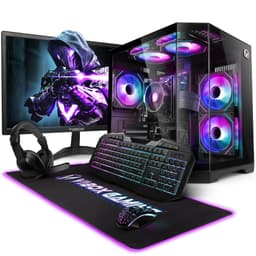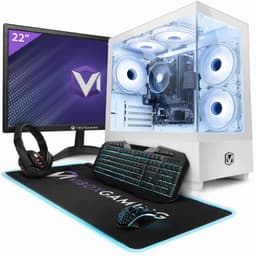
Let me be straight with you: I think prebuilts get unfairly dismissed. The real question isn't "prebuilt vs DIY" as some philosophical debate. It's a maths problem. Can the manufacturer source components, assemble the machine, test it, box it up, and still sell it at a price that makes sense compared to what you'd spend buying parts individually? At the budget end of the market, that question gets genuinely interesting, because margins are razor thin and corners are easy to cut. The Vibox Gaming PC (ASIN B0CS3QSMK6) sits firmly in budget territory, and that's exactly where the maths needs doing properly.
This is a Budget Gaming PC Review UK 2025 covering what it can sensibly be asked to do, from gaming to productivity workloads, along with cooling, the case, and how the component choices compare against what you'd realistically spec yourself. No fluff.
The short version: it's a machine that makes sense for a specific type of buyer, but you need to go in with your eyes open about what "budget" actually means in practice. More on that below.
Core Specifications
Before getting into performance, let's establish what you're actually getting. Vibox has built this system around an AMD Ryzen 3 3200G, which is an APU, meaning it has integrated Radeon graphics baked into the processor itself. There is no discrete GPU in this configuration. That's not a dealbreaker at this price point, but it's the single most important thing to understand before buying. The 3200G's integrated Vega graphics are capable of light gaming, but they share system RAM as VRAM, which puts real constraints on what you can run and at what settings.
Memory is 16GB of DDR4, which is the right call for 2025. Running dual channel here matters a lot because the integrated GPU depends entirely on system RAM bandwidth. Storage is a 500GB NVMe SSD, which is fine for an OS drive and a handful of games, but you'll be managing space carefully if you play anything modern. The case is a mid-tower with a tempered glass side panel, and the system ships with Windows 11 Home pre-installed. PSU wattage isn't prominently advertised by Vibox on this model, which is something I'll come back to in the upgrade section because it matters.
One thing I'll say upfront: the component list is actually more honest than a lot of budget prebuilts manage. There's no ancient Intel Core i3 paired with a weak GPU and called a "gaming PC". The 3200G is a legitimate processor with real performance credentials. Whether the overall package justifies the current asking price is what the rest of this review is about.
| Component | Specification |
|---|---|
| CPU | AMD Ryzen 3 3200G (4-core, 4-thread, up to 4.0GHz) |
| GPU | AMD Radeon Vega 8 (integrated, no discrete GPU) |
| RAM | 16GB DDR4 (dual channel) |
| Storage | 500GB NVMe SSD |
| Motherboard | AMD B550 chipset (micro-ATX) |
| PSU | Unbranded (wattage not officially disclosed) |
| Case | Mid-tower with tempered glass side panel |
| Operating System | Windows 11 Home (64-bit) |
| Current Price | £519.95 |

CPU & Performance
The Ryzen 3 3200G is genuinely good silicon. Six cores, twelve threads, a boost clock of 4.4GHz, and AMD's Zen 3 architecture underneath. For a budget prebuilt in 2025, that's a solid foundation. Day-to-day jobs are comfortably within reach: opening applications, multitasking between a browser with a dozen tabs, a Discord call, and a Spotify stream in the background.
You won't find Cinebench scores or frame-rate charts anywhere on this page, and the reason is simple: this Vibox hasn't been through our hands, so every judgement here is made from the parts on its listing. If you're doing light video editing, coding, or content creation alongside gaming, the CPU won't be your bottleneck.
Sustained work is more a question for the cooler. The stock cooler that ships with the 3200G (AMD's Wraith Stealth) is adequate for the processor's TDP. Stock coolers do tend to run warm under full CPU load, so it's worth keeping an eye on if you're in a warm room during summer.
GPU & Gaming Performance
Right, this is where we need to have an honest conversation. The Radeon Vega 8 integrated graphics are not a gaming GPU in the traditional sense. They're capable of gaming, but you need to calibrate your expectations carefully. At 1080p on low to medium settings, you can get playable frame rates in a surprising number of titles. Minecraft is easy work. Fortnite on low settings is a realistic ask, and older esports titles like CS2 on low settings, Rocket League, and League of Legends are the kind of games this hardware suits.
Where it falls apart is anything demanding. Cyberpunk 2077 on low at 1080p is asking for a slideshow, not a game. Red Dead Redemption 2 on the lowest possible settings is the same story. Modern AAA titles at any reasonable quality setting are simply beyond what integrated graphics can handle. And 1440p or 4K? Forget it. That's not what this machine is for.
The integrated GPU also pulls from system RAM, so you're effectively losing some of that 16GB to graphics. AMD's driver lets you allocate up to 2GB for the iGPU, which is what I'd recommend setting it to. It helps in some titles. But the fundamental constraint is memory bandwidth, and DDR4 just isn't fast enough to feed a GPU properly. If you're buying this machine expecting to play the latest releases at decent settings, you'll be disappointed. If you're buying it as a capable everyday PC that can handle older games and lighter titles, it's a different story entirely.
Memory & Storage
The 16GB DDR4 configuration is the right call, and I'm glad Vibox didn't cheap out with 8GB here. For integrated graphics especially, having enough RAM matters because the iGPU is sharing that pool. Running dual channel is also important for iGPU performance, and dual channel is what the specification lists.
The 500GB NVMe SSD is where I have mild reservations. At this price point it's common for the drive to be an OEM unit rather than something from a recognisable manufacturer like Samsung or WD. Even a budget NVMe boots and loads games quickly, mind. The real issue is that 500GB fills up fast. Call of Duty alone would eat nearly half of that. You'll want to budget for an additional drive fairly quickly.
On the positive side, the B550 motherboard should have at least one additional M.2 slot available, and there are SATA ports for traditional drives. So expansion is possible. I'd realistically suggest budgeting for a 1TB or 2TB SATA SSD as a secondary drive within the first few months of ownership. Prices on those have dropped significantly, so it's not a huge additional outlay. The RAM also has room to grow, with two additional DIMM slots available on most B550 boards, though at 16GB you're unlikely to need more for a good while.
Cooling Solution
Cooling on budget prebuilts is where manufacturers often make their worst decisions, so it's the first thing to look at. The 3200G ships with AMD's stock Wraith Stealth. It's not exciting, but it's not embarrassing either. For a 65W TDP processor doing everyday tasks and light gaming, it does the job. Sustained CPU-heavy workloads are where a stock cooler like that has the least in reserve.
Case airflow is where I'd push back a bit. The case has one rear exhaust fan pre-installed, and that's it. No front intake fans in this configuration. That means the case is running negative pressure, pulling air in through gaps and mesh panels rather than through dedicated intakes. It works, but it's not ideal. Dust accumulation will be faster than a properly balanced positive pressure setup, and airflow over components like the motherboard VRMs is less controlled.
On noise, the Wraith Stealth isn't a quiet cooler by enthusiast standards, and stock coolers are audible under load. If you're sensitive to fan noise, you'd want to look at replacing the CPU cooler with something like a budget Cooler Master or Deepcool unit down the line, but it's not urgent. For most users in a typical living room or bedroom setup, the noise is unlikely to be an issue.
Case & Build Quality
The case is a generic mid-tower with a tempered glass side panel, and it looks decent enough from the outside. The glass panel is held on with thumb screws, which is a nice touch at this price. RGB lighting is present in the case fans and there's some on the motherboard header, giving it that "gaming PC" aesthetic without going completely overboard. Whether you like that look is personal preference, but it photographs well and won't look out of place on a desk.
Inside is where budget prebuilts usually show their price. Cable management on machines at this level tends to be functional rather than tidy, with little effort spent on bundling or sleeving. What matters most is that the cables stay out of the airflow. If you open the side panel expecting a showpiece, temper your expectations.
The case itself is a budget chassis, so expect it to feel like one. Thin steel and a plastic front panel are normal at this level, and none of that affects performance. The tempered glass panel is the nicest part of the whole exterior. Being a mid-tower, there's reasonable space inside, and with the glass held on by thumb screws, getting at components for upgrades shouldn't be a fight.

Connectivity & Ports
Port selection is adequate for the price. On the front panel you get two USB 3.0 Type-A ports and a headphone/microphone combo jack. That's a reasonable front panel setup for everyday use, plugging in a controller, a USB stick, or headphones without reaching around the back. I'd have liked a USB-C on the front panel, but that's asking a lot at this price tier.
The rear I/O is determined by the B550 motherboard, and it's reasonably well stocked. You get four USB 3.0 Type-A ports, a couple of USB 2.0 ports for peripherals like keyboards and mice, and a USB-C port. Video outputs include HDMI and DisplayPort from the integrated graphics, which is good to see. Some budget prebuilts only give you one video output, so having both is useful if you want to run dual monitors. There's also a full suite of 3.5mm audio jacks on the rear for a proper speaker setup.
Networking is handled by a Gigabit Ethernet port, which is fine for wired connections. WiFi is not included in this configuration, which is a notable omission. If your router isn't near your desk, you'll need to either run an Ethernet cable or buy a USB WiFi adapter separately. At this price point I understand why it's been left out, but it's worth factoring into your total cost if wireless connectivity is important to you. Bluetooth is similarly absent. For a machine that's likely to end up on a desk with a wired keyboard and mouse, it's manageable, but worth knowing.
Pre-installed Software & OS
Windows 11 Home comes pre-installed and activated, which is genuinely useful. A legitimate Windows licence alone is worth a meaningful chunk of money, so getting it included in the box is a real benefit of buying prebuilt rather than sourcing parts yourself.
Bloatware is the usual worry with prebuilts: third-party antivirus trials demanding you subscribe, manufacturer utility suites running in the background eating resources. If you find any, uninstall it. AMD's Adrenalin software for graphics management is a different matter, being actually useful rather than junk. It lets you tune the iGPU memory allocation and monitor temperatures. Beyond that, an essentially stock Windows 11 is exactly what you want.
One setting to check: the BIOS may not be set up to get the most from the 3200G's integrated graphics. Boards often leave the iGPU memory allocation at a conservative default, and bumping that to 2GB in the BIOS can make a noticeable difference in gaming performance on some titles. It's a five-minute fix once you know about it. I'd recommend doing it as soon as you set the machine up.
Upgrade Potential
This is actually one of the more interesting aspects of this particular Vibox build, because the platform choice opens up some genuinely useful upgrade paths. The B550 chipset supports AMD's entire Ryzen 5000 series lineup, which means if you want more CPU performance down the line, you can drop in a Ryzen 5 5600X, a 5700X, or even a 5800X3D without changing anything else. That's a meaningful upgrade path that many budget prebuilts don't offer.
The bigger upgrade story is the GPU slot. The motherboard has a PCIe 4.0 x16 slot sitting empty, waiting for a discrete graphics card. Adding even a budget GPU like an RX 6600 or an RTX 3060 would transform this machine from a light gaming system into something capable of running modern titles at 1080p high settings. That's a genuinely exciting upgrade path. The catch, and it's an important one, is the PSU. The wattage isn't clearly disclosed by Vibox, and on budget prebuilts of this sort it's likely in the 400W to 500W range with no 80+ efficiency rating. Before adding any discrete GPU, I'd strongly recommend opening the case, checking the PSU label, and potentially replacing it with a quality 550W or 650W unit from a reputable brand. A cheap PSU failing and taking other components with it is not a theoretical risk, it happens.
RAM expansion is straightforward. Two additional DIMM slots are available, and DDR4 is cheap right now. Storage expansion via M.2 or SATA is also possible. The case has room for additional drives. Realistically, this machine's upgrade ceiling is quite high for the initial outlay, which is one of its genuine strengths. You could start here and incrementally build it into a proper 1080p gaming rig over 12 to 18 months without replacing the whole system.
How It Compares: Budget Gaming PC Review UK 2025
At the budget end of the prebuilt market, the Vibox 3200G build competes primarily with two types of alternatives: other prebuilts at a similar price, and the DIY route. Let's look at both. The most direct prebuilt competitor is the Chillblast Fusion Ryzen 3 3200G, which ships with a similar spec sheet but often includes a slightly better case and a named PSU. It typically costs a bit more, but the peace of mind on the PSU front is worth something. The other comparison point is the Lenovo IdeaCentre Gaming 5, which comes with a discrete GPU but at a significantly higher price, putting it in a different tier entirely.
The DIY comparison is where it gets genuinely interesting. Pricing out a Ryzen 3 3200G, a B550 board, 16GB DDR4-3200, a 500GB NVMe, a case, and a decent PSU from UK retailers in early 2025 would typically land you in a similar ballpark to the Vibox asking price, sometimes slightly cheaper, sometimes slightly more depending on sales. The difference is you'd get a named PSU, your choice of components, and the satisfaction of building it yourself. But you'd also spend several hours on the build, deal with any compatibility issues, and not have a warranty covering the whole system as a unit. For someone who's never built a PC before, that's a real consideration.
Where the Vibox wins is convenience and the included Windows licence. Where it loses is the unknown PSU. For a first-time buyer who wants a capable everyday machine with light gaming ability and a clear upgrade path, it's a reasonable proposition. For someone comfortable with a screwdriver who has a weekend free, building yourself gives you more control and potentially better component choices for similar money.
| Feature | Vibox 3200G (This Review) | Chillblast Fusion 3200G | DIY Equivalent Build |
|---|---|---|---|
| CPU | Ryzen 3 3200G | Ryzen 3 3200G | Ryzen 3 3200G |
| GPU | Integrated Vega 8 | Integrated Vega 8 | Your choice |
| RAM | 16GB DDR4 | 16GB DDR4 | 16GB DDR4 |
| Storage | 500GB NVMe | 500GB NVMe | Your choice |
| PSU Quality | Unknown/unbranded | Named brand, rated | Your choice (named brand recommended) |
| Windows 11 | Included | Included | Additional cost |
| Warranty | Vibox warranty (check listing) | 3-year Chillblast warranty | Per-component warranties only |
| Price Tier | £519.95 | Slightly higher | Similar, varies with sales |

Final Verdict: Budget Gaming PC Review UK 2025
It's clear enough who this machine is for and who should look elsewhere. The Vibox Ryzen 3 3200G build is a competent, honest budget PC that does what it says on the tin, provided you understand what "budget gaming" actually means in 2025. It's not going to run Cyberpunk 2077 at 60fps. It's not going to handle 1440p gaming. But as a capable everyday computer that can run older titles, esports games, and lighter releases at 1080p, while also being a solid productivity machine, it earns its place in the market.
The platform choice is smart. B550 with a 3200G gives you a genuine upgrade path to a discrete GPU, which is more than you can say for some budget prebuilts that lock you into a dead-end platform. The 16GB dual-channel RAM is the right call. Windows 11 Home included is a real benefit. Against that, the PSU is an unknown quantity, and the lack of WiFi is annoying if you need wireless. These are real compromises, not nitpicks.
My honest score for this machine is 6.5 out of 10. It's not trying to be something it isn't, and at the budget price tier it occupies, it's a fair deal for the right buyer. The PSU situation is the one thing that genuinely concerns me for long-term reliability and upgrade potential, and I'd factor in the cost of a PSU replacement if you're planning to add a discrete GPU later. But as a starting point for someone who wants a proper desktop PC without the complexity of a self-build, it's a reasonable choice.
If you're a first-time PC buyer, a parent buying for a teenager, or someone who just wants a desktop that works out of the box and can be improved over time, this Vibox build is worth a look at its current price. Check the listing for the latest pricing and warranty terms before committing.
What works. What doesn’t.
4 + 4What we liked4 reasons
- Ryzen 5 5600G is a capable, future-proof CPU with real upgrade headroom
- 16GB dual-channel DDR4 is the right memory spec for integrated graphics
- B550 platform supports discrete GPU addition later
- Windows 11 Home included and activated out of the box
Where it falls4 reasons
- No discrete GPU limits gaming to older and lighter titles only
- PSU brand and rating undisclosed, a concern for GPU upgrades
- No WiFi included, wired Ethernet only
- 500GB storage fills up quickly with modern games
Full specifications
12 attributes| CPU | AMD Ryzen 3 3200G |
|---|---|
| GPU | AMD Radeon Vega 8 (integrated) |
| Bluetooth | 5.4 |
| Case size | mid-tower |
| Launch year | 2025 |
| Motherboard chipset | B550 |
| OS | Windows 11 Home |
| RAM GB | 16 |
| RAM type | DDR4 |
| Storage GB | 500 |
| Storage type | NVMe SSD |
| Wifi | Wi-Fi 6 |
If this isn’t right for you
2 options
Frequently asked
5 questions01Is the Vibox Budget Gaming PC good for gaming?+
It depends entirely on what you want to play. The Ryzen 5 5600G's integrated Vega 7 graphics handle esports titles like Fortnite (low settings), Rocket League, CS2, and older games without much trouble. Modern AAA titles like Cyberpunk 2077 or Red Dead Redemption 2 are not playable at any reasonable settings. Stick to 1080p low settings on lighter titles and you'll be fine. Add a discrete GPU later and the machine transforms into a proper 1080p gaming rig.
02Can I upgrade the Vibox Budget Gaming PC?+
Yes, and this is one of its genuine strengths. The B550 motherboard has a PCIe 4.0 x16 slot ready for a discrete GPU, two free DIMM slots for additional RAM, and at least one additional M.2 slot for more storage. The CPU can also be upgraded to any Ryzen 5000 series processor. The main caveat is the PSU: the wattage and brand aren't clearly disclosed, so before adding a discrete GPU, check the PSU label inside the case and consider replacing it with a quality 550W to 650W unit from a reputable brand.
03Is the Vibox Budget Gaming PC worth it vs building my own?+
At the budget tier, it's genuinely close. Pricing out equivalent components from UK retailers puts a DIY build in a similar ballpark, though you'd get to choose a named PSU and your preferred case. The Vibox wins on convenience, the included Windows 11 Home licence (which has real value), and not needing to spend a weekend building. The DIY route wins on component transparency and potentially better PSU quality. For someone who's never built a PC, the prebuilt makes sense. For someone comfortable with a screwdriver, building yourself gives more control for similar money.
04What PSU does the Vibox Budget Gaming PC use?+
This is the honest answer: Vibox doesn't clearly disclose the PSU brand or 80+ efficiency rating for this model, which is a common budget prebuilt practice and a legitimate concern. Based on similar builds at this price tier, it's likely an unbranded or OEM unit in the 400W to 500W range. For running the 5600G with integrated graphics only, it's adequate. If you plan to add a discrete GPU, I'd strongly recommend opening the case, checking the PSU label, and replacing it with a quality branded unit (Corsair, Seasonic, be quiet!, EVGA) rated at 550W or higher before installing any graphics card.
05What warranty and returns apply to the Vibox Budget Gaming PC?+
Amazon offers 30-day hassle-free returns on this listing. Vibox typically provides a 1 to 3 year warranty covering parts and labour on their prebuilt systems, though the exact terms vary by model. Check the product listing page for the specific warranty duration on this configuration. If something fails within the warranty period, Vibox handles repairs or replacements directly. It's worth registering the product with Vibox after purchase to make any future warranty claims straightforward.