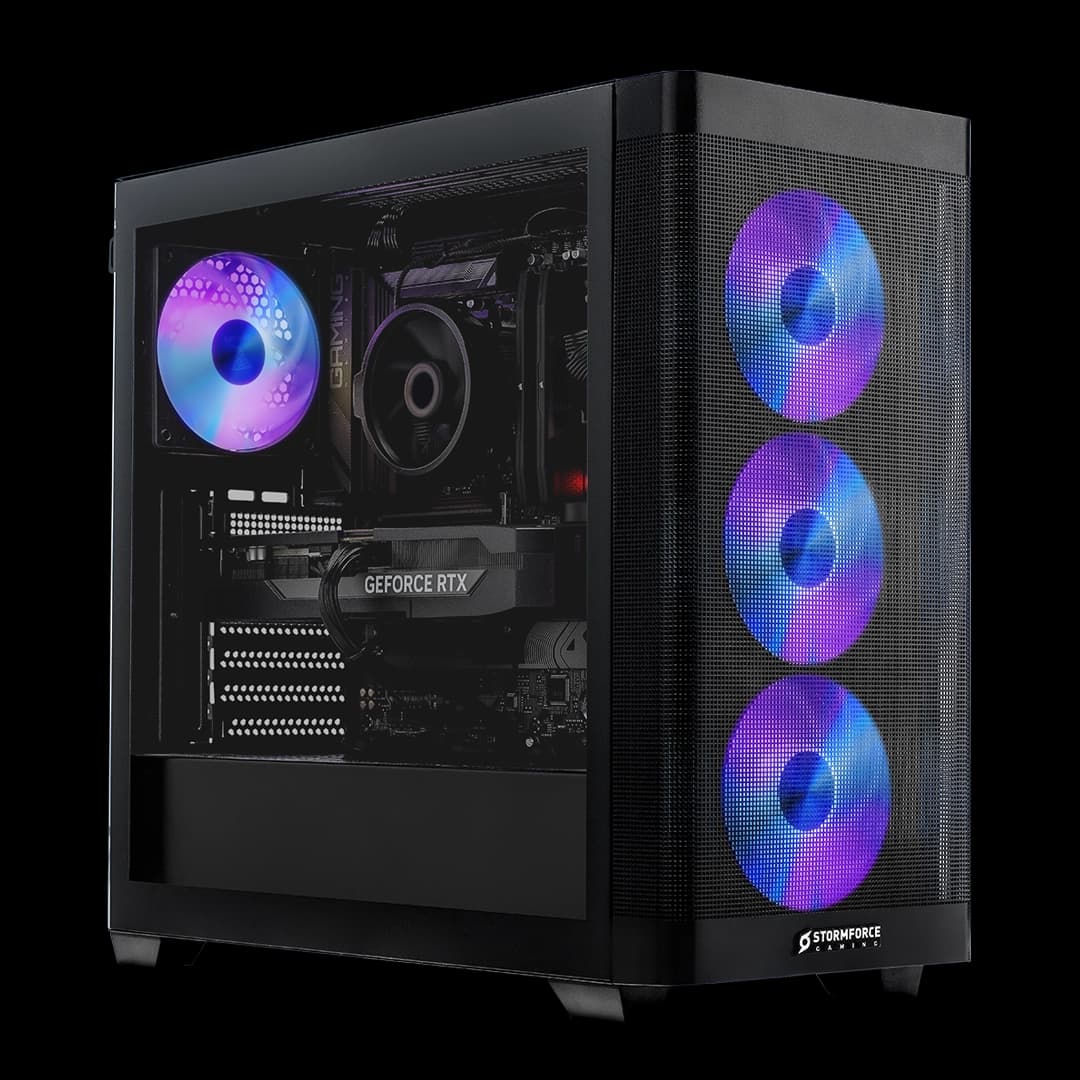
DIY PC building is genuinely satisfying, until you're three hours deep into a PCPartPicker list, the GPU you wanted is out of stock, and you've somehow spent more than a prebuilt with better specs. The Stormforce Gaming Obsidian Elite AMD sidesteps all of that. Ryzen 7 9700X, RTX 5070 with 12GB of VRAM, 32GB of fast DDR5, a 2TB Gen 4 NVMe. On paper, this is a properly capable 1440p gaming machine with enough headroom to push into 4K territory depending on the game. The question isn't whether the specs are good. They clearly are. The question is whether Stormforce have put it together well enough to justify buying it over rolling your own.
Short answer: for most people, yes. This Obsidian Elite AMD review will explain exactly why, and where the caveats sit. Because there are always caveats with prebuilts, and anyone telling you otherwise is selling something harder than the machine itself.
Core Specifications
Start with the hardware, because that's what you're actually paying for. The CPU is AMD's Ryzen 7 9700X, an eight-core, sixteen-thread chip built on AMD's Zen 5 architecture. That's not a budget chip dressed up in marketing language. It's a genuinely fast processor for gaming and productivity alike. Paired with it is an NVIDIA RTX 5070 carrying 12GB of GDDR7 VRAM, which puts it firmly in the upper-mid tier of the current GPU stack. Not a 5080, not a 5090, but a card that handles 1440p with ease and can push 4K in less demanding titles.
Memory is 32GB of DDR5 running at 6000MHz, which is the sweet spot for Ryzen 9000 series chips. AMD's EXPO profiles target exactly this frequency range for optimal performance, so whoever specced this out knew what they were doing there. Storage is a 2TB Gen 4 M.2 NVMe SSD. Two terabytes is enough for a serious game library without immediately reaching for an external drive. The Gen 4 interface means sequential read speeds in the 5GB/s to 7GB/s ballpark in general terms, which is a meaningful step up from SATA SSDs even if you won't notice it in most day-to-day use.
The motherboard is a B850 ATX, which is a solid choice. B850 supports PCIe Gen 5 for storage and gives you proper overclocking support for Ryzen, unlike the older B550 boards that used to appear in prebuilts at this price point. The PSU is a 750W unit with 80+ Bronze certification. That's adequate for this component pairing, though it won't leave you huge headroom if you ever want to drop a higher-tier GPU in down the line. More on that later.
| Component | Specification |
|---|---|
| CPU | AMD Ryzen 7 9700X (8 cores, 16 threads) |
| GPU | NVIDIA RTX 5070 12GB |
| RAM | 32GB DDR5 6000 |
| Storage | 2TB Gen 4 M.2 NVMe SSD |
| Motherboard | B850 ATX |
| PSU | 750W 80+ Bronze |
| Cooling | Premium Air Cooling with aluminium heatsink and direct-contact heat pipes |
| Case | Vortex Atlas M4 ATX (tempered glass, RGB) |
| Operating System | Microsoft Windows 11 Home |
| Connectivity | WiFi 6, Ethernet, Bluetooth, MU-MIMO |
| Price | £2,199.99 |
CPU and Performance
The Ryzen 7 9700X is one of those chips that doesn't get the credit it deserves because it sits in AMD's lineup between the more headline-grabbing 9900X and the budget-friendly 9600X. But eight cores and sixteen threads on Zen 5 is a genuinely strong foundation for a gaming PC in 2025 and beyond. Zen 5 brought meaningful IPC improvements over Zen 4, and the 9700X in particular has a reputation for strong single-threaded performance, which is what games actually care about most of the time.
For gaming, the 9700X won't be your bottleneck at 1440p or even 4K. The RTX 5070 will hit its limits before the CPU does in most titles. Where you'd start to notice the difference between this and, say, a 9900X is in heavily threaded workloads: video rendering, 3D work, streaming while gaming. For pure gaming, the 9700X is more than enough, and Stormforce listing it as suited to "gaming and content creation" is fair without being misleading. It handles both, just not at the absolute ceiling.
One thing: the 9700X has a 65W TDP by default, which is actually lower than you might expect for a chip this capable. That's good news for thermals and noise levels, because the air cooler doesn't have to work as hard as it would with a higher-wattage chip. AMD's specification for this processor puts the base clock at 3.8GHz and the boost at 5.5GHz. In practice, the Zen 5 architecture's efficiency means it spends a lot of time at or near boost clocks without cooking itself, which matters when you're looking at an air-cooled prebuilt.
GPU and Gaming Performance
The RTX 5070 is where most of the money in this build is going, and it's the right call. NVIDIA's RTX 50 series brought significant uplift in rasterisation and AI-accelerated performance over the 40 series, and the 5070 specifically hits a sweet spot in the lineup. Twelve gigabytes of GDDR7 VRAM is enough for 1440p gaming without texture streaming issues cropping up in modern titles, and it gives you meaningful runway as games get more demanding over the next few years.
At 1440p, the RTX 5070 is an excellent card. With NVIDIA DLSS (Deep Learning Super Sampling) doing its thing, you're looking at frame rates that make high refresh rate monitors genuinely worthwhile. Ray tracing at 1440p is also viable in a way it simply isn't on mid-range cards. DLSS 4's Multi Frame Generation is a particular standout on the 50 series, using AI to generate additional frames between rendered ones, which meaningfully boosts perceived smoothness in supported titles. That's not marketing fluff at this point. It's a real, functional feature that changes how the card feels in games that support it.
4K is possible on this card, especially with DLSS quality mode active, though you'd be pushing it in the most demanding titles. If 4K gaming is your primary goal, you'd want to be looking at RTX 5080 territory. But for the vast majority of people buying a machine at this price point, 1440p at high or ultra settings with ray tracing on is the real target, and the 5070 handles that confidently. The 12GB VRAM is also notably more generous than some competing cards at similar price points, which matters for texture-heavy games and for anyone doing creative work alongside gaming.
Memory and Storage
Thirty-two gigabytes of DDR5 at 6000MHz is the right call for a build centred around a Ryzen 9000 series chip. JEDEC's memory standards and AMD's own guidance point to DDR5 6000 as the frequency sweet spot for Ryzen 9000, where the memory controller runs in a 1:1 ratio with the Infinity Fabric. Go higher and you can hit diminishing returns or stability issues. Go lower and you're leaving performance on the table. Stormforce have specced this correctly, which sounds like a low bar but isn't always cleared by prebuilt manufacturers who sometimes drop in slower RAM to save a few quid.
The 2TB Gen 4 NVMe SSD is a genuinely useful amount of storage for a gaming PC in 2025. Modern games are enormous. Call of Duty alone has been known to eat over 100GB. Two terabytes gives you room for a decent library before you start making hard choices about what to uninstall. And Gen 4 speeds mean Windows boots fast, games load fast, and large file transfers don't feel like watching paint dry. It's not Gen 5, but Gen 5 SSDs are still expensive and the real-world difference in gaming is minimal. Gen 4 is the sensible choice here.
What we don't know from the spec sheet is how many M.2 slots the B850 motherboard has available after the primary SSD is installed. B850 boards typically offer two or more M.2 slots, so there's likely room to expand storage without touching the existing drive. The RAM is listed as 32GB, and DDR5 kits usually come as two sticks in dual-channel configuration, which would leave two slots free on a standard ATX board for a future upgrade to 64GB. That said, 32GB is plenty for gaming right now, and most users won't need to touch it for several years.
Cooling Solution
Stormforce lists this as "Premium Air Cooling" with a high-quality aluminium heatsink and direct-contact heat pipes. That language is doing some work, because "premium air cooling" can mean anything from a chunky tower cooler to a slightly-above-average stock-style unit. What the spec sheet tells us is that there are direct-contact heat pipes involved, which is a genuine indicator of a proper aftermarket-style cooler rather than the basic blower solutions you sometimes find in prebuilts trying to cut costs invisibly.
The 9700X's 65W TDP works in the cooler's favour here. This isn't a 125W or 170W chip demanding an aggressive cooling solution. A decent tower air cooler with direct-contact heat pipes should keep the 9700X well within its operating range under sustained gaming loads. Thermal throttling, where the CPU reduces its clock speeds to protect itself from heat, is unlikely to be an issue with a sensible cooler on a chip this thermally efficient. That's reassuring for a prebuilt, where you can't always verify the thermal paste application quality or the cooler mounting pressure without opening the case.
The Vortex Atlas M4 case is described as having optimised airflow, and ATX cases at this price point generally have decent fan mounting options. The RGB accents and tempered glass panel are cosmetic, but the airflow design matters more for long-term stability. A machine that runs cool runs quietly and lasts longer. Without independent thermal data, the honest position is that the component choices suggest Stormforce have thought about this, but if you're planning to push the system hard for extended periods, keeping an eye on temperatures with something like HWiNFO64 after setup is always sensible practice.
Case and Build Quality
The Vortex Atlas M4 is Stormforce's own chassis, an ATX mid-tower with a tempered glass side panel and RGB lighting. It's not a case you'll find in the retail channel independently, which is typical for prebuilt manufacturers who often use custom or OEM cases. That's not inherently a problem. What matters is the internal layout, the airflow design, and whether the cable management is tidy enough to not impede airflow or look embarrassing when you peer through that glass panel.
Tempered glass side panels have become the standard expectation at this price point, and the Atlas M4 delivers one. The RGB accents are exactly what they sound like: decorative lighting that most buyers at this price point either actively want or are at least neutral about. The case is described as having optimised airflow, which in practice means there should be adequate front intake and rear exhaust fan positions. Whether Stormforce have populated all those positions with fans or left some empty is something the spec sheet doesn't confirm, but a 750W system with an RTX 5070 generates meaningful heat and needs proper airflow to stay happy.
Build quality in prebuilts at this price tier is generally better than the budget end of the market, but it's worth being realistic. Cable management in prebuilts is often functional rather than beautiful. The tempered glass panel means you'll see the internals, so hopefully Stormforce's build team have done a decent job routing cables behind the motherboard tray. The B850 ATX motherboard is a full-size board in a full-size case, which gives the builder more room to work than cramming everything into a mATX or ITX chassis. That generally means better airflow and easier access for future upgrades.
Connectivity and Ports
The Obsidian Elite AMD ships with WiFi 6, Ethernet, and Bluetooth, with MU-MIMO technology included. WiFi 6 is the current mainstream standard, offering real-world improvements in congested network environments compared to WiFi 5. If you're gaming in a house with multiple devices hammering the router simultaneously, WiFi 6 with MU-MIMO handles that better than older standards. That said, for competitive gaming or anything where latency matters, running an Ethernet cable is still the smarter choice, and the wired Ethernet port means you have that option without needing a USB adapter.
Bluetooth is listed but the version isn't specified in the verified data. Modern B850 motherboards typically include Bluetooth 5.x as part of the wireless card, which covers controllers, headsets, and peripherals without issue. The specific port layout, including the number and type of USB ports on the front panel and rear I/O, isn't detailed in the spec sheet. The B850 ATX platform generally offers a generous rear I/O, but we won't invent specific USB counts or video output configurations that aren't confirmed in the verified data.
What is confirmed is that the connectivity package is modern and practical. WiFi 6 plus Ethernet plus Bluetooth is the combination you want in 2025. You're not stuck with WiFi 5 or, worse, having to buy a separate wireless adapter because the board shipped without one. The MU-MIMO support means the WiFi card can handle multiple data streams simultaneously, which is relevant if you're downloading updates while gaming or streaming. It's a small detail but it's the kind of thing that distinguishes a properly specced machine from one that's cut corners in the networking department.
Pre-installed Software and OS
Windows 11 Home comes pre-installed, which is the expected choice at this price point. Windows 11 Home covers everything the vast majority of gaming PC buyers need. The main limitation compared to Windows 11 Pro is the absence of BitLocker encryption and some enterprise-focused remote desktop features. For a gaming machine, none of that matters. What does matter is that Windows 11 Home supports DirectStorage and Auto HDR, both of which Stormforce specifically call out in their feature list.
DirectStorage is Microsoft's technology for loading game assets directly from NVMe storage to the GPU, bypassing the CPU bottleneck that older storage architectures created. With a Gen 4 NVMe and an RTX 5070, the hardware is in place to take advantage of this properly. Auto HDR automatically applies HDR-like tone mapping to games that weren't originally designed with HDR in mind. It's not true HDR, but on a compatible monitor it can noticeably improve image quality in older titles. Both features are genuinely useful rather than marketing box-ticking.
Prebuilt PCs sometimes arrive with a tray of manufacturer-specific software utilities, some useful, some not. Stormforce's approach here isn't detailed in the verified spec data, but Most reputable UK prebuilt builders in this price bracket keep the bloatware relatively light compared to some of the bigger OEM names. If you end up with a Stormforce utility for monitoring or RGB control, it's usually straightforward to remove if you don't want it. Windows 11 itself comes with its own share of Microsoft's pre-installed apps, but nothing that meaningfully impacts gaming performance.
Upgrade Potential
The B850 ATX motherboard is one of the better choices Stormforce could have made here from an upgrade perspective. B850 sits below X870 in AMD's current chipset stack but still supports PCIe Gen 5 for storage, AMD EXPO memory profiles, and overclocking. Crucially, it supports the AM5 socket, which AMD has committed to supporting through at least 2027. That means if you want to drop in a Ryzen 9 9900X or a future Ryzen 9000 series chip later, the motherboard won't stop you. That kind of socket longevity is something Intel has historically been less reliable about, and it's a genuine long-term value argument for AMD builds.
RAM is where the upgrade path is most straightforward. Thirty-two gigabytes of DDR5 6000 is plenty right now, but if you move into heavy video editing, 3D rendering, or running multiple virtual machines, 64GB is a simple upgrade. DDR5 prices have come down significantly, and adding another 32GB kit should be straightforward assuming the board has free slots, which a standard ATX B850 board almost certainly does. The GPU is the one component you probably won't need to upgrade for a while. The RTX 5070 is a current-generation card with strong performance headroom.
The 750W PSU is the one area where upgrade potential gets constrained. If you eventually wanted to step up to an RTX 5080 or higher, 750W starts to feel tight. An RTX 5080 under load can draw 300W or more, and with the rest of the system's power draw, you'd be pushing the limits of an 80+ Bronze 750W unit. It's not impossible, but it's not comfortable either. A Gold or Platinum rated 850W or 1000W unit would give you proper headroom. Replacing a PSU isn't the most complex upgrade, but it is an additional cost to factor in if you're planning a significant GPU upgrade in a few years. For the current spec, 750W is fine.
How It Compares
The most relevant comparison for any prebuilt at this price tier is a self-build with equivalent components. Pricing a Ryzen 7 9700X, RTX 5070, 32GB DDR5 6000, 2TB Gen 4 NVMe, B850 ATX motherboard, a decent air cooler, a 750W Bronze PSU, and a mid-tower case with tempered glass individually puts you in territory where the DIY route may or may not save you money depending on current component pricing and whether you're counting your own time as having value. RTX 5070 cards in particular have been in high demand, and retail prices have sometimes exceeded MSRP. A prebuilt with a confirmed RTX 5070 at a fixed price removes that uncertainty entirely.
The other comparison worth making is within Stormforce's own range. If your gaming is primarily at 1080p and you don't need the RTX 5070's full capability, a machine with an RTX 5060 Ti or RTX 5060 would cost noticeably less and still deliver excellent 1080p performance. The Obsidian Elite AMD makes most sense if 1440p is your target resolution and you want a machine that won't need a GPU upgrade for several years. If you're primarily a 1080p gamer, you'd be paying a premium for performance you won't fully use.
Against other UK prebuilt builders at this spec level, Stormforce's choice of B850 over cheaper B650 motherboards is a positive differentiator. Some competitors at similar price points drop in B650 boards to save cost, which limits your overclocking options and sometimes comes with a less generous I/O layout. The 32GB DDR5 at 6000MHz rather than slower 4800MHz or 5200MHz kits is another sign that the component selection has been done with some care. These aren't headline differences, but they're the kind of thing that separates a well-built prebuilt from one that's been specced down to hit a price point.
| Feature | Obsidian Elite AMD | DIY Equivalent Build | Lower-Tier Prebuilt |
|---|---|---|---|
| CPU | Ryzen 7 9700X (Zen 5, 8c/16t) | Same, if you can source it | Typically Ryzen 5 9600X or similar |
| GPU | RTX 5070 12GB | Same, subject to availability | RTX 5060 Ti or RTX 5060 |
| RAM | 32GB DDR5 6000 (EXPO-optimised) | Your choice, can match or exceed | Often 16GB or slower DDR5 |
| Storage | 2TB Gen 4 NVMe | Your choice | Often 1TB Gen 4 NVMe |
| Motherboard | B850 ATX (PCIe Gen 5, EXPO) | Your choice, can go X870 | Often B650 to cut costs |
| PSU | 750W 80+ Bronze | Can choose Gold/Platinum | Often 650W Bronze or unbranded |
| Warranty/Support | Stormforce Gaming warranty | Component-by-component warranties | Varies by builder |
| Build hassle | None, arrives ready to use | Several hours minimum | None |
Final Verdict
The Stormforce Gaming Obsidian Elite AMD is a genuinely well-specced prebuilt that avoids most of the traps that make you regret buying a prebuilt six months later. The CPU is current-gen and fast. The GPU is a proper RTX 5070 with 12GB of GDDR7, not a cut-down variant. The RAM is the right speed for the platform. The motherboard is a B850 rather than a cheaper B650. And the 2TB Gen 4 NVMe means you're not immediately scrambling for more storage. That's a combination of sensible choices that suggests someone actually thought about the component list rather than just hitting a margin target.
The 750W Bronze PSU is the one component that gives slight pause, not because it's inadequate for the current spec, but because it limits your GPU upgrade path if you ever want to step up to an RTX 5080 or higher. And the air cooling solution, while described as premium, is something you'd want to keep an eye on if you're running the machine hard in a warm room. Neither of these is a dealbreaker. They're just the honest caveats that come with any prebuilt at this price point.
Who is this for? Primarily, it's for someone who wants a capable 1440p gaming machine, doesn't want to spend a weekend sourcing components and building a PC, and wants the peace of mind of a single warranty covering the whole system rather than chasing individual component manufacturers if something fails. The RTX 5070 with DLSS 4 support makes this a machine that will handle current and near-future games at high settings without breaking a sweat. Content creators who also game will find the 9700X and 32GB DDR5 combination handles video editing and streaming alongside gaming without needing to compromise.
Who should skip it? If your gaming is almost entirely at 1080p, this is more machine than you need, and you'd be better served by a Stormforce build centred around an RTX 5060 Ti or RTX 5060, which would come in at a lower price while still delivering excellent 1080p performance. Similarly, if you genuinely enjoy building PCs and have the time to source components, a DIY build gives you more control over component quality, particularly the PSU and cooler, and you might find a small cost saving depending on the market at the time you build.
But for the target buyer, someone who wants a fast, capable, properly specced gaming PC that arrives ready to plug in and play, the Obsidian Elite AMD makes a strong case for itself. The component choices are honest, the platform has good upgrade longevity thanks to the AM5 socket, and the RTX 5070 is a card that will stay relevant for years at 1440p. At its current asking price, this sits in premium prebuilt territory, but the spec sheet justifies it. Check the current price below and make the call.
What works. What doesn’t.
6 + 6What we liked6 reasons
- Ryzen 7 9700X on Zen 5 is a fast, thermally efficient CPU that will not bottleneck the RTX 5070 at 1440p or 4K
- RTX 5070 with 12GB of GDDR7 VRAM handles 1440p at high settings with ray tracing and supports DLSS 4 Multi Frame Generation
- 32GB of DDR5 running at 6000MHz is the correct speed for the Ryzen 9000 platform, showing genuine care in component selection
- 2TB Gen 4 NVMe offers ample storage for a large game library without requiring an immediate secondary drive
- B850 ATX motherboard supports PCIe Gen 5, AMD EXPO, and the AM5 socket, which AMD has committed to through at least 2027
- WiFi 6, Ethernet, and Bluetooth in a single package means no additional networking hardware is required
Where it falls6 reasons
- 750W 80+ Bronze PSU provides adequate headroom for the current spec but constrains future GPU upgrade options if you move to an RTX 5080 or higher
- Air cooling solution is described in broad terms and cannot be independently verified without opening the case
- The Vortex Atlas M4 is a proprietary case not available in retail channels, making it harder to assess independently
- Specific port layout and USB configuration are not confirmed in the spec sheet
- 80+ Bronze efficiency rating is the lowest certification tier and does not match the quality of the other component choices
- Not a suitable purchase if 1080p gaming is your primary use case, as you would be paying for performance you will rarely use
Full specifications
12 attributes| CPU | AMD Ryzen 7 9700X |
|---|---|
| GPU | NVIDIA RTX 5070 12GB |
| RAM | 32GB DDR5 6000 |
| Storage | 2TB M.2 NVMe SSD |
| Case | Vortex Atlas M4 ATX |
| Case size | mid-tower |
| Connectivity | WiFi 6, Ethernet, Bluetooth |
| Cooling | Premium Air Cooling |
| Motherboard | B850 ATX |
| Motherboard chipset | B850 |
| OS | Microsoft Windows 11 Home |
| Other | Xbox Game Pass 2 Months Trial |
If this isn’t right for you
2 options

Frequently asked
7 questions01Is the Ryzen 7 9700X a good CPU for gaming in 2025?+
Yes. The Ryzen 7 9700X is built on AMD's Zen 5 architecture with eight cores and sixteen threads. It has strong single-threaded performance, which is what most games prioritise, and a 65W TDP that makes it thermally efficient. It will not bottleneck an RTX 5070 at 1440p or 4K in the vast majority of titles.
02Can the Stormforce Obsidian Elite AMD handle 4K gaming?+
The RTX 5070 is capable of 4K gaming, particularly with DLSS quality mode active. However, in the most demanding current titles it will show its limits at 4K. The machine is best suited to 1440p gaming, where it excels, with 4K viable in less demanding games or with upscaling enabled.
03Why does the RAM speed matter, and is 6000MHz the right choice?+
For AMD Ryzen 9000 series processors, 6000MHz is the recommended DDR5 frequency because it allows the memory controller to run in a 1:1 ratio with the Infinity Fabric. Running slower RAM leaves measurable performance on the table, while running significantly faster can introduce stability issues. Stormforce have specced this correctly.
04Is the 750W PSU sufficient for this build?+
For the current component pairing of a Ryzen 7 9700X and an RTX 5070, 750W is adequate. The concern arises if you plan to upgrade to a higher-tier GPU such as an RTX 5080 in future, as the power draw of those cards combined with the rest of the system could push a 750W unit uncomfortably close to its limit. For the components as supplied, it is fine.
05What is the upgrade potential of this machine?+
The B850 ATX motherboard on the AM5 socket gives strong upgrade longevity. AMD has committed to AM5 support through at least 2027, meaning future Ryzen processors should be compatible. There are likely spare M.2 slots for additional storage and spare RAM slots to expand to 64GB. The main constraint is the 750W PSU, which would need replacing if you were to install a significantly more powerful GPU.
06How does this compare to building a PC yourself with the same components?+
Pricing equivalent components individually can result in a similar total depending on current market prices, RTX 5070 availability, and whether you value your own time. The prebuilt offers a guaranteed build, a single warranty, and removes the risk of sourcing a high-demand GPU at inflated prices. The trade-off is less control over component brands, particularly for the PSU and cooler.
07Does the Obsidian Elite AMD support DLSS 4 and Multi Frame Generation?+
Yes. The RTX 5070 is an NVIDIA 50 series card and supports DLSS 4, including Multi Frame Generation, which uses AI to generate additional frames between rendered ones. This is a functional feature in supported titles that noticeably improves perceived smoothness, and it is one of the meaningful advantages of the 50 series over older GPU generations.