There's a moment every PC builder knows: you price up your dream build on a parts picker, add it all up, and realise the total is somehow more expensive than a prebuilt with the same specs. That used to be a fluke. These days it's fairly common, especially at the entry end of the market where component margins are thin and prebuilt manufacturers buy in bulk. The question isn't "should I build or buy?" anymore. It's "is this particular prebuilt actually any good, or are they just winning on price by stuffing it with rubbish parts?"
The Stormforce Gaming Carbon Prime AMD sits in that entry gaming bracket, built around the AMD Ryzen 5 5600GT, a chip that's genuinely interesting because it packs integrated Radeon graphics capable of light gaming without needing a discrete GPU. So is this a clever budget buy, or a box of compromises dressed up in a tempered glass case? Based on the spec sheet and what we know about these components, here's the honest answer. This is our Carbon Prime AMD review.
The short version: it's a solid starting point for someone who wants a capable everyday PC with a clear upgrade path, and it's priced at a level where building the same thing yourself would cost you more time than money saved. But there are caveats, and a few things about the component choices that you should know before handing over your cash.
Core Specifications
The headline component here is the AMD Ryzen 5 5600GT, a six-core, twelve-thread chip built on AMD's Zen 3 architecture using a 7nm process. It runs at a base clock of 3.6GHz and boosts up to 4.6GHz, with a 65W TDP that keeps thermal requirements manageable. Crucially, the 5600GT includes integrated Radeon graphics, which is what makes this machine functional out of the box without a discrete GPU. That's not a given at this price point, and it matters.
Memory is 16GB of DDR4 at 3200MHz, which is the right amount for 2025 and fast enough not to bottleneck the CPU in day-to-day use. Storage is a 1TB Gen 4 M.2 NVMe SSD, which is a genuinely good spec at this tier. Gen 4 NVMe means fast sequential read and write speeds that make Windows boot quickly and games load without the kind of pause that makes you question your life choices. The motherboard is an A520, which supports the Ryzen 5000 series and provides M.2 storage and a range of USB options, though note the A520 doesn't support CPU overclocking. Not that the 5600GT is a chip you'd be overclocking anyway.
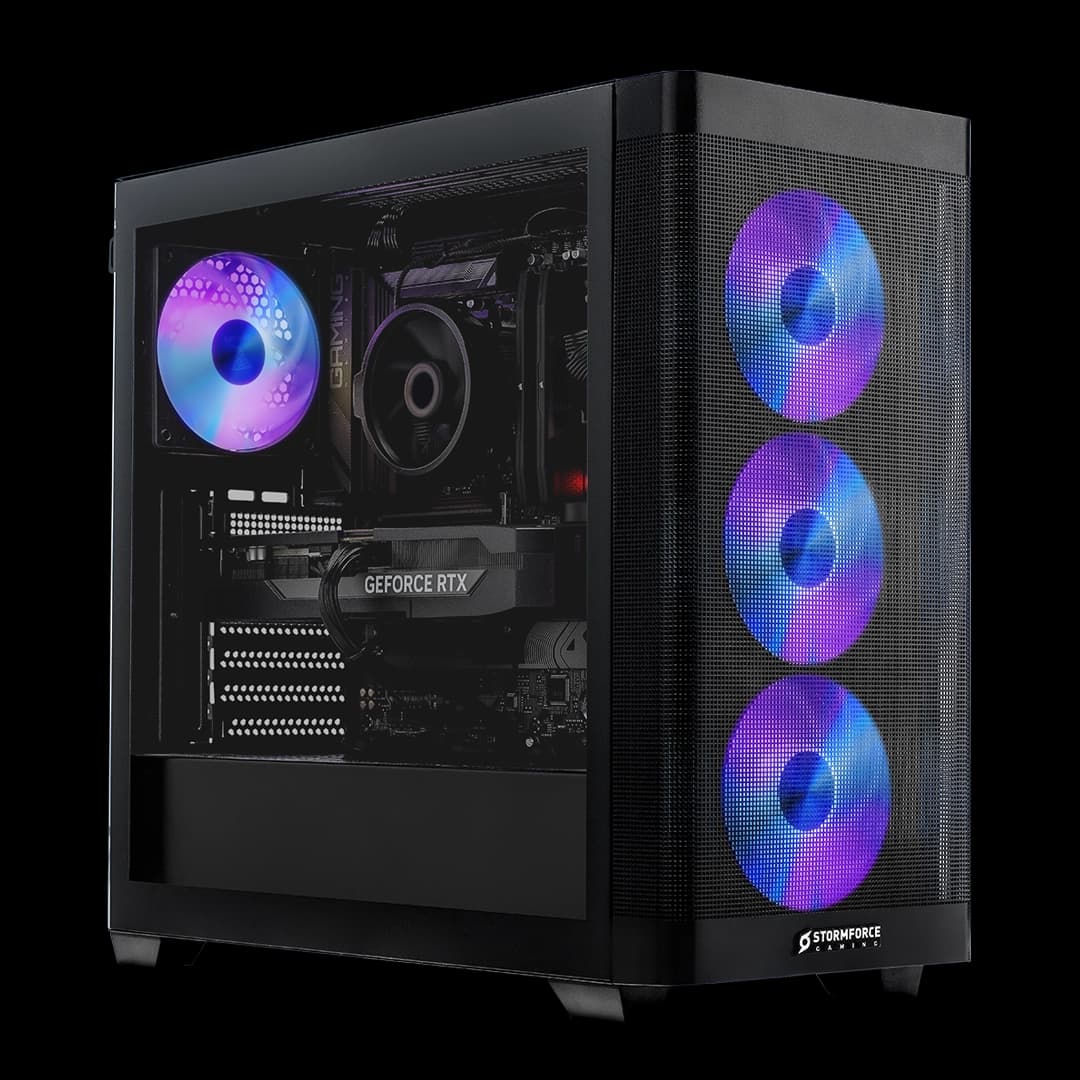
The case is the Cougar FV150, a Mini mATX compact mid-tower with tempered glass side panels. Power comes from a 350W Bronze-rated PSU. Windows 11 Home is installed. Networking covers WiFi 6 and Ethernet. The cooler is a compact aluminium heatsink with an integrated fan, described as optimised air cooling. The full spec breakdown is below.
| Component | Specification |
|---|---|
| CPU | AMD Ryzen 5 5600GT (6 cores, 12 threads, 3.6GHz base, 4.6GHz boost, Zen 3, 7nm, 65W TDP) |
| GPU | Integrated Graphics (AMD Radeon, included in 5600GT) |
| RAM | 16GB DDR4 3200MHz |
| Storage | 1TB Gen 4 M.2 NVMe SSD |
| Motherboard | A520 (Mini mATX, supports AMD Ryzen, M.2, SATA, USB) |
| Case | Cougar FV150 Mini mATX compact mid-tower, tempered glass side panel |
| Cooling | Compact aluminium heatsink with integrated fan |
| PSU | 350W Bronze rated |
| Networking | WiFi 6, Ethernet |
| Operating System | Microsoft Windows 11 Home |
| Price | £699.99 |

CPU & Performance
The Ryzen 5 5600GT is a chip that doesn't get talked about enough, probably because it sits in an awkward spot in AMD's lineup. It's not the newest architecture, and it's not the fastest chip you can buy. But for the money, it punches hard. Six cores and twelve threads on Zen 3 architecture means you've got a genuinely capable processor for productivity tasks: video calls, spreadsheets, light video editing, web browsing with forty-seven tabs open (we all do it). The 4.6GHz boost clock is competitive with what Intel was shipping in the mid-range not long ago, and single-core performance on Zen 3 is still strong enough that most everyday software won't expose any weakness.
Where the 5600GT differs from the standard 5600 is in its integrated graphics. AMD's Radeon graphics built into this chip are meaningfully faster than Intel's integrated options at the same price tier, which is one of the reasons this particular chip makes sense in a no-GPU prebuilt. You're not getting a powerhouse for gaming, but you're getting something that can handle casual titles, older games, and media playback without a discrete card. That's a real differentiator, and it's the core of the value argument for this system.
The 65W TDP is well within what a compact air cooler can handle, so thermal throttling under normal workloads isn't a concern based on the chip's rated power envelope. AMD's own specifications for this processor show it's designed to run efficiently within that thermal budget. Where you might see the CPU working harder is if you add a discrete GPU later and start pushing more demanding games, but even then the 5600GT's six cores should remain competitive for the next couple of years for gaming workloads. It's not a chip that will embarrass you.
GPU & Gaming Performance
Let's be upfront about this: the Carbon Prime AMD ships with integrated graphics only. There is no discrete GPU in the box. If you're expecting to run modern AAA titles at high settings and smooth frame rates, this isn't the machine for that, at least not out of the box. The integrated Radeon graphics in the 5600GT are the best integrated option AMD offers at this tier, but "best integrated" is still a long way from even a budget discrete card like a used RX 6600 or an RTX 4060.
What the integrated graphics are actually good for: older titles, indie games, esports games with modest system requirements, and anything that doesn't need a lot of raw GPU horsepower. Think games like Minecraft, Rocket League, older FIFA titles, CS2 at lower settings, that kind of thing. For media consumption, streaming, and general desktop use, integrated graphics are completely fine and you won't notice any limitation. The chip handles 4K video playback without breaking a sweat.
The honest framing here is that this machine is designed as a starting point, not a finished gaming rig. Stormforce Gaming has built it with an upgrade path in mind (more on that in the upgrade section), and the value of the integrated graphics is that you're not paying for a budget GPU you'll want to replace in six months anyway. If you know you'll be adding a discrete card, buying this and upgrading later can make more sense than paying a premium now for a GPU that's already dated. That said, if you need to game properly right now, you'll want to factor in the cost of a GPU from day one.
Memory & Storage
16GB of DDR4 at 3200MHz is the right call for this tier in 2025. It's enough for gaming, enough for productivity, and enough to run a browser, a game, and a music player simultaneously without Windows starting to choke. Some budget prebuilts at this price still ship with 8GB, which is genuinely too little now that Windows 11 itself has a meaningful memory footprint. Stormforce Gaming has avoided that trap here, and 16GB gives you a machine that won't feel sluggish in day-to-day use.
The 1TB Gen 4 M.2 NVMe SSD is probably the most impressive individual component spec in this build relative to the price. NVMe storage in general is a big step up from the SATA SSDs that still appear in some budget prebuilts, and Gen 4 speeds are faster still. In practical terms this means Windows boots quickly, applications open fast, and games load without the kind of extended pauses you'd get from an older drive. 1TB is a reasonable starting capacity, though if you install a lot of games you'll fill it eventually. The good news is the A520 motherboard supports additional M.2 storage and SATA devices, so expanding isn't difficult.
One thing to keep in mind with the DDR4 at 3200MHz: the 5600GT's integrated graphics share system memory rather than having dedicated VRAM. This means memory speed has a more direct impact on integrated GPU performance than it would with a discrete card. 3200MHz is solid for this, and it's faster than the DDR4 2666MHz that cheaper prebuilts sometimes use. If you later add a discrete GPU, the memory speed becomes less critical for graphics performance, but 3200MHz is a decent baseline regardless. The spec sheet doesn't confirm whether the memory is running in single or dual channel, and that does matter for integrated graphics performance, so it's something to ask Stormforce Gaming about directly if you're on the fence.
Cooling Solution
The cooling setup here is described as a compact aluminium heatsink with an integrated fan. That's essentially a stock-style cooler, and for a 65W TDP chip like the 5600GT, it's adequate. The Ryzen 5 5600GT doesn't run particularly hot under normal conditions, and AMD's thermal design for Zen 3 is well understood at this point. A compact heatsink with a fan will keep the chip within its operating range for everyday workloads and light gaming without breaking into a sweat.
Where you might notice the cooler's limitations is under sustained heavy load. If you're running a CPU-intensive workload for extended periods, a compact cooler will eventually reach a thermal plateau and the chip may reduce its boost clocks to stay within the thermal budget. This isn't unique to this system; it's a characteristic of any compact cooler on a mid-range chip. For the use cases this machine is designed for, it's unlikely to be a meaningful problem. The 65W TDP gives the cooler a manageable target, and Zen 3 doesn't have the kind of power spikes that make some Intel chips difficult to cool on budget coolers.
The Cougar FV150 case is described as having efficient airflow design, which helps the overall thermal picture. A case that moves air well means the cooler is working with cooler ambient air inside the chassis, which keeps temperatures lower overall. If you later add a discrete GPU, airflow becomes more important because you're adding a second heat source to a compact enclosure. The FV150's support for long GPUs and multiple storage drives suggests Stormforce Gaming has thought about this, but the 350W PSU will be the real limiting factor for GPU upgrades rather than the cooling setup. The cooler itself can be swapped for something beefier if you find temperatures climbing after an upgrade, since the AM4 socket is compatible with a wide range of aftermarket coolers.
Case & Build Quality
The Cougar FV150 is a Mini mATX compact mid-tower, and it's a decent choice for a budget prebuilt. Cougar is a legitimate case manufacturer with a proper product line, not a no-name chassis that's been slapped together from whatever was cheapest. The tempered glass side panel is a nice touch at this price point; it lets you see the internals, which matters if you're planning to add components later or just like knowing what's going on inside your machine. It also means the build quality of the internals is on display, which is a mild incentive for the builder to do a decent job with cable management.
The case supports long GPUs, which is relevant if you're planning to add a discrete card. Budget cases sometimes have clearance issues with full-length graphics cards, and the fact that Stormforce Gaming has specifically called this out suggests they've considered the upgrade scenario. Multiple storage drive support is also listed, which ties into the upgrade story around adding more storage over time. The Mini mATX form factor keeps the footprint compact, which is good for desk space but does mean you're working within tighter constraints than a full ATX build.
Build quality on Stormforce Gaming prebuilts generally comes down to how much care went into assembly. The company is a UK-based system builder with an established product range, not a warehouse operation shipping untested machines. That said, no prebuilt manufacturer is immune to the occasional cable routing decision that makes you wince, and compact cases make cable management harder. The tempered glass panel means you'll see exactly what you've got. If anything looks off when the machine arrives, Stormforce Gaming's support is the right first call rather than poking around yourself during any warranty period.
Connectivity & Ports
Networking is covered by WiFi 6 and Ethernet, which is a solid combination. WiFi 6 brings faster wireless speeds and better performance in congested environments compared to WiFi 5, and having both wireless and wired options means you're not forced into one or the other depending on your setup. If you're running a long Ethernet cable to your router, great. If you're relying on wireless, WiFi 6 is the right standard to be on in 2025 and will serve you well as routers continue to improve.
The A520 motherboard supports a range of USB options, which is listed in the spec highlights. The specific port count and layout on the front and rear panels isn't detailed in the verified specifications, so for exact port counts and video output options, the Stormforce Gaming product page is the right place to check. What the A520 platform offers in general is a mature, well-supported set of connectivity options for an entry-level build, and the board's USB range covers the basics you'd expect from a modern desktop.
Video output is handled by the integrated graphics in the 5600GT, and AMD's integrated Radeon graphics support display output through the motherboard's rear video ports. Again, the specific output types (HDMI, DisplayPort) aren't confirmed in the verified spec data, so check the product page for exact details. If you add a discrete GPU later, you'd typically connect your monitor to the GPU's outputs rather than the motherboard, which is standard practice. The WiFi 6 inclusion is genuinely good to see at this price tier; some budget prebuilts still ship with WiFi 5 or omit wireless entirely and call it a feature.
Pre-installed Software & OS
Windows 11 Home comes pre-installed, which is the right choice for a machine at this level. Windows 11 Pro costs more and offers features (BitLocker, Remote Desktop hosting, Hyper-V) that most home users simply don't need. Home covers everything a typical user wants: gaming via Steam or the Xbox app, Microsoft 365, general productivity, and media. The fact that it's pre-installed means you're not dealing with a USB stick and a licence key on day one, which is one of the genuine conveniences of buying a prebuilt.
Stormforce Gaming doesn't have a reputation for loading machines with aggressive bloatware, which is a real concern with some prebuilt manufacturers. The bigger bloatware offenders tend to be the large volume manufacturers rather than UK system builders, and Stormforce Gaming's positioning as a gaming-focused builder means they're unlikely to be filling the SSD with trial software that clogs up the startup sequence. That said, the spec sheet doesn't confirm what if anything comes pre-installed beyond Windows, so it's reasonable to do a fresh check of startup apps when the machine arrives.
Windows 11 Home does have its own built-in features that some users find intrusive: Microsoft's advertising integration, OneDrive prompts, and the Widgets panel are all present by default. None of that is Stormforce Gaming's doing; it's just what Windows 11 Home ships with. A few minutes in Settings sorts most of it. The 1TB NVMe SSD gives you plenty of room for Windows, your applications, and a decent library of games without immediately feeling squeezed, which is more than can be said for some entry prebuilts that ship with 512GB and call it sufficient.
Upgrade Potential
This is where the Carbon Prime AMD makes its clearest argument. The AM4 socket on the A520 motherboard is one of the most upgrade-friendly platforms in PC history. AMD supported AM4 from 2017 through to the Ryzen 5000 series, which means there's a massive ecosystem of compatible processors. The 5600GT is already near the top of what the A520 supports (the A520 doesn't support overclocking, but it does support Ryzen 5000 series chips), so CPU upgrades within the platform are limited, but the socket and board give you flexibility if you want to experiment.
The GPU upgrade path is the most obvious and most impactful thing you can do with this machine. The case supports long GPUs, the PCIe slot is there, and adding a discrete card transforms what this machine can do for gaming. The 350W Bronze PSU is the constraint here. A 350W PSU is tight for a mid-range discrete GPU; a card like an RX 7600 or RTX 4060 can work within that budget at moderate loads, but you'd be living close to the limit, and a more powerful card would require a PSU swap. Budget around £60 to £100 for a PSU upgrade alongside any meaningful GPU addition, and factor that into your total cost calculation.
Memory is expandable, and the A520 board supports additional M.2 and SATA storage. If 16GB ever feels tight (it won't for a while, but eventually), adding another stick is straightforward assuming there's a free slot. The 1TB NVMe SSD can be supplemented with a second M.2 drive or a SATA SSD for mass storage. The compact case keeps things manageable without being claustrophobic. Overall, this is a machine that can grow with you over time, which is exactly what you want from an entry prebuilt. The upgrade story is coherent and the platform choices support it.
How It Compares
At the entry gaming prebuilt tier, the Carbon Prime AMD is competing against a mix of UK system builders and the occasional large-brand machine. The honest comparison isn't always flattering to the big names. Volume manufacturers at this price point have historically reached for slower storage (SATA SSDs instead of NVMe), less memory (8GB or 12GB), and less capable integrated graphics options. The 5600GT with its Radeon integrated graphics is a meaningful differentiator over Intel-based machines in the same bracket that use Intel's UHD graphics, which are considerably weaker for any light gaming use.
Against a DIY build at the same spec, the Carbon Prime AMD holds up well. Pricing a Ryzen 5 5600GT, 16GB DDR4 3200, a 1TB Gen 4 NVMe SSD, an A520 board, the Cougar FV150 case, a 350W Bronze PSU, and a Windows 11 Home licence separately puts you at a figure that's surprisingly close to (or above) what Stormforce Gaming is asking. You'd also spend time building it, and you'd carry the warranty risk yourself rather than having a system builder accountable for the whole machine. For experienced builders who enjoy the process, self-building still has its appeal. For everyone else, the maths are tighter than they used to be.
The main area where a self-build wins is PSU quality and choice. A 350W Bronze PSU is fine for this system as configured, but if you're self-building you'd probably stretch to a 550W or 650W unit to give yourself headroom for a future GPU without needing to swap it later. That's a legitimate criticism of the Carbon Prime AMD as a prebuilt: the PSU is sized for the current configuration rather than the upgrade path. It's not a dealbreaker, but it's a cost to factor in if GPU upgrades are on your roadmap from day one.
| Feature | Carbon Prime AMD | Typical Intel Entry Prebuilt | Equivalent DIY Build |
|---|---|---|---|
| CPU | Ryzen 5 5600GT (6C/12T, 4.6GHz boost) | Core i5 or Pentium equivalent | Same chip, self-sourced |
| Integrated GPU | AMD Radeon (in 5600GT) | Intel UHD (weaker for gaming) | Same as CPU choice |
| RAM | 16GB DDR4 3200 | Often 8GB or 12GB at this tier | 16GB DDR4 3200 (your choice) |
| Storage | 1TB Gen 4 NVMe SSD | Often SATA SSD or slower NVMe | 1TB Gen 4 NVMe (your choice) |
| PSU | 350W Bronze | 300W to 400W typical | 550W+ recommended for headroom |
| Networking | WiFi 6 + Ethernet | WiFi 5 or Ethernet only at this tier | Depends on motherboard |
| OS | Windows 11 Home (included) | Windows 11 Home (included) | Separate licence cost |
| Warranty | Stormforce Gaming system warranty | Manufacturer warranty | Per-component warranties only |
| Price | £699.99 | Similar bracket | Comparable or higher total cost |

Final Verdict
The Stormforce Gaming Carbon Prime AMD is a genuinely sensible buy for a specific type of person: someone who needs a capable everyday PC right now, wants the option to add a GPU later, and doesn't want to spend their weekend sourcing parts and troubleshooting a build. The Ryzen 5 5600GT is a good chip. The 16GB DDR4 3200 is the right amount of memory. The 1TB Gen 4 NVMe SSD is a proper fast drive, not the slow SATA unit some budget prebuilts try to get away with. And WiFi 6 is the right networking standard for 2025. These aren't compromised specs; they're reasonable choices at this price tier.
The 350W PSU is the one component that limits your future options, and you should go in with eyes open about that. If you're planning to add a discrete GPU, a PSU upgrade is likely part of that project. It's not a fatal flaw, but it's a real cost to factor in. The A520 motherboard's lack of overclocking support matters, though the 5600GT isn't a chip that benefits from overclocking anyway, so in practice it's a non-issue for most buyers. The compact air cooler is adequate for the 65W chip but won't win any awards, and if you push the system hard after adding a GPU, you might find yourself wanting to swap it for something with more headroom.
Who should skip this? If you need to game properly right now and can't wait to save up for a GPU, look at prebuilts that include a discrete card even if it means stepping up in price. A machine with an entry-level discrete GPU will outperform integrated graphics for gaming in a way that can't be closed by any other upgrade. And if you're an experienced builder who enjoys the process and has time to source parts, a self-build at this spec might come in at a similar cost while giving you better PSU headroom from the start.
But for the person who wants a ready-to-go Windows 11 machine, a solid CPU, fast storage, and a clear upgrade path without the faff of building from scratch? The Carbon Prime AMD makes a strong case at its current price. It's not a gaming powerhouse. It knows what it is, and it does that job well.
Our editorial assessment: 7 out of 10. Good specs for the money, honest about what it is, let down only by a PSU that limits the upgrade path it's otherwise well set up for.
What works. What doesn’t.
6 + 6What we liked6 reasons
- Ryzen 5 5600GT offers strong multi-threaded performance and the best integrated Radeon graphics at this price tier
- 1TB Gen 4 NVMe SSD is a genuinely fast storage solution, well above what many budget prebuilts offer
- 16GB DDR4 3200MHz is the right memory amount for 2025 and avoids the 8GB trap common at this price
- WiFi 6 included as standard, which is ahead of many competitors in this bracket
- Clear and coherent upgrade path via the AM4 socket and a case that accommodates long discrete GPUs
- Windows 11 Home pre-installed with no reported aggressive bloatware from the builder
Where it falls6 reasons
- No discrete GPU included, so demanding modern games are not playable out of the box
- 350W Bronze PSU is sized for the current configuration and will need upgrading before adding any meaningful discrete graphics card
- A520 motherboard does not support CPU overclocking, limiting tuning options even if you later want to explore them
- Compact air cooler is only adequate and may show limitations under sustained heavy loads or after a GPU is added
- Memory channel configuration is not confirmed in the spec sheet, and single-channel operation would noticeably hurt integrated graphics performance
- Upgrade costs, particularly a PSU swap, should be factored into the total price from day one if GPU gaming is on the roadmap
Full specifications
12 attributes| CPU | AMD Ryzen 5 5600GT |
|---|---|
| GPU | Integrated Graphics |
| RAM | 16GB DDR4 3200 |
| Storage | 1TB M.2 NVMe SSD |
| Case | Cougar FV150 Mini mATX |
| Connectivity | WiFi 6, Ethernet |
| Cooling | Optimised Air Cooling |
| Motherboard | A520 |
| OS | Microsoft Windows 11 Home |
| PSU | 350w Bronze PSU |
| RAM GB | 16 |
| RAM type | DDR4 |
If this isn’t right for you
2 options
Frequently asked
7 questions01Does the Stormforce Gaming Carbon Prime AMD include a discrete graphics card?+
No. The Carbon Prime AMD relies entirely on the integrated Radeon graphics built into the AMD Ryzen 5 5600GT processor. There is no discrete GPU included in the box. This makes it suitable for everyday computing, light gaming, and media playback, but not for running demanding modern titles at high settings.
02Can I add a discrete GPU to the Carbon Prime AMD later?+
Yes, the Cougar FV150 case supports long graphics cards and the motherboard has a PCIe slot for a discrete GPU. However, the 350W Bronze PSU is the main constraint. Mid-range discrete cards such as an RX 7600 or RTX 4060 can operate within tight power budgets, but a more capable card would require a PSU upgrade, typically to a 550W or higher unit, which adds to the overall cost of the upgrade.
03Is 16GB of DDR4 enough for gaming in 2025?+
For the majority of current games and everyday multitasking, 16GB of DDR4 is sufficient. Windows 11 itself has a meaningful memory footprint, and 16GB gives you comfortable headroom for running a game, a browser, and background applications simultaneously. Some newer AAA titles recommend 16GB as a minimum, so you are at the right level rather than ahead of the curve, but it remains adequate for most gaming scenarios in 2025.
04What is the upgrade path for the CPU on the Carbon Prime AMD?+
The A520 motherboard uses the AMD AM4 socket, which supports Ryzen 5000 series processors. The Ryzen 5 5600GT is already a capable Zen 3 chip, and the A520 platform does not support CPU overclocking. Meaningful CPU upgrades within the AM4 socket at this point are limited, though the platform itself has broad compatibility. The more impactful upgrade for most users will be adding a discrete GPU rather than changing the processor.
05How does the Ryzen 5 5600GT's integrated graphics compare to Intel integrated graphics at the same price tier?+
AMD's integrated Radeon graphics in the Ryzen 5 5600GT are considerably stronger than Intel's UHD integrated graphics found in comparable Intel processors at this price bracket. The difference is most noticeable in light gaming scenarios, where the AMD integrated option can handle casual and older titles at modest settings while Intel's UHD graphics struggle to maintain playable frame rates in the same situations. For media playback and desktop use, both are adequate.
06Will the 350W PSU support a future GPU upgrade?+
A 350W Bronze-rated PSU can technically run the system with a modest discrete GPU such as an RX 7600 or RTX 4060 under normal conditions, but it leaves little headroom and may not comfortably support more powerful cards. For any meaningful GPU upgrade, budgeting for a replacement PSU of at least 550W from a reputable brand is advisable. This additional cost should be factored into your total upgrade budget from the outset.
07Does the Carbon Prime AMD come with Windows 11 already installed?+
Yes, Windows 11 Home comes pre-installed on the machine. This means the system is ready to use out of the box without requiring a separate operating system licence or installation process. Stormforce Gaming does not have a known reputation for loading systems with excessive third-party software, though it is sensible to review startup applications when any new machine arrives.