Pick the wrong case and you'll feel it every time you try to fit a 280mm radiator where the spec says 240mm, or when you're routing a 24-pin cable through a gap that's 15mm too narrow. The Lian Li Lancool 207 Digital is mid-range money spent on a case that actually seems to have been designed by people who've thought about those problems. And based on dozens of owner reviews with a positive overall rating, it's doing something right.
This is a Lian Li Lancool 207 Digital review that cuts straight to what matters: the clearances, the thermal design, the build experience, and whether the 'Digital' branding is worth anything beyond a fancier front panel. Spoiler: it's a strong case at this price tier. But it's not perfect, and it's not for everyone. Let's get into the specifics.
Against the Corsair 4000D Airflow and the Fractal Design Pop Air, which are the obvious alternatives at this price, the Lancool 207 Digital holds up well on airflow and clearances. Where it gets interesting is that LCD display panel on the front, which either sells you or it doesn't. If you don't care about it, there are arguably better-value options. If you do, there's nothing quite like it at this price.
Core Specifications
The Lancool 207 Digital is a mid-tower ATX case with a full mesh front panel and a 4mm tempered glass side panel. Lian Li's product page confirms support for ATX, Micro-ATX, and Mini-ITX motherboards, with a maximum GPU length of 435mm and a CPU cooler height limit of 176mm. Those are genuinely generous numbers for a case at this price point, and they matter enormously when you're planning a build around a modern GPU.
It ships with three 140mm PWM fans pre-installed, two at the front as intake and one at the rear as exhaust. That's a proper default configuration, not the single-fan token gesture you get from some competitors. The case supports up to a 360mm radiator at the front and a 280mm at the top, which covers virtually every AIO on the market right now. PSU clearance is rated at 220mm, which handles full-size modular units without drama.
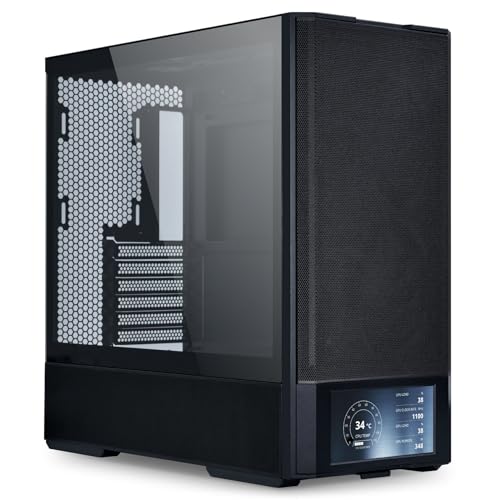
The headline feature, obviously, is the 2.1-inch LCD display integrated into the front panel. It connects via USB internally and can display system stats, custom images, or animations through Lian Li's software. It's a genuinely unusual feature at this price tier. Whether it's useful or just a gimmick depends entirely on how much you care about monitoring CPU temps from across the room. The spec sheet also lists a USB 3.2 Gen 2 Type-C port on the front I/O alongside two USB 3.0 Type-A ports, which is the right answer in 2026.
| Specification | Detail |
|---|---|
| Form Factor | Mid-Tower |
| Motherboard Support | ATX, Micro-ATX, Mini-ITX |
| Max GPU Length | 435mm |
| Max CPU Cooler Height | 176mm |
| Front Radiator Support | Up to 360mm |
| Top Radiator Support | Up to 280mm |
| Rear Fan/Radiator | 1x 120mm or 140mm |
| Included Fans | 3x 140mm PWM |
| PSU Clearance | 220mm |
| Drive Bays (3.5") | 2x |
| Drive Bays (2.5") | 4x |
| Front I/O | 1x USB 3.2 Gen 2 Type-C, 2x USB 3.0 Type-A, HD Audio |
| LCD Display | 2.1-inch front panel display |
| Side Panel | 4mm Tempered Glass |
| Steel Thickness | 0.7mm SECC |
| Dimensions (W x H x D) | Approx. 230 x 480 x 470mm |
| Weight | Approx. 8.7kg |
| Current Price | £100.02 · Details |

Form Factor and Dimensions
The Lancool 207 Digital sits in standard mid-tower territory. At roughly 230mm wide, 480mm tall, and 470mm deep, it's not a compact case and it's not trying to be. It'll fit on most desks without issue, though if you're working with a particularly shallow desk (under 500mm front to back) you'll want to double-check your setup. The footprint is comparable to the Corsair 4000D Airflow and slightly deeper than the Fractal Pop Air, which matters if desk space is genuinely tight.
The weight comes in at around 8.7kg, which is on the heavier side for a mid-tower. That's partly the 4mm tempered glass side panel, which is thicker than the 3mm glass you find on cheaper cases. It adds a bit of rigidity and a noticeable sense of solidity when you pick it up. Owner reviews consistently mention that the case feels well-built rather than flimsy, which is exactly what you want to hear at this price tier. Nobody's reporting panels that wobble or flex under light pressure.
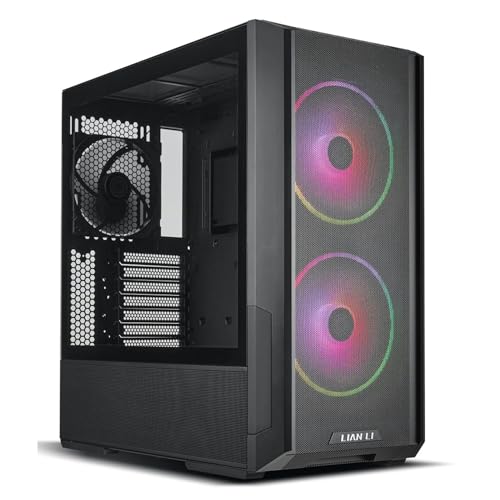
The overall aesthetic is clean. The mesh front panel dominates the visual design, and the LCD display sits in the lower section of the front panel, integrated neatly rather than bolted on as an afterthought. The black finish on this variant is matte, which resists fingerprints better than a gloss finish would. There's no RGB lighting on the case itself beyond what the included fans provide, which keeps things tasteful if that's your preference. The tempered glass side panel is hinged on the left side, swinging open rather than sliding, which owners report as a genuinely useful quality-of-life feature when you're frequently accessing the interior.
Motherboard Compatibility
ATX, Micro-ATX, and Mini-ITX are all supported, with the standard ATX layout being the obvious sweet spot for this size of case. The standoff layout is pre-installed for ATX, which is the sensible default, and the case is roomy enough that even a full-size ATX board doesn't feel cramped. If you're running a Micro-ATX build, you'll have noticeably more room around the board for cable routing and airflow, which isn't a bad thing.
E-ATX is not officially supported, which matters if you're planning a high-end HEDT build. The interior width simply isn't there for extended ATX boards. But honestly, if you're spending E-ATX money on a motherboard, you're probably looking at a different class of case anyway. For the vast majority of mainstream builds, from budget Ryzen systems all the way up to Core i9 or Ryzen 9 mid-to-high-end configurations, the motherboard compatibility here is entirely fine.
One thing that owners flag positively is the clarity of the standoff layout. The motherboard tray is clearly marked, and the pre-installed standoffs are in the right positions for ATX out of the box. It sounds basic, but you'd be surprised how many cases in this price range manage to get this slightly wrong, either missing a standoff or placing them off-centre enough to cause alignment headaches. The Lancool 207 Digital doesn't seem to have that problem based on owner feedback. Several reviewers specifically mention the motherboard installation as straightforward and quick.
GPU Clearance
435mm of GPU clearance is the headline number, and it's a good one. To put that in context, an NVIDIA RTX 4090 Founders Edition measures around 336mm in length, so you've got nearly 100mm of headroom even with the most physically demanding consumer GPU currently available. Triple-fan aftermarket variants from ASUS, MSI, and Gigabyte typically run between 340mm and 360mm, which still fits comfortably. You'd have to be installing something genuinely unusual to hit the 435mm limit.
The 435mm clearance figure assumes no front radiator is installed. If you're running a 360mm AIO at the front, GPU clearance will be reduced depending on the radiator and fan thickness combined. In that configuration you're typically looking at something closer to 320mm to 360mm of usable GPU space depending on fan thickness, which is still fine for most builds but worth calculating before you commit to a specific AIO and GPU combination. This isn't unique to the Lancool 207 Digital; it's a physics problem every mid-tower faces.
There's no vertical GPU mount option included in the box, which is a minor omission at this price tier. Some competitors, like the Lian Li Lancool 216, include a vertical riser cable as standard. If you want to show off your GPU vertically in the Lancool 207 Digital, you'll need to buy a PCIe riser cable separately and check compatibility with the bracket spacing. It's not a dealbreaker, but it's upfront rather than discovering it after you've bought the case. Owner reviews don't flag this as a common frustration, probably because most people aren't planning a vertical mount anyway.
CPU Cooler Clearance
The 176mm CPU cooler height limit is generous enough to accommodate virtually every mainstream tower cooler on the market. The Noctua NH-D15 measures 165mm, the be quiet! Dark Rock Pro 5 comes in at 162mm, and the Thermalright Phantom Spirit 120 SE sits at 155mm. You've got comfortable clearance for all of them, with at least 11mm to spare even at the top of the range. That's enough margin that you don't need to stress about cooler selection, which is exactly how it should be at this price point.
For AIO liquid cooling, the front panel supports radiators up to 360mm, and the top supports up to 280mm. That covers the full range of popular AIO sizes. A 360mm front-mount AIO is the most thermally effective configuration for most builds, and this case handles it without requiring any modification or panel removal gymnastics. The top 280mm support is useful if you want to keep the front clear for maximum intake airflow from the included fans, running a 240mm or 280mm AIO at the top instead.
RAM clearance with a top-mounted radiator is if you're running tall memory modules. The spec sheet doesn't call out a specific RAM height limit for top radiator configurations, but owner feedback suggests that standard-height DDR5 modules (around 34mm to 38mm) don't cause problems. High-profile RAM with large heatspreaders above 45mm could potentially conflict with a 280mm top radiator depending on fan thickness. If you're running something like G.Skill Trident Z5 Royal with its tall heatspreader, measure carefully before committing to a top radiator configuration.
Storage Bay Options
Two 3.5-inch drive bays and four 2.5-inch bays is a reasonable allocation for a mid-tower at this price. The 3.5-inch bays sit behind the PSU shroud in the lower section of the case, keeping mechanical drives out of the main airflow path and tucked away from the tempered glass side view. That's the right approach aesthetically and practically. The 2.5-inch bays are positioned on the back of the motherboard tray and on the PSU shroud, giving you options for SSD placement depending on your cable routing preferences.
If you're building a storage-heavy system with four or more mechanical drives, this case isn't going to cut it. Two 3.5-inch bays is fine for most gaming builds where NVMe SSDs handle the primary storage and you might have one or two HDDs for bulk media storage. But a content creation or NAS-adjacent build that needs six or eight spinning disks needs a different case entirely. That's not a criticism of the Lancool 207 Digital specifically; it's just not designed for that use case, and no mid-tower at this price is.
Tool-less drive mounting is present for the 2.5-inch bays, which owners appreciate. The 3.5-inch bays use a tray system with screws, which is standard for mechanical drives and sensible given that you don't want HDDs vibrating loose from a tool-less clip system. A few owner reviews mention that the drive trays feel solid and don't rattle, which is the main thing you want from HDD mounting. NVMe M.2 drives mount directly to the motherboard, so the case's drive bay count doesn't affect that at all. Most modern builds are running two or three M.2 slots on the motherboard anyway.
Cable Management
Cable management is where mid-range cases often separate themselves from budget options, and the Lancool 207 Digital does reasonably well here. The rear panel clearance is reported at around 25mm to 30mm, which is enough for a tidy build without being the cavernous 40mm+ space you get in some premium cases. It's workable, especially with a modular PSU where you're only running the cables you actually need. Owner reviews consistently describe cable routing as straightforward, which is the target outcome.
There's a full PSU shroud covering the lower chamber, which hides the power supply and any excess cable length cleanly. Velcro straps are included for cable bundling, which is a small but meaningful detail that some cases at this price omit entirely. The cable routing holes are grommeted, which protects cables from sharp edges and keeps the finished build looking cleaner through the tempered glass. Several owners specifically mention that the grommets are properly fitted rather than loose or missing, which sounds trivial but genuinely matters when you're trying to route a stiff 24-pin cable.
The 24-pin ATX motherboard connector routing can be slightly awkward depending on your motherboard layout, which is a common challenge in mid-towers rather than a specific fault of this case. The routing channel on the right side of the motherboard tray is the standard path, and with a modular PSU and some patience the result should be clean. A few owners mention that the EPS CPU power cable routing to the top of the motherboard requires a longer cable if your PSU is at the bottom, particularly with larger ATX boards. A 650mm or longer EPS cable sorts this without drama. Nothing here is unusual for the format, but check it before you start the build.
Airflow and Thermal Design
The full mesh front panel is the most important thermal feature of the Lancool 207 Digital, and it's a proper mesh, not a decorative panel with a few slots cut into it. Mesh fronts allow significantly more air through than solid or glass fronts. The difference in thermal performance between a mesh front and a solid front can be meaningful, particularly for the GPU which benefits most from fresh cool air being pushed through the case. This is why the Corsair 4000D Airflow outsells its glass-front sibling in enthusiast circles, and why Lian Li's choice to go full mesh here is the right call.
Three 140mm PWM fans pre-installed is a strong starting point. Two front intakes and one rear exhaust creates positive pressure when the front fans are running faster than the rear, which reduces dust ingress through unfiltered gaps. The fans are controlled via PWM, meaning your motherboard or a fan controller can manage their speed based on temperature rather than running them flat out all the time. Owner reviews describe the fans as reasonably quiet at lower speeds, with noise becoming noticeable only when the system is under sustained load. That's about what you'd expect from included 140mm fans at this price.
Dust filtration is present on the front panel and the PSU intake at the bottom. The filters are magnetic on the front, which means they pull off cleanly for cleaning without tools. That's the right design choice. A dust filter you have to unscrew is a dust filter you'll clean less often, and a dirty filter restricts airflow. The top panel doesn't have a dust filter included, which matters if you're planning a top-mounted radiator with fans pulling air through from inside. A few owners have added aftermarket magnetic filters to the top, which is straightforward enough. The thermal performance reported by owners is consistently positive, with several noting that their CPU and GPU temperatures are well-managed compared to their previous cases.
Front I/O and Connectivity
The front I/O panel sits at the top of the case and includes one USB 3.2 Gen 2 Type-C port, two USB 3.0 Type-A ports, and a combined headphone/microphone jack. The USB 3.2 Gen 2 Type-C is the standout here. It supports up to 10Gbps transfer speeds, which means it's actually useful for connecting fast external SSDs or modern peripherals rather than just charging phones slowly. Connecting to the motherboard requires a USB 3.2 Gen 2 Type-C header, which most mid-to-high-end motherboards from the last couple of years include. If you're running an older or budget board without that header, you'll lose the Type-C functionality.
Two USB 3.0 Type-A ports is the standard allocation for a mid-tower, and it's adequate for most builds. If you're someone who constantly has USB drives, controllers, and other peripherals plugged into the front of the case simultaneously, you might want more. But for typical use, two Type-A plus one Type-C covers most scenarios. The power button placement at the top of the case is standard and accessible, and the reset button is present but recessed slightly to avoid accidental presses. That's the sensible design choice.
Then there's the LCD display, which is the whole point of the 'Digital' variant over the standard Lancool 207. The 2.1-inch screen connects via an internal USB header and is controlled through Lian Li's software, which lets you display CPU temperature, GPU temperature, clock speeds, fan speeds, or custom images and animations. Owner feedback on this is genuinely positive. People who bought the Digital specifically for the display report that it works well and the software is reasonably straightforward to set up. A couple of owners mention that the software requires a bit of configuration to get the display showing exactly what you want, but nothing described as particularly painful. If you want a case that lets you glance at system stats without opening a software overlay, this is a legitimately useful feature rather than pure gimmick.
Build Quality and Materials
The steel is 0.7mm SECC, which is standard for mid-range cases. It's not the thicker 1mm steel you find in premium workstation cases, but it's sturdy enough that the chassis doesn't flex noticeably when you're handling it. Owner reviews don't flag any structural concerns, which is the important data point. The panels align properly, the screws thread cleanly, and nothing feels like it's about to snap off. At this price tier, that's the baseline you're hoping for, and the Lancool 207 Digital meets it.
The 4mm tempered glass side panel is noticeably thicker than the 3mm glass common in this price range. It contributes to the solid feel of the case and is less prone to the minor flexing and vibration that thinner glass can exhibit when fans are running at higher speeds. The hinge mechanism for the glass panel is one of the details owners specifically praise. It swings open smoothly and holds its position, which makes accessing the interior much less fiddly than cases where you're wrestling with a panel that wants to slide off at an angle. A few owners mention that the hinge feels genuinely premium rather than cheap, which is a meaningful observation for a case at mid-range money.
Sharp edges are the bane of building in cheaper cases, and the Lancool 207 Digital doesn't seem to have this problem. Owner reviews consistently describe the interior as smooth and well-finished, with rolled edges where they matter. No reports of cut fingers during installation, which is a low bar but one that some cases fail to clear. The finish on the black exterior is consistent and matte, resisting fingerprints reasonably well. The overall impression from owner feedback is of a case that feels like it costs more than it does, which is exactly the right outcome for a mid-range product trying to punch up.
How It Compares
The two obvious alternatives at this price are the Corsair 4000D Airflow and the Fractal Design Pop Air. Both are strong cases with genuine followings, and both are depending on your priorities. The Corsair 4000D Airflow is probably the most popular mid-tower at this price tier in the UK right now, with a well-established reputation for airflow and build quality. The Fractal Pop Air is the more design-focused option, with a cleaner aesthetic and slightly more refined cable management features.
Where the Lancool 207 Digital differentiates itself is the LCD display and the three 140mm fans included as standard. The Corsair 4000D Airflow ships with two 120mm fans, which is a less impressive starting point. The Fractal Pop Air ships with two 140mm fans. Neither competitor includes anything remotely like the front LCD display. If the display is the feature that drew you to the Lancool 207 Digital, there's genuinely nothing comparable at this price tier. You'd have to spend considerably more to get a similar feature from a competitor.
On raw airflow credentials, the Lancool 207 Digital and the 4000D Airflow are closely matched. Both run full mesh fronts with positive pressure fan configurations. The Fractal Pop Air's front panel is more restrictive than either, which shows up in thermal comparisons. GPU clearance is similar across all three, with the Lancool 207 Digital's 435mm being competitive. Where the Fractal Pop Air pulls ahead is cable management refinement and overall interior organisation, which is a genuine strength. But the Lancool 207 Digital's three included fans mean you're not immediately spending extra money on additional fans after purchase, which affects the real-world value calculation.
| Feature | Lian Li Lancool 207 Digital | Corsair 4000D Airflow | Fractal Design Pop Air |
|---|---|---|---|
| Form Factor | Mid-Tower | Mid-Tower | Mid-Tower |
| Front Panel | Full Mesh | Full Mesh | Mesh (less open) |
| Included Fans | 3x 140mm PWM | 2x 120mm | 2x 140mm |
| Max GPU Length | 435mm | 360mm | 467mm |
| Max CPU Cooler Height | 176mm | 170mm | 185mm |
| Front Radiator Support | 360mm | 360mm | 360mm |
| LCD Display | Yes (2.1-inch) | No | No |
| USB Type-C Front I/O | USB 3.2 Gen 2 | USB 3.1 Gen 1 | USB 3.2 Gen 2 |
| Tempered Glass Thickness | 4mm | 4mm | 3mm |
| Price Tier | Mid-Range | Mid-Range | Mid-Range |

Final Verdict
The Lian Li Lancool 207 Digital is a genuinely good mid-tower case that earns its positive overall rating from dozens of owners. The mesh front, three included 140mm PWM fans, 435mm GPU clearance, and 176mm CPU cooler height limit are all strong numbers for the price tier. The 4mm tempered glass, hinged side panel, and grommeted cable routing holes are quality-of-life details that make the build process noticeably less frustrating than cheaper alternatives. And the 2.1-inch LCD display is a legitimately useful feature if you want system monitoring on the front of your case, not just a marketing bullet point.
The things it doesn't do as well: no vertical GPU mount included, the top panel lacks a dust filter, and the rear panel cable clearance of around 25 to 30mm is workable but not exceptional. None of these are serious problems, but they're. The standard Lancool 207 (without the Digital LCD display) costs less and makes sense if you genuinely don't care about the front display. That's the honest answer for anyone who's been drawn in by the case's airflow and build quality rather than the LCD feature specifically. Save the money and buy the non-Digital variant if the display does nothing for you.
But if you want the LCD, this is the case to buy at this price. There's nothing comparable from Corsair, Fractal, or NZXT at a similar price point. The Lancool 207 Digital sits in a genuinely useful niche: proper airflow credentials, generous clearances, strong build quality, and a front display that actually works. For a mainstream gaming build with a modern GPU and either a tower cooler or AIO, it handles everything without compromise. That's a solid result for mid-range money.
Owner satisfaction with a positive overall rating across dozens of reviews is meaningful signal. Cases attract complaints when they deserve them, and the absence of consistent gripes about build quality, sharp edges, or poor fit is reassuring. The Lancool 207 Digital earns a strong recommendation for anyone building a mid-to-high-end gaming system who wants a case that looks good, performs well thermally, and doesn't make the build process harder than it needs to be.
What works. What doesn’t.
5 + 4What we liked5 reasons
- Three 140mm PWM fans included as standard, better than most rivals
- 435mm GPU clearance handles every current flagship card comfortably
- 2.1-inch LCD display is genuinely useful, not just a gimmick
- Hinged 4mm tempered glass side panel praised consistently by owners
- Full mesh front panel delivers proper unrestricted intake airflow
Where it falls4 reasons
- No vertical GPU mount included in the box
- Top panel lacks a dust filter for radiator configurations
- Rear cable clearance around 25-30mm, workable but not exceptional
- LCD display software requires initial configuration effort
Full specifications
11 attributes| Form factor | Mid-Tower |
|---|---|
| CPU cooler clearance MM | 180 |
| Dimensions MM | 455.6 x 219 x 456 |
| Fans included | 4 |
| GPU clearance MM | 375 |
| MAX FAN count | 8 |
| MAX radiator MM | 360 |
| PSU support | ATX under 160mm |
| Side panel | tempered glass |
| Supported motherboard | ATX, Micro-ATX, Mini-ITX |
| Weight KG | 9.25 |
Got a motherboard yet?
4 reviewsThe maker lists ATX, Micro-ATX and Mini-ITX boards for this case. These ATX boards fit it.
Frequently asked
5 questions01Is the Lian Li Lancool 207 Digital - Black good for airflow?+
Yes, it's one of the stronger airflow cases at this price tier. The full mesh front panel allows significantly more air through than solid or glass alternatives, and it ships with three 140mm PWM fans pre-installed in a two-front-intake, one-rear-exhaust configuration. That's a proper positive pressure setup that reduces dust ingress while keeping temperatures in check. Owner reviews consistently report good thermal performance. The front supports up to a 360mm radiator if you're going AIO, and the top supports up to 280mm. Dust filters are present on the front and PSU intake, with magnetic attachment on the front for easy cleaning. The top panel doesn't include a dust filter, which matters if you're mounting fans or a radiator there.
02What's the GPU clearance on the Lian Li Lancool 207 Digital - Black?+
The maximum GPU length is 435mm with no front radiator installed. That's enough headroom for every current consumer GPU, including triple-fan aftermarket variants of the RTX 4090 which typically measure between 340mm and 360mm. If you install a 360mm front radiator, effective GPU clearance reduces depending on the combined thickness of the radiator and fans, typically leaving around 320mm to 360mm of usable space. There's no vertical GPU mount option included in the box, so if you want to display your GPU vertically you'll need to purchase a separate PCIe riser cable and bracket.
03Can the Lian Li Lancool 207 Digital - Black fit a 360mm AIO?+
Yes. The front panel supports radiators up to 360mm, which is the most popular AIO size for high-end CPU cooling. The top panel supports up to 280mm if you prefer to keep the front clear for intake fans. A 360mm front-mounted AIO is the most thermally effective configuration in this case, and it doesn't require any modification or panel removal to install. If you're running tall RAM modules (above around 45mm), check clearance carefully with a top-mounted radiator configuration, as high-profile heatspreaders can potentially conflict with fans hanging down from a top radiator.
04Is the Lian Li Lancool 207 Digital - Black easy to build in?+
Owner feedback is consistently positive on the build experience. The hinged tempered glass side panel is a genuine quality-of-life improvement over sliding panels. The interior is well-finished with no sharp edges reported, rolled edges throughout, and grommeted cable routing holes. Velcro straps are included for cable management. Rear panel cable clearance is around 25mm to 30mm, which is workable with a modular PSU. The 24-pin and EPS cable routing is standard for mid-towers, though a longer EPS cable (650mm or more) helps with routing to the top of larger ATX boards. Motherboard standoffs are pre-installed for ATX, and the tray is clearly marked. No significant frustrations reported by owners.
05What warranty and returns apply to the Lian Li Lancool 207 Digital - Black?+
Specific warranty terms for this product are not confirmed in the verified product data available to us. For purchases made through Amazon UK, Amazon's standard 30-day returns policy applies, and the A-to-Z Guarantee provides additional buyer protection. For warranty information directly from Lian Li, we recommend checking their official support documentation or contacting them directly through their website.