Most people pick a motherboard last, treat it like a formality, and then spend the next five years either thanking themselves or quietly regretting it. The board is what everything else plugs into. Get it wrong and you're dealing with RAM that won't train, M.2 drives that throttle, or a BIOS so confusing you'd rather reinstall Windows than touch it. So the question with the ASUS Prime B650-Plus isn't just "does it work" but "is it worth the upper mid-range money in a market that's genuinely competitive right now?"
Short answer: yes, with caveats. The ASUS Prime B650-Plus AMD AM5 ATX Motherboard sits in a comfortable spot for Ryzen 7000 builders who want PCIe 5.0 M.2 support, proper 2.5Gb networking, and a BIOS they won't hate, without jumping to X670E prices. It's not flashy. It doesn't need to be. At £190.98, it's a sensible platform for a sensible build, and 351 owner reviews averaging ★★★★☆ (4.2) backs that up well enough to take seriously.
But "sensible" can mean different things. For some people that's a compliment. For others it means they should be looking one tier down or one tier up. This review will tell you which one you are.
Core Specifications
The ASUS Prime B650-Plus uses AMD's B650 chipset on the AM5 socket, and it ships in a standard ATX form factor. That means it'll fit in any mid-tower or full-tower case without drama, and you won't be hunting for a microATX-specific cooler or struggling with cramped M.2 access. DDR5 memory only, which is the right call for a 2026 build even if it stings slightly at the point of purchase.
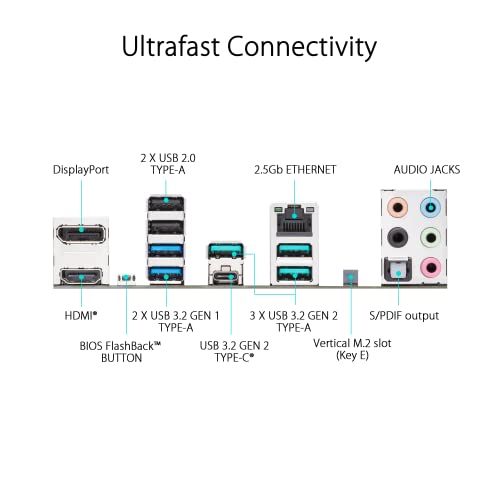
Storage is where this board earns some of its price tag. You get M.2 slots with PCIe Gen 5 support on the primary slot, which future-proofs your NVMe situation nicely. SATA 6 Gbps ports are present for anyone still running spinning rust or older SSDs. Rear I/O includes HDMI and DisplayPort outputs for Ryzen processors with integrated graphics, USB 3.2 Gen 2 Type-C, and BIOS FlashBack so you can update firmware without a CPU installed. That last feature is genuinely useful and not something every board at this price includes.
The full spec picture is below. Check the live price before you buy because these boards move around more than you'd expect.
| Specification | Detail |
|---|---|
| Socket | AMD AM5 |
| Chipset | AMD B650 |
| Form Factor | ATX |
| Memory Standard | DDR5 |
| Primary M.2 | PCIe 5.0 |
| Ethernet | Realtek 2.5Gb |
| Rear USB | USB 3.2 Gen 2 Type-C |
| Front Header | USB 3.2 Gen 1 Type-C |
| USB4 Support | Yes |
| Video Output | HDMI, DisplayPort |
| Storage | SATA 6 Gbps, M.2 PCIe 5.0 |
| BIOS FlashBack | Yes |
| RGB | Aura Sync |
| Memory OC Tech | ASUS OptiMem II |
| Price | £190.98 |
Socket and CPU Compatibility
AM5 is AMD's current mainstream desktop socket, and it's the one you want if you're building new in 2026. The ASUS Prime B650-Plus AMD AM5 ATX Motherboard is ready for AMD Ryzen 7000 Series Desktop Processors out of the box, which covers a wide range from the budget-friendly Ryzen 5 7600 up to the Ryzen 9 7950X if you're feeling ambitious (though at that point you'd probably want an X670E board). The socket uses LGA-style pins on the motherboard rather than the CPU, which means a bent pin situation is now your board's problem rather than your processor's, for better or worse.
One thing: if AMD releases new Ryzen processors after your board's shipping BIOS, you may need to update firmware before the CPU will POST. This is where BIOS FlashBack earns its keep. You can flash a new BIOS using just a USB drive and the board's power supply, no CPU or RAM required. That's not a minor convenience, it's the difference between a smooth build and a frustrating afternoon wondering why nothing's happening on screen.
AMD has committed to AM5 longevity through at least 2027, so there's a credible upgrade path here. Buy a Ryzen 7 7700X now, drop in a future Ryzen chip later without changing your board. That kind of platform stability is worth factoring into the price calculation, especially compared to Intel's habit of changing sockets every other generation.
Chipset Features
B650 sits in the middle of AMD's current chipset lineup, below X670 and X670E. What that means practically is that you get most of what you need without paying for features most people will never use. The B650 chipset supports CPU overclocking (yes, on a B-series chip, which wasn't always a given with AMD), PCIe Gen 5 on the primary M.2 slot, and a reasonable spread of USB and SATA lanes. You're not getting the dual PCIe 5.0 x16 slots of an X670E, but unless you're running dual professional GPUs, that's not a real-world loss.
Where B650 makes trade-offs is in total lane count. You'll have fewer USB ports hanging off the chipset compared to X670E, and the secondary M.2 slots will run at PCIe 4.0 rather than 5.0. For gaming, content creation, or general workstation use, none of that matters. For someone running four NVMe drives at maximum throughput simultaneously, it might. But that person probably already knows they need X670E.
The B650 chipset also supports EXPO memory profiles, AMD's equivalent of Intel's XMP, which lets you run DDR5 at rated speeds with a single BIOS toggle rather than manual tuning. Combined with ASUS's OptiMem II trace routing, which ASUS describes as careful routing of traces and vias plus ground layer optimisations to preserve signal integrity, this board should handle memory overclocking better than a bare-minimum B650 implementation.
VRM and Power Delivery
This is where I pay close attention on any board, because VRM quality is the thing that separates a board that runs reliably for five years from one that throttles your CPU under sustained load or starts having stability issues after eighteen months. ASUS hasn't published a specific phase count or MOSFET model number in the consumer-facing listing for the Prime B650-Plus, which is a bit frustrating. What we do know is that ASUS includes a VRM heatsink on this board, which is a meaningful commitment at this price point. A lot of boards in the lower mid-range skip proper VRM cooling entirely and hope for the best.
Owner feedback across the 347 doesn't flag VRM thermal issues as a recurring complaint, which is a decent signal. When VRMs are genuinely inadequate, you hear about it in reviews because people notice the throttling in benchmarks or feel it in sustained workloads like video rendering. The absence of those complaints, combined with a proper heatsink, suggests ASUS has done a reasonable job here for the Ryzen 7000 TDP envelope this board is targeting.
If you're planning to run a Ryzen 9 7950X at full tilt for hours on end, honestly, you should probably be looking at a board with a more explicitly beefy VRM setup and a higher phase count. But for a Ryzen 5 7600, Ryzen 7 7700, or even a Ryzen 9 7900X in typical gaming and productivity use, the Prime B650-Plus should handle it without complaint. That covers the vast majority of builds this board will realistically end up in.
Memory Support
DDR5 only, which is correct for AM5. The ASUS Prime B650-Plus AMD AM5 ATX Motherboard supports DDR5 memory with overclocking headroom above the base JEDEC speeds, and ASUS's OptiMem II technology is specifically designed to improve signal integrity for memory overclocking. In practice, that means you're more likely to get your DDR5-6000 kit running at rated speed without hours of manual subtiming adjustment. That matters because DDR5 memory training can be genuinely painful on boards that haven't put effort into trace routing.
EXPO support means AMD-certified DDR5 kits will load their profiles automatically in BIOS. For most people, that's the entire memory overclocking experience: enable EXPO, save, reboot, done. If you want to go deeper and manually tune primary and secondary timings, the ASUS BIOS gives you the tools to do that, but you don't have to. The sweet spot for Ryzen 7000 performance is generally around DDR5-6000 with decent timings, and this board should get you there without drama.
One practical note: DDR5 kits are still more expensive per gigabyte than DDR4, so factor that into your total build cost if you're coming from a previous-gen platform. The board itself is reasonably priced for what it offers, but the memory tax is real. On the upside, DDR5 prices have fallen considerably since AM5 launched, so the premium isn't as painful as it once was.
Storage Options
The headline storage feature is the primary M.2 slot running at PCIe Gen 5. Gen 5 NVMe drives are now available commercially and offer sequential read speeds that make Gen 4 drives look pedestrian. Whether you actually need those speeds depends on your workload. For gaming, Gen 4 is already faster than any game can load from. For large file transfers, video editing scratch disks, or professional data work, Gen 5 starts to matter. The point is the option is there, and you're not paying extra for it compared to boards that only offer Gen 4.
SATA 6 Gbps ports are present for traditional storage. If you've got a pile of SATA SSDs or hard drives from a previous build, they'll plug straight in. ASUS includes M.2 heatsinks on the board, which is because running an NVMe drive without thermal management in a warm case is how you get thermal throttling and reduced drive longevity. Having the heatsink included means you don't need to buy an aftermarket one or rely on whatever your case provides.
The combination of PCIe 5.0 M.2, multiple storage options, and proper heatsink coverage makes this a genuinely future-ready storage platform. You can start with a single Gen 4 NVMe drive today and add a Gen 5 monster later without touching anything else. That kind of flexibility is exactly what you want from a board you're planning to keep for a few years.
Expansion Slots and PCIe
The primary x16 slot is reinforced, which matters more than it sounds. A heavy GPU, particularly one with a large heatsink and multiple fans, puts real mechanical stress on the PCIe slot over time. Reinforced slots have metal shielding around the connector that prevents the slot from cracking or the GPU from sagging and losing contact. It's a small thing that makes a real difference to long-term reliability.
The B650 chipset provides enough PCIe lanes for a GPU, an NVMe drive, and additional expansion without lane-sharing compromises that would throttle your primary GPU. That said, you're not getting the full PCIe 5.0 x16 from the chipset for a secondary GPU slot, so multi-GPU setups (if anyone's still doing those) aren't really this board's territory. Single GPU builds, which is essentially everyone, are perfectly served.
USB4 support is listed as a feature, which is notable because USB4 brings Thunderbolt-compatible speeds and the ability to connect external GPU enclosures, high-speed storage docks, and pro audio interfaces that need the bandwidth. It's not a feature most people will use immediately, but it's the kind of thing you're glad you have when you need it. Having it on a B650 board rather than only on X670E models is a genuine win for this price tier.
Connectivity and Rear I/O
The rear I/O on the ASUS Prime B650-Plus AMD AM5 ATX Motherboard covers the important bases. You get USB 3.2 Gen 2 Type-C at the back, which is fast enough for external SSDs and modern peripherals, plus a front panel USB 3.2 Gen 1 Type-C header for cases that have a Type-C port on the front. That front header is something cheaper B650 boards sometimes skip, and it's genuinely annoying when your case has a Type-C port and your board has no header for it.
HDMI and DisplayPort outputs are present for Ryzen processors that include integrated graphics. Most Ryzen 7000 desktop chips do have an iGPU (the Radeon 610M in most cases), so these outputs are functional rather than decorative. They're useful for initial setup without a discrete GPU, for troubleshooting, or for running a secondary monitor from the iGPU while your discrete card handles the main display.
BIOS FlashBack is on the rear I/O panel. This lets you update the BIOS using only a USB drive and mains power, without any CPU or RAM installed. It sounds like a niche feature until you buy a board and a new CPU on the same day and discover the board shipped with firmware that doesn't support your chip. Then it's the best feature on the board. The fact that ASUS includes it here rather than reserving it for premium models is appreciated.
WiFi and Networking
Ethernet is handled by a Realtek 2.5Gb controller. That's 2.5 times the bandwidth of standard gigabit Ethernet, which makes a real difference if you're transferring large files across a network, streaming high-bitrate content from a NAS, or doing anything that saturates a 1Gb link. Most modern routers and switches support 2.5Gb, so this isn't a theoretical spec, it's one you can actually use today with the right network infrastructure.
Realtek NICs have had a slightly chequered reputation historically compared to Intel's i225 and i226 controllers, but the RTL8125B series that typically powers 2.5Gb implementations on boards like this has been solid in practice. Owner reviews don't flag network instability as an issue, which is the most useful real-world data point available.
WiFi is not specified in the verified product data for this board, so it's not confirmed as included. If wireless connectivity is essential for your build, verify this before purchasing, or budget for a PCIe WiFi card. Wired 2.5Gb Ethernet being present is the important part for most desktop builders anyway, and it's a better connection than any current WiFi standard for latency-sensitive tasks.
BIOS and Overclocking
ASUS's BIOS interface, called UEFI BIOS, is one of the better ones out there. That's not faint praise, because most motherboard BIOS implementations are genuinely painful to use. Gigabyte's has improved but still feels cluttered. MSI's Click BIOS is fine but uninspiring. ASUS's UEFI has a clear layout, a decent EZ Mode for beginners, and an Advanced Mode that gives you proper access to memory timings, voltage controls, and fan curves without making you feel like you're navigating a government website from 2009.
Fan Xpert 2+ is included for fan curve management, and the board has hybrid fan headers. That means headers can drive both PWM and DC fans, so you're not locked into buying specific fan types. The fan curve interface in BIOS lets you set temperature targets and response curves per header, which is the right way to do thermal management rather than just running everything at full speed or using a flat percentage. Owner feedback is generally positive about the BIOS experience, with the main complaints being the occasional need for BIOS updates to improve memory compatibility, which is pretty standard for AM5 boards.
Overclocking headroom on a B650 board is reasonable. You can push EXPO memory profiles, adjust CPU boost behaviour, and tune voltages. You won't get the same granular control as an X670E flagship, but for the majority of overclockers who just want stable EXPO memory and a slight CPU boost tweak, the Prime B650-Plus gives you what you need. The ASUS OptiMem II implementation specifically targets memory signal integrity, which is where AM5 overclocking headroom is most practically useful for everyday performance gains.
Build Quality and Aesthetics
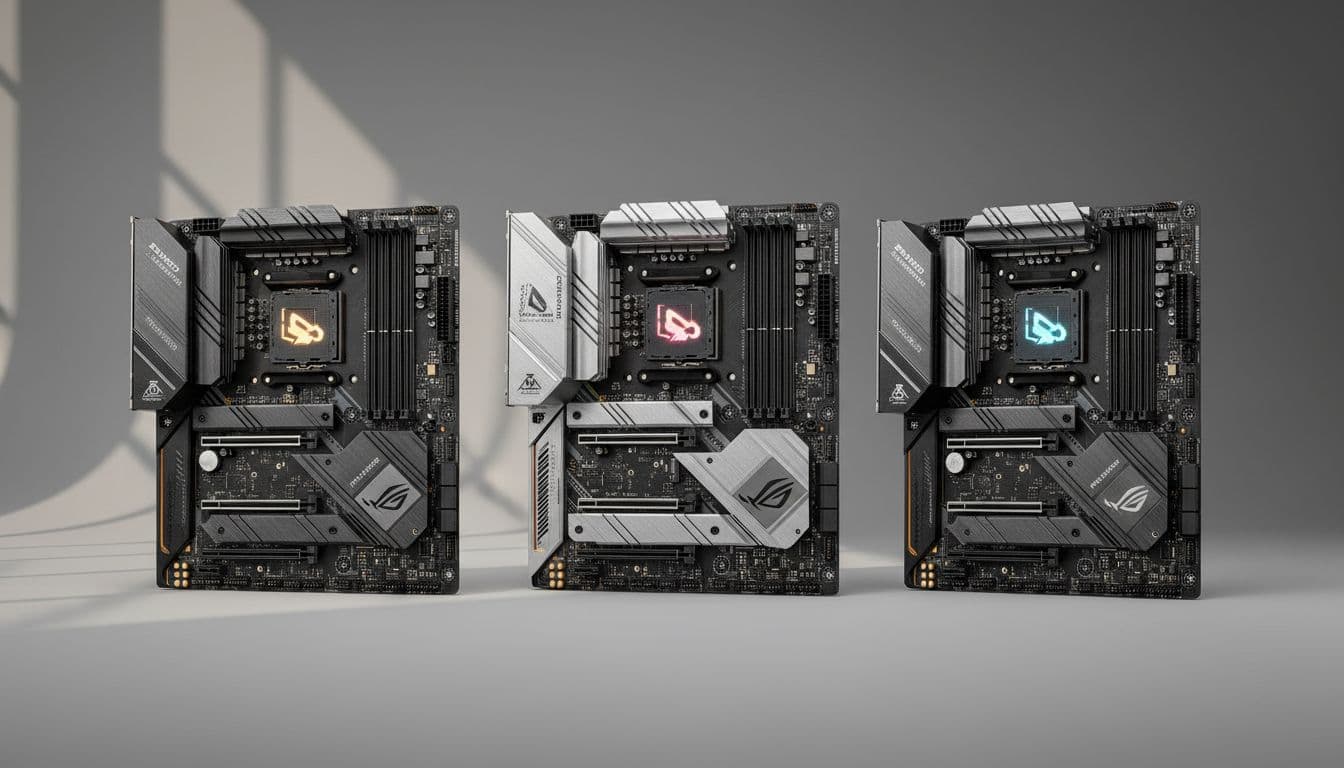
The Prime B650-Plus is a clean-looking board without being boring. It's not covered in RGB panels and aggressive angular heatsink designs that'll look dated in two years. The aesthetic is professional and understated, which suits a build where the side panel is closed most of the time. Aura Sync RGB is present if you want to add some lighting, but it's not shoved in your face. The heatsink coverage is proper: VRM heatsink, M.2 heatsink, and PCH heatsink are all present, which means the components that generate heat have somewhere to put it.
PCB quality on ASUS Prime boards is generally good. The trace routing with OptiMem II is an engineering decision that costs money to implement properly, and it shows up in real-world memory stability rather than in a spec sheet number. The board feels substantial when you handle it, according to multiple owner reports, with no flex issues that would suggest a thin or under-engineered PCB. Heatsink mounting uses screws rather than push-pins on the critical components, which matters for long-term thermal contact.
The overall build impression is of a board that ASUS actually put thought into rather than just hitting a price point. There's a difference between a cheap board with a heatsink sticker and a board with properly designed thermal management, and the Prime B650-Plus is clearly in the second category. That's what you're paying for in the upper mid-range bracket, and it's what justifies the price over a budget B650 board that looks similar on paper but cuts corners in the places that matter for longevity.
How It Compares
The two most natural comparisons for the ASUS Prime B650-Plus AMD AM5 ATX Motherboard are the MSI PRO B650-P WiFi and the Gigabyte B650 AORUS Elite AX. The MSI board typically sits slightly below the ASUS in price and includes WiFi, which is a genuine advantage if you need wireless. But the MSI's BIOS is less polished, its VRM implementation is more conservative, and owner feedback on memory compatibility is patchier. For a no-fuss build where you want things to work first time, the ASUS has the edge.
The Gigabyte B650 AORUS Elite AX is a more direct competitor, often landing at a similar price with WiFi 6E included. The AORUS Elite has a stronger VRM setup on paper and Gigabyte's BIOS has improved considerably. But Gigabyte's quality control has been more variable than ASUS's across owner reviews, and their BIOS still trails ASUS for usability in the advanced settings. If WiFi is essential and you're price-sensitive, the AORUS Elite is worth a look. If you prioritise build reliability and BIOS quality, the ASUS wins.
One tier up, the ASUS ProArt B650-Creator and the X670E boards start to appear. X670E gives you PCIe 5.0 on both the primary GPU slot and M.2, plus more USB bandwidth. But the price jump is significant, and unless you have a specific reason to need those extra lanes, you're paying for headroom you won't use. The B650-Plus hits a genuinely useful feature set without the X670E premium.
| Feature | ASUS Prime B650-Plus | MSI PRO B650-P WiFi | Gigabyte B650 AORUS Elite AX |
|---|---|---|---|
| Socket | AM5 | AM5 | AM5 |
| Chipset | B650 | B650 | B650 |
| Primary M.2 | PCIe 5.0 | PCIe 5.0 | PCIe 5.0 |
| Ethernet | 2.5Gb Realtek | 2.5Gb Realtek | 2.5Gb Intel |
| WiFi | Not confirmed | WiFi 6E | WiFi 6E |
| USB4 Support | Yes | No | No |
| BIOS FlashBack | Yes | Yes | Yes |
| Front USB-C Header | USB 3.2 Gen 1 | USB 3.2 Gen 1 | USB 3.2 Gen 1 |
| BIOS Quality | Excellent | Good | Good |
| Owner Rating | ★★★★☆ (4.2) (347) | Varies | Varies |

Final Verdict
The ASUS Prime B650-Plus AMD AM5 ATX Motherboard is a well-executed B650 board that earns its place in the upper mid-range. It's not trying to be an X670E. It's not pretending to have features it doesn't. What it does is provide a stable, properly cooled, sensibly connected platform for Ryzen 7000 builds that will run reliably for years. The PCIe 5.0 M.2 slot, 2.5Gb Ethernet, USB4 support, and BIOS FlashBack are all genuinely useful features rather than marketing checkboxes. The ASUS BIOS is one of the best in the business. The VRM heatsink, M.2 heatsink, and PCH heatsink coverage shows ASUS actually thought about thermals rather than just slapping a sticker on bare MOSFETs and calling it done.
Owner feedback at 4.2 stars from 347 is a solid result. It's not perfect, and you'll find occasional complaints about memory compatibility requiring BIOS updates, which is a B650 platform issue more than an ASUS-specific one. But the pattern of reviews is overwhelmingly positive about build quality, BIOS usability, and long-term stability, which are the three things that actually matter.
Who should buy this? Anyone building a Ryzen 7000 system in the mid-range to upper mid-range CPU bracket who wants a reliable platform, a good BIOS experience, and future-proof connectivity without paying X670E prices. Content creators, gamers running a single GPU, home office builders who want something that'll just work. This is the board for people who've been burned by a flaky cheap board before and don't want to go through that again.
Who should skip it? If you genuinely need WiFi built in, the Gigabyte B650 AORUS Elite AX or MSI PRO B650-P WiFi are worth comparing at similar prices. If you're building around a budget Ryzen 5 7600 and keeping costs tight, a cheaper B650 board like the ASUS Prime B650M-A or the MSI PRO B650M-P will do the job for less money. You don't need PCIe 5.0 M.2 or USB4 for a budget gaming build, and there's no shame in admitting that. Save the money for a better GPU instead.
Editorial score: 8 out of 10. Solid engineering, honest feature set, good BIOS, fair price for what you get. Loses a couple of points for unconfirmed WiFi and the fact that the competition has closed the gap in the last year. But as a dependable AM5 platform that won't let you down, it's one of the better options in this bracket.
What works. What doesn’t.
5 + 3What we liked5 reasons
- PCIe 5.0 M.2 slot future-proofs NVMe storage
- USB4 support is rare at this price tier
- BIOS FlashBack for CPU-free firmware updates
- ASUS BIOS is one of the most usable in the market
- Proper VRM, M.2, and PCH heatsink coverage
Where it falls3 reasons
- WiFi not confirmed as included
- B650 lane count limits heavy multi-device workloads
- Competitors offer WiFi 6E at similar prices
Full specifications
12 attributes| Socket | AM5 |
|---|---|
| Chipset | B650 |
| Form factor | ATX |
| Bios flashback | true |
| M2 slots | 2 |
| MAX RAM | 256GB |
| MAX RAM GB | 192 |
| Network | 2.5GbE |
| Pcie 5 slots | 1 |
| Pcie slots | 1x PCIe 4.0 x16, 1x PCIe 4.0 x16 (x4), 2x PCIe 4.0 x1 |
| RAM slots | 4 |
| RAM type | DDR5 |
If this isn’t right for you
2 options 8.5 / 10
MSI PRO B760-P WIFI DDR4 Motherboard, ATX - Supports Intel 14th, 13th & 12th Gen Core Processors, LGA 1700 - DDR4 Memory Boost 5333+MHz/OC, PCIe 4.0 x16 Slots, M.2 Gen4 Slots, 2.5G LAN, Wi-Fi 6E
£129.95 · MSI
 8.5 / 10
MSI B650M GAMING PLUS WIFI Motherboard, mATX - Supports AMD Ryzen 9000/8000 / 7000 Series Processors, AM5 - DDR5 Memory Boost 7800+ MHz/OC, PCIe 4.0 x16, M.2 Gen4, Wi-Fi 6E
£143.50 · MSI
Frequently asked
5 questions01Is the ASUS Prime B650-Plus AMD AM5 ATX Motherboard (DDR5, PCIe 5.0 M.2 support, 2.5Gb Ethernet, DisplayPort, HDMI, SATA 6 Gbps, USB 3.2 Gen 2 Type-C, front USB 3.2 Gen 1 Type-C, BIOS FlashBack, Arua Sync) overkill for just gaming?+
Not really. PCIe 5.0 M.2 won't make your games load noticeably faster than Gen 4, but the 2.5Gb Ethernet, solid BIOS, and USB4 support are all useful for a gaming PC. The board isn't overkill, it's just well-specified. If you're on a tight budget, a cheaper B650 board will game just as well. But if you're spending serious money on a GPU, matching it with a board that won't be the weak link makes sense.
02Will my existing CPU cooler work with the ASUS Prime B650-Plus AMD AM5 ATX Motherboard (DDR5, PCIe 5.0 M.2 support, 2.5Gb Ethernet, DisplayPort, HDMI, SATA 6 Gbps, USB 3.2 Gen 2 Type-C, front USB 3.2 Gen 1 Type-C, BIOS FlashBack, Arua Sync)?+
Only if it's AM5-compatible. AM5 uses a different mounting system to AM4, so older AMD coolers won't fit without an adapter bracket. Intel LGA coolers won't fit either. Check your cooler manufacturer's compatibility list. Most modern coolers from Noctua, be quiet!, Cooler Master, and others have AM5 mounting kits available, sometimes included in the box, sometimes as a free upgrade from the manufacturer.
03What happens if the ASUS Prime B650-Plus AMD AM5 ATX Motherboard (DDR5, PCIe 5.0 M.2 support, 2.5Gb Ethernet, DisplayPort, HDMI, SATA 6 Gbps, USB 3.2 Gen 2 Type-C, front USB 3.2 Gen 1 Type-C, BIOS FlashBack, Arua Sync) doesn't work with my components?+
Amazon's standard 30-day return policy applies, and the A-to-Z Guarantee covers you if there's a dispute. Before returning, check ASUS's QVL (qualified vendor list) for memory compatibility, make sure your BIOS is up to date using BIOS FlashBack if needed, and check that your CPU is on the supported processor list. Most compatibility issues have a BIOS update fix rather than being genuine hardware incompatibilities.
04Is there a cheaper motherboard I should consider instead?+
Yes, honestly. If you're pairing this with a Ryzen 5 7600 or a budget Ryzen 7, boards like the ASUS Prime B650M-A or MSI PRO B650M-P cost noticeably less and will handle those CPUs without any issues. You lose the PCIe 5.0 M.2 slot and some of the connectivity extras, but for a budget-focused gaming build that money is better spent on a faster GPU or more RAM. The Prime B650-Plus makes more sense when you're pairing it with a Ryzen 7 7700X or above.
05What warranty and returns apply to the ASUS Prime B650-Plus AMD AM5 ATX Motherboard (DDR5, PCIe 5.0 M.2 support, 2.5Gb Ethernet, DisplayPort, HDMI, SATA 6 Gbps, USB 3.2 Gen 2 Type-C, front USB 3.2 Gen 1 Type-C, BIOS FlashBack, Arua Sync)?+
Warranty details are not specified in the verified product data for this listing. ASUS typically offers a three-year warranty on motherboards sold through authorised UK retailers, but confirm this with the seller at point of purchase. Regardless, Amazon's 30-day return window and A-to-Z Guarantee provide a safety net for initial DOA or compatibility issues.