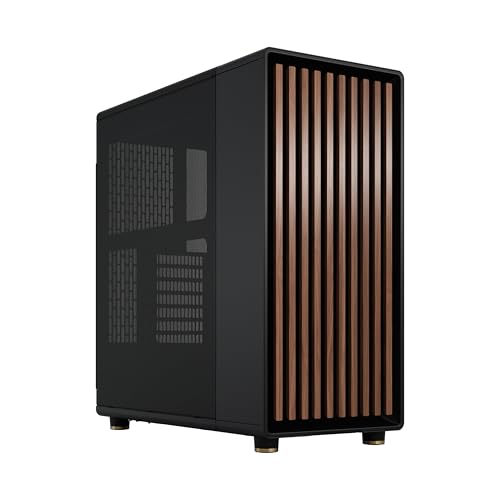
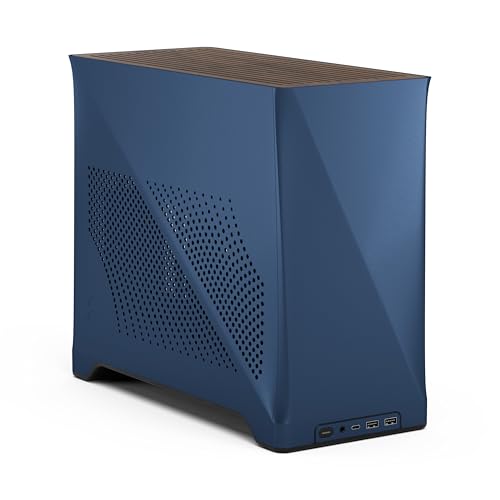
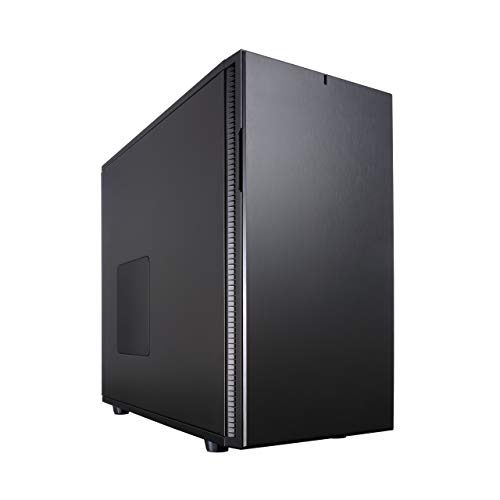
The Define R5 is the answer to a question a lot of builders have been quietly asking for years: why does every decent mid-tower make you choose between silence and airflow, or between a great build experience and a mediocre one? Fractal Design's answer, backed by over a thousand owners rating it positively, is that you genuinely don't have to compromise. The specs and the owner feedback together paint a picture of a case that gets the fundamentals right in a way that a lot of rivals at this price tier simply don't.
The verdict? This is one of the best mid-range ATX cases you can buy for a quiet, well-organised build. It's not the newest, and it's not the flashiest. But if you're building something you want to actually enjoy using rather than just photograph once and forget, the Define R5 earns its reputation. The body of this review is going to explain exactly why, with the numbers and the owner patterns to back it up. If you want the short version: buy it. If you want to know whether it fits your specific GPU, cooler, or radiator, read on.
Numbers on a spec sheet only tell you so much. What owners report after actually routing cables through the thing, after fighting with (or not fighting with) the front panel, after trying to squeeze in a 360mm radiator, that's where the real picture emerges. So that's where this Fractal Design Define R5 review UK 2026 is going to focus: the clearances that matter, the design choices that land, and the couple of things that'll make you raise an eyebrow.
Core Specifications
The Define R5 is a full-featured ATX mid-tower built around Fractal Design's philosophy of controlled, quiet airflow. It ships with two of Fractal Design's own Dynamic GP-14 140mm fans, one at the front and one at the rear, and the case is designed to support up to six fans in total across the front, top, rear, and bottom positions. That's a solid foundation for either a pure air-cooling setup or a custom water loop.
The chassis itself is steel, with a brushed aluminium-look front panel and a ModuVent system on the top panel that lets you swap between solid (quiet) and mesh (airflow) configurations depending on what your build needs. That modular top is genuinely one of the more thoughtful design touches you'll find at this price point, because most cases force you to commit to one or the other at purchase. The Define R5 doesn't. Weight comes in at around 10.5 kg, which tells you the steel is proper gauge rather than the flimsy stuff you find on budget cases.
Dust filtration is covered on the front, top, and bottom, all of which are removable for cleaning. The PSU shroud keeps the bottom of the case tidy. The side panels are solid steel with acoustic dampening foam on the inside, which is where a lot of the silence reputation comes from. There's no tempered glass side panel option on this model, which will disappoint RGB enthusiasts but is entirely intentional. This case is built for people who care more about acoustics than aesthetics.
| Specification | Detail |
|---|---|
| Form Factor | Mid Tower ATX |
| Motherboard Support | ATX, mATX, Mini-ITX, E-ATX (up to 285mm wide) |
| Dimensions (H x W x D) | 232 x 462 x 543 mm |
| Weight | 10.5 kg |
| Max GPU Length | 440mm (310mm with HDD cage installed) |
| Max CPU Cooler Height | 172mm |
| Front Fan Support | 3x 120mm or 2x 140mm |
| Top Fan Support | 3x 120mm or 2x 140mm |
| Rear Fan Support | 1x 120mm or 1x 140mm |
| Bottom Fan Support | 2x 120mm |
| Included Fans | 2x Dynamic GP-14 140mm |
| Radiator Support (Front) | Up to 360mm |
| Radiator Support (Top) | Up to 360mm |
| Radiator Support (Rear) | Up to 120mm |
| 3.5" Drive Bays | 8 (2 in removable cage, 6 in modular HDD area) |
| 2.5" Drive Bays | 3 dedicated (plus 3.5" bays with adapter) |
| Expansion Slots | 7 |
| Front I/O | 2x USB 3.0, 1x USB 2.0, HD Audio |
| Side Panel | Steel with acoustic foam lining |
| ModuVent Top | Yes, solid/mesh switchable |
| Dust Filters | Front, top, bottom (removable) |
| Price | £114.99 · Details |

Form Factor and Dimensions
At 232 x 462 x 543 mm, the Define R5 is a proper mid-tower. It's not small. But it's also not one of those cases that takes up half your desk and makes you feel like you're sharing the room with a server rack. The footprint is sensible for what it offers inside, and the 462mm height means it'll sit comfortably under most desks without the top fan mounts being blocked. Width comes in at 232mm, which is on the wider side for a mid-tower but that extra space is doing real work in terms of cable routing room behind the motherboard tray.
The external design is clean and understated. The front panel is a solid door that swings open to reveal the fan and filter area, rather than a mesh grille. This is a deliberate acoustic choice, and it does mean airflow is slightly more restricted than on a fully open mesh front. Fractal Design has addressed this with a gap around the door perimeter that allows air in, but it's worth being aware of if you're planning an extreme air-cooling setup with high-RPM fans. For most builders, though, the trade-off is entirely reasonable.
Desk placement is straightforward. The rubber feet are large and grippy enough that the case stays put, and the front I/O sits at the top of the front panel at a comfortable height for reaching from a seated position. The case doesn't demand a particularly wide desk, and the side panel removal (thumbscrews at the rear, hinged open) is clean enough that you're not fighting with it every time you need to get inside. That might sound like a small thing, but if you've ever owned a case where the side panel requires a specific ritual involving three hands and a prayer, you'll appreciate it.
Motherboard Compatibility
The Define R5 handles ATX, mATX, and Mini-ITX as standard, which covers the vast majority of builders. But the headline here is E-ATX support up to 285mm wide. That's not full E-ATX (which can go up to 305mm), but it covers a good chunk of the E-ATX boards out there, including most HEDT and server-adjacent platforms. If you're running a proper workstation build on something like an older X299 or TR4 platform, double-check your board's exact width before assuming it fits.
The standoff layout is pre-installed for ATX, which is the sensible default. The motherboard tray itself is solid, with no noticeable flex when you're actually seating the board and tightening screws. Owners consistently flag this as a positive, because a wobbly tray makes the whole experience more stressful than it needs to be, especially when you're trying to seat a 24-pin connector with one hand and hold the board steady with the other.
Cutouts in the tray are well-positioned and large enough to be genuinely useful. The main CPU backplate cutout in particular is generously sized, which matters enormously when you're swapping coolers after the build is done and you don't want to pull the motherboard out every time. Several owners specifically mention this as one of the quality-of-life details that sets the R5 apart from cheaper alternatives. It's the kind of thing that doesn't show up in marketing materials but makes a real difference when you're elbow-deep in a build.
GPU Clearance
Right, this is where things get interesting. With the HDD cages fully removed, the Define R5 offers a maximum GPU length of 440mm. That's enough for essentially any current graphics card, including the longest triple-fan variants of the RTX 4090 and RX 7900 XTX. With the standard HDD cage configuration in place, that drops to 310mm, which still covers the majority of cards but will cause problems for some of the longer triple-fan designs. So if you're running a massive GPU, pull the cage.
There's no vertical GPU mount option out of the box, which won't bother most builders but is if you're planning a show-off build. The seven expansion slots give you plenty of room for multi-GPU setups (if you're still doing that) or high-profile cards with bracket-mounted accessories. GPU sag support isn't built in, but the slot covers are solid enough that a heavy card isn't going to be actively unsupported. A third-party sag bracket will sort it if you're worried.
Owner feedback on GPU fitment is almost universally positive. The internal layout is logical enough that even large cards go in without drama, and the PCIe slot covers use standard thumbscrews rather than the tool-free clips that some cases use and that occasionally strip or break. A minor thing, but proper screws mean a proper connection. The clearance between the GPU and the front drive cage (when installed) is tight but workable, and Fractal Design has positioned the cage so that airflow from the front fans still reaches the GPU even with drives installed.
CPU Cooler Clearance
172mm of CPU cooler clearance is the figure to work with here, and that's genuinely good for a mid-tower. To put it in context, the Noctua NH-D15 (widely regarded as the best air cooler you can buy) stands 165mm tall, so it fits with 7mm to spare. The be quiet! Dark Rock Pro 4 comes in at 162.8mm. You'd have to be reaching for something truly exotic to exceed 172mm in a standard tower air cooler configuration. So for air cooling, you're sorted.
AIO radiator support is where the R5 really earns its water-cooling-ready badge. The front supports radiators up to 360mm, the top supports up to 360mm, and the rear takes a single 120mm. That means you can run a proper 360mm AIO in either the front or the top, or theoretically both if you're building a custom loop with separate radiators. The front is generally the better location for a 360mm AIO in terms of thermal performance, as it puts the radiator in the path of fresh intake air rather than pre-warmed case air.
One thing to be aware of: with a 360mm radiator installed in the top, you'll want to check RAM clearance. Tall RAM heatspreaders (anything over about 35mm) can conflict with top-mounted radiators depending on the exact radiator thickness and fan combination. This is a common issue across mid-towers generally, not specific to the R5, but it's worth measuring before you buy. For front-mounted 360mm AIOs, clearance is much less of a concern, and owners report fitting them without issue.
Storage Bay Options
Storage capacity in the Define R5 is almost absurdly generous by modern standards. The modular HDD area supports up to eight 3.5" drives, with two in a removable front cage and the rest in a configurable bracket system that lets you adapt the layout to your build. Three dedicated 2.5" bays sit behind the motherboard tray, which is the right place for SSDs because it keeps them out of the main airflow path and away from the visual clutter of the front of the case.
The drive trays themselves use tool-free mounting for 3.5" drives, with rubber-isolated grommets that reduce vibration noise from spinning hard drives. This is a detail that matters more than it sounds. A case full of HDDs without proper vibration isolation can add a persistent low-frequency hum to your room that you'll notice at 2am. The rubber grommets in the R5 are specifically mentioned by multiple owners as genuinely effective at keeping things quiet. The 2.5" mounting is screw-based rather than tool-free, which is fine.
The modular cage system is one of the more flexible storage configurations you'll find at this price tier. You can remove sections of the cage to free up GPU length or improve front-to-rear airflow, or keep them in if you're running a NAS-adjacent build with multiple hard drives. It's not the most elegant system visually, but it's functional and well-thought-out. For a modern build with a couple of NVMe drives and no spinning rust, you'll probably remove most of the cage anyway, and that's absolutely fine.

Cable Management
This is one of the areas where the Define R5 genuinely shines, and where the extra width of the chassis pays dividends. The gap behind the motherboard tray measures around 20 to 25mm, which is enough to route even thick ATX power cables without forcing the side panel shut. Budget cases often give you 10 to 15mm back there, which turns cable management into a frustrating exercise in compression. The R5 doesn't do that to you.
There are multiple cable routing cutouts with rubber grommets, positioned thoughtfully around the tray so you can keep cables tidy without routing them halfway across the case to find the nearest hole. Velcro straps are included and pre-installed at several points behind the tray, which is a small touch but one that owners consistently appreciate. You're not hunting for cable ties or improvising with zip ties. The straps are there, they work, and the result is a clean rear panel without much effort.
The PSU shroud covers the bottom of the case and hides the PSU and any excess cabling neatly. It's not a full shroud in the sense of some newer cases where everything below the GPU is hidden, but it covers enough to make the interior look tidy. The power supply slides in from the rear, which is standard. There's a bottom-mounted PSU filter that pulls out from the front for cleaning, which is the right way to do it. Overall, cable management in the R5 is better than most cases at this price and better than some that cost significantly more.
Airflow and Thermal Design
Here's where the Define R5 requires a bit of honest context. The solid front door with acoustic foam on the side panels means this is not a case optimised for maximum airflow in the way that a mesh-front case like the Fractal Design Meshify C is. It's optimised for a balance of airflow and acoustics, which is a different thing. If you're running a high-end CPU and GPU at sustained loads and you want the absolute best temperatures, a mesh-front case will outperform the R5. But for the majority of builds, the thermal performance is entirely adequate.
The two included Dynamic GP-14 140mm fans are genuinely good. They're quiet at low RPM and move a decent amount of air. Fractal Design's GP-14 fans have a solid reputation in the PC building community for being reliable and acoustically well-behaved, and they're a step above the generic fans you get bundled with budget cases. Running one at the front as intake and one at the rear as exhaust is a sensible default configuration, and most owners report leaving this setup in place without needing to add more fans for typical gaming or productivity builds.
The ModuVent top panel is a clever bit of design. In its solid configuration, it reduces noise from top-mounted fans and helps the case maintain its quiet character. Swap it to the mesh insert and you open up significantly more airflow for top-mounted radiators or additional exhaust fans. The dust filter sits underneath either configuration. Owners who run 360mm AIOs in the top consistently report good results with the mesh insert in place. The front door, despite being solid, does allow air in around its perimeter, and the large 140mm fans are efficient enough at lower RPMs that temperatures stay reasonable without the fans spinning up to audible levels.
Front I/O and Connectivity
The front I/O on the Define R5 is functional but showing its age. You get two USB 3.0 Type-A ports and one USB 2.0 port, plus a combined HD Audio jack for headphones and microphone. There's a power button and a reset button, both of which feel solid and clicky rather than mushy. The power button in particular has a satisfying tactile response that owners mention positively, which matters more than you might think when you're pressing it every day.
The absence of a USB Type-C port is the most obvious sign that this case predates the widespread adoption of USB-C front panel headers. If you're building on a modern motherboard and you regularly use USB-C devices, this will be mildly annoying. It's not a dealbreaker for most people, since USB-C on the front panel is still more of a convenience than a necessity for the majority of use cases. But if USB-C front I/O is on your must-have list, you'll need to look at something newer.
Placement of the I/O ports is at the top of the front panel, which is sensible for a tower that sits on a desk. The audio jack is a combined headphone/mic rather than separate jacks, which is fine for headsets but slightly less ideal if you use separate headphones and a dedicated microphone. The overall I/O layout is clean and uncluttered, without the excessive button arrays or RGB lighting controls that some cases plaster across their front panels. For a case that's fundamentally about doing the basics well, the restrained I/O is in keeping with the philosophy.
Build Quality and Materials
The steel in the Define R5 is noticeably thicker than what you find in budget and lower mid-range cases. The chassis doesn't flex when you pick it up, the panels align properly without gaps, and there are no sharp edges on the cable routing cutouts or drive bays. That last point is mentioned specifically by several owners, because sharp edges on internal metalwork are a genuinely common problem in cheaper cases and they draw blood in the worst possible way at the worst possible moment.
The acoustic foam on the inside of the side panels and top is dense and well-adhered. It doesn't look like it's going to peel off after a year, which is a real concern with some budget cases that use foam as an afterthought. The front door hinge is smooth and the magnetic latch holds it shut firmly without requiring a precise push to close. A few owners note that the front door can feel slightly stiff when new, but it loosens up with use and doesn't become loose or wobbly over time. That's the right direction for a hinge to travel.
The thumbscrews throughout the case are properly knurled and easy to grip, which sounds trivial but is the sort of thing you notice when you're doing your tenth build in a case and you still haven't stripped a screw. The finish on the steel is consistent and the black paint is even without obvious drips or thin patches. Overall, the build quality of the R5 is clearly above average for its price tier, and it's one of the things that owners mention most frequently when they're explaining why they'd buy it again. This is a case that feels like it was built by people who have actually used cases, rather than just designed them on a screen.
How It Compares
The obvious comparison is the Fractal Design Meshify C, which is the R5's more airflow-focused sibling. The Meshify C has a mesh front panel and is generally a bit smaller, making it better for pure thermal performance and tighter desk setups. But it gives up the acoustic foam, the modular storage system, and the sheer internal space of the R5. If you're prioritising temperatures over silence, the Meshify C is worth a look. If you want a quieter build with more storage flexibility, the R5 wins.
The be quiet! Silent Base 600 is the other natural competitor in this space. It's similarly focused on acoustics and has comparable build quality. The Silent Base 600 arguably has a slight edge on pure noise suppression, but the R5 has better storage options and a more flexible fan/radiator mounting system. The be quiet! case is also typically priced similarly, so it's a genuine choice rather than an obvious winner either way. Which one you prefer will come down to whether you want marginally better silence (Silent Base 600) or marginally better cooling flexibility and storage (R5).
The Corsair 4000D Airflow is too, even though it's a different philosophy entirely. The 4000D Airflow prioritises airflow over acoustics, with a mesh front and no acoustic dampening. It's a more modern case with USB-C front I/O and a cleaner internal layout for contemporary builds. If you're not fussed about silence and you want the best temperatures for a gaming build, the 4000D Airflow is a strong alternative. But if quiet operation is on your list of requirements, it's not the right tool.
| Feature | Fractal Design Define R5 | Fractal Design Meshify C | be quiet! Silent Base 600 |
|---|---|---|---|
| Form Factor | Mid Tower ATX | Mid Tower ATX | Mid Tower ATX |
| Front Panel | Solid door (acoustic) | Mesh | Solid (acoustic) |
| Acoustic Foam | Yes (sides, top) | No | Yes (sides, top, front) |
| Max GPU Length | 440mm | 315mm | 435mm |
| Max CPU Cooler | 172mm | 170mm | 167mm |
| 360mm Radiator (Front) | Yes | Yes | Yes |
| 3.5" Drive Bays | Up to 8 | 2 | 3 |
| USB Type-C Front I/O | No | No | No |
| Included Fans | 2x 140mm GP-14 | 2x 120mm | 2x 140mm Pure Wings 2 |
| ModuVent / Flexible Top | Yes | No | No |
| Price Tier | Mid-range | Mid-range | Mid-range |

Final Verdict: Fractal Design Define R5 Review UK 2026
The Define R5 is a case that knows exactly what it is and delivers it without fuss. It's built for builders who want a quiet system with a well-organised interior, proper storage flexibility, and enough cooling headroom for a serious AIO or custom loop. The positive overall rating from over a thousand owners isn't a fluke. It's the result of Fractal Design getting the fundamentals right in a way that a lot of competitors still struggle with: solid steel, sensible layout, acoustic foam that actually works, and a build experience that doesn't leave you swearing at the thing.
The weaknesses are real but manageable. No USB-C front I/O is the most significant, and it's a genuine limitation for modern builds. The solid front door restricts airflow compared to mesh alternatives, which means if you're pushing a high-end CPU and GPU hard under sustained loads, you might see temperatures a few degrees higher than you'd get in a Meshify C or a Corsair 4000D Airflow. And at this price tier, you're paying for quality and thoughtful design rather than cutting-edge features.
Who should buy this? Anyone building a quiet workstation, a home media PC, or a gaming rig where noise matters as much as temperatures. Builders who need serious storage capacity. Anyone who appreciates a case that's genuinely pleasant to build in rather than a frustrating puzzle. The R5 is also a strong pick if you're running a custom water loop and want the flexibility of 360mm radiator support in both the front and top.
Who should skip it? If you're building a pure performance gaming rig and temperatures are your top priority, go for the Meshify C or the Corsair 4000D Airflow instead. Both will run cooler. If USB-C front I/O is non-negotiable, look at something newer. And if you're on a tight budget, the Fractal Design Core 1000 or similar budget options will get the job done for less, though you'll give up the storage flexibility, the acoustic foam, and the build quality. Sometimes the cheaper option is the right call. But if you're in the R5's price bracket and you want a quiet, well-built case that'll serve you for years, this is one of the best options available.
This is a case that earns a strong 9 out of 10. The only thing stopping it from being a perfect score is the missing USB-C and the slightly dated front I/O, which are real omissions on a case being sold in 2026. Everything else is excellent. The Define R5 remains one of the most well-considered mid-tower cases ever made, and the owner feedback confirms it's still delivering on that promise for builders today.
What works. What doesn’t.
5 + 3What we liked5 reasons
- Exceptional build quality with thick steel and no sharp edges
- Up to 8x 3.5" drive bays with rubber-isolated, vibration-damping trays
- 440mm GPU clearance with HDD cage removed
- 360mm radiator support in both front and top simultaneously
- ModuVent top panel switchable between solid (quiet) and mesh (airflow)
Where it falls3 reasons
- No USB Type-C front I/O port
- Solid front door restricts airflow vs mesh-front alternatives
- No vertical GPU mount option included
Full specifications
11 attributes| Form factor | Mid-Tower |
|---|---|
| CPU cooler clearance MM | 180 |
| Dimensions MM | 232 x 462 x 531 |
| Fans included | 2 |
| GPU clearance MM | 440 |
| MAX FAN count | 9 |
| MAX radiator MM | 420 |
| PSU support | ATX up to 300mm |
| Side panel | solid |
| Supported motherboard | ATX, Micro-ATX, Mini-ITX |
| Weight KG | 10.2 |
Got a motherboard yet?
4 reviewsThe maker lists ATX, Micro-ATX and Mini-ITX boards for this case. These ATX boards fit it.
Frequently asked
5 questions01Is the Fractal Design Define R5 good for airflow?+
It's good but not exceptional in pure airflow terms. The solid front door with acoustic foam prioritises quiet operation over maximum airflow, so it won't match a mesh-front case like the Fractal Design Meshify C for raw temperatures. That said, the two included Dynamic GP-14 140mm fans are genuinely quiet and move a solid amount of air, and the ModuVent top panel can be switched to a mesh insert for better top-mounted radiator performance. For most gaming and productivity builds, thermal performance is entirely adequate. If you're pushing a high-end CPU and GPU at sustained 100% loads and temperatures are your top priority, a mesh-front case will serve you better.
02What is the GPU clearance on the Fractal Design Define R5?+
With the HDD cages fully removed, the Define R5 supports GPU lengths up to 440mm, which is enough for any current graphics card including the longest triple-fan RTX 4090 and RX 7900 XTX variants. With the standard HDD cage configuration in place, maximum GPU length drops to 310mm. So if you're running a large triple-fan card, removing the front HDD cage is the straightforward fix. There's no vertical GPU mount option included.
03Can the Fractal Design Define R5 fit a 360mm AIO?+
Yes, and it's one of the case's strongest features. The Define R5 supports 360mm radiators in both the front and top positions simultaneously, which makes it excellent for custom loop builds. For a single 360mm AIO, the front is generally the better location as it puts the radiator in the path of fresh intake air. If you mount a 360mm radiator in the top, check your RAM heatspreader height as tall heatspreaders (over roughly 35mm) can conflict with the radiator and fans depending on exact thickness. The rear supports a single 120mm radiator.
04Is the Fractal Design Define R5 easy to build in?+
Yes, consistently rated as one of the better build experiences in its price tier. The rear cable management space is around 20 to 25mm, which is generous enough for thick ATX power cables without forcing the side panel shut. Multiple rubber-grommeted cable routing cutouts are well-positioned around the motherboard tray, and Velcro straps come pre-installed behind the tray. The CPU backplate cutout is large enough that you can swap coolers without removing the motherboard. Owners specifically call out the absence of sharp edges as a positive. The side panels use thumbscrews and open on a hinge, making repeated access straightforward.
05What warranty and returns apply to the Fractal Design Define R5?+
Warranty details specific to this product are not confirmed in the verified product data. For purchases made through Amazon UK, you're covered by Amazon's standard 30-day return window and the Amazon A-to-Z Guarantee, which protects you if the item arrives damaged or not as described. For warranty support beyond the return window, contact Fractal Design directly through their official support channels.