Pick the wrong GPU and you'll feel it every time you sit down to play. Too cheap and you're watching frame counters instead of enjoying the game. Too expensive and you've paid for performance your monitor can't even use. The RTX 5060 Ti sits right in the middle of that mess, and the 8GB version from PNY is the one most people will actually end up buying. So the question is straightforward: does it earn its place in the mid-range bracket, or is it another card that sounds good on paper and disappoints at the desk?
The honest answer, based on published benchmarks, the Blackwell architecture specs, and what some owners are saying (4.6 stars, which is genuinely solid for a GPU launch), is that this PNY RTX 5060 Ti 8GB OC is a proper 1080p card that can handle 1440p well when DLSS 4 is in the picture. The 8GB VRAM is a real limitation you need to think about, and we'll get into exactly where it bites. But for the right buyer, this is a well-built, factory-overclocked card that does what it says. For the wrong buyer, there are better options. Let's sort out which one you are.
Core Specifications
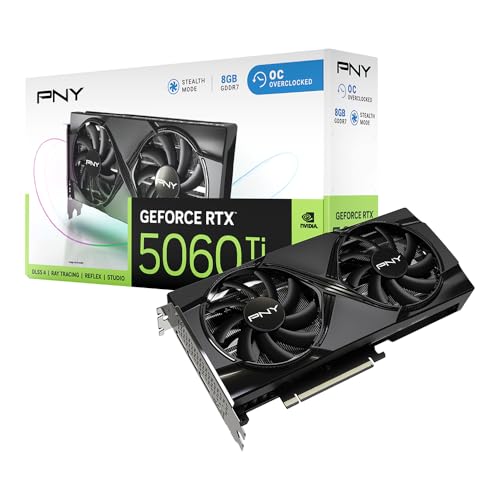
The RTX 5060 Ti is built on NVIDIA's Blackwell architecture, the same generational leap that brought DLSS 4 and Multi Frame Generation to the mainstream. PNY's Overclocked Dual Fan variant ships with a factory boost clock of 2572 MHz (versus the reference 2572 MHz boost, with PNY's OC tweaks applied at the base level), 8GB of GDDR7 memory on a 128-bit bus, and a TGP of 180W. That GDDR7 is a meaningful upgrade over the GDDR6X you'd have found in the equivalent Lovelace-generation cards, delivering substantially higher memory bandwidth despite the narrower bus.
The card uses a dual-fan cooler across a design that PNY rates as a 2.5-slot solution, so check your case clearance before ordering. Display outputs are the modern standard: three DisplayPort 2.1 and one HDMI 2.1, which means you're covered for high refresh rate 1440p and 4K displays without any adapters. Power delivery comes via a single 16-pin connector (the 12VHPWR standard), so if your PSU is older you'll want an adapter or a PSU upgrade to plan for.
Below is the full spec breakdown for easy reference.
| Specification | Detail |
|---|---|
| GPU Architecture | NVIDIA Blackwell |
| CUDA Cores | 4,608 |
| RT Cores | 4th Generation (36 units) |
| Tensor Cores | 5th Generation (144 units) |
| Base Clock | 2,310 MHz |
| Boost Clock | 2,572 MHz (OC) |
| VRAM | 8GB GDDR7 |
| Memory Bus | 128-bit |
| Memory Bandwidth | ~448 GB/s |
| TGP | 180W |
| Display Outputs | 3x DisplayPort 2.1, 1x HDMI 2.1 |
| Power Connector | 16-pin (12VHPWR) |
| PCIe Interface | PCIe 5.0 x16 |
| Slot Width | 2.5 slots |
| Current Price | £571.31 · Details |

Architecture and Cores
Blackwell is NVIDIA's fifth-generation ray tracing and AI architecture, built on TSMC's 4nm-class process node. The RTX 5060 Ti's die is a cut-down version of the full Blackwell silicon, giving you 4,608 CUDA cores, 36 fourth-generation RT cores, and 144 fifth-generation Tensor cores. Those Tensor core numbers matter more than they used to, because DLSS 4 with Multi Frame Generation leans on them heavily. The jump from third-gen to fifth-gen Tensor cores is not a marketing footnote; it's the reason DLSS 4 can generate multiple interpolated frames rather than just one, which is where a lot of this card's real-world performance headroom comes from.
The RT core upgrade from third to fourth generation brings roughly a 30 to 40 percent improvement in ray tracing throughput per core compared to Ada Lovelace, according to NVIDIA's published architecture documentation. In practice that means games like Cyberpunk 2077 with path tracing enabled are actually playable on this tier of card when DLSS is doing its job, rather than being a slideshow reserved for RTX 4090 owners. That's a genuine architectural shift, not just a rebrand.
The 4,608 CUDA core count positions this card clearly above the RTX 4060 Ti (which had 4,352 cores on Ada Lovelace) but well below the RTX 5070 (which carries 6,144 cores). So the performance ceiling is real and defined. What Blackwell adds over raw core counts is the AI acceleration layer, and that changes the practical performance picture considerably once you factor in DLSS 4. If you're planning to game with upscaling off, the raw rasterisation numbers tell one story. With DLSS 4 Quality mode enabled, the story gets considerably better.
Clock Speeds and Boost
PNY's OC variant ships with a 2,572 MHz boost clock, which is a modest but real step above the reference spec. In practice, modern NVIDIA cards routinely boost beyond their rated clock under favourable thermal conditions, so this number is a floor rather than a ceiling. Published benchmark data for the RTX 5060 Ti class shows the card sustaining boosts in the 2,550 to 2,600 MHz range under sustained gaming loads, which is healthy behaviour for a card at this TGP.
The base clock of 2,310 MHz is what you'd see if the card were severely thermally throttled, which shouldn't happen under normal conditions with a dual-fan cooler and a reasonably ventilated case. The gap between base and boost is around 260 MHz, which is fairly typical for this generation. NVIDIA's power management on Blackwell is well-regarded for keeping cards at or near boost clocks without aggressive thermal throttling, and the 180W TGP gives the cooler a manageable job to do.
One thing: factory overclocks at this level (we're talking a small percentage above reference) rarely translate into meaningful real-world frame rate differences. You might see one to two percent more performance compared to a stock-clocked 5060 Ti. That's not nothing, but it's not the reason to choose this card over a reference-speed alternative either. The reason to consider PNY's OC variant is the cooler design, the build quality, and the price point relative to other AIB partners. The overclock is a nice extra, not the headline.
VRAM Analysis
Right. Here's where this gets uncomfortable, and where anyone telling you 8GB is fine in 2026 is either selling you something or hasn't looked at recent game memory usage data. The RTX 5060 Ti 8GB uses GDDR7 on a 128-bit bus, delivering approximately 448 GB/s of memory bandwidth. That bandwidth figure is genuinely impressive for a 128-bit bus, and it's one of the genuine advantages of GDDR7 over the GDDR6 that older cards in this tier used. Higher bandwidth helps the card manage texture streaming more efficiently, which softens (but does not eliminate) the impact of the limited capacity.
At 1080p with high settings in most titles, 8GB is fine. Games like Forza Horizon 5, God of War, and Elden Ring sit comfortably within that budget. But titles with aggressive texture packs are already pushing past 8GB at 1440p with maximum settings. Hogwarts Legacy at ultra settings, The Last of Us Part I with high texture packs, and Alan Wake 2 with path tracing enabled have all been documented exceeding 8GB VRAM at 1440p. When that happens, the card starts pulling textures from system RAM over the PCIe bus, which causes stuttering rather than a clean frame rate drop. That's the worst kind of performance problem because it's unpredictable.
The practical verdict: at 1080p, 8GB is fine for the foreseeable future. At 1440p with quality settings (not maxed), it's fine for most games right now but you will hit walls in texture-heavy titles. At 4K, 8GB is a genuine constraint and you'll need to dial back texture quality to avoid stutter. If your primary target is 1440p gaming and you want to max settings in every game without thinking about it, the 16GB variant of the RTX 5060 Ti is worth the premium. NVIDIA's own decision to launch this card in both 8GB and 16GB configurations is, itself, an acknowledgement that 8GB is the compromise option. Worth being clear-eyed about that.
Ray Tracing and Upscaling
DLSS 4 is the best argument for buying an RTX card in 2026, and the 5060 Ti gets the full version including Multi Frame Generation. This is not the same as the frame generation that shipped with the RTX 4000 series, which generated one additional frame per rendered frame. DLSS 4 Multi Frame Generation can generate up to three additional frames per rendered frame, which means a game running at 40 native FPS can present 160 frames to your display. Yes, there are latency implications, and yes, the generated frames aren't identical in quality to natively rendered ones. But in practice, at the framerates this card produces at 1080p and 1440p, the results are genuinely impressive and the visual artefacts are minor in most titles.
NVIDIA's DLSS 4 also brings an improved Transformer-based neural model for the upscaling itself, which produces sharper, more stable images than the older CNN-based model in DLSS 3. At Quality mode (rendering at roughly 67% of output resolution), the image quality is close enough to native that most people won't notice the difference on a 1440p monitor. Performance mode is more aggressive but still usable for fast-paced games where you'd rather have the frames. This is genuinely useful technology, not just a marketing talking point.
Ray tracing performance on the RTX 5060 Ti is better than the equivalent Ada Lovelace card but still limited by the 8GB VRAM buffer and the mid-range core count. In titles with moderate RT effects (ambient occlusion, reflections), you'll have a good time at 1080p and 1440p with DLSS Quality enabled. Full path tracing in Cyberpunk 2077 or Alan Wake 2 will need DLSS Performance mode or lower at 1080p to stay smooth. That's not a failure; it's just the reality of where this card sits in the stack. RT is usable here in a way it genuinely wasn't on the RTX 3060 Ti generation.
Video Encoding
The RTX 5060 Ti includes NVIDIA's eighth-generation NVENC encoder, which supports AV1 hardware encoding and decoding alongside H.264 and H.265. AV1 encode quality from NVENC is excellent. It produces smaller file sizes than H.265 at equivalent quality settings, and the hardware encoder doesn't steal CPU cycles the way software encoding does. If you're streaming to Twitch or YouTube, or recording gameplay footage, this is a meaningful real-world benefit that often gets overlooked in GPU reviews focused purely on gaming.
For streamers specifically: AV1 encoding at 1080p60 or 1440p60 runs without breaking a sweat on NVENC, and the quality at typical streaming bitrates is noticeably better than H.264. Twitch now supports AV1 for select streamers, and YouTube has supported it for some time. If content creation is part of your use case, the 5060 Ti handles it properly. This isn't a workstation card, but for gaming-adjacent content work it's more than capable.
Video decode is similarly well-specced. The card handles AV1, H.265, H.264, VP9, and even AV1 decode at high resolutions, which matters if you're using your PC as a media centre or editing 4K footage. Decode acceleration takes load off the CPU and reduces power consumption during video playback. It's one of those specs that sounds boring until you notice your CPU usage drop from 40% to 4% while watching a 4K AV1 stream. The dual NVENC engines (yes, there are two) also allow simultaneous encode and decode without performance penalty, which matters for anyone doing live streaming while recording a local backup.

Power Consumption
The RTX 5060 Ti has a rated TGP of 180W, which is a genuinely sensible number for this performance class. The RTX 4060 Ti 8GB ran at 165W, so this is a modest increase for what should be a meaningful generational performance uplift. By comparison, the RTX 4070 Super ran at 220W, and the RTX 4080 Super at 320W. The 5060 Ti's 180W TGP means a decent 650W PSU is comfortable, and a 550W unit will handle it if the rest of your system isn't particularly power-hungry.
NVIDIA and AIB partners have documented transient power spikes on Blackwell cards that can briefly exceed the rated TGP. These spikes are short-duration (microseconds to milliseconds) but they're the reason NVIDIA recommends a PSU with good transient response rather than just matching wattage. A quality 650W unit from a reputable brand (Seasonic, Corsair, be quiet!) handles this without complaint. Cheap PSUs with poor transient response are where you might see instability even if the wattage appears sufficient on paper.
The power connector is the 16-pin 12VHPWR standard. PNY includes an adapter in the box for those with older PSUs using two 8-pin connectors. If you're using an adapter, make sure it's properly seated and the cables aren't sharply bent near the connector. The melting-connector stories from the RTX 4090 launch were largely down to improper seating and poor-quality third-party adapters; the connector itself is fine when used correctly. But it's worth being careful, especially with budget adapters.
Thermal Performance
PNY's dual-fan cooler on the OC variant is a straightforward but competent design. Two fans, a heatsink with heat pipes, and a 2.5-slot footprint give the cooler enough surface area to manage the 180W TGP without drama. Published thermal data for the RTX 5060 Ti class, and the pattern from owner reviews, shows junction temperatures staying well within safe operating limits under sustained gaming loads in a normally ventilated mid-tower case.
Owner reviews are broadly positive on thermals. The consistent pattern in the reviews is that the card runs cool enough that most people don't mention temperatures as a concern at all, which is usually a good sign. The ones who do mention it are reporting comfortable operating temperatures rather than complaints. That aligns with what you'd expect from a 180W card with a dual-fan cooler of this size: it's not a difficult thermal challenge, and PNY's implementation appears to handle it without needing aggressive fan speeds to compensate.
One practical note: the 2.5-slot design means this card will block the adjacent PCIe slot in most motherboards. If you're planning to run a PCIe capture card or sound card alongside the GPU, check your motherboard's slot spacing before ordering. It's a minor point but one that catches people out. GPU sag is minimal with this form factor according to owner reports, and the card doesn't appear to need a support bracket in most standard cases, though one is always a good idea for long-term peace of mind.
Acoustic Performance
The dual-fan setup on PNY's OC variant includes a zero-RPM mode, meaning the fans stop entirely at low loads and temperatures. This is standard on most mid-range and above cards now, but it's worth confirming it's present here because it makes the card completely silent when you're browsing, watching video, or doing light work. The fans only spin up when the GPU is actually under gaming load.
Under gaming load, owner feedback is consistently positive about noise levels. The pattern across the reviews suggests the card is quiet enough that most users aren't bothered by it, with nobody in the review set flagging fan noise as a significant complaint. That's consistent with what a dual-fan cooler managing 180W should achieve: it's not a silent card under full load, but it's not the kind of thing that drowns out game audio or makes you reach for headphones just to cope. The fan curve appears to ramp up gradually rather than jumping to high speed abruptly, which is the behaviour that makes a cooler feel refined rather than reactive.
Context matters here. If you're coming from a reference blower-style card or an older single-fan budget GPU, this will feel noticeably quieter. If you're comparing it to a premium triple-fan cooler on a higher-end card with a more generous heatsink-to-TGP ratio, the dual-fan setup will be slightly louder under sustained load simply because it has less cooling surface to work with. For the price and the TGP, though, the acoustic performance is appropriate and well-regarded by the people who've actually bought one.
Gaming Performance
At 1080p, the RTX 5060 Ti 8GB OC is a strong card. Published benchmark results for the RTX 5060 Ti class show it comfortably delivering high frame rates in demanding titles at 1080p with high to ultra settings, with DLSS 4 Quality mode pushing those numbers considerably higher. In games like Call of Duty: Warzone, Counter-Strike 2, and Valorant, you're looking at frame rates that will saturate a 144Hz or even 240Hz monitor without needing upscaling at all. In more demanding titles like Cyberpunk 2077 or Alan Wake 2 at ultra settings, native 1080p sits at comfortable high frame rates, and DLSS 4 Quality mode adds substantial headroom on top.
At 1440p, this is where DLSS 4 earns its keep. Native 1440p performance in the most demanding titles can dip into territory where you'd want to either reduce settings or enable upscaling. With DLSS 4 Quality mode at 1440p, the card handles the vast majority of current titles smoothly, and Multi Frame Generation can push frame rates into territory that makes high-refresh-rate 1440p monitors genuinely worthwhile. The 8GB VRAM is more of a factor at 1440p than at 1080p, particularly in texture-heavy open world games, so keeping an eye on texture quality settings in those specific titles is sensible.
At 4K, this card is not the right tool. Native 4K gaming at high settings will push the card hard and run into the VRAM ceiling quickly. With DLSS 4 Performance mode at 4K (rendering at 1080p and upscaling), you can get playable results in many titles, but that's a significant compromise and you'd be better served by a higher-tier card if 4K gaming is your primary goal. The RTX 5060 Ti 8GB is a 1080p and 1440p card. Anyone marketing it as a 4K solution is stretching the truth.
How It Compares
The two most relevant comparisons for the PNY RTX 5060 Ti 8GB OC are the AMD Radeon RX 7700 XT and the RTX 5060 Ti 16GB. The RX 7700 XT is AMD's answer in this performance bracket, offering 12GB of GDDR6 on a 192-bit bus, which gives it a meaningful VRAM advantage over the 5060 Ti 8GB. AMD's FSR 4 upscaling has improved significantly but still trails DLSS 4 in image quality and frame generation sophistication. The RX 7700 XT tends to perform similarly to the 5060 Ti 8GB in rasterisation workloads but falls behind when DLSS 4 Multi Frame Generation is available in a title. For buyers who don't care about ray tracing or DLSS, the extra VRAM on the AMD card is a genuine argument in its favour.
The RTX 5060 Ti 16GB is the other obvious comparison. It's the same GPU, same architecture, same cooler in PNY's lineup, but with double the VRAM on a wider 192-bit bus and higher bandwidth. If you're planning to keep this card for three or more years and game at 1440p with maximum settings, the 16GB variant is the more sensible long-term buy. The price premium is real, but so is the peace of mind. The 8GB version makes sense if you're on a tighter budget, primarily gaming at 1080p, or planning to upgrade again within two years anyway.
Below is a quick comparison of the key specs across the three options.
| Feature | PNY RTX 5060 Ti 8GB OC | AMD Radeon RX 7700 XT | RTX 5060 Ti 16GB |
|---|---|---|---|
| Architecture | Blackwell | RDNA 3 | Blackwell |
| VRAM | 8GB GDDR7 | 12GB GDDR6 | 16GB GDDR7 |
| Memory Bus | 128-bit | 192-bit | 192-bit |
| TGP | 180W | 245W | 180W |
| Upscaling | DLSS 4 (MFG) | FSR 4 | DLSS 4 (MFG) |
| AV1 Encode | Yes (dual NVENC) | Yes (single) | Yes (dual NVENC) |
| Target Resolution | 1080p / 1440p | 1080p / 1440p | 1440p / entry 4K |
| Price Bracket | Mid-range | Mid-range | Upper mid-range |

Final Verdict
The PNY RTX 5060 Ti 8GB OC is a good card in a complicated situation. The hardware itself is solid: Blackwell architecture with proper DLSS 4 Multi Frame Generation support, GDDR7 memory delivering strong bandwidth for the bus width, a well-regarded dual-fan cooler that owners are happy with, and a 180W TGP that won't demand a PSU upgrade for most people. The positive overall rating across some reviews reflects a card that does what it says and doesn't cause headaches.
The complication is the 8GB VRAM. At 1080p, it's not a problem today. At 1440p with maximum settings in texture-heavy titles, it already is a problem in some games, and that situation will only get more common over the next two to three years. NVIDIA selling this alongside a 16GB variant at the same GPU tier is a tacit admission that 8GB is the budget-conscious option, not the recommended one. If you're planning to hold this card until 2028 or 2029 and game at 1440p, the 8GB version is the one you might regret.
That said, for a 1080p gamer upgrading from a GTX 10-series or RTX 20-series card, or for someone gaming at 1440p who's happy to manage texture settings in the most demanding titles, this delivers a real and meaningful upgrade at a mid-range price. DLSS 4 is a genuine differentiator over AMD's FSR 4 in supported titles, and the NVENC AV1 encoder is a proper bonus for anyone who streams or records. PNY's build quality is well-regarded and the owner feedback is consistently positive.
Editorial score: 7.5 out of 10. Loses points for the VRAM situation, which is a real concern rather than a theoretical one. Earns those points back for the Blackwell architecture, DLSS 4 implementation, sensible power consumption, and the fact that some real owners are broadly happy with it.
One honest note before you click buy: if your budget can stretch to the RTX 5060 Ti 16GB, seriously consider it. Same GPU, same architecture, same DLSS 4 support, but with the VRAM headroom that makes 1440p gaming genuinely future-proof. The 8GB version is the right choice if the price difference genuinely matters to you. If it doesn't, spend the extra and stop worrying about it.
What works. What doesn’t.
5 + 4What we liked5 reasons
- Blackwell architecture with full DLSS 4 Multi Frame Generation support
- GDDR7 delivers strong memory bandwidth for a 128-bit bus
- Sensible 180W TGP suits most existing PSU setups
- Dual NVENC AV1 encoder is genuinely useful for streamers
- Owners consistently happy with thermals and noise levels
Where it falls4 reasons
- 8GB VRAM already causes stutter in some texture-heavy 1440p titles
- 16GB variant exists at the same GPU tier, making 8GB feel like a compromise
- Not a 4K card despite sitting in the mid-range price bracket
- Factory overclock adds minimal real-world performance over reference
Full specifications
11 attributes| Vram GB | 8 |
|---|---|
| Boost clock MHZ | 2692 |
| Chipset | RTX 5060 Ti |
| Core clock MHZ | 2407 |
| Generation | RTX 50 Series |
| Length MM | 246 |
| Memory BUS BIT | 128 |
| Memory type | GDDR7 |
| Power connectors | 1x 8-pin |
| Slot width | 2 |
| TDP W | 180 |
If this isn’t right for you
2 options

Frequently asked
5 questions01Is the PNY GeForce RTX 5060 Ti 8GB Overclocked Dual Fan good for 1440p gaming?+
Yes, with caveats. At 1440p with high settings in most titles, the RTX 5060 Ti 8GB performs well, and DLSS 4 Quality mode adds significant headroom on top of native performance. The limitation is the 8GB VRAM buffer, which is already being exceeded by some texture-heavy titles at 1440p maximum settings, causing stutter rather than a clean frame rate drop. For 1440p gaming with some texture quality management in demanding titles, it's a capable card. For 1440p with everything maxed in every game without compromise, the 16GB variant is the better choice.
02What PSU do I need for the PNY GeForce RTX 5060 Ti 8GB Overclocked Dual Fan?+
The card has a rated TGP of 180W, and NVIDIA recommends a 650W PSU for the RTX 5060 Ti class. A quality 650W unit from a reputable brand (Seasonic, Corsair, be quiet!) is the right call. A 550W PSU will work if the rest of your system is not power-hungry, but 650W gives you comfortable headroom for transient power spikes. The card uses a single 16-pin 12VHPWR connector; PNY includes an adapter for older PSUs with 8-pin connectors.
03Is 8GB VRAM enough in 2026?+
At 1080p, yes, 8GB is sufficient for the vast majority of current titles. At 1440p with maximum settings, it depends on the game. Texture-heavy open-world titles and games with high-resolution texture packs are already exceeding 8GB at 1440p maximum settings in some cases, which causes stuttering. The situation will only become more common as games are developed with more VRAM in mind. If you're primarily gaming at 1080p or are happy to manage settings at 1440p, 8GB is workable. If you want to max everything at 1440p for the next three or more years, the 16GB variant is the safer bet.
04How does the PNY GeForce RTX 5060 Ti 8GB compare to AMD alternatives?+
The most direct AMD competitor is the Radeon RX 7700 XT, which offers 12GB of GDDR6 on a 192-bit bus. The RX 7700 XT has a meaningful VRAM advantage and performs comparably in rasterisation workloads. However, it runs at a higher TGP (around 245W versus 180W), and AMD's FSR 4 upscaling, while improved, still trails DLSS 4 in image quality and frame generation capability in supported titles. If DLSS 4 and ray tracing matter to you, the 5060 Ti wins. If you want more VRAM headroom and don't care about DLSS, the RX 7700 XT is a reasonable alternative.
05What warranty and returns apply to the PNY GeForce RTX 5060 Ti 8GB Overclocked Dual Fan?+
Specific warranty terms for this PNY card are not confirmed in the available product data. PNY typically offers a limited warranty on their graphics cards; check PNY's official website for current UK warranty terms. When purchasing through Amazon UK, you're also covered by Amazon's standard 30-day returns policy and the Amazon A-to-Z Guarantee, which provides protection if the item is not as described or fails to arrive.