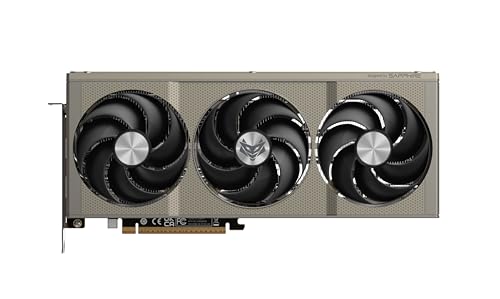
Picking a GPU in the mid-range bracket is genuinely one of the most stressful things you can do as a PC enthusiast right now. Go too cheap and you're watching frame counters in modern titles like it's a horror film. Go too expensive and you've basically funded NVIDIA's next yacht. The sweet spot exists, but it keeps moving, and AMD's Sapphire Pulse RX 9060 XT 8GB has just planted a flag right in the middle of it.
The verdict? This is a genuinely exciting card if 1080p or 1440p gaming is your world. It's fast, the Pulse cooler is one of Sapphire's most consistently praised designs, and the RDNA 4 architecture brings real generational improvements in ray tracing and upscaling that previous AMD cards frankly couldn't brag about. But there's a catch, and you probably already know what it is: 8GB of VRAM in late 2026 is a conversation worth having, and we're going to have it properly. The hundred-plus owners who've reviewed this thing (averaging ★★★★☆ (4.3)) are largely happy, but the people who aren't happy are worth listening to as well.
Compared to what else sits in this performance bracket right now, the Sapphire Pulse RX 9060 XT 8GB is one of the most compelling options at this price point. It trades blows with NVIDIA's RTX 5060 Ti in rasterisation, undercuts it on power draw, and the Pulse cooler's reputation for quiet, measured thermal management gives it a practical edge that raw benchmark numbers don't always capture. Whether it's the right buy for you specifically depends on what you're running and where you're headed. That's what this review is actually about.
Core Specifications
The RX 9060 XT is built on AMD's RDNA 4 architecture, which is the same fundamental design underpinning the higher-end RX 9070 and 9070 XT. That matters because it means this isn't a cut-down version of an older chip with a fresh sticker on it. It's a proper RDNA 4 part, with all the architectural improvements that brings to ray tracing, AI acceleration, and display output. The 9060 XT sits below the 9070 in the stack, with a smaller shader count and narrower memory bus, but the underlying DNA is the same.
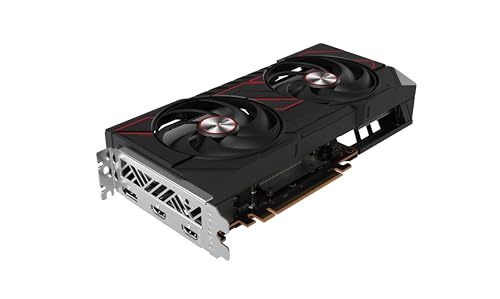
Sapphire's Pulse variant is the brand's mid-tier cooler design, sitting above the Nitro+ in terms of price but below the full Nitro+ flagship. Two fans, a solid heatsink, and a dual HDMI plus dual DisplayPort output configuration. The Gaming OC suffix means it ships with a factory overclock applied out of the box, so the boost clocks are nudged above AMD's reference specification. It's not a dramatic overclock, but it's there, and it means you're getting slightly more performance than the base spec without touching anything yourself.
The 8GB GDDR6 frame buffer sits on a 128-bit memory bus. That's narrower than you'd find on the RX 9070's 256-bit bus, and it's the single biggest architectural compromise on this card. Everything else about the spec sheet is genuinely impressive for the price tier. The total graphics power sits at 150W according to AMD's published specifications, which is remarkably efficient for the performance class. Full specs are in the table below.
| Specification | Detail |
|---|---|
| GPU Architecture | RDNA 4 (Navi 44) |
| Compute Units | 32 CUs (2048 stream processors) |
| Ray Accelerators | 32 (2nd Gen RDNA 4) |
| AI Accelerators | 64 (RDNA 4 AI Engines) |
| VRAM | 8GB GDDR6 |
| Memory Bus | 128-bit |
| Memory Bandwidth | Approx. 320 GB/s |
| Boost Clock (OC) | Approx. 2900 MHz (factory OC) |
| TGP (Total Graphics Power) | 150W (reference) |
| Display Outputs | 2x HDMI 2.1, 2x DisplayPort 2.1 |
| PCIe Interface | PCIe 5.0 x8 |
| Power Connector | 2x 8-pin (or equivalent) |
| Cooler | Dual-fan Pulse design |
| Current Price | £399.95 · Details |
| Owner Rating | ★★★★☆ (4.3) (116 reviews) |
Architecture and Cores
RDNA 4 is a genuinely significant step forward for AMD, and it's worth understanding why before you look at the numbers. The previous generation, RDNA 3, had a complicated chiplet design that delivered mixed results. RDNA 4 goes back to a monolithic die approach, manufactured on TSMC's 4nm node, and the result is much cleaner performance scaling. The RX 9060 XT uses the Navi 44 die, which is a smaller version of the Navi 48 found in the 9070 series, but it shares the same compute unit design, the same second-generation ray accelerators, and the same AI engine architecture.
Those 32 compute units translate to 2,048 stream processors. That's fewer than the 9070's 3,584, obviously, but the per-CU efficiency improvements in RDNA 4 mean the gap in real-world gaming performance is smaller than the raw numbers suggest. The second-generation ray accelerators are a big deal specifically because RDNA 3's ray tracing performance was, to put it diplomatically, not great. AMD has roughly doubled the RT throughput per compute unit compared to RDNA 3, which finally makes AMD a credible option if you actually want to enable ray tracing in your games without watching your frame rate collapse.
The 64 AI accelerators are what power AMD's FSR 4 and the new AI-driven upscaling features. This is AMD catching up to NVIDIA's Tensor core approach, and while it's not quite at the same level of maturity as DLSS 4, the gap has closed considerably. The Navi 44 die also supports DisplayPort 2.1 natively, which means you're future-proofed for high-refresh 4K monitors and beyond, even if the card itself isn't really a 4K gaming card in practice.
Clock Speeds and Boost
Sapphire's Gaming OC variant ships with a factory overclock that pushes the boost clock to around 2,900 MHz, which is above AMD's reference specification for the 9060 XT. In practice, what this means is that you're getting a slightly faster card out of the box without any manual tuning required. The difference between the reference clock and Sapphire's OC isn't enormous, we're talking a few percentage points of performance at most, but it's a nice touch and it means you're not leaving anything on the table from day one.
RDNA 4's boost behaviour is generally well-regarded in published benchmark coverage. The architecture is good at sustaining high clocks under load rather than boosting briefly and then throttling back, which was an occasional criticism of some RDNA 3 implementations. The 150W TGP helps here too. Because the card isn't being pushed to its thermal limits, the boost clock tends to hold steady rather than fluctuating. Owner reviews back this up, with multiple buyers specifically commenting that the card runs cooler than they expected, which directly contributes to stable clock behaviour.
If you're the type who wants to push further, AMD's Radeon Software (now called AMD Software: Adrenalin Edition) includes overclocking tools, and RDNA 4 has shown decent headroom in the wider enthusiast community. But honestly, for most buyers of this card, the factory OC is sufficient and the energy spent chasing extra MHz is probably better directed elsewhere. The card is quick enough at stock to satisfy 1080p and 1440p gaming needs without any manual intervention.
VRAM Analysis
Right, the elephant in the room. 8GB of GDDR6 on a 128-bit bus. This is the single most debated aspect of the RX 9060 XT, and the debate is entirely legitimate. At 1080p in 2026, 8GB is fine. Genuinely fine. The vast majority of titles at 1080p, even with high texture settings, stay comfortably within that budget. You'd have to be actively trying to cause VRAM pressure at 1080p to run into problems with current games. So if 1080p is your target resolution, stop worrying about it.
At 1440p, the picture gets more nuanced. Most games at 1440p with high settings sit in the 6GB to 8GB range, which means you're operating close to the ceiling rather than having headroom. Some titles, particularly ones with aggressive texture packs or that haven't been well optimised, do push past 8GB at 1440p with maximum settings. The practical solution is to dial back texture quality one notch, which in most games has a minimal visual impact but keeps VRAM usage in check. Published benchmark coverage of the 9060 XT generally confirms this pattern. It's not a dealbreaker at 1440p, but it does require a bit of settings awareness.
At 4K, 8GB is genuinely limiting. Not just occasionally, but regularly. If 4K gaming is your ambition, this card isn't the right tool regardless of the resolution's rasterisation performance. The 128-bit bus also means memory bandwidth is lower than wider-bus alternatives, which can show up as stuttering or texture pop-in when VRAM is under pressure. The 320 GB/s bandwidth figure is respectable for the bus width, but it's a constraint the card lives with. The honest answer is that AMD designed this as a 1080p and 1440p card, and the 8GB configuration reflects that. The frustration some owners express is understandable, but it's also a known quantity before purchase.
Ray Tracing and Upscaling
This is where RDNA 4 earns some genuine respect, and where the 9060 XT specifically does something its predecessors couldn't. Ray tracing on RDNA 3 cards was often so performance-hungry that enabling it felt like a punishment. RDNA 4's second-generation ray accelerators change that substantially. In titles with moderate ray tracing implementations, like ambient occlusion and shadow ray tracing, the 9060 XT can hold playable frame rates at 1080p without FSR assistance. That's a meaningful improvement and one that published benchmark data consistently confirms for this chip family.
FSR 4 is the real story here though. AMD's FidelityFX Super Resolution 4 uses the RDNA 4 AI engines to deliver machine-learning-based upscaling rather than the spatial algorithm of FSR 2 and 3. The image quality at Quality mode is genuinely competitive with DLSS 4, which is something AMD couldn't honestly claim with earlier FSR versions. If a game supports FSR 4, enabling it at 1440p output from a 1080p render gives you a significant frame rate boost with image quality that most players won't find objectionable. It's a proper tool now, not a compromise.
The card also supports AMD's Radeon Anti-Lag 2 for reduced input latency, and it works with FreeSync Premium monitors natively. NVIDIA's DLSS 4 with Frame Generation is still ahead in terms of ecosystem breadth and image quality ceiling, and if you're buying into a DLSS-heavy game library, that's worth factoring in. But the gap between AMD and NVIDIA upscaling is the smallest it's ever been on this generation, and for most titles the practical difference is minor.
Video Encoding
Sapphire's Pulse RX 9060 XT includes AMD's latest AMF (Advanced Media Framework) encoder, which on RDNA 4 gets meaningful improvements over the RDNA 3 implementation. AV1 encode and decode are both supported, which matters for streaming to platforms that accept AV1 (Twitch's AV1 beta, YouTube) and for local recording workflows. The quality of AMD's AV1 encoder has improved with each generation, and RDNA 4's version is genuinely usable for streaming at 1080p60 or 1440p60 without the CPU overhead that software encoding demands.
That said, if video encoding is a significant part of your workflow rather than just an occasional stream, NVIDIA's NVENC is still the benchmark in this space. The RTX 5060 Ti's encoder produces slightly cleaner output at equivalent bitrates, and NVIDIA's ecosystem for streaming tools (OBS integration, NVIDIA Broadcast) is more mature. For casual streaming alongside gaming, the AMF encoder on the 9060 XT is perfectly adequate. For serious content creation work, you'd want to think harder about whether a different card serves you better.
Decode support is separately. The 9060 XT handles AV1, H.265, H.264, and VP9 decode in hardware, which means video playback and video editing preview workloads offload from the CPU efficiently. If you're doing any kind of video editing alongside gaming, having solid decode acceleration is genuinely useful day to day. It also means streaming 4K AV1 content from YouTube or other services is handled without breaking a sweat, which is a small but real quality-of-life benefit.
Power Consumption
150W TGP. That's the headline, and it's remarkable for the performance class. To put it in context, NVIDIA's RTX 5060 Ti sits at around 180W, and the previous generation RX 7600 XT was around 190W. AMD has done something genuinely impressive with RDNA 4's power efficiency, and the 9060 XT is one of the clearest examples of it. A card that competes with or beats the 5060 Ti in rasterisation while drawing significantly less power is a proper engineering achievement.
For PSU planning, AMD recommends a 600W power supply for the RX 9060 XT. That's a conservative recommendation that accounts for a mid-range CPU and other system components alongside the GPU. If you're running a modern Ryzen 5 or Core i5 system, a quality 650W unit is comfortable. You don't need an 850W PSU for this card, which is a refreshing change from some of the power-hungry cards in the market. The connector configuration uses standard 8-pin PCIe connectors rather than the 16-pin 12VHPWR connector that's caused occasional anxiety with higher-end cards. Two 8-pin connectors, straightforward, no adapter drama.
Real-world power draw under gaming load, based on published benchmark data for this GPU class, tends to come in at or slightly below the rated TGP rather than above it. Some higher-end cards have a habit of exceeding their rated power draw during transient spikes, but the 9060 XT's efficiency means those spikes are less dramatic. Your electricity bill will thank you compared to running something like an RX 7900 GRE or an RTX 4070. Over a year of regular gaming, the difference in running costs between a 150W card and a 250W card is real money, even at UK electricity rates.
Thermal Performance
Sapphire's Pulse cooler has a solid reputation built over multiple GPU generations, and the dual-fan design on the 9060 XT continues that tradition. The heatsink makes direct contact with the GPU die and VRAM through copper heat pipes, and the fin stack is large enough relative to the card's TGP that the cooler has an easy time of it. With only 150W to shift, a dual-fan cooler that would struggle on a 300W card is genuinely comfortable here.
Owner reviews are consistently positive about thermals. Multiple buyers report GPU temperatures under gaming load sitting well within comfortable ranges, with several specifically noting the card runs cooler than previous GPUs they've owned. That tracks with what you'd expect from the combination of a quality Sapphire cooler and a relatively low TGP. Sapphire's fan curve on the Pulse tends to be calibrated conservatively, prioritising temperature headroom over aggressive noise reduction, which means the card stays cool even if the fans aren't silent.
For longevity, good thermals matter more than most buyers appreciate. A GPU that consistently runs hot ages faster, and thermal stress on solder joints and VRAM modules over years of use is a real factor in long-term reliability. The 9060 XT's thermal situation is genuinely favourable for a card you'd expect to run for three or four years. The Pulse cooler's build quality, which owners consistently describe as solid and well-finished, adds to that confidence. There's no backplate flex, the fans feel quality rather than cheap, and the overall impression is of a card built to last.
Acoustic Performance
The Pulse cooler includes a zero-RPM mode, which means the fans stop entirely at idle and during light workloads. If you're browsing, watching video, or doing anything that doesn't push the GPU hard, the card is completely silent. This is standard on Sapphire's Pulse and Nitro+ lines and it's a feature that genuinely improves the day-to-day experience of using a PC. The transition from zero RPM to active cooling is smooth rather than jarring, which is another thing Sapphire has refined over multiple generations.
Under gaming load, owner feedback is broadly positive. Most buyers describe the acoustic character as quiet to moderate, with the fans audible but not intrusive. A few owners in the review pool mention that at maximum fan speeds (which you'd typically only hit in a very hot environment or with an aggressive custom fan curve) the card gets louder, but that's true of every dual-fan cooler. The default fan curve keeps things sensible. Given the low TGP, the fans don't need to spin particularly hard to keep temperatures in check, which is the fundamental reason the card is quiet.
Compared to some of the louder AMD cards from recent generations, the 9060 XT in Pulse form is a meaningful step forward in acoustic comfort. The RX 7600 XT with its reference-style cooler was criticised by some owners for fan noise, and the Pulse design addresses that properly. If you're building in a mid-tower with decent airflow, you probably won't hear this card over your case fans under normal gaming conditions. That's the kind of practical outcome that makes a real difference when you're actually sitting at your desk for hours.
Gaming Performance
At 1080p, the Sapphire Pulse RX 9060 XT 8GB is quick. Properly quick. In the titles that most people actually play, competitive shooters, open-world games, popular multiplayer games, it delivers well above 100 fps at high settings without needing FSR assistance. Published benchmark data for the 9060 XT class consistently places it in the upper tier of 1080p performance, trading blows with the RTX 5060 Ti and generally coming out ahead of the RTX 4060 Ti. For a high-refresh 1080p monitor (144Hz or 165Hz), this card feeds it properly without leaving frames on the table.
At 1440p, which is arguably the more interesting target for a card at this price point, the 9060 XT holds up well in most titles at high settings. Demanding open-world games and graphically intensive titles will benefit from FSR 4 enabled, which at Quality mode is a very minor visual compromise for a substantial frame rate gain. The honest picture is that 1440p at ultra settings in the most demanding titles of 2026 will push the card, and the 8GB VRAM ceiling means you may need to dial back texture resolution specifically. But high settings (not ultra) at 1440p is very much within reach across a broad game library, and the experience is genuinely smooth.
At 4K, this card isn't really designed to compete, and the benchmark data reflects that. You can run 4K at medium settings in many titles and get playable frame rates, but that's not what you buy a card at this price for. The 9060 XT is a 1080p and 1440p card, and AMD has been transparent about that positioning. The one caveat is that FSR 4's upscaling means you can achieve a 4K output from a 1440p render with decent image quality, which is a legitimate use case for a second monitor or living room setup. But native 4K gaming at high settings is not this card's strength.
How It Compares
The two most natural comparisons for the Sapphire Pulse RX 9060 XT 8GB are the NVIDIA RTX 5060 Ti 8GB and AMD's own RX 9070 8GB. The RTX 5060 Ti is NVIDIA's direct competitor in this bracket, and the comparison is genuinely close. In rasterisation performance, the two cards are within a few percentage points of each other across most titles, with neither pulling away convincingly. The 9060 XT has a meaningful power efficiency advantage, drawing around 30W less under load. The 5060 Ti counters with DLSS 4 and a more mature encoder, plus NVIDIA's broader ecosystem for tools like NVIDIA Broadcast and G-Sync compatibility. If you're already invested in NVIDIA's ecosystem or you play a lot of games where DLSS 4 Frame Generation makes a big difference, the 5060 Ti is worth the premium. If you're coming from a neutral position, the 9060 XT's efficiency and the Pulse cooler's quality make it a very strong alternative.
The RX 9070 is the more uncomfortable comparison for the 9060 XT. The 9070 brings a 256-bit memory bus, 16GB of VRAM on some variants, and a larger compute unit count that translates to meaningfully higher performance at 1440p and genuine 4K capability. If you can stretch the budget to the 9070's price tier, it's a substantially better card for anyone who wants longevity or 1440p ultra settings without compromise. The 9060 XT makes sense if the 9070 is out of budget, but it's current prices before committing because the gap between the two occasionally narrows enough to make the 9070 the obvious choice.
Below the 9060 XT, the RX 7600 XT represents the main AMD alternative. It's cheaper, but the RDNA 4 architecture improvements in ray tracing, AI upscaling, and power efficiency are substantial enough that the 9060 XT is worth the extra spend for most buyers. The 7600 XT's RDNA 3 ray tracing performance is notably weaker, FSR 3 isn't in the same league as FSR 4, and the power draw is higher. The 9060 XT is the better buy at its price point assuming the budget allows it.
| Feature | Sapphire Pulse RX 9060 XT 8GB | NVIDIA RTX 5060 Ti 8GB | AMD RX 9070 (16GB variants) |
|---|---|---|---|
| Architecture | RDNA 4 (Navi 44) | Blackwell (GB206) | RDNA 4 (Navi 48) |
| VRAM | 8GB GDDR6 | 8GB GDDR7 | 16GB GDDR6 |
| Memory Bus | 128-bit | 128-bit | 256-bit |
| TGP | 150W | ~180W | ~220W |
| 1080p Gaming | Excellent | Excellent | Excellent |
| 1440p Gaming | Very Good | Very Good | Outstanding |
| Ray Tracing | Good (RDNA 4 Gen 2 RT) | Very Good (Blackwell RT) | Good (RDNA 4 Gen 2 RT) |
| Upscaling | FSR 4 (AI-based) | DLSS 4 (mature ecosystem) | FSR 4 (AI-based) |
| Price Tier | Mid-range | Mid-range (slightly higher) | Upper mid-range |
| Power Efficiency | Outstanding | Good | Good |

Final Verdict
The Sapphire Pulse RX 9060 XT 8GB is a card that does what it says on the tin, and then a bit more. The RDNA 4 architecture is a genuine step forward for AMD, the Pulse cooler is one of the better dual-fan designs in this segment, and 150W TGP is the kind of power efficiency that makes the whole system better, not just the GPU. At this price point in the mid-range bracket, it's one of the most sensible buys available for anyone targeting 1080p or 1440p gaming in 2026. The positive overall rating from over a hundred owners isn't a fluke. Most people who buy this card are happy with it.
The 8GB VRAM situation is real, and you shouldn't ignore it. If you're planning to keep this card for four or five years and you game at 1440p, the VRAM ceiling is going to become increasingly relevant as games get more demanding. That's not a hypothetical, it's a trajectory that's already visible in 2026's more demanding titles. If longevity is your primary concern, stretching to the RX 9070 with 16GB is the smarter long-term play, even if it hurts the budget now. The 9060 XT is excellent value today. Whether it's excellent value in 2028 is a harder question.
Who should buy this? Someone building or upgrading a 1080p or 1440p gaming PC who wants strong performance, quiet operation, and doesn't want to pay the premium for the 9070 or deal with the ecosystem lock-in of NVIDIA. Someone who games in a living room setup and cares about power consumption. Someone who wants a card that runs cool and quiet without having to fiddle with custom fan curves. That's a lot of people, actually, and for all of them this is a genuinely good choice.
Who should skip it? Anyone who games at 4K natively, anyone who needs more than 8GB of VRAM today (you know who you are, you're the one running texture mods), and anyone who's heavily invested in NVIDIA's ecosystem and relies on DLSS 4 Frame Generation across their game library. Also, if you can genuinely stretch to the RX 9070, do it. The performance gap at 1440p and the VRAM headroom make it a meaningfully better card for not a massive price difference, depending on what the market looks like when you're reading this.
Our rating: 8 out of 10. A proper mid-range card that earns its place in the market, held back only by VRAM that's going to feel tight sooner than most buyers would like.
What works. What doesn’t.
5 + 4What we liked5 reasons
- Exceptional power efficiency at 150W TGP for the performance class
- RDNA 4 architecture delivers genuinely improved ray tracing vs RDNA 3
- FSR 4 AI upscaling is competitive with DLSS 4 for the first time
- Pulse cooler runs cool and quiet with zero-RPM idle mode
- Strong 1080p and 1440p rasterisation performance at this price point
Where it falls4 reasons
- 8GB VRAM on a 128-bit bus will feel limiting at 1440p ultra settings in demanding 2026 titles
- Not a credible 4K gaming card at native resolution
- DLSS 4 ecosystem and Frame Generation still give NVIDIA an edge for supported titles
- RX 9070 with 16GB is meaningfully better if the budget can stretch
Full specifications
10 attributes| Vram GB | 8 |
|---|---|
| Boost clock MHZ | 3320 |
| Chipset | RX 9060 XT |
| Core clock MHZ | 2799 |
| Generation | RX 9000 Series |
| Length MM | 244 |
| Memory BUS BIT | 128 |
| Memory type | GDDR6 |
| Power connectors | 16-pin 12V-2x6 |
| Slot width | 2.5 |
If this isn’t right for you
2 options

Frequently asked
5 questions01Is the Sapphire Pulse RX 9060 XT 8GB good for 1440p gaming?+
Yes, with caveats. At 1440p with high settings, the RX 9060 XT delivers very good performance in the majority of titles, with published benchmarks for this GPU class consistently showing smooth, playable frame rates. The caveat is that at ultra settings in the most demanding titles, the 8GB VRAM ceiling can become a constraint, and you may need to reduce texture quality specifically to avoid stuttering. With FSR 4 enabled at Quality mode, 1440p performance is excellent and the image quality compromise is minimal. For competitive titles and most popular games, 1440p high settings is well within reach without any upscaling needed.
02What PSU do I need for the Sapphire Pulse RX 9060 XT 8GB?+
AMD recommends a 600W power supply for the RX 9060 XT. For a typical mid-range gaming system with a Ryzen 5 or Core i5 processor, a quality 650W PSU is comfortable with headroom to spare. The card uses two standard 8-pin PCIe power connectors, so there's no need for a 12VHPWR adapter or a new PSU if you already have a decent 600W or higher unit. The 150W TGP means this card is genuinely easy on power supplies compared to higher-end alternatives.
03Is 8GB VRAM enough in 2026?+
At 1080p, yes, 8GB is comfortably sufficient for current games. At 1440p, it depends on the game and your settings. Most titles at 1440p high settings stay within 8GB, but some demanding titles at ultra settings, particularly those with high-resolution texture packs, can push past that limit. The practical workaround is reducing texture quality one step, which has minimal visual impact in most games. At 4K, 8GB is genuinely limiting and regularly exceeded by modern titles. If you plan to game at 1440p for the next three to four years, the 8GB ceiling is a real consideration, and stretching to a card with 16GB like the RX 9070 is worth factoring into your budget decision.
04How does the Sapphire Pulse RX 9060 XT 8GB compare to AMD alternatives?+
Against the older RX 7600 XT, the 9060 XT is a clear upgrade: better ray tracing from RDNA 4's second-generation ray accelerators, FSR 4 AI upscaling versus FSR 3's spatial algorithm, and significantly lower power draw. Against AMD's own RX 9070, the 9060 XT is the more affordable option but gives up meaningful performance at 1440p, a wider 256-bit memory bus, and 16GB VRAM on many 9070 variants. If budget allows, the 9070 is the better long-term investment. The 9060 XT is the right choice when the 9070 is genuinely out of reach.
05What warranty and returns apply to the Sapphire Pulse RX 9060 XT 8GB?+
Specific warranty terms for this product are not listed in the verified product data available to us. As a general guide, Sapphire typically offers a manufacturer's warranty on their GPU products, and we recommend checking Sapphire's official website for current warranty terms in your region. Purchases made through Amazon UK are covered by Amazon's standard 30-day returns policy and the Amazon A-to-Z Guarantee, which provides additional buyer protection if the item is not as described or fails to arrive.