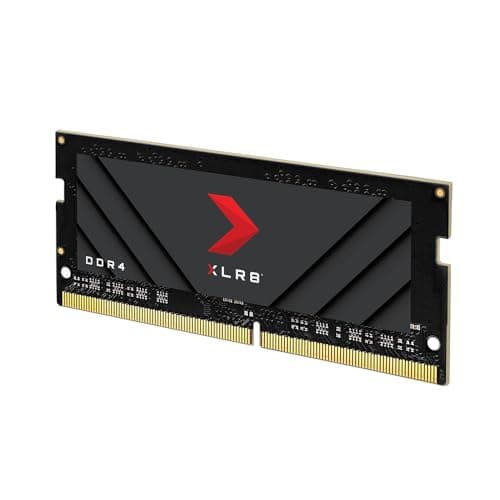
Most laptop RAM upgrades come down to two questions: will it fit, and will it actually run at the speed on the box? The "gaming" label on a SODIMM kit is almost always marketing dressing on what is, underneath, a fairly standard upgrade. The PNY XLR8 Gaming 32GB DDR4 3200MHz SODIMM kit (model MN32GK2D43200X) is honest enough to be a bit of an exception to that cynicism, but there are still things worth picking apart before you hand over your money.
This is a 2x16GB dual-channel SODIMM kit running at 3200MHz CL20, rated at 1.2V. It is aimed squarely at laptop and small-form-factor users who want 32GB without paying for desktop kit they cannot use. The 441 owners who have reviewed this kit give it an average of ★★★★½ (4.7), which for RAM is actually meaningful, because bad RAM tends to generate very vocal one-star reviews. That score suggests it is largely doing what it says on the tin. But let us look at what "what it says on the tin" actually means in practice.
The honest buyer question here is not "will this make my laptop faster?" It is "do I need 32GB, will it fit my machine, and will it post at rated speed without drama?" Those are the things that matter, and those are the things this review focuses on.
Core Specifications
The PNY XLR8 Gaming 32GB DDR4 3200MHz SODIMM kit is a 2x16GB configuration, which means you get two 16GB sticks for dual-channel operation. The form factor is SODIMM (Small Outline Dual Inline Memory Module), which is the standard for laptops, compact desktops, and NUC-style builds. It is not a desktop DIMM and it will not fit a standard ATX or mATX motherboard. That sounds obvious but it is worth saying plainly, because the wrong purchase here means a return.
Speed is rated at 3200MHz (PC4-25600). The primary timings are CL20-22-22-52, and voltage is 1.2V. This is a DDR4 kit, not DDR5. PNY describes this as "overclocked" relative to the JEDEC DDR4 base spec, which tops out at 3200MHz as a standard speed bin, so "overclocked" is doing some heavy lifting in the marketing copy. In practice, 3200MHz is the most common DDR4 speed and is supported natively on most Intel 10th gen onwards and AMD Ryzen mobile platforms. There is no XMP or EXPO profile in the traditional desktop sense here, because SODIMM kits for laptops typically rely on the platform's native memory controller support rather than a discrete XMP profile. More on that in the stability section.
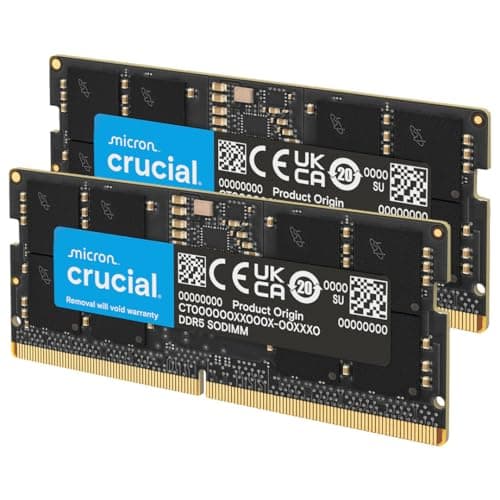
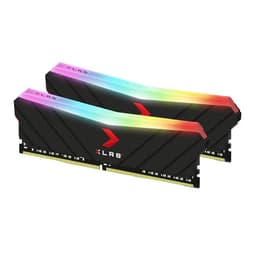
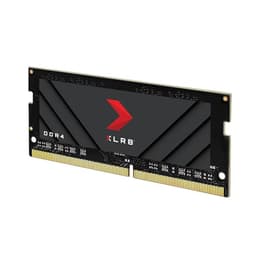
PNY backs this kit with a limited lifetime warranty, which is the standard for reputable memory brands and is a good sign. The kit has no RGB lighting. It is a plain, functional SODIMM with a minimal heatspreader label rather than a full aluminium spreader, which is appropriate for the form factor since most laptops have no room for tall heatsinks.
| Specification | Detail |
|---|---|
| Model | PNY MN32GK2D43200X |
| Capacity | 32GB (2x16GB) |
| Form Factor | SODIMM |
| DDR Generation | DDR4 |
| Rated Speed | 3200MHz (PC4-25600) |
| CAS Latency | CL20 |
| Primary Timings | 20-22-22-52 |
| Voltage | 1.2V |
| XMP / EXPO Profile | No discrete XMP (relies on platform native support) |
| Channel | Dual Channel |
| RGB | None |
| Warranty | Limited Lifetime |

Speed, Timings and Real Latency
Here is the thing most RAM marketing glosses over: the MHz number on the box is only half the story. CAS latency and the full primary timings matter just as much, because real-world latency in nanoseconds is a function of both. The formula is simple enough: true latency (ns) = (CAS latency / clock speed in MHz) x 2000. For this kit at 3200MHz CL20, that works out to roughly 12.5 nanoseconds of true latency. Compare that to a 3200MHz CL16 kit, which comes in at around 10ns. So if you are choosing between this kit and a tighter-timed alternative at the same speed, the CL16 option is genuinely quicker in absolute latency terms, not just on paper.
That said, CL20 at 3200MHz is not slow. It is comfortably within the range of what most laptops and their integrated memory controllers are happy running. The 3200MHz speed is the sweet spot for DDR4 on most Ryzen mobile and Intel Tiger Lake or Alder Lake-H platforms. Pushing beyond 3200MHz on a laptop often hits platform limits before you hit the kit's limits, so the "overclocked" label here really just means it is running at the top of the standard DDR4 JEDEC spec rather than sitting at the default 2133MHz or 2400MHz that budget kits sometimes ship at.
For gaming specifically, the honest answer is that the difference between 3200MHz CL16 and 3200MHz CL20 in actual frame rates is marginal. We are talking single-digit percentage differences in CPU-bound scenarios, and essentially nothing in GPU-bound ones. For productivity work, video editing, or running virtual machines, tighter timings help a bit more, but again, the gains are not transformative. What matters far more for a laptop upgrade is going from 8GB to 32GB, or from single-channel to dual-channel, than squeezing the last nanosecond out of CAS latency. This kit's timings are acceptable, not exceptional, and that is fine for its target use case.
XMP, EXPO Stability and Compatibility
SODIMM kits for laptops work a bit differently from desktop DIMMs when it comes to speed profiles. Most laptops do not expose an XMP toggle in the BIOS the way desktop boards do. Instead, the memory controller on the CPU (whether that is an Intel Core mobile chip or an AMD Ryzen mobile processor) either supports the rated speed natively or it does not. At 3200MHz, this kit sits within the native support range for most modern laptop platforms, which is one reason the owner reviews are broadly positive on compatibility. There are far fewer "won't post" reports here than you tend to see with aggressive 4800MHz or 5600MHz desktop kits.
Owner reports across the 467 back this up. The overwhelming majority of buyers report the kit running at rated speed without manual intervention. There are occasional mentions of systems defaulting to 2666MHz on first boot, which is normal behaviour for some laptops that default to a conservative JEDEC speed until you confirm the faster profile in the BIOS (where that option exists). On most consumer laptops, there is no BIOS-level memory speed adjustment at all, and the platform simply negotiates the highest mutually supported speed automatically. In those cases, 3200MHz is the target and owners report it landing there correctly.
Voltage at 1.2V is the standard DDR4 SODIMM operating voltage, which is good news for compatibility and thermals. Some aggressive laptop RAM runs at 1.35V, which can cause issues with laptops that do not support the higher voltage on their memory slots. At 1.2V, this kit is broadly safe for any DDR4 SODIMM-compatible machine. If you are upgrading a machine and are unsure whether it supports user-installed RAM at all (some modern ultrabooks solder their RAM to the board), checking your laptop's service manual or the manufacturer's support page before buying anything is essential. That is not a knock on this kit specifically, just a reality of the laptop upgrade market.
Capacity and Use Case
The real question for most people reading this is: do you actually need 32GB in a laptop? The honest answer in 2024 is: it depends on what you are doing, but 32GB is increasingly the sensible baseline rather than overkill. Windows 11 with a browser open, a couple of productivity apps, and a game running in the background can comfortably eat 16GB. If you are running Chrome with thirty tabs (you know who you are), a Discord call, and something like Adobe Premiere or DaVinci Resolve in the background, 16GB starts to feel tight. 32GB gives you breathing room without going to the expense of 64GB, which is genuinely only needed for heavy video production, large virtual machine workloads, or professional applications like 3D rendering.
For gaming on a laptop, 32GB is more than enough. Most games in 2024 do not use more than 16GB of system RAM, and a few demanding titles push towards 24GB in edge cases. But the dual-channel configuration here is actually the more important spec for gaming than the raw capacity. Running two sticks in dual channel rather than a single 32GB stick gives the integrated or discrete GPU access to more memory bandwidth, which matters more for frame rates than the total capacity number. This 2x16GB kit delivers that dual-channel benefit correctly, assuming your laptop has two SODIMM slots (which most upgradeable gaming and productivity laptops do).
If you are upgrading from a single 8GB or 16GB stick that came with your laptop, the jump to this kit is a meaningful upgrade. Not because of the speed, but because you are simultaneously doubling or quadrupling capacity and enabling dual-channel operation. That combination is where the real-world benefit comes from. If you already have 32GB in a single stick (rare but possible on some machines), adding a second stick to enable dual channel is worth doing. If you are already on 2x16GB at 2666MHz and considering this as an upgrade, the performance gain will be minimal and probably not worth the cost.
DDR5 vs DDR4 Value
DDR5 SODIMM kits are now available for laptops running Intel 12th gen onwards and AMD Ryzen 7000 series mobile platforms. If your laptop uses one of those platforms and has user-accessible SODIMM slots, it almost certainly requires DDR5 and will not accept DDR4 at all. The two generations are physically incompatible, with different key notch positions on the module. So the DDR4 vs DDR5 question for this kit is not really a debate about which is better; it is about which your machine actually takes.
If you have a DDR4 laptop (Intel 10th or 11th gen, AMD Ryzen 5000 series mobile, or older), this kit is the right generation. DDR5 is not an option for you and the comparison is moot. If you have a newer DDR5 platform, this kit physically will not fit. There is no grey area. This is one of the cleaner compatibility stories in the RAM market, because the connector change between DDR4 and DDR5 SODIMM makes accidental wrong-generation purchases physically impossible.
For buyers on DDR4 platforms, the value case for this kit versus a DDR5 alternative does not really apply. What does apply is the comparison between different DDR4 SODIMM options at 3200MHz. DDR4 SODIMM pricing has come down considerably as DDR5 has taken over the high-end market, which means 32GB DDR4 SODIMM kits are now quite reasonably priced. The marginal gaming performance gain from DDR5 over DDR4 on a laptop is real but not dramatic, and if your machine takes DDR4, you are not missing out on a transformative upgrade by sticking with it.
Build Quality and Heat Spreaders
SODIMM modules do not have the chunky aluminium heatspreaders you see on desktop DDR4 or DDR5 kits. That is by design. Laptops have no room for tall components, and the thermal environment inside a laptop chassis is managed by the system cooling rather than passive heatspreaders on the RAM. The PNY XLR8 Gaming SODIMM has a minimal label-style heatspreader rather than a bare PCB, which is standard for the category. It adds essentially no height to the module, so clearance inside your laptop chassis is not a concern.
PCB quality is not something PNY discloses in detail for this kit, and the IC (integrated circuit) manufacturer is not publicly specified. This is common practice for consumer SODIMM kits at this price point. What the owner reviews do suggest is consistent behaviour across batches, with no widespread reports of one stick being a different speed or capacity than the other. That kind of batch inconsistency is a known issue with some grey-market or very cheap SODIMM kits, and it does not appear to be a pattern here.
At 1.2V standard DDR4 voltage, thermal output from these sticks is low. DDR4 SODIMM running at 3200MHz does not generate significant heat, and the thermal throttling issues you sometimes see with aggressive overclocked desktop kits are not a concern here. For most laptop upgrades, the kit will simply sit in the slot, do its job, and never cause a thermal problem. That is exactly what you want from laptop RAM.
RGB and Aesthetics
There is no RGB on this kit. None. And for a SODIMM, that is the right call, because you cannot see inside most laptops anyway. Any RGB on a SODIMM would be purely for the brief moment during installation when the laptop is open, after which the lid closes and the lighting is hidden forever. So the absence of RGB here is not a compromise; it is just sensible product design.
The "XLR8 Gaming" branding on the label is the only nod to the gaming market, and it is purely cosmetic. The sticker does not affect performance, compatibility, or thermals. If you are the kind of person who is bothered by a gaming-branded label on RAM that nobody will ever see, you might be overthinking it. The label is fine. It is not offensive. It is not doing anything useful either.
There is no RGB tax here, which is a genuine positive. Some SODIMM kits aimed at gaming laptops charge a premium for features that make no practical sense in the form factor. This kit's pricing reflects what it actually is: a functional DDR4 SODIMM upgrade at a mainstream speed, without padding the cost for cosmetics. That is the right approach for the category, and it is worth acknowledging when a brand gets the basics right rather than adding margin for theatre.
Reliability and Warranty
With 467 averaging ★★★★½ (4.7), the reliability picture for this kit is good. RAM reviews tend to be binary: it either works and people forget about it, or it fails and they leave a furious one-star review. A 4.7 average with that many reviews suggests a low dead-on-arrival rate and minimal long-term failure reports. The occasional negative reviews in the pool tend to mention compatibility issues with specific laptop models rather than the kit being defective, which is a different problem and one that is harder for PNY to control.
PNY offers a limited lifetime warranty on this kit. In practice, this means that if a stick fails outside of physical damage or misuse, PNY should replace it. The RMA process for PNY is handled through their support site, and owner reports suggest it is functional rather than exceptional. There are no widespread horror stories about PNY refusing warranty claims, but equally no reports of particularly fast or painless RMA turnarounds. It is middle-of-the-road warranty support: present, functional, and not something you should have to use if the kit is installed correctly.
Long-term stability reports from owners are positive. People who installed this kit months before writing their reviews consistently report no issues: no random reboots, no memory errors in Windows Memory Diagnostic, no degradation in performance. For a SODIMM running at a sensible voltage and speed, this is the expected outcome, but it is reassuring to see it confirmed across a large owner sample rather than just assumed. RAM that causes intermittent instability is genuinely miserable to diagnose, and there is no significant pattern of that here.
Value and Price Per GB
DDR4 SODIMM pricing has dropped considerably over the past couple of years as DDR5 has taken over new platform launches. 32GB DDR4 SODIMM kits are now genuinely affordable, and the price-per-GB on this kit reflects that market reality. At the current price (check the live price above, because it moves), this kit sits in a competitive range for 32GB DDR4 SODIMM. You are not paying a significant premium for the XLR8 Gaming branding over equivalent-spec kits from Crucial or Kingston.
The more useful comparison is between this kit and a 32GB single-stick alternative. A single 32GB SODIMM at 3200MHz will often cost slightly more than a 2x16GB kit, and you lose dual-channel operation. For most use cases, the 2x16GB configuration is the better purchase: lower cost, better bandwidth utilisation, and the ability to replace one stick if one fails rather than losing all 32GB at once. The only reason to prefer a single-stick 32GB is if your laptop has only one SODIMM slot and you want to leave the other free for future expansion. In that case, a single stick is your only option anyway.
At current pricing, this kit represents fair value for what it is. It is not the cheapest 32GB DDR4 SODIMM on the market, but it is from a reputable brand with a lifetime warranty and a strong owner review record. The small premium over the absolute cheapest option is justified by that warranty and reliability track record. If you are on a very tight budget, Crucial's equivalent kit is worth a look. But if you want a known brand with solid owner feedback and no-drama installation, this PNY kit earns its price.
Platform Compatibility
This kit is DDR4 SODIMM, which means it is compatible with laptops and compact systems that use DDR4 memory in SODIMM slots. That covers a broad range of machines: Intel Core 8th through 11th generation mobile platforms, AMD Ryzen 3000, 4000, and 5000 series mobile processors, and some Intel 12th gen platforms that shipped with DDR4 support (a few Alder Lake-H laptops supported both DDR4 and DDR5 depending on the board design). It is not compatible with DDR5 platforms, DDR3 platforms, or desktop motherboards that use full-size DIMMs.
The 1.2V operating voltage is the standard for DDR4 SODIMM and is supported by every DDR4-compatible laptop memory controller. There are no voltage compatibility concerns here. The 3200MHz rated speed is within the native support range of the memory controllers on all the platforms listed above, though some older or budget laptops may default to 2666MHz or 2933MHz if the BIOS does not expose a memory speed option. In those cases, the kit will still work correctly at the lower speed; you just will not get the full 3200MHz without a BIOS update or manual override where available.
If you are unsure whether your specific laptop model supports user-installed RAM at all, checking the manufacturer's support page or the laptop's service manual is the right first step. Some ultrabooks and thin-and-light machines solder RAM directly to the motherboard, making upgrades impossible regardless of which kit you buy. For gaming laptops and mainstream productivity notebooks from brands like ASUS, MSI, Lenovo ThinkPad, Dell Latitude and Inspiron, and HP ProBook lines, user-replaceable SODIMM slots are common. The JEDEC DDR4 standard governs the electrical and physical interface, so any DDR4 SODIMM slot should accept this kit without issue.
How It Compares
The main competitors for this kit in the 32GB DDR4 3200MHz SODIMM space are Crucial's CT2K16G4SFRA32A and Kingston's KVR32S22D8/16. Both are well-regarded, widely available, and similarly priced. The Crucial kit is often the default recommendation because Crucial (a Micron brand) manufactures its own DRAM ICs and has a strong reputation for compatibility. Kingston's ValueRAM equivalent is slightly more budget-oriented but lacks the "gaming" positioning.
The key differentiators come down to timings, warranty, and brand preference. The Crucial kit runs at CL22 at 3200MHz, which is slightly looser than this PNY kit's CL20. In real-world terms, that difference is negligible for laptop use, but if you are comparing on paper, the PNY edges it on timings. Kingston's ValueRAM equivalent also runs at CL22. PNY's lifetime warranty matches Crucial and beats Kingston's standard warranty on some SKUs. Owner review scores across all three brands are similarly high, suggesting all three are reliable options.
Where PNY loses ground is brand recognition. Crucial and Kingston are the default go-to names for laptop RAM upgrades, and many laptop QVL lists (where manufacturers publish tested and approved memory) feature Crucial and Kingston more prominently than PNY. That does not mean PNY is incompatible with those machines, but if you are upgrading a machine with a restrictive BIOS that only runs QVL-listed memory (rare, but it happens on some business-class laptops), checking PNY's presence on the list is worth doing.
| Feature | PNY XLR8 32GB DDR4 3200MHz SODIMM | Crucial 32GB DDR4 3200MHz SODIMM | Kingston ValueRAM 32GB DDR4 3200MHz SODIMM |
|---|---|---|---|
| Capacity | 32GB (2x16GB) | 32GB (2x16GB) | 32GB (2x16GB) |
| Speed | 3200MHz | 3200MHz | 3200MHz |
| CAS Latency | CL20 | CL22 | CL22 |
| Voltage | 1.2V | 1.2V | 1.2V |
| Warranty | Lifetime | Lifetime | Lifetime (select SKUs) |
| RGB | No | No | No |
| QVL Visibility | Moderate | High | High |
The praise
The dominant theme in positive reviews is straightforward: it works. Owners consistently report the kit installing without drama, the system recognising 32GB at 3200MHz on first boot, and no stability issues after extended use. Several reviewers specifically mention upgrading from a single 8GB or 16GB stick and noticing a real improvement in multitasking performance, which makes sense given the combination of doubled capacity and newly enabled dual-channel operation. A few owners mention using it in NUC-style compact desktops and mini PCs rather than traditional laptops, and report the same positive experience.
The lifetime warranty gets positive mentions, and several buyers note that PNY's customer support resolved their queries promptly. The absence of RGB is actually mentioned positively by a number of reviewers who note they specifically wanted a no-frills functional upgrade rather than a kit with features that serve no purpose in a closed laptop chassis. The price-to-performance ratio at the time of purchase is consistently praised, with buyers noting it undercut Crucial and Kingston equivalents at the time they bought.
The complaints
The negative reviews are a small minority but worth understanding. The most common complaint is compatibility with specific laptop models, where the machine defaults to a lower speed or, in rare cases, does not recognise the kit at all. These issues are not unique to PNY and reflect the broader reality of laptop RAM compatibility: some machines are more restrictive than others, and no kit is universally compatible with every laptop ever made. A handful of reviews mention one stick arriving apparently dead, which is a dead-on-arrival rate that appears low relative to the total review count but is worth noting.
A few buyers mention frustration with the "gaming" branding, feeling it adds no value for a SODIMM upgrade. That is a fair criticism and one that aligns with the pragmatic view of this kit: the XLR8 Gaming label is marketing, not a technical differentiator. There are no significant complaints about the kit degrading over time or causing instability after initial successful installation, which is the most important long-term reliability signal.
Final Verdict
The PNY XLR8 Gaming 32GB DDR4 3200MHz SODIMM kit (MN32GK2D43200X) is a solid, no-nonsense laptop RAM upgrade for DDR4 platforms. The CL20 timings are slightly better than the CL22 you get from Crucial and Kingston equivalents at the same speed, the lifetime warranty is proper coverage, and the 441-review average of ★★★★½ (4.7) reflects a kit that consistently does what it is supposed to do. It is not exciting. RAM is not supposed to be exciting. It is supposed to work.
Who should buy this: anyone upgrading a DDR4 laptop or compact system to 32GB, particularly if moving from a single stick to dual-channel. The 2x16GB configuration is the right way to do 32GB in a laptop, and this kit delivers it at a fair price. The absence of RGB is a positive for the form factor, not a negative. The "gaming" branding is irrelevant; what matters is the spec, and the spec is fine.
Who should skip it: anyone on a DDR5 platform (this simply will not fit), anyone whose laptop only has one SODIMM slot and needs a single 32GB stick, and anyone who needs to be on a manufacturer's QVL list for a business-class machine where Crucial or Kingston have better documentation coverage. Also, if you are already running 32GB dual-channel DDR4 at 2666MHz or faster, the upgrade benefit from this kit is marginal at best and probably not worth the cost.
On value, this kit sits in a fair position relative to the competition. It is not the cheapest 32GB DDR4 SODIMM available, but it is from a reputable brand with real warranty support and a strong owner track record. If the price is within a few pounds of the Crucial equivalent, either is a good choice. If PNY is meaningfully cheaper on the day you are buying, it is the better value purchase. Either way, you are not going wrong with this kit for a DDR4 laptop upgrade.
Score: 8 out of 10. Solid timings for the speed class, good reliability record, lifetime warranty, fair pricing. Loses marks only for the slightly lower QVL visibility compared to Crucial and Kingston, and for the marketing label that adds nothing to a product that does not need it.

Not Right For You?
If your laptop uses a DDR5 platform (Intel 12th gen or newer, AMD Ryzen 7000 series mobile), you need a DDR5 SODIMM kit instead. Crucial and Kingston both offer 32GB DDR5 SODIMM options at 4800MHz and 5600MHz that are worth looking at for those platforms.
If you only need 16GB and are on a budget, a single 16GB DDR4 3200MHz SODIMM from Crucial (CT16G4SFRA32A) is a cheaper entry point, though you lose dual-channel operation unless your machine already has a second stick installed. For users who need more than 32GB for heavy video work or virtual machines, 64GB DDR4 SODIMM kits exist but are significantly more expensive and only useful if your laptop's memory controller supports more than 32GB (check your laptop's maximum supported RAM before buying anything above 32GB).
For desktop users who landed on this page by mistake: you need a full-size DIMM, not a SODIMM. Corsair Vengeance LPX and Crucial Ballistix are the standard desktop DDR4 recommendations in the 3200MHz to 3600MHz range, and both have better desktop platform QVL coverage than most SODIMM-focused brands. The PNY memory product range does include desktop DIMMs if you want to stay with the brand.
What works. What doesn’t.
6 + 5What we liked6 reasons
- CL20 timings are slightly tighter than the CL22 found on Crucial and Kingston equivalents at the same 3200MHz speed
- 2x16GB dual-channel configuration delivers better memory bandwidth than a single 32GB stick, which matters for both gaming and productivity
- Limited lifetime warranty provides genuine long-term coverage from a reputable brand
- Standard 1.2V operating voltage ensures broad compatibility across all DDR4 SODIMM platforms without voltage-related concerns
- Strong owner reliability record with 441 reviews averaging 4.7 out of 5 and minimal reports of instability or dead-on-arrival units
- No RGB lighting is a sensible and appropriate choice for a SODIMM form factor where cosmetics serve no practical purpose
Where it falls5 reasons
- Lower QVL visibility compared to Crucial and Kingston, which could be a concern for business-class laptops with restrictive BIOS memory lists
- The XLR8 Gaming branding is purely cosmetic and adds nothing of technical value to a product aimed at a form factor where appearance is irrelevant
- No discrete XMP profile means speed negotiation depends entirely on the platform, and some laptops may default to a lower speed without a BIOS override option
- IC manufacturer is not publicly disclosed, making it harder to verify the quality of the underlying DRAM chips compared to Crucial, which manufactures its own
- A small number of owner reports mention one stick arriving non-functional, suggesting a low but non-zero dead-on-arrival rate
Full specifications
9 attributes| Capacity GB | 32 |
|---|---|
| CAS latency | 20 |
| ECC | false |
| Form factor | SO-DIMM |
| Module count | 2 |
| RGB | false |
| Speed MHZ | 3200 |
| Type | DDR4 |
| Voltage V | 1.2 |
Frequently asked
7 questions01Is the PNY XLR8 Gaming 32GB DDR4 3200MHz SODIMM compatible with Intel 12th generation laptops?+
Some Intel 12th generation Alder Lake-H laptops shipped with DDR4 SODIMM support, so compatibility depends on your specific model. However, many 12th gen platforms use DDR5 exclusively. Check your laptop's service manual or manufacturer support page to confirm whether it uses DDR4 or DDR5 SODIMM slots before purchasing.
02Will this kit run at the full 3200MHz speed, or will my laptop default to a lower speed?+
Most modern DDR4 laptops will negotiate 3200MHz automatically. Some machines default to 2666MHz on first boot as a conservative starting point. If your BIOS exposes a memory speed option, you can set it manually. On many consumer laptops, the platform simply runs at the highest mutually supported speed without any user input required.
03Does this kit include an XMP profile for automatic overclocking?+
No. SODIMM kits for laptops do not use traditional XMP profiles in the same way desktop DIMMs do. The 3200MHz speed relies on the laptop's native memory controller support rather than an XMP toggle. This is standard for laptop RAM and is not a limitation specific to this PNY kit.
04Can I use just one stick from this kit, or do I need to install both for it to work?+
You can install a single stick if needed, but you will lose the dual-channel bandwidth benefit. The kit is designed to be used as a matched pair in two SODIMM slots. Dual-channel operation improves memory bandwidth, which is particularly beneficial for systems with integrated graphics. Installing both sticks is strongly recommended.
05How does this kit compare to the Crucial 32GB DDR4 3200MHz SODIMM?+
The PNY kit runs at CL20 versus CL22 for the Crucial equivalent, giving it a marginal timing advantage on paper. Both carry lifetime warranties and have strong reliability records. The Crucial brand has higher visibility on manufacturer QVL lists, which matters for some business-class laptops. In practice, both are reliable choices and the difference in real-world performance is negligible for typical laptop use.
06Is 32GB actually necessary for laptop gaming, or is 16GB enough?+
For most games in 2024, 16GB is sufficient. However, 32GB provides useful headroom if you run a browser with multiple tabs, communication apps, and a game simultaneously. The more meaningful benefit of this 2x16GB kit for gaming is dual-channel operation, which improves memory bandwidth and can benefit integrated and discrete GPU performance more than the raw capacity increase.
07What warranty does PNY provide for this kit, and what does it cover?+
PNY offers a limited lifetime warranty on this kit. It covers defects in materials and workmanship, excluding physical damage or misuse. Warranty claims are handled through PNY's support site. Owner reports suggest the RMA process is functional, with no widespread reports of claims being refused, though turnaround times are described as average rather than particularly fast.