The GPU market hands you a headache before you've even picked a card. Inflated prices, VRAM that runs out faster than manufacturers admit, and coolers that sound like a hair dryer on full blast. So when something lands in the budget bracket promising 3600MHz DDR4 in a dual-channel kit with XLR8 branding, the sensible question is: what's the catch?
Here's the short version. The PNY XLR8 Gaming 16GB DDR4 3600MHz CL18 kit is a solid, no-drama memory upgrade for anyone still on a DDR4 platform who wants to hit the sweet spot for Ryzen performance without overpaying for speed the platform can't use. Fifty-two owner reviews averaging ★★★★½ (4.5) don't happen by accident. But there are things to know before you click buy, and this review covers all of them.
The frustration this kit solves is specific: you're running 2666MHz or 3200MHz RAM, your Ryzen CPU is leaving performance on the table because its Infinity Fabric wants 3600MHz to run at 1:1 ratio, and you don't want to spend a fortune fixing that. This kit targets that exact problem. Whether it's the right fix for your situation depends on a few details.
Core Specifications
The PNY XLR8 Gaming 16GB DDR4 3600MHz kit is a straightforward dual-channel DIMM pair, two 8GB sticks running at PC4-28800 speeds. The CL18 latency is the number that needs some context, because 3600MHz CL18 sits in a slightly awkward position compared to 3200MHz CL16 kits. The primary timings here are CL18-22-22, which is looser than what enthusiasts would call tight, but for most gaming workloads the raw frequency advantage over 3200MHz CL16 is marginal rather than dramatic. The voltage is rated at 1.35V, which is standard for DDR4 running above 3200MHz and won't stress a modern motherboard.
The kit carries JEDEC XMP 2.0 profile support, meaning you enable it in the BIOS and the system configures itself. That's the correct way to run this kit. Without XMP enabled you'll be stuck at 2133MHz or 2400MHz by default, which would make the purchase pointless. PNY lists this as compatible with Intel and AMD platforms, though as always you should cross-reference your specific motherboard's QVL list before committing.
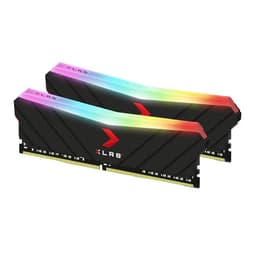
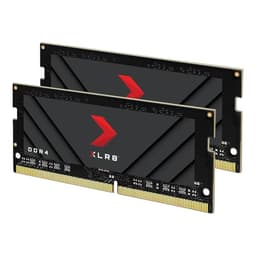
The sticks themselves use a heat spreader design under the XLR8 branding, which is functional rather than flashy. No RGB here, which is either a relief or a dealbreaker depending on your build aesthetic. Owner reviews consistently mention that the sticks are straightforward to install and the XMP profile loads without fuss on both Ryzen and Intel boards, which is the most important practical detail for most buyers.
| Specification | Detail |
|---|---|
| Kit Capacity | 16GB (2x8GB) |
| Memory Type | DDR4 |
| Speed | 3600MHz (PC4-28800) |
| Primary Latency | CL18 |
| Voltage | 1.35V |
| Form Factor | DIMM (Desktop) |
| Configuration | Dual Channel |
| XMP Support | XMP 2.0 |
| Colour / RGB | No RGB, heat spreader design |
| Current Price | £343.89 |
| Owner Rating | ★★★★½ (4.5) (52 reviews) |

Architecture and Memory Technology
DDR4 as a standard has been around long enough that there are no surprises in how it works, but the specifics of this kit's position within DDR4 are genuinely relevant to whether you should buy it. DDR4 SDRAM operates on a double data rate architecture, transferring data on both the rising and falling edge of the clock signal, which is why a 1800MHz physical clock produces the quoted 3600MHz effective speed. That's not marketing spin; it's how the standard works.
The reason 3600MHz specifically matters for Ryzen builds comes down to AMD's Infinity Fabric, the interconnect that links the CPU cores to the memory controller and to each other. On Ryzen 3000, 5000, and many 7000 series chips running in DDR4 mode, the Infinity Fabric clock synchronises with the memory controller at a 1:1 ratio up to around 1800MHz fabric clock, which corresponds to 3600MHz memory. Push beyond 3600MHz and most chips drop to a 2:1 ratio, which actually hurts latency rather than helping it. So 3600MHz is the practical ceiling for Ryzen DDR4 performance in most real-world scenarios, not an arbitrary marketing number.
On Intel's side, the platform is less sensitive to this specific threshold, but 3600MHz still sits comfortably within what most modern Intel DDR4 motherboards will happily run with XMP enabled. The CL18 latency is the trade-off PNY made to hit 3600MHz at a lower price point. Higher-end kits at the same speed run CL16 or even CL14, but those cost noticeably more. For gaming, the real-world difference between CL16 and CL18 at 3600MHz is small enough that most benchmarks struggle to show it clearly outside of latency-sensitive synthetic tests.
Clock Speeds and XMP Behaviour
The rated 3600MHz is an XMP profile speed, not the JEDEC default. Out of the box, every DDR4 kit initialises at a JEDEC standard speed, typically 2133MHz or 2400MHz, and waits for you to enable the XMP profile in the BIOS. This is not a flaw specific to PNY; it's how the entire DDR4 ecosystem works. Enable XMP, save, reboot, and the sticks run at 3600MHz with the CL18-22-22 timings loaded automatically.
Owner feedback on this kit is consistently positive about XMP stability. The 4.5-star average across 52 reviews includes multiple mentions of the kit running stable from day one with XMP enabled, on boards ranging from budget B450 and B550 to higher-end X570 and Z490 platforms. That matters more than you might think. Some cheaper kits advertise 3600MHz but struggle to hold it on anything other than premium boards with strong memory trace routing. This one appears to be less fussy.
If you want to push beyond 3600MHz, you're into manual overclocking territory, which means tightening or loosening timings and accepting that your specific CPU's memory controller will determine the ceiling. The XMP profile is the sensible stopping point for most people, and 3600MHz CL18 is genuinely the right place to stop on Ryzen anyway. Going to 3800MHz or 4000MHz on most Ryzen chips forces the 2:1 Infinity Fabric ratio, which typically costs more in latency than it gains in raw bandwidth. So the kit's rated speed is actually well-matched to the platform it's most likely to end up in.
Capacity and Bandwidth Analysis
Sixteen gigabytes in 2026 is the minimum sensible amount for a gaming system. Eight gigabytes of system RAM is genuinely too tight for modern titles that load large asset packs, and 32GB is overkill for pure gaming unless you're also running a browser with forty tabs open while streaming. This 16GB kit hits the practical sweet spot. The dual-channel configuration is the other critical piece: running two sticks in the correct slots (typically A2 and B2, check your motherboard manual) doubles the memory bandwidth compared to a single 16GB stick, which has a measurable impact on integrated graphics performance and a smaller but real impact on discrete GPU systems.
At 3600MHz with a 64-bit bus per channel (128-bit total in dual channel), the theoretical peak bandwidth of this kit sits at around 57.6 GB/s. That's the maths: 3600 million transfers per second multiplied by 8 bytes per transfer across the 64-bit channel, doubled for dual channel. In practice, real-world bandwidth is lower due to latency, refresh cycles, and memory controller efficiency, but the figure gives you a sense of scale. For context, that's comfortably above what most DDR4 3200MHz CL16 kits deliver, and the gap is more meaningful for CPU-intensive workloads and integrated graphics than for discrete GPU gaming, where the GPU has its own GDDR6 or GDDR6X memory operating at far higher bandwidths.
The 2x8GB configuration does leave two slots free on a standard ATX or micro-ATX board, which means you can add another 16GB kit later if you need 32GB. That's a practical advantage over buying a single 16GB stick or a 4x4GB kit that fills all slots. One thing to be aware of: mixing memory kits from different batches can cause stability headaches. If you do expand later, buying an identical kit from the same PNY part number gives you the best chance of a drama-free system.
XMP Profiles and Platform Compatibility
The XMP 2.0 profile on this kit is what makes it genuinely plug-and-play rather than requiring manual BIOS fiddling. Intel's XMP standard stores the timing and voltage configuration on the module itself in the SPD (Serial Presence Detect) chip, and compliant motherboards read it automatically when you enable the profile in the BIOS. AMD calls their equivalent EXPO on newer DDR5 platforms, but for DDR4, XMP 2.0 is the universal standard and AMD boards support it fine.
Platform compatibility is something to verify before buying any RAM kit. PNY's product listing covers Intel and AMD desktop platforms broadly, but the specific motherboard matters. A budget B450 board with weaker memory trace routing will have a harder time hitting 3600MHz than a mid-range B550 or X570 board. Most B550 and X570 boards handle 3600MHz without complaint, and owner reviews of this kit don't flag widespread compatibility problems. On Intel's Z490, Z590, Z690, and Z790 platforms running DDR4, 3600MHz is similarly well within the comfort zone.
What you won't get with this kit is AMD's newer EXPO profile, because EXPO is a DDR5 feature and this is DDR4. You also won't get Intel's XMP 3.0, which is the DDR5-era version of the standard. Neither of those omissions matters for a DDR4 kit; XMP 2.0 is exactly what you need, and it's what this provides. The kit also doesn't support ECC (error-correcting code) memory, but that's a workstation and server feature that gaming motherboards don't support anyway.
Build Quality and Physical Design
The XLR8 Gaming branding on this kit comes with a heat spreader that's functional rather than decorative. DDR4 at 3600MHz 1.35V doesn't generate enormous heat, so the spreader is more about looking the part than solving a thermal crisis. Owner photos and descriptions suggest a relatively low-profile design compared to some of the taller, chunkier spreaders on competing kits, which is useful if you're running a large CPU cooler with a heatsink that hangs over the first DIMM slot.
The absence of RGB is a deliberate choice on PNY's part for this particular SKU. If your build has a glass panel and you care about aesthetics, that's a meaningful consideration. PNY does make RGB versions of the XLR8 Gaming line, but this kit isn't one of them. The upside is that without the RGB hardware and the software that goes with it, there's less to go wrong and no driver conflicts with lighting control software. Several owner reviews specifically mention appreciating the clean, understated look in a build that doesn't need more glowing components.
Installation is standard DIMM procedure: hold the stick at the edges, align the notch, press firmly until both retention clips click. Owner reviews don't flag any issues with stiff slots or sticks that don't seat properly, which is the kind of basic quality control that cheaper kits sometimes fail. The sticks are straightforward to remove too, which matters if you're swapping RAM in a tight case. Nothing exotic, nothing clever, just functional hardware that does what it should.

Power Consumption and Voltage
At 1.35V, this kit runs at the standard elevated voltage for DDR4 above 3200MHz. JEDEC's standard DDR4 voltage is 1.2V, and XMP profiles that push higher speeds typically specify 1.35V as the sweet spot between stability and longevity. This is not a concern for a modern motherboard; every DDR4 board designed in the last several years handles 1.35V memory without issue, and the memory controller on Ryzen and Intel CPUs is rated for it.
The actual power draw of a 16GB DDR4 kit at 1.35V is low enough to be irrelevant to PSU calculations. A pair of DDR4 DIMMs draws somewhere in the region of two to four watts total under load. Your power supply will not notice. This is worth stating plainly because some buyers coming from GPU shopping are used to thinking about power budgets carefully. For RAM, the voltage spec matters for motherboard compatibility and stability, not for PSU sizing.
Running the kit at 1.35V long-term is fine. DDR4 memory is designed for sustained operation at this voltage, and there's no credible evidence that 1.35V DDR4 degrades faster than 1.2V DDR4 in normal desktop use. The thermal output at this voltage is low, which is why the heat spreader on this kit doesn't need to be particularly substantial. If your case has reasonable airflow, the sticks will run cool without any active cooling.
Thermal Performance
DDR4 memory at 3600MHz 1.35V is not a thermal challenge. The heat spreader on the XLR8 Gaming sticks exists primarily to conduct heat away from the DRAM chips and into the surrounding air, and at these power levels it does that job easily. Owner reviews don't mention thermal throttling or heat-related instability, which is exactly what you'd expect from a kit in this class. If your system has adequate case airflow, the memory will run at safe temperatures indefinitely.
Where thermals can become relevant with DDR4 is in extremely cramped cases with no airflow over the DIMMs, or in systems where a large tower cooler's heatsink sits directly over the memory slots and blocks all air movement. In those scenarios, even low-power DDR4 can accumulate heat over long sessions. The relatively compact heat spreader on this kit is actually an advantage in tight-clearance situations, since it's less likely to conflict physically with a large CPU cooler than taller, more elaborate spreader designs.
For the vast majority of builds, thermal performance is a non-issue with this kit. The sticks will run warmer to the touch after a long gaming session than they would at idle, but not hot enough to cause concern. If you're building in a well-ventilated mid-tower or ATX case, this is genuinely not something that needs managing. The heat spreader does its job quietly and without drama, which is the best thing you can say about passive cooling on RAM.
Acoustic Performance
RAM is passive. It makes no noise. This section exists because some buyers, particularly those new to building, occasionally wonder whether faster memory introduces any acoustic penalty. It doesn't. There are no fans, no moving parts, and no coil whine associated with DDR4 DIMMs. The XLR8 Gaming kit is completely silent in operation, as all DDR4 memory is.
The only acoustic consideration adjacent to memory is the motherboard's voltage regulation circuitry, which can occasionally produce coil whine when memory is running at elevated frequencies and voltages. This is a motherboard characteristic, not a memory characteristic, and it's relatively uncommon. Owner reviews of this kit don't mention any associated coil whine, though individual results depend entirely on the specific motherboard and its VRM design.
So if you're asking whether this kit will make your system louder: no. If your system is loud, the culprit is the CPU cooler, the GPU fans, or the case fans. The RAM is not contributing. This is one area where the PNY XLR8 Gaming 16GB kit is unambiguously perfect, albeit for the trivial reason that all RAM is equally silent.
Gaming Performance Impact
The performance impact of upgrading to 3600MHz DDR4 from slower memory depends heavily on what you're coming from and what CPU you're running. On Ryzen 5000 series chips, the difference between 3200MHz CL16 and 3600MHz CL18 in gaming is typically in the range of two to five frames per second at 1080p in CPU-limited scenarios. That's real, but it's not transformative. Where the upgrade makes a more meaningful difference is if you're coming from 2666MHz single-channel or 3000MHz, in which case the jump to 3600MHz dual-channel can produce double-digit FPS gains in games that stress the CPU.
Titles that are particularly sensitive to memory speed and latency include competitive shooters like Counter-Strike 2 and Valorant, open-world games with heavy streaming like Cyberpunk 2077 and Hogwarts Legacy, and strategy games with large unit counts. In these titles, faster memory with lower latency helps the CPU feed the GPU more efficiently, which shows up as higher minimum frame rates and smoother frametimes rather than just higher averages. Published benchmarks from outlets like TechPowerUp and similar sources consistently show that Ryzen gaming performance scales with memory speed up to around 3600MHz, after which returns diminish rapidly.
At 1440p and 4K, the GPU becomes the bottleneck in most titles and the memory speed matters less. If you're gaming at 4K on a high-end GPU, the difference between 3200MHz and 3600MHz system RAM is negligible. The sweet spot for this kit is a Ryzen-based system running a mid-range GPU at 1080p or 1440p, where the CPU has enough headroom that memory speed can actually show up in the numbers. That's also the most common configuration in the UK gaming market, which is why this kit makes sense for a lot of people.
How It Compares
The main competition at this speed and capacity comes from Corsair's Vengeance LPX 16GB 3600MHz CL18 and Kingston's Fury Beast 16GB 3600MHz CL18. All three kits are targeting the same buyer: someone who wants the Ryzen-optimal memory speed without paying enthusiast prices for tighter timings. The differences between them are mostly in heat spreader height, brand preference, and price on any given day.
Corsair's Vengeance LPX is the benchmark for low-profile DDR4. It's been around long enough to have an enormous QVL presence, meaning it appears on almost every motherboard manufacturer's tested compatibility list. If compatibility certainty is your priority, the LPX has an edge simply through longevity. Kingston's Fury Beast is newer branding over what was the HyperX Fury line, and it similarly has broad platform support and a reputation for stable XMP behaviour. Neither competes dramatically differently from the PNY XLR8 Gaming kit on raw performance, because at 3600MHz CL18 the silicon is doing the same job.
Where the PNY kit can stand out is price. At certain points in the market cycle, PNY's pricing on this kit undercuts both Corsair and Kingston by a meaningful margin. If the specs are equivalent and the price is lower, that's a straightforward win. The 4.5-star average across 52 reviews suggests buyers aren't encountering problems that would justify paying more for a competitor. The one area where the Corsair LPX has a genuine advantage is physical clearance: it's one of the lowest-profile DDR4 spreaders available, which matters in small form factor builds or with very large air coolers. The PNY XLR8 spreader is not dramatically tall, but it's not as flat as the LPX.
| Feature | PNY XLR8 Gaming 16GB 3600MHz CL18 | Corsair Vengeance LPX 16GB 3600MHz CL18 | Kingston Fury Beast 16GB 3600MHz CL18 |
|---|---|---|---|
| Capacity | 16GB (2x8GB) | 16GB (2x8GB) | 16GB (2x8GB) |
| Speed | 3600MHz | 3600MHz | 3600MHz |
| Primary Latency | CL18 | CL18 | CL18 |
| Voltage | 1.35V | 1.35V | 1.35V |
| XMP Support | XMP 2.0 | XMP 2.0 | XMP 2.0 |
| RGB | No | No | Optional |
| Heat Spreader Height | Standard | Very low profile | Standard |
| QVL Presence | Good | Excellent | Good |
| Owner Rating | ★★★★½ (4.5) (52 reviews) | ★★★★½ (4.5) (large sample) | ★★★★½ (4.5) (large sample) |

Final Verdict
The PNY XLR8 Gaming 16GB DDR4 3600MHz CL18 kit does exactly what it says. It's a competent, stable, no-RGB dual-channel DDR4 kit at the frequency that Ryzen platforms actually want. The CL18 latency is looser than enthusiast-tier kits, but for the price bracket it occupies and the gaming use case it targets, that trade-off is sensible. The 4.5-star average from 52 real owners, with consistent praise for XMP stability and straightforward installation, is the kind of social proof that matters more than any single benchmark number.
This kit suits a specific buyer well: someone building or upgrading a Ryzen 3000 or 5000 series system, running a mid-range discrete GPU, gaming primarily at 1080p or 1440p, and wanting to hit the optimal memory frequency without spending extra on tighter timings that won't show up in their games. It also suits Intel DDR4 platform users who just want reliable 3600MHz without drama. If you're running integrated graphics on a Ryzen APU, faster memory matters more than almost anything else in the system, and this kit is a strong choice for that too.
Who should skip it? If you're building on a DDR5 platform, this kit is irrelevant to you. If you're in a small form factor build with a large tower cooler that barely clears the DIMM slots, the Corsair Vengeance LPX's lower profile might be the smarter physical choice. And if you genuinely need 32GB, buying two of these kits later is possible but not guaranteed to be drama-free; you'd be better off buying a 32GB 3600MHz kit in one go if that's your actual requirement.
The honest don't-overspend note: if you're already running 3200MHz CL16 dual-channel, the upgrade to this kit will produce a small improvement on Ryzen and an even smaller one on Intel. The people who get the most from this kit are those jumping from single-channel, from 2666MHz, or from 3000MHz. If you're already at 3200MHz dual-channel, the real-world gaming gain is modest. Spend the money on something else instead.
For the buyer it suits, this is a proper recommendation. Stable XMP, sensible price, correct speed for the platform, and an owner base that's largely satisfied. That's the job done.
What works. What doesn’t.
5 + 3What we liked5 reasons
- 3600MHz XMP profile is the Ryzen sweet spot and loads stably on most boards
- CL18 at this price point is a fair trade-off for the target buyer
- No RGB keeps it clean and avoids software conflicts
- Low-profile enough to fit most cooler clearances
- Strong 4.5-star average from 52 real owners with no widespread compatibility complaints
Where it falls3 reasons
- CL18 latency is looser than competing CL16 kits at similar speeds
- No RGB if your build needs it
- Marginal upgrade from 3200MHz CL16 dual-channel for gaming
Frequently asked
5 questions01Is the PNY XLR8 Gaming 16GB DDR4 3600MHz CL18 kit good for gaming?+
Yes, for the right platform. On Ryzen 3000 and 5000 series, 3600MHz is the optimal DDR4 speed for the Infinity Fabric's 1:1 ratio, which delivers the best balance of bandwidth and latency. In CPU-sensitive titles at 1080p you can expect small but real FPS gains over 3200MHz, and a more meaningful improvement if you're upgrading from 2666MHz or single-channel. At 1440p and 4K the GPU dominates and memory speed matters less.
02What PSU do I need for the PNY XLR8 Gaming 16GB DDR4 3600MHz kit?+
RAM draws almost no power. A 16GB DDR4 kit at 1.35V uses roughly two to four watts total. Your PSU requirements are determined entirely by your CPU and GPU, not by this memory kit. Size your PSU for your processor and graphics card, and this kit adds nothing meaningful to that calculation.
03Is 16GB of RAM enough in 2026?+
For gaming, yes. Most current titles run comfortably within 16GB of system RAM, and the dual-channel configuration of this kit means you're getting full memory bandwidth. If you also run a browser with many tabs, streaming software, and video editing simultaneously, 32GB becomes more useful. For pure gaming, 16GB dual-channel at 3600MHz is the practical sweet spot in 2026.
04How does the PNY XLR8 Gaming 16GB 3600MHz compare to Corsair Vengeance LPX at the same speed?+
At the same speed and CL18 latency, real-world gaming performance is essentially identical. The Corsair Vengeance LPX has a lower physical profile, which matters if you have a large CPU cooler with limited DIMM clearance, and it has a longer track record on motherboard QVL lists. The PNY kit can be cheaper on any given day. If price is equal, the LPX's lower profile is a practical advantage in tight builds. If the PNY is cheaper and clearance isn't an issue, the PNY is the sensible choice.
05What warranty applies to the PNY XLR8 Gaming 16GB DDR4 3600MHz kit?+
The verified product listing does not specify a warranty term in the data available to us. PNY typically offers a limited lifetime warranty on their XLR8 memory products, but confirm this directly with PNY or the seller before purchasing. Regardless of manufacturer warranty, purchases through Amazon UK are covered by Amazon's standard 30-day returns policy and the A-to-Z Guarantee.