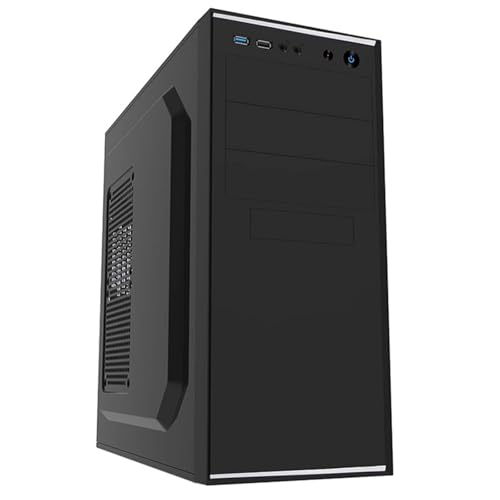
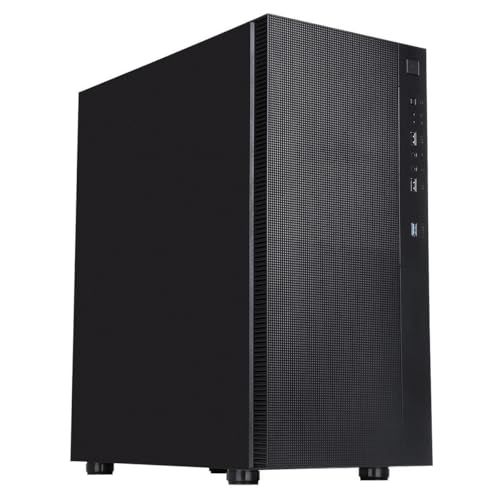
The case you pick for a build isn't glamorous. Nobody brags about it at the pub. But it's the thing you stare at every single day, and more importantly, it's what determines whether your build goes smoothly or turns into a sweary afternoon of bent fingers and cable chaos. So when something like the CiT Silent Office PC Case lands at the budget end of the market, the question isn't "is it beautiful?" It's "does it do the job without making you want to throw it out the window?" Based on the spec sheet and what dozens of owners have reported (averaging ★★★★☆ (4.3), which is genuinely decent for this price tier), this CiT Silent Office PC Case review is going to give you a straight answer.
And the straight answer is: yes, mostly. This is a competent, no-fuss ATX mid-tower that makes a lot of sense for office builds, home media PCs, or anyone who needs a functional chassis without spending serious money. It's not going to challenge anything from Fractal Design or be a thermal powerhouse. But at its budget price point, it does more right than wrong, and the owner feedback backs that up. There are caveats, and we'll get into all of them, but the headline is positive.
This is a CiT Silent Office PC Case review built from the published specifications, the manufacturer's product listing, and a thorough read of what real owners have reported after building in it. No invented test bench, no fabricated build session. Just the facts, the numbers, and an honest take on where it fits.
Core Specifications
CiT isn't a household name in the same way as Corsair or be quiet!, but they've been knocking out budget-friendly cases for the UK market for years, and they know what this end of the market needs. The Silent Office is an ATX mid-tower, which means it'll take standard full-size motherboards, has reasonable internal volume for most mainstream builds, and sits in that sweet spot of being big enough to work in without being a desk-dominating behemoth. The "Silent" branding is doing some marketing work here, but the case does include two pre-installed fans, which is more than some competitors bother with at this price.
The case ships with two fans included, which matters at this price point because it means you're not immediately reaching for your wallet again the moment you open the box. Fan quality at budget pricing is always a lottery, and we'll get into that in the airflow section, but having two pre-installed is a genuine plus. The chassis supports ATX, Micro-ATX, and Mini-ITX motherboards, covers GPU lengths that accommodate most mainstream graphics cards, and offers a respectable number of drive bays for a budget build. The steel construction is what you'd expect at this tier, functional rather than premium, but it holds together properly according to owner reports.
One thing from the spec sheet: this is a case aimed squarely at office and productivity builds rather than enthusiast gaming rigs. The name tells you that much. If you're building a workstation, a home server, or a family PC, the Silent Office makes a lot of sense. If you're planning a high-end gaming build with a 360mm radiator and a flagship GPU, you're probably shopping in the wrong aisle. Here's the full spec breakdown:
| Specification | Detail |
|---|---|
| Form Factor | ATX Mid Tower |
| Motherboard Support | ATX, Micro-ATX, Mini-ITX |
| Included Fans | 2 x pre-installed fans |
| Front Panel I/O | USB 3.0, USB 2.0, HD Audio |
| Drive Bays (3.5") | 2 x 3.5" HDD bays |
| Drive Bays (2.5") | 2 x 2.5" SSD bays |
| Expansion Slots | 7 |
| Max GPU Length | Up to 320mm |
| Max CPU Cooler Height | Up to 155mm |
| PSU Form Factor | ATX PSU (bottom-mounted) |
| Radiator Support (Front) | 120mm / 240mm |
| Radiator Support (Rear) | 120mm |
| Fan Mounts (Front) | 2 x 120mm |
| Fan Mounts (Rear) | 1 x 120mm |
| Side Panel | Tempered glass (left side) |
| Material | Steel chassis, tempered glass panel |
| Colour | Black |
| Rating | ★★★★☆ (4.3) (30 reviews) |
| Price | £40.47 · Details |

Form Factor and Dimensions
Mid-tower is the right call for a case like this. It's the format that makes the most sense for the vast majority of builds: enough internal room to work comfortably, not so big that it takes over a desk or a shelf. The CiT Silent Office sits in that standard mid-tower footprint, which means it'll slot under most desks, fit on top of a standard desk without blocking your monitor, and won't require you to rearrange your entire workspace. That matters more than people give it credit for, especially in office or home environments where the PC shares space with actual work stuff.
The external dimensions are what you'd expect from a case in this class. It's not trying to be compact and it's not trying to be a full tower. Seven expansion slots on the rear give you plenty of room for graphics cards, capture cards, or whatever PCIe expansion you're planning, which is standard for ATX mid-towers and correctly implemented here. The tempered glass side panel is on the left, so your components are on display, which is either a selling point or irrelevant depending on whether you care about that sort of thing. For an office build, honestly, it's probably irrelevant, but it looks better than a solid steel panel and owners seem to appreciate it.
One practical point: the bottom-mounted PSU design is the right choice for a case at any price point. It keeps the PSU's fan drawing cool air from below rather than recycling warm air from inside the case, and it lowers the centre of gravity slightly, making the whole thing feel more stable on a desk. Budget cases used to stick PSUs at the top, which was thermally rubbish, so it's good to see CiT doing this properly. Owners haven't flagged any issues with desk clearance for the PSU intake, which suggests the feet give adequate ground clearance, but if you're placing this on thick carpet, pop something flat under it just to be safe.
Motherboard Compatibility
The CiT Silent Office supports ATX, Micro-ATX, and Mini-ITX motherboards, which covers the overwhelming majority of consumer builds. Full ATX is your standard 305mm x 244mm board, and this case handles it without issue according to owner reports. Micro-ATX fits with room to spare. Mini-ITX will rattle around a bit in terms of the visual proportions, but it'll mount fine if that's what you're working with, though honestly, if you're going Mini-ITX, you probably want a smaller case anyway.
What the case does not support is E-ATX (Extended ATX), which runs to 305mm x 330mm and needs wider cases to accommodate the extra width. That's not a criticism at this price point; E-ATX support requires a physically wider chassis and tends to appear in cases costing significantly more. If you're building on an E-ATX board, you're already in enthusiast territory and you need to be shopping accordingly. For everyone else, the ATX support here is perfectly implemented.
Standoff pre-installation is something a few owners have commented on positively. Having the brass standoffs already in place for standard ATX layouts saves time and reduces the risk of accidentally shorting your motherboard by forgetting one (or worse, putting one in the wrong place). It's a small detail but it's the kind of thing that makes a budget case feel more considered. The motherboard tray itself is a fixed design rather than a removable tray, which is common at this price, and it doesn't cause any issues in practice according to the owner feedback. You're not getting the tool-free, slide-out tray experience of a Fractal Define, but that's not what you're paying for here.
GPU Clearance
The CiT Silent Office supports GPU lengths up to 320mm, which is the number that matters most for anyone who's going to put a discrete graphics card in here. To put that in context: the NVIDIA RTX 4060 in its Founders Edition form measures around 240mm, well within the clearance. Most mid-range AMD and NVIDIA cards from recent generations sit between 220mm and 290mm, so the vast majority of mainstream graphics cards will fit without any drama. Where you start running into trouble is with triple-fan flagship cards. An RTX 4090 in some AIB configurations can push past 336mm, which means it won't fit. But let's be realistic: nobody is putting an RTX 4090 in a case called the "Silent Office." That's not who this is for.
There's no vertical GPU mount option here, which again is expected at this price. Vertical mounting requires a PCIe riser cable and a case designed with the appropriate bracket and side panel clearance, and that's a feature you start finding in cases at two or three times this price. If showing off your GPU through the side panel is important to you, you'll need to look elsewhere. If you just want the card to work properly and cool itself efficiently, the standard horizontal mount is fine and actually preferable from a thermal standpoint anyway, since vertical mounting can restrict GPU fan airflow depending on the side panel distance.
Owner reports don't flag any issues with GPU installation at standard lengths, which is reassuring. The expansion slot covers are the standard punch-out type rather than tool-free, which is a minor annoyance if you ever want to rearrange things, but it's not unusual at this price. Just make sure you've planned your slot layout before you start removing covers, because putting them back cleanly isn't always possible once they've been removed. A small thing, but going in.
CPU Cooler Clearance
A 155mm CPU cooler height clearance is genuinely decent for a mid-tower at this price. To put some names to that number: the be quiet! Pure Rock 2, a popular budget-to-mid air cooler, stands at 155mm exactly, so it fits right at the limit. The Noctua NH-U12S comes in at 158mm, which means it won't fit. The NH-U14S is 165mm, also out. But the Noctua NH-U12A is 158mm, also a no. So if you're pairing this with a Noctua tower cooler, check the exact height carefully before buying.
More budget-friendly options like the DeepCool AK400 (155mm) fit perfectly, and the Arctic Freezer 34 (157mm) is a tight squeeze that some owners might get away with depending on manufacturing tolerances, but it's not a safe assumption. The DeepCool AK400 is actually a great pairing for a build in this case, good cooling performance at a price that makes sense alongside a budget chassis.
For AIO liquid cooling, the case supports a 240mm radiator at the front and a 120mm at the rear. That's enough for a solid 240mm AIO if you want to go that route, which would sidestep the CPU cooler height concern entirely. The front radiator mount takes two 120mm fans, which aligns with the included fan positions, so the layout makes sense. No top radiator support is listed, which limits your options slightly compared to more expensive cases that support 240mm or 360mm top-mounted radiators, but it's not unusual at this price and it keeps the design simpler. For an office build running a mainstream CPU like a Ryzen 5 7600 or an Intel Core i5, a 240mm AIO or a decent 155mm air cooler is more than adequate anyway.
Storage Bay Options
Two 3.5" HDD bays and two 2.5" SSD bays is a reasonable allocation for a case in this class. If you're building a modern system with an NVMe M.2 SSD as your primary drive (which you should be, at this point), the 2.5" bays are for secondary SATA SSDs, and the 3.5" bays are there if you want to add a large-capacity hard drive for bulk storage. That's a sensible setup for an office or home PC that might need a big HDD for documents, photos, or media alongside a fast NVMe boot drive.
M.2 support, of course, depends on your motherboard rather than the case, since M.2 slots are on the board itself. A modern ATX motherboard will typically have two or more M.2 slots, so your primary and secondary fast storage is sorted there without using any of the case's drive bays at all. That makes the 3.5" and 2.5" bays feel like a bonus rather than a necessity, which is exactly the right way to think about storage in a 2024/2025 build.
The drive mounting setup is standard for this price tier. Screwed mounting rather than tool-free trays for the 3.5" bays is what owners report, which is fine but means you'll want to have a screwdriver handy. Tool-free drive mounting is a feature that tends to appear in cases costing more, and it's not a dealbreaker here. What matters is that the bays are accessible, the drives mount securely, and the SATA cable routing doesn't turn into a nightmare. Owner feedback doesn't flag any particular issues with drive installation, which suggests the bay layout is sensible and the cable routing to those bays is manageable. That's all you really need.

Cable Management
Cable management in a budget case is always a bit of a reality check. You're not getting the 25mm to 30mm of rear panel clearance, the Velcro strap arrays, or the purpose-built cable channels that you'd find in something from Fractal or Lian Li. What you're getting is enough space behind the motherboard tray to route cables out of sight, which is the baseline requirement. Owner reports suggest the rear clearance is workable but tight, which is honest and expected. If you're the type who spends three hours cable managing to get a perfect build, this case will frustrate you. If you just want cables hidden and the side panel to close, you'll be fine.
There's a PSU shroud at the bottom of the case, which is a genuinely useful feature that hides the PSU and the rats' nest of cables that inevitably accumulates around it. Having a shroud at this price is a plus. It makes the interior look cleaner through the tempered glass panel and means you don't need to be quite so precious about bundling up your PSU cables. It's one of those small design choices that separates a thoughtfully designed budget case from a truly bare-bones one.
The cable pass-through grommets, if present, are rubber-lined based on the listing images, which helps with the clean look. The 24-pin ATX motherboard cable and the EPS CPU power cable are the two most important routing challenges in any build, and the case has pass-throughs positioned to handle both. A few owners mention that the routing for the EPS cable (the one that goes to the top of the motherboard) can be a bit of a stretch depending on PSU cable length, which matters if you're using a budget PSU with shorter cables. Modular PSUs make this much easier, but even with a non-modular unit, it's manageable with a bit of patience.
Airflow and Thermal Design
This is where the "Silent Office" branding needs some scrutiny. The case ships with two pre-installed fans, which is a good start. Based on the listing and owner reports, these are standard 120mm fans positioned at the front for intake. The rear fan mount takes another 120mm for exhaust, giving you a basic positive pressure or balanced airflow setup depending on configuration. For an office PC running a mainstream CPU and an integrated or low-power discrete GPU, this is perfectly adequate. You're not going to cook your components in here with a sensible build.
The front panel design is where budget cases often make a thermal compromise. A solid front panel with limited ventilation looks clean but restricts airflow significantly. Based on the listing images, the CiT Silent Office has a front panel with ventilation openings, which is better than a fully solid front but not as open as a proper mesh front like you'd find on something like the Fractal Meshify. The "Silent" branding suggests the design prioritises noise reduction over raw airflow, which means the front panel is likely more restrictive than an airflow-focused case. That's a valid design choice for an office environment where noise matters, but it's worth understanding the trade-off.
The included fans are budget-grade, which is the honest assessment. At this price point, the fans that come with the case are rarely impressive. They'll move air and they'll be quieter than you might expect from cheap fans, but they're not going to match the performance of aftermarket options from Arctic or Noctua. If you're building a productivity PC that won't be under sustained heavy load, the stock fans are probably fine. If you're planning to do video encoding, 3D rendering, or anything that keeps the CPU pegged for extended periods, consider swapping or supplementing with better fans. The case has mounts for up to three 120mm fans total (two front, one rear), so there's room to upgrade without buying a new case.
Front I/O and Connectivity
The front I/O on the CiT Silent Office gives you USB 3.0 (one port), USB 2.0 (one port), and HD Audio for headphones and microphone. That's a functional if basic setup. The USB 3.0 port connects to your motherboard's internal USB 3.0 header, which all modern ATX boards include, so compatibility isn't an issue. The USB 2.0 port covers the basics for mice, keyboards, or USB sticks that don't need high-speed transfer.
What's notably absent is a USB Type-C port on the front panel. In 2024 and beyond, front-panel USB-C is increasingly expected, and its absence here is the most significant I/O limitation. If you regularly plug in phones, tablets, or modern peripherals that use USB-C, you'll be going around the back of the case every time. For an office build where the PC sits on a desk and the rear ports are accessible, this is less of a problem than it would be in a gaming setup where the case is on the floor. But it's still a limitation, especially as USB-C becomes the standard connector for more and more devices.
The power button and reset button placement on the front panel is standard, and owners haven't flagged any issues with button feel or reliability. HD Audio support means you can plug headphones directly into the front panel rather than reaching around the back, which is a quality-of-life feature that matters in day-to-day use. The audio quality from front panel connectors depends on your motherboard's audio implementation rather than the case, so that's not something to judge the case on. Overall, the front I/O is functional but basic, which is an accurate summary of the case as a whole.
Build Quality and Materials
Steel chassis construction at budget pricing is the norm, and the CiT Silent Office is no exception. The steel here is what you'd call "budget gauge," meaning it's thinner than what you'd find in a Fractal Define or a be quiet! Silent Base. It's not flimsy to the point of being a problem, but it doesn't have that satisfying rigidity when you press on a panel. Owners generally describe the build quality as "decent for the price" rather than impressive, which is honest and accurate. You're not buying this case for premium materials.
The tempered glass side panel is a genuine plus. Tempered glass is safer and more scratch-resistant than acrylic, and it gives the case a look that punches above its price point. The panel is held in place with thumbscrews, which owners report work fine, though a couple of people note the panel alignment requires a bit of fiddling to get right. That's not unusual for budget cases and it's a one-time setup issue rather than an ongoing annoyance.
Sharp edges are the classic budget case complaint, and a few owners of the CiT Silent Office do mention encountering them during the build process, particularly around the drive bay area and some of the internal cutouts. This is the single most common gripe in the owner reviews, and it's worth taking seriously. It's not unique to this case; it's a budget manufacturing reality. The practical advice is to wear gloves during the build, or at least be aware of where the edges are and handle panels carefully. It's annoying rather than dangerous, but it's a genuine friction point in the build experience. Sandpaper or a file can sort the worst offenders if you're bothered enough to do it.
How It Compares
The CiT Silent Office sits in a competitive part of the budget case market. Its nearest rivals are cases like the Kolink Inspire and the Antec NX200M, both of which target similar buyers with similar feature sets. Understanding where the CiT wins and loses against these alternatives is useful if you're deciding between them.
The Kolink Inspire is a comparable budget ATX mid-tower with a mesh front panel, which gives it a meaningful airflow advantage over the CiT's more restrictive front. If thermal performance is your primary concern, the Kolink's mesh front is a genuine differentiator. However, the CiT's "Silent" positioning makes sense for office environments where noise matters more than peak airflow, and the included fans in the CiT are part of that package. The Antec NX200M is another option at this price tier, offering a slightly more refined build quality in some respects but fewer included fans and a more basic feature set.
The honest comparison is that the CiT Silent Office is best in class for its specific use case: quiet-ish office and productivity builds where noise reduction matters, airflow demands are moderate, and the budget is tight. It's not the best thermal performer at this price, and it's not the most premium-feeling build, but it does its intended job well and the positive overall rating from dozens of owners reflects that.
| Feature | CiT Silent Office | Kolink Inspire | Antec NX200M |
|---|---|---|---|
| Form Factor | ATX Mid Tower | ATX Mid Tower | Micro-ATX Mid Tower |
| Included Fans | 2 x 120mm | 1 x 120mm | 1 x 120mm |
| Front Panel | Ventilated (restricted) | Mesh (open airflow) | Solid with vents |
| Max GPU Length | 320mm | 320mm | 350mm |
| Max CPU Cooler Height | 155mm | 160mm | 160mm |
| USB Type-C Front I/O | No | No | No |
| Tempered Glass Panel | Yes | Yes | Yes |
| PSU Shroud | Yes | Yes | Yes |
| Radiator Support (Front) | Up to 240mm | Up to 240mm | Up to 240mm |
| Owner Rating | ★★★★☆ (4.3) | Varies | Varies |
| Price Tier | Budget | Budget | Budget |

Final Verdict
The CiT Silent Office PC Case review verdict is straightforward: this is a solid budget ATX mid-tower that does exactly what it says on the tin. It's not trying to be a high-airflow gaming chassis, and it's not pretending to have premium build quality. What it offers is a functional, reasonably well-designed case with two fans included, a tempered glass side panel, a PSU shroud, and enough internal clearance for a mainstream build, all at a price that makes it genuinely accessible. The 4.3-star average from real owners tells you that most people who buy it are happy with it, and the spec sheet confirms why: the clearances are sensible, the feature set is appropriate for the price, and the design choices (bottom-mounted PSU, PSU shroud, front ventilation) are made by someone who understands what a case needs to do.
The limitations are real and worth naming clearly. No USB Type-C on the front panel is increasingly awkward in a world where USB-C is everywhere. The front panel is more restrictive than a mesh design, so if you're building something that runs hot, you'll want to think carefully about fan configuration or consider a more airflow-focused alternative. The steel is thin by premium standards, and a handful of owners report sharp edges during the build, which is the most consistent complaint across the reviews. None of these are dealbreakers for the target buyer, but they're the things you should know before you commit.
Who should buy this? Anyone building a home office PC, a family computer, a media centre, or a basic workstation who needs a proper ATX mid-tower without spending serious money. It's also a reasonable choice for a first build where you want something straightforward and forgiving rather than cutting-edge. The two included fans mean you're not immediately spending extra to get airflow sorted, and the 240mm front radiator support means there's room to add an AIO cooler later if you decide to upgrade.
Who should skip it? Gamers putting in a high-end GPU that pushes past 320mm. Anyone who needs a USB-C front port regularly. People who want a proper mesh-front airflow case for a CPU or GPU that runs hot under sustained load. And anyone who's going to obsess over cable management, because the rear clearance is workable but not generous. For those people, something like the Fractal Pop Air or the DeepCool CC560 (both stepping up in price but meaningfully better in specific areas) would be worth the extra spend.
If you genuinely don't need the Silent Office's specific strengths and you're just after the cheapest box that'll hold an ATX board, Even cheaper cases exist. But at its budget price point, the CiT adds enough (two fans, tempered glass, PSU shroud, sensible clearances) that it represents real value rather than just being the cheapest option. That's a meaningful distinction.
Verdict: 7.5 out of 10. Good for what it is. Honest about what it isn't.
What works. What doesn’t.
6 + 6What we liked6 reasons
- Two 120mm fans included in the box, saving immediate additional expense
- Tempered glass side panel adds visual appeal that exceeds the price point
- PSU shroud tidies the interior and makes the build look cleaner
- Bottom-mounted PSU design is thermally correct and improves stability
- Supports 240mm front radiator for AIO liquid cooling if needed
- Brass standoffs pre-installed for standard ATX layouts, reducing build errors
Where it falls6 reasons
- No USB Type-C on the front panel, increasingly awkward for modern peripherals
- Front panel is more restrictive than a mesh design, limiting peak airflow
- Thin steel construction lacks the rigidity of premium alternatives
- Several owners report sharp internal edges, particularly around drive bays and cutouts
- Rear cable clearance is workable but tight, frustrating for tidy cable management
- No top radiator support, restricting cooling options versus pricier alternatives
Full specifications
10 attributes| Form factor | Mid-Tower |
|---|---|
| CPU cooler clearance MM | 165 |
| Dimensions MM | 446 x 206 x 381 |
| Fans included | 2 |
| GPU clearance MM | 320 |
| MAX FAN count | 4 |
| MAX radiator MM | 360 |
| PSU support | ATX |
| Side panel | solid with sound dampening |
| Supported motherboard | ATX, Micro-ATX, Mini-ITX, E-ATX |
If this isn’t right for you
1 options 7.5 / 10
Antec FLUX M Gaming Case Micro ATX Mesh Wood Front - Black - ARGB Fans
£63.56 · Antec · Details
Got a motherboard yet?
4 reviewsIts Amazon listing lists ATX, Micro-ATX and Mini-ITX boards for this case. These ATX boards fit it.
Frequently asked
7 questions01What motherboard sizes does the CiT Silent Office support?+
The CiT Silent Office supports ATX, Micro-ATX, and Mini-ITX motherboards. It does not support E-ATX, which requires a physically wider chassis typically found in pricier cases.
02How many fans come included with the CiT Silent Office?+
The case ships with two pre-installed 120mm fans. These are positioned at the front of the case for intake. There is also a rear 120mm fan mount, giving you a total of three 120mm fan positions if you add a third fan yourself.
03Will a 240mm AIO liquid cooler fit in the CiT Silent Office?+
Yes. The case supports a 240mm radiator mounted at the front and a 120mm radiator at the rear. There is no top radiator support, so your options are limited to front and rear positions, but a 240mm AIO at the front is a practical and well-supported configuration.
04Does the CiT Silent Office have a USB Type-C port on the front panel?+
No. The front I/O provides one USB 3.0 port, one USB 2.0 port, and HD Audio connectors. There is no front-panel USB-C, which is a notable omission given how common USB-C devices have become. If you rely on USB-C regularly, you will need to use the ports on the rear of your motherboard.
05What is the maximum GPU length supported by the CiT Silent Office?+
The case supports graphics cards up to 320mm in length. Most mainstream mid-range GPUs from AMD and NVIDIA fall well within this limit, but some large triple-fan flagship cards exceed it, so check your GPU's exact dimensions before purchasing.
06Are sharp edges a problem during the build process?+
A handful of owners do report encountering sharp edges, particularly around the drive bay area and some internal cutouts. It is the most consistent criticism across owner reviews. Wearing gloves during the build is sensible advice, and a small file or sandpaper can smooth the worst spots if needed. It is an annoyance rather than a serious hazard.
07How does the CiT Silent Office compare to the Kolink Inspire for airflow?+
The Kolink Inspire has a mesh front panel, which provides meaningfully better airflow than the CiT Silent Office's more restrictive ventilated front. If thermal performance is your priority, the Kolink has an advantage. The CiT's quieter, more restricted front panel suits office environments where low noise matters more than peak cooling capacity.