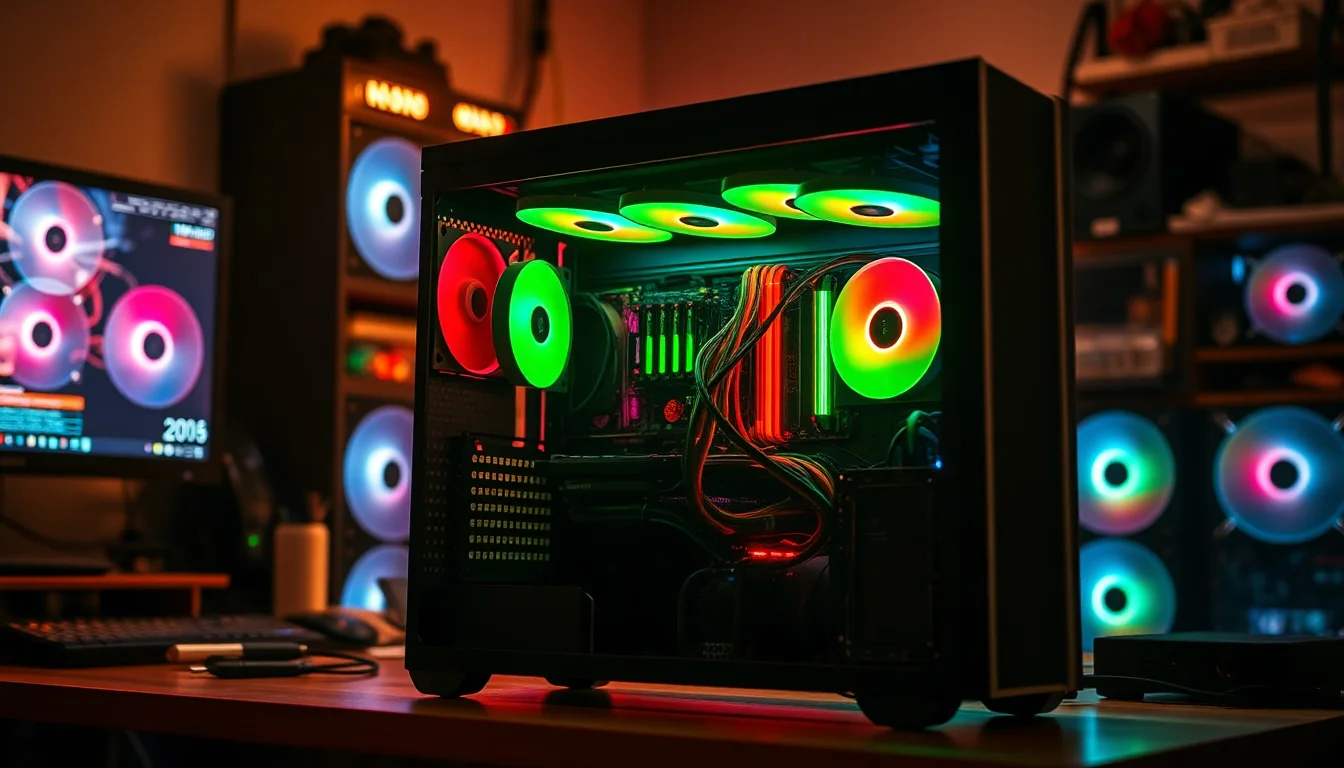
Glass PC cases are everywhere right now, and most of them are exactly what you'd expect at the budget end: thin steel, fans that sound like a hairdryer, and enough sharp edges to ruin your afternoon. So when a relatively unknown brand like HYXN shows up with a case that's pre-loaded with seven ARGB fans, claims to fit dual 360mm radiators simultaneously, and sits in the entry price bracket, you're right to be sceptical. That's a lot of promises for not a lot of money.
But here's the thing about the HYXN H1: the spec sheet is actually more interesting than you'd expect, and the few dozen owners who've reviewed it have given it a positive overall rating, which isn't nothing. This is a HYXN H1 PC case review grounded in what the specs actually say, what real owners report, and how it stacks up against the competition at this price point. The verdict? It's a genuinely decent shout for a first build or a budget RGB setup, with a couple of caveats before you click buy.
The headline specs are legitimately good on paper: 420 x 285 x 430mm chassis, 400mm GPU clearance, 170mm CPU cooler height, dual 360mm radiator support (top and side), and seven PWM ARGB fans included out of the box. For a case in the entry price tier, that's a lot of hardware for your money. Whether it all holds together in practice is where things get more nuanced, and that's exactly what we're going to work through.
Core Specifications
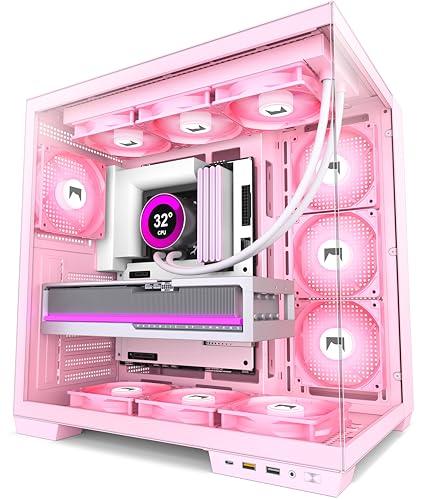
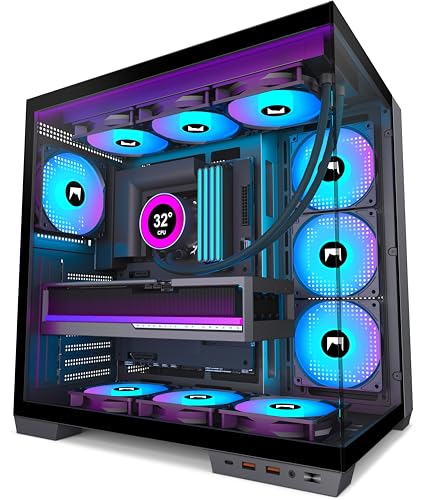
The H1 is an ATX mid-tower with a 270-degree panoramic tempered glass design, which basically means two large glass panels rather than the single side panel you'd get on a more traditional case. The exterior dimensions sit at 420mm long, 285mm wide, and 430mm tall, which puts it on the larger end of mid-tower territory. That extra width and depth is what enables the dual-chamber layout and the generous internal clearances, so the size is doing real work here rather than just being bulk for the sake of it.
Storage is handled by one HDD bay and two SSD mounts, or alternatively three SSDs if you skip the hard drive entirely. In 2026 that's fine for most builds, though anyone planning a NAS-style multi-drive setup will need to look elsewhere. The PSU is capped at 200mm in length, which covers the vast majority of units on the market but is worth double-checking if you're running something particularly long. Seven expansion slots give you proper multi-GPU or riser card flexibility, though realistically most people will only ever use one or two.
Fan support is where the H1 really leans into its strengths. The seven pre-installed ARGB PWM fans (three on the bottom, three on the side, one at the rear) connect via a daisy-chain system to a single 5V 3-pin ARGB header, which means you're not hunting for six separate headers on your motherboard. That's a genuinely thoughtful bit of design. Radiator support extends to 360mm on both the top and side panels simultaneously, which is unusual at this price. Below is the full spec breakdown.
| Specification | Detail |
|---|---|
| Form Factor | ATX Mid-Tower |
| Dimensions (L x W x H) | 420 x 285 x 430mm (16.5 x 11.2 x 17.3 inches) |
| Motherboard Support | ATX, Micro-ATX, Mini-ITX |
| GPU Clearance | Up to 400mm |
| CPU Cooler Height | Up to 170mm |
| PSU Length | Up to 200mm |
| Radiator Support | Up to 360mm top, up to 360mm side (simultaneous) |
| Pre-installed Fans | 7 x 120mm ARGB PWM (3 bottom, 3 side, 1 rear) |
| Drive Bays | 1 x HDD, 2 x SSD (or 3 x SSD) |
| Expansion Slots | 7 |
| Front I/O | 1 x USB Type-C 3.0, 1 x USB 3.0, 1 x USB 2.0, Mic/Audio, Power Button |
| Panel Design | Dual tempered glass (270-degree panoramic) |
| ARGB Connection | 5V 3-pin daisy chain |
| Price | £67.99 · Details |

Form Factor and Dimensions
At 420 x 285 x 430mm, the H1 is bigger than a lot of cases that call themselves mid-towers. The 285mm width in particular is generous, and that's not an accident. The dual-chamber design needs that extra real estate to keep the PSU and cable management hidden behind a dividing wall while still giving the main chamber enough room to breathe. If you're used to squeezed-in ATX cases where you're wrestling with cables three inches from your GPU, the H1 should feel noticeably more comfortable to work in.
The 430mm height is standard enough that it'll fit under most desks without drama, and the 420mm depth means it won't be hanging off the back of a shallow desk either. For context, the NZXT H510 is 428 x 210 x 460mm, so the H1 is a bit wider and shorter. The Corsair 4000D Airflow comes in at 453 x 230 x 466mm, making the H1 the more compact option overall despite its spacious interior. Whether you're building on a desk or inside a cabinet, it's a manageable footprint.
The 270-degree glass design means two large tempered glass panels rather than one. The side panel and a portion of the front are both glass, which gives you that wraparound visual effect that looks genuinely good with ARGB fans running. The trade-off, as with any glass-heavy design, is that airflow relies more on the top, bottom, and rear vents than on a mesh front. More on that in the airflow section, but it's now because it affects where you should position your radiators and fans for the best thermal results.
Motherboard Compatibility
The H1 supports ATX, Micro-ATX, and Mini-ITX motherboards, which covers the vast majority of consumer builds. ATX is the sweet spot here given the case's size, and a full-size ATX board will use the space well without feeling lost inside. Micro-ATX builders will find the interior feels noticeably roomy, which is either a bonus (easier cable management, more airflow around components) or a minor aesthetic annoyance depending on how much you care about proportions.
Mini-ITX in a case this size is technically supported but probably overkill unless you're specifically building around a large cooler or a chunky GPU and want the clearance headroom. There's no mention of E-ATX support in the verified specs, so if you're running a high-end HEDT board you'll want to double-check compatibility before ordering. For the target audience of this case, which is someone building a gaming or enthusiast rig on a budget, ATX or Micro-ATX is almost certainly what you're working with anyway.
Standoff placement is standard for ATX mid-towers, and owner reviews don't flag any particular issues with motherboard installation. That's actually a meaningful data point because standoff alignment problems show up in reviews pretty reliably when they exist. The dual-chamber layout means the motherboard tray is properly separated from the PSU compartment, which keeps cable runs tidier and gives you more room to work around the board itself during installation. First-time builders especially will appreciate not having to reach around a power supply to plug in their 24-pin connector.
GPU Clearance
Four hundred millimetres of GPU clearance is the headline number, and it's a good one. To put that in context, an RTX 5080 Founders Edition sits at around 336mm, an RTX 5090 FE at around 336mm as well, and even the famously large Asus ROG STRIX cards tend to top out around 380mm. So the H1 will swallow pretty much anything the current GPU market throws at it with room to spare. That 400mm figure isn't just marketing padding; it's genuinely future-proofing you against the next generation of increasingly chunky graphics cards.
The dual-chamber design also means the GPU sits in a cleaner space without PSU cables snaking across in front of it, which is both better for airflow and better for aesthetics if you're going for that tidy, show-off build. With the side glass panel giving a clear view of the GPU, this is clearly a case designed to show off your hardware rather than hide it. If you're running a triple-slot card (and most modern GPUs are), you'll still have clearance to spare on the remaining expansion slots for things like capture cards or sound cards.
There's no mention of a vertical GPU mount option in the spec sheet, so if you're specifically planning to rotate your card 90 degrees to show off the cooler through the glass, you'd need to factor in the cost of a third-party riser cable and check whether the slot positioning works for your card. That's not unusual at this price point, and the standard horizontal mounting with the side glass panel still gives a great view of the GPU cooler anyway. The 400mm clearance is the main story here, and it's a good one.
CPU Cooler Clearance
The 170mm CPU cooler height limit is solid. The Noctua NH-D15 sits at 165mm, the be quiet! Dark Rock Pro 4 at 162.8mm, and the DeepCool AK620 at 160mm. So you can run virtually any top-tier air cooler on the market without worrying about clearance. The only units that push past 170mm are some of the more extreme tower coolers like certain Thermalright Peerless Assassin variants in specific configurations, and those are edge cases rather than mainstream choices.
For liquid cooling, the H1 is where things get properly interesting. The case supports up to 360mm radiators on both the top and the side simultaneously. That means you could theoretically run a 360mm AIO on the top for your CPU and a second 360mm radiator on the side for a custom loop or a GPU liquid cooling setup. At this price point, that level of radiator support is unusual. Most budget cases either cap out at a 240mm top mount or offer a single 360mm position but not both. The H1 giving you both is a genuine differentiator.
Practically speaking, most people building in this price range will be running a single AIO, and the top mount is the natural home for it. The 360mm support means you're not limited to a 240mm or 280mm unit to save money on the cooler as well as the case. A 360mm AIO paired with the three side intake fans and the rear exhaust fan creates a solid thermal setup without needing to buy any additional fans. That's a properly complete cooling solution out of the box, which is rare at the entry price tier.
Storage Bay Options
Storage capacity is the one area where the H1 is clearly budget-tier rather than mid-range. You get one HDD bay and two SSD mounts, or alternatively three SSDs if you skip the hard drive. For a gaming build in 2026 that's genuinely fine; most people are running a single NVMe boot drive and maybe a secondary SSD for game storage, and they'll never miss the extra bays. But if you're building a workstation that needs four or five drives, or you're planning to repurpose some older mechanical drives, the H1 isn't your case.
The dual-chamber layout means the drive bays are tucked away in the PSU compartment area rather than cluttering up the main chamber, which is good for aesthetics and airflow. Hidden drives mean clean sightlines through the glass panels, and that matters when you've spent money on ARGB fans and a nice GPU. The SSD mounting positions are standard 2.5-inch bays, and the HDD bay handles 3.5-inch drives, so compatibility with mainstream drives isn't an issue.
Owner reviews don't specifically flag drive installation as a frustration point, which suggests the mounting process is at least straightforward enough that nobody felt the need to complain about it. Tool-less mounting specifics aren't confirmed in the spec sheet, so go in expecting standard screw-mount bays rather than tool-free snap-in trays. It's a minor thing, but so you have a screwdriver handy during the build. For the target builder who's running an NVMe primary and one or two SSDs, the storage situation is perfectly adequate.

Cable Management
The dual-chamber design is the single biggest factor in cable management quality here, and it's a legitimate advantage over single-chamber cases at the same price. Separating the PSU and its associated cables from the main motherboard area means your 24-pin, EPS, and peripheral cables can be routed behind the tray and fed through to where they're needed without crossing the main chamber. The result, assuming you take the time to route things properly, should be a relatively clean build even without premium cable management tools.
The daisy-chain fan connection system deserves a specific mention here because it's a genuinely clever bit of design for a budget case. All seven ARGB fans connect through a single chain to one 5V 3-pin header on your motherboard, rather than requiring seven separate headers or a dedicated controller hub. That eliminates a lot of cable clutter in the back of the case and means the fan wiring is much easier to manage neatly. It also means fan speed control happens through your motherboard software (ASUS Aura, MSI Mystic Light, Gigabyte RGB Fusion, etc.) rather than a separate controller, which is cleaner for a budget build.
The 200mm PSU length limit is worth thinking about in the context of cable management too. Shorter PSUs generally mean more slack in the cables, which gives you more material to work with when routing. Most modular and semi-modular PSUs in the 650W to 850W range that would suit this case are well under 200mm, so you'll have the flexibility to only run the cables you actually need. Rear panel clearance specifics aren't confirmed in the spec sheet, but the dual-chamber design implies there's a proper rear compartment with some depth to it rather than the paper-thin cable channel you get in cheaper single-chamber cases.
Airflow and Thermal Design
This is where the 270-degree glass design creates the most interesting trade-off. Glass panels don't breathe, so the H1 is relying on its top vents, bottom intake area, and rear exhaust for the bulk of its airflow. The three bottom-mounted fans are pulling air in from underneath the case, which works well as long as the case has adequate feet to lift it off the surface (standard for mid-towers, but if you're placing it on carpet). The three side fans and the rear fan handle the rest of the airflow equation.
The fan configuration is actually quite thoughtful when you look at it properly. Three 120mm reverse-blade fans on the bottom, three 120mm reverse-blade fans on the side, and one 120mm forward-blade fan at the rear. The reverse-blade fans on the intake positions are designed to pull air more efficiently through the case, while the conventional forward-blade fan at the rear pushes warm air out. Whether the reverse-blade claim translates to a meaningful real-world difference at this price point is debatable, but the intent is clearly to maximise airflow through the chassis. Independent testing from established fan aerodynamics principles suggests blade direction does affect static pressure and flow characteristics, so it's not pure marketing.
The big thermal question for a glass-heavy case is always whether the cooling is adequate for high-TDP components. With seven fans pre-installed and support for dual 360mm radiators, the H1 gives you the tools to manage heat from a powerful build. But if you're running a 250W-plus CPU and a top-tier GPU without any liquid cooling, the glass-heavy design means you're more dependent on those fans spinning at higher RPM to compensate for the lack of a mesh front. Owner reviews with a positive overall rating suggest most people are happy with thermals, but that population is probably not all running extreme TDP components. For a mid-range gaming build with a 65W to 125W CPU and a mainstream GPU, the H1's cooling setup should be more than adequate.
Front I/O and Connectivity
The front I/O on the HYXN H1 PC case review spec sheet is one of the stronger points at this price tier. You get a USB Type-C 3.0 port, a USB 3.0 Type-A, a USB 2.0 Type-A, combined microphone and audio jacks, and a power button. Three USB ports on the front panel is genuinely useful for a gaming or content creation build where you're regularly plugging in controllers, headsets, USB drives, or phones. A lot of cases at this price give you two USB ports and call it done.
The Type-C port is the one that matters most in 2026. USB Type-C connectivity is standard on modern peripherals, and having it on the front panel rather than having to reach around to the back of your motherboard every time is a quality-of-life improvement that sounds small until you're doing it daily. The USB Implementers Forum specifies USB 3.0 as supporting up to 5Gbps throughput, which is plenty for fast storage transfers and charging. that the Type-C here is listed as USB 3.0 (5Gbps) rather than USB 3.2 Gen 2 (10Gbps) or Thunderbolt, but for the target audience that's a non-issue.
The power button placement and the audio jacks are confirmed in the spec but their exact physical position on the case isn't detailed. From the product imagery, the I/O cluster appears to sit on the top panel, which is the most ergonomic position for a case that sits on a desk. Top-mounted I/O means you're not bending down to the front of the case every time you want to plug something in, and it keeps the glass front panel clean and uninterrupted. That's a design choice that improves the daily usability of the case, and it's something cheaper cases often get wrong by cramming everything onto a front bezel that's awkward to reach.
Build Quality and Materials
HYXN isn't a household name, and at the entry price point you're always making some compromises on materials. The two tempered glass panels are described as high-hardness and resistant to damage, which is the kind of claim every case manufacturer makes. What we can say from owner reviews is that a positive overall rating across dozens of reviews with no obvious pattern of glass breakage or panel alignment complaints is a reasonable indicator that the glass quality is at least acceptable. Tempered glass at this price isn't going to be as thick or as precisely fitted as you'd get on a Lian Li or Fractal Design case, but it should be functional.
The steel chassis quality is the bigger unknown. Budget cases in this price range typically use 0.5mm to 0.6mm SPCC steel, which is thinner than the 0.8mm you'd find in a Fractal Design Pop or a be quiet! Pure Base 500. That doesn't mean the case falls apart, but it does mean panels might flex slightly under pressure and the overall feel won't be as solid as a premium chassis. Owner reviews don't flag excessive flex or structural issues as a recurring complaint, which is encouraging, but it's worth going in with realistic expectations about the premium-feel comparison.
Sharp edges during builds are a perennial budget-case problem, and it's one area where the H1's owner reviews are worth paying attention to. No dominant pattern of sharp-edge complaints appears in the feedback, which is a good sign. The dual-chamber design also means you're working in a more open space than a cramped single-chamber case, which reduces the likelihood of scraping your hand on a bracket while trying to reach an awkward cable. The overall build quality picture from the available evidence is: good enough for the price, not exceptional, and unlikely to cause frustration during a careful build.
How It Compares
The two most obvious comparisons in the entry price bracket are the Corsair 4000D Airflow and the Fractal Design Pop Air. Both are well-established cases with strong reputations, and both sit in a similar or slightly higher price range depending on current deals. The 4000D Airflow is the airflow king at this tier with its mesh front panel, but it ships with only two fans and doesn't have the same radiator flexibility as the H1. The Pop Air is a solid all-rounder with good build quality, but again comes with fewer fans included.
Where the H1 wins outright is value for money on included hardware. Seven ARGB PWM fans versus two (Corsair) or three (Fractal) is a meaningful difference when you factor in the cost of buying additional fans separately. A decent 120mm ARGB fan costs anywhere from £8 to £20, so the H1's seven-fan bundle represents real savings if you were planning to fill a case with fans anyway. The dual 360mm radiator support is also unusual at this price and beats both the 4000D Airflow and the Pop Air on raw liquid cooling flexibility.
The Corsair 4000D Airflow wins on airflow efficiency thanks to its mesh front, and the Fractal Pop Air wins on build quality and brand reputation. Both of those matter if you're running a high-TDP build or you want a case that feels premium to the touch. But for someone building a mid-range gaming rig on a budget who wants ARGB lighting, good clearances, and solid cooling options without buying a bunch of extra fans, the H1 makes a compelling argument. It's a different set of priorities rather than a straight loss.
| Feature | HYXN H1 | Corsair 4000D Airflow | Fractal Design Pop Air |
|---|---|---|---|
| Form Factor | ATX Mid-Tower | ATX Mid-Tower | ATX Mid-Tower |
| Included Fans | 7 x 120mm ARGB PWM | 2 x 120mm | 3 x 140mm |
| Max GPU Length | 400mm | 360mm | 467mm |
| Max CPU Cooler Height | 170mm | 170mm | 185mm |
| Max Radiator (Top) | 360mm | 360mm | 360mm |
| Front Panel | Tempered Glass | Mesh | Mesh |
| USB Type-C Front I/O | Yes (USB 3.0) | Yes (USB 3.1) | Yes (USB 3.1) |
| Price Tier | Entry | Entry to Mid | Entry to Mid |

Final Verdict: HYXN H1 PC Case Review
The HYXN H1 is a better case than its brand recognition would suggest. Seven ARGB PWM fans included, dual 360mm radiator support, 400mm GPU clearance, 170mm CPU cooler height, and a front I/O setup with USB Type-C, USB 3.0, and USB 2.0 is a genuinely strong spec sheet for the entry price tier. The dual-chamber design makes cable management less of a nightmare than it is in cheaper single-chamber cases, and the 270-degree glass panels look the part when everything's lit up. For a first gaming build or a budget-focused enthusiast rig, this ticks a lot of boxes.
The caveats are real though. The glass-heavy front panel means airflow is more dependent on fan speed than a mesh-front alternative, and if you're pushing a 200W-plus CPU with a power-hungry GPU, you'll want to think carefully about whether the H1's thermal design is right for your components. Build quality is fine for the price but it's not going to feel like a Fractal or a Lian Li. And the storage options, while adequate for most gaming builds, are limited if you need multiple drives. These are budget-tier trade-offs, not deal-breakers.
Who should buy this? Someone building their first proper gaming PC who wants ARGB lighting, good clearances for a mid-range GPU and cooler, and doesn't want to spend extra money on additional fans. The seven included fans alone justify a significant chunk of the price compared to buying fans separately. If you're pairing this with something like a Ryzen 5 7600 or an Intel Core i5, a mid-range GPU, and a 240mm or 360mm AIO, the H1 is a genuinely solid choice. The positive overall rating from dozens of owners backs that up.
Who should skip it? If airflow is your absolute top priority because you're running a high-TDP build, the Corsair 4000D Airflow's mesh front will serve you better even though it comes with fewer fans. And if build quality and that premium feel matter more to you than included fans and ARGB lighting, the Fractal Design Pop Air is worth the extra spend. The H1 is an honest budget case with a surprisingly strong spec sheet, not a premium case at a budget price. Know the difference and you'll make the right call.
On balance, we'd give the HYXN H1 a solid 7.5 out of 10. It punches above its weight on cooling hardware and clearances, loses some points for the glass-front airflow compromise and unknown-brand build quality risk, and earns genuine credit for the daisy-chain fan system and dual-chamber design at this price. Worth a look if the spec sheet matches your build plans.
What works. What doesn’t.
5 + 4What we liked5 reasons
- Seven ARGB PWM fans included out of the box, daisy-chained to a single 5V 3-pin header
- Dual 360mm radiator support (top and side simultaneously) is unusual at this price
- 400mm GPU clearance handles current flagship cards with room to spare
- Dual-chamber design keeps cables and PSU out of the main chamber
- Front I/O includes USB Type-C, USB 3.0, and USB 2.0 for a three-port setup
Where it falls4 reasons
- Glass-heavy front panel limits passive airflow compared to mesh-front alternatives
- Storage limited to one HDD and two SSDs, not ideal for multi-drive builds
- HYXN is an unknown brand with no long-term reliability track record
- Build quality is adequate for the price but not premium-feeling
Full specifications
6 attributes| Form factor | Mid-Tower |
|---|---|
| Airflow type | vertical airflow |
| MAX GPU length | 400 |
| Radiator support | up to 3x 360mm |
| Fans included | 7 |
| MAX radiator MM | 360 |
If this isn’t right for you
2 options 8.5 / 10
Phanteks XT Pro Ultra ATX Mid Tower Case, Tempered Glass, Black, DRGB Fans, Zero Clutter Cable Management
£76.99 · Phanteks · Details

Got a motherboard yet?
4 reviewsIts Amazon listing lists ATX, Micro-ATX and Mini-ITX boards for this case. These ATX boards fit it.
Frequently asked
5 questions01Is the HYXN H1 ATX PC Case-Pre-Installed 7 PWM ARGB Fans, Dual Chamber Mid-Tower Gaming PC Case, with Type-C, Simultaneous Installation of 3x 360mm Radiators, Black (Black, H1) good for airflow?+
The H1's airflow is decent but not outstanding. The 270-degree glass design means the front panel doesn't breathe, so airflow comes primarily from the bottom intake (three 120mm fans), side intake (three 120mm fans), and rear exhaust (one 120mm fan). For mid-range gaming builds with mainstream CPUs and GPUs, the seven pre-installed fans provide adequate cooling. However, if you're running high-TDP components like a 200W-plus CPU and a power-hungry GPU, a mesh-front case will serve you better thermally. The dual 360mm radiator support (top and side simultaneously) means liquid cooling options are strong, which compensates for the glass-front limitation if you're willing to run an AIO.
02What's the GPU clearance on the HYXN H1 ATX PC Case-Pre-Installed 7 PWM ARGB Fans, Dual Chamber Mid-Tower Gaming PC Case, with Type-C, Simultaneous Installation of 3x 360mm Radiators, Black (Black, H1)?+
The HYXN H1 supports GPUs up to 400mm in length. That's enough for virtually every current consumer graphics card, including large triple-fan models from ASUS ROG STRIX, MSI Gaming X Trio, and Gigabyte AORUS series, which typically top out around 340mm to 380mm. Even the most oversized AIB partner cards on the market sit comfortably within the 400mm limit. There is no vertical GPU mount option confirmed in the spec sheet, so standard horizontal installation is the supported configuration.
03Can the HYXN H1 ATX PC Case-Pre-Installed 7 PWM ARGB Fans, Dual Chamber Mid-Tower Gaming PC Case, with Type-C, Simultaneous Installation of 3x 360mm Radiators, Black (Black, H1) fit a 360mm AIO?+
Yes, and it goes further than most cases at this price. The H1 supports up to 360mm radiators on both the top and side panels simultaneously. That means you can fit a 360mm AIO for your CPU on the top mount while keeping the side panel for additional radiators or fans. For most single-AIO builds, the top mount is the natural position and works well paired with the three side intake fans and the rear exhaust. The 360mm top support means you don't need to compromise down to a 240mm or 280mm unit to fit the case.
04Is the HYXN H1 ATX PC Case-Pre-Installed 7 PWM ARGB Fans, Dual Chamber Mid-Tower Gaming PC Case, with Type-C, Simultaneous Installation of 3x 360mm Radiators, Black (Black, H1) easy to build in?+
Based on the spec sheet and owner review patterns, the H1 is reasonably straightforward to build in. The dual-chamber design separates the PSU and cabling from the main motherboard area, which gives you more room to work and keeps cable runs cleaner. The seven fans use a daisy-chain connection to a single 5V 3-pin ARGB header, which eliminates a lot of fan cable management headaches. Owner reviews with a good overall rating don't show recurring complaints about sharp edges or awkward panel access, which is a positive indicator. Standard screw-mount drive bays are the expected configuration, so have a screwdriver handy. The 420 x 285 x 430mm chassis gives you more interior space than many mid-towers, which helps during installation.
05What warranty and returns apply to the HYXN H1 ATX PC Case-Pre-Installed 7 PWM ARGB Fans, Dual Chamber Mid-Tower Gaming PC Case, with Type-C, Simultaneous Installation of 3x 360mm Radiators, Black (Black, H1)?+
The product listing does not specify a manufacturer warranty period in the verified product data. HYXN does indicate direct customer support is available through their Amazon seller page. As this is sold via Amazon, you are covered by Amazon's standard 30-day return window and the Amazon A-to-Z Guarantee, which protects your purchase if the item arrives damaged or not as described. For the most current warranty information, check the product listing directly or contact HYXN through the 'Sold by HYXN' link on the Amazon product page.