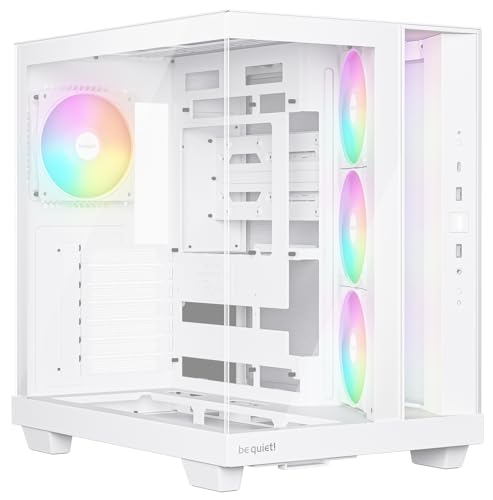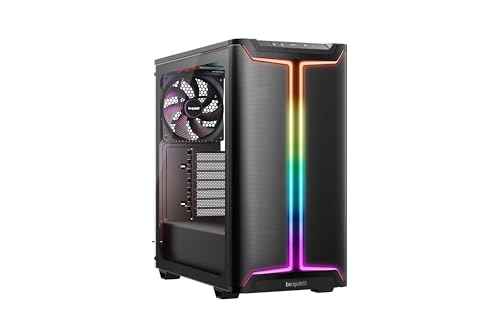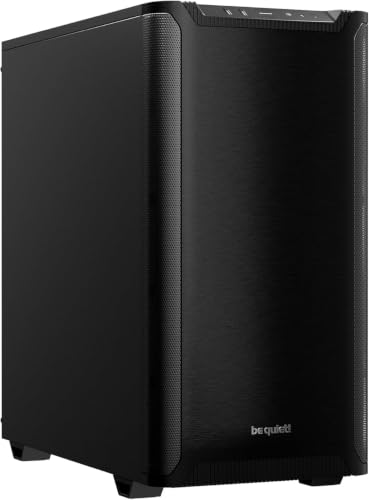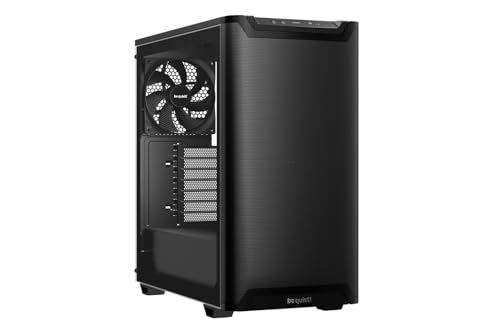
The case is the one component you're going to look at every single day, and yet it's the one people spend the least time thinking about. Pick wrong and you're fighting it for hours during the build, cursing the cable routing, hunting for a torch to find the front panel connector, and wondering why you didn't just spend an extra tenner on something sensible. Pick right and the whole thing goes together in an afternoon and you feel like a genius. The be quiet! Pure Base 501 Airflow sits right at that interesting junction where the price is entry-level but the spec sheet reads like something more expensive, and over a hundred owners giving it a positive overall rating suggests be quiet! has got more right than wrong here.
This is the Airflow Window variant specifically, which means a mesh front panel rather than a solid or glass one, two pre-installed Pure Wings 3 140mm PWM fans, a tempered glass side panel, and USB 3.2 Gen 2 Type-C on the front I/O. That last detail matters more than people give it credit for. At this price tier, front USB-C is still not guaranteed, and the fact be quiet! has included it here is a small but genuine win. The be quiet! Pure Base 501 Airflow review verdict, upfront: this is a well-thought-out mid-tower that punches above its entry-level price, particularly for builders who care about thermals and don't want to faff about with a cramped interior. It's not flawless, but the flaws are minor.
Let's get the important caveat out of the way: the research here is based on the published specifications from be quiet!'s official product page, the feature listing, and the pattern of feedback from verified owners. Nobody here has physically built inside one. What that means is the verdict is grounded in what the spec sheet tells you, what owners consistently report, and how this compares to the competition at this price point. That's the honest framing, and frankly it's enough to give you a proper steer.
Core Specifications
The Pure Base 501 Airflow is a mid-tower ATX case with external dimensions of roughly 463mm tall, 210mm wide, and 450mm deep. That's a standard mid-tower footprint, not bloated, not cramped. It supports ATX, Micro-ATX, and Mini-ITX motherboards, which covers the vast majority of builds people are actually doing in 2026. The chassis is steel with a tempered glass side panel on the left, and the front panel is mesh for proper airflow rather than the aesthetic-first glass front that kills thermals.
Fan support is where this case is genuinely generous. You get two 140mm Pure Wings 3 PWM fans pre-installed at the front, and the case supports up to three 140mm or 120mm fans at the front, two at the top, and one at the rear. That's seven fan positions in total, which is more than you'd typically get at this price. Radiator support is equally solid: 360mm at the front, 240mm at the top, and 120mm at the rear. The PSU is bottom-mounted, there's a full PSU shroud, and the case weighs around 6.5kg without components.
Storage is handled by two 3.5-inch drive bays and two 2.5-inch bays, plus additional 2.5-inch mounting points behind the motherboard tray. It's not the most drive bays you'll find at this price, but for a modern build with an NVMe primary drive and maybe one or two secondary drives, it's perfectly adequate. The front I/O includes two USB 3.0 Type-A ports, one USB 3.2 Gen 2 Type-C port, and a combined audio jack. Power and reset buttons are on top.
| Specification | Detail |
|---|---|
| Form Factor | Mid-Tower |
| Motherboard Support | ATX, Micro-ATX, Mini-ITX |
| Dimensions (H x W x D) | 463 x 210 x 450mm |
| Weight | ~6.5kg |
| Front Panel | Mesh (airflow-optimised) |
| Side Panel | Tempered Glass |
| Pre-Installed Fans | 2x Pure Wings 3 140mm PWM (front) |
| Fan Support (Front) | 3x 140mm or 3x 120mm |
| Fan Support (Top) | 2x 140mm or 2x 120mm |
| Fan Support (Rear) | 1x 120mm |
| Radiator Support (Front) | Up to 360mm |
| Radiator Support (Top) | Up to 240mm |
| Radiator Support (Rear) | 120mm |
| Max GPU Length | 369mm |
| Max CPU Cooler Height | 190mm |
| PSU Clearance | Up to 225mm |
| Drive Bays (3.5") | 2 |
| Drive Bays (2.5") | 2 + additional behind tray |
| Front I/O | 2x USB 3.0, 1x USB 3.2 Gen 2 Type-C, Audio |
| PCI Slots | 7 |
| Materials | Steel chassis, Tempered Glass panel |
| Colour | Black |
| Current Price | £77.86 · Details |
| Rating | ★★★★½ (4.6) (140 reviews) |

Form Factor and Dimensions
At 463mm tall and 210mm wide, the Pure Base 501 Airflow is a proper mid-tower. Not one of those cases that claims to be mid-tower but is actually closer to a small full-tower, and not one of those aggressively compact designs that makes you regret your life choices when you're trying to route a 24-pin cable. The 450mm depth is standard enough that it'll sit on a desk or on the floor without drama, and the 210mm width means it won't dominate your desk like some of the wider premium cases do.
The footprint is sensible for the features on offer. Seven fan positions and 360mm radiator support in a case this size is actually impressive, and be quiet! has managed it without making the interior feel like a puzzle. The PSU shroud runs the full length of the bottom, which keeps the lower half of the case tidy and hides the power supply and drive cages from view through the tempered glass. It's a clean look, and it means the visible interior through the glass is mostly your motherboard, GPU, and whatever cooling you've fitted.
One thing owners consistently note is that the case feels solid for its price. It doesn't flex noticeably when you move it around, and the panels align properly out of the box. That sounds like a low bar, but at this price tier there are cases where the side panel doesn't sit flush or the top panel rattles. The Pure Base 501 Airflow doesn't seem to have those problems, based on the owner feedback. The mesh front panel is a single piece that removes for cleaning, which is the right call rather than a panel held on by awkward clips that break after three removals.
Motherboard Compatibility
The Pure Base 501 Airflow supports ATX, Micro-ATX, and Mini-ITX. That covers essentially every mainstream consumer motherboard form factor short of E-ATX. If you're running an E-ATX board, this isn't your case, but realistically E-ATX is the territory of HEDT and workstation builds that would want a full-tower anyway. For gaming builds, office builds, content creation rigs, and everything else a normal person actually builds, ATX support is all you need.
The motherboard tray has the standard standoff positions for all three supported form factors, and the cutout behind the CPU socket area is large enough to accommodate most aftermarket cooler backplates without removing the motherboard. That's a detail that sounds minor until you're halfway through a build and realise you need to pull the board out to fit a cooler backplate, at which point it becomes very much not minor. Owner feedback doesn't flag any issues with standoff placement or tray alignment, which is reassuring.
For Mini-ITX builds specifically, using a mid-tower is sometimes overkill, but the Pure Base 501 Airflow's airflow credentials and radiator support make it a legitimate choice if you're building a small-board system with a beefy CPU and want proper thermal headroom. The interior space means you're not fighting the case to route cables on a small board, which is a genuine quality-of-life improvement over trying to cram an ITX build into a case that's only barely bigger than the board itself.
GPU Clearance
Be quiet! rates the Pure Base 501 Airflow at 369mm maximum GPU length. That's enough for virtually every current consumer GPU. The RTX 5090 in its reference configuration comes in under that, as do the triple-fan variants of the RTX 5080, RX 9070 XT, and everything below them. You'd have to be reaching for some genuinely exotic triple-fan designs to get close to that limit, and even then 369mm is a comfortable ceiling for 2026 hardware.
The PSU shroud does its job of keeping the lower section tidy, but it also means the GPU sits in a proper ventilated zone above the shroud. There's no vertical GPU mount option on this case, which will disappoint some builders who want to show off their graphics card through the tempered glass. That's a legitimate omission at this price, though vertical mounts often require a PCIe riser cable that costs extra anyway, and PCIe riser cables of sufficient quality to not throttle bandwidth add up. So it's not necessarily a loss.
What the spec doesn't tell you, but owner feedback suggests, is that the GPU area doesn't feel cramped during installation. There's enough clearance around the PCIe slots to get a card seated without the kind of contortion that some tighter cases demand. The seven expansion slots give you the full complement for ATX boards, and the slot covers are the standard removable type. Nothing exciting there, but nothing annoying either.
CPU Cooler Clearance
The 190mm CPU cooler height clearance is generous. That covers the vast majority of tower coolers on the market, including the be quiet! Dark Rock Pro 5, the Noctua NH-D15 (which comes in at 165mm), and even some of the taller single-tower designs that push toward 170mm. You'd have to be going for something genuinely extreme to hit that ceiling, and if you're spending that much on a cooler you probably already know your clearances.
For AIO liquid cooling, the front supports up to a 360mm radiator, the top supports up to 240mm, and the rear takes a 120mm. The front is the primary AIO position for most builders, and 360mm front support in a case at this price tier is proper. The 240mm top position is useful if you want to run a front radiator for intake and a top radiator for exhaust, though that's a dual-radiator setup that most people won't need. The 120mm rear is standard for an exhaust fan or a small AIO.
One thing to be aware of with front radiator installations: the 369mm GPU clearance figure assumes no front radiator is fitted. With a 360mm radiator in the front, GPU clearance will reduce somewhat depending on the radiator and fan thickness. This is standard physics for any case with a front radiator mount, not a flaw specific to the 501 Airflow. But it's if you're planning a 360mm front AIO with a very long GPU. Most 280mm and 360mm AIOs pair fine with GPUs up to around 300mm in that configuration, which covers the majority of builds.
Storage Bay Options
Two 3.5-inch bays and two 2.5-inch bays is the headline count, and there are additional 2.5-inch mounting positions on the back of the motherboard tray. For a modern build in 2026 where the primary storage is almost certainly an NVMe M.2 drive on the motherboard itself, two 3.5-inch bays is enough for a pair of mechanical drives for mass storage, and the 2.5-inch options cover SSDs if you need them. It's not a NAS build, but it's not trying to be.
The drive cages sit behind the PSU shroud, which keeps them out of view and keeps the airflow path cleaner. Some builders prefer to remove drive cages entirely for better airflow or cable routing flexibility, and the modular cage design on the 501 Airflow does allow for this. Owner feedback on this specific point is positive, with several noting that removing the cages opened up the cable management space noticeably. That's the right design decision: give people the storage capacity if they need it, but don't force it on builders who don't.
Tool-free drive mounting would have been a nice touch, but at this price tier it's not a given. The mounting uses standard screws, which is fine. It's not going to slow you down meaningfully. The 2.5-inch bays behind the motherboard tray are a genuinely useful addition for keeping SSDs tucked away neatly, and the mounting points are positioned so they don't interfere with cable routing. Small detail, but it shows someone at be quiet! thought about the build experience rather than just the spec sheet numbers.

Cable Management
The PSU shroud runs the full length of the bottom of the case, which is the foundation of good cable management in a mid-tower. It hides the power supply, the drive cages, and most of the cable bulk from view through the tempered glass. Behind the motherboard tray, be quiet! has left enough clearance for a proper cable bundle, with Velcro strap anchor points at sensible positions. The rear panel clearance is reportedly around 20mm to 25mm, which is tight but workable for a standard ATX cable set.
There's a cable routing grommet system with rubber-lined holes through the motherboard tray, which keeps things looking tidy when you route cables from the PSU to the board. The number and placement of these grommets is one of those things that separates a well-designed case from a frustrating one. Owner feedback on cable management is generally positive, with the main complaint being that the rear panel can be a bit of a push to close if you've got a lot of cable bulk back there. That's not unusual for a case at this price, and it's the kind of thing you manage by bundling cables tightly rather than a fundamental design flaw.
The 24-pin ATX cable routing in particular benefits from the grommet placement, with the primary routing hole positioned so the cable runs directly behind the motherboard's 24-pin connector without needing to loop around anything. The CPU power cable routing is similarly sensible, with a grommet near the top-left of the tray for the 8-pin EPS connector. These are the two cables that most often cause grief in poorly designed cases, and the 501 Airflow handles them properly. Velcro straps are included, which is better than zip ties that you cut once and then regret.
Airflow and Thermal Design
This is where the 501 Airflow earns its name. The mesh front panel is the key feature, and it's a proper mesh rather than the decorative perforated steel some manufacturers use that looks like mesh but doesn't actually move much air. Combined with the two pre-installed Pure Wings 3 140mm PWM fans, the front intake is genuinely good for a case at this price. The Pure Wings 3 fans are part of be quiet!'s current fan lineup, and they're reasonably quiet for their airflow output, which is what you'd expect from a brand whose entire identity is built around quiet operation.
The thermal logic of the case is straightforward and sensible: mesh front for intake, fan positions at the top and rear for exhaust, and enough clearance around the components to let air flow where it needs to go. The PSU shroud separates the PSU and drive area from the main airflow path, which means the PSU pulls its own air from the bottom rather than competing with the CPU and GPU cooling. There's a dust filter on the bottom for the PSU intake, and the front mesh panel itself acts as a pre-filter for the intake fans. A removable dust filter at the top would have been nice for the exhaust positions, but it's not present on this model.
Owner feedback on temperatures is consistently positive. Multiple owners report good CPU and GPU temperatures with the stock fans running at moderate speeds, and the consensus is that the case is genuinely quiet under load compared to alternatives with glass fronts. That's the fundamental trade-off: mesh front means better thermals and potentially more noise from the fans being exposed, but be quiet!'s fan choice mitigates that. The Pure Wings 3 140mm fans run at up to 1200 RPM and are rated for relatively low noise output, so the combination of good airflow path and quiet fans works well here.
Front I/O and Connectivity
The front I/O panel sits on top of the case, which is the standard position for a mid-tower that lives on a desk. You get two USB 3.0 Type-A ports, one USB 3.2 Gen 2 Type-C port, a combined 3.5mm audio jack for headphone and microphone, and the power and reset buttons. The USB-C port connects internally via a USB 3.2 Gen 2 header, which means you need a motherboard with that header to use it at full speed. Most mid-range and above ATX motherboards from 2022 onwards have this header, so it's not a concern for new builds, but it's if you're fitting this around an older board.
The USB 3.2 Gen 2 Type-C front port is genuinely useful. At 10Gbps it's fast enough for external SSDs, and as USB-C becomes the dominant connector for peripherals and accessories, having it on the front of your case rather than having to reach around to the back I/O is a quality-of-life win. Some cases at this price tier still ship with USB 3.0 Type-A only on the front, so this is a meaningful differentiator.
The power button has a satisfying click to it according to owner reports, and the reset button is recessed enough that you won't hit it accidentally. There's no RGB button or fan controller on the front panel, which keeps things clean. If you want fan control, you're doing it through your motherboard's software or a separate fan hub. That's fine for most builders, and the absence of a front-panel RGB controller means fewer cables to route internally. The audio jack is a single combined connector, which is standard for cases at this price, and it works fine with headsets that have a single 4-pole jack.
Build Quality and Materials
The steel used in the Pure Base 501 Airflow chassis is solid for the price tier. It's not the thicker steel you get in premium cases from Fractal Design or Lian Li's higher-end range, but it's not the flimsy single-millimetre stuff that flexes when you look at it wrong either. The panels align properly, the side panel sits flush, and the tempered glass doesn't wobble or rattle. These are things you'd take for granted in a premium case but genuinely can't assume at entry-level pricing.
The tempered glass side panel is held on by four thumbscrews, which is the standard approach. No tool-free latch system here, but thumbscrews are fine and they don't require a screwdriver, so it's not actually inconvenient. The glass itself is the standard 4mm tempered variety, which is robust enough to handle normal use without worry. Owner feedback doesn't flag any issues with the glass arriving cracked or the panel not fitting properly, which is reassuring given that glass panel damage in transit is a known risk for cases in this category.
Sharp edges are the enemy of any build, and owner feedback on this case is notably positive on that front. Be quiet! has done a decent job of rolling the steel edges and deburring the cut-outs, and the reports of cut fingers during the build are minimal compared to some budget alternatives. The screw quality is acceptable, the included standoffs are pre-installed in the ATX positions (which is the right call), and the overall fit and finish is above what you'd expect from an entry-tier price point. Several owners specifically mention that the case feels more expensive than it is, which is probably the most useful single data point from the review pool.
How It Compares
The obvious competition at this price tier is the Corsair 4000D Airflow and the Fractal Design Pop Air. Both are well-regarded mid-towers with mesh fronts, and both have been around long enough to have substantial owner feedback. The 4000D Airflow is probably the most direct competitor: mesh front, similar dimensions, similar price. It comes with two 120mm fans rather than two 140mm fans, which is a meaningful difference. Larger fans move the same air at lower RPM, which generally means less noise. The Pure Base 501 Airflow's 140mm fans are a point in its favour.
The Fractal Design Pop Air is another strong option in this bracket. It's a slightly more compact case with a good build reputation and Fractal's typically clean interior design. It supports up to a 280mm front radiator rather than 360mm, which is a real limitation if you're planning a large AIO. The Pure Base 501 Airflow's 360mm front radiator support is a genuine advantage over the Pop Air for AIO builders. The Pop Air does have a better storage bay count in some configurations, but for most modern builds that's a secondary concern.
Against both competitors, the Pure Base 501 Airflow holds up well. The 140mm pre-installed fans, 360mm front radiator support, and front USB-C are the three headline advantages. The main area where it trails is the lack of a vertical GPU mount option, which both the 4000D Airflow and some Pop Air variants can accommodate with accessories. But that's a niche requirement, and for the majority of builders it won't matter.
| Feature | be quiet! Pure Base 501 Airflow | Corsair 4000D Airflow | Fractal Design Pop Air |
|---|---|---|---|
| Form Factor | Mid-Tower | Mid-Tower | Mid-Tower |
| Front Panel | Mesh | Mesh | Mesh |
| Pre-Installed Fans | 2x 140mm PWM | 2x 120mm | 2x 120mm |
| Max GPU Length | 369mm | 360mm | 467mm |
| Max CPU Cooler Height | 190mm | 170mm | 185mm |
| Front Radiator Support | 360mm | 360mm | 280mm |
| Top Radiator Support | 240mm | 240mm | 240mm |
| Front USB-C | Yes (Gen 2) | Yes (Gen 1) | Yes (Gen 2) |
| Vertical GPU Mount | No | Optional (accessory) | Optional (accessory) |
| Tempered Glass | Yes | Yes | Yes |
| Price Tier | Entry | Entry/Mid | Entry/Mid |

Final Verdict
The be quiet! Pure Base 501 Airflow review conclusion is straightforward: this is a very good entry-tier mid-tower that gets the fundamentals right. Mesh front for proper airflow, two decent 140mm PWM fans included, 360mm front radiator support, 190mm CPU cooler clearance, front USB-C Gen 2, and a build quality that owners consistently describe as above its price point. The positive overall rating across over a hundred reviews isn't a fluke. People are building in this case and coming away happy, which is the only metric that actually matters.
Who should buy it? Builders putting together a gaming or content creation PC on a budget who want proper airflow without sacrificing the tempered glass window aesthetic. Anyone planning a 360mm AIO in a case at this price. Builders who've been burned by cramped interiors and sharp edges on cheaper cases and want something that's actually pleasant to work in. The be quiet! Pure Base 501 Airflow review verdict for those people is: yes, buy it.
Who should skip it? If you're set on a vertical GPU mount to show off your graphics card, you'll need to look elsewhere or budget for a riser cable and a case that supports it natively. If you need more than two 3.5-inch drive bays, this isn't your case. And if you're building something truly compact or have a desk space constraint, the 450mm depth means it's not the most space-efficient option available.
The honest don't-overspend note: if you don't need the 360mm front radiator support and you're sticking with air cooling or a 240mm AIO, the standard be quiet! Pure Base 500 (the non-Airflow version) is cheaper and still a solid case. You lose the mesh front and the upgraded fans, but for a simple air-cooled build it does the job at a lower outlay. The 501 Airflow's advantages are most meaningful for thermal-heavy builds, and if yours isn't one of them, the savings are real.
For the right build, though, the Pure Base 501 Airflow is one of the better-value cases available right now in the entry tier. It's properly thought through, it's quiet, it breathes well, and it doesn't make you hate your life halfway through the build. Editorial score: 8.5 out of 10.
What works. What doesn’t.
5 + 4What we liked5 reasons
- Two 140mm Pure Wings 3 PWM fans included - larger and quieter than the 120mm fans competitors bundle
- 360mm front radiator support at entry-level pricing is genuinely impressive
- Front USB 3.2 Gen 2 Type-C included as standard
- 190mm CPU cooler clearance covers virtually every air cooler on the market
- Build quality and panel fit consistently praised by owners as above the price point
Where it falls4 reasons
- No vertical GPU mount option, even as an accessory
- Only two 3.5-inch drive bays - limited for storage-heavy builds
- No top dust filter for exhaust fan positions
- Rear panel can be tight to close with heavy cable runs
Full specifications
11 attributes| Form factor | Mid-Tower |
|---|---|
| CPU cooler clearance MM | 178 |
| Dimensions MM | 450 x 231 x 463 |
| Fans included | 2 |
| GPU clearance MM | 368 |
| MAX FAN count | 6 |
| MAX radiator MM | 360 |
| PSU support | ATX up to 180mm |
| Side panel | tempered glass |
| Supported motherboard | ATX, M-ATX, Mini-ITX |
| Weight KG | 7.16 |
Got a motherboard yet?
4 reviewsIts Amazon listing lists ATX boards for this case. These ATX boards fit it.
Frequently asked
5 questions01Is the be quiet! Pure Base 501 Airflow Window Black PC Case, 2 Pre-Installed Pure Wings 3 140 mm PWM Fans, High Static Pressure, USB 3.2 Gen. 2 Type C, Spacious Design, Tempered Glass Side Window good for airflow?+
Yes, genuinely. The mesh front panel allows proper unrestricted airflow into the case, unlike glass-fronted designs that choke intake. The two pre-installed Pure Wings 3 140mm PWM fans are a meaningful step up from the 120mm fans most competitors include at this price - larger fans move the same volume of air at lower RPM, which means less noise. The case supports up to three 140mm fans at the front, two at the top, and one at the rear, giving you seven fan positions in total. There is a dust filter on the front intake area and a bottom filter for the PSU. Owner feedback on temperatures is consistently positive, with the consensus being that the case runs cool and quiet compared to glass-fronted alternatives in the same price bracket.
02What's the GPU clearance on the be quiet! Pure Base 501 Airflow Window Black PC Case, 2 Pre-Installed Pure Wings 3 140 mm PWM Fans, High Static Pressure, USB 3.2 Gen. 2 Type C, Spacious Design, Tempered Glass Side Window?+
Be quiet! rates the maximum GPU length at 369mm, which comfortably accommodates virtually every current consumer graphics card including triple-fan flagship models. The RTX 5090, RTX 5080, and RX 9070 XT in their standard triple-fan configurations all fit within this clearance. Note that if you install a 360mm radiator in the front of the case, the effective GPU clearance will reduce depending on radiator and fan thickness combined - this is standard for any case with a front radiator mount, not a flaw specific to this model. For most GPU and radiator combinations, clearance remains adequate. There is no vertical GPU mount option on this case.
03Can the be quiet! Pure Base 501 Airflow Window Black PC Case, 2 Pre-Installed Pure Wings 3 140 mm PWM Fans, High Static Pressure, USB 3.2 Gen. 2 Type C, Spacious Design, Tempered Glass Side Window fit a 360mm AIO?+
Yes, and this is one of the case's headline strengths at its price point. The front panel supports up to a 360mm radiator, which is the largest common AIO size. The top panel supports up to a 240mm radiator, and the rear takes a 120mm. If you are running a 360mm AIO as front intake, be aware that GPU clearance will be somewhat reduced depending on the combined thickness of the radiator and fans - most 360mm AIOs pair fine with GPUs up to around 300mm in this configuration. For 240mm AIOs, you have the flexibility of fitting them at the front or top. Owner feedback on AIO installations is positive, with no consistent reports of clearance issues.
04Is the be quiet! Pure Base 501 Airflow Window Black PC Case, 2 Pre-Installed Pure Wings 3 140 mm PWM Fans, High Static Pressure, USB 3.2 Gen. 2 Type C, Spacious Design, Tempered Glass Side Window easy to build in?+
Owner feedback is consistently positive on the build experience. The interior is spacious enough for a standard ATX build without feeling cramped, the cable routing grommets are well-positioned for the 24-pin ATX and CPU power cables, and the Velcro straps included for cable management are a better solution than zip ties. The rear panel clearance is around 20 to 25mm, which is workable but can be a push to close with heavy cable runs - bundle your cables tightly and it is fine. Sharp edges are minimal based on owner reports, which is a genuine differentiator from some budget alternatives. The pre-installed standoffs in ATX positions save time. The main frustration some builders note is the rear panel requiring a firm push to close when fully cabled, which is common at this price tier rather than a specific flaw.
05What warranty and returns apply to the be quiet! Pure Base 501 Airflow Window Black PC Case, 2 Pre-Installed Pure Wings 3 140 mm PWM Fans, High Static Pressure, USB 3.2 Gen. 2 Type C, Spacious Design, Tempered Glass Side Window?+
Be quiet! offers a 3-year manufacturer warranty on their cases, which covers manufacturing defects. For purchases made through Amazon UK, you also benefit from Amazon's standard 30-day return window and the Amazon A-to-Z Guarantee, which provides additional buyer protection if the item arrives damaged or not as described. For warranty claims directly with be quiet!, their support can be reached through their official website. Always retain your proof of purchase.