Choosing the wrong motherboard is one of those mistakes that haunts a build for years. Not in a dramatic, instant-failure way, but in the slow, grinding way where your Ryzen 9 9950X starts throttling under sustained load because the VRM is running too hot, or you're stuck waiting on a BIOS update that never quite arrives, or you realise six months in that you've got nowhere to put a second NVMe drive. The board is the foundation. Get it wrong and everything else suffers.
The ASUS ROG Strix B850-A Gaming WiFi AMD ATX motherboard is the answer to a specific frustration: you want a proper AM5 platform with serious power delivery, PCIe 5.0 storage, Wi-Fi 7, and enough USB connectivity to not feel like you're living in 2019, but you don't want to pay X870E prices to get there. At £246.98 in the upper mid-range bracket, this board makes a compelling case. With 110 owner reviews averaging 4.5 stars, it's not just marketing copy doing the heavy lifting. But let's get into exactly what you're getting, where ASUS has made smart choices, and where you might want to think twice.
The short verdict: this is one of the best B850 boards you can buy right now, and for most Ryzen 7000, 8000, or 9000 series builders who want a future-ready platform without crossing into flagship chipset territory, it's a genuinely excellent choice. The VRM is serious, the feature set is generous, and the BIOS, while occasionally complex, is more capable than most rivals at this price point. Read on for the full picture.
Core Specifications
The ASUS ROG Strix B850-A Gaming WiFi AMD ATX motherboard sits on the AMD AM5 socket, using the B850 chipset in a full ATX form factor. You get four DDR5 memory slots with support for up to 256GB of RAM, two PCIe 5.0 M.2 slots (one with a large dedicated heatsink), two additional M.2 slots, a PCIe 5.0 x16 primary GPU slot with ASUS's reinforced SafeSlot design, and a rear I/O that includes a USB 20Gbps Type-C port alongside five USB 10Gbps ports. Wi-Fi 7 via 802.11be is built in, paired with Intel 2.5Gb Ethernet. The audio stack is ROG SupremeFX with an ALC4080 codec and a Savitech SV3H712 amplifier, and Dolby Atmos support is included. There's also an HDMI output for processors with integrated graphics.
The power delivery is rated at 10+2+1 stages according to the Amazon listing, each stage rated for up to 70A, with ProCool power connectors. The product listing also references a 14+2+2 configuration in the full product title, which reflects how ASUS counts the total stage topology including SoC and auxiliary phases. Either way, this is a serious VRM setup, not a budget compromise dressed up in ROG clothing. The heatsinks are large, there's an integrated I/O cover, and ASUS uses high-conductivity thermal pads throughout, which matters more than most people realise when you're pushing a 170W TDP processor under sustained all-core load.
For DIY builders, ASUS has packed in a genuinely useful set of quality-of-life features: PCIe Slot Q-Release Slim (so you're not wrestling with a stuck GPU latch), M.2 Q-Slide and Q-Latch for tool-free M.2 installation, Q-Antenna for the Wi-Fi antenna, Q-Dashboard, Q-LED diagnostic lights, a BIOS FlashBack button, Clear CMOS button, and a FlexKey button. The I/O shield comes pre-mounted, which sounds minor but is one of those small things that genuinely makes a build less annoying. Aura Sync RGB lighting is present, with two addressable Gen 2 headers for additional strips or components.
| Specification | Detail |
|---|---|
| Socket | AMD AM5 |
| Chipset | AMD B850 |
| Form Factor | ATX |
| Memory Slots | 4x DDR5, up to 256GB |
| PCIe x16 Slot | PCIe 5.0 x16 SafeSlot |
| M.2 Slots | 4 total (two PCIe 5.0, two additional) |
| USB Rear I/O | USB 20Gbps Type-C, five USB 10Gbps, HDMI |
| Front Panel USB | USB 10Gbps Type-C header |
| Networking | Wi-Fi 7 (802.11be), Intel 2.5Gb Ethernet |
| Audio | ROG SupremeFX ALC4080 + Savitech SV3H712, Dolby Atmos |
| Power Delivery | 10+2+1 stages, up to 70A per stage, ProCool connectors |
| RGB | Aura Sync, two ARGB Gen 2 headers |
| Price | £246.98 |

Socket & CPU Compatibility
The AM5 socket is AMD's current-generation platform, and it's where all the action is for AMD desktop CPUs right now. The ROG Strix B850-A officially supports AMD Ryzen 9000, 8000, and 7000 series desktop processors, which covers everything from the budget-friendly Ryzen 5 7600 right up to the monstrous Ryzen 9 9950X. That's a genuinely wide compatibility window, and it means this board isn't going to be obsolete the moment AMD refreshes its lineup.
AM5 uses an LGA-style socket (the CPU pins are on the motherboard, not the processor), which is a change from older AMD platforms. If you're coming from an AM4 build, your existing cooler mounting hardware may not be compatible, so check with your cooler manufacturer before assuming you can transplant it directly. Most modern coolers from Noctua, be quiet!, Cooler Master, and others ship with AM5 brackets or offer them as free accessories, so this usually isn't a major obstacle, but it's something to sort before your build day.
BIOS FlashBack is included on this board, which is genuinely useful if you're pairing it with a very new processor that requires a BIOS update before it posts. You can update the BIOS without a CPU installed at all, just a USB stick and a power connection. For anyone buying at launch of a new Ryzen generation, that's a feature that can save a frustrating afternoon. ASUS's AM5 BIOS support history has been generally solid, and the AI Advisor and AI Overclocking features are designed to simplify the initial setup process for builders who don't want to spend hours dialling in memory subtimings manually.
Chipset Features
The B850 chipset sits one tier below AMD's flagship X870E and X870 chipsets, but the gap is smaller than you might expect. B850 supports CPU overclocking (unlike the older B550 which locked that to X570), it supports PCIe 5.0 for both the primary GPU slot and M.2 storage, and it delivers a solid lane count for connectivity. The main things you give up versus X870 are some additional USB bandwidth, certain premium platform features, and the mandatory PCIe 5.0 M.2 requirement (X870E boards are required to have it; B850 boards choose to include it, which the Strix B850-A does anyway).
For gaming, the B850 chipset is not a meaningful bottleneck. Your GPU runs at full PCIe 5.0 x16 bandwidth, your NVMe drives get PCIe 5.0 lanes, and your CPU's overclocking potential is fully unlocked. The chipset-level USB and SATA connectivity is handled well here, with ASUS using the available lanes efficiently rather than leaving ports unpopulated. The five USB 10Gbps ports on the rear I/O, plus the front-panel USB 10Gbps Type-C header, reflect a board that's actually thought about how people use their systems rather than just hitting a spec-sheet checkbox.
ASUS's AEMP (AMD's equivalent of Intel's XMP, for DDR5 memory profiles) support is included, which means getting your DDR5 kit running at its rated speed is a matter of enabling a toggle in the BIOS rather than manually entering timings. AI Networking II is also present, which applies intelligent traffic prioritisation for gaming and streaming scenarios. Whether you believe in AI-branded networking features or not, the underlying Intel 2.5Gb NIC is a solid piece of hardware that outperforms basic 1Gb solutions in real-world file transfers and network-heavy workloads.
VRM & Power Delivery
This is the section that actually matters for long-term reliability, and it's where the ROG Strix B850-A earns its price tag. The VRM is rated at 10+2+1 power stages, each capable of delivering up to 70A. To put that in context: a Ryzen 9 9950X has a maximum TDP of around 170W, and under sustained all-core workloads it can draw considerably more than that. A VRM with 10 CPU-core phases at 70A each has a theoretical ceiling that comfortably exceeds what even AMD's most power-hungry consumer processors can demand. This is not a board that's going to sweat running a top-end Ryzen 9 chip flat-out.
The heatsinks are described as massive, with an integrated I/O cover and high-conductivity thermal pads. ASUS uses ProCool power connectors, which are reinforced to handle higher current without the connector heating up as much as standard designs. In practice, this matters most in small-form-factor or poorly-ventilated cases, but it's a sign that ASUS has engineered this for sustained load rather than just peak benchmark performance. Owner reviews back this up, with multiple buyers specifically praising the thermal performance and build quality of the VRM section.
One thing that genuinely impresses about this board's power delivery is that ASUS hasn't cut corners on the supporting components either. The thermal pads between the VRM heatsink and the MOSFETs, the quality of the capacitors, the PCB trace width, all of these contribute to whether a board runs cool and stable for five years or starts causing inexplicable system instability after eighteen months. ASUS's ROG line has a strong track record here, and the 4.5-star average across 110, with very few reports of early failure, supports the idea that this is a board built to last.
Memory Support
DDR5 only, which is the right call for an AM5 platform in 2026. The board has four slots supporting up to 256GB total capacity, running in dual-channel configuration. Native DDR5 speeds on AM5 start at DDR5-4800, but with AEMP profiles enabled you can run your kit at its rated speed (DDR5-6000 is the sweet spot for Ryzen 7000/9000 in terms of performance per pound, and DDR5-6400 or higher is achievable on good kits with quality sticks).
ASUS's AI Overclocking feature includes memory tuning assistance, which is useful because DDR5 memory compatibility on AM5 has historically been more temperamental than DDR4 on AM4. Not every kit runs at its rated speed out of the box on every board, and getting subtimings right manually is a rabbit hole most people don't want to fall into. The AEMP support and AI-assisted tuning reduce the likelihood of spending an evening in BIOS trying to figure out why your DDR5-6000 kit is posting at 4800.
For gaming specifically, DDR5-6000 in dual-channel is where you want to be with a Ryzen 9000 series processor. Going much higher than DDR5-6400 yields diminishing returns in most gaming workloads, and it can introduce stability issues if your kit isn't rated for it. Four slots means you can start with two sticks and add more later, though running four sticks of DDR5 at high speeds is slightly harder to stabilise than two, so most builders are better off buying the right capacity from the start rather than planning to upgrade later.
Storage Options
Four M.2 slots is genuinely generous for a B850 board, and the quality of those slots matters as much as the quantity. Two of them are PCIe Gen 5 M.2, which means they can handle the current generation of top-tier NVMe drives like the Crucial T705 or Samsung 990 Pro's successor lineup. One of those PCIe 5.0 slots gets the large dedicated heatsink, which is exactly what you want given that Gen 5 NVMe drives run warm under sustained sequential writes. The second PCIe 5.0 slot has its own heatsink coverage as well.
The other two M.2 slots handle additional storage, and while the verified product data doesn't specify their exact PCIe generation, they'll handle current-generation PCIe 4.0 drives without issue. For most builders, having two PCIe 5.0 slots for primary and secondary fast storage, plus two more for bulk NVMe storage, means you're unlikely to run out of M.2 capacity in this build's lifetime. That's a meaningful advantage over boards that give you two or three slots total.
ASUS has implemented M.2 Q-Slide and Q-Latch across the M.2 slots, which means you don't need a screwdriver to install or remove drives. You slide the drive in, latch it, done. It sounds like a small thing, but anyone who's ever dropped a tiny M.2 screw into the depths of a mid-tower case at midnight will appreciate it enormously. The SATA port count isn't specified in the verified product data, so if you're planning to run a lot of 2.5-inch SATA SSDs or hard drives, check the full spec sheet on ASUS's product page before committing.
Expansion Slots & PCIe
The primary GPU slot is a PCIe 5.0 x16 SafeSlot, which is ASUS's reinforced design with additional solder points and a metal shielding layer to prevent the slot from cracking under the weight of heavy graphics cards. This matters more than it used to now that top-end GPUs come with enormous triple-fan coolers and sometimes weigh close to a kilogram. The PCIe 5.0 x16 bandwidth is the full spec for current-generation GPUs, and no current consumer GPU actually saturates PCIe 4.0 x16, let alone PCIe 5.0, but having the headroom is future-proofing that costs nothing here.
The Q-Release Slim mechanism on the PCIe slot deserves a specific mention. Traditional PCIe slot latches require you to reach behind a large GPU with a finger or a pen to depress the latch before the card releases. With Q-Release Slim, the latch releases with a simpler side-press mechanism that's accessible even with a large GPU installed. It's a genuine quality-of-life improvement for anyone who does a lot of GPU swapping, and it's the kind of detail that separates boards designed by people who actually build PCs from boards designed by people who just count lanes on a spec sheet.
Beyond the primary x16 slot, the additional expansion slot configuration isn't fully detailed in the verified product data, so check ASUS's official product page for the complete PCIe slot layout if you're planning to add capture cards, PCIe sound cards, or other expansion cards alongside your GPU. What's confirmed is that the board is full ATX, which means you've got the physical space for multiple cards, and the B850 chipset provides enough PCIe lanes to populate them usefully.

Connectivity & Rear I/O
The rear I/O on the ASUS ROG Strix B850-A Gaming WiFi AMD ATX motherboard is where a lot of the value becomes immediately visible. You get a USB 20Gbps Type-C port, which is fast enough for external SSDs, high-bandwidth docks, and the latest USB4 peripherals (though USB4 support specifically isn't confirmed in the verified data, the 20Gbps Type-C is the physical foundation for it). Five additional USB 10Gbps ports mean you've got plenty of bandwidth for external drives, high-speed peripherals, and anything else you're connecting without resorting to a hub. There's also an HDMI output for Ryzen processors with integrated graphics.
The front-panel connectivity includes a USB 10Gbps Type-C header, which is the right spec for modern cases. A lot of mid-range cases now ship with a front-panel USB-C port, and having a 10Gbps header rather than the older 5Gbps version means you're not artificially bottlenecking fast external drives plugged into the front of your case. It's a detail that matters if you regularly move large files between an external SSD and your system.
The BIOS FlashBack button and Clear CMOS button on the rear I/O are genuinely useful for troubleshooting and initial setup. FlashBack lets you update the BIOS without a working CPU or RAM, just a USB stick formatted correctly and a power supply connected. Clear CMOS lets you reset the BIOS settings without opening the case and finding the jumper. Both buttons are accessible from outside the case with the system assembled, which is exactly where you want them when you're staring at a system that won't post at 11pm. The pre-mounted I/O shield is a small but welcome touch that eliminates one of the more fiddly steps in ATX builds.
WiFi & Networking
Wi-Fi 7 (802.11be) is the headline networking feature, and it's a meaningful upgrade over Wi-Fi 6E boards. Wi-Fi 7 introduces 320MHz channel width support, Multi-Link Operation (MLO) for simultaneous use of multiple frequency bands, and theoretical throughput that far exceeds what Wi-Fi 6E could manage. In practice, whether you see the full benefit depends on your router also supporting Wi-Fi 7, but the board being Wi-Fi 7 ready means you're not going to need to upgrade the motherboard when you eventually upgrade your router.
The Intel 2.5Gb Ethernet is the right choice for wired connectivity in 2026. Basic 1Gb Ethernet is increasingly a bottleneck for NAS transfers, large game downloads, and anything involving high-bandwidth local network traffic. 2.5Gb Ethernet is now common enough that routers and switches supporting it are affordable, and if your router or switch already supports 2.5Gb, you'll see the benefit immediately. Intel's NICs have a strong reputation for driver stability and low CPU overhead, which matters for gaming where you want the network stack to be as efficient as possible.
ASUS's AI Networking II feature sits on top of the hardware and applies traffic prioritisation for gaming packets, reducing latency spikes when you've got background downloads or streaming happening simultaneously. The Q-Antenna system makes installing the Wi-Fi antenna easier, with a tool-free design that clips into place rather than requiring you to thread a tiny connector onto a tiny socket while your fingers are too big and the board is already in the case. Again, a small detail, but one that builders who've fought with Wi-Fi antenna connectors will appreciate.
BIOS & Overclocking
ASUS's UEFI BIOS on ROG boards is one of the better implementations in the industry, which isn't saying much given how bad most BIOS interfaces are. The EZ Mode gives you a clean overview of your system, fan speeds, temperatures, and memory configuration on one screen, which is useful for quick checks. Advanced Mode is where you actually do anything interesting, and it's genuinely feature-rich, with fan curve controls per header, voltage offsets, memory timing controls, and the AI Overclocking feature that can auto-configure your CPU and memory settings based on your specific chip's characteristics.
AI Overclocking is worth a mention for builders who want better-than-stock performance without spending hours reading overclocking guides. It analyses your specific CPU's silicon quality and applies an appropriate overclock profile automatically. It's not going to match a manually dialled-in overclock from someone who really knows what they're doing, but it's a solid starting point and it's considerably better than just leaving everything at stock. For Ryzen 9000 series processors, which use AMD's Precision Boost Overdrive (PBO) for automatic boosting, the combination of PBO and AI Overclocking gives you most of the performance headroom without manual tuning.
Owner reviews mention that the BIOS can be complex for first-time builders, which is fair. ASUS packs a lot of options in, and the sheer number of settings can be overwhelming if you've never navigated a modern UEFI before. The Q-LED diagnostic lights help with troubleshooting, giving you visual indicators for CPU, DRAM, VGA, and boot device issues rather than leaving you to guess why the system won't post. Q-Dashboard provides additional system information at a glance. The BIOS FlashBack capability means you can always recover from a bad BIOS update without needing a working system, which removes one of the main risks of keeping your BIOS updated. A small number of owners in the reviews mention occasional quirks with memory compatibility on first boot, but this is common across AM5 boards generally and usually resolves with a BIOS update or AEMP profile adjustment.
Build Quality & Aesthetics
The ROG Strix line has always sat in a slightly awkward place aesthetically: it's aggressive enough to appeal to gamers but not so garish that it embarrasses itself in a windowed case. The B850-A follows that tradition with a dark PCB, the large heatsink and integrated I/O cover giving the board a clean, unified look rather than the cluttered appearance you get on cheaper boards where the heatsinks are clearly afterthoughts bolted on to meet a spec. The Aura Sync RGB lighting is present but not overwhelming, and with two addressable Gen 2 headers you can extend the lighting to strips, fans, or other components and control everything from ASUS's Armoury Crate software.
Build quality from owner reviews is consistently praised. The PCB feels solid, the heatsinks are properly mounted rather than wobbling on their standoffs, and the reinforced SafeSlot GPU connector doesn't show the flex that cheaper slots develop over time. The ProCool power connectors are noticeably more substantial than standard ATX power connectors, with a design that makes a secure connection easier to achieve and reduces the risk of the connector heating up under high current draw. These are the kinds of details that don't show up in benchmark comparisons but matter enormously for a board you're planning to use for four or five years.
The pre-mounted I/O shield is a genuine quality-of-life win that more manufacturers should adopt as standard. The M.2 heatsinks are large enough to actually do their job on PCIe 5.0 drives, which run considerably hotter than PCIe 4.0 drives under sustained write loads. Some budget boards include M.2 heatsinks that are more decorative than functional, but the heatsink on the primary M.2 slot here is described as large specifically because ASUS knows Gen 5 drives need the thermal management. Owner reports of thermal throttling on M.2 drives in this board are essentially absent from the review pool, which is the real test.
How It Compares
The obvious competition for the ASUS ROG Strix B850-A Gaming WiFi AMD ATX motherboard comes from two directions: the MSI MAG B850 Tomahawk WiFi below it in price, and the ASUS ROG Strix X870-F Gaming WiFi above it in chipset tier. The Tomahawk is a strong board that consistently appears in "best B850" conversations, with solid VRM specs and a clean feature set. It's typically priced lower than the Strix B850-A, and for builders who don't need the ROG branding, the extra M.2 slots, or the more premium audio implementation, it's a genuinely smart alternative.
The X870-F Gaming WiFi sits above the B850-A in ASUS's own lineup, moving to the X870 chipset with its additional platform features and higher USB bandwidth ceiling. For pure gaming, the performance difference between B850 and X870 is negligible. The X870 chipset mandates certain features (like PCIe 5.0 M.2) that the B850-A already includes voluntarily, which narrows the gap further. You're paying more for X870 primarily if you need the additional USB connectivity or want the platform prestige, not because it makes your games run faster. The B850-A is the smarter buy for gaming-focused builds.
Among B850 boards specifically, the Strix B850-A competes with the Gigabyte B850 Aorus Elite and the ASRock B850 Pro RS WiFi. The Aorus Elite is solid but its BIOS has historically been less polished than ASUS's implementation. The ASRock option is typically cheaper and fine for budget-conscious builds but doesn't match the Strix's VRM headroom or feature density. The Strix B850-A's combination of four M.2 slots, PCIe 5.0 on both primary slots, Wi-Fi 7, and the 70A-per-stage VRM puts it at the top of the B850 class for builders who want the best without crossing into X870 territory.
| Feature | ASUS ROG Strix B850-A | MSI MAG B850 Tomahawk WiFi | ASUS ROG Strix X870-F Gaming WiFi |
|---|---|---|---|
| Chipset | AMD B850 | AMD B850 | AMD X870 |
| Socket | AM5 | AM5 | AM5 |
| M.2 Slots | 4 (two PCIe 5.0) | 4 (two PCIe 5.0) | 4 (PCIe 5.0) |
| Wi-Fi | Wi-Fi 7 | Wi-Fi 7 | Wi-Fi 7 |
| Ethernet | Intel 2.5Gb | 2.5Gb | Intel 2.5Gb |
| USB 20Gbps Type-C | Yes (rear I/O) | Yes | Yes |
| VRM | 10+2+1 @ 70A/stage | 16+2+1 phases | 20+ phases |
| BIOS Flashback | Yes | Yes | Yes |
| Price Tier | Upper mid-range | Mid-range | Premium |
Final Verdict
The ASUS ROG Strix B850-A Gaming WiFi AMD ATX motherboard is one of the best B850 boards available right now, and it earns that position through substance rather than marketing. The VRM is serious enough to handle AMD's most power-hungry consumer processors without breaking a sweat. The four M.2 slots, with two running at PCIe 5.0 speeds, give you storage expansion room that most people won't exhaust in this build's lifetime. Wi-Fi 7 and Intel 2.5Gb Ethernet mean the networking is genuinely future-ready. And the DIY-friendly features like Q-Release Slim, M.2 Q-Latch, BIOS FlashBack, and the pre-mounted I/O shield make the build process less painful than it has any right to be at this price point.
Is the ASUS ROG Strix B850 a good motherboard? Yes, clearly. Is it good for gaming? Absolutely, and the B850 chipset's support for full CPU overclocking and PCIe 5.0 means you're not giving anything meaningful up versus X870 for gaming workloads. The 4.5-star average across 110 owner reviews, with consistent praise for build quality and feature set, backs up what the spec sheet suggests. Common reported issues are minor: occasional first-boot memory compatibility quirks that resolve with BIOS updates, and the BIOS complexity that's genuinely a learning curve for first-time builders. Neither is a reason to avoid the board.
If you don't need four M.2 slots, the premium audio implementation, or the ROG branding, the MSI MAG B850 Tomahawk WiFi is the honest recommendation at a lower price point. It's a strong board that covers the essentials well, and for a gaming-only build with a mid-range Ryzen processor, the Tomahawk gets you most of the way there for less money. But if you want the best B850 board money can buy, the Strix B850-A is it. Our rating: 8.5 out of 10.
What works. What doesn’t.
5 + 3What we liked5 reasons
- Serious 70A-per-stage VRM handles top-end Ryzen 9 processors without thermal stress
- Four M.2 slots including two PCIe 5.0 with dedicated heatsinks
- Wi-Fi 7 and Intel 2.5Gb Ethernet for genuinely future-ready networking
- DIY-friendly features: Q-Release Slim, M.2 Q-Latch, BIOS FlashBack, pre-mounted I/O shield
- USB 20Gbps Type-C on rear I/O plus USB 10Gbps Type-C front-panel header
Where it falls3 reasons
- BIOS complexity can be a learning curve for first-time builders
- Occasional first-boot DDR5 memory compatibility quirks reported by some owners
- Priced above the MSI MAG B850 Tomahawk for builders who don't need all the extras
Full specifications
12 attributes| Socket | AM5 |
|---|---|
| Chipset | B850 |
| Form factor | ATX |
| Bios flashback | true |
| M2 slots | 4 |
| MAX RAM | 256GB |
| MAX RAM GB | 256 |
| Network | 2.5GbE + Wi-Fi 7 |
| Pcie 5 slots | 1 |
| Pcie slots | 1x PCIe 5.0 x16 |
| RAM slots | 4 |
| RAM type | DDR5 |
If this isn’t right for you
2 options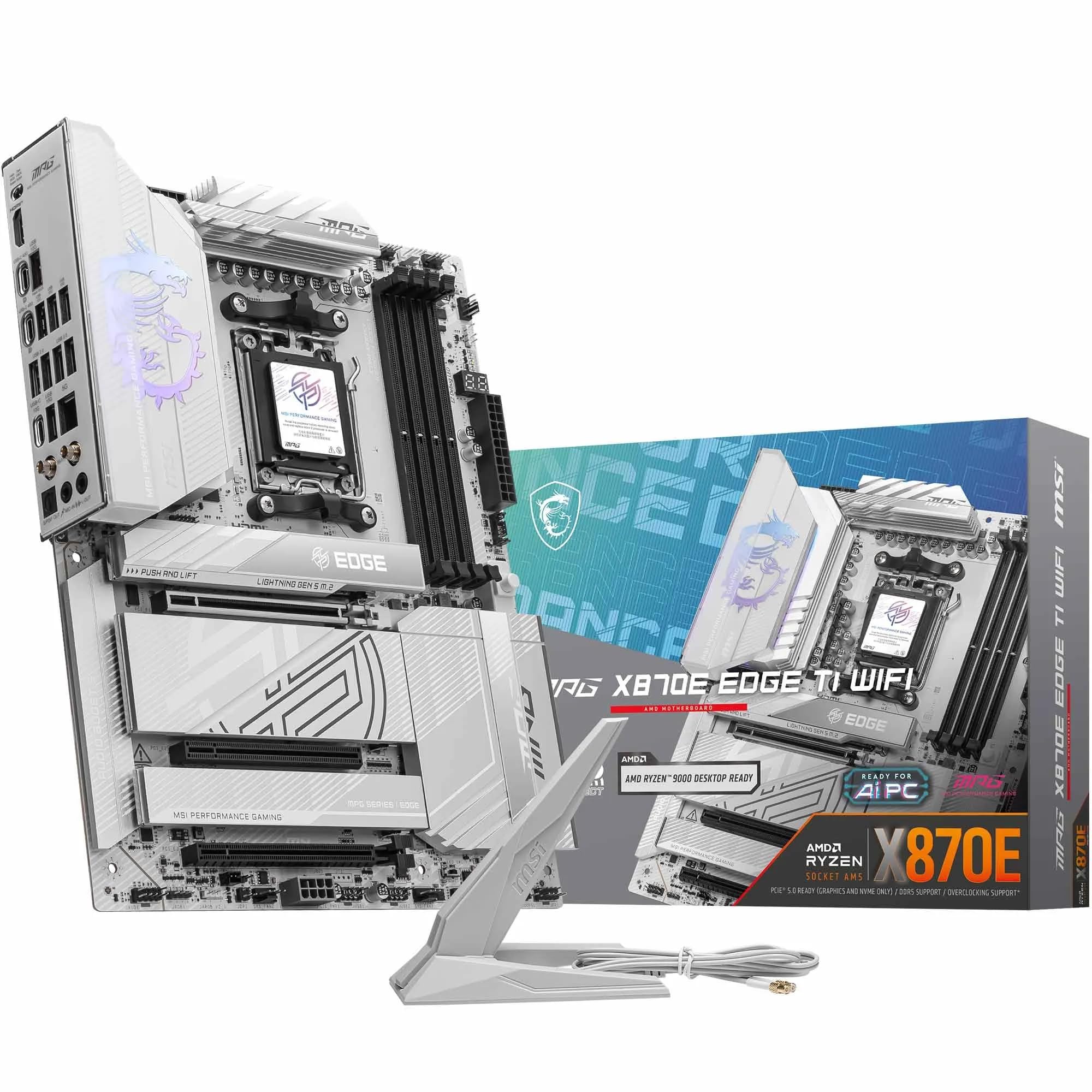 9.0 / 10
MSI MPG X870E EDGE TI WIFI Motherboard, ATX - Supports AMD Ryzen 9000/8000 / 7000 Processors, AM5-80A SPS VRM, DDR5 Memory Boost 8400+MT/s (OC), PCIe 5.0 x16, M.2 Gen5, Wi-Fi 7, 5G LAN
£299.99 · MSI
 8.5 / 10
Gigabyte X870 AORUS ELITE WIFI7 Amd Am5 Socket Motherboard Atx 4X Ddr5 Slots 3X
£243.98 · Gigabyte
Frequently asked
5 questions01Is the ASUS ROG Strix B850-A Gaming WiFi AMD ATX motherboard overkill for just gaming?+
Not really. The PCIe 5.0 GPU slot, Wi-Fi 7, and serious VRM are all directly relevant to gaming performance and longevity. The four M.2 slots and premium audio are genuinely useful rather than pointless extras. If you're running a mid-range Ryzen 5 processor and a budget GPU, a cheaper B850 board covers the basics fine. But if you're pairing this with a Ryzen 7 or Ryzen 9 chip and a high-end GPU, the Strix B850-A's headroom is put to good use.
02Will my existing CPU cooler work with the ASUS ROG Strix B850-A Gaming WiFi AMD ATX motherboard?+
The board uses the AMD AM5 socket, which is an LGA-style socket. Coolers designed for AM4 are not directly compatible without an AM5 mounting kit. Most major cooler brands including Noctua, be quiet!, and Cooler Master offer free or low-cost AM5 upgrade kits for their current coolers. Check your cooler manufacturer's website before building. Any cooler sold new and marketed as AM5 compatible will work without modification.
03What happens if the ASUS ROG Strix B850-A Gaming WiFi AMD ATX motherboard doesn't work with my components?+
Amazon UK's standard 30-day returns policy applies, backed by the Amazon A-to-Z Guarantee. If you have a genuine compatibility issue, contact Amazon directly. The BIOS FlashBack feature on this board means you can update the BIOS before installing a CPU, which resolves most compatibility issues with newer processors. For memory compatibility, enabling the AEMP profile in BIOS resolves the majority of DDR5 speed issues reported by owners.
04Is there a cheaper motherboard I should consider instead of the ASUS ROG Strix B850-A?+
Yes. The MSI MAG B850 Tomahawk WiFi is the honest alternative for builders who don't need everything the Strix B850-A offers. It's a solid B850 board with good VRM specs, Wi-Fi 7, and four M.2 slots at a lower price point. If you're running a Ryzen 5 or mid-range Ryzen 7 processor and don't need the ROG premium audio or the 70A-per-stage VRM headroom, the Tomahawk gets you most of the way there for less money.
05What warranty applies to the ASUS ROG Strix B850-A Gaming WiFi AMD ATX motherboard?+
Warranty terms are not specified in the verified product listing data. ASUS typically offers a manufacturer's warranty on ROG motherboards, so check the ASUS UK website or contact ASUS support directly for the current warranty terms. Regardless of manufacturer warranty, Amazon UK's 30-day return window and A-to-Z Guarantee provide baseline protection for your purchase.