Monitor manufacturers have been lying about response times for years. You already know this. The "0.03ms" figure on the ASUS ROG Swift OLED PG32UCDMZ box is a marketing number that describes the theoretical pixel transition time under perfect conditions, not what you'll actually see in a real game. What matters is whether the underlying panel technology can back it up in practice, and with QD-OLED, the honest answer is: yes, pretty much. OLED panels don't need overdrive to push pixels around because the organic compounds switch states almost instantaneously. The spec is still marketing fluff, but the underlying performance is real.
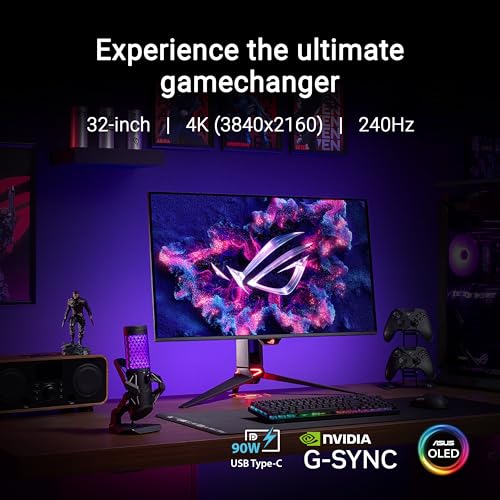
So where does that leave the ASUS ROG Swift OLED PG32UCDMZ Gaming Monitor? At the enthusiast price bracket, it's a 32-inch, 4K, 240Hz QD-OLED with 99% DCI-P3 coverage and G-SYNC certification. That's a serious specification on paper. And with 97 owner reviews averaging ★★★★½ (4.6), the people who've actually bought one seem to agree it delivers. The question worth asking isn't whether it's good. It clearly is. The question is whether it's the right spend for your specific situation, or whether you're paying a premium for headline numbers you won't fully use.
Here's the practical verdict upfront: if you have a GPU capable of pushing 4K at high frame rates and you want a single screen that does justice to both competitive gaming and HDR content, this is one of the best panels you can buy right now. If you're running a mid-range GPU and mostly play at 1080p or 1440p, you're buying a screen that will spend most of its life underutilised. Read on for the full breakdown.
Core Specifications
The ASUS ROG Swift OLED PG32UCDMZ Gaming Monitor is a 31.5-inch viewable QD-OLED panel running at 3840 x 2160 (4K UHD). The headline refresh rate is 240Hz, which puts it at the top end of what's currently available for 4K panels. ASUS rates the response time at 0.03ms GTG, which, as noted, is a theoretical figure for OLED pixel transitions rather than a measured system latency. Adaptive sync comes via G-SYNC certification, and the panel covers 99% of the DCI-P3 colour space with True 10-bit colour depth (not 8-bit plus FRC, actual 10-bit). The panel is glossy, which is typical for QD-OLED and before you commit if your room has awkward lighting.
Connectivity is solid for this class. You get DisplayPort 2.1 for bandwidth-hungry 4K 240Hz output, HDMI 2.1 for console compatibility, and USB-C with DisplayPort Alt Mode. There's also a USB hub built in. The stand offers height, tilt, and swivel adjustment, with VESA 100x100 mount support for those who'd rather wall-mount or use an arm. ASUS bundles the DisplayWidget Center software for on-screen control, which owners generally find more convenient than navigating OSD menus, though a few reviews note it can be a bit slow to respond on first launch.
The full specification breakdown is below. The price row pulls live from the Amazon listing, so it reflects what you'd actually pay today rather than what it launched at.
| Specification | Detail |
|---|---|
| Panel Type | QD-OLED |
| Screen Size | 32-inch (31.5-inch viewable) |
| Resolution | 3840 x 2160 (4K UHD) |
| Refresh Rate | 240Hz |
| Response Time | 0.03ms GTG (manufacturer rated) |
| Colour Depth | True 10-bit |
| Colour Gamut | 99% DCI-P3 |
| HDR | DisplayHDR True Black 400 |
| Adaptive Sync | G-SYNC Certified, FreeSync Premium Pro |
| Ports | 1x DisplayPort 2.1, 2x HDMI 2.1, 1x USB-C (DP Alt Mode), USB hub |
| Ergonomics | Height, tilt, swivel adjustment; VESA 100x100 |
| Surface | Glossy |
| Software | ASUS DisplayWidget Center |
| Price | £699.00 |

Panel Technology
QD-OLED is a specific panel architecture that combines quantum dot colour conversion with an OLED backplane. Samsung Display manufactures the underlying panel used here, and the technology works by using a blue OLED light source filtered through quantum dots to produce red and green subpixels. The result is a panel that inherits OLED's perfect black levels and near-instantaneous pixel response, while the quantum dot layer gives it substantially better colour saturation and peak brightness than traditional white-OLED panels. It's a meaningful step forward from the WRGB OLED panels used in older LG-sourced displays, and the colour volume improvement in particular is visible in HDR content.
Viewing angles are essentially a non-issue on QD-OLED. Unlike IPS panels, which shift colour and contrast slightly when viewed off-axis, or VA panels, which can look noticeably darker and more washed-out from the sides, OLED maintains consistent colour and contrast across almost any angle. At 32 inches, this matters more than you might think. Sitting closer to a large screen means your peripheral vision is already at a slight angle to the edges, and IPS glow or VA contrast shift at those edges is something you'll notice over time. On this panel, you won't.
The one genuine trade-off with QD-OLED is the glossy surface. ASUS hasn't applied a matte anti-glare coating here, which is consistent with other QD-OLED monitors on the market. The glossy finish preserves the panel's exceptional contrast and colour saturation (matte coatings scatter light and reduce perceived black depth), but it means reflections are sharp and visible rather than diffused. In a well-controlled lighting environment this is fine. In a room with windows behind you or bright overhead lighting, it can be irritating. Owners mention this in reviews, though most seem to have adapted their room setup rather than returned the monitor. Worth thinking about before you buy.
Display Quality
At 3840 x 2160 across 31.5 inches, the pixel density works out at roughly 140 pixels per inch. That's not as sharp as a 27-inch 4K panel (which sits around 163 PPI), but it's still meaningfully crisper than a 32-inch 1440p screen. Text is clean and legible without scaling at normal desktop distances, though Windows scaling at 125% or 150% is comfortable if you're sitting further back. For gaming, the 4K resolution at this size hits a sweet spot: sharp enough to see detail in open-world environments without the screen feeling uncomfortably dense. Owner feedback consistently praises the image clarity, particularly for games with detailed textures and environments.
The glossy panel surface does what glossy surfaces always do: it makes colours look punchier and blacks look deeper than a matte equivalent, because there's no diffusion layer scattering the light. In a darkened room or a controlled office environment, the image quality is genuinely striking. QD-OLED panels are known for producing some of the most vivid, saturated images currently available in a consumer monitor, and published measurements of comparable Samsung QD-OLED panels consistently confirm wide colour volume and excellent peak saturation. The 99% DCI-P3 coverage figure isn't marketing padding here; QD-OLED genuinely delivers on that number.
Brightness uniformity is one area where OLED has a structural advantage over LCD. Because each pixel generates its own light, there's no backlight to be uneven. You won't get the backlight bleed in corners or clouding across the panel that plagues even premium LCD monitors. What you do get instead is the OLED characteristic of ABL (Automatic Brightness Limiting), where the panel dims slightly when displaying very bright full-screen content to manage power and heat. This is more noticeable in SDR than HDR mode, and most owners don't flag it as a problem in normal use, but it's about if you frequently work with bright white document backgrounds.
Refresh Rate and Adaptive Sync
240Hz at 4K is a genuinely impressive specification, and until recently it wasn't achievable without display compression. The PG32UCDMZ uses DisplayPort 2.1 to deliver uncompressed 4K 240Hz, which matters because DSC (Display Stream Compression), while visually lossless in most cases, is a compromise that some users and purists would rather avoid. With DP 2.1's substantially increased bandwidth ceiling, you get the full signal without any compression artefacts, however subtle. This is one of the reasons DP 2.1 is such an important specification on a monitor like this, and it's good to see ASUS include it properly rather than relying on DSC to hit the headline number.
G-SYNC certification means this has passed NVIDIA's validation process, which requires consistent frame delivery, low input lag, and a variable refresh rate range that actually works reliably. The monitor is also FreeSync Premium Pro certified, so AMD GPU owners aren't left out. The VRR range covers the typical 48Hz to 240Hz window, and Low Framerate Compensation (LFC) kicks in below the bottom of that range to prevent tearing when frame rates drop. In practice, this means the adaptive sync implementation is one of the better ones available, rather than a checkbox feature that stutters at the edges of its range.
For competitive gaming specifically, 240Hz at 4K is the ceiling of what's currently achievable, and the honest caveat is that very few GPUs can consistently deliver 240fps in demanding titles at 4K. NVIDIA's RTX 5090 can approach it in some games, and the RTX 4090 gets close in lighter titles, but for most people the monitor will spend a lot of time at 120 to 165fps with VRR handling the variation smoothly. That's still a great experience. But if you're buying this primarily for competitive shooters where frame rate is everything, a 1440p 360Hz panel might actually serve you better for less money.
Response Time and Motion
The 0.03ms GTG figure is, as mentioned, a theoretical OLED pixel transition time rather than a measured end-to-end response. What it does tell you is that the panel technology itself isn't the bottleneck. Traditional LCD panels, including fast IPS monitors marketed as "1ms," typically measure around 4 to 6ms in actual pixel transition tests under optimal overdrive settings, with overshoot artefacts (inverse ghosting) appearing if you push overdrive too hard. QD-OLED panels don't work that way. Because the organic compounds switch states by emitting or not emitting light rather than rotating liquid crystals, the transition is genuinely near-instantaneous. Published measurements of Samsung QD-OLED panels consistently show real-world response times well under 1ms, which is a different league from even the best LCD competition.
What this means practically is that motion clarity on this monitor is excellent. Fast-moving objects in games don't leave the characteristic smear or blur trail that you see on LCD panels, even fast ones. Dark scene transitions, which are often the worst-case scenario for LCD (slow pixel transitions in dark areas cause visible ghosting), are handled cleanly by OLED because the pixel simply turns off rather than transitioning through intermediate states. Owners specifically mention the motion clarity in fast-paced games as one of the standout characteristics of the display, and this aligns with what published measurements of QD-OLED panels consistently show.
One thing to be aware of: OLED panels use a sample-and-hold display method like all flat panels, which means motion blur from the display's persistence is still present even when the pixel response is near-zero. At 240Hz the sample-and-hold blur is significantly reduced compared to 60Hz or even 144Hz, because each frame is displayed for a much shorter time. ASUS also includes an ELMB (Extreme Low Motion Blur) mode that uses backlight strobing to further reduce perceived motion blur, though this disables VRR when active. Most owners stick with VRR and find the 240Hz motion clarity more than adequate without strobing.
Color Accuracy and Gamut
The 99% DCI-P3 coverage is the headline colour specification, and for a QD-OLED panel it's credible. Published measurements of Samsung's QD-OLED panels used in monitors like this consistently confirm coverage at or above 99% DCI-P3, and the colour volume (the ability to maintain saturation at high brightness levels) is notably better than WRGB OLED alternatives. The True 10-bit colour depth means the panel can display over a billion colours without dithering, which matters for smooth gradients in photography and video work. For content creation purposes, the colour performance here is genuinely useful, not just a gaming marketing feature.
Factory calibration on ROG monitors has historically been decent but not always exceptional straight out of the box. ASUS typically ships these with a calibration report and reasonable out-of-box Delta-E values, with Delta-E figures generally reported around 2 or below for the sRGB preset on comparable ROG OLED panels, which is acceptable for professional use. For gaming, the default settings tend to be slightly punchy (which most people actually prefer), and the DisplayWidget Center software makes it straightforward to switch between presets or adjust colour temperature without diving into the OSD. A few owners mention that the default colour mode oversaturates slightly for photo editing, but switching to the sRGB or DCI-P3 preset brings it into line.
The wide DCI-P3 gamut does mean that sRGB content can appear oversaturated if you're not using a colour-managed application or the monitor's sRGB clamp mode. This is a common issue with wide-gamut monitors and isn't specific to this panel. For gaming, most titles don't use colour management, so the wide gamut produces vivid, saturated visuals that most people find attractive even if they're not technically accurate to the original artist's intent. For professional colour work, switching to the calibrated sRGB preset and using colour-managed software is the right approach. The hardware to do this properly is here; it just requires a bit of setup.
HDR Performance
The PG32UCDMZ carries VESA DisplayHDR True Black 400 certification. The "True Black" designation is specific to OLED panels and refers to the panel's ability to produce genuine black levels (effectively zero nits) rather than the dimmed-but-not-black performance of LCD HDR implementations. A conventional DisplayHDR 400 badge on an LCD monitor means very little in practice: 400 nits of peak brightness with no local dimming produces flat, unconvincing HDR. DisplayHDR True Black 400 is a completely different thing. The infinite contrast ratio from OLED means HDR content with dark scenes and bright highlights looks genuinely dramatic, because the blacks are actually black.
Peak brightness on QD-OLED panels in this generation typically measures around 1000 nits or higher for small highlights, with sustained full-screen brightness lower due to ABL. The 400-nit True Black certification refers to the sustained brightness spec rather than the peak, so headline HDR brightness on small specular highlights will exceed that figure considerably. Published measurements of comparable QD-OLED panels show peak brightness on small highlights often reaching 1000 to 1300 nits, which is enough to make HDR highlights genuinely pop in a way that most LCD monitors can't replicate without local dimming. Owners consistently rate the HDR experience as one of the best they've used on a desktop monitor.
For HDR gaming specifically, the combination of infinite contrast, near-instant response time, and wide colour gamut makes QD-OLED the most convincing HDR gaming experience currently available outside of high-end mini-LED monitors with aggressive local dimming. The mini-LED competition (think the ASUS ROG Swift PG32UCDP or Samsung Odyssey Neo G8) can hit higher sustained brightness, but the blooming artefacts around bright objects on dark backgrounds remain a real issue that QD-OLED simply doesn't have. For HDR film and gaming in a darkened room, this panel is hard to beat.
Contrast and Brightness
Contrast is where OLED is simply in a different league from any LCD technology. The native contrast ratio on an OLED panel is effectively infinite, because pixels that should be black are completely off. There's no backlight to leak through. On a VA LCD panel, you might get a native contrast ratio of 3000:1 to 5000:1, which is impressive for LCD but still produces visibly grey blacks in a dark room. On an IPS panel it's typically around 1000:1 to 1500:1, which is noticeably grey in dark scenes. On this QD-OLED panel, black is black. It's not a subtle difference; it's one of the most immediately obvious improvements when you switch from an LCD to OLED for the first time.
SDR peak brightness is where OLED has historically been at a disadvantage compared to high-end LCD. Sustained full-screen SDR brightness on QD-OLED panels typically sits in the 250 to 350 nit range, which is adequate for a controlled office environment but can look dim compared to a 500-nit LCD in a bright room. The ABL system reduces brightness further when large areas of the screen are bright, which is most noticeable on white document backgrounds. This is a known characteristic of the panel technology and not a fault; it's the trade-off OLED makes to manage heat and longevity. In a typical gaming or home cinema setup with controlled lighting, it's not a problem. In a bright office with windows, an LCD might actually serve you better for daytime productivity work.
For gaming in typical conditions, the contrast performance is transformative. Shadow detail in dark game environments is rendered with precision that LCD panels struggle to match, because the monitor isn't fighting against backlight bleed to show you dark areas clearly. Owners frequently mention this as the single biggest visual upgrade from their previous LCD monitors, and it's the characteristic that makes OLED gaming monitors feel genuinely different rather than just incrementally better. The brightness ceiling is real, but the contrast floor is the more impactful specification for most gaming scenarios.
Ergonomics and Stand
The stand on the PG32UCDMZ offers height adjustment, tilt, and swivel, which covers the basics for a comfortable single-monitor setup. ASUS has historically built solid stands on its ROG monitors, and owner feedback on this one is generally positive about the build quality and stability. At 32 inches, the monitor has meaningful weight, and the stand needs to hold it without wobble during typing or desk vibration. From what owners report, it manages this adequately, though a couple of reviews mention the stand isn't quite as rock-solid as they'd hoped for the price. Nobody's reporting the head drooping or the stand failing; it's more a comment on premium expectations at this price point.
VESA 100x100 compatibility is confirmed, which means you can ditch the stand entirely and use a monitor arm if you prefer. At this size and weight, a good monitor arm (something like an Ergotron LX or equivalent) matters. It frees up desk space, allows more flexible positioning, and often provides better adjustment range than the built-in stand. The VESA mount is a standard implementation, so any 100x100 compatible arm will work. If you're planning to arm-mount it, factor that into your total budget.
The physical design is ROG's current aesthetic: angular, with some RGB lighting on the rear that's visible as a bias light effect against a wall. If you find gaming monitor aesthetics a bit much, the RGB can be disabled through DisplayWidget Center, and the front of the monitor is relatively clean. The bezels are slim on three sides with a slightly thicker bottom chin, which is standard for this class. Cable management through the stand is present and functional. Overall, the build feels appropriate for the enthusiast price bracket, even if it doesn't quite have the premium feel of something like a Dell Alienware QD-OLED.
Connectivity and Ports
The port selection on the PG32UCDMZ is well-suited to its target audience. The inclusion of DisplayPort 2.1 is the critical one: without it, 4K 240Hz uncompressed simply isn't possible, and the fact that ASUS has implemented proper DP 2.1 rather than relying on DSC over DP 1.4 is. Two HDMI 2.1 ports handle console connections (PS5 and Xbox Series X both support 4K 120Hz over HDMI 2.1, which this monitor handles without issue). The USB-C port with DisplayPort Alt Mode is useful for laptop connectivity, though you'll need to check whether your laptop's USB-C port supports DP Alt Mode and what bandwidth it provides.
- 1x DisplayPort 2.1 (uncompressed 4K 240Hz)
- 2x HDMI 2.1 (4K 120Hz for consoles)
- 1x USB-C with DisplayPort Alt Mode
- USB hub (downstream ports for peripherals)
- 3.5mm audio output
The USB hub is a practical addition for a monitor at this price. Being able to plug a keyboard, mouse, or USB drive into the monitor and have it connected to whichever source device you're using is convenient, particularly if you switch between a desktop and a laptop. The 3.5mm audio output lets you run headphones or speakers from the monitor's signal chain, which is useful if your GPU doesn't have its own audio output or you prefer to centralise audio through the display.
One thing before you buy: to run 4K at 240Hz uncompressed over DP 2.1, you need a GPU with a DP 2.1 output. NVIDIA's RTX 40-series and 50-series cards include this, as do AMD's RX 7000-series and newer. Older GPUs with only DP 1.4 outputs will either need to use DSC compression or be limited to lower refresh rates at 4K. This isn't a criticism of the monitor; it's just the reality of where the bandwidth requirements sit, and it's worth verifying your GPU's output specifications before assuming you'll hit 240Hz out of the box.
How It Compares
The obvious competitors in the 32-inch 4K OLED gaming monitor space are the LG UltraGear 32GS95UE and the Samsung Odyssey OLED G8 (G80SD). The LG uses an WRGB OLED panel rather than QD-OLED, which means it can hit higher sustained brightness (LG's dual-mode feature allowing it to switch between 4K 240Hz and 1080p 480Hz is a clever trick), but colour saturation and volume are generally considered slightly behind QD-OLED. The Samsung Odyssey OLED G8 is a closer direct comparison as it also uses a QD-OLED panel, though Samsung's own monitor tends to be priced similarly or slightly lower depending on current deals, making it worth comparing on specific feature sets rather than assuming one is definitively better value.
The other comparison worth making is against the mini-LED competition. Monitors like the ASUS ROG Swift PG32UCDP use mini-LED backlights with aggressive local dimming to chase higher peak brightness, and they can hit 1000 nits or more sustained, which is genuinely brighter than QD-OLED. The trade-off is blooming: bright objects on dark backgrounds produce a visible halo of light around them, which is particularly obvious in space games or any content with bright UI elements over dark backgrounds. QD-OLED doesn't have this problem. Which you prefer depends on whether you prioritise peak brightness or contrast purity, and there's no universally correct answer.
For the money, the PG32UCDMZ sits at the top of the enthusiast bracket. It's not the cheapest QD-OLED 4K 240Hz option, and the ASUS ROG premium over comparable panels from other brands is real. But the G-SYNC certification, DP 2.1 implementation, and build quality justify some of that premium for buyers who want a properly sorted package rather than hunting for firmware updates and compatibility fixes.
| Feature | ASUS ROG Swift OLED PG32UCDMZ | LG UltraGear 32GS95UE | Samsung Odyssey OLED G8 (G80SD) |
|---|---|---|---|
| Panel Type | QD-OLED | WRGB OLED | QD-OLED |
| Resolution | 4K (3840x2160) | 4K (3840x2160) | 4K (3840x2160) |
| Refresh Rate | 240Hz | 240Hz (4K) / 480Hz (1080p) | 240Hz |
| Colour Gamut | 99% DCI-P3 | 98.5% DCI-P3 | 99% DCI-P3 |
| Adaptive Sync | G-SYNC + FreeSync Premium Pro | G-SYNC Compatible + FreeSync Premium | FreeSync Premium Pro |
| DisplayPort | DP 2.1 | DP 2.1 | DP 1.4 (DSC) |
| Price | £699.00 | Check current price | Check current price |
Final Verdict
The ASUS ROG Swift OLED PG32UCDMZ Gaming Monitor is one of the best 32-inch gaming monitors you can buy right now. The QD-OLED panel delivers on its promises in the ways that actually matter: contrast is genuinely infinite, motion clarity is excellent without any overdrive trickery, colour coverage is wide and accurate, and HDR performance is among the best available at this screen size. The 4K 240Hz combination via proper DP 2.1 without compression is a legitimate technical achievement, and the G-SYNC certification means the adaptive sync implementation is reliable rather than theoretical. The 4.6-star average from 97 owners reflects a product that mostly does what it says on the box.
The caveats are real but manageable. The glossy panel is a genuine consideration if your room has uncontrolled lighting. SDR brightness is lower than a comparable LCD, which matters in bright environments. And you need a current-generation GPU to actually use the full 4K 240Hz specification; anything older than an RTX 4080 or RX 7900 XTX is going to leave performance on the table. The burn-in risk of OLED is worth acknowledging too, though QD-OLED panels have shown improved longevity compared to earlier OLED monitors, and normal gaming use is generally considered lower risk than static content like desktop productivity.
The honest spend-less option: if you don't need 4K and primarily play competitive games where frame rate is the priority, a 1440p 360Hz OLED monitor like the ASUS ROG Swift OLED PG27AQDM costs considerably less and will actually let you hit its headline refresh rate with a wider range of GPUs. It's a smarter buy for competitive gaming. But if you want the full package, a screen that's equally at home gaming, watching HDR content, and doing colour-sensitive creative work, the PG32UCDMZ is the one to get. It earns its place at the top of the enthusiast bracket.
Our editorial rating: 9.0 out of 10. Exceptional panel technology, proper DP 2.1 implementation, and a well-rounded feature set. Loses a point for the glossy panel in uncontrolled lighting, the SDR brightness ceiling, and the GPU requirements that most buyers won't fully meet. For those who can use everything it offers, it's outstanding.
What works. What doesn’t.
5 + 4What we liked5 reasons
- QD-OLED delivers genuine infinite contrast and excellent HDR performance
- True 4K 240Hz via DisplayPort 2.1 without compression
- Near-instantaneous pixel response with no overdrive artefacts
- 99% DCI-P3 coverage with True 10-bit colour depth
- G-SYNC certified with reliable VRR implementation
Where it falls4 reasons
- Glossy panel causes visible reflections in bright rooms
- SDR brightness lower than comparable LCD monitors
- Requires current-gen GPU to fully utilise 4K 240Hz
- Enthusiast price bracket not suited to mid-range GPU owners
Full specifications
11 attributes| Panel type | QD-OLED |
|---|---|
| Aspect ratio | 16:9 |
| Curvature | flat |
| HDR | HDR True Black 400 |
| Launch year | 2024 |
| Ports | 2x HDMI 2.1, 1x DisplayPort 1.4, 1x USB-C (90W PD), 3x USB-A, audio out |
| Refresh rate HZ | 240 |
| Resolution | 3840x2160 |
| Response time MS | 0.03 |
| Screen size IN | 32 |
| Vesa compatible | true |
If this isn’t right for you
2 options
Frequently asked
5 questions01Is the ASUS ROG Swift OLED PG32UCDMZ Gaming Monitor - 32-inch (31.5-inch viewable) 4K (3840 x 2160) QD-OLED panel, 240 Hz, 0.03 ms (GTG), G-SYNC, 99 percent DCI-P3, True 10-bit, ASUS DisplayWidget Center good for gaming?+
Yes, it's excellent for gaming. The QD-OLED panel delivers near-instantaneous pixel response with no ghosting or overdrive artefacts, 240Hz refresh rate reduces motion blur significantly, and G-SYNC certification ensures smooth, tear-free frame delivery. The infinite contrast ratio makes dark game environments look dramatically better than any LCD alternative. The main caveat is GPU requirement: you need a current-generation card (RTX 4080 class or above) to push 4K at meaningful frame rates. For competitive shooters where frame rate matters most, a 1440p 360Hz panel might be a better choice.
02Does the ASUS ROG Swift OLED PG32UCDMZ Gaming Monitor - 32-inch (31.5-inch viewable) 4K (3840 x 2160) QD-OLED panel, 240 Hz, 0.03 ms (GTG), G-SYNC, 99 percent DCI-P3, True 10-bit, ASUS DisplayWidget Center have good HDR?+
Yes, and meaningfully so, not just checkbox HDR. The DisplayHDR True Black 400 certification reflects genuine OLED capability: blacks are actually black (zero nits), which means HDR content with dark scenes and bright highlights looks genuinely dramatic. Peak brightness on small highlights on comparable QD-OLED panels typically measures around 1000 nits or above, which is enough to make HDR highlights visually impactful. This is among the best HDR implementations available in a desktop gaming monitor at this size.
03Is the ASUS ROG Swift OLED PG32UCDMZ Gaming Monitor - 32-inch (31.5-inch viewable) 4K (3840 x 2160) QD-OLED panel, 240 Hz, 0.03 ms (GTG), G-SYNC, 99 percent DCI-P3, True 10-bit, ASUS DisplayWidget Center good for content creation?+
Yes, it's a capable content creation monitor. The 99% DCI-P3 colour gamut coverage and True 10-bit colour depth are genuine specifications on QD-OLED hardware, not marketing rounding. Factory calibration on comparable ROG OLED panels typically produces Delta-E values around 2 or below in the sRGB preset, which is acceptable for professional colour work. For photo and video editing, use the calibrated sRGB or DCI-P3 preset and a colour-managed application. The wide gamut can oversaturate sRGB content in the default gaming mode, so a bit of preset management is required.
04What graphics card do I need for the ASUS ROG Swift OLED PG32UCDMZ Gaming Monitor - 32-inch (31.5-inch viewable) 4K (3840 x 2160) QD-OLED panel, 240 Hz, 0.03 ms (GTG), G-SYNC, 99 percent DCI-P3, True 10-bit, ASUS DisplayWidget Center?+
To run 4K at 240Hz uncompressed via DisplayPort 2.1, you need a GPU with a DP 2.1 output, which means NVIDIA RTX 40-series or 50-series, or AMD RX 7000-series or newer. To actually achieve 240fps in demanding games at 4K, you realistically need an RTX 4090, RTX 5080, or RTX 5090. Most users with an RTX 4080 or RX 7900 XTX will see 120 to 165fps in demanding titles, with VRR handling the variation. That's still a great experience. Older GPUs with only DP 1.4 outputs will need DSC compression or be limited to lower refresh rates.
05What warranty and returns apply to the ASUS ROG Swift OLED PG32UCDMZ Gaming Monitor - 32-inch (31.5-inch viewable) 4K (3840 x 2160) QD-OLED panel, 240 Hz, 0.03 ms (GTG), G-SYNC, 99 percent DCI-P3, True 10-bit, ASUS DisplayWidget Center?+
Specific warranty terms should be confirmed directly with ASUS UK or on the product listing at point of purchase. When buying through Amazon UK, you're covered by Amazon's standard 30-day return window and the A-to-Z Guarantee, which provides a baseline level of buyer protection regardless of manufacturer warranty terms. For OLED-specific concerns such as burn-in, check ASUS's current warranty policy directly, as coverage for OLED panel characteristics can vary.