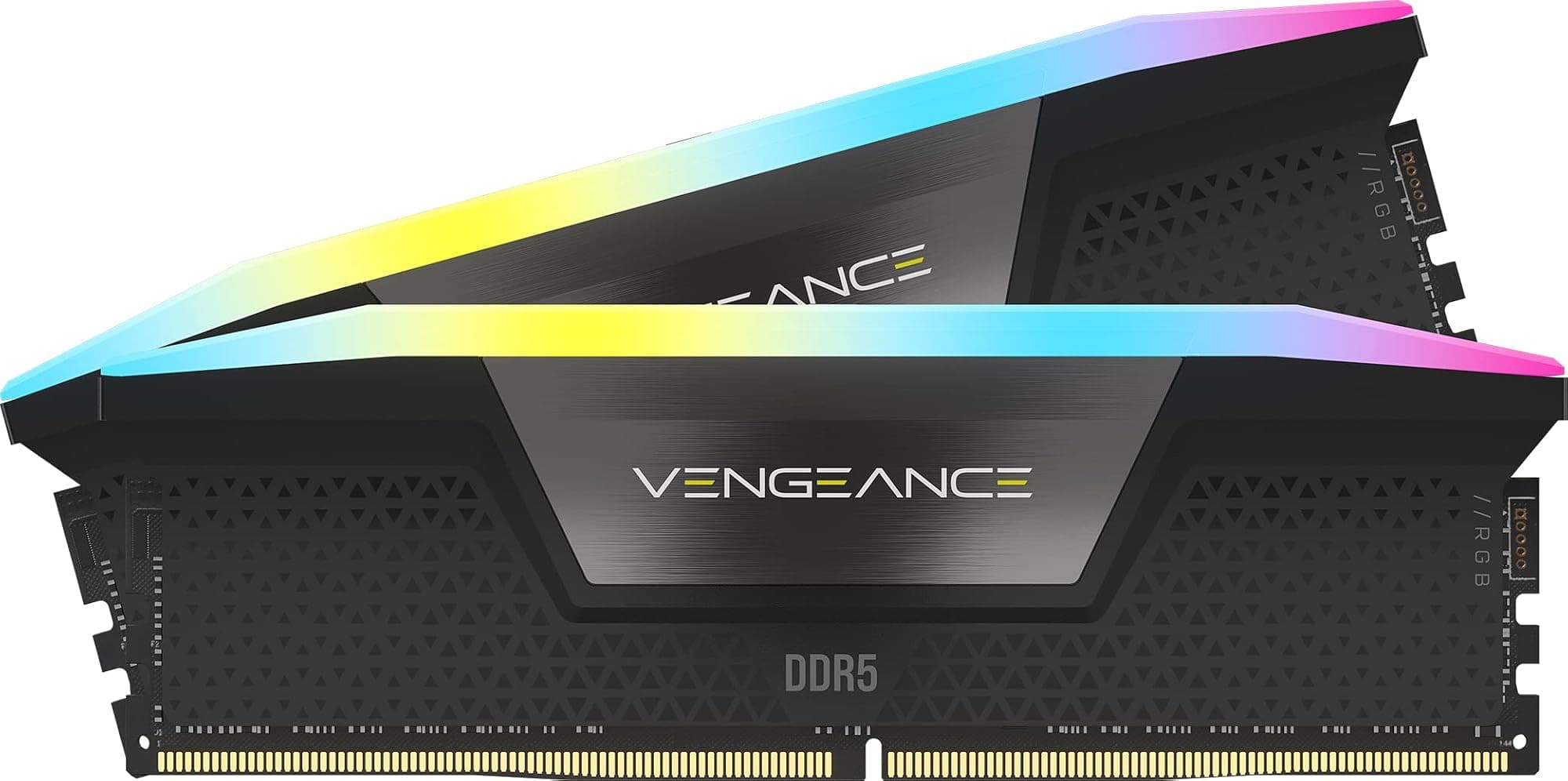
Four numbers. That's all RAM really is. Speed, timings, voltage, capacity. Get those right for your actual workload and you're sorted. Get them wrong and you've either bottlenecked your platform or spent money on headroom you'll never touch. The Corsair Vengeance DDR5 32GB kit at 6000MHz CL30 is trying to hit the sweet spot on all four, and for most people building on AM5 or a recent Intel platform right now, it's aiming squarely at the right target.
The model number is CMK32GX5M2B6000Z30 if you want to look it up yourself, and it comes in a 2x16GB configuration in a fairly understated grey heatspreader design. No RGB here. That's not a criticism, that's the point. This is Corsair's practical option, the one that says "I want fast, stable DDR5 and I'd rather not pay extra for lights I'll never see once the side panel goes on." Whether it actually delivers on that promise is what we're here to work out, based on the spec sheet, what 3,218 owners have reported (average 4.6 stars, for what it's worth), and where it sits against the competition.
The short version: 6000MHz CL30 is genuinely a good target for DDR5 right now, especially on AMD's AM5 platform where the memory controller has a sweet spot that this kit is designed to hit. But there's nuance worth understanding before you click buy, particularly around compatibility, whether 32GB is the right capacity for you, and what you actually get for the money versus cheaper alternatives.
Core Specifications
The CMK32GX5M2B6000Z30 is a 32GB kit made up of two 16GB sticks, running at a rated speed of 6000MHz under JEDEC's DDR5 standard with XMP 3.0 and AMD EXPO profiles on board. The CAS latency is CL30, and the full primary timings are 30-38-38-76. Voltage sits at 1.35V, which is standard territory for DDR5 running at this speed, not pushing anything particularly hard. The form factor is standard DIMM, so desktop only, no laptop variants here.
What's notable on paper is the combination of 6000MHz with CL30 timings. A lot of DDR5 kits at this speed ship with CL36 or CL40 timings, which are meaningfully looser. Corsair has tightened things up here, and that does matter for real-world latency in a way the headline speed alone doesn't tell you. The kit carries both Intel XMP 3.0 and AMD EXPO profiles, so you're not restricted to one platform, which is a practical advantage worth flagging. iCUE software compatibility is listed, though since there's no RGB on this particular model, the software relevance is limited to fan/pump control if you're using other Corsair components.
The kit is covered by Corsair's lifetime warranty, which is the standard for their Vengeance line and something worth factoring in when comparing against budget alternatives that ship with shorter fixed warranties. Below is the full spec breakdown.
| Specification | Detail |
|---|---|
| Capacity | 32GB (2x16GB) |
| DDR Generation | DDR5 |
| Rated Speed | 6000MHz |
| CAS Latency | CL30 |
| Primary Timings | 30-38-38-76 |
| Voltage | 1.35V |
| XMP Profile | Intel XMP 3.0 |
| EXPO Profile | AMD EXPO |
| Form Factor | 288-pin DIMM |
| RGB | None |
| Heatspreader | Grey aluminium |
| Warranty | Lifetime |
| Model Number | CMK32GX5M2B6000Z30 |
| Price | £508.75 |

Speed, Timings and Real Latency
The marketing will tell you this is 6000MHz RAM. That's true, but it's only half the story. CAS latency is the other half, and this is where a lot of buyers get confused or misled. A 6000MHz CL40 kit and a 6000MHz CL30 kit are not the same thing, even though they share a headline speed. True latency in nanoseconds is calculated by dividing (CAS latency x 2000) by the speed in MHz. For this kit, that works out to roughly 10 nanoseconds of true latency. A 6000MHz CL40 kit comes in around 13.3 nanoseconds. That gap is real and measurable, even if it's not always transformative in practice.
For context, JEDEC's baseline spec for DDR5 starts at much lower speeds with looser timings. Running at 6000MHz CL30 with 30-38-38-76 timings puts this kit well above the JEDEC floor and into genuinely tuned territory. The voltage of 1.35V is where you'd expect a kit at this speed and timing combination to sit. It's not overvolted, it's not scraping by on minimum voltage either. It's a sensible operating point. Corsair has clearly binned these ICs to hit these timings at this speed without pushing the voltage envelope, which is the right approach for a kit aimed at everyday builders rather than extreme overclockers.
Where does this sit versus the competition? There are faster kits, yes. You can buy 6400MHz CL32 or even 7200MHz kits. But faster with looser timings often means worse real-world latency than a tighter slower kit, and the gains from going beyond 6000MHz on AM5 in particular are genuinely marginal for most workloads. On AMD's Ryzen 7000 series, 6000MHz is widely understood to be the sweet spot where the memory controller runs in a 1:1 ratio with the Infinity Fabric, which is where you want to be. Pushing beyond that often means either accepting a 1:2 ratio penalty or fighting your board to maintain stability. So this kit isn't just hitting a round number for marketing reasons. It's hitting a technically meaningful target for the platform it's aimed at.
Gaming gains from faster RAM are real but modest. Going from 4800MHz to 6000MHz will show up in CPU-limited scenarios, particularly in games that stress the processor. But the difference between 6000MHz CL30 and 6400MHz CL32 in a gaming context is the kind of thing you'd see in a benchmark and not notice in actual play. Don't buy this kit expecting a frame rate transformation. Buy it because the speed and timing combination is genuinely good value and technically sensible for the platform.
XMP / EXPO Stability and Compatibility
This is honestly where most RAM headaches come from, and it's worth being direct about it. Having XMP or EXPO profiles on the box does not guarantee they'll post first time on your specific board. That said, the picture for this kit from owner reports is broadly positive. The majority of the 3,218 reviewers report straightforward plug-in-and-enable-XMP/EXPO experiences, with the profile loading cleanly on both AM5 boards and Intel platforms. That's not nothing. There are kits out there with far more drama attached to them.
On AMD AM5 specifically, the EXPO profile is the one to enable in your BIOS. EXPO is AMD's equivalent of Intel's XMP, and Corsair has included a proper EXPO profile here rather than relying on XMP compatibility mode, which sometimes doesn't tune the sub-timings correctly on Ryzen platforms. Owners on X670E and B650 boards report clean boots at 6000MHz with EXPO enabled, and the 1.35V operating voltage is within what AMD's memory controller on Ryzen 7000 is happy with. On Intel's side, XMP 3.0 covers the 13th and 14th gen platforms, and reports there are similarly clean. The kit appears on QVL lists for a reasonable number of popular boards, though as always, checking your specific motherboard's QVL before buying is not optional if you want certainty.
There are some no-post reports in the reviews, as there are with virtually any kit running above 5600MHz. A small minority of owners report needing to manually adjust sub-timings or drop to 5600MHz on certain boards to achieve stability. This is more a board and BIOS version issue than a kit defect, and updating your BIOS before installing any fast DDR5 kit is genuinely important advice. Corsair's own compatibility checker is worth running before you commit. The overwhelming majority of owners had no drama, but "mostly fine" is the honest answer, not "guaranteed fine on everything."
One practical note on voltage: 1.35V is within the safe operating range for most DDR5-capable platforms, but some budget boards are more conservative about memory voltages than others. If you're building on a very entry-level B650 board, it's worth checking that the board's VDD/VDDQ settings support 1.35V properly. Most do, but it's a five-minute check that can save a frustrating afternoon.
Capacity and Use Case
32GB in a 2x16GB configuration is the right amount of RAM for most people building a PC in 2024 and 2025. That's not a hedge, it's a genuine assessment of where workloads sit right now. Gaming alone doesn't need 32GB yet. Most titles run comfortably in 16GB, with a handful of modern open-world games starting to push past that in edge cases. But the moment you're doing anything alongside gaming, whether that's streaming, having a browser with twenty tabs open, running Discord, or keeping a game launcher or two in the background, 16GB starts feeling tight. 32GB gives you proper headroom without paying the premium for 64GB that most people genuinely don't need.
The 2x16GB configuration is the right choice over 4x8GB for most builds. Two sticks means you're using two DIMM slots and leaving two free for future expansion if you ever want to go to 64GB. Four sticks of 8GB fills all your slots, costs more to upgrade later, and can actually cause stability issues at higher speeds on some platforms because the memory controller is working harder to manage four ranks simultaneously. Dual channel is maintained either way since you're populating two channels, but the practical flexibility of 2x16GB is better. If you're on a platform that supports quad channel (HEDT territory, not mainstream AM5 or LGA1700), this kit isn't the right tool anyway.
For content creation, 32GB is increasingly the sensible floor rather than a luxury. Video editing in DaVinci Resolve or Premiere with 4K footage, photo editing in Photoshop with large files, 3D rendering, running a local AI model, any of these will eat 16GB and start eyeing your swap file. 32GB keeps you comfortable for most of these tasks without the 64GB premium. If you're running virtual machines regularly or doing serious data science work with large datasets in memory, 64GB starts making sense, and you'd want to look at 2x32GB kits instead of this one. But for the typical builder who games, creates content occasionally, and runs a normal desktop workload, 32GB is the honest answer.
The kit configuration also matters for gaming specifically. There's evidence that memory capacity above 16GB provides meaningful benefit in a handful of titles, and the trend is moving in that direction as games get more ambitious. Buying 32GB now is partly future-proofing, and at current DDR5 prices it's not an unreasonable premium to pay for that headroom.
DDR5 vs DDR4 Value
DDR5 is now the standard for new builds on AM5 and Intel's 12th gen onwards (Alder Lake introduced DDR5 support, and from Raptor Lake it became the dominant choice). If you're building new, you're almost certainly on a DDR5 platform, and the DDR4 vs DDR5 question is mostly settled. DDR5 has come down significantly in price since its early days when kits were eye-wateringly expensive for modest speeds. The premium over DDR4 is now much smaller than it was, and for a new build it makes no sense to hunt for a DDR4 platform just to save a few pounds on RAM.
Where the DDR5 value question still matters is in the tier you buy within DDR5 itself. JEDEC baseline DDR5 runs at 4800MHz or 5600MHz with looser timings, and you can find cheap kits at those speeds. Going from 4800MHz to 6000MHz CL30 does produce a measurable improvement, particularly on AM5 where the Infinity Fabric synchronisation matters. Whether that improvement is worth the price delta over a 5600MHz CL36 kit depends on what you're doing. For gaming, the gains are real but modest. For latency-sensitive workloads or applications that genuinely stress the memory subsystem, the tighter timings and higher speed of this kit earn their keep more clearly.
The honest take: if your budget is tight, a 5600MHz CL36 kit at a lower price is not a disaster. You'll lose some performance, but not enough to ruin your day. If you're spending proper money on a Ryzen 7 7800X3D or an Intel Core Ultra build, spending a bit more to get the memory controller running at its sweet spot with decent timings makes sense. The CMK32GX5M2B6000Z30 sits at a price point where it's not the cheapest DDR5 you can buy, but it's not the premium end either. It's the pragmatic middle ground, which is exactly where most sensible builds should land.
Build Quality and Heat Spreaders
The Vengeance DDR5 in grey uses a fairly slim aluminium heatspreader. It's not the tallest thing on the market, which is actually useful. Tall heatspreaders on RAM are a genuine problem when you're running a large tower cooler with a wide base, because the cooler's overhang can physically foul the first DIMM slot. Corsair hasn't published an exact heatspreader height for this specific model, but owner reports and the design language of the Vengeance DDR5 line suggest it sits comfortably under most mainstream air coolers. If you're running something like a Noctua NH-D15 or a be quiet! Dark Rock Pro, it's worth measuring the clearance on your specific board, but reports of clearance issues with this kit are rare.
The heatspreader itself is functional rather than flashy. Grey anodised aluminium, no RGB cutouts, no elaborate fins or angular design. It does the job of spreading heat away from the PCB and ICs without adding unnecessary height or cost. DDR5 at these speeds doesn't generate alarming amounts of heat in normal operation. The on-die power management IC (PMIC) that's part of the DDR5 standard does run slightly warmer than DDR4 by design, but the heatspreader handles it without issue in normal airflow conditions.
The PCB and IC specifics aren't officially published by Corsair for this kit, which is fairly standard practice. Owner reports and third-party teardowns of similar Vengeance DDR5 kits suggest Samsung or Hynix ICs, both of which are good substrates for the speed and timing combination this kit runs. The CL30 timings at 6000MHz do suggest reasonably well-binned ICs rather than bottom-of-the-barrel parts, which is consistent with Corsair's positioning of this kit above their entry-level offerings. If you're planning to manually overclock beyond the EXPO/XMP profile, the IC lottery is always a factor, but for running the rated profile you're not going to have issues with the underlying hardware quality.

RGB and Aesthetics
There isn't any RGB on this kit. That's the whole point. The CMK32GX5M2B6000Z30 is Corsair's non-RGB Vengeance option, and if you're looking at it specifically because you want lights, you're looking at the wrong product. The Corsair Vengeance RGB DDR5 exists if you need the light show, but it costs more and the RGB tax is real.
What you get instead is a clean grey heatspreader that looks perfectly fine in a build. It's not trying to be anything it isn't. If your case has a glass side panel and you've gone all-in on RGB everything else, these sticks will look a bit plain next to your lit-up GPU and fans. But if you're building a professional-looking system, an all-black or grey build, or you simply don't care about what the inside of your case looks like because the side panel is solid, this is the sensible choice. No RGB means no software conflicts, no iCUE dependency for the RAM itself, and no paying extra for features that don't affect performance.
The iCUE compatibility listed in the product name is slightly misleading in this context. iCUE is Corsair's ecosystem software, and it's relevant here only if you're running other Corsair components like fans, coolers, or peripherals. The RAM itself doesn't have anything for iCUE to control in terms of lighting. So don't factor software compatibility in as a selling point for this specific kit. It's listed because Corsair includes it on all their products, not because it does anything meaningful for a non-RGB stick. The aesthetic here is purely the heatspreader, and it's fine. Understated, but fine.
How It Compares
The main alternatives at this capacity and speed tier are the G.Skill Flare X5 32GB DDR5 6000MHz CL36 and the Kingston Fury Beast DDR5 32GB 6000MHz CL36. Both are popular, both are well-regarded, and both hit the same 6000MHz target. The difference is in the timings. The G.Skill and Kingston kits typically ship at CL36, which as covered earlier works out to a meaningfully higher true latency than CL30. The Corsair kit's tighter timings are a genuine advantage, not just a spec sheet number.
The G.Skill Flare X5 is specifically tuned for AM5 with EXPO support and has a strong reputation for stability on Ryzen platforms. It's a very good kit. But at CL36 versus CL30, the Corsair has a latency advantage that's worth paying a modest premium for if you're going to be doing anything latency-sensitive. For pure gaming, the difference is small. For workloads that stress the memory subsystem more directly, it matters more.
The Kingston Fury Beast DDR5 is often the budget pick in this tier, frequently available at lower prices than either the Corsair or G.Skill options. If price is the primary concern and you're not bothered about squeezing the last bit of latency performance, it's a reasonable choice. But the Corsair's CL30 timings and Corsair's generally strong RMA process give it an edge for buyers who want to buy once and not think about it again.
| Feature | Corsair Vengeance DDR5 6000MHz CL30 | G.Skill Flare X5 DDR5 6000MHz CL36 | Kingston Fury Beast DDR5 6000MHz CL36 |
|---|---|---|---|
| Capacity | 32GB (2x16GB) | 32GB (2x16GB) | 32GB (2x16GB) |
| Speed | 6000MHz | 6000MHz | 6000MHz |
| CAS Latency | CL30 | CL36 | CL36 |
| True Latency | ~10ns | ~12ns | ~12ns |
| Voltage | 1.35V | 1.35V | 1.35V |
| EXPO Support | Yes | Yes | Yes |
| XMP Support | XMP 3.0 | XMP 3.0 | XMP 3.0 |
| RGB | No | No | No |
| Warranty | Lifetime | Lifetime | Lifetime |
Reliability and Warranty
With 2,509 averaging 4.6 stars, the reliability picture for this kit is good. Not perfect, nothing is, but the pattern of owner reports is encouraging. The vast majority of long-term owners report stable operation at rated speeds without issues developing over months of use. Dead-on-arrival reports exist but are a small minority, and Corsair's RMA process gets broadly positive feedback in reviews, with replacement sticks arriving promptly and without excessive bureaucracy. That matters. A lifetime warranty is only as useful as the company's willingness to honour it, and Corsair's track record here is solid.
The small cluster of negative reviews follows a fairly predictable pattern. Some owners report instability that turns out to be a BIOS version issue rather than a kit defect. Others report incompatibility with specific boards that, on investigation, either aren't on the QVL or had outdated firmware. A handful report genuine dead sticks. The ratio of these complaints to positive reports is low enough that it doesn't change the overall picture, but it does reinforce the point that enabling XMP or EXPO on any kit requires a BIOS that actually supports it properly, and that checking your board's QVL isn't paranoia, it's just sensible.
Corsair's lifetime warranty on the Vengeance line is a genuine differentiator against some budget alternatives that ship with one or three year warranties. DDR5 is a long-term investment in your platform, and knowing the sticks are covered indefinitely is worth something real. The warranty covers manufacturing defects, not user damage or overclocking-induced failure, which is standard. But for a kit you're running at its rated EXPO/XMP profile without manual overclocking, the lifetime coverage is essentially a "buy it and forget it" guarantee on the hardware itself.
Value and Price Per GB
At current pricing, this kit sits in what you'd call the sensible premium tier for DDR5. It's not cheap, but it's not flagship pricing either. The price per GB works out to a figure that's competitive for CL30 DDR5 at 6000MHz, and the tighter timings versus CL36 alternatives at similar prices make the value calculation lean in its favour. You're paying for the binning work that gets CL30 timings at 6000MHz, and that's a legitimate cost rather than pure margin.
Compared to budget DDR5 at 5600MHz CL36, you're paying a premium. Whether that premium is worth it depends on your workload. For a gaming build on AM5, the performance difference is real but not dramatic. For content creation or latency-sensitive applications, the tighter timings earn more of their cost. For someone who just wants reliable 32GB of DDR5 without worrying about whether they're leaving performance on the table, the CL30 timings provide enough of a buffer that you can be confident you're not bottlenecking your memory subsystem unnecessarily.
The no-RGB design means you're not paying an RGB tax here, which is refreshing. The equivalent Corsair Vengeance RGB DDR5 kit costs more for the same underlying performance. If you want the lights, fair enough, but if you don't, this is the smarter buy within Corsair's own lineup. The grey heatspreader design keeps costs focused on what actually matters, which is the IC quality and the binning that gets you CL30 at 6000MHz. That's the right set of priorities for a kit aimed at builders who care about performance over aesthetics.
Platform Compatibility
This kit is designed for DDR5 platforms, which means AM5 (Ryzen 7000 series) and Intel 12th gen Alder Lake onwards, through 13th gen Raptor Lake and 14th gen. It will not work in DDR4 slots, and there is no DDR4 compatibility mode. If you're on an older platform, this is simply the wrong kit and you need to look at DDR4 options instead. That sounds obvious, but it's worth being explicit because DDR5 pricing has come down enough that some buyers on older boards might be tempted to look at DDR5 kits without checking their platform first.
For AMD AM5 specifically, the EXPO profile is what you want to enable. This kit's 6000MHz speed aligns with the Ryzen 7000 memory controller's optimal operating point, where it runs in a 1:1 ratio with the Infinity Fabric. AMD's Ryzen 7000 platform documentation confirms the memory controller's preferred operating range, and 6000MHz sits right in it. Going above 6000MHz on AM5 often means accepting a 1:2 ratio, which can negate the speed gains. This kit is genuinely well-matched to the platform it's primarily aimed at.
On Intel's side, XMP 3.0 support is present and the kit works with Z690, Z790, and B760 boards among others. Intel's memory controller is generally more flexible about speeds and timings than AMD's, so compatibility tends to be slightly less fraught on Intel platforms. That said, the same advice applies: check the QVL for your specific motherboard before buying, and make sure your BIOS is up to date. Mixing this kit with a second kit from a different manufacturer is not recommended and not supported. If you want 64GB, buy a 2x32GB kit rather than adding two more sticks from a different batch or brand. Memory controllers can handle mismatched kits, but they often won't run at rated speeds and stability becomes a guessing game.

Final Verdict
The Corsair Vengeance DDR5 32GB 6000MHz CL30 (CMK32GX5M2B6000Z30) is a genuinely well-specced kit that hits the right numbers for the right reasons. The 6000MHz target is technically meaningful on AM5, not just a marketing figure. The CL30 timings are tighter than most competitors at this speed, which translates to real latency advantages over the CL36 kits that dominate this price range. The dual EXPO and XMP 3.0 support covers both major platforms properly. And the no-RGB design keeps the price focused on actual performance rather than aesthetics you may not care about.
Owner reports back up the spec sheet. 2,509 averaging 4.6 stars is a strong signal that this kit works as described for the vast majority of buyers. The compatibility caveats are real but standard for fast DDR5: update your BIOS, check the QVL, enable EXPO or XMP in the BIOS after installation. Do those three things and you're almost certainly going to have a drama-free experience.
Who should buy this? Anyone building on AM5 or a recent Intel platform who wants 32GB of properly-specced DDR5 without paying for RGB or chasing extreme speeds that push stability. It's the right kit for a Ryzen 7 7700X or 7800X3D build, for a Core i7 or i9 gaming and content creation rig, for anyone who wants the memory sorted properly and moved on from. It's not the right kit if you're on a tight budget and would rather have 5600MHz CL36 at a lower price, or if you need 64GB for VM-heavy workloads. But for the mainstream 32GB buyer on a DDR5 platform who wants tighter-than-average timings and proper EXPO support, this is a solid, unsentimental choice.
Score: 8.5 out of 10. It does what it says, at a price that's fair for what it is, with a reliability record that backs it up. The only things holding it back from higher marks are the limited IC transparency and the fact that some boards will still require a bit of manual coaxing, which is an industry-wide issue rather than a Corsair-specific one.
What works. What doesn’t.
6 + 5What we liked6 reasons
- CL30 timings at 6000MHz produce a true latency of roughly 10ns, meaningfully tighter than the CL36 kits that dominate this price bracket
- Dual EXPO and XMP 3.0 profiles provide proper native support for both AM5 and recent Intel platforms without relying on compatibility workarounds
- No RGB design keeps the price focused on IC quality and binning rather than aesthetics, avoiding the premium charged on equivalent RGB kits
- Slim heatspreader height reduces the risk of clearance conflicts with large tower air coolers
- Lifetime warranty from a brand with a reliable RMA process adds long-term confidence to the purchase
- 6000MHz aligns precisely with the Ryzen 7000 memory controller's 1:1 Infinity Fabric ratio, making it technically well-matched to its primary target platform
Where it falls5 reasons
- Corsair does not publish IC manufacturer details for this kit, so buyers have no official transparency over what substrate they are getting
- A minority of owners report needing manual sub-timing adjustments or BIOS updates to achieve stability, which may catch less experienced builders off guard
- No RGB option for buyers who want aesthetic integration with a lit build, requiring a switch to the pricier Vengeance RGB variant
- Pushing past the rated EXPO/XMP profile for further manual overclocking carries the usual IC lottery risk with no official guidance from Corsair
- Not suitable for any DDR4 platform, limiting the audience strictly to AM5 and Intel 12th gen onwards
Full specifications
9 attributes| Capacity GB | 32 |
|---|---|
| CAS latency | 30 |
| ECC | false |
| Form factor | DIMM |
| Module count | 2 |
| RGB | false |
| Speed MHZ | 6000 |
| Type | DDR5 |
| Voltage V | 1.4 |
If this isn’t right for you
2 options
Frequently asked
7 questions01Is the Corsair Vengeance DDR5 6000MHz CL30 compatible with AMD AM5 motherboards?+
Yes. The kit includes a native AMD EXPO profile designed specifically for AM5 platforms running Ryzen 7000 series processors. Enabling EXPO in your BIOS on an X670, X670E, B650, or B650E board will load the correct timings and voltage automatically. The 6000MHz speed also aligns with the Ryzen 7000 memory controller's optimal 1:1 Infinity Fabric ratio, making it a technically well-matched choice for the platform.
02What is the difference between CL30 and CL36 at 6000MHz, and does it matter?+
True memory latency in nanoseconds is calculated by dividing (CAS latency multiplied by 2000) by the speed in MHz. At 6000MHz, CL30 works out to approximately 10 nanoseconds of true latency, while CL36 produces around 12 nanoseconds. In CPU-limited gaming scenarios and latency-sensitive workloads the difference is measurable, though in everyday desktop use it is unlikely to be noticeable. The advantage becomes more meaningful in applications that stress the memory subsystem directly, such as certain content creation tasks or simulation workloads.
03Does this kit work on Intel platforms as well as AMD?+
Yes. The CMK32GX5M2B6000Z30 includes Intel XMP 3.0 support alongside the AMD EXPO profile, covering 12th gen Alder Lake, 13th gen Raptor Lake, and 14th gen platforms on Z690, Z790, B760, and compatible boards. Intel's memory controller is generally flexible about speeds and timings, and owner reports on Intel platforms are broadly positive for stability at the rated 6000MHz CL30 profile.
04Will this RAM fit under a large air cooler such as a Noctua NH-D15 or be quiet! Dark Rock Pro?+
The Vengeance DDR5 in its non-RGB form uses a relatively slim heatspreader, and clearance issues with this specific kit are rare in owner reports. That said, the safest approach is to measure the gap between the first DIMM slot and the lowest point of your cooler's fan or base before purchasing, as clearance varies between motherboard layouts. Most mainstream tower coolers accommodate this kit without modification.
05Can I add two more sticks later to reach 64GB?+
It is not recommended. Adding sticks from a different batch or brand to an existing kit introduces timing and voltage mismatches that often prevent the combined set from running at rated speeds. If you anticipate needing 64GB, the better approach is to purchase a 2x32GB kit from the outset. The current 2x16GB configuration does leave two DIMM slots free, but any expansion sticks should ideally be an identical matched kit purchased at the same time.
06Does the kit require Corsair iCUE software to function correctly?+
No. The iCUE compatibility listed in the product description refers to Corsair's broader ecosystem software and is relevant only if you are running other Corsair components such as fans, coolers, or peripherals. This kit has no RGB lighting and therefore nothing for iCUE to control on the RAM itself. It will operate at its rated EXPO or XMP profile through the BIOS alone, with no software installation required.
07What warranty does the Corsair Vengeance DDR5 6000MHz CL30 carry?+
The kit is covered by Corsair's lifetime warranty, which is standard across the Vengeance DDR5 line. The warranty covers manufacturing defects under normal operating conditions. Running the kit at its rated EXPO or XMP profile is considered normal operation. The warranty does not cover damage caused by physical mishandling or voltages significantly beyond the rated specification. Corsair's RMA process receives broadly positive feedback in owner reviews for responsiveness and ease of replacement.