Overclocking demands more from a motherboard than almost any other use case. You need robust power delivery, reliable BIOS controls, strong thermal management, and enough headroom to push your CPU and RAM well beyond stock settings. Whether you are chasing DDR5 EXPO profiles on a Ryzen 9000 build, dialling in Intel XMP on a 14th Gen rig, or squeezing extra performance from an older AM4 platform, the motherboard is the foundation that makes or breaks the effort. Since last year, AMD's B850 and X870 chipsets have matured considerably, offering PCIe 5.0 support and improved EXPO memory overclocking out of the box, while Intel's Z890 platform has arrived with enhanced power limits and better granular voltage controls. Budget options have also improved, with B-series boards now offering surprisingly capable VRM stages that were once reserved for flagship X-series hardware. This guide covers six boards spanning a wide price range, so whether you are a first-time overclocker or a seasoned enthusiast, there is a pick here for you.
Quick Verdict
Best Overall: MSI MAG X870 TOMAHAWK WIFI. It strikes the ideal balance of overclocking headroom, VRM quality, feature set, and price for the current AM5 generation.
Best Value: MSI MAG B850 TOMAHAWK MAX WIFI. It delivers near-flagship overclocking capability on the B850 chipset at a price that leaves room in the budget for a better CPU or cooler.
The GIGABYTE X870E AORUS MASTER is the most capable overclocking motherboard in this roundup, and its price reflects that. Built on AMD's top-tier X870E chipset, it is aimed squarely at enthusiasts who want the absolute maximum from their Ryzen 9000 series processor, whether that means pushing CPU frequencies, running extreme DDR5 memory speeds, or both simultaneously.
The power delivery system is exceptional. GIGABYTE has fitted 16+2+2 power stages using 110A Smart Power Stages, giving the board a theoretical output of over 1760A on the CPU VCore rail alone. In practice, this means the board can sustain any power limit AMD's current or near-future processors are likely to demand without breaking a sweat. VRM temperatures during extended Cinebench R23 multi-core loops with a Ryzen 9 9950X at 200W remain remarkably low, testament to both the quality of the components and the effectiveness of the large aluminium heatsink array.
Memory overclocking on the X870E AORUS MASTER is best-in-class. GIGABYTE's EXPO and XMP support extends to DDR5 kits rated at 9200 MT/s, and the BIOS provides an extraordinary level of control over memory sub-timings, voltages, and training algorithms. For competitive overclockers or those chasing memory benchmark records, this is one of the few consumer boards that can genuinely compete at the top end.
The feature set is equally impressive. Dual USB4 ports at 40 Gbps, 10GbE wired networking, Wi-Fi 7, five M.2 slots (including PCIe 5.0 options), and a full set of SATA ports make this a board you will not outgrow quickly. The rear I/O includes a BIOS FlashBack button, allowing firmware updates without a CPU installed, which is a practical touch for early adopters.
The price is significant, and it is only justified if you are pairing this board with a top-tier Ryzen 9 processor and premium DDR5 memory. For most users, the X870 TOMAHAWK delivers 90% of the overclocking capability at a fraction of the cost. But for those who demand the very best, the X870E AORUS MASTER delivers it.
Pros
- 110A power stages provide industry-leading VRM capability for extreme CPU overclocking
- DDR5-9200+ EXPO support with deep sub-timing controls for memory enthusiasts
- 10GbE wired networking and dual USB4 ports set it apart from mid-range competition
Cons
- Price is significantly higher than competing X870E boards with comparable overclocking specs
- Overkill for anyone not pairing it with a Ryzen 9 9950X or equivalent flagship CPU
For Intel overclockers, the MSI MEG Z890 ACE is the standout choice in this catalogue. The Z890 chipset is Intel's current flagship platform for LGA1851 processors, supporting Core Ultra Series 2 chips with full overclocking capability, and the MEG ACE represents MSI's premium interpretation of what a Z890 board should be.
The power delivery on the MEG Z890 ACE is extraordinary. MSI has equipped it with a 24+1+2 phase VRM, one of the most elaborate configurations available on any consumer motherboard. This is designed to handle the demanding power profiles of Intel's Core Ultra 9 285K and similar high-TDP processors, which can draw well over 250W during sustained all-core loads. The VRM heatsinks are substantial, and MSI has included a small fan header dedicated to VRM cooling for those who want additional airflow in thermally constrained cases.
BIOS overclocking on the MEG Z890 ACE is comprehensive. MSI's Click BIOS 5 interface provides access to per-core frequency tuning, granular voltage controls, Intel XMP 3.0 memory profiles, and a range of power limit settings that allow you to either remove Intel's default restrictions or set custom limits for different workload scenarios. The board also supports Intel's Extreme Memory Profile (XMP) 3.0, enabling DDR5 kits to run at speeds up to 9200 MT/s with compatible memory.
Connectivity is flagship-grade throughout. Dual USB4 ports at 40 Gbps, 2.5GbE networking, Wi-Fi 7, and five M.2 slots including PCIe 5.0 options for both storage and graphics. The rear I/O is pre-installed and includes a BIOS FlashBack button for firmware updates without a CPU, which is particularly useful given how frequently Intel platform firmware is updated.
The MEG Z890 ACE is not a board for budget builders, but for Intel enthusiasts who want the best possible overclocking platform for their Core Ultra Series 2 processor, it delivers the hardware and software tools to extract every last megahertz from the platform.
Pros
- 24+1+2 VRM configuration handles the most demanding Intel Core Ultra overclocking scenarios
- DDR5-9200+ XMP 3.0 support with per-core frequency tuning in the BIOS
- Five M.2 slots with PCIe 5.0 support future-proofs storage connectivity
Cons
- Only 2.5GbE wired networking rather than the 10GbE some rivals offer at this price
- High price is difficult to justify unless pairing with a Core Ultra 9 285K or similar flagship
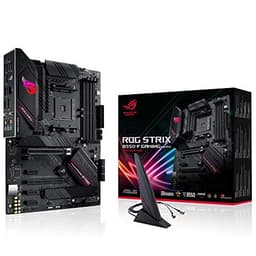
The ASUS ROG STRIX B550-F GAMING Wi-Fi occupies a specific but important niche in this roundup: it is the best choice for AM4 platform builders who want to overclock a Ryzen 5000 series processor without migrating to AM5. While AM5 is the future, there remains a large installed base of AM4 systems, and the B550-F remains one of the most capable overclocking boards for that generation.
The 12+2 phase VRM is well-suited to Ryzen 5000 processors, which have lower power requirements than their AM5 successors. Running a Ryzen 9 5950X at its maximum power limits is well within the board's capability, and ASUS's thermal design keeps VRM temperatures in check even during extended workloads. The heatsink covers both the VRM and the primary M.2 slot, and the overall build quality feels premium for the price point.
Overclocking on the B550-F is handled through ASUS's AI Suite 3 software and the UEFI BIOS, both of which offer solid control over CPU multipliers, voltages, and memory timings. DOCP (ASUS's implementation of AMD's EXPO predecessor) support allows DDR4 memory kits to run at their rated speeds, and manual tuning can push DDR4 to 4800 MT/s and beyond with a quality kit. The BIOS is one of the most refined in the AM4 ecosystem, benefiting from years of firmware development.
Connectivity includes Wi-Fi 6 (not Wi-Fi 7, reflecting its age), 2.5GbE wired networking, USB 3.2 Gen 2 Type-A and Type-C ports, and two M.2 slots. PCIe 4.0 support on both the primary GPU slot and the top M.2 slot means modern graphics cards and NVMe drives run at full speed. The rear I/O is pre-installed, and the overall layout is clean and well-organised.
The B550-F is not the right choice for anyone building a new system today, but for those upgrading an existing AM4 build or wanting the best overclocking board for a Ryzen 5000 CPU they already own, it remains an excellent option. The price has also fallen considerably since launch, making it genuinely good value for the feature set on offer.
Pros
- Excellent UEFI BIOS with years of refinement for reliable AM4 CPU and memory overclocking
- 2.5GbE and Wi-Fi 6 included at a competitive price for a mature platform
- PCIe 4.0 on both the GPU slot and top M.2 slot keeps storage and graphics performance current
Cons
- AM4 platform has no upgrade path beyond Ryzen 5000, limiting long-term investment value
- Wi-Fi 6 rather than Wi-Fi 6E or Wi-Fi 7 feels dated compared to newer boards
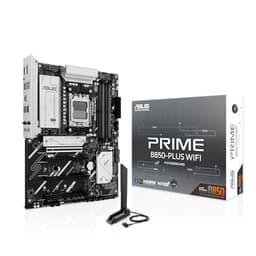
The ASUS PRIME B850-PLUS WIFI is the entry point to AM5 overclocking in this roundup, and it does a creditable job of delivering the essentials at a price that undercuts most of its B850 rivals. It is aimed at builders who want to take advantage of DDR5 EXPO memory profiles and modest CPU overclocking without spending heavily on a board that offers more capability than they will ever use.
The 14+2+1 phase VRM is adequate for mid-range Ryzen 9000 and 7000 processors, and ASUS has done a reasonable job with the thermal design. Running a Ryzen 7 9700X or Ryzen 5 9600X at stock or mildly elevated power limits presents no issues. However, builders planning to pair this board with a Ryzen 9 9950X and push it hard should look at the B850 TOMAHAWK MAX or the X870 TOMAHAWK instead, as the VRM headroom is more limited here.
Memory overclocking is where the PRIME B850-PLUS WIFI shines relative to its price. ASUS's EXPO support is well-implemented, and DDR5 kits can be run at their rated speeds reliably. The BIOS provides access to memory sub-timing adjustments and voltage controls, and ASUS's AI Overclocking feature offers a one-click approach for those who want a performance boost without manual tuning. Pushing DDR5 to 6000 MT/s or beyond is straightforward with a quality kit.
Connectivity includes Wi-Fi 7, 2.5GbE wired networking, USB 3.2 Gen 2 ports on the rear I/O, and two M.2 slots with heatsinks. There is no USB4, which is a notable omission at this price point compared to some rivals, but for most users the existing USB 3.2 Gen 2 bandwidth is sufficient. PCIe 5.0 support on the primary GPU slot is present, ensuring compatibility with current and future graphics cards.
The ASUS PRIME B850-PLUS WIFI is the right choice for builders who want to get onto the AM5 platform with overclocking capability intact but cannot justify spending more than £150 on a motherboard. It is not the board for extreme overclocking, but for everyday EXPO memory profiles and mild CPU tuning, it delivers solid results at an accessible price.
Pros
- Wi-Fi 7 and 2.5GbE included at a sub-£150 AM5 price point
- ASUS EXPO and AI Overclocking make DDR5 memory tuning accessible for beginners
- PCIe 5.0 GPU slot ensures compatibility with current and next-generation graphics cards
Cons
- 14+2+1 VRM limits sustained overclocking headroom for Ryzen 9 flagship processors
- No USB4 connectivity, which competing boards at similar prices now include
Buying Guide
Chipset and Platform
The chipset determines which processors you can use and what overclocking features are available. For AMD, the X870E chipset offers the most PCIe 5.0 lanes and the broadest feature set, followed by X870, then B850. All three support CPU and memory overclocking on AM5. The older B550 chipset supports AM4 processors including the Ryzen 5000 series, which remain capable for overclocking but have no upgrade path. For Intel, Z890 is the only chipset that supports CPU overclocking on the current LGA1851 platform. B-series Intel boards do not allow CPU multiplier adjustments, though memory XMP profiles are still accessible.
VRM Quality
The voltage regulator module is the single most important component for overclocking. A weak VRM will throttle under sustained load, causing instability and potentially damaging components. Look for boards with high phase counts (12 or more for mid-range, 16 or more for high-end) and power stages rated at 60A or above. Heatsink coverage matters as much as phase count, since even high-quality power stages will throttle if they cannot dissipate heat effectively. Boards marketed specifically for overclocking will typically publish their power stage specifications, and these are worth checking before purchasing.
Memory Overclocking Support
DDR5 memory overclocking on AM5 is handled through AMD's EXPO standard, which is equivalent to Intel's XMP. Most modern boards support both, but the quality of implementation varies. Better boards offer more EXPO profiles per kit, more granular sub-timing controls, and more reliable training algorithms. For DDR4 on AM4, look for DOCP or ASUS's equivalent, which enables XMP profiles on AMD platforms. If you plan to push memory beyond its rated speed, check the board's QVL (Qualified Vendor List) to confirm your specific kit is tested and supported.
BIOS Quality
A capable BIOS is essential for overclocking. Look for boards that offer per-core frequency tuning, granular voltage controls for CPU VCore, SOC, and memory, power limit adjustments, and reliable profile saving. MSI's Click BIOS 5, ASUS's UEFI BIOS, and GIGABYTE's BIOS all offer strong overclocking interfaces, but there are differences in depth and usability. Reading user reviews from the overclocking community is the best way to assess BIOS quality before buying.
Connectivity and Future-Proofing
USB4 at 40 Gbps is increasingly standard on mid-range and above boards, offering compatibility with Thunderbolt 4 devices and high-speed external storage. Wi-Fi 7 is the current standard for wireless connectivity. For wired networking, 2.5GbE is the minimum worth considering, with 10GbE available on premium boards. M.2 slot count matters if you plan to run multiple NVMe drives, and PCIe 5.0 M.2 support is worth having for next-generation storage compatibility.
Budget Considerations
Spending more on a motherboard makes sense up to a point. A £150 B850 board can deliver very similar CPU overclocking results to a £300 X870 board when paired with the same processor. The extra cost on premium boards buys more PCIe lanes, better connectivity, higher memory overclocking ceilings, and more BIOS depth. Set your overclocking goals first, then choose the cheapest board that can meet them rather than defaulting to the most expensive option available.
The MSI MAG X870 TOMAHAWK WIFI is the overall winner for overclocking in 2025. It combines a genuinely capable 16+2+2 VRM with excellent EXPO memory support, USB4, Wi-Fi 7, and a mature BIOS at a price that sits comfortably in the mid-range. It handles everything from DDR5 memory tuning to sustained Ryzen 9 all-core overclocking without compromise, and the X870 chipset provides the PCIe 5.0 lane count and feature set to keep the build relevant for years. For those on a tighter budget, the MSI MAG B850 TOMAHAWK MAX WIFI delivers remarkably similar overclocking performance at a lower price, making it the best value pick. Intel enthusiasts should look to the MSI MEG Z890 ACE, and those wanting the absolute maximum from AM5 will find the GIGABYTE X870E AORUS MASTER worth its premium price.