
The ASUS Prime AP201 is, genuinely, one of the more interesting Micro-ATX cases to land in the mid-range bracket in the last few years. It's compact without being punishing to build in, it's got proper mesh ventilation rather than the usual glass-and-throttle approach, and the specs back up what the marketing says for once. With hundreds of owner reviews and a positive overall rating, the crowd has spoken pretty clearly. But is it the right pick for your build, or should you be looking at the Fractal Design Pop Mini Air or the Lian Li Lancool 205M instead? That's what this is really about.
Short answer: if you're building a compact, airflow-focused Micro-ATX system and you don't want to compromise on GPU length or cooler height, the AP201 is a strong buy at its current mid-range price. It's not perfect. The included fans are adequate rather than brilliant, and the side panel design divides opinion. But the fundamentals are solid, the clearances are generous for the class, and owners consistently flag it as genuinely easy to build in. That last point matters more than people realise until they've spent three hours wrestling with a case that was clearly designed by someone who's never actually built a PC.
Core Specifications
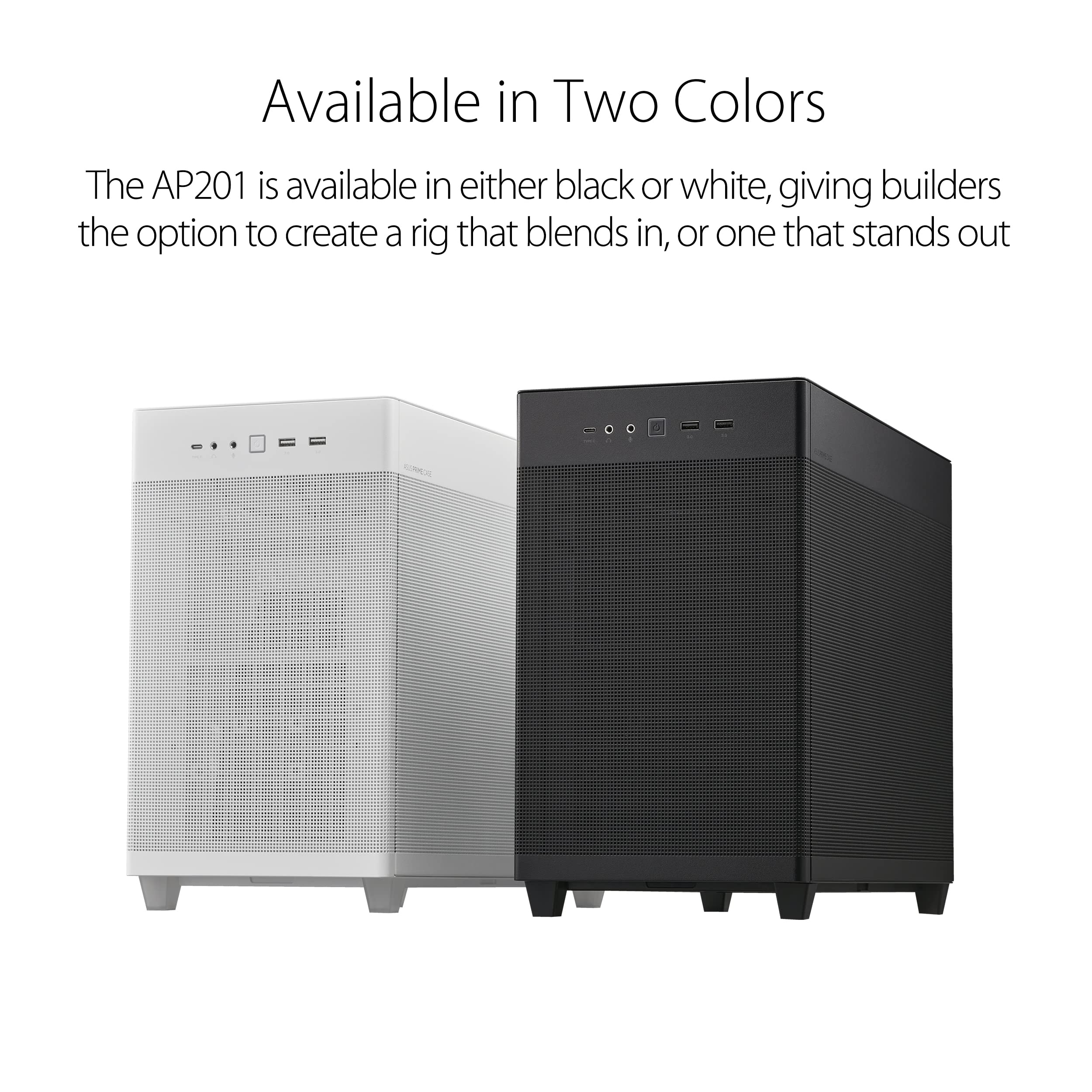
The AP201 is a Micro-ATX cube-style case with dimensions of 331mm x 226mm x 350mm. That's genuinely compact for what it supports. The case is built primarily from steel with a mesh front, top, and left-side panel, which is the whole point of this thing. ASUS rates it at 360mm GPU clearance, 155mm CPU cooler height clearance, and support for up to a 240mm AIO radiator at the top or front. Weight comes in at around 5.5kg without components, which feels solid without being a workout to shift around.
Fan support is three 120mm positions on the front, one 120mm at the rear, and up to 240mm (two 120mm) at the top. It ships with three 120mm fans included, which is actually decent for the price tier. You're getting a PSU shroud, cable routing channels, and a USB 3.2 Gen 1 Type-A plus USB 3.2 Gen 2 Type-C on the front I/O. Drive support is two 2.5-inch bays and one 3.5-inch bay, which is fine for a modern NVMe-first build but not going to thrill anyone still running a small army of hard drives.
The case supports Micro-ATX and Mini-ITX motherboards. No ATX support, which is the whole trade-off you're making for the compact footprint. ASUS has published the full product spec sheet for the AP201 if you want to cross-reference anything before buying. One thing from owner reviews: the PSU clearance is rated to 160mm, which covers most standard ATX power supplies but catches out a handful of longer units. Check your PSU length before ordering.
| Specification | Detail |
|---|---|
| Form Factor | Micro-ATX Cube |
| Dimensions (H x W x D) | 331mm x 226mm x 350mm |
| Motherboard Support | Micro-ATX, Mini-ITX |
| Max GPU Length | 360mm |
| Max CPU Cooler Height | 155mm |
| Radiator Support | 240mm (top/front), 120mm (rear) |
| Drive Bays | 2x 2.5", 1x 3.5" |
| Included Fans | 3x 120mm |
| PSU Clearance | Up to 160mm |
| Front I/O | USB 3.2 Gen 1 Type-A, USB 3.2 Gen 2 Type-C, HD Audio |
| Materials | Steel, Mesh Panels |
| Weight | ~5.5kg |

Form Factor and Dimensions
The AP201 sits in an interesting spot. It's technically a cube-style case, but it doesn't feel as boxy or awkward as some cube designs that have come before it. At 331mm tall, 226mm wide, and 350mm deep, it's genuinely compact. For context, that's noticeably smaller than a standard mid-tower like the Fractal Design Meshify C, while still offering clearances that rival it. You can fit this on most desks without it dominating the space, which matters if you're working with a compact setup.
The footprint is one of the AP201's real selling points. You're not sacrificing a huge amount of desk real estate compared to a Mini-ITX build, but you're getting the much more sensible Micro-ATX platform to work with. That means more VRM phases, more DIMM slots, more PCIe slots if you want them, and generally easier access to the kind of mid-range motherboards that hit the sweet spot for price and features. It's a smart trade-off and ASUS has clearly thought about it.
From what owners report, the case sits stable on a desk without wobble, and the rubber feet do their job. A few reviewers mention that the compact design means the side panels are closer to components than in a larger case, which can make cable routing feel a bit tight if you're not methodical about it. But that's true of any compact form factor. Nobody's pretending this is a full-tower. The point is that ASUS has squeezed a lot of usable space into a small shell, and the owner feedback consistently backs that up.
Motherboard Compatibility
The AP201 supports Micro-ATX and Mini-ITX boards. That's it. If you're planning an ATX build, this isn't your case. But if you're already shopping for a compact build, that's probably not news. The Micro-ATX sweet spot is genuinely well-served here. Boards up to the full 244mm x 244mm mATX spec will fit without drama, and the standoff layout follows the standard Micro-ATX spec, so you're not going to run into weird proprietary positioning.
Mini-ITX boards obviously fit with plenty of room. Some owners use the AP201 as an ITX build with the extra space for better cable management and cooling options, which is a perfectly valid approach if you want the flexibility without the cramped interior of a proper ITX case. There's something to be said for not fighting your case every time you need to swap a component.
One thing that comes up in owner reviews is that the I/O shield installation is straightforward and the board installation process generally goes smoothly. No reports of misaligned standoffs or awkward access to the rear I/O area, which sounds basic but genuinely isn't guaranteed at this price. A handful of owners building with larger mATX boards (think full-featured B650 or Z790 mATX boards) confirm everything lines up correctly. No nasty surprises.
GPU Clearance
Three hundred and sixty millimetres. That's the rated GPU length clearance in the AP201, and for a compact Micro-ATX cube, that's a proper number. To put it in context: an RTX 4080 Super Founders Edition comes in at 336mm, and the RTX 4090 FE is 336mm too. The AMD RX 7900 XTX reference card is 287mm. So yes, even a flagship GPU fits in here, which is not something you can say about every compact case in this price range.
Width clearance is where things get slightly more interesting. The AP201 supports three-slot cards, which covers the vast majority of modern GPUs. Some particularly chunky aftermarket triple-fan designs can push up against the side panel, and a few owners have flagged this with very wide cards. But the spec supports three slots, and most cards on the market fit cleanly. If you're running something particularly enormous, check the manufacturer's width spec before committing.
There's no vertical GPU mount option on the AP201, which will disappoint the RGB showcase crowd. But honestly, vertical mounts in compact cases create airflow problems more often than not, and the AP201 is fundamentally an airflow-first design. Skipping vertical mount is a sensible call here. The standard horizontal mount keeps the GPU pulling cool air directly from the mesh front panel, which is exactly what you want in a case this size. Owner temperatures reported in reviews back up the idea that the thermal design works as intended.
CPU Cooler Clearance
The 155mm CPU cooler height clearance is the number to focus on. That gets you into the territory of some genuinely capable air coolers. The Noctua NH-D15 is out (it's 165mm), but the NH-U12S (158mm) is also a whisker too tall according to the spec. The Noctua NH-U12A is 158mm too, so that's borderline. What does fit comfortably? The be quiet! Pure Rock 2 at 155mm is right at the limit. The Cooler Master Hypo 212 Black Edition at 159mm is technically over spec, though some owners report fitting it with the side panel on with minimal clearance. The safer picks are the Arctic Freezer 34 eSports at 157mm (also borderline) or the be quiet! Shadow Rock Slim 2 at 134mm, which fits with room to spare.
For AIO cooling, the AP201 supports a 240mm radiator at the top or front, and a 120mm at the rear. The top mount is the one most owners gravitate towards for a 240mm AIO, keeping the front intake clear for case airflow. A couple of owners have noted that fitting a 240mm AIO at the top requires some planning around cable routing, particularly the CPU power cable, but nothing that a bit of patience doesn't sort. The front 240mm position works well too and is arguably better for intake-focused thermal setups.
One thing that comes up repeatedly in owner reviews is that the cooler installation process is accessible. The top panel removes easily, giving you decent access to the CPU socket area without having to do yoga. That's not guaranteed in compact cases. Some cube designs are genuinely horrible to work in around the CPU area, and the AP201 seems to have avoided that particular trap. The pump head clearance for AIO installations is also called out positively by owners running larger socket platforms.
Storage Bay Options
Two 2.5-inch bays and one 3.5-inch bay. That's the storage situation in the AP201. If you're building a modern system around an NVMe M.2 SSD (which you should be, frankly), the 2.5-inch bays are there for a secondary SATA SSD or two, and the 3.5-inch bay handles a mechanical hard drive if you need the bulk storage. It's a sensible layout for 2024 and beyond, where M.2 slots on the motherboard handle the primary storage duties.
The 3.5-inch bay sits behind the PSU shroud area, keeping it tucked away and out of the main airflow path. The 2.5-inch bays are mounted on the back of the motherboard tray, which is standard practice and keeps the main chamber cleaner. Tool-less drive mounting gets mentioned positively in owner reviews, though a couple of reviewers note that the 3.5-inch tray feels slightly less refined than the rest of the case. Nothing that affects function, just a minor quality observation.
If you're a heavy storage user running four or more drives, this case isn't for you. That's not a criticism, it's just reality. The AP201 is designed for compact, clean builds, not storage servers. The trade-off for the compact footprint is fewer drive bays, and ASUS has prioritised airflow and GPU clearance over raw drive count. Given that M.2 NVMe storage is both fast and cheap now, most builders won't find the bay count limiting. But if you're migrating from a build with six hard drives, plan accordingly.
Cable Management
Cable management in compact cases is where builds either come together cleanly or turn into an absolute mess. The AP201 handles it better than most at this size. There's a PSU shroud that hides the power supply and the worst of the cable runs from the front of the case. Cable routing channels run behind the motherboard tray, and ASUS has included Velcro cable ties, which is a small detail that makes a genuine difference when you're trying to keep things tidy.
The rear panel clearance for cables is reported by owners as around 15mm to 20mm, which is workable but not generous. If you're using a modular PSU with slim cables, you'll have an easier time. Fat stock cables from a non-modular PSU will make the rear panel harder to close, and a few owners mention this as a minor frustration. The fix is obvious (use a modular PSU or aftermarket sleeved cables) but it's going in rather than discovering it when you're trying to close the case at midnight.
The 24-pin ATX cable routing and the CPU EPS cable routing both have dedicated channels, and the cable tie-down points are in sensible locations. Owners building clean, tidy systems consistently report positive experiences with the cable management options. One reviewer specifically called out that the routing channels are wide enough to handle thicker cables without forcing them, which is a detail that cheaper cases often get wrong. The overall impression from owner feedback is that ASUS has thought about the build experience here, not just the external aesthetics.
Airflow and Thermal Design
This is the AP201's headline feature and the main reason to pick it over a glass-fronted alternative. All three main panels (front, top, and left side) are mesh. Not decorative mesh with a solid backing. Actual open mesh that moves air. This is the correct approach for a compact case where heat buildup is a real concern, and it's what separates the AP201 from cases like the NZXT H510 or even some versions of the Corsair 4000D that use glass or solid panels.
The three included 120mm fans are positioned at the front as intake, with the rear position available for a fourth fan as exhaust. The top mesh allows hot air to escape passively or with an additional fan or AIO radiator mounted there. The left-side mesh panel means the GPU has a direct path to fresh air from outside the case rather than recirculating warm air from inside. For a compact build running a mid-range to high-end GPU, this matters. Owner reviews consistently report good temperatures, with several specifically crediting the mesh panels for keeping things cool under load.
Dust filtration is handled by magnetic filters on the front and top panels, which is the right way to do it. Magnetic filters are easy to remove, easy to clean, and don't require tools. A few owners note that the mesh is fine enough to catch most dust without significantly restricting airflow, which is the balance you want. The bottom filter covers the PSU intake, completing the picture. Compare this to cases where dust filters are either absent or require panel removal to clean, and the AP201's approach looks thoughtful. The airflow fundamentals here are genuinely well-executed for the price tier.
Front I/O and Connectivity
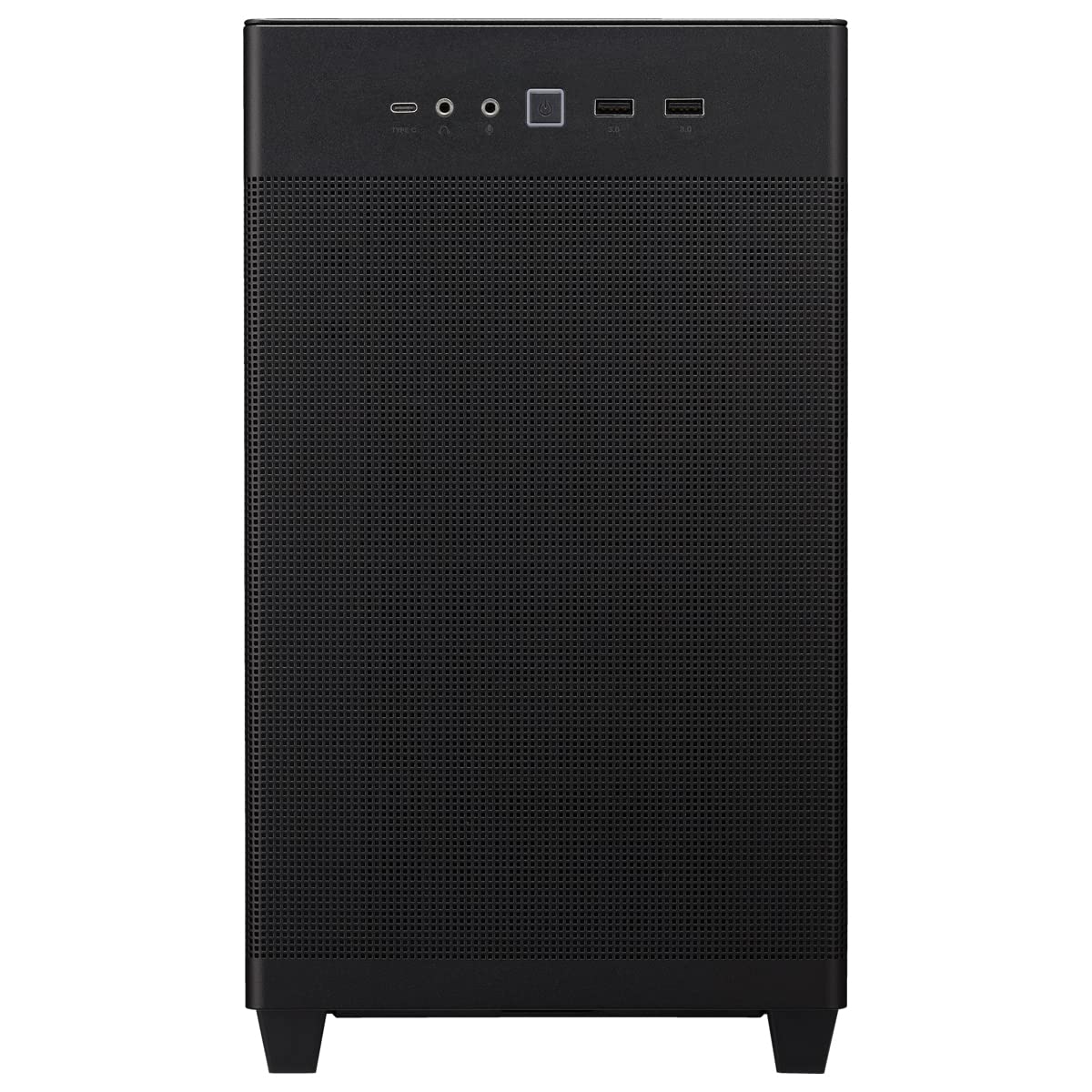
The front I/O on the AP201 is located on the top of the case, which makes sense given the compact footprint. You get one USB 3.2 Gen 1 Type-A port and one USB 3.2 Gen 2 Type-C port. There's a combined 3.5mm audio jack for headphones and microphone. Power button and reset button complete the set. It's clean, it's functional, and the USB-C port is the right call for a case released in this era.
The USB 3.2 Gen 2 Type-C connection means you're getting up to 10Gbps on that port, which is relevant if you're plugging in fast external drives or a USB-C hub. The Type-A port runs at Gen 1 speeds (5Gbps), which is standard for front panel ports at this price. The internal header for the Type-C port requires a USB 3.2 Gen 2 Type-C header on your motherboard, which most modern mid-range and above boards include, but if you're running an older platform.
A few owners mention that they'd have liked a second USB-A port, and that's a fair point. One Type-A and one Type-C is a bit minimal if you regularly plug things into the front of your case. But it's also a compact case with limited front panel real estate, and ASUS has prioritised the Type-C over a second Type-A, which is probably the right long-term call. The power button placement gets positive mentions for being easy to reach without being in a position where you'd accidentally hit it. Small thing, but you notice it when it's wrong.
Build Quality and Materials
The AP201 is built from steel, and it feels it. The chassis is solid without being unnecessarily heavy. Panel alignment is consistently reported as good by owners, with no significant flex or rattle mentioned in the reviews. The mesh panels are the main structural concern in any mesh-heavy case, and ASUS has done a decent job of keeping them rigid. The magnetic dust filters add a small amount of structure to the mesh panels, and they click into place satisfyingly rather than rattling around.
Sharp edges are the classic budget-case complaint, and the AP201 largely avoids them. A few owners mention minor sharp edges in specific spots (typically around the drive bay area), but nothing that causes injury during a normal build. The general consensus is that ASUS has rolled the edges adequately. This is one of those things that's easy to get wrong and cheap to get right, and at the mid-range price point you should expect it to be sorted. Mostly, it is.
The side panels deserve a specific mention because they generate the most discussion in owner reviews. The mesh left panel is the divisive one. Some owners love the airflow it provides. Others wish they had the option of a tempered glass panel for showing off their build. ASUS does offer the AP201 in a version with a glass panel (the AP201 TG), so if that matters to you, that version exists. The mesh version reviewed here is the better thermal choice, but it's a genuine trade-off. The panel removal mechanism is reported as tool-free and straightforward, which is a plus. No fighting with screws every time you need to get inside.
How It Compares
The obvious competitors in this space are the Fractal Design Pop Mini Air and the Lian Li Lancool 205M. Both are Micro-ATX focused, both prioritise airflow, and both sit in a similar price bracket. The Pop Mini Air is arguably the AP201's closest rival. It's similarly sized, ships with two 120mm fans instead of three, and offers a slightly more refined interior finish. But it maxes out at 340mm GPU length versus the AP201's 360mm, which is a meaningful difference if you're running a longer card.
The Lian Li Lancool 205M is a more traditional rectangular case rather than a cube design, which gives it a slightly larger footprint but more conventional proportions. It supports ATX motherboards, which the AP201 doesn't, and offers more drive bays. If you need ATX support or more storage, the Lancool 205M is the smarter pick. But if you're committed to Micro-ATX and want the most compact footprint with strong airflow, the AP201 holds its own.
The NZXT H510 Flow is another case that comes up in comparisons. It's a proper mid-tower, supports ATX, and has a good reputation. But it's also larger, and the mesh front on the H510 Flow is less open than the AP201's full-mesh approach. Owners who've compared temperatures between the two consistently report the AP201 running cooler in compact builds, which makes sense given the more aggressive ventilation. The NZXT also tends to price above the AP201, making the ASUS the better value pick for the specific use case it targets.
| Feature | ASUS Prime AP201 | Fractal Design Pop Mini Air | Lian Li Lancool 205M |
|---|---|---|---|
| Form Factor | mATX Cube | mATX Tower | mATX Tower |
| Motherboard Support | mATX, mITX | mATX, mITX | ATX, mATX, mITX |
| Max GPU Length | 360mm | 340mm | 370mm |
| Max CPU Cooler Height | 155mm | 167mm | 167mm |
| Included Fans | 3x 120mm | 2x 120mm | 2x 120mm |
| Max Radiator | 240mm | 240mm | 280mm |
| Front Panel | Full Mesh | Mesh | Mesh |
| USB-C Front I/O | Yes (Gen 2) | Yes (Gen 2) | Yes (Gen 2) |
| Drive Bays (2.5" / 3.5") | 2 / 1 | 2 / 2 | 3 / 2 |
Final Verdict
The ASUS Prime AP201 is a genuinely good compact Micro-ATX case. It's not trying to be everything to everyone, which is actually a point in its favour. It's a mesh-first, airflow-focused, compact cube that supports long GPUs, gives you three fans out of the box, and builds in cleanly according to the vast majority of its hundreds of owners. A positive overall rating across that many reviews isn't marketing fluff. That's real people who've actually built in it saying it works. And the spec sheet backs up why: 360mm GPU clearance, full-mesh panels, magnetic dust filters, and a sensible front I/O with USB-C Gen 2. These are the things that matter, and the AP201 gets them right.
The compromises are real but predictable. You're limited to Micro-ATX and Mini-ITX motherboards. CPU cooler clearance at 155mm rules out some of the taller air coolers. Storage bay count is minimal. The included fans are fine but not exciting, and anyone building a serious system will probably want to upgrade them or at least add a rear exhaust fan. The rear panel cable clearance can be tight with non-modular PSUs. None of these are dealbreakers, but they're things to factor in.
Who should buy this? Anyone building a compact mATX system where airflow and GPU clearance are the priority, and desk space is limited. Content creators, gamers, and home office builders who want a capable, quiet-ish system without a full-tower taking over their desk. The AP201 is also a solid pick for a second or living-room PC where the compact footprint matters.
Who should skip it? If you need ATX motherboard support, look at the Lian Li Lancool 205M or a proper mid-tower. If you want to show off your build through glass, ASUS makes the AP201 TG with a tempered glass side panel. If you're running a 160mm-plus air cooler and can't compromise, you'll need more clearance than this case offers. And if you're on a tighter budget, it's whether a case like the Cooler Master MasterBox Q500L (which comes in cheaper and still offers decent airflow) covers your needs. The AP201 earns its mid-range price, but not everyone needs everything it brings.
Overall score: a solid 8.5 out of 10. Thoughtful design, strong thermal credentials for the size, and an owner community that's overwhelmingly happy with it. That's a recommendation from us.
What works. What doesn’t.
6 + 6What we liked6 reasons
- Full-mesh front, top, and left-side panels deliver genuinely strong airflow for a compact case
- 360mm GPU clearance is exceptional for a Micro-ATX cube and accommodates flagship cards
- Three 120mm fans included in the box, which is above average for this price tier
- Magnetic dust filters on front, top, and PSU intake are easy to remove and clean without tools
- Build experience consistently praised by owners, with accessible CPU area and straightforward panel removal
- USB 3.2 Gen 2 Type-C on the front I/O is the right choice for a modern build
Where it falls6 reasons
- 155mm CPU cooler height limit rules out popular tall air coolers including the Noctua NH-D15 and NH-U12S
- No ATX motherboard support, limiting the platform to Micro-ATX and Mini-ITX only
- Rear panel cable clearance of around 15 to 20mm can be tight with non-modular or bulky PSU cables
- Only two 2.5-inch and one 3.5-inch drive bay, which is restrictive for storage-heavy builds
- Included 120mm fans are adequate rather than high-performance, and a rear exhaust fan is not provided
- No vertical GPU mount option, which some builders will miss regardless of the thermal reasoning
Full specifications
11 attributes| Form factor | Micro-ATX |
|---|---|
| CPU cooler clearance MM | 170 |
| Dimensions MM | 205 x 350 x 460 |
| Fans included | 1 |
| GPU clearance MM | 338 |
| MAX FAN count | 6 |
| MAX radiator MM | 360 |
| PSU support | ATX up to 180mm |
| Side panel | mesh |
| Supported motherboard | Micro-ATX, Mini-ITX |
| Weight KG | 5.8 |
Got a motherboard yet?
4 reviewsThe maker lists Micro-ATX and Mini-ITX boards for this case. These Micro-ATX boards fit it.
Frequently asked
7 questions01What is the maximum GPU length the ASUS Prime AP201 supports?+
The AP201 is rated for GPUs up to 360mm in length. That covers even flagship cards such as the RTX 4080 Super and RTX 4090 Founders Edition, both of which measure 336mm. Three-slot cards are supported, though particularly wide aftermarket designs should be checked against the manufacturer's width specification before purchasing.
02Will a Noctua NH-D15 fit in the ASUS Prime AP201?+
No. The NH-D15 stands 165mm tall, which exceeds the AP201's 155mm CPU cooler height limit. The Noctua NH-U12S at 158mm and NH-U12A at 158mm are also technically over the rated clearance. Safer air cooler choices include the be quiet! Shadow Rock Slim 2 at 134mm, or the be quiet! Pure Rock 2 at 155mm, which sits right at the limit.
03Does the ASUS Prime AP201 support a 240mm AIO radiator?+
Yes. The AP201 supports a 240mm radiator at either the top or front positions, and a 120mm unit at the rear. Most owners fit a 240mm AIO at the top, which keeps the front intake clear for case airflow. Fitting the top radiator does require some planning around the CPU power cable, but owners report it is manageable with a bit of patience.
04Does the front I/O include a USB-C port?+
Yes. The AP201 includes one USB 3.2 Gen 2 Type-C port on the top-mounted front I/O panel, providing up to 10Gbps transfer speeds. There is also one USB 3.2 Gen 1 Type-A port running at 5Gbps, plus a combined 3.5mm audio jack. The USB-C header requires a USB 3.2 Gen 2 Type-C connector on the motherboard, which most modern mid-range boards provide.
05How does the ASUS Prime AP201 compare to the Fractal Design Pop Mini Air?+
Both are compact mATX-focused cases with mesh panels and similar pricing. The AP201 ships with three 120mm fans versus the Pop Mini Air's two, and offers 360mm GPU clearance versus the Pop Mini Air's 340mm. The Pop Mini Air allows a slightly taller CPU cooler at 167mm compared to the AP201's 155mm, and also has two 3.5-inch drive bays versus the AP201's one. The best choice depends on whether GPU clearance or CPU cooler flexibility matters more to your specific build.
06Is the PSU length a concern in the ASUS Prime AP201?+
PSU clearance is rated to 160mm, which covers most standard ATX power supplies. However, some longer PSU models exceed this limit, so it is your power supply's length specification before ordering. This is flagged in owner reviews as an occasional catch for builders who have not checked in advance.
07Can the ASUS Prime AP201 be used with a Mini-ITX motherboard?+
Yes. The AP201 supports both Micro-ATX and Mini-ITX motherboards. Some builders deliberately choose the AP201 for ITX builds precisely because the larger interior provides more room for cable management and cooling options compared to a purpose-built ITX case, while the compact cube footprint still keeps the overall system size manageable.





