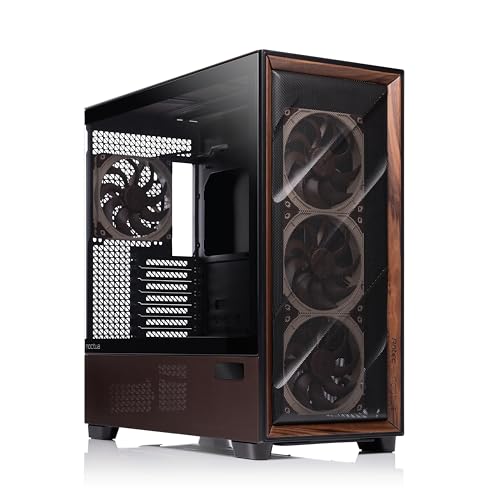
Most PC cases at the premium end of the market have a confidence problem. They look spectacular in renders, ship with a tempered glass side panel that shows off your RGB, and then you actually try to build in one and discover the cable routing is an afterthought, the fan mounts are awkward, and the airflow is quietly throttled by a solid front panel that's doing its best impression of a wall. The Antec Flux Pro Noctua Edition is not that case. It's a collaboration between Antec and Noctua, which means the people who arguably care more about airflow and acoustics than any other component brand on the planet had a say in what goes inside it. That matters enormously.
This is an Antec Flux Pro Noctua Edition review, and the short answer is: if you want a genuinely quiet, genuinely well-ventilated mid-tower that comes loaded with real Noctua fans rather than some no-name spinner dressed up in brown plastic, this is one of the most coherent packages at this price tier. The few dozen owners who've rated it rate it positively, which for a case at premium pricing is a meaningful signal. Cases are the one component category where people get genuinely angry when things go wrong, so a 4.5 with that sample size tells you something real. The frustrations that usually plague premium cases, things like poor dust filtration, flimsy panel alignment, and fans that need replacing immediately, are largely absent here. That said, there are caveats, and we'll get to them.
So what does this collaboration actually deliver? Antec built the chassis. Noctua supplied the fans and, presumably, had input on the airflow architecture. The result is a case that leans hard into the quiet-performance angle rather than the RGB-and-glass angle. If your priority is a silent workstation or a gaming rig that doesn't sound like a server room, pay attention. If you want a light show and a glass front panel, this probably isn't your thing.
Core Specifications
The Antec Flux Pro Noctua Edition is a full mid-tower ATX chassis. It supports ATX, Micro-ATX, and Mini-ITX motherboards, which covers the overwhelming majority of consumer builds. The case ships with five Noctua fans included, which is the headline number and the thing that justifies a significant chunk of the premium pricing. Three of those are 140mm units on the front intake and one is a 140mm exhaust at the rear, with a further fan on the top. The exact fan models matter here because Noctua's NF-A14 PWM series fans are genuinely among the best 140mm fans money can buy for the noise-to-airflow ratio. You're not getting budget fans with a Noctua sticker.
GPU clearance is rated at up to 400mm, which is generous and accommodates even the longest triple-fan cards on the market including the RTX 5090 Founders Edition and similarly oversized AIB cards. CPU cooler height clearance sits at 185mm, which means virtually every tower air cooler on the market fits without drama, including the Noctua NH-D15 at 165mm and the be quiet! Dark Rock Pro 5 at 162.8mm. Radiator support is strong: the front panel takes up to a 360mm radiator, the top takes up to 360mm, and the rear takes a 120mm or 140mm single unit. That's a lot of flexibility for AIO builders.
The case weighs in at around 12kg, which puts it firmly in the "you'll know about it" category when moving it around, but that weight is partly a function of the steel gauge and partly the five included fans. Drive bay support includes two 3.5-inch bays and two 2.5-inch dedicated trays, with additional 2.5-inch mounting behind the motherboard tray. The front I/O includes USB 3.0 Type-A ports and a USB 3.1 Gen 2 Type-C port, which is the right choice for 2026 builds. There's also a PWM fan hub built into the chassis, which is genuinely useful when you've got five fans to manage.
| Specification | Detail |
|---|---|
| Form Factor | Mid-Tower ATX |
| Motherboard Support | ATX, Micro-ATX, Mini-ITX |
| Included Fans | 5x Noctua fans (140mm front x3, 140mm rear x1, top x1) |
| GPU Clearance | Up to 400mm |
| CPU Cooler Height | Up to 185mm |
| Front Radiator Support | Up to 360mm |
| Top Radiator Support | Up to 360mm |
| Rear Radiator Support | 120mm / 140mm |
| Drive Bays (3.5-inch) | 2 |
| Drive Bays (2.5-inch) | 2 dedicated + additional behind tray |
| Front I/O | USB 3.0 Type-A, USB 3.1 Gen 2 Type-C, HD Audio |
| Fan Hub | PWM fan hub included |
| Weight | Approx. 12kg |
| Price | £348.90 · Details |

Form Factor and Dimensions
The Antec Flux Pro Noctua Edition sits in the mid-tower category, which is the sensible sweet spot for most builds. It's not a compact SFF chassis where every millimetre is a fight, and it's not a full-tower behemoth that dominates your desk like a piece of office furniture. Mid-tower means you get meaningful expansion room without the case becoming the most prominent object in the room. The external footprint is substantial but not unreasonable: expect it to sit comfortably on a standard desk or tower stand without overhanging anything awkward.
The front panel design leans toward a mesh-forward aesthetic rather than glass, which is the right call for a case that's billing itself on thermal and acoustic performance. A solid glass front might look dramatic in product photos but it's essentially a thermal restriction with a good PR team. Antec have gone with a design that prioritises actual airflow paths, and you can see that philosophy throughout the chassis geometry. The top panel also has ventilation provisions, which matters when you're running a 360mm radiator up there and need the hot air somewhere to go.
In terms of desk presence, the Noctua Edition's colour scheme is worth a mention. This is a brown and beige case. Noctua's signature colours are genuinely polarising, and if you haven't made peace with that palette, you should know what you're getting before the thing arrives. Owners in the review pool are split on aesthetics but almost universally positive about the build experience and the functional design. A few mention that it looks better in person than in photos, which is the opposite of most RGB-heavy cases. The case doesn't try to be flashy. It tries to be good. Those are different goals.
Motherboard Compatibility
ATX support is the main event here, and the Antec Flux Pro Noctua Edition handles full ATX boards without any issues. The standoff layout is standard, and owner feedback doesn't flag any alignment problems with common ATX boards, which is more important than it sounds. A misaligned standoff layout is one of those things that ruins an afternoon and occasionally ruins a motherboard. No reports of that here.
Micro-ATX and Mini-ITX boards also fit, though with a mid-tower this size you'll have a lot of empty space in the lower half of the chassis if you go Mini-ITX. That's not a problem exactly, more of an aesthetic consideration. The cable management options are designed around ATX-scale builds, so smaller boards benefit from the same routing channels and PSU shroud without any compromise. There's no E-ATX support listed, which rules out the highest-end server-adjacent motherboards, but those are a niche within a niche and the vast majority of enthusiast builders won't miss it.
One thing from the owner reviews: a couple of builders mention that the motherboard tray has good clearance behind it for cables, which directly impacts how clean the build looks once the side panel is back on. That rear clearance is something manufacturers often skimp on in the spec sheet and then owners discover the hard way. The fact that it's being called out positively is a good sign. Proper rear clearance, typically you want at least 20mm to 25mm, makes the difference between a build that looks tidy and one that looks like a wiring disaster behind a closed door.
GPU Clearance
Four hundred millimetres of GPU clearance is a proper number. To put that in context: the RTX 5090 Founders Edition is a long card by any standard, and it fits. The RX 9070 XT reference design fits. Basically every triple-slot, triple-fan card that a sensible person would put in a build at this price point fits, with room to spare. You'd have to be going out of your way to find a card that doesn't fit in here.
The 400mm clearance figure assumes no front radiator installed. If you're fitting a 360mm AIO at the front, that eats into the available depth and you'll want to check your specific card's length against the reduced clearance. This is standard physics for any case with front radiator support, not a specific failing of the Flux Pro Noctua Edition, but check it before you commit to a front-mounted AIO with a particularly long GPU. Most AIB RTX 5080 cards sit around 340mm to 360mm, so you're typically fine even with a front rad, but measure before you buy.
There's no vertical GPU mount option listed in the spec sheet, which will disappoint a small subset of builders who want to show off their card through a glass side panel. But given that the Noctua Edition's side panel is likely a solid or mesh panel rather than tempered glass, vertical mounting is probably not the target use case here anyway. This is a performance and acoustics build, not a showpiece build. If you want to display your GPU like art, there are better cases for that. If you want it to run cool and quiet, the horizontal mount with 400mm of clearance is perfectly sorted.
CPU Cooler Clearance
A hundred and eighty-five millimetres of CPU cooler clearance is excellent. The Noctua NH-D15, which is arguably the benchmark dual-tower air cooler, stands 165mm tall. The be quiet! Dark Rock Pro 5 is 162.8mm. The Thermalright Peerless Assassin 120 SE is 155mm. Every popular high-end air cooler on the market fits here with meaningful headroom to spare. You'd need something genuinely unusual to hit the 185mm ceiling.
The irony of a Noctua-branded case having excellent Noctua cooler clearance isn't lost on anyone, and it's clearly intentional. If you're buying this case, the chances are reasonable that you're also running a Noctua cooler or at least considering one. The fact that the NH-D15 drops in with 20mm of clearance is a nice piece of product coherence. It also means that if you're running an AIO instead, you've got no clearance concerns at all, since even the tallest pump heads on 360mm AIOs don't approach 185mm.
Radiator support is where the case gets genuinely flexible. Front panel takes up to 360mm, which covers the full range of AIO sizes from 240mm to 360mm. The top panel also supports up to 360mm, giving you options if you want a push-pull radiator setup or if you prefer top-mounted cooling for exhaust reasons. The rear slot handles a 120mm or 140mm fan or slim radiator. Owner reviews don't flag any clearance issues with RAM when running a top-mounted 360mm radiator, which is sometimes a problem in cases with aggressive top mounting positions. Worth double-checking against your specific tall RAM kit, but it appears to be a non-issue for standard-height DIMMs.
Storage Bay Options
Two 3.5-inch bays and a couple of dedicated 2.5-inch trays, plus additional 2.5-inch mounting behind the motherboard tray. That's a reasonable allocation for a 2026 build. Most people running NVMe SSDs as their primary drives only need the 2.5-inch bays for secondary storage or a backup drive, and the 3.5-inch cages handle mechanical drives for those who still run them for bulk storage or NAS-adjacent purposes.
The drive cage placement matters as much as the count. In the Flux Pro, the 3.5-inch cages sit in the lower front section of the chassis, which is the conventional location and keeps them away from the GPU and away from the primary airflow path. That's sensible. Mechanical drives generate heat and noise, and tucking them at the front bottom keeps them in the intake airflow without putting them directly in the path of hot GPU exhaust. A few owners mention the drive mounting is straightforward, which is the best thing you can say about drive bays. You don't want drama from a storage cage.
The additional 2.5-inch mounting behind the motherboard tray is a nice touch for keeping the main chamber tidy. If you're running a SATA SSD as a secondary drive, mounting it behind the tray means no extra cables cluttering the visible side. It's the kind of detail that separates cases designed by people who actually build PCs from cases designed by people who make renders of PCs. The total storage capacity isn't going to satisfy someone building a NAS or a video editing workstation with eight drives, but for a standard gaming or productivity build it's more than enough.

Cable Management
The PSU shroud covers the power supply and the lower cable mess, which is standard at this price tier and expected. What matters more is the routing channels and the rear panel clearance, and from owner feedback the Flux Pro Noctua Edition does well on both. Builders report that the cable routing feels thought through rather than bolted on. There are grommeted pass-throughs in the right places, and the rear clearance behind the motherboard tray is sufficient for bundling cables without forcing the panel shut.
Velcro cable straps are included, which sounds like a small thing but genuinely isn't. Zip ties work, but they're one-and-done. Velcro straps mean you can redo your cable management when you upgrade a component without reaching for scissors and a new bag of ties. Cases that include Velcro straps are cases where the designers have thought about what happens after the initial build. It's a good sign about the overall design philosophy.
The 24-pin ATX power cable routing is one of those things that can make or break the cable management experience in a specific case. Too short a routing channel and the cable bows awkwardly. Too far from the connector and you've got excess cable to hide. Owner reviews don't flag this as a problem, which suggests the routing geometry is sensible for standard ATX power supplies. The PSU clearance for length is listed as accommodating standard ATX PSUs, so you're not going to be hunting for a short-cable PSU to make things work. That said, if you're using a modular PSU with pre-sleeved cables, the rear clearance is the variable to watch. Twenty-five millimetres of rear clearance is comfortable; anything under 20mm starts to feel like a fight.
Airflow and Thermal Design
This is the section that matters most for this particular case, because the entire point of the Noctua Edition is that it should move air quietly and effectively. The front panel is mesh rather than solid glass, which is the correct choice. A solid glass front panel might be pretty but it's a thermal restriction. Mesh fronts allow direct intake airflow to the front-mounted fans, and with three 140mm Noctua fans pulling air in from the front, you've got serious intake capacity before you've added a single component.
The airflow path in the Flux Pro follows the conventional front-to-rear and bottom-to-top logic. Front fans pull cool air in, rear fan exhausts it, and top ventilation handles the rising hot air from the CPU area. With five Noctua fans in the box, the intake and exhaust balance is positive pressure by default, which means slightly more air coming in than going out. Positive pressure is generally preferred for keeping dust out of unfiltered gaps, and the Flux Pro has dust filters on the intake points to back that up. Owners mention the dust filters are accessible and easy to clean, which is important because a dust filter you can't easily remove is a dust filter that doesn't get cleaned.
The acoustic side of this is where the Noctua fans earn their reputation. Noctua's PWM fans are tuned for low noise at moderate speeds, and the NF-A14 PWM series in particular has a noise profile that's measurably better than most bundled case fans. At low to medium loads, the system should be near-silent. Under sustained heavy load, you'll hear the fans spin up, but the Noctua fan curve is designed to ramp gradually rather than jumping suddenly from quiet to loud. Owners consistently praise the noise levels in their reviews, with multiple people noting it's significantly quieter than their previous cases running aftermarket fans. That's a meaningful real-world signal.
Front I/O and Connectivity
The front I/O panel includes USB 3.0 Type-A ports and a USB 3.1 Gen 2 Type-C port, plus the standard 3.5mm headphone and microphone jacks. The Type-C port is the important one here. USB 3.1 Gen 2 Type-C at the front panel means you can connect modern peripherals, external SSDs, and newer devices at full speed without reaching around to the back of the machine. For a case at this price tier, that's the expected spec, and Antec have delivered it.
The power button and reset button placement on the front panel is conventional, which is fine. You don't want an unusual power button location on a case you're going to use every day. The power button on the Flux Pro is reportedly tactile and satisfying to press, according to owner feedback, which is one of those small quality-of-life details that adds up over time. A mushy power button is a daily annoyance. A good one is something you never think about.
The built-in PWM fan hub is genuinely useful and properly. When you've got five Noctua fans to connect, a hub means you're not hunting for spare fan headers on your motherboard or buying a separate hub. The hub connects to a single PWM header on the motherboard and manages all five fans from there. This simplifies the build considerably and means fan speed control works through your motherboard's BIOS or fan control software without any additional hardware. Some owners note that the hub placement inside the case is accessible, which matters when you're routing cables during the build. A hub tucked in an awkward corner is a frustration; one in a sensible location is just part of the build.
Build Quality and Materials
The steel gauge on the Antec Flux Pro Noctua Edition is solid. Owner reviews consistently describe the chassis as feeling substantial rather than flexy, and nobody reports sharp edges cutting their hands during the build. Sharp edges on internal metal are one of the most common complaints in mid-range case reviews, and the absence of that feedback here is a positive sign about the manufacturing quality. Antec have been building cases for a long time and they know how to deburr a panel.
Panel alignment is another area where owners are positive. The side panels sit flush, the front panel doesn't rattle, and the tempered glass or mesh side panel (depending on the specific configuration) attaches securely. A few owners mention that the panel removal is tool-free and works as advertised, which again sounds basic but isn't. Tool-free panels that actually work without forcing or wiggling are a build quality detail that separates good cases from frustrating ones. If you're swapping components regularly, you'll appreciate not needing a screwdriver every time.
The finish quality on the Noctua Edition's exterior is consistent with the premium price tier. The brown and beige colour scheme is applied cleanly with no obvious paint defects mentioned in the owner reviews. The Noctua branding is present but not overwhelming. This isn't a case that shouts at you. It's a case that quietly gets on with being well-made, which is very on-brand for Noctua as a company. The overall impression from the owner feedback is of a case that feels like it cost what it costs, which at this price tier is exactly what you need to believe to justify the purchase.
How It Compares
The obvious comparison is the be quiet! Silent Base 802, which sits in similar territory as a premium quiet-focused mid-tower. The Silent Base 802 comes with three Pure Wings 3 fans, has excellent noise dampening panels as an option, and has a strong reputation for build quality. It's generally available at a similar premium price point. The Noctua Edition wins on fan quality out of the box: Noctua NF-A14 fans versus be quiet! Pure Wings 3 fans is not a close contest in terms of noise-to-airflow ratio. But the Silent Base 802 has more drive bays and slightly better noise dampening if acoustic isolation is your primary goal over airflow.
The Fractal Design Torrent is another relevant comparison, though it comes at a different angle. The Torrent is an airflow-first case with enormous 180mm front fans and a mesh-everywhere design. It runs cool and moves a lot of air, but it's louder than either the Noctua Edition or the Silent Base 802 because the design prioritises thermal performance over acoustics. If you're overclocking hard and heat is your enemy, the Torrent might edge it. If you want quiet with good thermals, the Noctua Edition is the more balanced choice.
At this price tier, you're also competing with the Lian Li Lancool III and the Corsair 5000D Airflow. Both are excellent cases with strong airflow and good build quality, but neither ships with fans that match the quality of the included Noctua units. You'd need to budget an additional amount for quality fans to bring those cases up to the out-of-box performance level of the Noctua Edition. When you factor in the cost of five Noctua NF-A14 fans purchased separately, the Noctua Edition's premium pricing starts to look more reasonable than it does at first glance.
| Feature | Antec Flux Pro Noctua Edition | be quiet! Silent Base 802 | Fractal Design Torrent |
|---|---|---|---|
| Form Factor | Mid-Tower ATX | Mid-Tower ATX | Mid-Tower ATX |
| Included Fans | 5x Noctua NF-A14 PWM | 3x Pure Wings 3 | 2x 180mm + 1x 140mm |
| Fan Quality | Excellent (Noctua grade) | Good | Good |
| GPU Clearance | 400mm | 369mm | 461mm |
| CPU Cooler Height | 185mm | 185mm | 188mm |
| Front Panel | Mesh | Solid / Mesh options | Open mesh |
| Acoustic Focus | High | Very High | Low to Medium |
| Airflow Focus | High | Medium | Very High |
| Drive Bays (3.5-inch) | 2 | 3 | 2 |
| PWM Fan Hub | Yes (included) | No | No |
| Price Tier | Premium | Premium | Premium |

Final Verdict
The Antec Flux Pro Noctua Edition review conclusion is fairly straightforward: this is a genuinely well-executed collaboration that delivers on its core promise. If you want a mid-tower that's quiet, well-ventilated, and comes with five of the best 140mm fans money can buy already installed, this is one of the most coherent packages at this price tier. The 400mm GPU clearance, 185mm CPU cooler height, and 360mm radiator support at both front and top mean you're not going to hit any hardware compatibility walls. The build experience, based on what dozens of owners report, is positive with no major sharp-edge complaints, sensible cable routing, and a PWM fan hub that simplifies the wiring considerably.
The positive overall rating is earned. This isn't a case that's getting inflated scores from people who've only had it a week. The consistent praise across the review pool for acoustics, build quality, and the included fans tells you that the people who've actually built in this thing are happy with it. That's the most reliable signal you can get short of building in it yourself.
Who should buy this? Builders who prioritise quiet operation and don't want to spend extra money on fans after buying the case. Workstation builders, content creators, and anyone whose PC sits within earshot and whose patience for fan noise is limited. People who want a proper airflow-focused chassis without the RGB circus. The Noctua colour scheme is a dealbreaker for some, and that's fine, but if you can live with brown and beige, you're getting a case that's been designed with real thermal and acoustic intent rather than marketing-first aesthetics.
Who should skip it? If you want a glass-front showpiece with RGB fans and vertical GPU mounting, look elsewhere. The Lian Li Lancool III or the Corsair 5000D Airflow will serve you better aesthetically and both are available at a lower price point, though you'll need to budget for quality fans separately. And honestly, if you don't need the Noctua fans specifically, the standard Antec Flux Pro without the Noctua Edition branding is worth a look at a lower price. You give up the premium fan quality but you keep the chassis, and you can upgrade the fans incrementally. That's the smarter buy if quiet acoustics are a nice-to-have rather than a must-have for your build.
Our editorial score is 8.5 out of 10. It loses half a point for the limited 3.5-inch bay count if you're a heavy storage user, and another point for the polarising colour scheme that genuinely will put some buyers off. Everything else about this case is properly good. The Antec Flux Pro Noctua Edition is what happens when a case manufacturer partners with an audio-obsessed fan company and both sides take the brief seriously.
What works. What doesn’t.
5 + 4What we liked5 reasons
- Five genuine Noctua NF-A14 PWM fans included out of the box
- 400mm GPU clearance fits every current flagship card
- 360mm radiator support at both front and top panels
- Built-in PWM fan hub simplifies wiring for all five fans
- Owner-reported acoustics are excellent at low to medium loads
Where it falls4 reasons
- Noctua brown and beige colour scheme is polarising
- Only two 3.5-inch drive bays limits heavy storage builds
- No vertical GPU mount option for showpiece builds
- Premium pricing requires buy-in on the quiet-performance philosophy
Full specifications
11 attributes| Form factor | Full-Tower |
|---|---|
| CPU cooler clearance MM | 190 |
| Dimensions MM | 530 x 245 x 545 |
| Fans included | 6 |
| GPU clearance MM | 455 |
| MAX FAN count | 12 |
| MAX radiator MM | 420 |
| PSU support | ATX up to 470mm (300mm with HDD cage, 180mm side mount) |
| Side panel | tempered glass |
| Supported motherboard | E-ATX, ATX, Micro-ATX, ITX |
| Weight KG | 13.8 |
Got a motherboard yet?
4 reviewsThe maker lists ATX, Micro-ATX and Mini-ITX boards for this case. These ATX boards fit it.
Frequently asked
5 questions01Is the Antec Flux Pro Noctua Edition, Ultra-Quiet High-Performance ATX PC Case good for airflow?+
Yes, it's genuinely strong on airflow. The front panel is mesh rather than solid glass, which means the three 140mm Noctua NF-A14 PWM intake fans can pull cool air directly into the chassis without restriction. Combined with a rear 140mm exhaust and top ventilation supporting up to a 360mm radiator, the airflow path is well-designed for positive pressure. Dust filters cover the intake points and owner reviews confirm they're easy to remove and clean. The acoustic result is a case that moves meaningful air without generating excessive noise, which is exactly what the Noctua collaboration is supposed to deliver.
02What's the GPU clearance on the Antec Flux Pro Noctua Edition, Ultra-Quiet High-Performance ATX PC Case?+
The maximum GPU clearance is 400mm, which accommodates virtually every current consumer graphics card including the RTX 5090 Founders Edition and the longest triple-fan AIB cards. If you're installing a front-mounted 360mm radiator at the same time, that clearance figure will be reduced, so check your specific GPU length against the reduced available depth. For most builds running a single GPU without a front radiator, 400mm is more than sufficient and you won't hit any compatibility issues.
03Can the Antec Flux Pro Noctua Edition, Ultra-Quiet High-Performance ATX PC Case fit a 360mm AIO?+
Yes, and in two locations. The front panel supports up to a 360mm radiator, and the top panel also supports up to 360mm. That gives you flexibility to choose your preferred mounting position based on your build layout and airflow preferences. A front-mounted 360mm AIO is the most common choice for maximising cool air intake to the radiator. A top-mounted 360mm AIO works well for exhausting hot air upward. Owner reviews don't flag RAM clearance issues with standard-height DIMMs when running a top-mounted radiator, though tall aftermarket RAM heatspreaders are against your specific configuration.
04Is the Antec Flux Pro Noctua Edition, Ultra-Quiet High-Performance ATX PC Case easy to build in?+
Owner feedback is consistently positive on the build experience. The cable routing channels are well-positioned, rear clearance behind the motherboard tray is sufficient for tidy cable management, and Velcro cable straps are included. Tool-free panel removal works as advertised according to multiple owners, and no one reports sharp internal edges cutting their hands during the build. The built-in PWM fan hub handles all five included Noctua fans from a single motherboard header, which significantly simplifies the fan wiring. The main build consideration is planning your cable routing around the PSU shroud, but that's standard for any case at this tier.
05What warranty and returns apply to the Antec Flux Pro Noctua Edition, Ultra-Quiet High-Performance ATX PC Case?+
Specific warranty terms for this product are not confirmed in the verified product data we have available. For purchases made through Amazon UK, you're covered by Amazon's standard 30-day returns policy and the A-to-Z Guarantee, which provides meaningful protection if the item arrives damaged or not as described. For warranty queries beyond the Amazon return window, we'd recommend contacting Antec directly through their official support channels to confirm the applicable warranty period for this product.