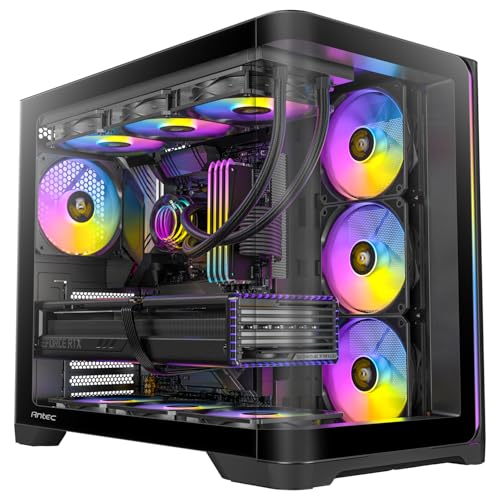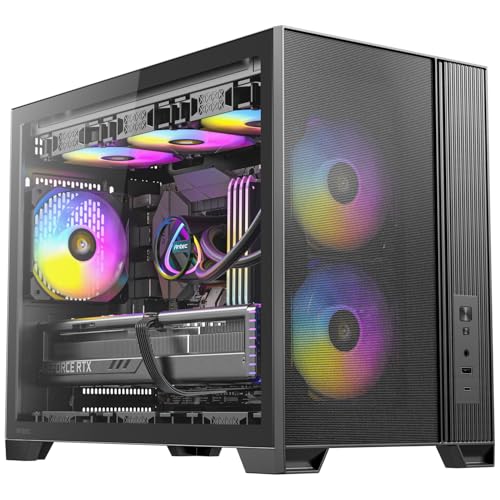
Buying a PC case without checking the clearances first is how you end up with a 420mm GPU wedged against a front radiator, or a 170mm tower cooler scraping the side panel. It's a boring thing to get wrong, and an easy thing to get right if someone just gives you the numbers upfront. So here they are, for the Antec Flux Midi Tower, a mid-range ATX case that's been quietly picking up solid reviews since it landed.
The short version of this Antec Flux Midi Tower case review: it's a genuinely capable mid-range case with a proper airflow-first design, decent clearances for most modern builds, and a fan setup that's better than most rivals at this price. It's not flawless. The front I/O is missing a USB-C port, which stings a bit in 2026, and a handful of owners have flagged that the side panel alignment needs a bit of patience. But hundreds of owner reviews with a positive overall rating tells you most people come away happy. That's a meaningful signal.
This Antec Flux Midi Tower case review digs into the specs, the real-world build experience owners report, and how it stacks up against the obvious competition at this mid-range price point. If you're trying to decide whether this is the right chassis for your next build, read on.
Core Specifications
The Antec Flux is a midi tower (Antec's own classification, though it's a standard ATX mid-tower in practice) supporting ATX, Micro-ATX, and Mini-ITX motherboards. The external dimensions come in at roughly 480mm tall, 220mm wide, and 450mm deep, which puts it firmly in the mainstream mid-tower bracket. It's not a small case, but it's not the kind of thing that dominates a desk either. Weight is around 7.5kg without any components, which is about average for a steel chassis with a tempered glass panel.
The headline feature is the fan configuration. Antec ships the Flux with five 120mm fans included: three at the front as intake and two at the rear as exhaust. That's an unusually generous bundle for a case in this price tier. Most rivals at a similar price throw in two fans at best. The front panel is a mesh design, which is exactly what you want if you're running those three intake fans hard. Mesh lets air in; solid panels don't. Simple as that.
Drive bay support covers two 3.5-inch bays and two 2.5-inch dedicated bays, with additional 2.5-inch mounting on the rear of the motherboard tray. Radiator support is solid: up to 360mm at the front, 240mm at the top, and 120mm at the rear. GPU clearance is rated at 380mm, and CPU cooler height allowance is 165mm. PSU clearance is up to 200mm. Full specs are in the table below.
| Specification | Detail |
|---|---|
| Form Factor | ATX Mid-Tower (Midi Tower) |
| Motherboard Support | ATX, Micro-ATX, Mini-ITX |
| Dimensions (H x W x D) | Approx. 480 x 220 x 450mm |
| Weight | Approx. 7.5kg |
| GPU Clearance | 380mm |
| CPU Cooler Height | 165mm |
| PSU Clearance | Up to 200mm |
| Front Radiator Support | Up to 360mm |
| Top Radiator Support | Up to 240mm |
| Rear Radiator Support | 120mm |
| Included Fans | 5 x 120mm (3 front intake, 2 rear exhaust) |
| Drive Bays (3.5-inch) | 2 |
| Drive Bays (2.5-inch) | 2 dedicated + motherboard tray mounts |
| Expansion Slots | 7 |
| Front I/O | 2x USB 3.0 Type-A, HD Audio |
| Side Panel | Tempered Glass (left), Steel (right) |
| Material | SPCC Steel + Tempered Glass |
| Current Price | £99.99 · Details |

Form Factor and Dimensions
The Antec Flux sits in the standard ATX mid-tower class. At roughly 480mm tall and 450mm deep, it has enough internal volume to handle a proper enthusiast build without taking over your entire desk. The 220mm width is standard for the class. If you're upgrading from a genuinely compact case or a budget micro-ATX box, this will feel like a lot of room. If you're coming from a full tower, it'll feel tighter, but that's the trade-off with mid-towers.
The footprint is manageable on most standard desks. It's not the kind of case that requires you to rearrange your entire setup. Owners generally report it fits well under desks too, though the mesh front means you want a bit of clearance at the front for intake airflow rather than pushing it flush against a wall. That's true of any mesh-front case, not a specific criticism of the Flux.
The overall silhouette is clean without being flashy. The tempered glass left panel shows off the internals, and the black finish is consistent across the chassis. It's not a case that shouts for attention, which some people prefer. If you want something that looks like a spaceship, there are other options. If you want something that looks tidy on a desk and does its job quietly, the Flux fits that brief well. The mesh front panel is the defining visual feature, and it's there for function rather than fashion.
Motherboard Compatibility
The Flux supports ATX, Micro-ATX, and Mini-ITX motherboards. The standoff layout follows the standard ATX grid, so there's nothing unusual to worry about here. If you're running a full ATX board, it'll sit comfortably with room for cable routing behind the motherboard tray. Micro-ATX builders get a bit of extra space around the board, which can make cable routing slightly easier. Mini-ITX in a case this size is overkill, frankly, but it works if that's what you have.
One thing: the Flux does not support E-ATX. If you're running a high-end HEDT platform with an oversized board, you'll need to look elsewhere. For the vast majority of mainstream builds using AMD or Intel consumer platforms, standard ATX is the right size and the Flux handles it without issue. The motherboard tray has a large CPU cutout, which matters if you need to install or swap a CPU cooler backplate without removing the board entirely. Owners confirm this works well in practice.
The seven expansion slots cover the standard ATX layout. You're not going to run out of slots on a typical gaming or workstation build. There's no riser cable included for vertical GPU mounting, and the case doesn't appear to have a dedicated vertical mount bracket as standard. If vertical GPU mounting is important to you, you'd need to factor in the cost of a separate riser. For most builders, horizontal mounting is fine and the standard slot layout works perfectly well.
GPU Clearance
The Antec Flux supports GPUs up to 380mm in length. That covers a wide range of current cards. An RTX 4080 Super, for example, sits around 336mm in reference form. Most custom triple-fan RTX 4090 variants land between 336mm and 360mm, so you're fine with the majority of them. The AMD RX 7900 XTX reference card is 287mm, and most custom versions stay under 340mm. In short, 380mm of clearance is generous enough that most people won't hit the limit.
Where it gets interesting is if you're also installing a 360mm front radiator. When a front-mounted radiator is in place, the effective GPU clearance can reduce depending on the radiator thickness and fan stack. Owners who have run a 360mm AIO with a high-end GPU report it's workable but tight at the longer end of the GPU range. If you're planning a 360mm front rad plus a card over 350mm, measure carefully before you commit. This isn't unique to the Flux; it's a geometry problem that affects most mid-towers with similar internal volumes.
The GPU is supported horizontally via the standard expansion slot brackets. There are no reports in the owner reviews of the GPU sag being a significant issue, though longer and heavier cards will always benefit from a GPU support bracket. The 380mm clearance figure comes from Antec's published specifications, and owners with long cards confirm it's accurate. No nasty surprises here, which is exactly what you want from a case spec sheet.
CPU Cooler Clearance
The Flux allows CPU air coolers up to 165mm tall. That's enough for most popular tower coolers. The Noctua NH-D15 sits at 165mm, which means it's technically right at the limit. In practice, some owners report it fits with the side panel on, but it's your specific cooler's dimensions before assuming. Anything under 160mm, like the be quiet! Dark Rock 4 at 159mm or the Noctua NH-U12S at 158mm, fits without any concern.
For AIO liquid coolers, the Flux supports up to a 360mm radiator at the front, 240mm at the top, and 120mm at the rear. The front is the primary spot for a 360mm AIO, and that's where most people will want to mount one. Top-mounted 240mm AIOs are also popular, and owners confirm this works well. The rear 120mm mount is fine for a compact AIO or a single exhaust fan. The Antec product page confirms these radiator dimensions.
One thing that matters with top-mounted radiators is RAM clearance. Tall RAM kits with chunky heatspreaders can sometimes interfere with a top-mounted radiator and its fans. The Flux's internal height gives reasonable clearance here, but if you're running 50mm-plus heatspreader RAM (the kind that looks like it's trying to be a tower cooler itself), double-check. Most standard DDR5 kits with sensible heatspreaders are fine. This is less of a Flux-specific issue and more of a general mid-tower geometry consideration.
Storage Bay Options
The Flux gives you two 3.5-inch drive bays and two dedicated 2.5-inch bays, plus additional 2.5-inch mounting points on the rear of the motherboard tray. For most modern builds, this is more than enough. If you're running an NVMe SSD as your primary drive (which you probably should be in 2026) and a couple of HDDs for mass storage, the Flux handles it without fuss. The 3.5-inch bays are located in the lower front area of the chassis, behind the PSU shroud.
The drive mounting itself is fairly standard. The 3.5-inch bays use a tray system, and owners generally report it's straightforward to use, though not tool-free in the strictest sense. You'll need a screwdriver for the hard drives. The 2.5-inch bays on the rear of the motherboard tray are more convenient and easier to access. For an NVMe-primary build, you'll likely use the M.2 slots on the motherboard and barely touch the drive bays at all, which makes the bay count less critical than it used to be.
If you're a heavy storage user with four or more HDDs, the Flux isn't the right case. Two 3.5-inch bays is the limit, and there's no obvious way to add more without aftermarket solutions. For a typical gaming build or a home workstation with one or two HDDs and a couple of SSDs, it's perfectly adequate. Owner reviews don't flag storage capacity as a frustration, which suggests the target audience for this case isn't running NAS-style storage arrays. That's fine. Know what you need before you buy.

Cable Management
This is where mid-range cases often let themselves down, and the Flux does a reasonable job of not doing that. There's a PSU shroud covering the lower section of the case, which hides the PSU and the tangle of cables that inevitably comes with it. The motherboard tray has a series of cable routing holes with rubber grommets, which makes threading cables through to the rear compartment cleaner and easier. Owners consistently mention the cable management as a positive, which is a good sign.
The rear cable management space is reportedly adequate without being generous. You're looking at around 20mm to 25mm of clearance behind the motherboard tray, which is enough for most cable runs but won't accommodate a massive bundle of thick cables from a non-modular PSU without some effort. If you're using a fully modular PSU, you'll find it much easier to keep things tidy. Velcro cable tie points are present, and owners confirm they're actually useful rather than decorative. That sounds like a low bar, but plenty of cheaper cases put tie points in positions that don't line up with where your cables actually run.
The overall cable management experience, based on what owners report, is that it's manageable and tidy without being the kind of premium experience you'd get in a Fractal Design or a Lian Li. That's fair at this price. You won't be pulling your hair out, but you might need to spend a bit of time routing things carefully if you're using a non-modular PSU. One owner specifically mentioned that the 24-pin ATX cable routing is well positioned, which is a small detail that makes a real difference when you're trying to keep things neat.
Airflow and Thermal Design
The Flux's airflow story is the main reason to consider it. Five included fans is a lot. Three 120mm fans at the front pulling air in through a mesh panel, two 120mm fans at the rear pushing air out. That's a positive pressure bias toward balanced airflow, and it means your components are getting fresh air from the moment you power on. Most cases at this price include two fans, sometimes one. Antec including five is a meaningful differentiator.
The mesh front panel is the other piece of the puzzle. A solid or glass front panel restricts intake airflow significantly, forcing air through small gaps at the sides or bottom. Mesh doesn't have that problem. Air flows freely through the front, straight to the fans, straight to your components. This is why mesh-front cases consistently outperform glass-front cases in thermal benchmarks, as shown in independent testing by outlets like Gamers Nexus. The Flux gets this right.
There are dust filters on the front and bottom of the case. The front filter is accessible without tools, which matters because you should be cleaning it regularly if you're running three intake fans at decent speed. The bottom filter covers the PSU intake. Owners report the filters do their job, though a few note that the front filter can be a bit fiddly to reattach after cleaning. Minor gripe, but. The fan controller, if there is one built in, isn't prominently featured in the spec sheet, so fan speed management will likely be handled through your motherboard's BIOS or a dedicated fan controller hub.
Front I/O and Connectivity
Here's where the Flux shows its age a little. The front I/O gives you two USB 3.0 Type-A ports and a combined HD audio jack (or separate headphone and mic ports, depending on the specific variant). No USB Type-C. In 2026, that's a genuine omission. Most new peripherals, headsets, and fast storage devices use USB-C, and having to reach around to the back of your PC every time you want to plug one in gets old quickly.
The power button is centrally placed on the top of the case, which is a sensible location for a tower that sits on a desk. Reset button is there too, smaller and recessed enough that you won't accidentally hit it. The I/O panel layout is clean and easy to reach. The absence of USB-C is the main frustration, and it's one that several owner reviews specifically call out. It's not a dealbreaker for everyone, but if you're regularly plugging in USB-C devices at the front of your PC, it's worth factoring in.
Some owners have noted that the HD audio connection works reliably with both AMD and Intel motherboard headers, which sounds obvious but isn't always the case with cheaper cases that use non-standard connectors. The USB 3.0 ports are properly implemented and deliver the expected transfer speeds. If your use case is primarily USB-A peripherals and you're not bothered about front-panel USB-C, the I/O is functional and well-positioned. But if you need USB-C at the front, this case doesn't have it, and that's a straight answer.
Build Quality and Materials
The Flux uses SPCC steel for the main chassis, which is the standard cold-rolled steel you'll find in most mid-range cases. It's not the thickest steel in the world, but it's not flimsy either. The chassis feels solid when you're handling it, and there are no reports in the owner reviews of panels flexing or the frame warping under normal use. The tempered glass left side panel is the visual centrepiece, and it's properly tempered rather than acrylic, which matters for both clarity and durability.
Panel alignment is generally good, though a handful of owners mention that the side panels need a bit of fiddling to seat correctly. This isn't unusual for steel-chassis cases in this price range. The tolerances are good enough that it's not a persistent problem, just something to be aware of during the build. The screws included with the case are standard and work fine. No reports of stripped threads or cross-threading, which is reassuring.
Sharp edges inside the case are because they're a real issue with some budget and mid-range cases. Owner reviews for the Flux are mostly positive on this front. A few people mention minor sharp edges around some panel cutouts, but nothing that caused injury or significant frustration. The overall impression from the owner feedback is of a case that's well-finished for the price. The black interior finish is consistent and doesn't show fingerprints as badly as some glossy interiors. The tempered glass panel is held in place with thumb screws, which makes removal and reinstallation straightforward.
How It Compares
The two most obvious competitors at this mid-range price point are the Corsair 4000D Airflow and the Fractal Design Pop Air. Both are well-regarded mesh-front ATX mid-towers with strong airflow credentials. How does the Flux stack up?
The Corsair 4000D Airflow is a strong case with excellent build quality and a clean interior layout. It comes with two 120mm fans included, compared to the Flux's five. The 4000D Airflow supports GPUs up to 360mm, which is slightly less than the Flux's 380mm. It does have USB-C on the front I/O, which the Flux lacks. The Fractal Design Pop Air is another solid option, with a similar mesh-front approach, good cable management, and two included fans. It also has USB-C front I/O. Both the 4000D Airflow and the Pop Air tend to sit at a similar or slightly higher price point compared to the Flux.
So the Flux's main advantage is the five included fans, which saves you buying additional fans separately. If you were going to add fans to a 4000D Airflow or Pop Air to match the Flux's fan count, the cost difference narrows considerably. The Flux's GPU clearance advantage (380mm vs 360mm on the 4000D Airflow) is also meaningful for owners of the longest custom GPU variants. The front USB-C omission is a real disadvantage against both rivals. Build quality is broadly comparable, though Fractal and Corsair have a slight edge in fit and finish.
| Feature | Antec Flux Midi Tower | Corsair 4000D Airflow | Fractal Design Pop Air |
|---|---|---|---|
| Form Factor | ATX Mid-Tower | ATX Mid-Tower | ATX Mid-Tower |
| Included Fans | 5 x 120mm | 2 x 120mm | 2 x 120mm |
| GPU Clearance | 380mm | 360mm | 467mm |
| CPU Cooler Height | 165mm | 170mm | 185mm |
| Front Radiator | 360mm | 360mm | 360mm |
| Front USB-C | No | Yes | Yes |
| Front Panel | Mesh | Mesh | Mesh |
| Price Tier | Mid-Range | Mid-Range | Mid-Range |
| Owner Rating | ★★★★½ (4.6) | ★★★★½ (4.6) | ★★★★½ (4.6) |

Final Verdict
The Antec Flux Midi Tower is a solid, practical mid-range case that gets the important things right. Mesh front panel, five included fans, 380mm GPU clearance, 360mm front radiator support, and a cable management setup that won't make you want to throw it out the window. For a builder putting together a mainstream gaming rig or a home workstation, it covers the bases without demanding a premium price.
The missing front USB-C is the most frustrating omission, and it's genuinely hard to defend in 2026. If you're regularly plugging in USB-C devices at the front of your PC, this will irritate you. If you mostly use USB-A peripherals and only occasionally need USB-C at the front, it's a minor inconvenience rather than a dealbreaker. The side panel alignment feedback from a small number of owners is but doesn't represent a widespread quality control problem, given the positive overall rating across hundreds of reviews.
The five included fans is the headline advantage over the Corsair 4000D Airflow and Fractal Pop Air. If you're factoring in the cost of buying three extra fans to match the Flux's out-of-the-box fan count on a rival case, the Flux starts looking like better value. The GPU clearance of 380mm also edges out the 4000D Airflow's 360mm, which matters if you're running one of the longer custom RTX 4090 variants.
Who should buy this? Anyone building a mainstream ATX gaming PC or home workstation who wants good airflow from day one, doesn't want to spend extra on fans, and has a GPU under 380mm. It's particularly good value if you compare the all-in cost against a rival case that ships with fewer fans. The Antec Flux Midi Tower case review verdict is straightforward: this is a competent, well-reviewed mid-range case that punches above its weight on fan count and airflow.
Who should skip it? If front USB-C is non-negotiable, look at the Corsair 4000D Airflow or Fractal Pop Air instead. Both have it. If you need E-ATX motherboard support, the Flux doesn't offer it. And if you're on a tighter budget and don't need all five fans, there are capable cases at a lower price point that will do the job for a simpler build. The Antec P10 Flux, Antec's own more budget-oriented option, is worth a look if your build doesn't need the full five-fan treatment.
For most people building a proper gaming or productivity PC in 2026, the Antec Flux Midi Tower is a smart choice at mid-range money. It's not perfect, but it's proper.
What works. What doesn’t.
5 + 4What we liked5 reasons
- Five 120mm fans included out of the box, exceptional for the price tier
- Mesh front panel delivers proper unrestricted intake airflow
- 380mm GPU clearance handles most current flagship cards
- 360mm front radiator support for full AIO compatibility
- Positive overall rating across hundreds of owner reviews, a strong real-world signal
Where it falls4 reasons
- No USB-C on the front I/O, a real omission in 2026
- Side panel alignment can need patience to seat correctly
- 165mm CPU cooler height limit is tight for the tallest air coolers
- Only two 3.5-inch drive bays limits heavy storage builds
Full specifications
11 attributes| Form factor | Mid-Tower |
|---|---|
| CPU cooler clearance MM | 180 |
| Dimensions MM | 484 x 239 x 502 |
| Fans included | 5 |
| GPU clearance MM | 408 |
| MAX FAN count | 9 |
| MAX radiator MM | 420 |
| PSU support | ATX up to 235mm |
| Side panel | tempered glass |
| Supported motherboard | E-ATX (≤330mm), ATX, Micro-ATX, ITX |
| Weight KG | 9.27 |
If this isn’t right for you
2 options 8.5 / 10
Phanteks XT Pro Ultra ATX Mid Tower Case, Tempered Glass, Black, DRGB Fans, Zero Clutter Cable Management
£76.89 · Phanteks · Details

Got a motherboard yet?
4 reviewsThe maker lists ATX, Micro-ATX and Mini-ITX boards for this case. These ATX boards fit it.
Frequently asked
5 questions01Is the ANTEC Geh Antec Flux Midi Tower Black Retail good for airflow?+
Yes, it's one of the stronger performers at this price for airflow. The mesh front panel allows unrestricted intake, and the case ships with five 120mm fans included: three at the front as intake and two at the rear as exhaust. That's a positive-pressure-biased setup that keeps fresh air moving across your components. Dust filters are present on the front and bottom. Owner reviews consistently highlight the thermal performance as a strength, and the mesh-front design is backed by the kind of airflow physics that independent testing consistently validates.
02What's the GPU clearance on the ANTEC Geh Antec Flux Midi Tower Black Retail?+
The Antec Flux supports GPUs up to 380mm in length. That covers the vast majority of current high-end cards, including most custom triple-fan RTX 4090 variants which typically land between 336mm and 360mm. If you're also installing a 360mm front radiator, the effective clearance can reduce slightly depending on radiator and fan stack thickness, so measure carefully if you're combining a long GPU with a front-mounted AIO. Without a front radiator, 380mm is generous clearance for almost any card currently available.
03Can the ANTEC Geh Antec Flux Midi Tower Black Retail fit a 360mm AIO?+
Yes. The Antec Flux supports a 360mm radiator at the front, a 240mm radiator at the top, and a 120mm radiator at the rear. The front is the best location for a 360mm AIO for maximum thermal performance. If you're mounting a 240mm AIO at the top, check your RAM heatspreader height, as very tall RAM kits can occasionally interfere with top-mounted radiator fans. Standard DDR5 kits with normal heatspreaders are fine. Owner feedback confirms the 360mm front mount works well in practice.
04Is the ANTEC Geh Antec Flux Midi Tower Black Retail easy to build in?+
Generally yes. Owner reviews rate the build experience positively, with cable routing holes and rubber grommets making rear cable management manageable. The PSU shroud keeps the lower section tidy, and Velcro tie points are positioned usefully rather than randomly. The rear cable management space is around 20mm to 25mm, which is adequate for modular PSUs and workable for non-modular ones with some patience. A small number of owners mention the side panels need a bit of fiddling to align correctly. No widespread reports of sharp internal edges causing problems.
05What warranty and returns apply to the ANTEC Geh Antec Flux Midi Tower Black Retail?+
Specific warranty terms for this product are not confirmed in the verified product data available to us. As a minimum, Amazon UK's standard 30-day return window applies, backed by the Amazon A-to-Z guarantee which covers you if the item arrives not as described or develops a fault. For warranty queries beyond the return window, contact Antec directly via their official support channels or check the documentation included with the case.