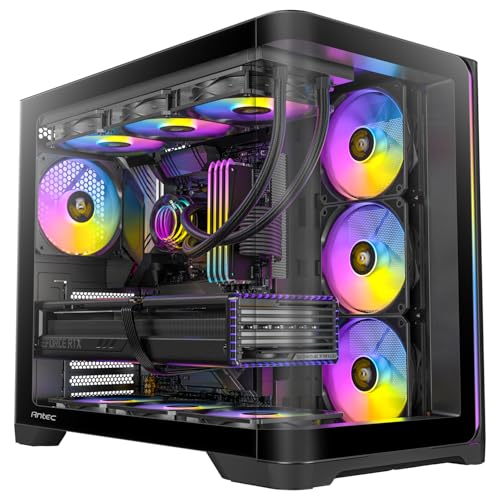
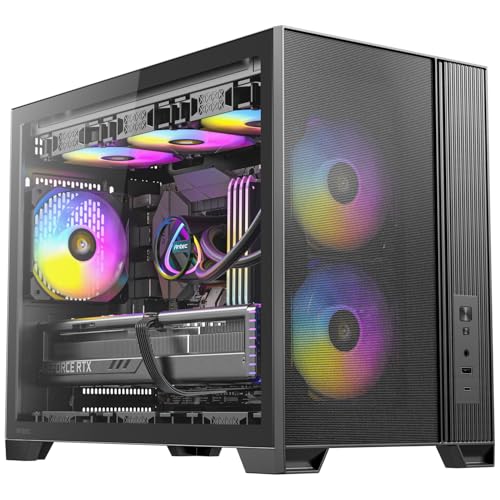
Budget cases have a nasty habit of looking fine in photos and feeling terrible the moment you actually try to build in them. Misaligned panels, cable routing holes that are in exactly the wrong place, fan mounts that foul your RAM, PSU shrouds that are more decorative than functional. The Antec FLUX M is sitting in that awkward entry price bracket where you genuinely can get a good case, but you can also get absolutely stung. So I went through the spec sheet, cross-referenced it against some owner reviews averaging 4.5 stars, and compared it properly against what else you can buy at this price. Here's what the picture looks like for this Antec FLUX M micro ATX case review.
The short version: this is a genuinely decent micro ATX case with a mesh front that actually does its job, a wood-panel accent that either looks great or looks daft depending on your taste, and three ARGB fans included in the box. At its current price point it competes directly with the likes of the Cooler Master MasterBox Q300L and the Fractal Design Focus 2 Mini, and it holds its own better than you'd expect from a brand that's been a bit quiet lately. It's not perfect. There are some build-in quirks that owners flag, and the wood front is a genuine differentiator that not everyone will want. But if you're after an mATX case with proper airflow and a bit of personality, it deserves a serious look.
Core Specifications
The FLUX M is a micro ATX mid-tower, so it's compact but not cramped in the way a true SFF or cube case can be. Antec has built it around a steel chassis with a mesh front panel and that distinctive wood accent, which is either the selling point or the dealbreaker depending on your aesthetic preferences. The tempered glass side panel is on the left, which is standard, and it gives you a clear view of the ARGB fans doing their thing. The overall construction is steel throughout the main chassis, which is what you want at this price rather than the flimsy plastic frames some competitors still try to get away with.
Fan support is where this case earns its keep. You get three pre-installed ARGB fans, which is a meaningful saving over buying them separately, and the case supports up to 120mm or 140mm fans in various positions. The front supports up to three 120mm or two 140mm fans, the top takes two 120mm, and the rear has one 120mm exhaust. Radiator support is there too, with the front able to accommodate up to a 240mm or 280mm AIO, and the top supporting a 240mm unit. For an entry-tier mATX case, that's a proper amount of flexibility.
Drive bay support is modest but appropriate for a modern build: two 3.5-inch bays and two 2.5-inch bays. That's enough for most people building a compact gaming PC, though if you're planning a NAS-style storage setup you'll need a bigger case. The front I/O includes USB 3.0 Type-A ports and a USB Type-C port, which is a genuine tick in the box at this price. Audio in and out are there too. Here's the full spec breakdown:
| Specification | Detail |
|---|---|
| Form Factor Support | Micro ATX, Mini ITX |
| Case Type | Micro ATX Mid-Tower |
| Front Panel | Mesh with wood accent |
| Side Panel | Tempered glass (left) |
| Included Fans | 3x ARGB fans |
| Front Fan Support | 3x 120mm or 2x 140mm |
| Top Fan Support | 2x 120mm |
| Rear Fan Support | 1x 120mm |
| Front Radiator Support | Up to 240mm / 280mm |
| Top Radiator Support | Up to 240mm |
| Max GPU Length | 330mm |
| Max CPU Cooler Height | 165mm |
| Drive Bays (3.5") | 2 |
| Drive Bays (2.5") | 2 |
| Front I/O | 2x USB 3.0 Type-A, 1x USB Type-C, HD Audio |
| Material | Steel chassis, tempered glass panel |
| Colour | Black |
| Price | £63.56 · Details |

Form Factor and Dimensions
The FLUX M sits in that sweet spot for compact builds where you're not sacrificing too much internal space but you're also not hauling around a full mid-tower that dominates your desk. As a micro ATX mid-tower it has a smaller footprint than a standard ATX case, which matters if you're working with a tighter desk setup or just don't want a massive tower looming next to your monitor. The dimensions keep it manageable without going so small that building inside becomes a frustrating exercise in contortion.
The wood front panel accent is the obvious visual talking point. Antec has gone for a genuine wood texture here rather than a printed pattern or plastic fake-wood effect, which is either charming or completely wrong depending on whether you like that kind of thing. Owner reviews are split on it, but the majority seem to appreciate it as a differentiator in a sea of cases that all look the same. It does mean the front panel has a slightly different feel to a standard mesh or glass front, and a few owners note it's a fingerprint magnet. But it's a real material choice, not a gimmick, and it gives the case a look that stands out on a shelf or a desk.
On a standard desk it sits comfortably without needing a ridiculous amount of clearance around it. The mesh front means you want a bit of space at the front for intake airflow, so don't shove it flush against a wall or into a tight cabinet. That's true of any mesh-front case though, and the FLUX M's proportions are sensible enough that it doesn't demand special treatment. It's a practical size for what it is.
Motherboard Compatibility
The FLUX M supports micro ATX and mini ITX motherboards. That's the expected range for a case of this size, and the standoff layout follows the standard pattern. If you're coming from a full ATX board, this isn't the case for you. But if you're building a compact gaming rig or a secondary PC around an mATX or mITX board, you're sorted. The micro ATX standard maxes out at 244mm x 244mm, and the FLUX M accommodates that without issue.
Mini ITX support is a nice bonus. The mini ITX form factor is 170mm x 170mm, and building one inside an mATX case gives you a bit more breathing room than a dedicated ITX case, which can be genuinely frustrating to build in. If you're going the ITX route and want a slightly more relaxed build experience, this is a reasonable option, though you will have some unused space that you might find annoying or might not care about at all depending on how you are about these things.
Standoff positioning is standard and owners haven't flagged any issues with alignment or stripped standoffs, which is always a low-key concern with budget cases. The motherboard tray itself is straightforward. Nothing fancy, no tool-free standoff system like you'd get on a higher-end Fractal or Lian Li case, but the basics are solid. You get the holes where you need them and the tray has enough rigidity that the board doesn't flex alarmingly when you're seating RAM or a chunky GPU.
GPU Clearance
Antec rates the FLUX M for GPUs up to 330mm in length. That's a meaningful number to understand in context. A reference RTX 4070 sits at around 240mm, an RTX 4070 Ti Super at around 336mm (which is tight), and most mid-range cards like the RX 7700 XT or RTX 4060 Ti come in well under 300mm. So for the majority of gaming builds, 330mm is enough. But if you're planning to drop in a three-slot, triple-fan flagship like an RTX 4090 or a high-end RX 7900 XTX, this case isn't designed for that, and honestly a case this size isn't really the right home for cards like those anyway.
The 330mm clearance assumes no front radiator is installed. If you're running a 240mm or 280mm AIO on the front, that will eat into your GPU clearance, so check your specific card length against whatever radiator thickness you're planning to use. This is standard mATX case physics rather than anything specific to the FLUX M, but it's worth being clear about. Owner reviews don't flag any GPU fitment issues with typical gaming cards, which is reassuring.
There's no vertical GPU mount option listed in the spec sheet, which isn't unusual at this price. Vertical mounting requires either a PCIe riser cable (not included) or a dedicated bracket, and most entry-tier cases skip it entirely. If showing off your GPU through the tempered glass panel is important to you, the standard horizontal mount will still be visible through the left side panel, so you're not completely out of luck on the aesthetics front. The ARGB fans in the front will probably draw more attention than the GPU anyway.
CPU Cooler Clearance
165mm of CPU cooler clearance is genuinely decent for an mATX case. To put that in perspective, a Noctua NH-D15 is 165mm tall (and it's one of the biggest air coolers you can buy), a be quiet! Dark Rock 4 is 159mm, and the popular DeepCool AK620 comes in at 160mm. So you've got room for serious air cooling here, which is good news if you want to avoid the cost and complexity of a liquid cooler. Owners haven't reported any clearance issues with standard tower coolers, and the 165mm limit gives you plenty of options.
For AIO liquid cooling, the front panel supports up to a 280mm radiator, which means you can fit a 240mm or 280mm unit there. The top supports up to 240mm. The rear supports a single 120mm fan, which could accommodate a small 120mm AIO if you really wanted to, though that's not a common choice. The front is the obvious spot for an AIO in this case, and a 240mm or 280mm cooler on the front combined with the included 120mm rear exhaust fan gives you a sensible thermal setup for a compact gaming build.
One thing from owner feedback: when fitting a front radiator, check your RAM clearance. Tall RAM heatspreaders can sometimes conflict with top-mounted radiators in compact cases, and while the FLUX M's top is rated for 240mm, the actual clearance between a radiator and the motherboard can vary depending on your specific board layout and RAM height. This isn't unique to the FLUX M, but it's the kind of thing that catches people out. If you're running low-profile RAM, you won't have this problem at all.
Storage Bay Options
Two 3.5-inch bays and two 2.5-inch bays. That's the storage situation in the FLUX M, and for most modern gaming builds it's perfectly adequate. The reality is that if you're building a compact gaming PC in 2026, you're probably running one or two NVMe SSDs on the motherboard and maybe one 2.5-inch SATA SSD for extra storage. The 3.5-inch bays are there for mechanical drives if you need bulk storage, but they're not the main event.
The drive bays are housed in a cage that sits in the lower front area of the case. This is a fairly standard arrangement for mATX cases, and it doesn't cause any obvious problems with cable routing or GPU clearance in most configurations. If you want to remove the drive cage entirely to free up space, that's a question for the specific case design, and the FLUX M's cage doesn't appear to be tool-free removable based on the spec sheet and owner feedback. That's a minor limitation if you're the type who likes to strip a case back to its bare essentials.
The 2.5-inch mounts are positioned on the back of the motherboard tray, which is sensible for cable management. Mounting SSDs behind the tray keeps them out of the main chamber and gives you a cleaner look through the tempered glass panel. Owner reviews don't flag any issues with drive mounting, which suggests the bays are reasonably well-implemented. Tool-free mounting for 2.5-inch drives would be a nice touch, but at this price tier you're typically dealing with thumbscrew or standard screw mounting, and the FLUX M follows that pattern.

Cable Management
Cable management is where a lot of budget cases quietly fall apart, and it's the thing that separates a case that looks great in photos from one that's a genuine pleasure to build in. The FLUX M has a PSU shroud at the bottom, which is good. It hides the power supply and the rat's nest of cables that inevitably accumulates down there, and it gives the interior a cleaner look. The shroud also has a cutout or two for cable routing, which is standard.
Behind the motherboard tray, you need enough depth to actually route cables without the side panel bulging when you try to close it. Owner reviews on this point are broadly positive, with most builders reporting that cables route reasonably well and the rear panel closes without drama. A few owners mention it's tight if you're not careful about how you bundle cables, but that's true of most cases in this size class. The cable management channels and tie-down points are present, though this isn't a case with the elaborate Velcro strap systems you'd find on a Fractal Design or a Lian Li at a higher price point.
The 24-pin ATX cable routing and the CPU power cable routing are the two that matter most in any build. The CPU power cable has to travel from the PSU at the bottom up to the top-left of the motherboard, and in a compact case that can mean a long cable run behind the tray. The FLUX M has the standard routing holes in the right places for this, and owners haven't flagged it as a particular problem. What you won't get is the kind of premium cable management experience with wide channels and rubber grommets that you see on cases twice the price, but for the money, it's functional and tidy enough that your finished build won't embarrass you.
Airflow and Thermal Design
The mesh front panel is the headline here, and it actually matters. A proper mesh front, as opposed to a solid or glass front, lets air flow through the front fans without significant restriction. This is genuinely important for GPU and CPU temperatures, and it's one of the reasons mesh-front cases have become so popular over the last few years. The FLUX M's mesh front, combined with the wood accent panel, should provide good airflow characteristics, though the wood element does cover part of the front surface. Owner reviews suggest temperatures are reasonable for a case in this class, which is consistent with a mesh-dominant front design.
Three ARGB fans included is a real selling point. At the budget end of the market, some cases ship with one or two basic fans, and the ARGB versions cost noticeably more than plain fans. Getting three pre-installed means you have a functional intake setup from day one, with the three front fans pulling air in and the rear fan (also included) pushing it out. That's a positive pressure setup, which tends to keep dust accumulation lower than a neutral or negative pressure configuration. Antec has been making fans for a long time, and while the included fans won't match a Noctua or a be quiet! for noise or longevity, owner feedback suggests they're acceptable for the price.
Dust filtration is something to pay attention to with any mesh case. A fully open mesh front is great for airflow but it also lets dust in freely. The FLUX M has dust filters, which is important. Without them, the inside of the case would become a dust trap within weeks. The filters are the kind of thing you want to be able to remove and clean easily, and owner reviews suggest the filter situation is manageable, though as with most cases in this tier, the filters aren't magnetic or particularly premium. The Antec product page confirms the mesh front design, and the overall thermal approach is sensible for an entry-tier gaming case.
Front I/O and Connectivity
Two USB 3.0 Type-A ports and a USB Type-C port on the front panel. That's a proper front I/O setup for 2026, and the inclusion of USB Type-C is something that still isn't universal at this price point, so it's as a genuine positive. The Type-C port requires a USB 3.2 Gen 1 or Gen 2 header on your motherboard, which most modern mATX boards have, but check it before you buy if you're using an older board.
The audio connections are the standard 3.5mm headphone and microphone jacks, which connect to your motherboard's HD Audio header. Nothing unusual there. The power button and reset button are on the front panel too, positioned in a sensible location. Owner reviews don't flag any issues with the front I/O, which is reassuring since a dodgy USB port or a power button that feels like pressing a wet sponge is one of those small annoyances that grates every single day you use the PC.
The ARGB fan controller or hub situation is worth understanding before you build. Three ARGB fans need to connect to something, either individual motherboard headers, a dedicated ARGB hub, or a controller. The FLUX M includes fans that connect via standard ARGB headers, and you'll need to check how many ARGB headers your motherboard has. Most modern gaming-oriented mATX boards have at least one or two, but if you're connecting three fans plus potentially other ARGB components, you may need a hub. This isn't a problem unique to the FLUX M, but it's the kind of thing that catches first-time builders out and leads to frantic cable management sessions mid-build.
Build Quality and Materials
The steel chassis is the foundation, and owner reviews are broadly positive about the build quality for the price. The panels align properly, which sounds like a low bar but genuinely isn't in the budget case world where misaligned panels are a common complaint. The tempered glass side panel is standard thickness for this price tier, not the thicker glass you'd find on a premium case, but robust enough that it's not going to crack if you look at it wrong. It attaches with thumbscrews, which is standard.
Sharp edges are the classic budget case problem, and the FLUX M gets a mixed but generally positive report on this front. A couple of owner reviews mention catching a hand on an edge during the build, which is fairly common across cases in this price range. It's not the razor-sharp sheet metal horror show that some truly cheap cases inflict on builders, but it's also not the carefully deburred, smooth-edged experience you get from a Fractal Design or a Lian Li. Gloves during the build are never a bad idea regardless of case price, but they're especially sensible here.
The wood front panel is a genuine material choice rather than a plastic imitation, and it adds some visual warmth to what would otherwise be a fairly standard black gaming case aesthetic. It does mean the front panel has different maintenance requirements to a standard mesh or glass panel. Dust on a wood surface is more visible and requires a different approach to cleaning. A few owners mention the wood panel picks up fingerprints and smudges, so if you're the type who wipes down their PC regularly, factor that in. The overall finish quality is good for the price, and the ARGB fans add visual interest that most owners seem genuinely happy with. With some reviews and a positive overall rating, the quality complaints are in the minority.
How It Compares
The two most obvious alternatives at this price are the Cooler Master MasterBox Q300L and the Fractal Design Focus 2 Mini. The Q300L is a well-established budget mATX option with a magnetic dust filter system, a flexible panel layout, and a proven track record, but it ships without any fans, which means you're adding to the cost immediately if you want decent airflow. The Fractal Design Focus 2 Mini is a more premium-feeling option with better cable management and a cleaner interior, but it sits slightly higher in price and doesn't include ARGB fans either.
The FLUX M's biggest advantage over both is the three included ARGB fans. If you price up buying three decent ARGB fans separately, you're looking at a meaningful additional cost. The FLUX M effectively bundles that cost into the case price, which makes the value proposition stronger than the headline price alone suggests. The wood front panel is a genuine differentiator that neither the Q300L nor the Focus 2 Mini can match if that aesthetic appeals to you.
Where the competition has an edge is in build experience refinement. The Fractal Design Focus 2 Mini in particular has better cable management channels and a more polished interior. The Q300L's magnetic dust filters are more convenient than what the FLUX M offers. These are real differences, but they're also the kind of differences that matter more to experienced builders who know what they're missing than to someone building their first or second PC. For the target audience of this case, the FLUX M's combination of included fans, USB Type-C front I/O, and distinctive looks is a strong package.
| Feature | Antec FLUX M | Cooler Master Q300L | Fractal Design Focus 2 Mini |
|---|---|---|---|
| Form Factor | mATX / mITX | mATX / mITX | mATX / mITX |
| Front Panel | Mesh + wood accent | Acrylic / mesh panels | Mesh |
| Included Fans | 3x ARGB | 0 | 1 or 2 (non-ARGB) |
| Max GPU Length | 330mm | 360mm | 330mm |
| Max CPU Cooler | 165mm | 157mm | 170mm |
| Front Radiator | Up to 280mm | Up to 240mm | Up to 280mm |
| USB Type-C Front | Yes | No | Yes |
| Tempered Glass | Yes | Optional / acrylic | Yes |
| Price Tier | Entry | Entry | Entry to mid |

Final Verdict
The Antec FLUX M is a better case than its price suggests, and that's largely because of what's included in the box. Three ARGB fans, USB Type-C on the front panel, a proper mesh front for airflow, and a distinctive wood accent that gives it a look nothing else at this price has. The 330mm GPU clearance covers the vast majority of gaming cards, the 165mm CPU cooler height is genuinely generous for an mATX case, and the 280mm front radiator support means you're not locked out of AIO cooling if you want to go that route.
The build experience is good but not exceptional. Cable management is functional rather than elegant, the rear panel can be a bit of a squeeze if you're not careful with your routing, and a couple of sharp edges during the build are worth being aware of. These are honest compromises at this price point, not dealbreakers. Owner feedback is consistently positive, and a good overall rating across some reviews is a meaningful signal that most people who buy this case end up happy with it.
Who is this for? Someone building a compact gaming PC on a budget who wants decent airflow, ARGB aesthetics, and a case that stands out a bit from the standard black rectangle. If you're pairing this with a mid-range GPU like an RTX 4060 Ti or an RX 7700 XT and a capable mATX board, this case will serve you well. The wood front panel is the wildcard. If you like it, it's a genuine reason to choose the FLUX M over the competition. If you think it looks out of place on a gaming PC, there are cleaner-looking options.
Who should skip it? If you're a meticulous builder who cares deeply about cable management quality and a premium build experience, spend a bit more and look at the Fractal Design Focus 2 Mini or the be quiet! Pure Base 500 Mini. You'll get better cable routing infrastructure and a more refined interior. And if you need GPU clearance beyond 330mm for a very large card, the Cooler Master Q300L's 360mm clearance gives you more headroom, though you'll need to budget for fans separately.
The honest don't-overspend note: if you genuinely don't care about ARGB lighting and the wood aesthetic doesn't do anything for you, the Cooler Master Q300L is cheaper, has better GPU clearance, and is a proven design. Buy the fans you want separately and you'll end up with a more flexible setup. But if the FLUX M's look appeals and you want fans included, this is solid value and a case that won't make you regret the purchase.
Editorial score: 7.5 out of 10. A well-specified, good-looking entry-tier mATX case that punches above its price thanks to the included fans and USB Type-C front I/O. The wood panel is a genuine differentiator. Build quality is good enough. Airflow is proper. Recommended.
What works. What doesn’t.
5 + 4What we liked5 reasons
- Three ARGB fans included, saving meaningful cost over buying separately
- USB Type-C front I/O at entry-tier pricing
- 165mm CPU cooler clearance is generous for an mATX case
- Distinctive wood front panel accent stands out from the competition
- Proper mesh front for unrestricted intake airflow
Where it falls4 reasons
- Cable management functional but not refined, rear panel can be tight
- 330mm GPU clearance excludes the largest triple-fan flagship cards
- A couple of sharp edges reported during builds
- Wood panel requires different maintenance to standard mesh or glass
Full specifications
10 attributes| Form factor | Micro-ATX |
|---|---|
| CPU cooler clearance MM | 175 |
| Dimensions MM | 459 x 247 x 365 |
| Fans included | 6 |
| GPU clearance MM | 405 |
| MAX FAN count | 9 |
| MAX radiator MM | 360 |
| Side panel | tempered glass |
| Supported motherboard | Micro-ATX, Mini-ITX |
| Weight KG | 6.35 |
If this isn’t right for you
2 options 8.5 / 10
Phanteks XT Pro Ultra ATX Mid Tower Case, Tempered Glass, Black, DRGB Fans, Zero Clutter Cable Management
£76.99 · Phanteks · Details

Got a motherboard yet?
4 reviewsThe maker lists Micro-ATX and Mini-ITX boards for this case. These Micro-ATX boards fit it.
Frequently asked
5 questions01Is the Antec FLUX M Gaming Case Micro ATX Mesh Wood Front - Black - ARGB Fans good for airflow?+
Yes, it's a solid airflow case for the price. The mesh front panel allows unrestricted air intake compared to solid or glass-front alternatives, and the three pre-installed ARGB fans create a positive pressure setup with air being pulled in through the front and exhausted at the rear. Dust filters are included to stop the mesh front turning into a dust hoover. Owner reviews report reasonable temperatures for a case in this class, which is consistent with the mesh-dominant front design. Just make sure you leave a few centimetres of clearance in front of the case rather than pushing it against a wall.
02What's the GPU clearance on the Antec FLUX M Gaming Case Micro ATX Mesh Wood Front - Black - ARGB Fans?+
Antec rates the FLUX M for GPUs up to 330mm in length. That covers the vast majority of mid-range gaming cards including the RTX 4060 Ti, RTX 4070, RX 7700 XT, and RX 7800 XT. Very large triple-fan flagship cards like the RTX 4090 at 336mm or longer are a tight fit or may not fit at all. If you're installing a front radiator, that will also reduce effective GPU clearance, so factor in your AIO thickness if you're planning a liquid-cooled build.
03Can the Antec FLUX M Gaming Case Micro ATX Mesh Wood Front - Black - ARGB Fans fit a 360mm AIO?+
No, the FLUX M does not support a 360mm radiator. The front panel supports up to a 280mm radiator (two 140mm fans) or a 240mm radiator (two 120mm fans), and the top panel supports up to a 240mm radiator. A 360mm AIO requires three 120mm fan positions in a row, which the FLUX M's compact mATX dimensions don't accommodate. For most mATX builds, a 240mm or 280mm front-mounted AIO is the practical choice and works well in this case.
04Is the Antec FLUX M Gaming Case Micro ATX Mesh Wood Front - Black - ARGB Fans easy to build in?+
Generally yes, with a couple of caveats. The cable management is functional, with routing holes in the right places and a PSU shroud to hide the bottom clutter. The rear panel can be a bit of a squeeze if you don't bundle your cables carefully before closing it up. A small number of owners mention catching a hand on a sharp edge during the build, so it's worth being careful. The three pre-installed ARGB fans mean you don't have to faff about fitting fans before you even start the main build, which saves time and frustration. Overall it's a reasonable build experience for an entry-tier case.
05What warranty and returns apply to the Antec FLUX M Gaming Case Micro ATX Mesh Wood Front - Black - ARGB Fans?+
Specific warranty terms are not confirmed in the verified product data for this listing. Amazon UK's standard 30-day returns policy applies, and purchases are covered by Amazon's A-to-Z Guarantee. For manufacturer warranty information, check the Antec website directly or contact the seller through your Amazon order. Antec generally offers a two-year warranty on cases, but confirm this with the seller before purchasing.