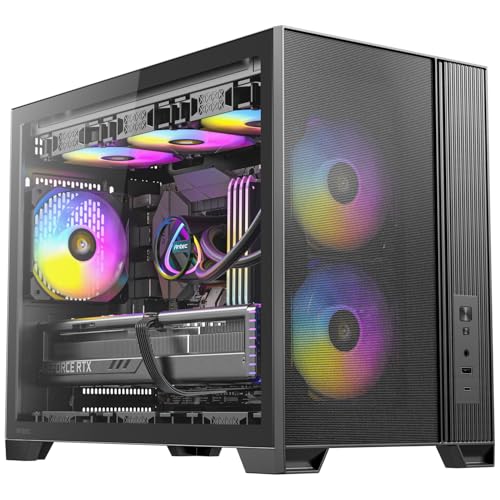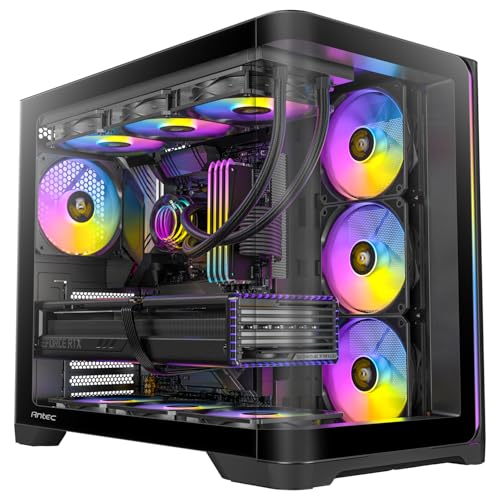
Skip the YouTube deep-dives. What the spec sheet and dozens of owner reviews actually tell you about the Antec C5 Curve ARGB is more useful than watching someone cable-tie a build for forty minutes. So here it is, straight: this is a genuinely capable mid-tower with a curved tempered glass front panel, three included ARGB fans, and clearances that'll swallow most modern hardware without complaint. At the enthusiast price tier, it's a serious option. But it has competition, and whether it beats that competition depends entirely on what you're building.
The Antec C5 Curve ARGB mid-tower case review verdict, up front: this is a good case for builders who want the full visual package (ARGB, curved glass, clean interior) without paying flagship money, and who are putting together a fairly beefy ATX build with a decent GPU and possibly an AIO cooler. It's not the airflow king at this price. That crown still goes to cases with proper mesh fronts. But it's not the disaster some curved-glass cases turn out to be either, and the owner feedback at ★★★★½ (4.5) across dozens of reviews backs that up pretty consistently.
Core Specifications
The C5 Curve is an ATX mid-tower, which means it'll handle the vast majority of standard desktop builds. It supports ATX, Micro-ATX, and Mini-ITX motherboards, so you've got flexibility there. Antec rates GPU clearance at 405mm, CPU cooler height at 170mm, and PSU length at 220mm. The case ships with three 120mm ARGB fans pre-installed at the front, and there's a rear 120mm fan position too, though the included fan count in this variant covers front intake only. Radiator support runs to 360mm at the front and 120mm at the rear.
The chassis is steel construction with a 4mm curved tempered glass side panel and a curved tempered glass front panel. That front glass is the defining design choice of this case, and it's also the main reason airflow is a conversation rather than a given. Weight comes in at around 8.5kg, which is on the heavier side for a mid-tower but not unusual once you factor in the glass panels. The case measures roughly 480mm tall, 220mm wide, and 470mm deep, so it's a proper-sized mid-tower rather than a compact one.
Drive support includes two 3.5-inch bays and two 2.5-inch bays, which is decent without being exceptional. There's a PSU shroud to hide the power supply and bottom cables, and Antec includes a built-in ARGB and fan controller hub, which is a genuinely useful inclusion at this price. Front I/O sits at the top of the case and includes USB 3.0 Type-A ports, a USB 3.2 Gen 1 Type-C port, and combined audio/mic. Full specs below.
| Specification | Detail |
|---|---|
| Form Factor | ATX Mid Tower |
| Motherboard Support | ATX, Micro-ATX, Mini-ITX |
| Dimensions (H x W x D) | ~480 x 220 x 470mm |
| Weight | ~8.5kg |
| Max GPU Length | 405mm |
| Max CPU Cooler Height | 170mm |
| Max PSU Length | 220mm |
| Included Fans | 3 x 120mm ARGB (front) |
| Fan Mounts | Front: 3 x 120mm / 2 x 140mm; Rear: 1 x 120mm; Top: 2 x 120mm or 140mm |
| Radiator Support | Front: up to 360mm; Top: up to 240mm; Rear: 120mm |
| Drive Bays | 2 x 3.5-inch, 2 x 2.5-inch |
| Front I/O | 2 x USB 3.0 Type-A, 1 x USB 3.2 Gen 1 Type-C, HD Audio |
| Side Panel | 4mm Curved Tempered Glass |
| Front Panel | Curved Tempered Glass |
| PSU Shroud | Yes |
| ARGB/Fan Hub | Yes, built-in |
| Price | £101.62 · Details |

Form Factor and Dimensions
The C5 Curve sits firmly in standard mid-tower territory. At roughly 480mm tall and 470mm deep, it's not a compact case by any stretch, but it's not going to dominate a desk the way a full-tower would. Most standard ATX desk setups will accommodate it without issue, and the 220mm width is fairly typical for a mid-tower with a glass side panel. If you're on a smaller desk or working in a tight space, measure first because this isn't a slim case.
The curved front panel is the defining visual feature, and it does add a few millimetres to the effective depth compared to a flat-front case of the same internal volume. That's if you're measuring against a specific desk or shelf setup. The curved glass also means the front isn't a standard flat surface, so don't expect to rest anything against it without it potentially sliding off. Functionally this doesn't matter at all, but it's the kind of thing that surprises people who haven't owned a curved-front case before.
Footprint-wise, the case sits on four rubber feet which do a reasonable job of damping vibration from the fans and any hard drives inside. Several owners mention the case feeling solid on the desk, which aligns with the steel chassis construction. It's not going to wobble around when you're plugging things in at the back, and the weight of the glass panels actually helps with stability. This is a case designed to sit on a desk and look good doing it, and the proportions work well for that purpose.
Motherboard Compatibility
ATX, Micro-ATX, and Mini-ITX are all supported. The standoff layout is standard, and nothing in the owner reviews suggests any unusual fitment issues with common boards. If you're building on a full ATX board, the case is sized correctly for it and you'll have room to work. Micro-ATX builders will notice more empty space in the upper portion of the case, but that's not a problem, just an aesthetic consideration. Mini-ITX in a case this size is technically fine but probably overkill unless you specifically want the expansion room and the look.
E-ATX is not officially supported, which matters if you're on a high-end HEDT or workstation platform. The interior width between the motherboard tray and the side panel is sized for standard ATX, so don't try to squeeze a 305mm-wide E-ATX board in here. For the vast majority of gaming and enthusiast builds, though, this isn't a limitation at all. Standard ATX boards from ASUS, MSI, Gigabyte, and ASRock all fit without any drama.
The motherboard tray has a standard rear cut-out for CPU backplate access, which is a basic requirement these days but worth confirming. Owner reviews don't flag any issues with the cut-out being misaligned or too small, which is reassuring. Some budget cases get this wrong and it creates a genuine headache when you're trying to mount a cooler. The C5 Curve appears to get it right. The I/O shield area is also reported as straightforward, with no awkward alignment issues mentioned in the feedback.
GPU Clearance
The 405mm GPU clearance figure is the headline number here, and it's a good one. To put that in context: an NVIDIA RTX 5080 Founders Edition measures around 336mm, and most triple-fan AIB versions of current flagship cards come in between 340mm and 380mm. So the C5 Curve will swallow virtually any current GPU you'd realistically pair with a mid-tower build. Even some of the chunkier triple-fan designs from ASUS ROG and MSI Gaming X Trio variants sit comfortably within the 405mm limit.
That said, 405mm is measured without a front radiator installed. If you're planning a 360mm AIO in the front and a long GPU simultaneously, you'll want to check the specific radiator thickness plus fan stack depth against the available GPU clearance. Front-mounted radiators eat into GPU clearance in most cases, and the C5 Curve is no exception. The general rule is that a 30mm radiator plus 25mm fans leaves you with roughly 350mm of GPU clearance, which still covers most cards but eliminates the very longest triple-fan designs.
There's no vertical GPU mount mentioned in the spec sheet or owner reviews for this case. That's not unusual at this price point, but it matters if you're specifically after a vertical display setup. The GPU sits in the standard horizontal orientation, which is fine for cooling and is honestly the sensible choice for most builds. Vertical mounts look great but often compromise airflow and add cost. The C5 Curve doesn't pretend to offer what it doesn't have, which is at least honest.
CPU Cooler Clearance
The 170mm CPU cooler height clearance is solid for a mid-tower. Most popular tower coolers fit comfortably within that limit. The Noctua NH-D15 measures 165mm, which just squeezes in. The be quiet! Dark Rock Pro 5 comes in at 162mm. The DeepCool AK620 is 160mm. So you're not restricted to low-profile coolers by any means, and the big dual-tower designs that enthusiast builders favour are all compatible. That said, always check your specific cooler's dimensions against your specific motherboard's VRM heatsink layout, because a few millimetres can matter at the edges.
For AIO liquid cooling, the front supports up to a 360mm radiator, the top supports up to 240mm, and the rear takes a single 120mm. Front 360mm AIO support is the key figure here, because it's what most mid-to-high-end AIO builds will want. Popular options like the Corsair H150i, NZXT Kraken 360, and be quiet! Pure Loop 2 FX 360 all mount at the front. The top 240mm support is a nice option for smaller AIOs or as a secondary cooling position if you're going all-out with a custom loop (though custom loops in a mid-tower like this are ambitious).
One thing to watch with front-mounted 360mm AIOs is RAM clearance at the top of the motherboard. Tall RAM with large heatspreaders can sometimes clash with the radiator or its mounting bracket depending on the motherboard layout. This is a general mid-tower concern rather than specific to the C5 Curve, but it's your RAM height against the front radiator position before committing. Low-profile RAM like the Corsair Vengeance LPX or G.Skill Ripjaws V avoids this entirely. Standard-height RAM with heatspreaders up to about 40mm is typically fine.
Storage Bay Options
Two 3.5-inch drive bays and two 2.5-inch bays is the storage offering here. It's adequate for most modern builds, which typically run an NVMe M.2 SSD as the primary drive (mounted on the motherboard itself) and might add one or two SATA SSDs or a mechanical drive for bulk storage. If you're building a NAS-adjacent machine that needs four or five spinning disks, this isn't the case for you. But for a gaming or content creation build, two 3.5-inch bays is genuinely enough.
The 2.5-inch mounts are positioned behind the motherboard tray, which is the right place for them. It keeps the main chamber tidy and means SATA SSDs don't clutter the visible interior. Whether they're tool-free or screw-mounted isn't explicitly confirmed in the spec sheet, but owner reviews don't flag any particular frustration with drive installation, which suggests it's at least reasonably straightforward. The 3.5-inch cages are accessible and the drives slot in from the side in the standard fashion.
M.2 support depends entirely on your motherboard rather than the case, so that's not a case spec. But notably, that most modern ATX boards include at least two M.2 slots, and some include four or five. For most builders in 2026, the case's SATA bay count is almost a secondary consideration behind the board's M.2 capacity. The C5 Curve's storage provision is fine for what it is. It's not a case that's been designed around massive storage arrays, and that's appropriate for its target audience.

Cable Management
The PSU shroud is present and covers the bottom of the case properly, hiding the power supply and the rats' nest of cables that inevitably come with it. This is standard at this price tier but genuinely important for keeping the main chamber looking clean, especially with a full glass side panel. The shroud has a cut-out or two for cable routing, and the overall layout follows the conventional approach of routing cables behind the motherboard tray and bringing them through grommeted holes at key points.
Cable routing channels behind the tray are where things get more interesting. Owner reviews are generally positive about the build experience, with several people commenting that the cable management is better than expected for the price. The rear panel clearance, which is the gap between the back of the motherboard tray and the side panel, is reported as sufficient for a tidy build. Antec doesn't publish an exact figure for this clearance in the spec sheet, but the general owner consensus suggests it's in the 20mm to 25mm range, which is workable.
Velcro straps or cable tie points are included, which is a small but meaningful detail. Cases that skip these force you to buy your own or improvise, and it's the kind of thing that separates a thoughtfully designed case from one that's just been thrown together. The built-in ARGB and fan hub is also a cable management win, because it means you're running one USB header and one SATA power cable to the hub rather than running individual fan headers and ARGB headers all over the place. That alone can save you a significant tangle behind the tray. Several owners specifically mention this hub as a highlight.
Airflow and Thermal Design
And here's where the C5 Curve's design philosophy creates a genuine trade-off. The curved tempered glass front panel looks brilliant. It's the reason this case exists as a distinct product rather than just another mesh mid-tower. But glass doesn't breathe, and a glass front panel fundamentally restricts intake airflow compared to a mesh or perforated steel alternative. This is physics, not a design flaw, but it's a trade-off you need to understand before buying.
The three included 120mm ARGB fans at the front are pulling air through whatever gaps exist around the curved glass panel. Antec has designed the front with side vents or gaps to allow air in, which is the standard approach for glass-front cases. It works, but it's not as efficient as a mesh front. In practical terms, this means the C5 Curve will run warmer than a comparable mesh-front case with the same hardware, particularly under sustained load. For a mid-range gaming build with a 200W to 250W GPU and a 65W to 125W CPU, the difference is manageable. For a high-end build with a 300W-plus GPU and a 170W-plus CPU pushing hard, you might want to think carefully.
The top panel has fan mounting positions for up to 240mm, which gives you exhaust options beyond the single rear 120mm. Running top exhaust fans alongside front intake fans creates a decent front-to-back, bottom-to-top airflow path. The rear 120mm fan position is standard. Dust filtration is included on the bottom for PSU intake, which is good. Whether there's a filter behind the front panel depends on the specific design, and Antec's product page suggests there is some filtration at the front. Owner reviews don't flag excessive dust accumulation as a concern, which is a reasonable indicator that the filtration is doing its job. For builders who prioritise thermals above all else, a mesh-front case like the Fractal Design Meshify 2 or the Lian Li Lancool III is the more logical choice. But if aesthetics matter and you're not running a thermal monster, the C5 Curve is fine.
Front I/O and Connectivity
The front I/O sits at the top of the case, which is the sensible location for a desktop tower. You've got two USB 3.0 Type-A ports and one USB 3.2 Gen 1 Type-C port, plus a combined headphone and microphone jack. The USB-C port is a meaningful inclusion at this price tier. It connects to your motherboard's internal USB header, so you'll need a board with a front-panel USB-C header to use it, which most modern ATX boards include as standard.
Two USB Type-A ports is on the lower end of what you'd want. Some cases at this price offer three or four Type-A ports, and if you're the type who regularly plugs in USB drives, controllers, headsets, and other peripherals at the front, two ports can feel limiting. That said, most people use the front I/O primarily for charging and occasional data transfers rather than as a permanent hub, so it's not a dealbreaker. Just if you rely heavily on front-panel USB.
The power button and reset button are clearly positioned, and owner reviews don't mention any issues with button feel or placement. The ARGB and fan controller button is also accessible from the front panel, letting you cycle through lighting modes without going into software. That's a nice touch for people who want to control the RGB without installing yet another piece of software. The overall front I/O layout is clean and functional, and the positioning at the top of the case means it's accessible whether the case is on a desk or on the floor. No complaints from owners on this front, which is exactly what you want.
Build Quality and Materials
The steel chassis is the backbone of the case, and owner reviews consistently describe it as feeling solid. No flexing panels, no sharp edges catching hands during the build, and no misaligned panel mounts reported in the feedback. Sharp edges are one of the most common complaints in budget case reviews, so the absence of that complaint here is a good sign. The 4mm curved tempered glass side panel is thick enough to feel premium, and the curved front glass is similarly substantial.
Panel removal is where things get more mixed. The side panel uses a standard screw-and-slide mechanism rather than a tool-free latch, which some builders find fiddly compared to push-button or magnetic panel systems on cases like the Fractal Design Pop Air or the NZXT H510. It's not a major issue, but if you're the type who opens your case regularly to clean or reconfigure, it's a minor inconvenience. The front panel removal for fan access or filter cleaning is also a consideration, and the curved glass design means it's not as straightforward as a flat mesh front.
The included ARGB fans are 120mm units, and the general owner consensus is that they're decent for included fans. They're not going to outperform a set of aftermarket Noctua or be quiet! fans, but they're not the rattling embarrassments that come with some cheaper cases either. The ARGB lighting is described as bright and even, which is what you want from a case that's clearly designed to be displayed. The built-in hub controls both the fans and the ARGB, and it connects to the motherboard via a standard USB header and SATA power. Several owners mention it working reliably with both ASUS Aura Sync and MSI Mystic Light, which is good to know if you're on a board with integrated RGB software.
How It Compares
The two obvious competitors at this price tier are the Corsair 4000D Airflow and the Fractal Design Pop XL Air. Both are established names with strong owner feedback, and both take a different approach to the C5 Curve's curved glass aesthetic. The 4000D Airflow is a mesh-front case that prioritises thermals above all else, with a clean interior layout and excellent cable management. The Pop XL Air is similarly mesh-focused but adds more internal volume and a slightly more premium feel. Neither has the curved glass visual drama of the C5 Curve.
If thermals are your primary concern, the 4000D Airflow wins. It's not even close on airflow performance, because mesh versus glass is a fundamental difference. But the 4000D Airflow doesn't look like the C5 Curve, and for a lot of builders, the aesthetic matters. The C5 Curve's curved glass front is a genuine differentiator in a market full of rectangular mesh boxes. The Fractal Design Pop XL Air is a bit larger and targets a slightly different builder, but it's because it's frequently compared at this price point.
The Antec C5 Curve ARGB mid-tower case review positioning is essentially this: it's the aesthetics-first choice in a price tier that's increasingly dominated by airflow-first designs. That's not a criticism. It's a legitimate design priority. The positive overall rating across dozens of reviews suggests that the people who buy it for what it is tend to be satisfied with what they get. The ones who'd be disappointed are the ones who expected mesh-front performance from a glass-front case, which is a mismatch of expectations rather than a product failure.
| Feature | Antec C5 Curve ARGB | Corsair 4000D Airflow | Fractal Design Pop XL Air |
|---|---|---|---|
| Front Panel | Curved Tempered Glass | Mesh | Mesh |
| Max GPU Length | 405mm | 360mm | 467mm |
| Max CPU Cooler Height | 170mm | 170mm | 185mm |
| Included Fans | 3 x 120mm ARGB | 2 x 120mm | 3 x 140mm |
| Front Radiator Support | Up to 360mm | Up to 360mm | Up to 420mm |
| USB-C Front I/O | Yes (USB 3.2 Gen 1) | Yes (USB 3.1 Gen 1) | Yes (USB 3.2 Gen 2) |
| ARGB Hub | Yes, built-in | No | No |
| PSU Shroud | Yes | Yes | Yes |
| Drive Bays (3.5") | 2 | 2 | 2 |
| Airflow Priority | Aesthetics first | Airflow first | Airflow first |
| Price | £101.62 · Details | Similar tier | Similar tier |

Final Verdict
The Antec C5 Curve ARGB is a well-executed case for what it's trying to be. The curved glass front looks genuinely different from the sea of rectangular mesh boxes that dominate this price tier, the build quality holds up to scrutiny from owner feedback, the clearances are generous (405mm GPU, 170mm CPU cooler, 360mm front radiator), and the included ARGB hub is a practical inclusion that saves you cable management headaches. The positive overall rating from dozens of owners isn't a fluke. People who buy this for the right reasons tend to like it.
The honest caveat is the front panel. Curved tempered glass is a thermal compromise. If you're building with a high-TDP GPU and a power-hungry CPU and you're going to be running sustained loads for extended periods, a mesh-front case will keep your components cooler. The C5 Curve is better suited to mid-range to upper-mid-range builds where the thermal headroom is less critical. Think RTX 4070 Ti Super class GPUs and mainstream platform CPUs rather than RTX 5090 and Core Ultra 9 territory. For that kind of build, the aesthetics-first trade-off makes complete sense.
The Antec C5 Curve ARGB mid-tower case review conclusion: buy it if the curved glass aesthetic is what you want and you're not building a thermal monster. If you're purely chasing the best thermals at this price and you don't care how the case looks, the Corsair 4000D Airflow is the more logical choice and is often available at a lower price. But if you want a case that looks genuinely distinctive and builds without drama, the C5 Curve earns its place at the enthusiast tier. The built-in ARGB hub alone saves you the faff of managing individual headers, and the 405mm GPU clearance means you're not going to outgrow it any time soon.
One straight piece of advice: if you're not running ARGB fans and you don't need the lighting ecosystem, there are solid mid-tower options at a lower price that offer better airflow. The C5 Curve's premium is partly for the glass, partly for the ARGB system, and partly for the hub. If those things matter to your build, the premium is justified. If they don't, spend less and get more mesh.
What works. What doesn’t.
5 + 4What we liked5 reasons
- Generous 405mm GPU clearance fits virtually all current cards
- Built-in ARGB and fan hub simplifies cable management significantly
- Three 120mm ARGB fans included from the box
- Curved glass front panel looks genuinely distinctive at this price
- Solid build quality with no sharp edges reported by owners
Where it falls4 reasons
- Curved glass front restricts intake airflow versus mesh alternatives
- Only two USB Type-A ports on the front I/O
- Side panel uses screw-and-slide rather than tool-free removal
- Not suited to very high-TDP builds where thermals are critical
Full specifications
11 attributes| Form factor | Mid-Tower |
|---|---|
| CPU cooler clearance MM | 160 |
| Dimensions MM | 465 x 285 x 400 |
| Fans included | 4 |
| GPU clearance MM | 410 |
| MAX FAN count | 10 |
| MAX radiator MM | 360 |
| PSU support | ATX up to 240mm |
| Side panel | 4mm tempered glass |
| Supported motherboard | ATX, Micro-ATX, ITX |
| Weight KG | 7.6 |
If this isn’t right for you
2 options 8.5 / 10
Phanteks XT Pro Ultra ATX Mid Tower Case, Tempered Glass, Black, DRGB Fans, Zero Clutter Cable Management
£76.99 · Phanteks · Details

Got a motherboard yet?
4 reviewsThe maker lists ATX, Micro-ATX and Mini-ITX boards for this case. These ATX boards fit it.
Frequently asked
5 questions01Is the Antec C5 Curve ARGB ATX Mid Tower Gaming Case - Black - 3 ARGB Fans good for airflow?+
It's adequate rather than exceptional. The curved tempered glass front panel restricts intake airflow compared to a mesh-front case, which is a fundamental physics trade-off rather than a manufacturing flaw. The three included 120mm ARGB fans pull air through gaps around the glass, and there are additional fan mounting positions at the top (up to 240mm) and rear (120mm). For mid-range builds with GPUs in the RTX 4070 class, thermal performance is fine. For high-TDP builds pushing 300W-plus from the GPU alone, a mesh-front case like the Corsair 4000D Airflow will run noticeably cooler. Dust filtration is included at the bottom for PSU intake, and owner reviews don't flag dust accumulation as a significant concern.
02What's the GPU clearance on the Antec C5 Curve ARGB ATX Mid Tower Gaming Case - Black - 3 ARGB Fans?+
Antec rates GPU clearance at 405mm, which is generous enough to accommodate virtually all current graphics cards including large triple-fan AIB designs. The NVIDIA RTX 5080 Founders Edition measures around 336mm, and most triple-fan variants of current flagship cards come in between 340mm and 380mm, so there's comfortable headroom. The main caveat is that installing a 360mm AIO radiator at the front will reduce effective GPU clearance, typically leaving around 340mm to 350mm depending on radiator and fan thickness. There is no vertical GPU mount option on this case.
03Can the Antec C5 Curve ARGB ATX Mid Tower Gaming Case - Black - 3 ARGB Fans fit a 360mm AIO?+
Yes. The front panel supports radiators up to 360mm, which is the standard mounting position for 360mm AIOs like the Corsair H150i, NZXT Kraken 360, and be quiet! Pure Loop 2 FX 360. The top panel supports up to 240mm for a secondary radiator or smaller AIO. The rear takes a single 120mm. When installing a 360mm AIO at the front, factor in that the radiator and fan stack will reduce available GPU clearance, and check your RAM height against the radiator mounting position if you're using tall heatspreader RAM.
04Is the Antec C5 Curve ARGB ATX Mid Tower Gaming Case - Black - 3 ARGB Fans easy to build in?+
Owner feedback is generally positive on the build experience. The PSU shroud keeps the bottom of the case tidy, cable routing channels behind the motherboard tray are reported as sufficient for a clean build, and the built-in ARGB and fan hub is a genuine time-saver because it consolidates fan headers and ARGB connections into a single USB header and SATA power connection rather than requiring individual header routing. Velcro cable management points are included. The side panel uses a screw-and-slide mechanism rather than tool-free removal, which is a minor inconvenience for regular access. No sharp edges are reported by owners, which is a meaningful positive for the build experience.
05What warranty and returns apply to the Antec C5 Curve ARGB ATX Mid Tower Gaming Case - Black - 3 ARGB Fans?+
Specific warranty terms for this product are not confirmed in the available product data. Antec generally offers a manufacturer warranty on their cases, so it's the Antec website or the product listing for the current warranty terms. Regardless of manufacturer warranty, purchases through Amazon UK are covered by Amazon's standard 30-day return policy and the Amazon A-to-Z Guarantee, which provides protection if the item arrives damaged or not as described.