Choosing a laptop brand can feel as daunting as choosing the laptop itself. Apple, ASUS, Lenovo, HP and Acer each occupy distinct positions in the market, and the landscape has shifted noticeably over the past twelve months. Apple's M1 machines have aged remarkably well and remain strong value picks, while ASUS has expanded its line-up from budget Chromebooks all the way to RTX 5060-powered gaming rigs. Lenovo continues to serve students and everyday users with solid mid-range options, and HP holds its own in the affordable Chromebook space. This article is aimed at anyone who wants to understand which brand actually delivers the best hardware for their budget, whether they are a student hunting for a reliable workhorse, a creative professional who needs reliable performance, or a gamer who wants frame rates without compromise. We have picked five representative models spanning the major brands to give you a clear, data-driven picture.
Quick Verdict
Best Overall: Apple MacBook Air M1 (B08N5N1WBH). Exceptional battery life, silent fanless operation and a polished macOS experience make it the most rounded laptop here for everyday and creative use.
Best Value: Lenovo IdeaPad 1 (B0D81C6WGH). Sixteen gigabytes of RAM and a 512 GB NVMe SSD at a competitive price point make it the strongest all-rounder for Windows users on a budget.
Best for Gaming: ASUS ROG Strix G16 2025 (B0DZZWMB2L). The RTX 5060 Laptop GPU and 165 Hz display deliver genuine high-refresh gaming performance that nothing else here can match.
The MacBook Air with Apple's M1 chip remains one of the most compelling laptops you can buy in 2025, even though it launched back in late 2020. That longevity is a testament to how far ahead of its time the M1 silicon was. This machine is aimed squarely at students, creative professionals, writers, developers and anyone who wants a lightweight, silent laptop that simply gets out of the way and lets them work. There is no fan inside the MacBook Air, meaning it runs completely silently under all but the most sustained workloads, which is a genuine quality-of-life benefit that is easy to underestimate until you have experienced it.
The 13-inch Retina display runs at 2560×1600 on an IPS panel, producing sharp, colour-accurate images that make everything from spreadsheets to photo editing look excellent. The M1 chip pairs an 8-core CPU with a 7-core GPU and Apple's unified memory architecture, meaning the 8 GB of RAM is shared efficiently between CPU and GPU tasks. In practice, this translates to snappy day-to-day performance, smooth video playback and capable photo editing in apps like Lightroom. The 256 GB SSD is on the smaller side for the price, but it is fast, and the machine's overall responsiveness is class-leading at this price point.
Battery life is genuinely outstanding. Apple's own figures suggest up to 18 hours, and real-world mixed use typically delivers 12 to 15 hours, meaning most users can go a full working day and into the evening without reaching for the charger. The keyboard is comfortable and the trackpad remains the best in the industry. Port selection is minimal, with two Thunderbolt/USB 4 ports and a 3.5 mm audio jack, so a hub or dongle is advisable if you use multiple peripherals.
macOS Sequoia runs beautifully on M1, and Apple's software ecosystem, including iMessage, AirDrop and Handoff, adds real value for anyone already using an iPhone or iPad. The machine weighs around 1.29 kg, making it one of the lightest options here. For students and professionals who prioritise battery life, silence and display quality over raw gaming performance, the MacBook Air M1 is the single best recommendation in this round-up.
Verdict: The best all-round laptop in this selection, combining exceptional battery life, a superb display and silent operation at a price that undercuts many Windows rivals with inferior specifications.
Pros
- Fanless design means completely silent operation under everyday workloads
- 2560×1600 Retina IPS display is sharp and colour-accurate for creative work
- Real-world battery life of 12-15 hours comfortably covers a full working day
Cons
- Only two Thunderbolt ports means most users will need a USB hub or dongle
- 256 GB base storage fills up quickly for users with large media libraries
The 2020 MacBook Pro with M1 sits in an interesting position in Apple's line-up. It shares the same M1 chip as the MacBook Air but adds one critical hardware difference: an active cooling fan. This means the MacBook Pro can sustain higher performance levels for longer periods before throttling, making it the better choice for sustained creative workloads such as video encoding, compiling large codebases or running virtual machines for extended sessions.
The M1 chip here features an 8-core CPU and an 8-core GPU, one more GPU core than the Air variant, which offers a modest but measurable advantage in GPU-intensive tasks such as video export and machine learning inference. The 256 GB SSD is fast and the 8 GB of unified memory handles most professional tasks with ease, though power users working with large video projects may find themselves wanting the 16 GB configuration available at a higher price.
The 13-inch IPS display is excellent, with the same Retina quality found on the Air, delivering crisp text and vibrant colours. The Touch Bar, present on this model, has since been removed from newer MacBook Pro designs, and opinions on it remain divided. Some users appreciate the contextual shortcuts it provides in apps like Final Cut Pro and Logic Pro, while others find it gimmicky and prefer physical function keys. The Touch ID sensor integrated into the Touch Bar works reliably for quick authentication.
Battery life is slightly lower than the MacBook Air owing to the active cooling system, but still comfortably exceeds most Windows laptops, with typical real-world figures of 10 to 13 hours under mixed use. The build quality is identical to the Air, with the same aluminium unibody construction and the same two Thunderbolt/USB 4 ports plus a 3.5 mm jack. At its current price point, the MacBook Pro M1 offers remarkable value for professionals who need sustained performance and are already invested in the Apple ecosystem.
This machine suits video editors, developers and anyone who regularly runs CPU or GPU-intensive tasks for prolonged periods and wants the assurance that the laptop will not throttle significantly under load. It is heavier than the Air at around 1.4 kg, though the difference is barely perceptible in daily use.
Verdict: A superb professional laptop that offers better sustained performance than the MacBook Air thanks to active cooling, at a price that makes it outstanding value for creative professionals.
Pros
- Active cooling allows sustained M1 performance under prolonged CPU/GPU workloads
- 8-core GPU provides a measurable advantage over the MacBook Air in creative tasks
- Outstanding build quality with the same premium aluminium chassis as more expensive MacBook Pros
Cons
- Touch Bar divides opinion and has been discontinued on newer Apple laptops
- Only two Thunderbolt ports, requiring a hub for users with multiple peripherals
The ASUS ROG Strix G16 2025 is the unambiguous choice for anyone who wants serious gaming performance from a laptop. Powered by an Intel Core i7-14650HX processor and an NVIDIA GeForce RTX 5060 Laptop GPU, this machine sits at the top of the performance hierarchy in this round-up and is capable of running the latest AAA titles at high settings with smooth, high-refresh frame rates. The 16-inch FHD+ display runs at 165 Hz with a 3 ms response time, making fast-paced competitive games feel genuinely responsive in a way that 60 Hz panels simply cannot replicate.
The 16:10 aspect ratio is a thoughtful choice that ASUS has adopted across its recent ROG line-up. Compared to the more common 16:9 format, 16:10 provides extra vertical screen real estate that benefits both gaming, where you see more of the game world, and productivity tasks like browsing and document editing. The 1 TB Gen 4 NVMe SSD is fast enough to load games quickly and store a substantial library without compromise, and the 16 GB of RAM handles modern gaming titles and background applications without issue.
The ROG Strix G16 is not a subtle machine. The design language is aggressive, with RGB lighting and angular styling that makes no attempt to blend into a corporate environment. The build quality is solid, with a chassis that feels rigid under pressure, and the keyboard is backlit and comfortable for extended gaming sessions. Thermals are managed by ASUS's ROG Intelligent Cooling system, which keeps the GPU and CPU within acceptable temperature ranges even under sustained load, though fan noise at full speed is considerable.
Battery life is, as expected from a high-performance gaming laptop, limited. Running on battery with the dedicated GPU active will drain the battery in two to three hours under gaming loads. For productivity tasks with the GPU less active, you can expect somewhat longer, but this is fundamentally a plugged-in machine. The weight reflects the hardware inside, and this is not a laptop you will want to carry around in a rucksack all day.
For gamers, streamers and anyone who needs the most GPU performance available in this price bracket, the ROG Strix G16 2025 is the clear winner. The RTX 5060 Laptop GPU represents a genuine generational step forward from the previous RTX 40-series, offering improved ray tracing and AI-enhanced rendering via DLSS 4.
Verdict: The best gaming laptop in this selection by a clear margin, with an RTX 5060 GPU and 165 Hz display that deliver a genuinely premium gaming experience for those who can accept the weight and limited battery life.
Pros
- RTX 5060 Laptop GPU delivers class-leading gaming performance with DLSS 4 support
- 165 Hz FHD+ 16:10 display provides smooth, responsive visuals for competitive gaming
- 1 TB Gen 4 NVMe SSD offers fast load times and ample storage for a large game library
Cons
- Battery life of two to three hours under gaming load makes it impractical away from a power socket
- Fan noise at full load is significant and noticeable in quiet environments
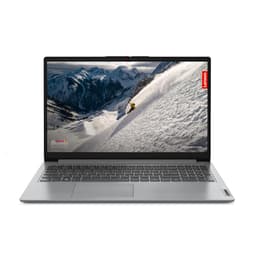
The Lenovo IdeaPad 1 is the best-value Windows laptop in this round-up, and it makes a compelling case for Lenovo's continued dominance in the budget-to-mid-range segment. Equipped with an AMD Ryzen 5 7520U processor and 16 GB of RAM paired with a 512 GB NVMe SSD, it offers a specification sheet that embarrasses many more expensive competitors. For students, home users and anyone who needs a reliable Windows machine for everyday tasks such as web browsing, document editing, video streaming and light productivity, the IdeaPad 1 delivers everything required without unnecessary expense.
The AMD Ryzen 5 7520U is built on AMD's Zen 3+ architecture and handles multitasking with ease, particularly given the generous 16 GB RAM allocation. Most budget laptops at this price point ship with 8 GB, so the doubling of memory is a meaningful advantage that future-proofs the machine and allows more browser tabs, applications and background processes to run simultaneously without slowdown. The 512 GB NVMe SSD is fast by budget laptop standards and provides ample space for most users' files, applications and media.
The 15.6-inch Full HD display uses a TN panel rather than the IPS panels found on the Apple machines and the HP Chromebook. TN panels have narrower viewing angles and less accurate colour reproduction than IPS, which is a genuine compromise for anyone who does photo or video editing. For general use, however, the 1920×1080 resolution is perfectly adequate and text appears sharp and readable. The AMD Radeon 610M integrated GPU handles basic video playback and light gaming in older or less demanding titles, but is not suited to modern AAA gaming.
Port selection is one of the IdeaPad 1's genuine strengths at this price point. The inclusion of a USB-C port, two USB-A ports, HDMI 1.4, a microSD card reader and a 3.5 mm audio jack means most users can connect their peripherals without needing a hub. This is a practical advantage over the MacBook models, which require additional accessories for similar connectivity. Windows 11 Home ships in S mode, which restricts app installation to the Microsoft Store by default, though switching out of S mode is free and straightforward.
Lenovo's build quality on the IdeaPad line is functional rather than premium. The chassis uses plastic throughout, which keeps weight manageable but does not feel as solid as the MacBook's aluminium body. For the price, however, the construction is entirely acceptable and the keyboard is comfortable for extended typing sessions.
Verdict: The best-value Windows laptop here, with 16 GB RAM and a 512 GB NVMe SSD at a price that undercuts rivals, making it the top recommendation for budget-conscious students and home users.
Pros
- 16 GB RAM is double what most budget laptops offer at this price, enabling smooth multitasking
- Comprehensive port selection including HDMI 1.4, microSD and two USB-A ports avoids the need for a hub
- 512 GB NVMe SSD provides fast storage and ample capacity for most everyday users
Cons
- TN panel has noticeably narrower viewing angles and less accurate colours than IPS alternatives
- Windows 11 Home in S mode requires a manual switch to install apps outside the Microsoft Store
Buying Guide
Which Operating System Is Right for You?
The choice of operating system is arguably more important than any individual hardware specification. macOS, available exclusively on Apple hardware, is the preferred platform for creative professionals, developers and anyone already using an iPhone or iPad. The integration between Apple devices is genuinely useful, and macOS is widely regarded as more stable and secure than Windows out of the box. The trade-off is a more restricted hardware ecosystem and higher entry prices, though the M1 MacBook Air and Pro challenge that assumption at their current prices.
Windows remains the most versatile operating system, running on hardware from dozens of manufacturers across every price point. It supports the widest range of software, including specialist professional applications, games and legacy business tools. Windows 11 is a significant improvement over Windows 10 in terms of interface and performance, though it does carry more maintenance overhead than macOS or ChromeOS. If you need specific Windows-only software, there is no alternative.
ChromeOS is the right choice for users whose entire workflow lives in a web browser or Google Workspace. It is fast, secure and almost maintenance-free, but it cannot run traditional Windows or macOS applications. Android app support helps bridge the gap, but ChromeOS is best suited to students, light home users and anyone who prioritises simplicity over capability.
How Much RAM Do You Actually Need?
In 2025, 8 GB of RAM is the practical minimum for a smooth experience on Windows or macOS. ChromeOS can function adequately with 4 GB, though 8 GB is preferable. For creative professionals working with video, large Photoshop files or virtual machines, 16 GB is strongly recommended. Gamers should also target 16 GB as a minimum, as modern titles increasingly demand it. The key point to note is that RAM is often soldered to the motherboard on modern laptops, meaning it cannot be upgraded after purchase. Always buy the RAM you need now, not the minimum you can get away with today.
Storage: SSD Type Matters
Not all SSDs are equal. NVMe SSDs, particularly Gen 4 variants, are significantly faster than SATA SSDs and eMMC storage. eMMC is found in budget Chromebooks and is adequate for ChromeOS but noticeably slower for Windows use. For Windows laptops, aim for NVMe SSD storage as a minimum. The capacity you need depends on your workflow: 256 GB is tight for most Windows users, 512 GB is comfortable for everyday use, and 1 TB is ideal for gamers or anyone storing large media files locally.
Display Quality: Panel Type and Resolution
IPS panels offer better viewing angles and colour accuracy than TN panels and are preferable for anyone doing creative work or spending long hours in front of the screen. TN panels are cheaper to manufacture and are common in budget laptops, but the narrower viewing angles and washed-out colours are a genuine compromise. For gaming, refresh rate matters: 165 Hz makes fast-paced games feel dramatically smoother than 60 Hz. For everyday use, 60 Hz at Full HD resolution is entirely adequate.
Ports and Connectivity
Modern thin laptops increasingly sacrifice ports in the name of slimness. Apple's MacBook Air and Pro include only two Thunderbolt/USB 4 ports, which is limiting for users with multiple peripherals. Windows laptops from Lenovo and HP tend to offer more ports at equivalent price points. Consider whether you need HDMI for connecting to a monitor or projector, USB-A for older peripherals, and a card reader for photographers. If the laptop you want lacks the ports you need, factor in the cost of a USB hub or dock.
Across five laptops representing Apple, ASUS, Lenovo and HP, the Apple MacBook Air M1 (B08N5N1WBH) emerges as the overall winner. Its combination of a sharp 2560×1600 Retina IPS display, completely silent fanless operation, outstanding 12 to 15-hour real-world battery life and the efficiency of Apple's M1 chip make it the most rounded laptop in this selection for the widest range of users. The fact that it achieves all of this at its current price point, undercutting many Windows rivals with inferior specifications, makes the case even stronger. For gamers, the ASUS ROG Strix G16 2025 is the only logical choice, with its RTX 5060 GPU and 165 Hz display delivering performance that nothing else here can approach. Budget-conscious Windows users should look seriously at the Lenovo IdeaPad 1, which offers 16 GB of RAM and a 512 GB NVMe SSD at a price that represents exceptional value. The HP Chromebook 14 rounds out the selection as the best entry-level pick for ChromeOS users who want a Full HD IPS display without spending more than necessary.