Getting a laptop wrong is an expensive mistake. Unlike buying a dodgy pair of headphones you can shove in a drawer, a laptop you regret tends to sit on your desk mocking you every morning. You're stuck with it. Anyone about to spend real money on something like the Lenovo IdeaPad Chromebook Duet deserves an honest answer.
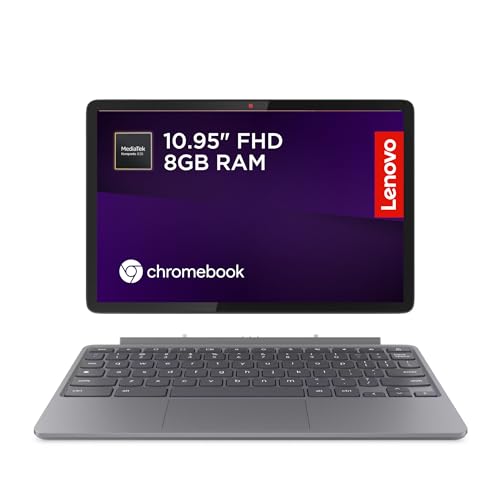
The Chromebook Duet is a 2-in-1 device, which means it's trying to be both a tablet and a laptop at the same time. That's a tricky balancing act. Lenovo has been at this for a while now, and this version brings a MediaTek Kompanio 838 chip, 4GB of RAM, 128GB of eMMC storage, and an 11-inch FHD+ 1200p display running Chrome OS. It also bundles in a folio keyboard and a folio stand. The listing title mentions Lenovo's USI Pen 2, but its description calls the pen optional, so check what the seller ships before counting on one. Even without it, that's a fair bit in the box for a budget device. But does it add up? Let's dig into the spec sheet and find out.
This Lenovo IdeaPad Chromebook Duet 11 inch review UK 2026 covers the spec sheet, battery life, the display and the bundled accessories. No fluff, no press release language.
Core Specifications
The heart of this machine is the MediaTek Kompanio 838, an octa-core ARM-based chip built on a 6nm process. It's not a chip you'll find in Windows laptops, and that's fine because it's designed specifically for Chrome OS. It handles the kind of work Chromebooks are built for: web browsing, Google Docs, video calls, YouTube, that sort of thing. Push it harder and you'll feel the limits, but for everyday tasks it keeps up without drama.
The 4GB of RAM is the spec that gives me pause. In 2026, 4GB is tight. Chrome OS is leaner than Windows, so it stretches further than you'd expect, but if you're someone who habitually opens 15 browser tabs, a Google Meet call, and a YouTube video simultaneously, you will hit the ceiling. It's manageable if you're disciplined about tab hygiene, but it's not ideal. I'd have liked to see 8GB here, even at a slight price bump. Lenovo does make an 8GB configuration of this Duet (its spec sheet lists both), so if you multitask it's worth hunting for; check the listing says 8GB before you buy, because this page covers the 4GB model.
Storage is 128GB of eMMC, which is faster than an SD card but slower than a proper NVMe SSD. For a Chromebook, 128GB is actually decent. Chrome OS itself doesn't eat much space, and most of your files will live in Google Drive anyway. The screen also works with Lenovo's USI Pen 2 (sold as optional), and because that pen follows the Universal Stylus Initiative 2.0 standard, it should work with other USI-compatible devices if you ever upgrade.
| Specification | Detail |
|---|---|
| Processor | MediaTek Kompanio 838 (Octa-core, 6nm) |
| RAM | 4GB LPDDR4X |
| Storage | 128GB eMMC |
| Display | 10.95-inch WUXGA (1920 x 1200) IPS touch, 400 nits, Gorilla Glass 3 |
| Operating System | Chrome OS |
| Stylus | USI Pen 2 support (pen listed as optional) |
| Keyboard | Folio Keyboard (included) |
| Stand | Folio Stand (included) |
| Connectivity | Wi-Fi 6, Bluetooth 5.3 |
| Ports | 2x USB-C (USB 3.2 Gen 1), 3.5mm headphone/mic combo jack |
| Colour | Luna Grey |
| Cameras | 5MP front with privacy shutter, 8MP rear autofocus |
| Battery | 29Wh, up to 12 hours (Lenovo figure) |
| Charger | 45W USB-C |
| Weight | Tablet from 510g, about 1.1kg with keyboard and stand |
| Warranty | 1 year, courier or carry-in (UK) |
| Price | £219.38 · Details |

Performance Benchmarks
Android apps are worth a mention because Chrome OS runs them. Lighter apps like Spotify, Netflix, and basic photo editors should run fine. More demanding Android apps are likely to feel sluggish, and some aren't optimised for the larger screen format anyway. If Android apps are a big part of why you're considering this, temper your expectations slightly. For the core Chrome OS experience though, the Kompanio 838 does its job without complaint. For a budget device, that's good enough for the people it's aimed at.
Display Analysis
The 10.95-inch panel runs at 1920 x 1200, which gives it a slightly taller aspect ratio than the standard 1920 x 1080. That extra vertical space helps when you're reading documents or browsing web pages. Text is sharp and clear at normal viewing distances, and the pixel density is high enough that you won't see individual pixels unless you're pressing your nose to the screen.
Brightness is rated at around 400 nits, which is fine indoors. Direct sunlight is a different story: like most budget displays, it will struggle when the sun is hitting it directly. The IPS panel gives decent viewing angles too, so sharing the screen with someone sitting next to you on a train isn't awkward.
For serious photo editing or colour-critical work, this isn't the right tool, but that's not what this device is for. The touchscreen pairs with a USI Pen 2 for notes and sketching in something like Google Keep or Concepts. The display is one of the stronger points of the package.
Battery Life
Lenovo claims up to 12 hours of battery life. Real-world figures almost always land below a manufacturer's claim, so treat 12 hours as a ceiling rather than a promise. Google Docs writing, a handful of browser tabs and the odd YouTube video is exactly the sort of light workload Chrome OS is built around.
Video playback tends to be kind to the battery on ARM Chromebooks, because decoding runs on dedicated hardware rather than the main cores. If streaming is your priority, our best laptops for streaming guide covers other options in this price range.
Charging is via USB-C, which is great because it means you can use any USB-C power delivery charger you already own. The included charger is a 45W unit. The fact that both USB-C ports support charging is a nice touch too, so you're not hunting for a specific port.
Portability
The Duet is light. The tablet itself starts at around 510g, and with the folio keyboard and stand attached you're looking at roughly 1.1kg total. That's lighter than most 13-inch laptops, and noticeably so when you're carrying it around all day. If it's going to live on café, airport and hotel Wi-Fi, a good VPN keeps your traffic private on those shared networks. The 11-inch footprint is compact enough to use comfortably on a tray table, which not every laptop can claim.
The folio stand props the tablet up for typing. Stands of this style aren't as flexible as a proper kickstand, and on your lap a detachable keyboard is less stable than a traditional clamshell laptop, which is a common issue with this style of 2-in-1.
A heavy brick charger can ruin the portability of an otherwise light device, and because the Duet charges over USB-C, you might not even need to carry the one in the box if you already have a USB-C charger at home and one at work. For commuters, students, or anyone who moves around a lot, portability is the Duet's best selling point.
Keyboard & Trackpad
The folio keyboard detaches and connects through a pogo-pin connector rather than Bluetooth, so there's nothing to pair or charge. Detachable keyboards on budget 2-in-1s are often an afterthought, and key travel on keyboards this thin tends to be shallow, which is fine for short bursts of typing but can get tiring over long sessions.
The layout is standard UK QWERTY, which is good. There's no backlight, which is a shame. If you're working in a dim environment, like a train in the evening or a dark room, you're typing blind. That's a real omission at this price point, and it's something I'd flag to anyone who does a lot of evening work. It's not a dealbreaker, but it's worth knowing.
The trackpad is small, as you'd expect on an 11-inch device, and it has a Mylar surface. It's not going to replace a proper laptop trackpad for anything demanding, and given that this is a touchscreen device with stylus support, the trackpad is more of a backup option than the primary input method anyway.

Thermal Performance
The Duet is a fanless design, which means it runs completely silently. There's no fan to spin up, no vents to block. Thermal management is handled entirely through passive cooling, with heat dissipating through the chassis.
Some thermal throttling under sustained heavy load is expected for a fanless ARM device. For the tasks this device is designed for, you're unlikely to hit that ceiling in normal use. If you're planning to run intensive workloads for hours at a time, this isn't the right device. For the people this is aimed at, passive cooling is an advantage: no fan noise and a slim chassis.
Acoustic Performance
There's nothing to say about fan noise because there isn't any. The Duet is completely silent at all times. It's one of the nicer things about ARM Chromebooks. You can use it in a library, in a quiet meeting room, or next to a sleeping partner without any concern. It's a level of quiet that most Windows laptops simply can't match.
The speakers are a stereo pair tuned with Waves MaxxAudio. Small tablet speakers are short on bass, but for video calls and YouTube they're enough.
There's a 3.5mm headphone and microphone combo jack, which is worth flagging because plenty of tablets have dropped it. Wired headphones plug straight in, so you don't need a USB-C to 3.5mm adapter, and both USB-C ports stay free for charging and accessories.
Ports & Connectivity
Port selection is minimal, which is the polite way of saying there are only two USB-C ports and a headphone jack. Both USB-C ports are USB 3.2 Gen 1, supporting data transfer, video output, and power delivery. So you can charge from either side, connect an external display, or plug in a USB-C hub. But if you need to do two of those things at once, you're already out of ports. A USB-C hub is basically a necessity if you plan to use this as a proper laptop replacement.
Wi-Fi is Wi-Fi 6 (802.11ax), which is a solid choice, and Bluetooth is version 5.3, which is all you need for wireless headphones and keyboards.
There's no HDMI port, no SD card slot, and no USB-A port. For some people that's fine because they live in a USB-C world. For others it's a real inconvenience. If you regularly plug in USB-A accessories like a mouse or a USB drive, budget for a hub. The good news is that USB-C hubs are cheap and widely available, so it's a solvable problem.
- 2x USB-C (USB 3.2 Gen 1, both support Power Delivery and DisplayPort Alt Mode)
- 3.5mm headphone/microphone combo jack
- Wi-Fi 6 (802.11ax)
- Bluetooth 5.3
- No USB-A, no HDMI, no SD card slot
Webcam & Audio
Because this is a tablet-style device, it actually has two cameras: a 5MP front-facing camera and an 8MP rear camera. The front camera is what you'll use for video calls, and 5MP is a step up from the 720p cameras you find on many budget Windows laptops. In low light it will degrade, as all webcams do.
The rear 8MP camera is a nice bonus for a Chromebook, useful for scanning documents or taking quick photos.
Build Quality
The tablet body is anodised aluminium, finished in Luna Grey, while the folio keyboard and stand are both covered in PU (polyurethane, the faux-leather finish used on most folio cases).
Lenovo's spec sheet lists the Duet as having passed MIL-STD-810H military testing. That's not a promise it will survive being dropped from a height, but it's a sensible standard for the kind of daily use a student or commuter would put it through.

Final Verdict
The Lenovo IdeaPad Chromebook Duet 11 inch is a genuinely good budget 2-in-1 Chromebook. That might sound like faint praise, but in a category full of compromises, getting the important things right matters. The display is sharp and bright enough for everyday use. The included keyboard and stand make it a usable laptop out of the box (the pen is listed as optional). For students, commuters, or anyone who needs a light, portable device for web browsing, video calls, and document work, this ticks most of the boxes.
The 4GB of RAM is the main thing holding it back. It's fine for focused use, but if you're a heavy multitasker, you'll feel the squeeze. The unlit keyboard is a real omission that will bother some people more than others. These are the trade-offs you make at the budget end of the market, and neither is surprising given the price.
Who should skip it? Anyone who needs Windows software, anyone who does heavy multitasking, and anyone who wants a device that'll still feel fast in five years. Chrome OS has a finite support window, and ARM Chromebooks aren't for everyone. If you're not already in the Google ecosystem, the adjustment period is real. But if you're a student, a light user, or someone who just needs a reliable, portable device for everyday tasks, the Duet is a solid choice that won't leave you feeling short-changed.
I'd give this a solid 7.5 out of 10 for the budget tier. The Kompanio 838 chip, the FHD+ display and the included keyboard and stand are what earn it. The rating on Amazon sits at ★★★★☆ (4.4) from 66 reviews.
What works. What doesn’t.
5 + 3What we liked5 reasons
- Sharp FHD+ 1200p display with good brightness indoors
- Folio keyboard and stand included in the box
- Completely silent fanless operation
- Wi-Fi 6 and generous 128GB storage for the price
- 3.5mm headphone jack alongside two USB-C ports
Where it falls3 reasons
- 4GB RAM feels tight with heavy multitasking
- No keyboard backlight
- Only two USB-C ports, with no USB-A or HDMI
Full specifications
12 attributes| GPU type | integrated |
|---|---|
| RAM | 4GB |
| Storage type | eMMC 5.1 |
| Battery life H | 12 |
| Battery WH | 29 |
| Bluetooth | 5.3 |
| CPU | MediaTek Kompanio 838 |
| Display refresh HZ | 60 |
| Display resolution | 1920x1200 |
| Display size IN | 10.95 |
| Display type | IPS |
| GPU | integrated Arm Mali-G57 MC3 |
If this isn’t right for you
2 options

Frequently asked
5 questions01Is the Lenovo IdeaPad Chromebook Duet good for gaming?+
Not really. The MediaTek Kompanio 838 and 4GB of RAM can handle casual Android games from the Play Store, but anything demanding will struggle. Cloud gaming services like Xbox Cloud Gaming work reasonably well over Wi-Fi 6, but this isn't a device designed with gaming in mind. Stick to casual titles and you'll be fine.
02How long does the Lenovo IdeaPad Chromebook Duet battery last?+
Lenovo claims up to 12 hours. Real-world battery life almost always lands below a manufacturer's figure, and it depends heavily on screen brightness and workload.
03Can I upgrade the RAM or storage in the Lenovo IdeaPad Chromebook Duet?+
No. The RAM is soldered to the motherboard and the eMMC storage is not user-replaceable. What you buy is what you get. You can expand storage using a USB-C hub with an SD card slot or an external USB-C drive, but internal upgrades are not possible. This is standard for devices in this category.
04Is the Lenovo IdeaPad Chromebook Duet good for students?+
Yes, for most students. The included keyboard and stand mean you don't need to buy those separately (the pen is listed as optional), and Google Docs, Sheets, and Meet all run well on Chrome OS. The 4GB of RAM is the main limitation, so students who multitask heavily should be aware of that.
05What warranty applies to the Lenovo IdeaPad Chromebook Duet?+
Amazon offers 30-day returns. Lenovo provides a 1-year courier or carry-in manufacturer warranty in the UK covering defects in materials and workmanship. Extended warranty options may be available through Lenovo's website. Always check the warranty terms at the point of purchase as these can vary.